
Nimbio Developer Platform — The AI-Ready Cellular Access API & SDK
Nimbio is an AI-ready, cellular-first smart access control platform. We expose a robust, secure REST API and SDK for programmatically triggering gates and doors, provisioning or revoking digital credentials, and querying real-time access logs from your own software.
Built for property owners, homeowners, and HOA boards automating a single residential gate; commercial property owners and businesses automating a gate, door, buzzer, or call box; and enterprise B2B platforms — smart-fleet routing, self-storage management, parking and mobility apps, and property-management software — integrating Nimbio into their own product. It is GitHub Copilot optimized — clean, well-described endpoints that autocomplete cleanly in modern editors.
Your integration runs on the same production infrastructure that processes 620,000+ gate openings every month — 7,000,000+ a year.
Does Nimbio have a REST API?
Yes — a REST API and SDK for smart access control
Nimbio provides a REST API and official Python and TypeScript/JavaScript SDKs designed for enterprise B2B integrations. The public developer API base is https://api.nimbio.com, with interactive Swagger docs and a ReDoc reference open to anyone — no credential required just to read the docs. Requests and responses are JSON over HTTPS, authenticated with a bearer token from a community-scoped key. Because Nimbio runs on the cellular network, your integration controls gates and doors that have no Wi-Fi and no on-site network of their own. For real-time state, open the live event stream — a single outbound Server-Sent Events connection (GET /v1/events/stream) that delivers every gate open, gate-status change, and hold-open change the instant it happens, with nothing on your side exposed to the internet.
Whether you are building a logistics dashboard, a property-management portal, or a self-storage rental flow, the API lets your application become the front door — literally. See how the cellular hardware works and the solutions it powers.
What can the Nimbio API do?
- ✓ Programmatically open a gate latch on demand
- ✓ Grant and revoke digital keys for community members
- ✓ Retrieve access logs and gate-status history for auditing and reporting
- ✓ Check live gate status and key statuses for any member — these routine status reads are free, they never count against your monthly quota
- ✓ Subscribe to a live event stream or register webhooks — gate opens, status changes, and hold-open changes pushed the moment they happen
- ✓ Issue and revoke GuestLinks and visitor access codes from your own booking, work-order, or property-management system
- ✓ Sync your unit roster — list, add, edit, and remove homes and units — from the property-management system you already use
- ✓ Approve members and run bulk operations — add members, or grant, revoke, and disable keys for up to 100 members in a single call
- ✓ Create recurring hold-open schedules and read or change community settings without opening the portal
- ✓ Replay any webhook delivery your receiver missed — one at a time, or every failed delivery in one call
- ✓ Group homes and units for multi-property management
- ✓ Integrate gate access into fleet routing workflows
- ✓ Drive self-storage rental and access automation
- ✓ Test safely with a sandbox key before switching to live
API at a glance
The essentials for evaluating the Nimbio developer platform:
- ✓ Base URL: https://api.nimbio.com
- ✓ Format: JSON request and response bodies
- ✓ Auth: a bearer token — a
nimbio_test_…key for safe sandbox testing, ornimbio_live_…for real side effects - ✓ Transport: HTTPS only, with enterprise-grade SSL/TLS
- ✓ SDKs: official Python client (sync + async) —
pip install nimbio-community-api; official TypeScript/JavaScript client —npm install @nimbio/community-api - ✓ Rate limits: enforced per-minute and per-month, with limit headers on every response — routine status reads (gate status, key statuses, hold opens) and the event stream don’t consume the monthly quota
How do I programmatically open a gate?
Send an authenticated request and Nimbio opens the gate over cellular
Your software sends an authenticated HTTPS request to the Nimbio API targeting the gate latch you control. Nimbio relays the command over the cellular network to the on-site hardware, which triggers the existing lock or gate operator. There is no clicker, no local network dependency, and no special on-site relay for your code to manage.
Live interactive docs, SDK, and source — no request needed to look
The full API reference is public. Try it, read it, or import it directly:
- Swagger UI — interactive reference, call endpoints live from the browser
- ReDoc — a readable three-panel view of the same reference
- Python SDK on PyPI (
pip install nimbio-community-api) — sync + async client, source on GitHub - TypeScript/JavaScript SDK on npm (
npm install @nimbio/community-api) — zero-dependency client for Node, the browser, Deno, Bun, and edge runtimes, source on GitHub - OpenAPI 3 spec — import into any client or codegen tool
- Postman collection (plus a prod environment to import alongside it) or a Bruno collection, if you’d rather import than write requests by hand
- Home Assistant integration
Open a latch — pick your language:
cURL
curl -X POST https://api.nimbio.com/v1/community/latches/{latch_id}/open \
  -H "Authorization: Bearer nimbio_live_<your-key>"
Python (official SDK)
pip install nimbio-community-apifrom nimbio_community_api import NimbioClient
client = NimbioClient(api_key="nimbio_live_<your-key>")
client.open_latch(latch_id="<latch_id>")Start with a nimbio_test_… key while you build — it runs the full request pipeline (auth, rate limit, scope, validation) but never actually fires a gate or mutates data; writes come back marked simulated. Switch to a nimbio_live_… key only once you want real side effects. Gate opens and community messages accept an idempotency_key (body field or Idempotency-Key header) that makes them retry-safe: for 24 hours, a repeat of the same key replays the original response instead of opening the gate again. One exception to build around: a 504 did_not_open keeps the key, because the open may already have fired — use a new key only if you deliberately want another attempt. The same authenticated-request pattern extends to granting/revoking keys and reading access logs — see the full endpoint reference for the complete set.
Can I integrate Nimbio into my own platform or app?
Yes — the API is built for fleet, self-storage, parking, and property-management workflows
For smart-fleet routing, Nimbio lets dispatch and routing platforms grant a driver or vehicle timed access to a gated destination — opening the gate as part of the route step rather than relying on call boxes or shared codes. Carriers and logistics systems can fold gate entry directly into the delivery sequence.
For self-storage management software, the API ties unit access to the rental lifecycle: provision a digital key when a tenant signs, revoke it on move-out or non-payment, and pull access logs for security and billing reconciliation. Group homes and units to manage access across an entire facility from one system.
For parking and mobility apps, the API lets you grant a driver programmatic access to a gated lot or garage as part of the reservation or check-in flow, instead of relying on shared codes or a physical call box.
- ✓ Fleet routing: open destination gates as a route step
- ✓ Self-storage: key provisioning tied to the rental lifecycle
- ✓ Parking & mobility: gated-lot access as part of a reservation or check-in flow
- ✓ Enterprise B2B: embed access control inside your own product
- ✓ Audit: pull access logs for security and reconciliation
Explore matching deployments on the Solutions overview.
How does a property use the Nimbio API day to day?
Magnolia Pines in Jacksonville runs most of its guest access through the Nimbio API. In their words:
Quoted $3k+ for a traditional controller. Nimbio + API + our short links gave us something we could customize: … vendor links, visit windows, dual GuestView texts — without living in the app all day.
We point our own domain at Nimbio guest URLs… Someone gets a clean link that looks like ours. Under the hood it redirects to a Nimbio guest link.
Can an AI assistant operate my Nimbio community?
Yes — through Nimbio’s official MCP server
Nimbio publishes an official Model Context Protocol (MCP) server, @nimbio/mcp-server, that exposes the community API to AI assistants and agents as tools. Any MCP-compatible client can list gates, look up members and keys, read access logs, and — only when you deliberately allow it — create guest links, adjust key schedules, or open a gate. The server is open source under the MIT license, with the code on GitHub, and installs with one command: npx -y @nimbio/mcp-server.
Built to read first and change nothing by accident
- Read-only by default. A fresh install reads everything and changes nothing. Write tools are enabled deliberately, and a live key registers no write tools at all until that opt-in is set.
- Irreversible actions ask a person first. Opening a gate, holding one open, revoking a guest link, removing a home, replaying webhook deliveries, switching access-code mode, and messaging every member each show their consequence and wait for confirmation.
- 54 tools across gates, members, keys, guest access, access and audit logs, settings, hardware, and webhooks. Tools your key cannot use are not shown, so the assistant never picks one that would fail.
- Test keys are safe to explore with. A
nimbio_test_…key runs the full pipeline — authentication, rate limiting, scope, validation — and then simulates the effect: no gate opens, no message is sent. Every result is labeled TEST MODE or LIVE. - Guest link tokens are redacted in conversations by default, and permission errors say which permission is missing instead of returning a bare status code.
Configuration details and the client snippet are in the README on GitHub and the package listing on npm. The server first shipped on 2026-09-02 — see the changelog for what each release adds.
How secure is the Nimbio API?
Enterprise-grade encryption on every API call
Our API runs exclusively over HTTPS with modern TLS encryption. Because Nimbio hardware operates on its own multi-carrier LTE SIM, your API triggers are routed over carrier-grade cellular networks rather than the property’s local network, which eliminates man-in-the-middle LAN sniffing. Access is gated by community-scoped keys, so every request is attributable, and because access is controlled in software rather than by physical clickers or shared PINs, revoking a compromised integration or a departed user is immediate.
How do I get API access?
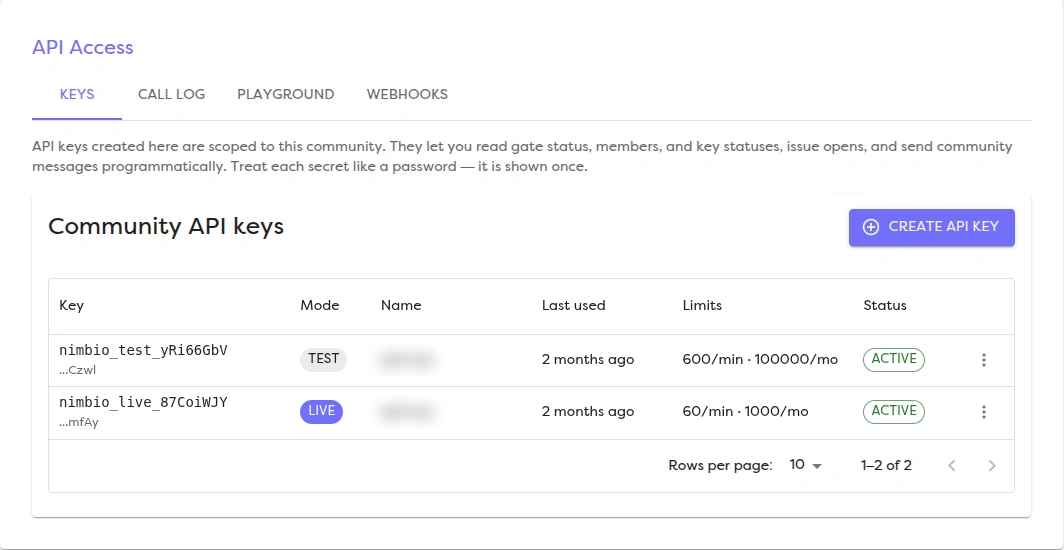
The docs are open to anyone — no request needed just to explore the API. Working keys need no request either: API access is on for every Nimbio community, so a community manager creates community-scoped keys (for the /v1/community/* endpoints) in the admin portal, and every key comes in a nimbio_test_… flavor for safe sandbox testing before you ever touch nimbio_live_…. The secret is shown once, when the key is created, and can’t be recovered afterward, so save it right away. The same API Access screen has a Playground, where you can try every operation your key can reach, grouped by area, and a Call Log that lists each API call with its time, mode, endpoint, status, outcome, latency and any error, and can be filtered by mode and outcome. Not a Nimbio customer yet, or building a platform that will serve many properties? Contact us and tell us about your use case — a single home gate, a commercial property, fleet routing, self-storage, a parking or mobility app, or a custom B2B integration — and we will point you at the right scopes.
Frequently asked questions
Who can use the Nimbio API?
Property owners, homeowners, and HOA boards can use the API to automate a single residential gate. Commercial property owners and businesses can use it for a gate, door, buzzer, or call box at their property. No request is needed: API access is on for every Nimbio community, and a community manager creates community-scoped keys in the admin portal. Software companies — fleet routing platforms, self-storage management systems, and property-management platforms — building for many properties can contact us to embed Nimbio into their own product. Individual residents and tenants can also create their own API key at api.nimbio.com/manage to open the gates their Nimbio keys already open.
Does the API support commercial properties and businesses, not just residential gates?
Yes. The same REST API and SDK that power residential integrations also support commercial properties and businesses — opening gates, doors, buzzers, and call boxes, provisioning and revoking staff or tenant credentials, and pulling access logs for a single commercial site or across a multi-property portfolio.
Can I automate my own home gate with the API without hiring a developer?
The API is built for developers — using it means making authenticated HTTP requests, so some technical comfort (or a developer’s help) is expected. If you just want app-based control of your own gate without writing any code, the Nimbio app itself already covers smartphone access, digital keys, and GuestView without needing the API directly. The API is for when you want to connect your gate to your own software, a smart-home setup, or another platform.
Can I test the API without risking a real gate open or a live data change?
Yes. A nimbio_test_… key runs the full request pipeline — authentication, rate limiting, scope checks, validation — but never actually fires a gate, sends a message, or changes a member’s access. Writes come back marked simulated, so you can build and debug your integration safely before switching to a nimbio_live_… key.
Can an HOA board integrate Nimbio into our community’s existing management software?
Yes. HOA boards and property management companies can connect the Nimbio API to the community-management or property-management software they already use: sync the unit roster (list, add, edit, and remove homes and units) from that system, approve join requests and grant or revoke keys from it — up to 100 members in a single call — issue a guest’s GuestLink or access code the moment a booking or work order is confirmed, and pull access logs plus a 30-day audit trail of who changed the community’s access settings. Gate access stays in sync with the system of record instead of being managed separately.
Does the Nimbio API support webhooks and real-time events?
Yes — both. Your integration can register webhooks directly with its API key (list the event catalog, rotate the signing secret, send a test ping) to receive events at your own endpoint, or open the live Server-Sent Events stream — one outbound connection that delivers gate opens, gate-status changes, hold-open changes, and member changes the instant they happen, with nothing on your side exposed to the internet. If the stream’s connection drops, reconnecting replays what you missed from a short buffer, and the stream doesn’t consume your monthly quota.
Can I replay a webhook delivery my server missed?
Yes. Every webhook keeps a delivery history, and a failed delivery — your server was down, a deploy swallowed it, your endpoint returned an error — can be re-sent once your receiver is back: replay one delivery, or retry every failed delivery for that webhook in a single call. Community managers can do the same from the portal’s Deliveries dialog. A replay carries the same event ID as the original, so de-duplicate on the X-Nimbio-Delivery header or your receiver will act on the event twice.
How much does the Nimbio API cost?
There is no separate charge for the Nimbio API — access is included with active Nimbio service. Usage is governed by per-minute and per-month rate limits rather than per-call fees, and routine status reads (gate status, key statuses, hold opens) and the live event stream don’t count against the monthly quota. The underlying Nimbio subscription follows the standard model: flat-rate per-home pricing for residential communities, and flexible pricing based on active users for commercial properties.
How do I get an API key?
No request is needed: a community manager creates community-scoped keys in the admin portal under API Access, in test and live versions, so you can build against the endpoint reference for opening latches, granting and revoking keys, and reading access logs. You don’t have to wait to start reading — the interactive docs are public now. Not a Nimbio customer yet? Use the contact form with your use case — a single home gate, a commercial property, or a software integration.
Does the Nimbio API work with AI assistants and agents?
Yes. Nimbio’s official Model Context Protocol (MCP) server, @nimbio/mcp-server, exposes the community API to any MCP-compatible AI assistant as 54 tools. It is read-only by default, asks a person before any irreversible action such as opening a gate, and works with nimbio_test_… keys that simulate effects without touching real hardware. Install it with npx -y @nimbio/mcp-server; the source is on GitHub under the MIT license.
See Nimbio on your gate
Tell us about your property and we’ll map the right retrofit. We offer flat-rate, per-home billing for residential communities, and flexible pricing for commercial properties.