
GuestLinks
Share a link. They tap it. The gate opens.
GuestLinks are shareable links a manager sends for a party, a delivery, or a one-off visit. The guest taps the link, and a page opens right in their phone’s browser — no app to download, no account to create, and no gate code to hand out and never get back.
No app for guests • No shared code to remember • Every attempt logged
How it works
A link instead of a gate code
A Community Manager creates a GuestLink in the Community Manager portal — picking the gate, naming the link, and setting how it behaves. (A CM can also flip a setting that lets members create their own Event Links, and anyone who can already share a key can create a Limited Use Link.) Once it’s created, the link is copied and sent however’s easiest — text, email, or any other way the sender already reaches people.
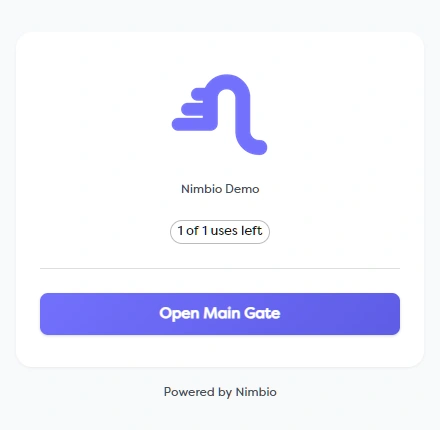
The guest just taps the link. A page opens directly in their phone’s browser showing what the link is for, with a button for each gate it opens — no app, no account, and no key required. If a community requires it, the guest verifies their phone number on that same page before the button appears. If the link has expired, is used up, or was turned off, the page says so plainly.
Every attempt on every link is logged — including the ones that didn’t work — and any link can be shut off instantly from the Community Manager portal.
Two kinds of links, built for how access actually works
Event Link
Works only during the exact time window you set. Built for a party, an open house, or a scheduled visit — the link is live for the hours it needs to be and nothing more.
Limited Use
Works for a chosen number of uses instead of a time window. Built for a recurring cleaner, a contractor making several trips, or a one-off pickup.
Built for more than one situation
Some visitor-access tools only offer a single, fixed access window that expires after a set period. GuestLinks gives a manager two distinct modes to choose from — a time window that fits the occasion, or a use count that fits the situation — plus settings many tools skip:
- ✓ Exclude specific gates from a link, so it only opens what it needs to
- ✓ Restrict Limited Use Links to members only, if that fits the community
- ✓ Optional phone verification before opening, set per community
- ✓ A complete audit trail that includes every failed attempt, not just successful ones
- ✓ Any link — active, expired, or used up — can be turned off instantly
“Friends and family visiting for a few days get their own named guest link for the stay — they save it in Contacts and tap it when they roll up. … When the visit ends, the link expires (or we revoke it).”
What GuestLinks gives every community
No App for the Guest
The link opens a page right in the guest’s phone browser — no app install, no account, no key on their end.
Full Audit Trail
Every attempt is logged, including the ones that didn’t work, so managers can see when each link was used.
Total Control
Exclude gates from a link, restrict Limited Use to members only, and shut off any link the moment it’s no longer needed.
GuestLinks questions
Does the guest need to download the Nimbio app to use a GuestLink?
No. The guest taps the link and a page opens right in their phone’s browser — no app install, no account, and no key. They tap a button for the gate, and it opens.
Who can create a GuestLink?
Community Managers can create Event Links in the Community Manager portal, and a CM can flip a setting that lets members create their own Event Links too. Limited Use Links are available more broadly: anyone who can already share a key can create one.
What’s the difference between an Event Link and a Limited Use Link?
An Event Link works only during the time window you set — built for a party, an open house, or a scheduled visit. A Limited Use Link works for a chosen number of uses instead — built for a recurring visitor like a cleaner or a contractor.
How do I send a GuestLink to a guest?
Copy the link from the Community Manager portal and send it however’s easiest — text, email, or any other way you already reach people. There’s no gate code to write down or hand back.
Can a GuestLink be turned off early?
Yes. Any GuestLink can be shut off instantly from the Links list, whether it’s still active, expired, or used up.
Is every use of a GuestLink recorded?
Yes. An Activity feed logs every attempt on every link — including the ones that failed — so there’s a record of every attempt and when it happened.
Stop handing out gate codes
Talk to our access experts about adding GuestLinks to your gate.