
Integrations / Home Assistant
Home Assistant Gate Opener: the Official Nimbio Integration
Put an open-gate button on your Home Assistant dashboard, watch live gate status, and hold the gate open from your own automations — powered by the Nimbio cellular gate opener already on your gate.
Open source · Installed through HACSDefinition
What is the Nimbio Home Assistant integration?
The Nimbio Home Assistant integration connects Nimbio’s cellular gate opener to Home Assistant, the open-source smart-home platform. It adds an open button for every gate key you hold, live open/closed gate status delivered push-first over Nimbio’s event stream, and hold-open controls you can use in your own automations. The integration is published by Nimbio Labs, Inc. as open source under the MIT license, installs through HACS, and runs on the same Nimbio REST API available to any developer — the platform behind 620,000+ gate openings every month.
What can Home Assistant do with your gate?
Once connected with a Nimbio API key, the integration discovers your gates automatically and exposes them as native Home Assistant entities — so your gate lives on the same dashboards, and in the same automations, as the rest of your smart home.
Can Home Assistant open my gate?
Yes. The integration creates an open button for every latch on every key you hold, so any gate you can open from the Nimbio app can also be opened from a Home Assistant dashboard, script, or automation. Gate opens go through the Nimbio API and count against your API usage; reading status doesn’t.
How does gate status stay up to date?
Push-first: by default the integration listens to Nimbio’s live event stream over an outbound connection from your Home Assistant, so state changes arrive as they happen. Webhook delivery and plain polling are available as alternatives, and status reads are exempt from API usage limits.
Can I hold the gate open from Home Assistant?
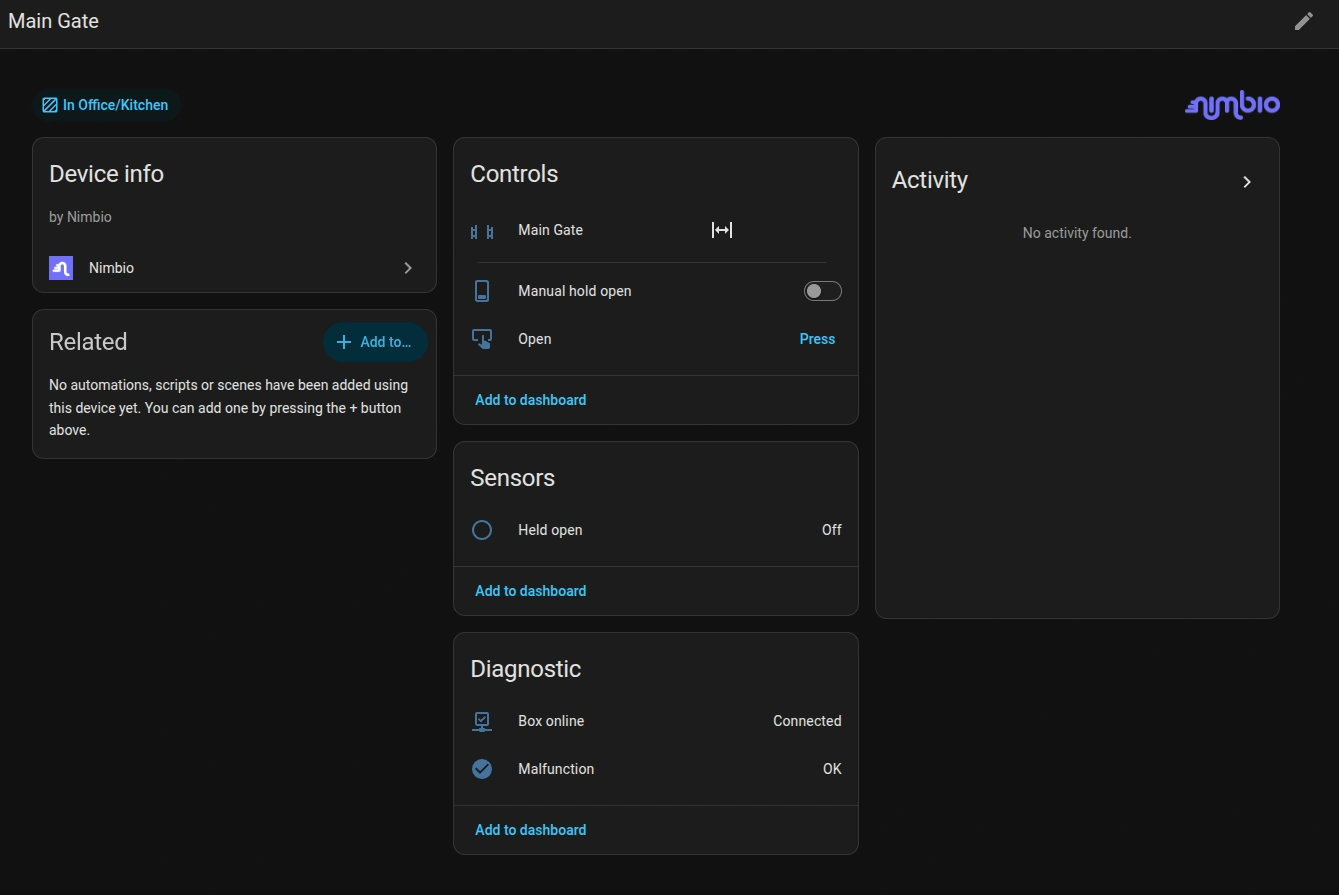
Yes. A switch entity starts and ends an indefinite hold open, and the nimbio.hold_open_for service holds a gate open for a duration you pass from any automation. A sensor reflects the held-open state, and a hold started from Home Assistant also appears on the Community Manager portal’s Hold Opens page, where a manager can end it.
- ✓Open buttons: one for every latch on every key you hold
- ✓Live gate status: open/closed state as native entities, delivered push-first
- ✓Hold opens: an indefinite hold switch plus a timed
hold_open_forservice - ✓Diagnostics: controller connectivity and malfunction indicators
- ✓API usage sensors: see your quota consumption right in Home Assistant
- ✓Clean removal: deleting the integration also removes its server-side webhook
How do I install the Nimbio integration?
Installation takes a few minutes through HACS (the Home Assistant Community Store). You’ll need a Nimbio API key: members can create one at api.nimbio.com/manage, and community managers can use a key from the Community Manager portal. A test key lets you try the integration without moving a real gate.
- In HACS, open Integrations → ⋮ → Custom repositories and add
github.com/nimbio-labs/nimbio-home-assistantas an Integration. - Install Nimbio from HACS, then restart Home Assistant.
- Go to Settings → Devices & Services → Add Integration → Nimbio.
- Paste your Nimbio API key — the integration discovers your gates and capabilities automatically, including webhook registration. No admin portal work required.
FAQ
Frequently asked questions
Is the Nimbio Home Assistant integration official?
Yes. The integration is published and maintained by Nimbio Labs, Inc. as open source under the MIT license, distributed through HACS, and built on the same public Nimbio REST API that powers other integrations.
Do I need to be a community manager to use it?
No. Any Nimbio member can create an API key at api.nimbio.com/manage and connect the gates their keys already open. Community managers can also connect with a key from the Community Manager portal.
Does the gate need Wi-Fi for Home Assistant to control it?
No. The Nimbio controller on the gate stays fully cellular — Home Assistant talks to Nimbio’s cloud over your home’s internet connection, and Nimbio reaches the gate over its multi-carrier LTE connection. Nothing at the gate joins your network.
Can I try it without opening a real gate?
Yes. Nimbio provides a test API key so you can set up the integration and explore its entities without moving a real gate — swap in your real key when you’re ready.
No Nimbio on your gate yet?
The controller retrofits your existing gate, door, or lock — no Wi-Fi at the gate, and your clickers keep working. Tell us about your property and we’ll map the right setup.