
In-car access
Open the gate from your dashboard
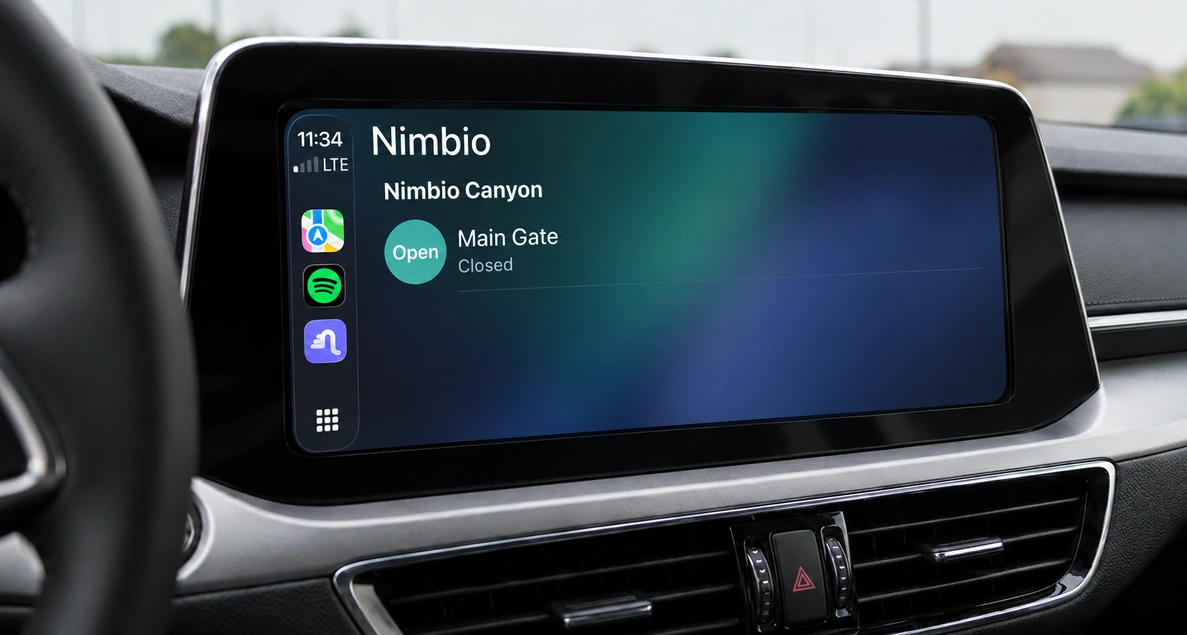
Nimbio works with Apple CarPlay and Android Auto™. Your gates and latches appear on the car’s screen alongside your other apps — one tap as you pull up, with no clicker to find and no window to roll down.
Nothing to set up • No phone unlocking once paired • Every open logged
Definition
What is in-car gate access?
In-car gate access is opening a gate, door, or latch directly from a vehicle’s dashboard screen instead of a clicker, a keypad, or a phone in your hand. With Nimbio, in-car gate access runs through Apple CarPlay and Android Auto: the app appears on the dashboard on its own, shows your Nimbio keys and latches, and opens a gate with one tap — without unlocking your phone, once the phone is paired with the car.
How it works
Do I need to set up anything to use Nimbio in my car?
Connect your phone to the car the way you normally do. Nimbio appears on the dashboard on its own, alongside your other apps — there is no pairing step inside Nimbio, nothing to enable, and nothing to configure for each vehicle.
Open it and you see your keys and latches — the same ones you already have in the app. Tapping one sends the same secure command the app sends. Once your phone is paired with the car, it does not need to be unlocked to open a gate.
Whether your car connects by cable or wirelessly is up to the vehicle’s head unit and your phone, not to Nimbio — if the car supports a wireless connection, in-car access works over it the same way.
What shows up on the car’s screen?
Your keys and latches
The list mirrors the app: every gate, door, and latch you hold a key for. Up to 20 items show at once — that limit comes from Apple and Google, not from Nimbio.
Pin the one you use most
Pin a key in the Nimbio app and it moves to the top of the list in the car too. The gate you use every day is the first thing on the screen.
Locked phone, open gate
Once the phone is paired with the car, you do not need to unlock it, pick it up, or look at it. The tap happens on the screen already in front of you.
Why open the gate from the car instead of a clicker or keypad?
The gate lane is where access control either works or annoys everyone. A clicker has to be found, a keypad has to be reached, and a phone has to be picked up and unlocked — all while a car waits behind you.
- ✓ No reaching out the window to a keypad, and no scraped mirrors or door panels from getting close enough to it
- ✓ No clicker to lose, replace, or hand back when someone moves out
- ✓ Traffic keeps moving through the gate lane instead of stacking up behind a fumbled entry
- ✓ Attention stays on the road and on the screen already mounted in front of the driver
Does opening from the car work like the app?
In-car access is not a separate product or a separate app — it is the Nimbio app showing up where your hands already are. Everything else keeps working exactly as it does:
- ✓ Opens from the car are logged like any other key use, with the same real-time notifications when you turn on key notifications
- ✓ Family Keys give every household member their own key — and their own dashboard list
- ✓ Existing clickers and keypads keep working; Nimbio is an add-on, not a replacement
- ✓ Runs over cellular LTE — no Wi-Fi at the gate and no landline
In-car access questions
Does my phone need to be unlocked to open the gate?
No. Once your phone is paired with the car, you can open a gate from the dashboard without unlocking the phone or picking it up.
Does it work with a wireless connection, or do I need a cable?
Either, depending on your car and phone. Whether the connection is wired or wireless is determined by the vehicle’s head unit and the phone — Nimbio works the same way over both.
Is opening from the car recorded like opening from the app?
Yes. It is the same secure command as the app, so it produces the same access log entry and the same real-time notification when you turn on key notifications.
Do I need a different app for in-car access?
No. It is the Nimbio app you already have, shown on the car’s display. Nothing separate to install, and nothing separate to sign in to.
Which phones and cars does it work with?
Apple CarPlay needs an iPhone running iOS 16 or later; Android Auto needs a phone running Android 9 or later with Android Auto kept up to date. On the car side, any CarPlay- or Android Auto-compatible vehicle or aftermarket head unit works — and you will want a current version of the Nimbio app on either platform. Cars without CarPlay or Android Auto can use the Nimbio Car Web App in the car’s browser instead.
What you need
For Apple CarPlay
- iPhone running iOS 16 or later
- A current version of the Nimbio app
- Any CarPlay-compatible vehicle or aftermarket head unit
For Android Auto
- Phone running Android 9 or later
- A current version of the Nimbio app, and Android Auto kept up to date
- Any Android Auto-compatible vehicle or aftermarket head unit
Stop reaching out the window
Talk to our access experts about bringing in-car gate access to your property.
Or call 1-800-353-3422
Compatible Android phone and compatible active data plan required for Android Auto.
Apple and CarPlay are trademarks of Apple Inc., registered in the U.S. and other countries. Android and Android Auto are trademarks of Google LLC.