
Car web app
Open the gate from your car’s browser
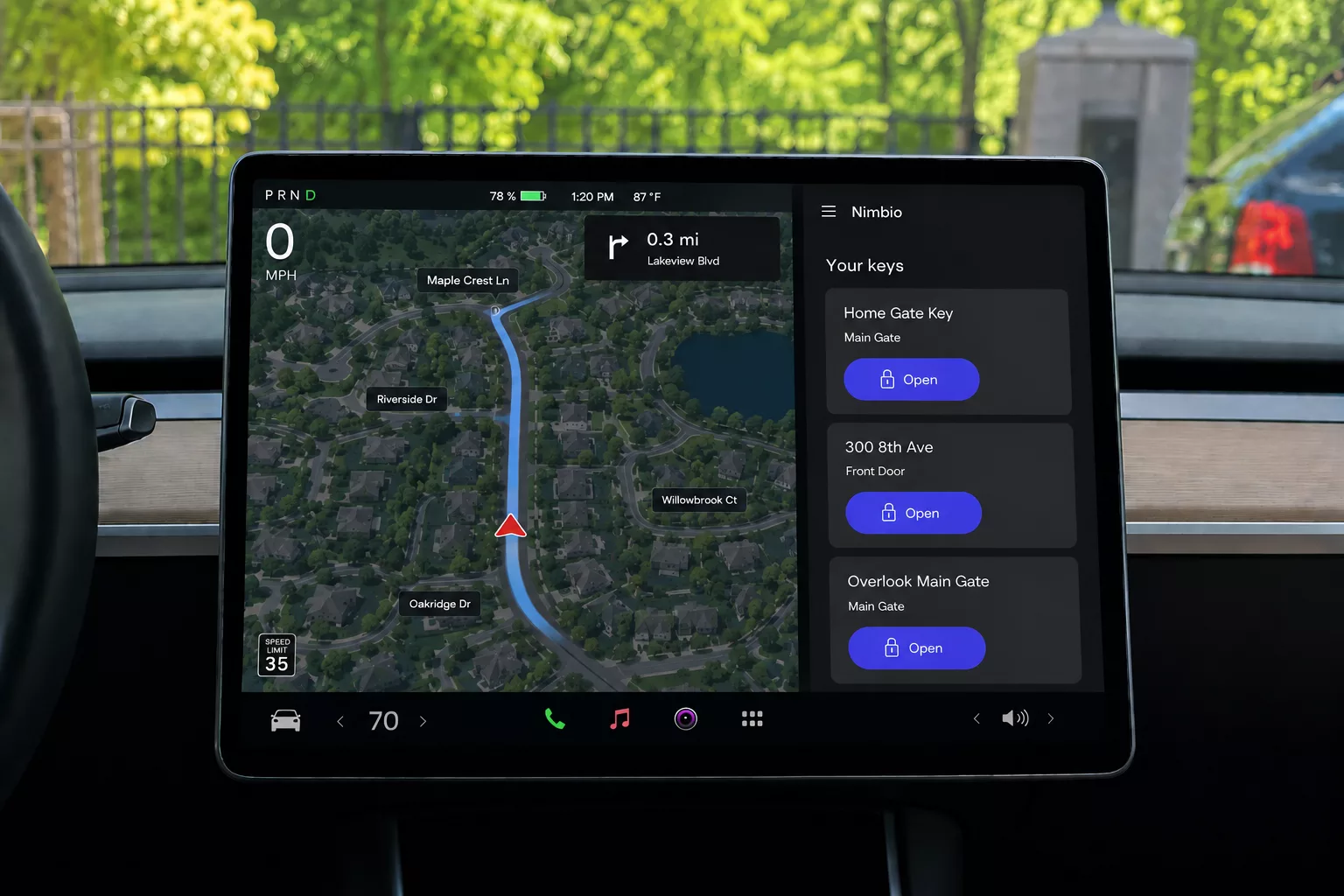
The Nimbio Car Web App runs at car.nimbio.com in any vehicle with a built-in web browser, including a Tesla. Sign in once with the phone number on your Nimbio account and your keys are on the car’s screen — one tap to open.
Nothing to install • Any car with a browser • Same keys as the app
Definition
What is the Nimbio Car Web App?
The Nimbio Car Web App is a version of Nimbio that runs in a car’s built-in web browser at car.nimbio.com, including in vehicles without Apple CarPlay or Android Auto, such as a Tesla. It shows the gates, doors, and latches a driver holds Nimbio keys for and opens one with a single tap on the car’s screen. There is nothing to install: the driver opens the address in the car’s browser and signs in with the phone number on their Nimbio account.
How it works
Do I need to set up anything to use it?
Open car.nimbio.com in the car’s web browser and sign in with the phone number you use for the Nimbio app. It is the same phone-verified Nimbio account and the same keys — no separate account, no download, and nothing to configure for the car.
Your keys appear as soon as you sign in. If the car’s browser can save bookmarks, save the page and it is one tap away the next time you pull up to the gate.
What shows up on the car’s screen?
Your keys
Every property you hold a Nimbio key for, with an Open button for each gate, door, or latch. It is the same list you see in the app.
Status at a glance
If a gate is held open, or a device is offline, the label shows under its Open button so you know before you tap.
Find the right one fast
A search box filters the list by name, and Refresh pulls your latest keys. Switch between light and dark mode to match the car’s display.
Why open the gate from the car instead of a clicker or keypad?
The gate lane is where access control either works or annoys everyone. A clicker has to be found, a keypad has to be reached, and a phone has to be picked up and unlocked — all while a car waits behind you.
- ✓ No reaching out the window to a keypad, and no scraped mirrors or door panels from getting close enough to it
- ✓ No clicker to lose, replace, or hand back when someone moves out
- ✓ Traffic keeps moving through the gate lane instead of stacking up behind a fumbled entry
- ✓ Attention stays on the road and on the screen already mounted in front of the driver
Does it do everything the app does?
No — the Car Web App is built for one thing: opening. Sharing keys, hold-open schedules, GuestView, and account settings stay in the Nimbio app and the Community Manager portal. Every open from the car uses your normal Nimbio key, and existing clickers and keypads keep working alongside it.
Car Web App questions
Which cars does the Nimbio Car Web App work with?
Any car with a built-in web browser and an internet connection, including a Tesla. If your car has Apple CarPlay or Android Auto instead, use Nimbio’s native in-car access.
Do I need a separate account?
No. Sign in with the same phone number you use for the Nimbio app. It is the same phone-verified Nimbio account and the same keys.
Is there anything to install?
No. The Car Web App is a web page at car.nimbio.com, not an app from a store. Open it in the car’s browser and sign in.
Can I share keys or schedule a hold open from the car?
No. The Car Web App only opens gates, doors, and latches. Sharing, hold-open schedules, and settings stay in the Nimbio app and the Community Manager portal.
What does the “Offline” label under a gate mean?
The Nimbio device at that gate is not reachable at the moment, so the Open button will not work until it reconnects. Try restarting the device — see How do I power cycle or restart my Nimbio device?
What you need
- A phone-verified Nimbio account with at least one key
- A car with a built-in web browser and an internet connection
- The address: car.nimbio.com
Bring the gate to the dashboard
Talk to our access experts about bringing in-car gate access to your property.
Or call 1-800-353-3422
Tesla is a trademark of Tesla, Inc. Nimbio is not affiliated with or endorsed by Tesla.