Features
Cellular Gate Opener Features & Capabilities
One controller at the gate, one app in every pocket. Open from your phone or your car’s dashboard, verify visitors on video, let couriers in with a time-limited code, and revoke any key in seconds from the cloud dashboard. Every feature on this page is included with every subscription — no tiers.
No Wi-Fi required • Works with your existing gate • Keeps your clickers
Platform features
Everything a modern gate should do
Nimbio is hardware-agnostic: your legacy clickers and keypads keep working, and the controller drives any electric gate or lock operating at 6.5V or higher. Here’s what each feature does — jump to any one for the detail. Every feature runs on the same Nimbio platform that processes 620,000+ gate openings every month — 7,000,000+ a year.
Smartphone Access
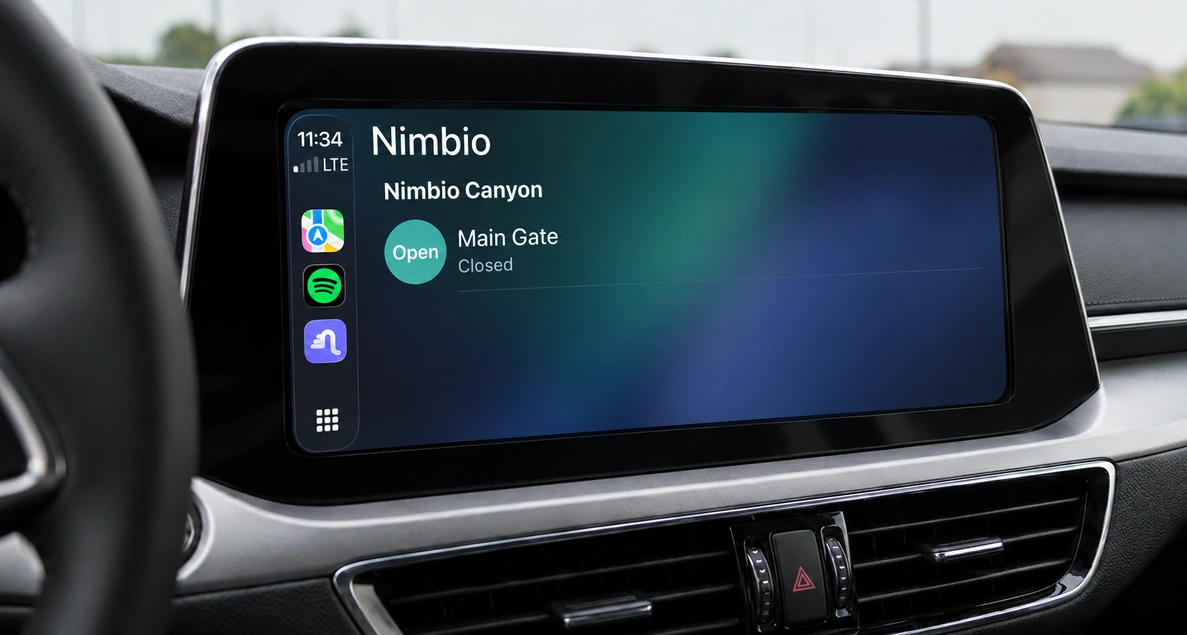
Open from the app or your car’s CarPlay / Android Auto dashboard, plus Family Keys and Doorbell Keys.
Details →GuestView
Visitors scan a QR/NFC panel to send a call request the resident answers (one-way by default, two-way optional) — no external camera, plus a community directory.
Details →Delivery
GuestView video verification or a time-limited access code lets couriers in even when you’re not home — every entry logged.
Details →Cellular
A pre-installed multi-carrier SIM connects to the strongest tower — no Wi-Fi, low power for solar gates.
Details →Cloud Portal
The Community Manager Dashboard: instant key revocation, home-grouping, and 24/7 access logs.
Details →Security
Enterprise-grade SSL/TLS on enterprise-grade cloud infrastructure — and going cellular removes local Wi-Fi sniffing.
Details →Virtual Keychain
One app, every door. Manage multiple gates and entrances with flexible per-zone key distribution across your community.
Details →Hold Open Scheduling
Keep the gate open right now, for a set time, or on a recurring weekly schedule — no propping it open.
Details →Gate Status
See whether a gate is actually open or closed, live, from anywhere — no driving out to check.
Details →Feature 1
Smartphone Access
Open your gate, garage, or door straight from the Nimbio app — no clicker to lose, no fob to replace. Trigger access from your phone, or from your car’s dashboard with native Apple CarPlay and Android Auto support — reducing gate-lane bottlenecks and the vehicle damage that comes from reaching out a window for a clicker or keypad — or hand out Family Keys so everyone in the household has their own access. Doorbell Keys let you open the gate remotely for a visitor without ever being on-site.
Can I open my gate from Apple CarPlay or Android Auto?
Yes. Nimbio puts an open-gate trigger right on your car’s CarPlay or Android Auto dashboard. As you pull up, you tap the screen already in front of you — no rolling down the window, reaching for a clicker, or leaning out to a keypad, which keeps traffic moving through the gate lane and drivers’ attention on the road. It’s the same secure command as the app, surfaced where your hands already are.
How do I share gate access with my family?
Family Keys let you grant access to everyone in your household, each with their own digital key on their own phone. Pair that with remote Doorbell Keys to buzz in a guest from anywhere, and GuestView allows video verification for couriers and delivery drivers.
Can I give a service provider recurring access on specific days and times?
Yes. Recurring Keys let you set access windows by day of week and time of day — a housekeeper on Mondays from 9 AM–2 PM, a landscaper on Fridays, a dog walker every weekday morning. The key is active only during the window you define; outside of it the gate won’t respond. You can revoke any key instantly at any time from the app.
How do I know when someone uses a key?
Nimbio sends a real-time push notification to your phone every time a key is used or a GuestView call comes in — whether it’s a family member, a recurring visitor, or a delivery driver. You can also check your gate’s live status (open or closed) from the app at any time, from anywhere.
- ✓Open gates, garages, and doors from the Nimbio app on iOS and Android
- ✓Native Apple CarPlay and Android Auto dashboard triggers — open from your car screen
- ✓Family Keys: every household member gets their own digital key
- ✓Scheduled Hold Open: set a gate to open automatically at a specific time, as a one-time event or on a recurring schedule by day and time
- ✓Gate status: verify whether your gate is open or closed from anywhere
- ✓Recurring Keys: grant access on specific days and time windows — automatically expires outside that window
- ✓Doorbell Keys: open the gate remotely for a guest from anywhere
- ✓Real-time push notifications whenever a key is used — always know who entered and when
- ✓No more rolling down windows in bad weather or fumbling for a lost clicker
- ✓Legacy clickers and keypads keep working alongside the app
Feature 2
GuestView
GuestView adds visitor video verification at the gate without a physical callbox. A visitor at the gate scans a QR code or taps an NFC panel, opening a secure directory where they select who they’re visiting. You get a text message with a link — tapping it starts a video call, one-way by default so you see who’s there and they don’t see you (turn on your own camera for two-way), and you decide whether to open the gate — all from your phone, anywhere. GuestView also doubles as a searchable community directory. See the full GuestView guide →
How does GuestView verify visitors without a camera at the gate?
The visitor’s own smartphone is the camera, but the call starts on the key holder’s end. When they scan the QR code or tap the NFC panel and select who they’re visiting, the key holder gets a text message with a link — tapping it starts the video call, streamed from the visitor’s phone with no external camera, wiring, or callbox hardware to install or maintain. The video is one-way by default: the key holder sees the guest, the guest doesn’t see the key holder — the key holder can turn on their own camera for two-way video.
Can GuestView work as a property directory?
Yes. Beyond visitor calls, GuestView acts as a digital directory for the property, so guests can find and reach the right key holder directly from their own phone.
- ✓Visitors scan a QR code or tap an NFC panel at the gate
- ✓Secure video call to the key holder’s smartphone for visual verification — one-way by default, two-way optional
- ✓No external camera hardware needed — the visitor’s phone is the camera
- ✓Nothing mounted at the gate to smash or tamper with
- ✓Doubles as a searchable property directory
Does Nimbio integrate with NFC and Bluetooth?
Yes — for two different purposes. NFC is what visitors use at the gate: tapping the NFC panel (or scanning the QR code) starts a GuestView video call, with no app install required on the visitor’s phone. Bluetooth is used during installation: the controller connects to the installer’s phone over Bluetooth for setup, provisioning a new device to the app in about 60 seconds with no manual configuration. Day-to-day key holder and guest access itself always runs over cellular LTE, not NFC or Bluetooth — those two only handle visitor entry and initial device setup.
Feature 3
Delivery
Stop staying home just to let a courier through. When a driver arrives, they scan the QR code or tap the NFC panel at the gate — GuestView texts your phone a link to start a video call (one-way by default, two-way if you turn on your camera), so you can see them and open the gate from anywhere. Or skip the call entirely: generate a unique, time-limited access code in the app and share it with the courier before they arrive. Either way, packages reach your door and every entry is logged.
How can a delivery driver get through my gate when I’m not home?
A few ways. If you’re reachable when the driver arrives, GuestView handles it — they scan the QR code or tap the NFC panel at the gate, and your phone receives a text message that allows you to initiate a video call with the visitor, no matter where you are in the world. It’s one-way by default — you see who’s there, they don’t see you — with two-way available if you turn on your own camera. You open the gate from your phone whether you’re across town, at the office, or on vacation. If you want a completely hands-off delivery, generate a unique access code in the app and send it to the courier in advance. The code works only within the time window you set, and every use is logged. On gates where your community has enabled Number-Verified Access, a driver with no code can also verify their own phone number at the gate and let themselves in.
Do drivers need to download an app?
No. The driver scans a standard QR code or taps NFC — no app install required. That opens the Nimbio web directory in their browser, where they can either start the GuestView video call or enter the access code you shared. Either way, your packages get through and you get notified.
- ✓GuestView: driver scans QR or taps NFC → you get a text with a link → tapping it starts a video call from anywhere in the world (one-way by default, two-way optional) → you see them and open the gate
- ✓Access codes: generate a unique, time-limited code in the app and share it with your courier in advance
- ✓No app install required for drivers — the QR/NFC scan opens the web directory for a video call or access-code entry
- ✓Closes the gate “blind spot” that strands packages at the entrance
- ✓Every delivery entry is logged in your access history
Feature 4
Cellular
Every Nimbio controller ships with a pre-installed multi-carrier SIM. It dynamically connects to the strongest tower available — AT&T, Verizon, or T-Mobile — so the gate stays online without a drop of Wi-Fi. The SIM works internationally too — international customers should contact us to confirm which networks are supported in their region. Its low power draw means it runs comfortably on solar-powered gates where pulling network cable was never an option.
Does Nimbio need Wi-Fi or a wired network at the gate?
No. Nimbio is fully cellular. The pre-installed multi-carrier SIM hops to whichever carrier has the strongest signal at your location, so there’s zero dependence on Wi-Fi range, a network drop at the gate, or a homeowner’s router. Remote gates and solar installations that could never reach Wi-Fi come online with no trenching and no bridge hardware.
Why cellular instead of a Wi-Fi bridge or short-range clicker?
A clicker only works within line-of-sight of the gate, and a Wi-Fi bridge depends on a router that may be hundreds of feet away. Cellular LTE gives you nationwide range, multi-carrier redundancy, and remote control from anywhere — see the comparison below.
Cellular LTE vs. clickers, Wi-Fi bridges, and NFC/Bluetooth
| Capability | Nimbio Cellular LTE | Legacy clicker / remote | Wi-Fi bridge | NFC / Bluetooth |
|---|---|---|---|---|
| Range | Anywhere with cell coverage — open from across town | Line-of-sight only | Within router Wi-Fi range | Inches at the panel |
| Needs Wi-Fi / wiring | No — pre-installed multi-carrier SIM | No | Yes — router + network drop | No |
| Remote control from phone | Yes — app, CarPlay, Android Auto | No | Yes, if router stays online | No — must be present |
| Carrier redundancy | Yes — picks strongest of AT&T, Verizon, T-Mobile | N/A | No — single ISP | N/A |
| Solar / off-grid gates | Yes — low power draw | Limited | No — needs powered router | Limited |
| Network sniffing exposure | Bypasses local Wi-Fi — no LAN to sniff | Code-grabbing risk | Rides shared Wi-Fi | Short-range intercept risk |
- ✓Pre-installed multi-carrier SIM — nothing for you to set up
- ✓Dynamically connects to the strongest tower: AT&T, Verizon, or T-Mobile
- ✓Zero Wi-Fi required — no router, no network drop, no trenching
- ✓Multi-carrier redundancy delivers 99.9% uptime — if one carrier drops, it hops to the next
- ✓Low power draw supports solar-powered and off-grid gates
- ✓Automatic over-the-air (OTA) firmware updates — your hardware stays current without manual upgrades
Wondering if your gate qualifies? Get a straight answer before you spend a dollar.
Or call 1-800-353-3422 — compatibility is usually a one-call answer.
Feature 5
Cloud Portal
The Community Manager Dashboard lives at community.nimbio.com. From one screen, managers revoke a digital key instantly, group homes, review 24/7 access logs, and handle key holder turnover — no truck roll, no rekeying, no collecting fobs from a departing tenant.
How do property managers revoke access remotely?
From the Cloud Portal at community.nimbio.com, a manager revokes any key holder’s or vendor’s digital key instantly — the moment a lease ends or a contractor finishes, their access stops. No rekeying the gate, no chasing down physical clickers. When someone new moves in, you issue a key just as fast.
What can a community manager see and control from the portal?
Managers get instant key revocation, home-grouping to organize units and buildings, and 24/7 access logs showing who entered and when. Key holder turnover that used to mean a service call becomes a few clicks.
- ✓Community Manager Dashboard at community.nimbio.com
- ✓Instant digital key revocation — no rekeying or truck roll
- ✓Home-grouping to organize units, buildings, and entrances
- ✓24/7 access logs of who entered and when
- ✓Hold-Open: keep the gate open for a set duration or on a recurring weekly schedule
- ✓Key holder turnover management built in
Feature 6
Security
Every command is protected by enterprise-grade SSL/TLS encryption and runs on enterprise-grade cloud infrastructure. Because Nimbio is cellular, it bypasses local Wi-Fi entirely — there’s no LAN for an attacker to sit on and sniff, eliminating the man-in-the-middle exposure that network-connected systems carry. Combined with instant revocation and full audit logs, the convenient path and the secure path are the same path.
How does going cellular make access more secure?
Wi-Fi-based access systems share a local network where a nearby attacker can attempt to sniff traffic or stage a man-in-the-middle attack. Nimbio never touches that local Wi-Fi — it talks to the cloud over an encrypted cellular link, so there’s no LAN to compromise. All traffic is wrapped in enterprise-grade SSL/TLS, and every action is recorded in a full audit log.
What happens to access when someone leaves?
Their key is revoked instantly from the Cloud Portal — no waiting for a fob to come back, no rekeying. The full access log shows exactly when they last entered, so there’s always an audit trail.
- ✓Enterprise-grade SSL/TLS encryption on every command
- ✓Hosted on enterprise-grade cloud infrastructure
- ✓Bypassing local Wi-Fi eliminates man-in-the-middle network sniffing
- ✓Instant key revocation closes access the moment it’s no longer needed
- ✓Full audit logs of every entry and access change
- ✓Certified: FCC, RoHS, REACH, CE (RED), PTCRB, IC, GCF, JATE, Telec, RCM
See the full cellular vs. clicker/Wi-Fi bridge/NFC-Bluetooth comparison →
Feature 7
Virtual Keychain
If Nimbio is installed on multiple access points — a main gate, a secondary gate, a lobby door, a garage — every one of them appears as its own open button inside a single app. Key holders only see the doors they’re meant to have. A flexible distribution model lets you configure exactly which keys go to which key holders, so the right people get the right access without anyone getting more than they should.
How does Nimbio handle a property with multiple gates?
Each Nimbio controller manages one access point, and multiple controllers on the same property appear as individual buttons inside the app. Key holders behind Gate 1 get a Gate 1 key; key holders behind Gate 2 get a Gate 2 key; everyone shares the main entrance key. The app automatically shows only the buttons each key holder is authorized for — no confusing menu of doors they can’t use.
Can I control which key holders get which doors?
Yes. Key distribution is fully configurable from the Cloud Portal. You assign each key holder the specific access points they need and nothing more. When a key holder moves out or changes units, you update their keychain from the dashboard — no physical key collection, no re-programming clickers.
- ✓Every access point appears as its own open button in the app — one interface for every door
- ✓Flexible per-zone key distribution: key holders get only the doors they’re authorized for
- ✓Shared keys (main gate, lobby) and private keys (unit-specific gates) coexist in the same keychain
- ✓Update any key holder’s keychain instantly from the Cloud Portal — no truck roll
- ✓Works across gates, lobby doors, garages, and any other electronic access point on the property
Feature 8
Hold Open Scheduling
Keep a gate open for business hours, a move day, or a one-off event without propping it or handing out a workaround code. From the Admin tab in the app (tap the menu icon, then Hold Opens) or community.nimbio.com on desktop, an administrator can set a Recurring Event that repeats on the days and hours they choose, use Hold Open Now for an immediate hold, or schedule a One Time Event for a single future date.
Can I schedule the gate to stay open automatically for business hours?
Yes. Set up a Recurring Event on the Hold Opens page and pick the days of the week and a start/end time — it repeats every week until you turn it off, so you don’t have to remember to open and close the gate for regular business hours or a busy access window.
What if I just need the gate open right now?
Use Hold Open Now for an immediate, one-tap hold — choose 1 hour, 4 hours, a specific time later today, or an Indefinite hold that stays open until you manually end it. Indefinite asks for confirmation first, since it has no built-in end time.
- ✓Recurring Event: repeats weekly on the days and hours you choose
- ✓Hold Open Now: instant 1-hour, 4-hour, until-a-set-time, or Indefinite hold
- ✓One Time Event: schedule a single future date and time window
- ✓Postpone All Hold Opens skips the next occurrence without deleting the schedule
- ✓A Recent Changes log tracks the last 30 days of hold-open activity
Feature 9
Gate Status
The Nimbio controller reports the gate or latch’s real physical position back to Nimbio’s servers over cellular — hardware-backed, not a guess. A status line under the open button on each key shows the current state (for example “Held open” or a custom label), so you can confirm a gate is actually closed, or catch one that didn’t fully close after a command, without driving out to check.
Can I see gate status from anywhere, not just on site?
Yes. Because status reports over cellular, the app shows live gate status at any time, from anywhere — no on-site visit required to confirm a gate is open or closed.
Can administrators configure status per gate?
Yes. Administrators get a dedicated Latch Status screen — tap the Admin tab in the app, then the menu icon, then Latch Status (or use community.nimbio.com on desktop) — to configure per-latch status settings for the property. If key-activity push notifications are turned on, you’re also alerted when a key is used, in addition to being able to check live status any time.
- ✓Hardware-backed: sense lines report the gate’s real physical position, not an assumption
- ✓Status shown on the key screen below the open button
- ✓Checkable from anywhere over cellular — no on-site visit needed
- ✓Dedicated Latch Status screen for per-gate admin configuration
- ✓Optional push notifications on key activity
Works with what you already have
Nimbio is hardware-agnostic. Your existing clickers and keypads keep working, so nobody is forced onto the app overnight, and the controller drives any electric gate or lock operating at 6.5V or higher. It’s a retrofit, not a rip-and-replace — your existing gate operator or electric lock keeps doing its job while Nimbio makes it smart. Explore solutions by property type — including manufacturing facilities, school districts, and towing & auto recovery yards — or read the technical specs.
- ✓Legacy clickers and keypads keep working — add the app, keep the old way
- ✓Operates on 6.5V–24V AC/DC — compatible with virtually any electric gate or lock (solar included)
- ✓Retrofit installation — wires in parallel to your existing control board in minutes, no rip-and-replace
Hardware Specifications
- Input voltage: 6.5V AC/DC to 24V AC/DC
- Solar compatible: Yes — low power draw suitable for solar-powered gates
- Relay: Premium Omron Mechanical Relay — rated for a minimum of 50,000,000 operations (1A @ 125VAC or 60VDC)
- Connectivity: Pre-installed multi-carrier LTE SIM (AT&T, Verizon, T-Mobile) — no Wi-Fi required
- Installation: Wires in parallel to existing dry-contact input — existing clickers, keypads, and fobs continue to function
Developer Platform
API & Integrations
Nimbio exposes a public REST API and SDK so developers can programmatically trigger gate opens, manage keys, and integrate access control into enterprise smart-fleet routing and facility management platforms. If you’re building logistics software, a property management system, a parking or mobility app, or an enterprise vehicle dispatch platform, the Nimbio API gives you reliable, cellular-backed gate control as a building block.
REST API
Programmatically open gates, issue and revoke keys, query gate status, and pull access logs — all over HTTPS with standard OAuth authentication.
SDK
Native SDK libraries let you embed Nimbio gate control directly into your own mobile or web applications without building against the raw REST endpoints.
Fleet & Enterprise Routing
Trigger gate access as part of a delivery route, dispatch event, or facility workflow — no human in the loop required for authorized vehicles.
FAQ
Frequently asked questions
Can I open my gate from Apple CarPlay or Android Auto?
Yes. Nimbio puts an open-gate trigger right on your car’s CarPlay or Android Auto dashboard, so you tap the screen already in front of you — no rolling down the window or reaching for a clicker, which reduces gate-lane bottlenecks and keeps drivers’ attention on the road. It’s the same secure command as the app, surfaced where your hands already are.
How does GuestView verify visitors without a camera at the gate?
The visitor’s own smartphone is the camera. When they scan the QR code or tap the NFC panel at the entrance, GuestView starts a video call from their phone to the key holder, who sees the visitor’s live video for verification — with no external camera, wiring, or callbox hardware. The video is one-way by default: the key holder sees the guest, the guest doesn’t see the key holder — the key holder can turn on their own camera for two-way video.
How can a delivery driver get through my gate when I’m not home?
A few ways. When the driver scans the gate’s QR code or taps the NFC panel, the Nimbio web directory opens in their browser and they select who they’re visiting — your phone then receives a text message with a link, and tapping it starts a video call (one-way by default, two-way if you turn on your camera) so you can see them and open the gate from anywhere. Or, for a hands-off delivery, generate a time-limited access code in the app and send it to the courier in advance — it works only within the window you set and every use is logged. Where your community has enabled Number-Verified Access, a driver can also verify their own phone number at the gate and let themselves in with no code or call needed. No more leaving work to meet a driver, and no more packages stranded outside a closed gate.
Does Nimbio need Wi-Fi or a wired network at the gate?
No. Nimbio is fully cellular. The pre-installed multi-carrier SIM connects to whichever carrier has the strongest signal, so there’s zero dependence on Wi-Fi range, a network drop, or a homeowner’s router. Remote and solar gates come online with no trenching and no bridge hardware.
How do property managers revoke access remotely?
From the Cloud Portal at community.nimbio.com, a manager revokes any key holder’s or vendor’s digital key instantly — the moment a lease ends or a contractor finishes, their access stops. No rekeying, no chasing down physical clickers.
How does going cellular make access more secure?
Wi-Fi-based systems share a local network where a nearby attacker can attempt to sniff traffic or stage a man-in-the-middle attack. Nimbio never touches that local Wi-Fi — it talks to the cloud over an encrypted cellular link wrapped in enterprise-grade SSL/TLS, and every action is recorded in a full audit log.
Can I schedule the gate to stay open automatically for business hours?
Yes. Set up a Recurring Event on the Hold Opens page and pick the days of the week and a start/end time — it repeats every week until you turn it off, so you don’t have to remember to open and close the gate for regular business hours or a busy access window.
Can I see gate status from anywhere, not just on site?
Yes. The Nimbio controller reports the gate’s real physical position back over cellular, so the app shows live gate status at any time, from anywhere — no on-site visit needed to confirm a gate is open or closed.
See Nimbio on your gate
Tell us about your property and we’ll map the right retrofit. We offer flat-rate, per-home billing for residential communities, and flexible pricing for commercial properties.