

A property manager staring at a gate that still uses an old keypad, a stack of fobs, and a spreadsheet of temporary codes usually knows the core problem already. The hardware works just enough to stay in place, but every resident move-in, vendor visit, and lost credential turns into another manual task.
That is where access control integrations stop being a nice-to-have and become operational infrastructure. Done well, they tie gate operators, mobile credentials, video intercoms, and property management software into one system, so HOA security and site access stop living in separate boxes.
Table of Contents
- Why Access Control Integrations Matter for Modern Properties
- How Access Control Systems Communicate and Connect
- Common Integration Types and Protocols Explained
- Real-World Use Cases Across Property Types
- Integration Failure Modes and Legacy Hardware Challenges
- Security and Privacy Considerations for Integrated Systems
- Best Practices for Deployment and Partner Integration
Why Access Control Integrations Matter for Modern Properties
A board approves a new resident access process, the gate vendor wants one login, the property manager uses another, and the camera system sits somewhere else entirely. Every handoff creates friction, and the staff who feel it first are the people answering calls about lost remotes, expired codes, and after-hours entry.
Access control integrations solve that by connecting the systems that already touch the door or gate. In practice, one platform can issue credentials, log events, enforce policies, and share status with other security tools instead of forcing staff to jump between disconnected screens.
The shift from isolated hardware to unified management
The industry has clearly moved toward integration. SecureSlate cites a Gartner survey showing that 73% of enterprises now integrate access control with video surveillance, alarms, and other security systems (SecureSlate).
That matters for property teams because access data is no longer just a record of a door opening. It becomes part of the audit trail, the visitor workflow, and the response plan when something looks off.
Practical rule: if the system cannot tell a manager who entered, when they entered, and what triggered the event, it is not integrated enough for a busy property.
Property managers also have to deal with old hardware that was never built for cloud coordination. A gate operator with dry-contact inputs, a legacy reader panel, or a controller tied to an aging intercom can still work well, but only if the integration layer respects what the equipment can and cannot do. Push too much intelligence into the cloud, and you get missed events, delayed access releases, or field fixes that tie up staff and residents.
The market is still moving in that direction. Grand View Research estimated the global access control market at USD 10.76 billion in 2024 and projected USD 17.30 billion by 2030 at an 8.4% CAGR from 2025 to 2030.
For HOAs and gated communities, that growth shows up as better resident experience and less admin drift. For integrators, it shows up as a clear expectation that the gate system should not be a standalone island. The practical test is simple. If the platform cannot handle older panels, gate operators, and mobile credentials without creating a support burden, the integration looks good in a demo and gets expensive in the field.
For teams working with newer cloud-managed gates, the gate access API is the kind of connection point that matters because it lets software talk to the gate without forcing a full hardware rip-and-replace.
How Access Control Systems Communicate and Connect
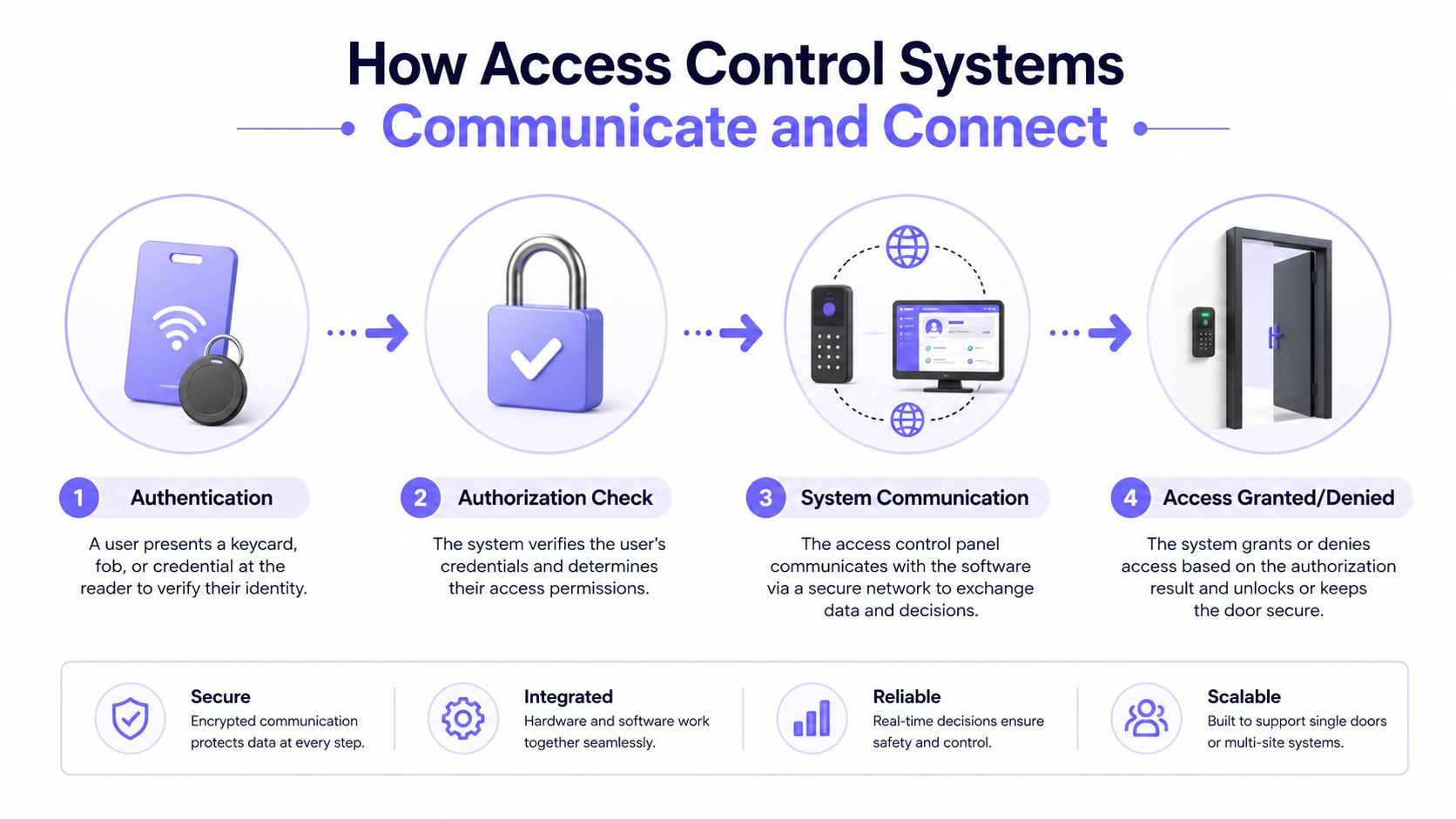
Every access event follows the same core sequence. A credential is presented, the system verifies identity, permissions are checked, and the controller decides whether to open the gate or keep it shut.
That sequence sounds simple until it has to work across different brands, mixed hardware generations, and cloud dashboards. Then the quality of the integration matters just as much as the quality of the reader or lock.
From credential capture to door movement
Readers capture PINs, RFID cards, biometric data, or mobile app credentials. Controllers process that input, compare it with stored permissions, and then command the lock, magnetic strike, or gate operator to respond (Kastle).
That's the local action layer. The integration layer sits above it and decides what gets logged, synchronized, or shared with other systems.
A phone-based credential usually travels through a cloud-managed service, gets validated, and then reaches the controller as an authorized event. The controller still performs the physical act at the gate, which is why reliable local enforcement matters even when the management layer is remote.
The communication paths that actually matter
Integrators usually work with two categories of connection:
Hardware-level signaling. Wiegand, relay contacts, and similar wiring methods pass open or close signals between readers and controllers. These are useful when a site needs a straightforward physical handoff.
Software-level integration. APIs, middleware, and cloud services move credentials, logs, and permission changes between platforms. This is the route that enables remote administration, auditability, and broader property workflows.
The gate access API is one example of the software layer property teams often ask for when they want events and permissions to flow into a broader management environment.
A clean integration does not replace the controller, it gives the controller a reliable way to talk to the rest of the stack.
Why the data flow needs to be explicit
The hardest step is often not the physical wiring. It's translating access-control points into the objects the receiving platform understands, like zones, building-automation points, or visit records (Smart Buildings Academy). That translation is where bad mapping creates duplicate records, missed events, or confusing dashboards.
When the chain is clear, a resident taps a phone, the reader sees the credential, the controller checks permission, the gate opens, and the event lands in a central log. When the chain is unclear, staff end up guessing which system failed.
Common Integration Types and Protocols Explained
The right integration path depends on what the site already has, how much of it should stay in place, and who needs to manage it. A small HOA with a durable gate operator has different needs than a mixed-use property with visitor management, intercoms, and a cloud dashboard.
Hardware, software, and identity integrations are not interchangeable
Hardware protocols move signals between devices. Software integrations move data between platforms. Identity integrations unify who the user is across systems.
That distinction matters because each layer solves a different problem. A site might keep the existing gate operator but still add cloud credential management, or it might need identity synchronization without touching the door hardware at all.
| Access Control Integration Methods Compared | How It Works | Best For | Key Limitation |
|---|---|---|---|
| Wiegand and relay contacts | Physical signals connect readers, controllers, and locks | Straightforward retrofit work | Limited data depth and less flexibility |
| REST APIs and cloud platforms | Software moves permissions, logs, and event data | Remote administration and auditability | Requires compatible platforms on both sides |
| SSO and identity-layer connections | Users authenticate through one identity source across systems | Unified staff workflows | Doesn't solve every hardware mismatch |
| Video intercom integration | Access events and visitor calls connect in one workflow | Visitor screening and front-entry control | Can be harder to coordinate across vendors |
| Cellular-based access control | A controller communicates over cellular service instead of relying on local Wi-Fi | Gates and properties with unreliable internet | Still needs clean hardware compatibility |
For teams evaluating platform connectivity, it can help to explore Ontrax API details through this endpoint reference. That kind of documentation is useful because it shows whether a platform exposes the objects and event types an integrator needs.
What each method does well
Wired signaling is useful when the goal is to trigger a gate or open a door. APIs are better when the goal is to synchronize credentials, logs, or visitor workflows across software.
SSO is valuable when staff should use one identity across multiple operational tools. It doesn't replace access hardware, but it reduces password sprawl and makes administrative workflows cleaner.
Cellular-based systems solve a different problem. They avoid dependence on local Wi-Fi, which is important at gate locations where the network is unstable or absent.
A quick decision filter
- Keep hardware signaling when the site only needs a dependable open or close action.
- Use APIs when staff need remote control, logs, or event-based automation.
- Add identity integration when multiple software tools must share the same user record.
- Choose cellular connectivity when the site can't tolerate Wi-Fi drops at the gate.
The right answer is often a mix, not one protocol by itself.
Real-World Use Cases Across Property Types
An HOA board usually cares about the same three things, even if they phrase them differently. They want fewer complaints, better visibility, and no expensive tear-out just to modernize access.
That's why retrofit-first thinking works so well in gated communities. The best projects keep the gate operator in place and upgrade the way people are identified, logged, and managed.
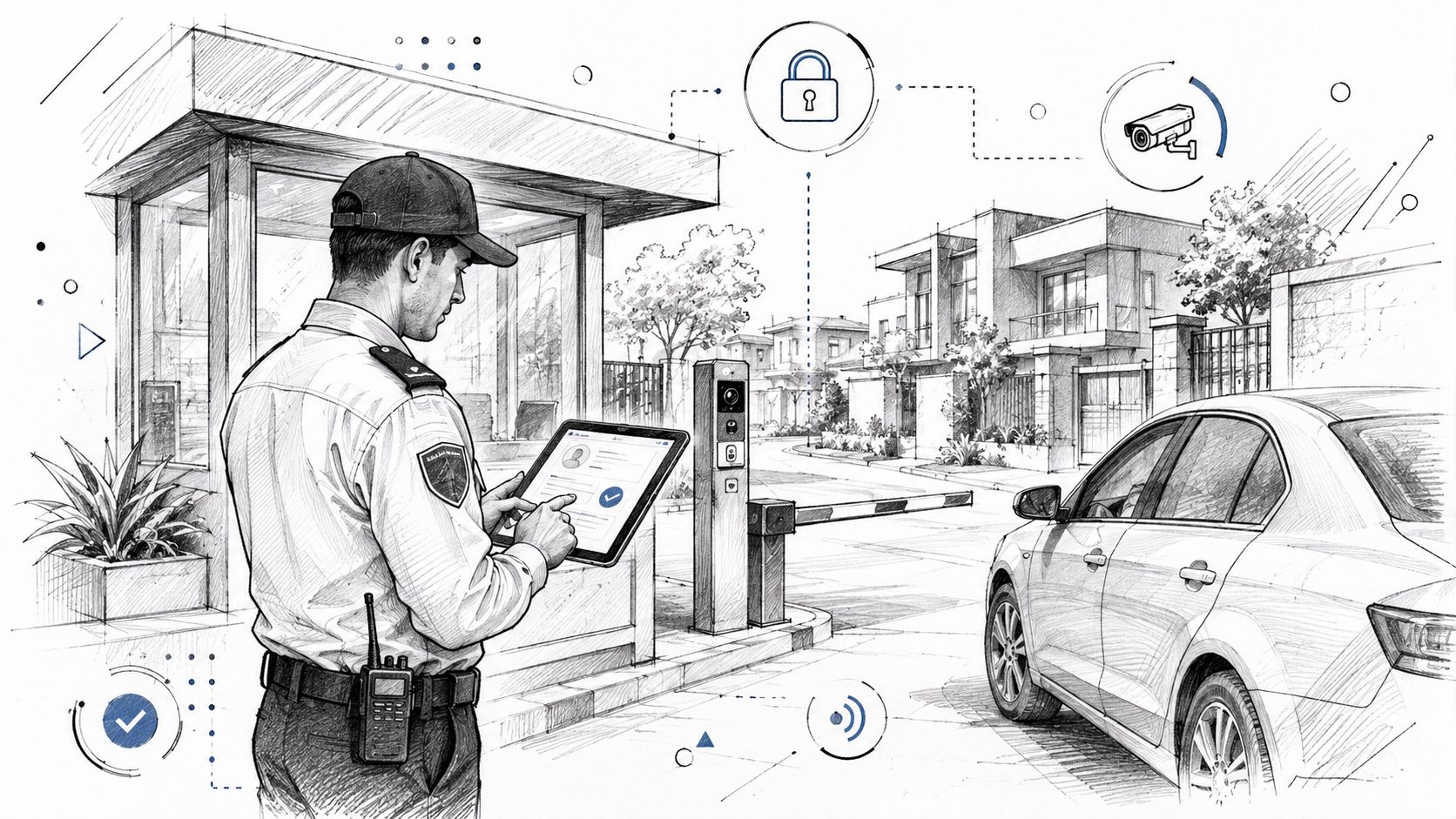
HOAs and gated communities
A practical HOA project usually starts with the existing operator, not a full replacement. Brands such as LiftMaster, Viking, FAAC, and DoorKing are common retrofit targets when the aim is to preserve working gate hardware and remove the mess of shared PIN codes and untracked fobs.
That matters because shared credentials create weak accountability. When a resident passes a code to a guest, the board loses visibility, and staff lose control of who can enter.
For boards looking at community definitions and operational expectations, the AMG community management guide is a useful reference point. It frames the gated community as an access-controlled environment, which is exactly why the credential process needs to be clean.
Commercial and multifamily properties
Multifamily buildings and commercial sites usually need more than open and close events. They need visitor workflow, intercom coordination, and better traceability across tenants, vendors, and staff.
Integrated platforms do well here because access control can sit next to video surveillance and visitor management in one operating view. That helps front desks and remote managers make faster decisions without toggling between unrelated tools.
Security integrators and installers
For installers, the business case is straightforward. Hardware-agnostic retrofit solutions reduce the need to redesign every site from scratch, which makes proposals easier to scope across older and newer properties.
A useful way to read the market is through the lens of the Nimbio cellular access control model, which retrofits existing gates and lets administrators manage entry through a smartphone app while preserving existing remotes and keypads. That kind of approach fits sites where the operator is still serviceable but the access process is outdated.
Retrofit work wins when the installer can identify what stays, what gets repurposed, and what actually needs replacement.
The operational payoff shows up in day-to-day work. Staff spend less time issuing temporary access, residents stop sharing codes informally, and visitor handling becomes easier to track.
Integration Failure Modes and Legacy Hardware Challenges
A clean dashboard can hide a messy field reality. The trouble starts when a modern cloud platform meets a gate operator, reader, or controller that was never built to share data outside its original ecosystem.
That mismatch is where projects slow down. It is also where property managers discover that the hardware still works, but not in the way the integration needs.
Where projects usually break
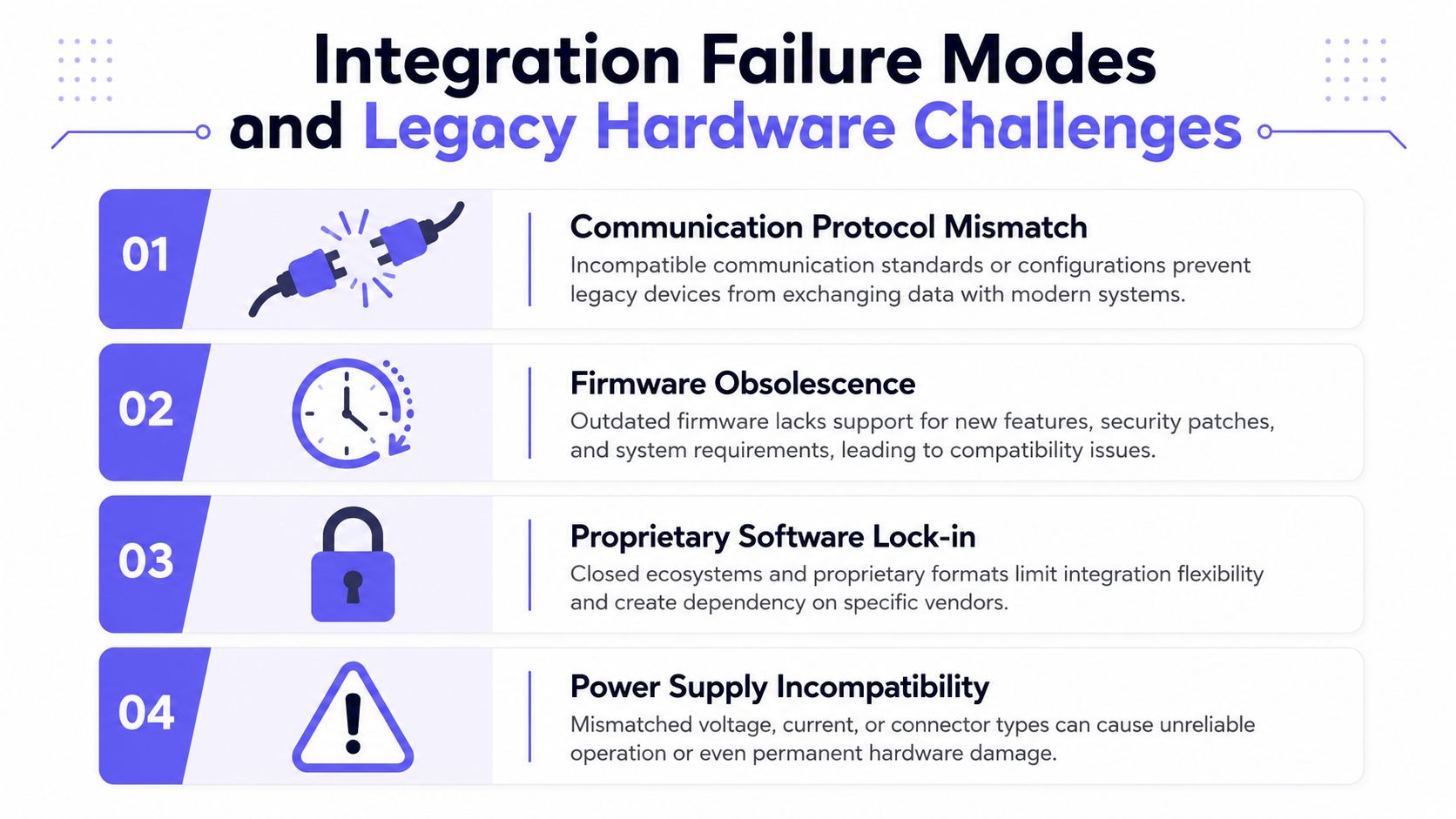
A communication protocol mismatch is usually the first failure point. The old controller may only support a narrow signal path, while the new platform expects cleaner event data or a different handoff, so the devices look compatible until the first live test.
A firmware obsolescence problem follows quickly. Legacy devices can still power on and trigger a gate, but they may not support the event formats, timing, or credential behavior the new system depends on.
A proprietary software lock-in issue can be harder to spot. Some panels rely on closed tooling that limits exports, blocks clean API access, or makes the hardware difficult to reuse once the original vendor setup is no longer maintained.
A power supply incompatibility problem can stop a project even when the access logic is sound. The reader, controller, and operator may all be fine individually, but the site wiring, voltage requirements, or backup power arrangement may not match what the new device expects.
A real example comes up often in retrofit jobs, a 2012 DoorKing panel with Wiegand-only output. It may still open and close a gate reliably, but a cloud-first platform that expects richer status reporting or a different credential flow will expose the limits fast. For details on retrofitting legacy gate operators, see the hardware guide.
Why the audit comes before the proposal
The safest approach is to audit the existing hardware first, reuse what still fits, and pilot before any full rollout. That sequence protects a property from assumptions that sound reasonable in the office and fail at the gate.
An audit should answer four practical questions:
- What is installed today?
- What model and version is each device?
- What licensing or driver support exists?
- Which parts are compatible with the receiving platform?
Unknown model numbers create expensive surprises. If the team cannot confirm the exact manufacturer, model, and version, the integration plan is usually incomplete.
Property teams also need effective access control policies before they connect old equipment to new software (effective access control policies). Without clear rules for credential issuance, admin rights, and event review, the integration can spread confusion instead of reducing it.
Pilot first, then scale
A pilot on one door, one building, or one visitor workflow lowers the chance of a broad failure. It gives the installer a controlled way to test communication settings, trigger behavior, and interoperability under real site conditions.
A staged rollout catches wiring issues, credential mismatches, and trigger failures before they spread across the property.
That same pilot usually exposes where the source of truth is fractured. If permissions live in spreadsheets, old panels, and separate admin accounts, the new platform can inherit drift instead of fixing it.
Security and Privacy Considerations for Integrated Systems
Integration often makes operations easier, but it also widens the surface area for mistakes. When video, mobile credentials, cloud admin tools, and third-party APIs all touch the same identity layer, policy needs to be tighter, not looser.
The goal is not to block useful integration. The goal is to keep convenience from becoming an unmanaged risk.
The controls that should be non-negotiable
Recent trend coverage points toward touchless access, unified security platforms, and the convergence of physical access control and cybersecurity (Honeywell LenelS2). That convergence means property managers need a policy model that accounts for both doors and data.
A workable baseline includes:
- Role-based access controls: staff should see only the functions required for their job.
- Multi-factor authentication for admin actions: permission changes deserve stronger verification than day-to-day entry.
- Data retention rules: access logs and video feeds should not be kept indefinitely without a policy.
- Audit controls: the system should record who changed access and when.
Privacy boundaries need to be explicit
The hard question is not whether data can be shared. It's whether it should be shared across systems that were never designed for the same identity layer.
Video intercoms, mobile credentials, and biometric verification all create new governance issues. If one platform knows too much, or keeps data too long, the integration becomes a liability instead of an efficiency gain.
For policy language and governance examples, effective access control policies are a practical starting point for teams building or reviewing their own rules.
A simple governance test
Before approving a new integration, ask whether the property can answer these three questions:
- Who can change permissions?
- How is that action verified?
- How long are logs and video retained?
If the answer is fuzzy, the rollout is premature.
Best Practices for Deployment and Partner Integration
A gate retrofit can look straightforward in the demo and fail in the field because the old operator does not speak the same language as the new controller. The safest deployments start with a site inventory, move through a pilot, define partner handoff points, and then expand only after the first gate or workflow behaves the way the property needs it to.
That order matters because the technical problem and the business problem show up at the same time. The site needs hardware that can communicate, and the board or operator needs confidence that the rollout will not create extra service calls, unclear ownership, or a bigger support burden.
Build the rollout in the right order
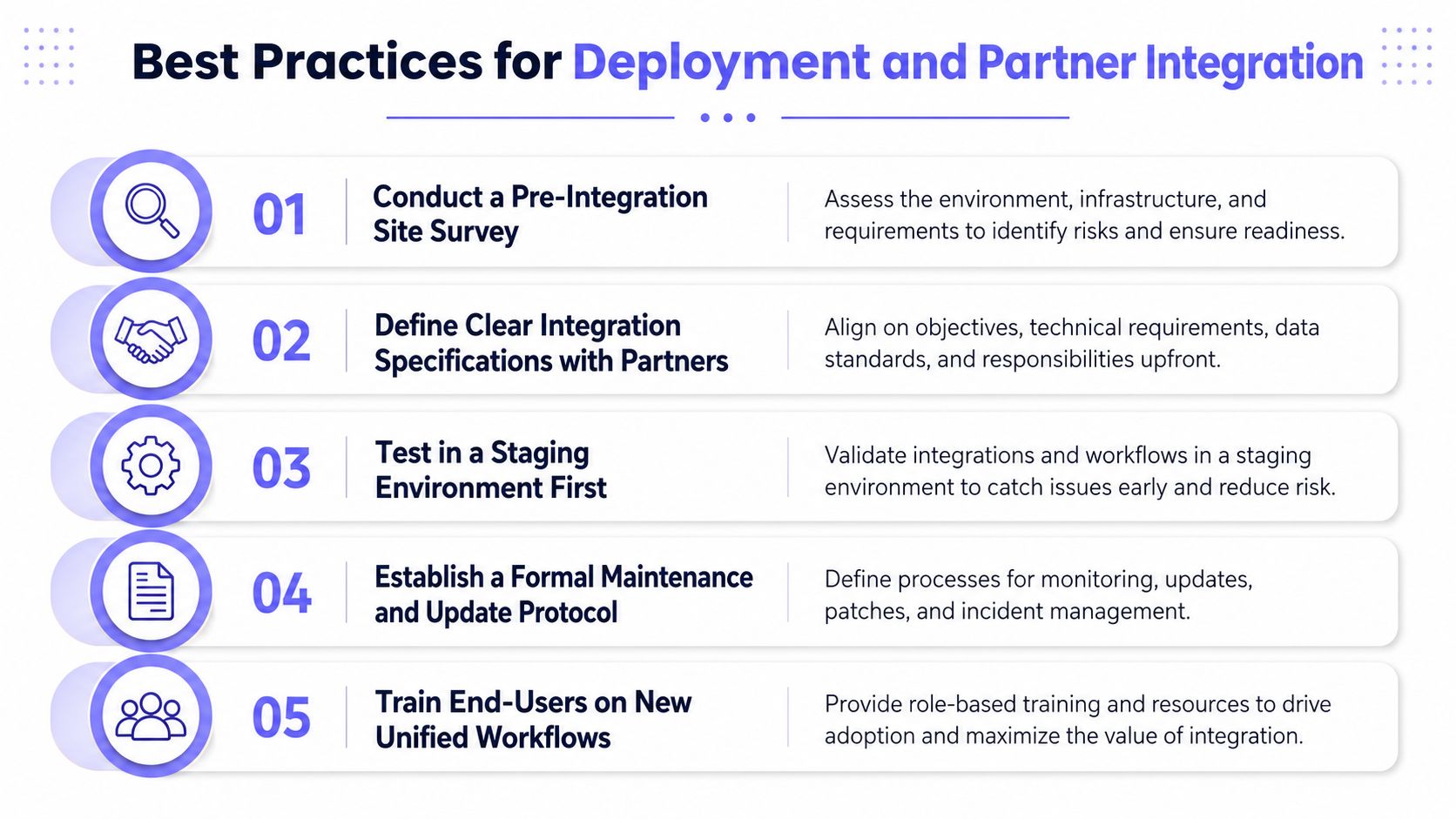
Start with a pre-integration site survey. That survey should identify the gate operator, controller model, current credential method, and any mixed-generation hardware that could complicate cutover. It should also surface whether the site depends on relay timing, dry contact wiring, or other legacy behavior that a cloud platform will not handle cleanly without extra configuration.
Then define the integration spec with the installer, the property manager, and any software partner. Everyone should know which events are being shared, who owns the admin workflow, and what “done” means before the work starts. If one party assumes the platform is managing permissions and another assumes the integrator is, the project becomes hard to support the moment the first resident credential fails.
A staging test comes next. Real hardware behavior often exposes issues that never appeared in the planning meeting, especially on older gates that close differently, hold contacts longer than expected, or drop offline when a network link is unstable.
Choose the deployment model on purpose
Deployment model matters. A cloud setup gives remote visibility, an on-premises setup keeps control local, and a hybrid model can fit sites that need both governance and flexibility.
Data-sovereignty concerns and existing infrastructure should drive that choice. If the site cannot support the architecture cleanly, the project should be simplified rather than forced. That is especially true for properties with older gate operators, because the weakest point is often not the software, it is the wiring, power, or connectivity behind the enclosure.
A cellular-first design can also avoid the brittle dependence on property Wi-Fi, which is useful when the integration has to work on an existing operator instead of a full replacement. Nimbio cellular access control is one example of that deployment principle in practice, since the connection path stays separate from the site network and reduces one common failure point for retrofits.
Make the partner path practical
Integrators and dealers do better when the system is easy to maintain. Over-the-air updates, clear maintenance rules, and a simple subscription model reduce long-term admin burden, especially when the property expects change over time.
The more important point is operational. If a partner has to touch every gate manually, or if troubleshooting requires a truck roll for a routine credential issue, the deployment will age badly. A workable partner model gives installers a repeatable process, gives managers a clear support path, and avoids turning every small change into a custom service call.
Keep the end-user training short and concrete
Residents and staff do not need a technical explanation. They need to know how to request access, grant access, and verify that the workflow behaves the same way every time. If the property still uses mixed systems, training should also cover the exception cases, such as what happens when the app is unavailable, the network is down, or a credential must be revoked quickly.
A strong deployment checklist looks like this:
- Survey the site first.
- Pilot the integration on one gate or workflow.
- Document partner responsibilities clearly.
- Set maintenance and update rules before launch.
- Train users on the new process, not the old one.
That approach protects the investment better than a feature-heavy purchase ever will. It also gives property managers a cleaner way to spot the hidden failure modes that usually appear only after the first few weeks of live use.


