

A delivery driver is idling at the entry while the arm stays down, and the complaint often lands on the motor first. In practice, the weak point is usually the barrier gate arm, the safety devices around it, or the way the site was wired and commissioned. A barrier arm is only a simple-looking piece of metal when the rest of the system is doing its job.
Table of Contents
- Why Barrier Gate Arms Fail Before the Motor Does
- The Building Blocks of a Barrier Arm
- Where Barrier Gate Arms Actually Get Used
- Matching the Arm to the Operator and Controller
- Safety Standards That Actually Shape the Installation
- Remote Access Does Not Replace Safety Hardware
- Installation and Maintenance Without the Guesswork
Why Barrier Gate Arms Fail Before the Motor Does
A property manager usually sees the symptom, not the cause. The lane backs up, a visitor calls from the intercom, and the arm seems dead even though the operator cabinet still has power. That is often a clue that the problem sits in the arm geometry, the sensing, the installation, or the access trigger, not in the motor alone.
What the arm actually does
A barrier gate arm is the moving visual and physical boundary that tells drivers when a lane is open or closed. On most sites it works with loops, photo eyes, safety edges, and a controller that decides when the arm may move. If one part of that chain is out of alignment, the arm can stop behaving like a lane-control device and start behaving like a nuisance.
The arm also changes the way people drive. A low-visibility arm, a poorly lit approach, or a lane with bad geometry gives drivers less time to react. That is why arm failures often look like access-control failures even when the root cause is physical layout.
Practical rule: treat the arm as part of a safety system, not as a decorative gate piece with a remote attached.
For Nimbio users, that distinction matters because a cellular trigger can open the gate from a phone, but it still depends on the existing operator and safety devices doing their job. The article's later sections cover why that matters more than most owners expect.
The questions that actually matter
Before choosing or replacing an arm, a site should know four things. How long is the lane, who shares it with pedestrians, what kind of traffic will hit it, and what happens when the site loses power or communications. Those are the questions that separate a smooth entry from a recurring service call.
The Building Blocks of a Barrier Arm
The choice starts with the arm itself, not the app, reader, or keypad. Length, profile shape, material, finish, and breakaway behavior all affect how the system handles wind, impact, visibility, and serviceability. The operator has to move the arm that is installed, so the arm spec and the operator rating need to make sense together.
What buyers are really choosing
Arm length sets how much roadway the gate blocks. Arm shape affects wind resistance and clearance. Material matters too, because an aluminum arm behaves differently from wood, steel-reinforced construction, or fiberglass when the site sees weather, impact, or repeated cycling.
Finish is not cosmetic on a busy site. A contrasting finish and visible striping help drivers judge distance and reduce late braking, while breakaway construction can make a strike easier to recover from. Rigid arms can be acceptable on some sites, but a breakaway segment can save time when a vehicle clips the gate and the goal is to get the lane back in service.
Installer rule of thumb: the heavier and longer the arm, the more it should be matched to the operator, the wind exposure, and the real lane width, not the hope that “bigger” means “safer.”
Common duty classes also matter. Light-duty parking applications usually prioritize moderate traffic and basic access control. Standard commercial sites need steadier cycling and better durability. Heavy-traffic logistics entries need faster recovery, stronger mounting, and an arm choice that fits the site's daily punishment.
| Typical Barrier Arm Lengths by Site | ||
|---|---|---|
| Site type | Typical arm length | Why that range |
| Small parking or residential entry | Shorter lanes usually fit a shorter arm | Keeps the opening matched to the driveway without overloading the operator |
| Standard commercial driveway | Mid-length arms | Covers a normal vehicle lane while keeping visibility and cycling practical |
| Toll or wide controlled lane | Longer arms | Helps span the lane and reduce the gap at the end of the arm |
A buyer reading installer language should be able to say, “This lane needs an arm that fits the opening, the traffic, and the strike risk,” instead of asking for a long stick and hoping the rest works out.
Where Barrier Gate Arms Actually Get Used
A parking deck, a multifamily entrance, a logistics yard, a toll lane, and a transit crossing all ask different things of a barrier arm. Visibility, approach speed, and recovery after a strike all change from site to site, so the right arm is the one that fits the lane and the traffic pattern, not the one with the strongest sales pitch.
Site type changes the spec
A residential driveway usually needs clear movement, predictable cycling, and enough visual presence to keep drivers from rushing the entry. A logistics yard puts more pressure on impact recovery, lane discipline, and the question of whether the gate can take a clipped arm and still let traffic keep moving. Toll lanes and transit crossings push even harder on visibility, arm placement, and how the lane is shaped around the operator.
People also behave differently once a barrier is in front of them. A plain site-access arm can invite impatience, while a lane that is clearly marked and well lit slows the approach and reduces bad decisions. For broader workplace context on keeping people alert around moving equipment, the TP Training site safety overview is a solid reference point.
The lane matters as much as the arm
Arm length does not fix a poor approach angle, a tight turn, or a lane that splits around the operator cabinet. Lighting, cabinet setback, photocell placement, loop placement, and the visible path of the lowered arm often matter more than the credential method. A cheap replacement becomes expensive when the site geometry was never right to begin with.
Toll lanes and multifamily entries ask different questions of the arm, which is why many communities start with multifamily gate access control before they decide on the arm hardware.
The safety piece matters here too. A barrier arm should work with photocells, loops, and breakaway behavior, not sit apart from them as if access control were the only issue. Cellular triggers can open the lane, but they do not change the need for the arm to stop cleanly, recover from contact, and keep the site moving without creating a second hazard.
Matching the Arm to the Operator and Controller
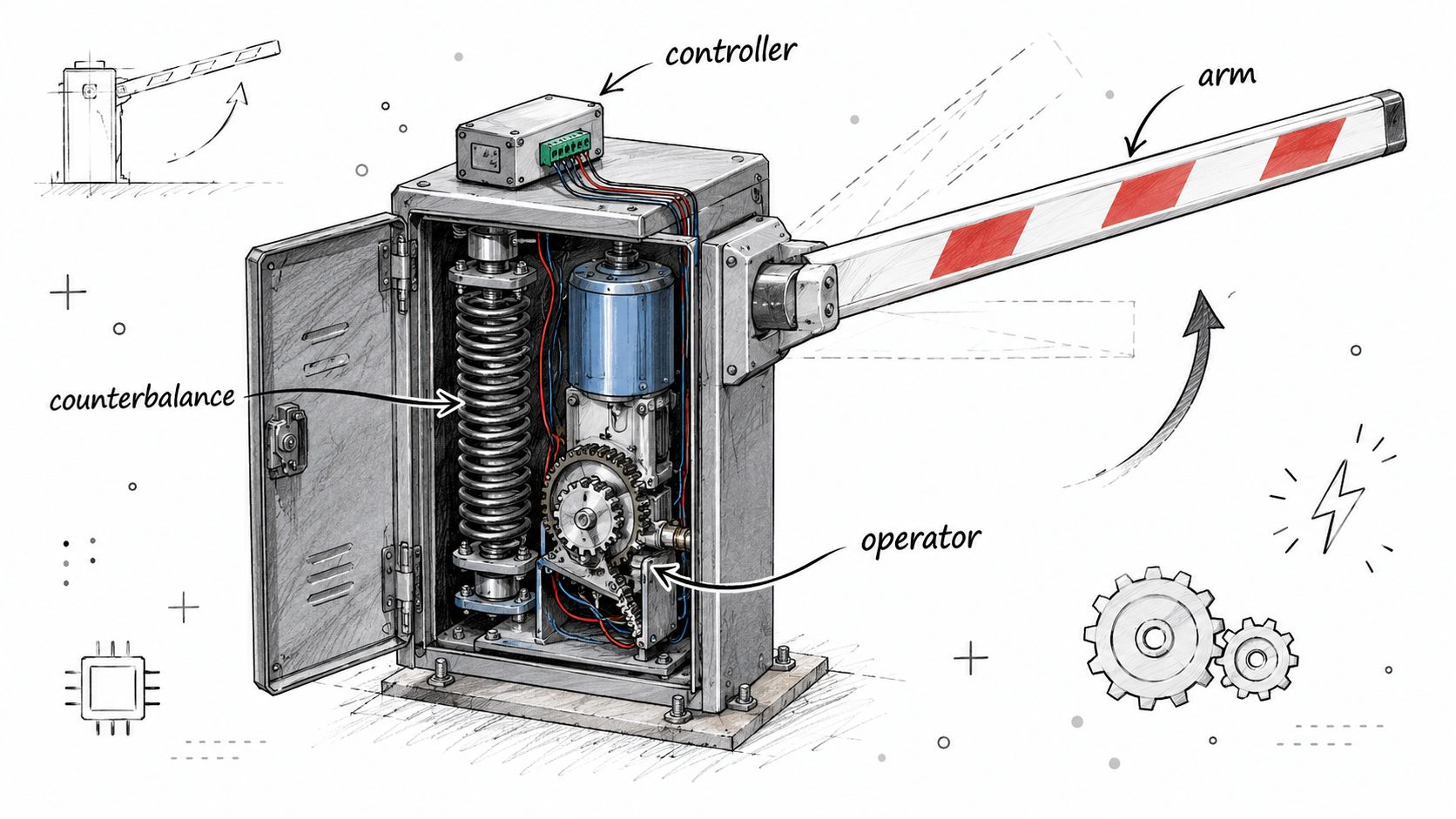
The arm does not float on its own. It bolts to an operator, and the operator responds to a controller, relays, sensors, and safety inputs. When those layers are mixed up, the site ends up with a gate that can open from multiple places but does not behave safely from any of them.
Three layers, three decisions
The first layer is the operator, which sets the mechanical limits. The second is the arm, which changes the load, balance, and visibility. The third is the access trigger, which can be a keypad, a reader, a loop, or a cellular controller.
That separation is where retrofit jobs go wrong. A property owner may keep the old operator, replace the arm, and add a new trigger path without checking whether the counterbalance, closing speed, and sensing logic still line up. Once the arm length or mounting geometry changes, the measured forces can change too, which means the site needs to be checked again, not assumed safe because it worked last year.
A controller can tell the operator to move. It cannot make an out-of-balance arm safe.
A cellular add-on belongs in this stack as an access layer, not a mechanical fix. Nimbio, for example, connects over cellular LTE, wires into the existing gate operator, and leaves existing remotes, fobs, and keypads in place. That makes it one option for sites that want smartphone-based access without replacing the gate hardware already on the property.
What a retrofit should preserve
Good retrofit work preserves the existing operator's certified behavior. That means the arm still needs to open and close as intended, and the safety devices still need to control when it may move. If the add-on changes timing, sequencing, or hold-open logic, the installer has to recheck the whole system instead of assuming the new trigger is harmless.
For owners comparing options, what to look for in a gate access system is the right kind of question. The trigger path is only one part of the answer, and it should never be treated as the whole solution.
Safety Standards That Actually Shape the Installation
Standards are not paperwork after the fact, they shape the hardware choices from the start. UL 325, ASTM F2200, EN 12453, and MUTCD guidance all affect where the controls go, how the arm is marked, and what protection has to be active before the gate is allowed to move. Local enforcement still varies, so the site has to be checked against the rules that apply there.
The rules that change the layout
For vehicular barrier operators, UL 325 requires at least two independent entrapment-protection means for each entrapment zone, and the operator must not run until the required protection devices are installed and enabled. UL 325 instructions also keep user controls away from the gate, with controls positioned at least 6 feet from any moving part in the guidance cited here (UL 325 and ASTM F2200 summary).
That means a remote trigger is never the only question. A phone app, reader, or keypad can be convenient, but it still has to sit on top of photo eyes, loops, obstruction sensing, and the operator's own safety logic. If the new trigger bypasses sequencing or hold-open logic, the site may become less safe even though it feels more modern.
Visibility is part of safety
Public standards also care about what drivers see. At highway-rail grade crossings, the MUTCD requires gate arms to be retroreflectorized on both sides, with alternating red-and-white vertical stripes at 16-inch intervals measured horizontally, and at least three red lights on the gate assembly in the railroad-crossing context (MUTCD railroad crossing guidance). For automatic gates at California grade crossings, the state MUTCD says the down-position gate arm should be between 3.5 and 4.5 feet above the crown of the roadway, and it specifies retroreflective sheeting widths that change along the arm (California MUTCD grade-crossing gate guidance).
For a property manager, the practical point is simple. Visibility treatment is not decoration, and the lane's sightline has to be designed for the people and vehicles that use it.
A useful installation question is whether the site needs a full safety redesign or only a controller change. For a broader physical-security comparison of access hardware, the compare compliant aluminum access resource shows how often access decisions depend on the surrounding structure, not one component alone.
Remote Access Does Not Replace Safety Hardware
A smartphone trigger feels like progress, but it is still only a trigger. It opens the gate faster and lets administrators issue or revoke digital keys remotely, yet it does nothing to replace photocells, loops, edge sensing, emergency release, or power-failure procedure. If those pieces are weak, remote control just makes a weak system easier to use.
What every new trigger path must preserve
A new command path has to respect the operator's safety logic. That means vehicle presence detection, obstruction sensing, warning lights, and the sequence that keeps the arm from closing on a person or car. If a trigger path skips any of those checks, the gate may open on command but it no longer behaves like a properly protected barrier operator.
A good commissioning test shows the difference fast. The phone may request an opening, but the arm still has to stop or refuse movement if a photocell is blocked, a loop is occupied, or a safety device is not reporting correctly. That is the point where a shortcut becomes obvious, and it is where installers should stop and correct the wiring or controller settings.
The rule is simple. The more ways there are to open the arm, the more carefully each path has to preserve the same safety outcome. A remote-open feature is useful only if it behaves like the other authorized access paths, not like a bypass that ignores them.
Operational caution: if the gate works from the phone but the safety devices no longer govern motion, the system has been made more convenient and less trustworthy.
That is why many installers treat cellular access as a separate layer, and it helps to understand how cellular gate access works before wiring one in. It can support a manager who needs to verify a visitor before opening the lane, but it should never be wired or programmed in a way that defeats the gate's required protection devices. The right question is not whether the arm opens from a phone. It is whether every activation path still preserves the operator's certified safety functions.
Installation and Maintenance Without the Guesswork
Keep the cabinet where the operator manufacturer intended it, and keep the arm length and counterbalance within the model's limits. After a strike, replace breakaway parts with the correct pieces, not whatever was on the truck. Inspect reflective sheeting, verify loops and photocells, and stop there if the operator needs deeper adjustment or any change to force settings.
For model-specific steps, the manufacturer's own manual wins. If the arm geometry changes, if the gate has been hit, or if the controls behave unpredictably, a qualified technician should handle the work rather than a property manager guessing at the settings.
For teams that want a broader physical-security plan around the gate and the entry, MR2 Solutions physical security is a useful reference point. The same principle applies there as here, the hardware has to be planned as a system, not as one isolated part.
If a property team wants cellular access without replacing the gate hardware, Nimbio is built for that kind of retrofit. It wires into an existing electric gate operator, works over cellular LTE, and lets managers issue, revoke, and time-limit digital keys while keeping existing remotes and keypads in place. Visit Nimbio to see how its approach fits a barrier gate arm system that still needs proper safety hardware and a careful installation.


