What happens to the audit trail, the revoked key, and the remote controls when a new controller is bolted onto a gate operator that's already ten years old?
That's the question most feature sheets skip, and it's the one that separates the best commercial access control systems from the rest. Brand names matter less than where the controller lives, how it reaches the internet, and whether its logs and revocation still work in a retrofit. Judge every candidate on those points first, then on price.
Table of Contents
- Quick Picks by System Type
- Criteria and Pricing That Separate Systems
- Connectivity and Retrofit Options Compared
- Audit Logs and Admin Controls to Test
- Security Controls Beyond the Feature Sheet
- Matching Systems to Property Types
- Confirm the Shortlist Before You Buy
Quick Picks by System Type
For most commercial buyers, the choice starts with controller location and connectivity, not with a brand shortlist. Four patterns cover nearly every quote a property will receive. Each describes how the system is wired and administered, and each fits a different kind of site.
| System type | Typical fit | Connectivity | Retrofit to existing gate | Remote admin and logs |
|---|---|---|---|---|
| On-premise panel with local readers | Sites with strong in-house IT control and fixed staff | Local network or direct wiring | Possible where the panel accepts the existing readers and operator inputs. Confirm with the installer. | Local logs. Remote access only if configured. |
| Cloud-managed controllers | Multi-site offices and facilities with reliable IT | Building network, Ethernet or Wi-Fi | Possible where controller inputs match the operator. Confirm compatibility in writing. | Web portal. Check vendor log retention in writing. |
| Cellular retrofit add-on | Gates and doors with no network at the device | LTE cellular. No Wi-Fi needed at the gate. | Wires to the operator or lock already installed | App or web admin. Confirm log and revocation behavior in writing. |
| Hybrid, cards or keypads plus app | Sites moving to mobile access in stages | Mixed | Keeps existing cards and keypads working | Logs sit in one layer. Confirm which layer records each event type. |
How to Read a Row
Start with the connectivity column and check it against the physical site. A property with a reliable building network and IT staff on hand usually fits cloud-managed controllers or on-premise panels, because someone owns the network, the patching, and the troubleshooting.
A gate or door with power but no network at the device points the other way. That's the common case at perimeter gates, yard entrances, and detached parking structures, and it's where a cellular retrofit add-on earns its place.
Mixed estates often run hybrid for a transition period. Cards and keypads stay live while mobile credentials roll out group by group, which avoids a single cutover weekend and lets administrators retire shared codes gradually.
Each row describes a pattern, not a guarantee. Two products in the same row can differ sharply on log depth, revocation speed, and offline behavior.
Before shortlisting anything, write down three facts for every entry point. Note its power and network status, the credentials it accepts today, and who will administer it after install day. Those three lines eliminate more wrong systems than any brochure comparison.
Criteria and Pricing That Separate Systems
Score five criteria from 1 to 3 for the actual property before opening a vendor page. Doing the scoring first keeps the comparison anchored to the site instead of to whichever feature a brochure leads with. A criterion scored 3 should decide the shortlist.
The weight behind that exercise is real. In 2025, 41% of organizations surveyed identified access control as their highest physical-security priority, according to Facilities Dive's coverage of Genetec's 2025 Physical Security Report.
The Five Criteria
- Scalability: Ask how a gate, a door, or a whole site gets added without re-architecting, and whether growing credential counts slow the system down.
- Connectivity: List the network path available at each entry point, not the path shown on a site plan.
- Audit and logging: Require records of denials, administrator changes, and offline events, not only successful entries.
- Admin tools: Check role groups, bulk changes, revocation speed, and hold-open scheduling for business hours.
- Software connections: Ask whether the system connects to leasing or property-management software, whether that link is built in or needs a custom connection, and don't assume one exists.
Admin tools deserve close attention because they shape daily workload. A property with high contractor turnover lives or dies on bulk changes and fast revocation, while a stable office may care more about role groups by department. Facility Management Insights offers useful background on managing employee and vendor access for teams setting up those groups for the first time.
Pricing Comes Last
Price every vendor on identical cost lines, using itemized installer quotes rather than a list price alone. Note whether charges run per door, per controller, per user, or per site, because that billing unit decides what growth costs later. Checking a published page such as Nimbio pricing shows how one vendor structures its lines, and the same structure should be demanded from every bidder.
| Cost line | Usually charged | Ask in writing |
|---|---|---|
| Hardware per gate or door | Per device | Unit price and warranty terms |
| Installation labor | Set by the installer | Itemized quote for each entry point |
| Subscription | Per controller, door, user or site | Billing unit and renewal terms |
| Cellular connectivity | Per device or plan | Whether data is included and who pays |
| Software and firmware updates | Per vendor | How updates are delivered and whether they carry a charge |
Installation labor is the line most often blurred. Because every commercial gate, multifamily doorway, and residential lock is unique, installation pricing is determined directly by the selected technician, so a hardware price without an installer's itemized quote isn't a comparable number.
Updates belong on the same quote. Some vendors deliver all firmware updates over-the-air over the cellular connection, with no service calls, no USB connections, and no extra cost, while others bill update visits or tie them to a support contract. Get the update path in writing before signing, since it affects both cost and security over the system's life.
Connectivity and Retrofit Options Compared
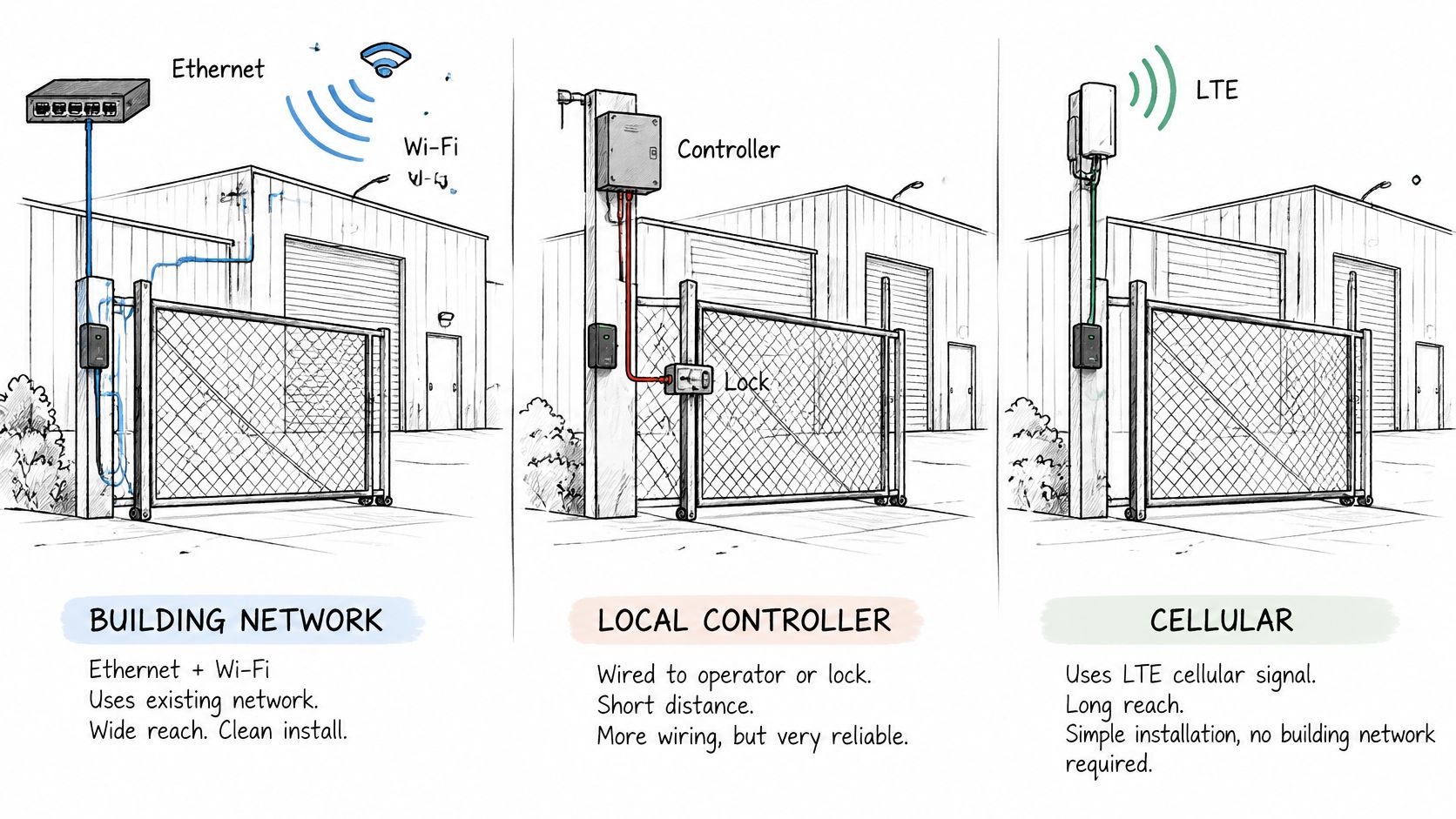
Cabling is where commercial access projects usually get expensive. Three connection paths cover most installs: a building network over Ethernet or Wi-Fi, local wiring from an operator or lock to a nearby controller, and LTE cellular.
Consider a hypothetical warehouse gate sitting a long cable run from the office network. Extending Ethernet out to it means trenching or conduit work, permits in some jurisdictions, and a cable that can be cut by the next paving job. A cellular controller avoids that route entirely, but it depends on mobile coverage at the gate, which should be tested at the exact mounting spot rather than assumed from a coverage map.
What Happens When the Connection Drops
Offline behavior separates careful designs from fragile ones. Ask what happens when the connection drops, whether the gate keeps working from its local inputs such as clickers and keypads, and whether events are queued locally and reconciled afterward without gaps or duplicates.
A system that freezes the gate during a network outage creates a safety and operations problem. A system that keeps the gate moving but loses the event record creates an accountability problem. Neither answer appears on a feature sheet, so both belong in the demo script.
The Retrofit Path
Most commercial gates already have a working operator. The practical question is whether the new controller wires to the operator's existing input, typically a dry-contact input, and whether legacy clickers and keypads keep working alongside the new layer. Guidance on retrofitting legacy gate operators shows how that parallel wiring approach is usually structured.
Nimbio is one example of the cellular add-on pattern. Its hardware retrofits directly to an existing automatic gate operator or electronic door lock, wiring in parallel to the gate operator, call box, or lock already owned, with no Wi-Fi at the gate and no landline. It's compatible with nearly any gate system, and because it wires to the existing dry-contact input, legacy clickers and keypads keep working alongside the app.
Practical rule: Ask every vendor for the wiring diagram for the exact operator model on site, plus a plain answer on whether a professional installer is required.
Three connection questions close out any comparison. What network path does each entry point have today? What does the gate do, and what does the log do, when that path fails? Does the controller wire to the installed operator, or does the quote assume a replacement?
Audit Logs and Admin Controls to Test
Run each demo check on a test credential. The record should let an administrator trace what happened at a specific entry point, including failed access and changes to permissions.
| Log or admin test | What to confirm | Why it matters |
|---|---|---|
| Date and time of each event | Controllers use synchronized clocks | Puts events in order during an investigation |
| Gate or door identifier | Each entry point has a unique name in the log | Shows where access happened |
| User or credential ID | Each event is tied to a named person or credential | Shows who entered |
| Denied attempts with reason | Invalid attempts are recorded with a reason | Helps identify expired credentials or probing |
| Administrator privilege changes | Additions, edits, and deletions are recorded | Supports offboarding and compliance reviews |
| Revocation across controllers | A revoked key is refused at every entry point | Closes the gap when a contractor or employee leaves |
| Offline event reconciliation | Events from an outage appear once after reconnection | Keeps the record reliable |
| Export and retention | Reports export in a usable format, and the retention period is stated in writing | Supports a later dispute or review |
What a Complete Record Contains
Good practice for a physical-access record is to capture the date and time, the gate or door involved, and the user ID. Record denied attempts and changes to access privileges too, including additions, modifications, and deletions.
A log that shows only granted entries leaves important gaps. Denials can reveal expired credentials or attempts to use access that should no longer work. Administrator changes matter because a review may depend on who granted or changed access, and when.
Day to Day Admin Controls
Test the controls administrators use regularly. Role groups should reflect actual users, such as staff, cleaners, and couriers. Check whether the system can make bulk access changes when a contractor crew arrives or leaves.
Test hold-open scheduling live. The Community Manager portal from Nimbio supports schedules that keep a gate open during business hours or a recurring time window, then return it to controlled access. Nimbio also provides per-person audit logs and instant digital key revocation through its cellular gate entry app.
Finish the demo by revoking a test key, trying it at the gate, and reviewing the resulting log. Confirm that the denied attempt and revocation time appear. Get the retention period and export terms in writing.
Security Controls Beyond the Feature Sheet
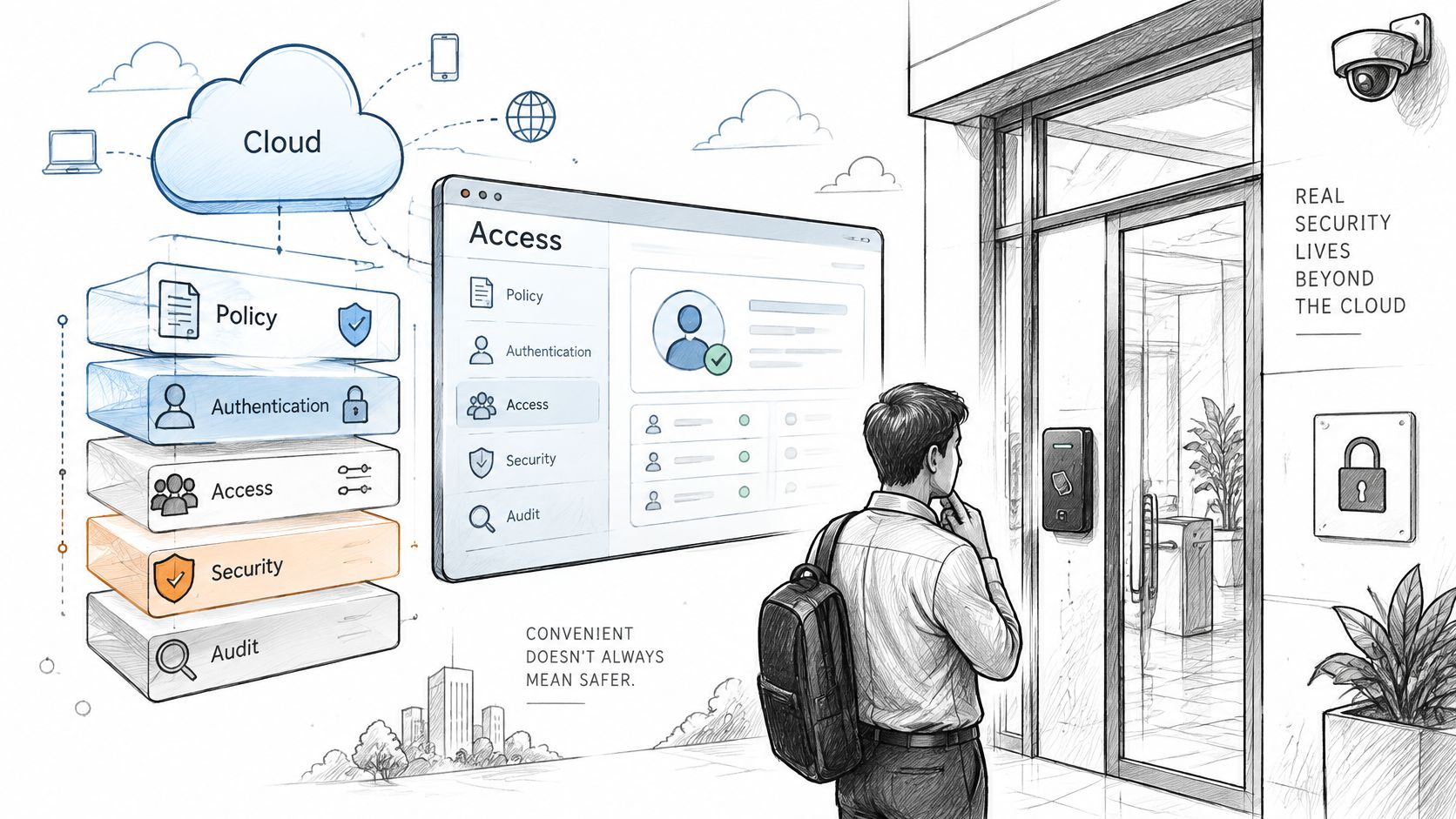
Cloud-managed doesn't automatically mean safer. In 2025, 90% of security professionals surveyed said alignment with cybersecurity standards was essential when selecting access controllers, according to Mercury Security's Trends in Access Controllers Report. Actual risk depends on identity controls, update practice, vendor access, and how legacy controllers get connected.
That caution has evidence behind it. Claroty Team82's 2025 analysis of building-management system exposures found widespread exposure to known vulnerabilities across building systems, which is the environment access controllers increasingly share.
Controls to Verify in Order
- Default credentials: Confirm they're replaced before deployment, on every controller and gateway.
- Remote access inventory: List every remote path into the system, including administrator portals and vendor maintenance accounts.
- Multifactor authentication: Require it for administrators, not only for end users.
- Least-privilege roles: Limit each admin and user group to the areas their duties require.
- Firmware update policy: Get patching responsibility in writing, including who acts and how fast.
- Network separation: Keep the access network apart from other building systems where the design allows.
CISA guidance on control system security advises organizations to identify and secure remote access points and to change default passwords throughout the system, particularly in remote-access and security components. The same separation principle applies at a gate. Protect the controller, the communications path, and the management interface, not only the entry point itself.
Reader Level Security With OSDP
Properties choosing new readers should also check the reader-to-controller link. The Security Industry Association's Open Supervised Device Protocol is an international standard, IEC 60839-11-5, and its Secure Channel uses AES-128 encryption with supervised bidirectional communication.
Verify three settings in production. Secure Channel should be enabled, each reader should carry a unique Secure Channel Base Key, and plaintext commissioning modes should be disabled after installation. OSDP support on a spec sheet proves nothing if those settings aren't confirmed on the installed system.
Local rules and standards vary, so the installer should confirm wiring and configuration against the requirements that apply at the property.
Matching Systems to Property Types
Different properties punish different weaknesses. The table matches each property type to the criteria that carry the most weight, so scoring starts from the right place rather than from a generic list.
| Property type | Priority criteria | Connectivity fit | Log depth needed | Starting point |
|---|---|---|---|---|
| HOA gated community | Remote revocation, visitor verification, low admin load | Cellular where no building network reaches the gate | Per-person entry history for disputes | Retrofit the existing gate operator |
| Multifamily property | Grouped units, fast offboarding, 24/7 access records | Building network or cellular per gate | Full export for tenant disputes | Run the audit test first |
| Commercial office or campus | Role-based permissions, IT-managed network | Building network over Ethernet or Wi-Fi | Immutable logs with user identity | Cloud or on-premise, per IT policy |
| Warehouse, logistics or yard | Vendor and courier access, scheduled hold-open | Cellular for gates away from the building network | Denials, timestamps and offline reconciliation | Cellular retrofit plus OSDP check |
| Single-family driveway gate | Simple revocation, low admin load | Cellular or existing Wi-Fi | Basic entry history | Retrofit add-on to the existing operator |
| Security integrator or dealer | Multi-brand compatibility, reseller support | Mixed, matched to each client site | Exportable logs for each client | Shortlist by wiring compatibility |
The Deciding Criterion by Property
For an HOA or gated community, remote revocation decides it. Boards need a departing resident's access gone the same day, visitor verification at the gate, and logs that settle disputes without guesswork. Multifamily properties turn on grouped units and fast offboarding, backed by full exports when a tenant dispute lands on a manager's desk.
Commercial offices and campuses usually start from IT policy. Role-based permissions on an IT-managed network point toward cloud or on-premise panels, and pages describing commercial property access control approaches show how staff and vendor entry is typically structured for those sites. For commercial properties without a building network at the gate, accountable app-based entry for staff and vendors, courier handling through GuestView, and a cellular connection that keeps the gate online cover the common gaps.
Warehouses, logistics yards, and trucking sites hinge on vendor and courier access plus scheduled hold-open. Consider a hypothetical logistics yard with a truck gate and a pedestrian door. The operator needs courier entry without a shared code, hold-open during receiving hours, cellular service where no network reaches the gate, and logs exportable for any period an insurer or customer requests.
Single-family driveway gates need simple revocation and a clean retrofit path, nothing more elaborate. Security integrators need multi-brand compatibility and exportable logs they can hand to clients. Treat the table as a starting point only. The live audit test decides the final shortlist.
Confirm the Shortlist Before You Buy
Shortlist only systems that pass three gates: the audit test, the security questions, and a written, itemized quote. A system that fails any one of them isn't a finalist, whatever its feature list says.
- Confirm wiring compatibility: Check that the operator or lock on site appears on the vendor's wiring list.
- Run a live revocation test: Revoke a test credential and try it at every entry point it once opened.
- Export a log: Verify that denied attempts and administrator changes appear in the export.
- Test offline behavior: Ask how events reconcile after a connection drop, and watch it happen if possible.
- Get itemized pricing: Require the installer's quote per entry point, with the billing unit stated.
- Confirm local regulations: Check gate access rules before removing or replacing a callbox, because requirements vary by jurisdiction and association rules.
For repair, wiring, or troubleshooting, follow the manufacturer's own manual and call a qualified technician when models differ. Guessing at wiring or indicator behavior on a live operator isn't a shortcut worth taking.
The first action this week takes twenty minutes. Write down each entry point, its power and network status, and who administers it, then bring that list to every demo. Vendors answer differently when the questions come from a written site record.
Properties weighing the best commercial access control systems for an existing gate can get a custom retrofit plan by sharing a few details about the property, and Nimbio access experts will map out the cellular upgrade for the gate or door. The controller wires into the operator already installed, needs no Wi-Fi at the gate, and lets managers issue and revoke digital keys remotely while existing clickers, fobs, and keypads keep working.