Yes, most connected gate controllers can receive firmware updates, but only if the model has an update mechanism, enough storage and a bootloader, and its vendor still supports it. That last condition is the one buyers rarely test. A controller that accepts a new firmware image today can stop accepting one when the vendor ends support, a cloud service changes, or a certificate expires, and nothing on the outside of the box will tell anyone.
So the useful version of "can firmware be updated" isn't a yes or no. It's a question about the whole support life of the device sitting on the gate operator at a property. Property managers approving a retrofit, HOA boards renewing a service agreement, and installers specifying hardware all need the same thing: a written answer for the exact model, not a general claim about connected devices.
Table of Contents
- Whether Your Gate Controller Can Be Updated
- How to Check Your Model's Update Options
- How Updates Reach and Install on the Controller
- Why Security Depends on Signed, Rollback-Protected Updates
- What Goes Wrong in a Failed Update
- Confirm Support Before You Buy or Renew
Whether Your Gate Controller Can Be Updated
Firmware can be updated remotely or locally when three things are present in the device. NIST's IoT device cybersecurity baseline defines update capability as the ability to update device software through remote network delivery or local media, and recommends that updates be restricted to authorized entities through a secure, configurable process.
- An update mechanism. Something in the device has to receive a new software image, whether that's a cellular modem, an Ethernet port, or a service connector a technician plugs into.
- Enough nonvolatile storage. The new image needs somewhere to sit before it replaces the old one, usually alongside the current version rather than on top of it.
- A bootloader. Think of it as the installer that puts a new app on a phone. It writes the image into flash memory and decides which version the device boots.
Older controllers missing those parts can often only be changed by hand, through a technician visit or a hardware swap. Whether a specific older model can be updated at all is a question for its manual, not a general rule.
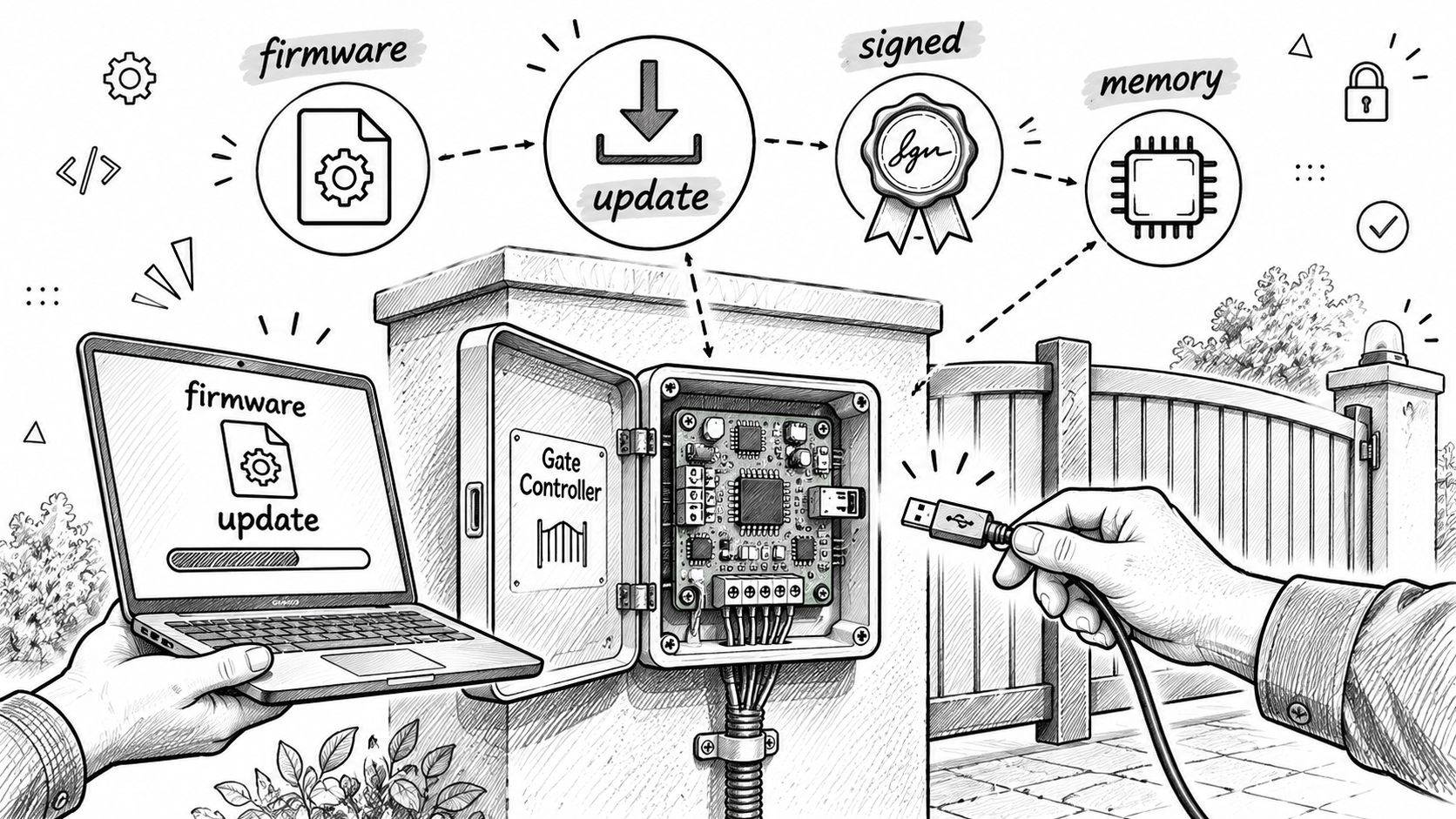
A well-designed implementation goes further. In an A/B partition scheme, the device keeps the working image in one slot while writing the candidate image into a second slot, then reboots and runs a health check on cellular registration, relay control, configuration parsing and cloud authentication. If that check fails or power drops, the bootloader reverts to the known-good image.
Practical rule: "can be updated" and "safe to update without checks" are different claims. Ask for both.
For a first answer, open the manufacturer's manual for the exact model and look for an update or firmware section. If the manual is silent, ask the installer or the manufacturer directly.
How to Check Your Model's Update Options
Update options belong to a model and a hardware revision, not to a brand. Two controllers from the same manufacturer can have different update paths, different support windows and different recovery behavior. Working through the checks below in order takes about ten minutes with the paperwork in hand.
Identifying the device first
Start with the label on the controller or the installer's paperwork. The model and part number decide which manual applies, and every later answer depends on getting this right. Then pull the current firmware version from the device status screen, the app or the installer tool, because a controller may already be running the release a manager is asking about.
Update checks for a gate controller
| Item to check | Where to find it | What it tells you |
|---|---|---|
| Model and part number | Label on the controller or the installer's paperwork | Which manual and update procedure apply |
| Current firmware version | Device status screen, app or installer tool | Whether an update is already installed or pending |
| Update method | Manufacturer's manual for the model | Whether updates arrive over the air, locally or need a technician |
| Support end date | Manufacturer's support or product-lifecycle page | How long security patches are promised |
| Connectivity requirement | Installation manual | Whether updates need cellular, Wi-Fi or a wired connection |
| Rollback policy | Release notes or vendor support | Whether a failed update can revert to the last working version |
| Update notification | Vendor account or app settings | Whether updates install automatically or need approval |
A filled-in table still doesn't replace the manual. Anything the manual doesn't state goes to the manufacturer or a qualified technician, and a guess about a connector or an indicator light isn't an answer. Compatibility questions for a cellular add-on are worth checking against a documented list such as the Nimbio supported devices overview before anyone assumes a controller will accept a given retrofit.
Readers who like getting specifics in writing before committing to anything will recognize the habit from other checklists, including RentReboot's answers for NYC apartment hunters, where the value comes from asking the exact question rather than accepting a general reassurance.
A complete answer looks like three written statements for one model: the update method, the support end date, and the rollback policy. Anything less leaves a gap someone will discover during an outage.
How Updates Reach and Install on the Controller
The sequence below is the order things happen in a properly designed update. Vendors document different parts of it, so the manual for the exact model is the reference for what a given controller does.
- The vendor publishes a signed firmware package.
- The controller, or the vendor's server on its behalf, checks for the package and downloads it over cellular or another available connection.
- The device verifies the signature against a trusted key before writing anything.
- The new image is written to inactive memory, leaving the working image untouched.
- The device reboots into the new image.
- A health check confirms cellular registration, relay control, configuration and cloud login.
- If any check fails or power is lost, the device returns to the last known-good image.
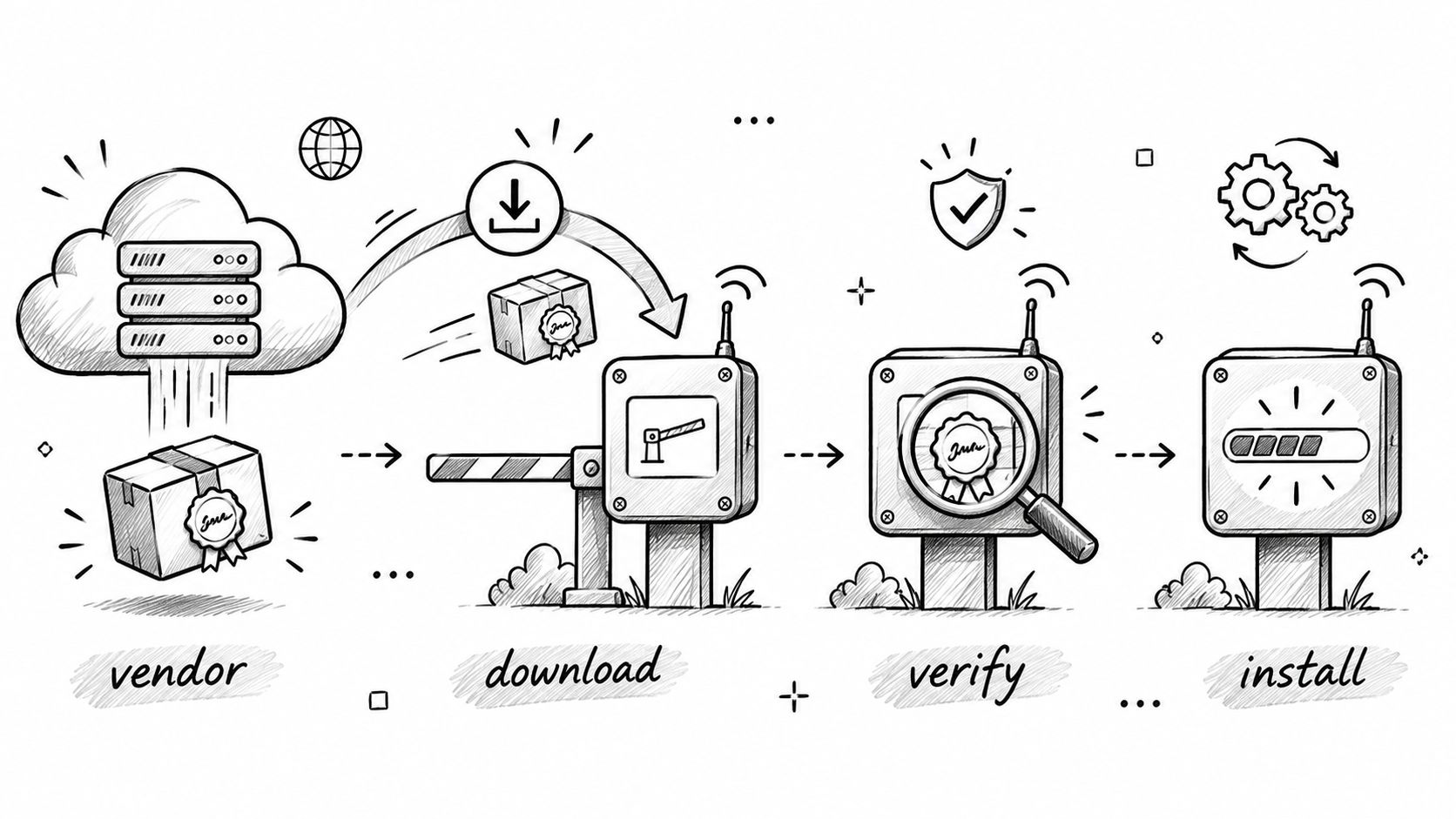
Delivery routes compared
The route only controls how the file arrives. It doesn't supply signature verification or recovery, so a route that avoids a site visit still needs both. Properties weighing a cellular path can read how cellular gate access works to see why the modem, not the property network, carries the traffic.
| Route | How the file reaches the device | Site visit needed? |
|---|---|---|
| Over-the-air over cellular | The controller downloads the package through its own LTE modem | Usually no, if the vendor supports it |
| Over-the-air over Wi-Fi or Ethernet | The device downloads through the property's network | Usually no, but network access must be available |
| Local port or removable media | A technician connects a laptop, USB or serial cable | Yes |
A remote update helps only when the device can finish the whole sequence without a technician standing at the gate. A controller that downloads reliably but can't recover from a power cut mid-write has moved the failure from the download step to the install step.
Why Security Depends on Signed, Rollback-Protected Updates
Firmware fixes are a security control. They correct known vulnerabilities, repair weak or unreliable communications, and add administrative features that let a manager tighten how access is granted, all without a technician visiting every property.
In its 2024 recommended cybersecurity requirements for consumer-grade routers, the U.S. National Institute of Standards and Technology states that every relevant device component should be updateable through a secure mechanism by authenticated and authorized users or services. The document recommends that devices receive, verify and apply software updates that are signed, and firmware updates that are both signed and encrypted. It's written for routers, but it sets the general baseline for any connected device that controls physical access.
Rollback protection is part of the baseline
The same guidance recommends protections against rollback attacks that could reinstall versions with known vulnerabilities. Without that protection, an attacker doesn't need to break the current firmware. They only need to push the device back to a release everyone already knows how to exploit.
NIST also calls for mechanisms that keep firmware current, such as automatic installation or consistent customer notifications. That second layer matters because a patch nobody installs fixes nothing. A gate controller in a utility closet has no user watching a screen, so either the device updates itself on an authenticated channel or the vendor has to reach the administrator reliably.
A signature check protects the update channel. Rollback protection protects the version history. A device needs both.
Consider a hypothetical: a property runs a gate controller that hasn't been updated in two years, while the vendor has since released patches for a flaw in its communications code. The gate keeps working, residents keep entering, and the exposure stays open until someone updates the controller or replaces it. Nothing about daily operation reveals the problem.
For the specific questions to put to a vendor about signing keys, encrypted delivery and rollback rules, the written checklist later in this article is the place to start. Managers who want the underlying concepts explained in plain terms can review encryption safeguards for property managers.
What Goes Wrong in a Failed Update
A security update can succeed and still lock people out. That's the part most explanations skip. An interrupted install can affect resident entry, emergency access, scheduled hold-open times, entry logs and integrations, even when the cybersecurity outcome is an improvement.
FDA's 2025 premarket cybersecurity guidance recommends that connected devices be designed for secure, timely updating and that manufacturers plan rapid testing, evaluation and patching for devices already deployed in the field. That guidance is written for medical devices, not gate operators, and the device classes differ. The operational lesson still transfers: a firmware update is a controlled change, not a file download.
Safeguards that keep the gate usable
- Power-loss protection. The controller has to survive a cut mid-write and come back on a working image, which is why the inactive-slot design matters at a gate fed by outdoor power.
- Version compatibility checks. The device should confirm the new image matches its hardware revision and configuration before activating it.
- Local fallback access. Fobs, clickers, keypads and any mechanical release should keep working through the install window, so residents aren't stranded by a reboot.
- An audit trail. Someone needs a record of which version was installed, when, and whether the device reported success.
Four questions to answer before approving
- Do updates install automatically, or does an administrator approve them?
- Does access stay available during installation, and for how long is the controller busy?
- What happens if cellular connectivity drops partway through the download or install?
- Who confirms recovery after a failure, the vendor, the installer or the property?
Those answers belong in the vendor's written documentation or service terms, not in a sales conversation. A vendor that can't answer the fourth question has left the property holding the risk.
Before approving an update window, ask what a resident does at 6 a.m. if the controller is mid-reboot.
Local requirements for emergency access vary, and gate and door installations are also subject to the operator manufacturer's instructions. Check the property's own rules, the manual for the installed model, and the installer or a qualified technician before scheduling anything that could interrupt entry.
Confirm Support Before You Buy or Renew
An update being possible and a device staying updateable are two different commitments. The first is a technical feature. The second is a promise with a date on it, and gates outlive most consumer electronics by a wide margin.
UK NCSC guidance on providing updates securely says manufacturers should disclose the minimum security-support period, update frequency, third-party component dependencies and the vulnerabilities addressed by each release. The EU Cyber Resilience Act takes a similar approach, requiring manufacturers to state a support period and handle vulnerabilities during it. Local requirements vary, so a property should treat these as disclosure expectations to ask about rather than rules that automatically apply to a given installation.
What to get in writing
- The minimum security-support period, with an end date for the exact model rather than a product family.
- Update cadence, and whether releases are security patches, feature upgrades or both.
- Third-party dependencies, including cellular service, cloud hosting and certificates that could end support before the hardware wears out.
- The vulnerabilities each release addresses, so a manager can judge whether a pending update is urgent.
The failure mode here isn't dramatic. A vendor stops shipping firmware, a certificate expires, or a cloud endpoint changes, and the controller keeps opening the gate while becoming unmaintainable. "OTA-capable" doesn't mean future-proof.
The action is simple: send the vendor or installer the model number and ask for the support end date, update method, connectivity requirement and rollback policy in writing, using the same items from the model table. Getting those terms before signing is the same discipline as any other property contract, whether that's access hardware or the kind of scope-and-quote clarity covered in REISR's guide to hiring contractors for Israeli flat renovations.
Nimbio is one example of the cellular approach: its add-on controller wires into the gate operator a property already has, connects over cellular LTE so it needs no Wi-Fi at the gate, and existing clickers, fobs and keypad codes keep working alongside the app. All firmware updates are delivered over-the-air over that cellular connection, with no service calls, no USB connections and no extra cost, and the hardware carries a lifetime warranty, replaced free if it ever fails, for the life of the subscription. Ask any vendor, Nimbio included, for the same written terms.
Managers with a specific gate, operator model or support question can send the details through Nimbio's contact page and get an answer for that hardware rather than a general one.
Nimbio's cellular controller retrofits the gate operator a property already owns, keeps existing fobs, clickers and keypads working, and receives every firmware update over the air through its LTE connection, so keeping the device current never means a service call or a USB cable. Property managers can issue and revoke digital keys remotely, set expiration dates on them, and let visitors in after video verification at the gate. If the question of whether firmware can be updated on a specific gate is still open, visit Nimbio with the operator's model number and get a straight answer for that property.