A car clears the driveway, and nobody is holding a button. The gate starts closing on its own, or it stays open because someone set it to remain that way. An automatic gate opener timer controls when a powered gate starts to close or when it can stay open without someone standing at the operator.
The phrase usually describes two different jobs: a short delay before the gate closes, or a clock schedule that holds it open during a planned window. Confusing them can leave an entrance open far too long or make a gate close before a vehicle has cleared. The distinction matters to a homeowner, property manager, HOA board member, or installer asked to “put a timer on the gate.” For a separate look at how controlled access applies to storage entrances, Partitioning Services Limited's guide to storage door security offers useful context. Those comparing an operator timer with app-based access can also learn how cellular gate openers work. The table below matches common requests to the control that does the job.
Table of Contents
- What an Automatic Gate Opener Timer Does
- Five Timer Types Side by Side
- How Auto Close Timing Works
- Hold Open Windows on the Clock
- What a Timer Must Not Override
- Match the Timer to the Property
What an Automatic Gate Opener Timer Does
An automatic gate opener timer is a control that determines when a powered gate begins closing, or how long it is allowed to stay open, without a person standing at the operator. The short version is that the word “timer” can refer to a delay tied to a gate movement or a schedule tied to the clock.
A seconds-long auto-close delay is usually intended to shut a private entrance after a vehicle passes through. A clock schedule, by contrast, can hold an entrance open during office hours, a receiving period, or a brief busy window, then return it to normal controlled entry.
Mixing up those jobs creates practical problems. Extending a short delay until it acts like an all-day open setting can leave the gate standing open longer than intended. Using a hold-open setting to accommodate one late guest can leave the entrance less controlled for everyone else.
The key question is what the request means. “Close it after a car goes through” points to an operator's closing control. “Keep it open during receiving” points to a clock schedule. “Let one visitor in later” is a request for temporary access, not a reason to leave the motor running or the entrance open. The next comparison helps match each request to the right kind of control.
Five Timer Types Side by Side
| Control | What it times | Usual length | Who sets it | Fits when |
|---|---|---|---|---|
| Auto-close delay | Close starts after an open command | Seconds on the operator | Owner or installer in the operator menu | Each vehicle should pass and the gate should shut |
| Timer-to-close after the opening clears | Close starts after a loop or similar sensor clears | Seconds after the sensor clears | Installer, with the vehicle detector | A slow or long vehicle must not meet a countdown that started too early |
| Recurring hold-open | Gate stays open on a clock, then returns to controlled entry | A daily or weekly window | Property manager on a controller or operator clock | Office hours, a receiving dock, or another known busy period |
| One-time visitor window | Permission for one arrival, then normal control returns | Minutes for that visit | Resident or manager | A guest or delivery that should not keep a standing code |
| Manual event override | Gate held open until someone cancels it, or until a set end if the system has one | Until cancelled, or one set end time | Whoever is on site | A single event, not a routine |
The first two rows are commonly settings on the gate operator itself. A recurring weekly schedule or a one-time visitor window usually needs an access controller or manager portal connected to the operator already installed. Not every operator or access system includes every control in the table.
Each option has a different failure mode. A timer-to-close can begin counting while a long vehicle is still crossing if the system doesn't wait for the opening to clear. A recurring schedule can be left running after the office closes, while an event override can remain active because nobody cancels it. Without a visitor window, people may fall back on sharing a four-digit code that stays usable beyond the intended visit.
Choose by the clock the request refers to. If the interval is measured in seconds, the auto-close section explains the operator's role. If it's a time of day, the hold-open section explains how a scheduled window works.
How Auto Close Timing Works
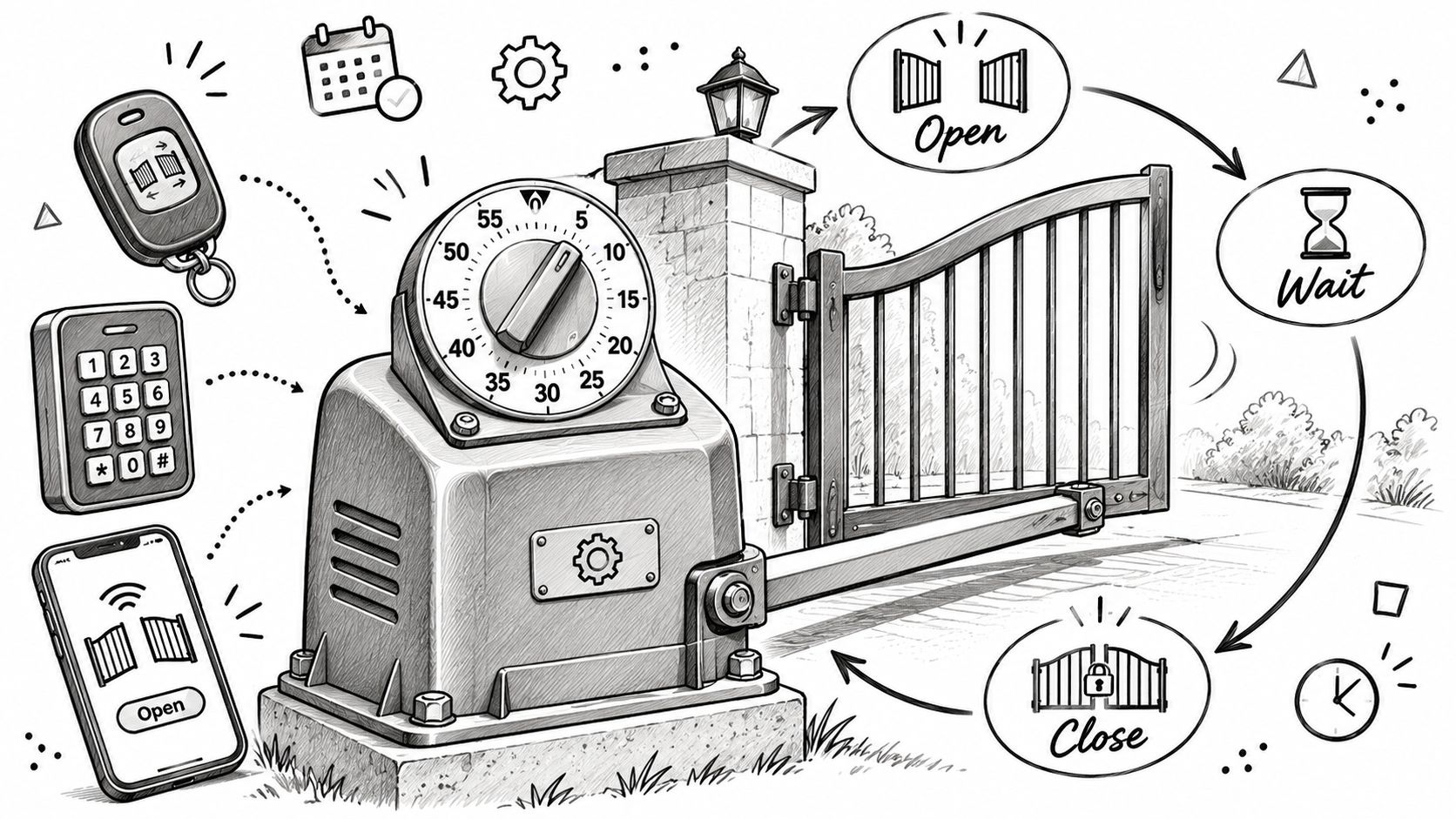
An auto-close setting works like a kitchen timer on the gate motor, not like a wall clock. An open command comes from a clicker, keypad, fob, or app; the gate travels open; then the operator starts its closing delay and begins to close when that delay ends.
A different mode, often called timer-to-close, waits for a vehicle loop or similar sensor to report that the opening is clear. Only then does its countdown begin. That difference matters when a vehicle takes time to pass through.
Why the starting point matters
Consider a slow box truck crossing the entrance. If the countdown begins as soon as someone sends the open command, the gate may start moving toward the truck while it's still passing through. If the operator waits until a loop detects that the opening has cleared, the truck can finish crossing before the closing delay starts.
The two modes may sound similar because both lead to an automatic close. But one starts its count from the open command, while the other starts after a detection point reports a clear opening. That distinction is more useful than the label alone when checking what an operator is set up to do.
The timer isn't the safety system
Existing clickers and keypads still send an open command. The timer decides when the gate begins closing; it doesn't replace the devices intended to stop or reverse that movement.
Photo eyes, sensing edges, and the operator's reversal function are separate from the timer. They need to keep working during a close, whether that close starts after a delay or after a scheduled open period ends.
Control names, available delay settings, and menu paths differ by operator brand and model. The property manager or owner should use the manual for that exact operator or ask a qualified gate technician, rather than assume there's a universal button sequence. No timer setting makes a failed obstruction device acceptable.
Hold Open Windows on the Clock
A scheduled hold-open window tells the gate to stay fully open during a recurring time period, then return to controlled entry when that period ends. It's meant for a known operating window, not a one-off arrival.
A commercial lobby might remain open during posted hours. A receiving dock might need a weekday morning window, while trash collection or vendor access may fit a schedule on particular days. A gated community might choose a brief open period for a rush, but the board needs to accept that the entrance won't check each arrival during that window.
The important distinction is how the open period ends. A recurring schedule has an end time and returns to controlled access by itself. A manual hold depends on someone remembering to cancel it, which can leave an entrance open after the people who needed it have gone.
Practical rule: A scheduled window should end on its own. A reminder to close the gate is not a substitute for an end time.
What happens outside the window
Outside the scheduled period, clickers, fobs, keypads, and any digital key can still request entry one party at a time. The operator's auto-close control handles the gate's closing movement after an authorized entry.
A front gate and a service gate on the same property rarely need the same schedule. A front entrance may serve residents throughout the day, while a service gate may need to stay open only for a specific receiving period. A manager portal that allows each gate to be configured separately makes it possible to avoid applying one entrance's schedule to another.
If the operator itself doesn't have a weekly clock, an add-on controller wired to the existing operator is the usual way to add a schedule. The property manager can consider temporary open access for delivery windows when planning a limited period for deliveries.
A good window reflects a real busy period, has a clear end, and doesn't leave the gate standing open when the property is empty. For a service entrance, the end time should account for when deliveries finish, rather than merely when the first vehicle is expected.
What a Timer Must Not Override
A timer chooses when gate motion starts. It doesn't replace the devices that stop or reverse that motion if something is in the way.
That remains true when a gate closes after a delay or starts closing after a hold-open period ends. Photo eyes, sensing edges, and the operator's reversal function still need to protect the moving gate. A longer delay doesn't make a damaged sensing edge acceptable, and a scheduled hold-open doesn't make it safe to bypass obstruction protection.
Two setting mistakes are easy to understand but can create real trouble. An auto-close delay that's too short can put a moving gate in the path of the second car in a queue. A hold-open with no end time can leave the entrance unattended overnight.
A timer controls timing, not whether the gate can safely move.
Brands use different names for their features, and menus differ between models. The operator's own manual is the reliable guide for the specific equipment. If a warning light or error appears after a change, the meaning shouldn't be guessed; the manual for that model or a qualified technician is the right next step.
Local requirements for automated gates vary. For a shared, HOA, or commercial property, the property manager or board should confirm planned work with the authority having jurisdiction and the installing dealer. A change to a timer doesn't remove the need to check that the operator and its protective devices are suitable for the property.
Match the Timer to the Property
The right control depends on what the entrance needs to do, and for whom. These hypothetical days show why the same timer setting won't suit every gate.
A single house
Hypothetical: A homeowner wants the driveway gate to close after a vehicle passes, including when the owner is away. A seconds-long auto-close setting can serve that purpose, provided the operator and its protective devices are working as intended.
A clock hold-open would solve a different problem. If the gate stayed open through the afternoon, it would leave the entrance open after the vehicle had already passed. For this driveway, the request is about closing after entry, not about opening the gate on a schedule.
A small commercial site
Hypothetical: A small site receives trucks from morning until late morning on weekdays. A recurring hold-open window with a real end time can give drivers room to finish deliveries, rather than asking them to pass through a narrow opening before a seconds-long countdown expires.
When the scheduled window ends, each driver can use a clicker, fob, keypad, or digital key to request entry. The operator's auto-close control then handles closing after an authorized arrival. The schedule serves the planned receiving period; it doesn't need to become the everyday access method.
A gated community
Hypothetical: An HOA board is asked to leave the main entrance open all morning for school traffic. An open gate may shorten the queue, but it also removes the entry check the gate was installed to provide. The board needs to weigh that trade-off for its own property rather than assume that a shorter queue settles the question.
A tighter alternative is to leave auto-close on and provide a sitter or contractor with a one-time visitor window, or a digital key with an end date. That avoids relying on a four-digit code that never expires. The best choice still depends on who needs access and whether the property can keep the entrance controlled during that period.
For shared entrances, decide who owns the schedule and who checks it when the property's routine changes.
A practical next step
First, identify the gate operator's brand and model, then read the timer instructions in that model's manual. For a shared or commercial gate, a licensed gate or low-voltage technician should make the change. If the operator has no weekly clock, an add-on controller connected to the operator already on site is the usual way to add a schedule.
Nimbio's Community Manager portal supports hold-open scheduling, so a gate can stay open during business hours or a recurring window and return to controlled access outside it. Nimbio is a cellular add-on controller and app that needs no Wi-Fi at the gate, leaves existing clickers and keypads working, and lets a manager set an expiration date on a digital key. For a wider checklist of access-control considerations, see what to look for in a gate access system.
The layout, traffic, and local rules all affect the choice. None of these hypothetical days is a template to copy; the right automatic gate opener timer is the control that fits the entrance's actual use without leaving safety devices or access decisions to chance.
For properties considering scheduled access alongside existing gate controls, Nimbio offers a cellular add-on controller and smartphone app that work with an existing operator. Property managers can review how it handles hold-open scheduling and digital keys with expiration dates.