The car is waiting outside, the button still clicks, and the gate won't move. A gate clicker not working usually points to a battery or contact problem, lost pairing, radio interference, a safety-device fault, or trouble with the gate operator. The quickest diagnosis starts by checking which other access controls still work, before resetting anything or buying a replacement remote.
Table of Contents
- Match Your Symptom to the Likely Fault
- How to Test the Clicker Before You Reprogram
- Reprogram or Replace the Clicker Correctly
- Checking Range, Interference and Antenna Position
- Safety Sensors and When to Call an Installer
- Decide Whether to Repair the Clicker or Upgrade Access
Match Your Symptom to the Likely Fault
A button that feels normal doesn't prove that the remote is transmitting a usable signal. Likewise, a stationary gate doesn't prove that the remote has failed. The receiver must recognize the command, and the operator must be able to move the gate safely.
Most troubleshooting falls into five groups: battery and contacts, pairing, range and interference, safety sensors, and operator faults. Replacement remotes introduce another possibility: a similar-looking case can contain incompatible radio technology.
Gate clicker symptoms, likely causes and first fixes
| Symptom | Likely cause | First fix |
|---|---|---|
| Remote LED does not light | Dead battery or wrong battery fitted | Fit a fresh battery of the type named in the manual, with correct polarity |
| Wall button works, every remote fails | Transmitter lost pairing or receiver memory changed | Check the operator manual and relearn the transmitter after battery checks |
| Remote works only up close | Weak battery, interference or receiver antenna placement | Test at several distances, then have the antenna reoriented or relocated according to the manual |
| Gate starts, then stops or reverses | Photo eye or reversing edge blocked, misaligned or unpowered | Clear obstructions and check sensor alignment according to the manual; don't bypass sensors |
| No response from any remote or wall control | Operator power, control board or safety interlock | Check the power supply according to the manual; call a qualified technician |
| Remote works in one location only | Radio interference from nearby electrical equipment | Switch off suspect equipment where safe and retest |
These are diagnostic clues, not confirmed diagnoses. When a wall station operates the gate but every radio remote fails, attention belongs on the transmitters, receiver, and programming rather than immediately on the motor.
A gate that starts moving has responded to some command. Stopping or reversing calls for investigation of the safety system and gate mechanism, rather than repeated remote programming.
Replacing the clicker won't repair an operator that has no power or a safety system that won't permit movement.
For properties considering an additional access method, smartphone gate access features are a separate decision from repairing the gate. Any access method still needs a safely functioning operator.
The matching symptom narrows the search. Battery and comparison tests should come before changes to receiver settings, particularly on a shared property where a reset could disrupt other residents' access.
How to Test the Clicker Before You Reprogram
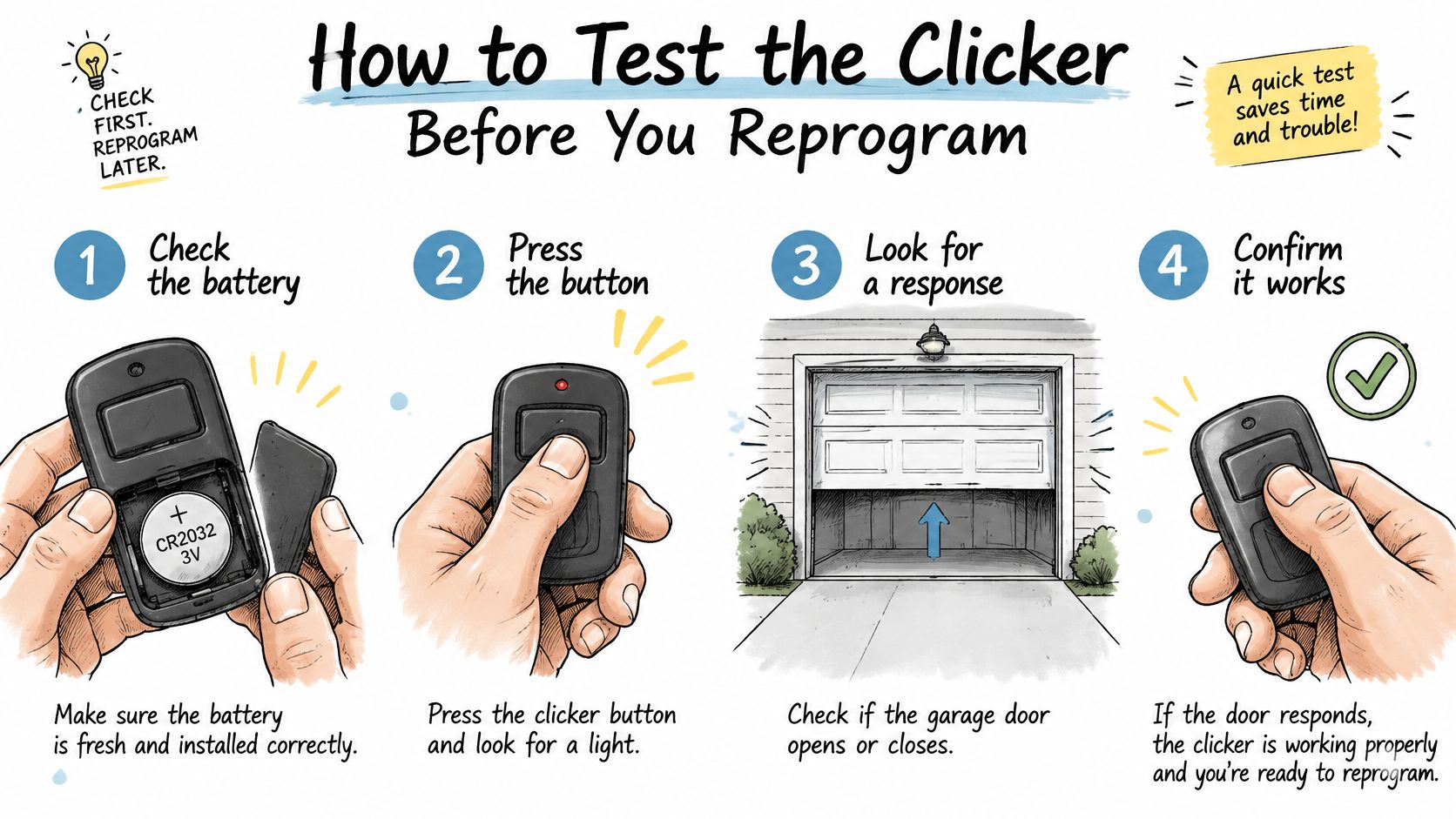
The useful test is a comparison: what works, what fails, and under what conditions? Chamberlain Group's remote-range troubleshooting guidance supports checking the transmitter battery and reception conditions before treating programming as the remedy.
The illustration accompanies the checks below. The operator and transmitter manuals remain the instructions for the installed equipment.
Checks that preserve existing settings
Try another authorized control. Test a second remote, keypad, wall station, or call box with the travel path clear. Record which devices move the gate, rather than merely lighting up or making a sound.
Press the failed remote and observe its indicator LED, if fitted. A dark indicator directs attention toward power or internal contact problems; an illuminated indicator doesn't prove successful radio reception.
Fit the specified battery. Use the type printed on the transmitter or named in its manual, observing polarity. A battery that fits the compartment isn't necessarily the correct replacement.
Inspect the battery contacts with the battery removed. Follow the transmitter manufacturer's cleaning instructions for light contamination, and don't force displaced contacts; substantial corrosion or damage warrants repair or replacement.
Test from several safe positions outside the gate's travel and entrapment areas. Note whether the gate responds consistently, only nearby, or only from a particular position.
Pair only after those checks. If the transmitter has adequate power and the symptoms support a pairing problem, an authorized person can use the receiver's model-specific learn procedure. An enclosure containing exposed electrical parts belongs in a qualified technician's hands.
Programming tip: A full receiver reset can erase stored remotes without fixing a weak battery. Adding a transmitter and erasing receiver memory are different operations.
What the results establish
A working wall control with failed remotes narrows the investigation to radio access, including the receiver itself. If every access device fails, operator power, receiver wiring, control-board status, or a safety interlock becomes more likely.
For a separate vehicle-key problem, Blade Auto Keys offers key fob troubleshooting for South Wales drivers. Vehicle pairing instructions shouldn't be applied to a gate receiver.
A short written record saves repeated work: control tested, battery replaced, LED behavior, working positions, and any displayed fault. The technician can then begin with evidence instead of repeating every initial check.
Reprogram or Replace the Clicker Correctly
Learn mode is model-specific. The location of the programming control, the confirmation signal, and the button sequence must come from the installed operator or receiver manual.
For example, the LiftMaster LA500 quick-start procedure describes this sequence:
- Press and release the control board's LEARN button.
- Confirm the operator beeps and its green transmitter indicator illuminates.
- Press the desired remote-control button before programming times out.
That example isn't a universal gate-remote procedure. Some systems can assign different buttons to stop, open, and close, so successful enrollment doesn't necessarily mean that every button performs the same action.
Match the radio system, not the case
Older transmitters may use fixed-code settings, while rolling-code systems change the transmitted code after authorized activation, a distinction described in the garage-door-opener technology overview. Compatibility requires the correct frequency and coding technology, not merely the same brand or a matching shell.
Before ordering, record the operator model, any separate receiver model, and the remote's identifying information. The receiver matters because an added receiver may differ from the radio equipment originally supplied with the operator.
The transmitter, receiver, antenna, and programming method need to work as a system. A marketplace description saying universal isn't enough to establish compatibility.
On a shared property, the manager should authorize enrollment and establish whether receiver memory has available capacity. If the receiver won't accept a confirmed-compatible transmitter, repeatedly attempting enrollment won't establish whether its memory or electronics have failed.
A new clicker may still need to be learned by the receiver. Buying one is a sensible response to a confirmed transmitter fault, not a substitute for diagnosis.
Checking Range, Interference and Antenna Position
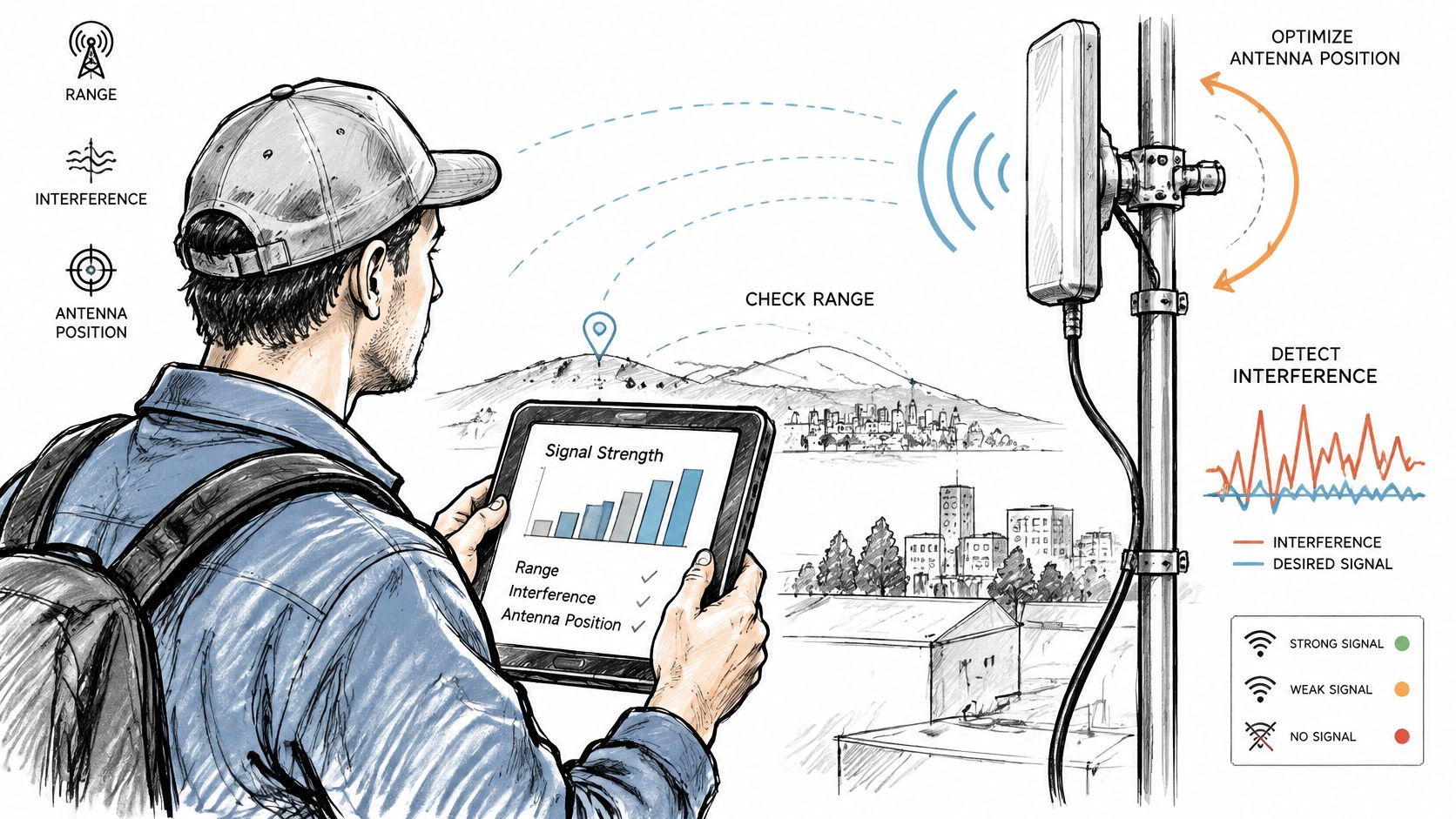
A useful range check compares the remote near the gate, at the normal stopping position, and farther along the approach where testing is safe. The person testing should remain clear of moving equipment and avoid blocking traffic.
Record successful and failed commands at each position. Consistent close-range operation with failures farther away suggests a reception problem; failures tied to a location or equipment operating schedule suggest possible interference.
Change a single condition at a time
The LiftMaster CSL24UL manual describes investigating interference by switching equipment off and on, and corrective measures including antenna reorientation or relocation and greater separation from interfering equipment.
New lighting, networking equipment, cameras, and power supplies are reasonable suspects. Where safe, switch off a suspect device and repeat the same remote test from the same position. Don't disconnect safety, security, or essential property equipment merely to experiment.
| Observation | What it suggests |
|---|---|
| Reception improves with a particular device off | That device or its power supply may be contributing interference |
| Several remotes fail in the same positions | A shared reception condition deserves investigation |
| Only the original remote has poor range | The individual transmitter remains suspect |
Antenna adjustments must follow the installed receiver's manual. Cutting an antenna, extending it with arbitrary wire, or moving internal wiring can create another fault; changes inside the operator enclosure should be handled by a qualified technician.
A repeatable improvement after a controlled change is more useful than an occasional successful button press.
For an alternative communication path, how cellular gate access works explains the approach. It doesn't remove the need to correct an unsafe gate or maintain the existing receiver for remaining clicker users.
A replacement remote won't necessarily overcome interference or poor receiver placement. The receiver environment deserves checking before another transmitter is purchased.
Safety Sensors and When to Call an Installer
A gate may ignore a valid remote command because its safety system won't permit movement. Treating that condition as a transmitter failure can lead to unnecessary programming and unsafe attempts to force operation.
Under the UL 325 guidance described on LiftMaster's gate safety page, each entrapment zone requires two independent safety-protection devices, with the operator's inherent reversing system counting as one. Local requirements vary, and the installed operator's manual determines its required safety-device configuration.
Safe external checks
A blocked, misaligned, damaged, or unpowered photo eye can prevent normal movement. Reversing edges and their associated wiring also deserve attention, but an indicator light must be interpreted using the correct manual.
- Look for obstructions. From outside the movement area, inspect the gate path and photo-eye beam for debris, vegetation, or an object blocking travel.
- Check photo-eye alignment according to the manufacturer's instructions. Cleaning an accessible lens is different from adjusting a bracket beside a moving gate; isolate equipment as the manual directs.
- Compare indicators with the manual. Note visible wiring damage and indicator behavior without opening energized enclosures or touching conductors.
- Never bridge terminals, disconnect a monitored sensor, or bypass a reversing edge to make the remote appear functional.
When DIY testing should stop
A qualified gate technician should investigate these conditions:
- No control works: Neither radio controls nor the wall station produces normal operation.
- The sensor fault remains: Cleaning and manufacturer-permitted alignment checks haven't restored normal status.
- Electrical damage is suspected: Wiring, power-supply, receiver, or control-board concerns require enclosure access or electrical testing.
- The gate reverses unexpectedly: Unexplained reversing or stopping needs investigation before normal use resumes.
The service request should include the operator model number, receiver model if separate, the manual, and the observed symptoms. Photographs of accessible labels and displayed faults can help identify equipment without dismantling it.
Repeatedly pressing a remote while the gate is obstructed isn't a diagnostic test. Until the cause is understood, property staff should use the site's established alternative-access procedure rather than defeating a safety device.
Decide Whether to Repair the Clicker or Upgrade Access
A clicker that opens the gate again only proves the transmitter and receiver can still talk. It does not tell you who else can open that same gate tonight.
Repair the clicker when one device has failed and you still know who holds the others. Move to a different access method when the problem is shared remotes, missing clickers, and codes you cannot tie to a person.
Property managers still need a straight answer on four points: lost devices, former residents, how a visitor gets in, and whether each open is recorded.
The ASSA ABLOY Wireless Access Control Report discusses the shift toward mobile credentials. On a particular gate, I use a simpler test. Can you remove one person's access without wiping everyone else's, and is there a fallback if that person's phone is dead?
Access methods compared on revocation, sharing and failure risk
| Access method | Revoking access | Sharing | Failure risk |
|---|---|---|---|
| Physical remote | Clear it from receiver memory, per the manual; some systems require broader erasure | Hand over the device | A lost remote remains usable until its authorization is removed |
| Keypad code | Change or remove it through the installed system's management procedure | Tell another person the code | The code can be passed on |
| Smartphone credential | Revoke it centrally if the system supports that function | Issue access to a named person | Phone power and the system's required communications service can fail |
Check offline behavior on purpose. A local remote can still work during a communications outage if the operator and receiver have power. A phone-based system needs its own connection. Emergency entry should follow the property's approved plan, not a resident picking up a call.
Decide what the record is allowed to hold: who was admitted, who can read that record, and who can shut off a shared credential without a site visit.
Nimbio is one cellular add-on that wires into an existing gate operator. Existing clickers, fobs, and keypad codes keep working alongside the app, and the gate does not need Wi-Fi. The cellular gate access system buyer's guide is a framework for judging that kind of retrofit: what stays local, what you can revoke, and how a visitor is admitted.
Restoring the button and controlling who may use the gate are separate jobs.
After the clicker works, list current holders, shared codes, and missing remotes. Confirm you can revoke one authorization without locking out the people who should still get in.
Nimbio offers a cellular-based controller and smartphone app for existing electric gates, with no Wi-Fi needed at the gate. For properties addressing access management alongside clicker repairs, visit Nimbio to explore remotely issued and revoked digital keys and remote visitor admission.