Does a barrier become safe because a driver can open it from a phone? No. A barrier arm gate operator is the motor and control unit that raises and lowers an arm across a vehicle lane. Its suitability depends on the arm design, operating specifications, installation geometry and protective devices, while the access-control device determines how an opening command reaches it.
Table of Contents
- What a Barrier Arm Gate Operator Does and Where It Is Used
- Barrier Arm Operator Types Compared
- Specs and Control Options to Compare
- Entrapment Protection and Site Survey
- Maintenance Records That Show a Barrier Stays Safe
- Choose Between Replacement and Retrofit
What a Barrier Arm Gate Operator Does and Where It Is Used
The operator works like the hinge and motor of a powered door, and the arm is the door itself. Inside the operator housing, the drive mechanism moves the arm while the control board responds to commands and connected protective devices. The housing, mounting and arm must work together, rather than being selected as unrelated parts.
A useful distinction separates the equipment into responsibilities:
- Gate structure: The arm, supports and mounting establish the physical movement and clearances.
- Operator: The motor and controller manage movement and respond to the connected safety system.
- Access device: A keypad, receiver or cellular controller supplies an authorization or opening command.
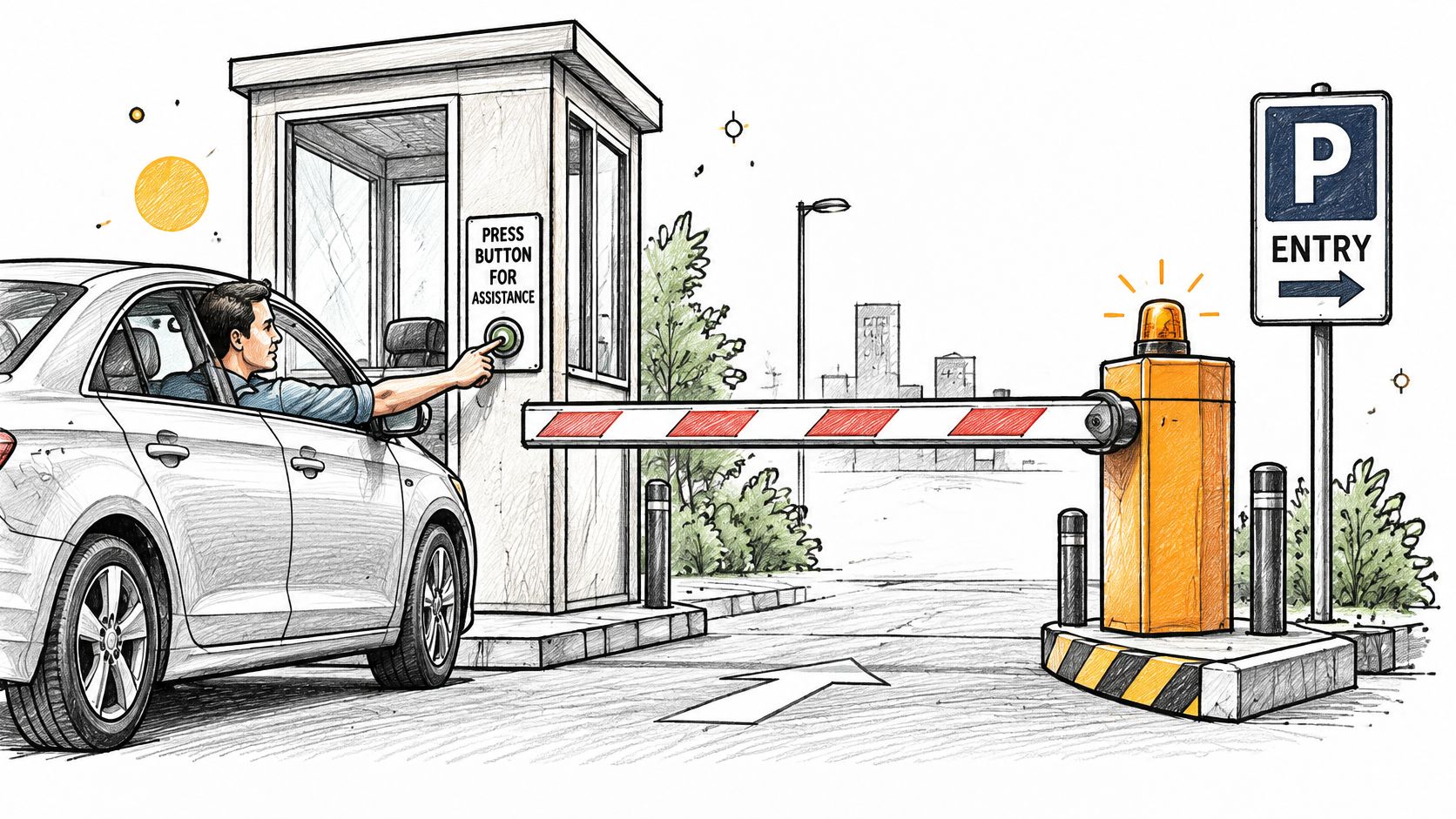
A standard parking arm manages vehicle access. Its appearance alone doesn't establish that it can resist a vehicle impact, prevent pedestrians from entering or stop an unauthorized driver from following another vehicle.
Where the operator fits
Common locations include single-lane residential driveways, parking lots and garages, commercial entries, logistics yards, campuses and industrial sites. At busy entries, automatic operation can reduce the delay associated with an attendant manually controlling every movement. Actual traffic flow still depends on arm length, opening speed, vehicle detection, lane layout and credential checks.
Consider a hypothetical 300-space garage where vehicles queue at the exit during peak hours. Before replacing the operator with a faster model, the manager should establish where drivers stop. A difficult turn, a poorly positioned reader or traffic crossing the exit could be the actual bottleneck.
For properties planning commercial gate access control, that distinction prevents an access-device purchase from becoming an attempted solution to a lane-design problem. Where an attendant also needs shelter and a clear view of approaching vehicles, planners can browse modular security shacks from Material Handling USA while keeping the booth outside the arm's movement area.
Safety belongs in the original specification
The Dataintelo vehicle barrier gate market overview discusses automatic-gate accident history and safety measures, reinforcing that these installations involve moving machinery rather than convenience equipment alone. That history concerns automatic gates broadly, not barrier arms exclusively.
The purchasing decision therefore needs more than an opening-speed comparison. Arm design, operating capacity, protective devices, site clearance and maintenance responsibility all affect whether a particular installation is suitable.
Barrier Arm Operator Types Compared
Barrier arm designs compared by movement, site and check
| Arm type | How the arm moves | Typical site | What to check |
|---|---|---|---|
| Straight arm | Rises and lowers as one piece | Single-lane driveways and short parking entries | Full sweep clear of posts, curbs and walls |
| Articulated arm | Jointed so it folds upward in sections | Wider lanes where one long arm would be heavy or slow | Joints and pivots for wear and adjustment |
| Heavy-duty arm | Larger arm, often with a counterweight | Busy commercial, logistics and industrial entries | Duty rating and cycle count in the manufacturer datasheet |
These descriptions aren't interchangeable product classifications. Straight and articulated describe arm geometry, while heavy-duty describes intended service. A manufacturer may offer more than one arm arrangement within a heavy-duty product family.
Match the movement to the available space
A straight arm moves as a single piece. Its apparent simplicity can make it an appropriate starting point for a driveway or short parking entry, but the raised arm needs overhead clearance as well as room beside the housing. The first check is whether the full sweep stays clear of posts, curbs, walls and overhead obstructions.
An articulated arm includes a joint that changes the arm's shape as it rises. It can help where a straight arm's raised position won't fit, especially beneath a garage ceiling. Although folding arrangements may be considered for wider lanes, articulation alone doesn't establish permissible span, weight or operating speed; the manufacturer's approved configuration controls those choices. The first check is the condition and specified adjustment of the joints and pivots.
Heavy-duty equipment is intended for demanding service rather than a larger-looking arm. A counterweight may be part of the approved assembly, but its presence doesn't establish that the operator can handle the property's traffic pattern. The first check is the manufacturer's duty rating and cycle-count definition for the proposed arm configuration.
Compare complete assemblies
Arm length and counterweight arrangement change the movement envelope and the loads acting on the assembly. An arm substitution can therefore affect clearance, balance and stopping behavior even when the replacement physically fits the shaft.
Selection rule: Match lane width, overhead clearance and traffic demand to an approved operator-and-arm combination before comparing brands.
Daily traffic alone isn't enough. A property with concentrated arrivals may need different operating capacity from a property with the same total traffic spread throughout the day.
The specification should identify the arm arrangement, approved length, accessories and intended service together. Joint adjustment, counterbalance work and arm replacement belong with a qualified gate technician following the exact model's manual, not a generic installation diagram.
Specs and Control Options to Compare
A useful specification explains what the operator must do at the property, rather than collecting impressive-looking values from unrelated product sheets. Comparisons should use the proposed arm and accessories because a manufacturer's operating figures may apply only to a particular configuration.
Specifications that affect the installation
- Arm length and sweep: These determine lane coverage and the space occupied during travel. The drawing should show the raised position and counterweight movement, not only the lowered arm.
- Opening and closing time: These affect waiting time and how the lane operates. The fastest available setting isn't automatically appropriate for the site.
- Duty rating and cycle count: These describe intended operating demand under the manufacturer's stated conditions. Peak traffic should be compared with the rating, not hidden inside a daily average.
- Power supply voltage: The available supply must match the operator's documented requirements. A qualified technician should confirm the supply and installation arrangement.
- Enclosure rating: Outdoor suitability needs to match the actual exposure, including rain, irrigation and dust. A sheltered cabinet location doesn't excuse an unsuitable enclosure.
- Monitored safety inputs: These determine which protective devices the operator supports and how it supervises them. Compatibility includes the monitoring method, not the presence of spare terminals.
- Manual release: The property needs a documented way to manage access when powered operation is unavailable. The release procedure differs between models.
- Emergency stop: The specification should identify the supported arrangement and expected response. Emergency stopping and manual release serve different purposes.
No universal wiring procedure follows from this checklist. Terminal functions, supply requirements and release mechanisms must come from the exact operator's manual; where that documentation is missing, a qualified technician should identify the equipment before work proceeds.
Separate authorization from detection
Keypads accept codes, while fobs and clickers send credentials or commands through their associated receivers. Telephone entry lets a visitor request admission from another person. Cellular access provides another command route, without changing the mechanical suitability of the barrier.
Loop detectors have a different role. They detect vehicles and may support automatic exit or other lane-control functions, according to the operator design. Vehicle detection isn't the same as identifying an authorized person, and a loop shouldn't be assumed to satisfy every required protective function.
Nimbio's cellular access features include an LTE-connected add-on controller that needs no Wi-Fi at the gate, wiring into an existing operator without replacing the gate, continued use of existing clickers, fobs and keypads alongside the app, remotely issued and revoked digital keys with optional expiration dates, and remote visitor admission with video verification at the gate.
The cellular gate access system buyer's guide provides context for evaluating that control approach. The decisive distinction remains local: access equipment supplies a command, while the operator and its protective circuits govern the response. Any retrofit must preserve those circuits and their fail-safe behavior.
Entrapment Protection and Site Survey
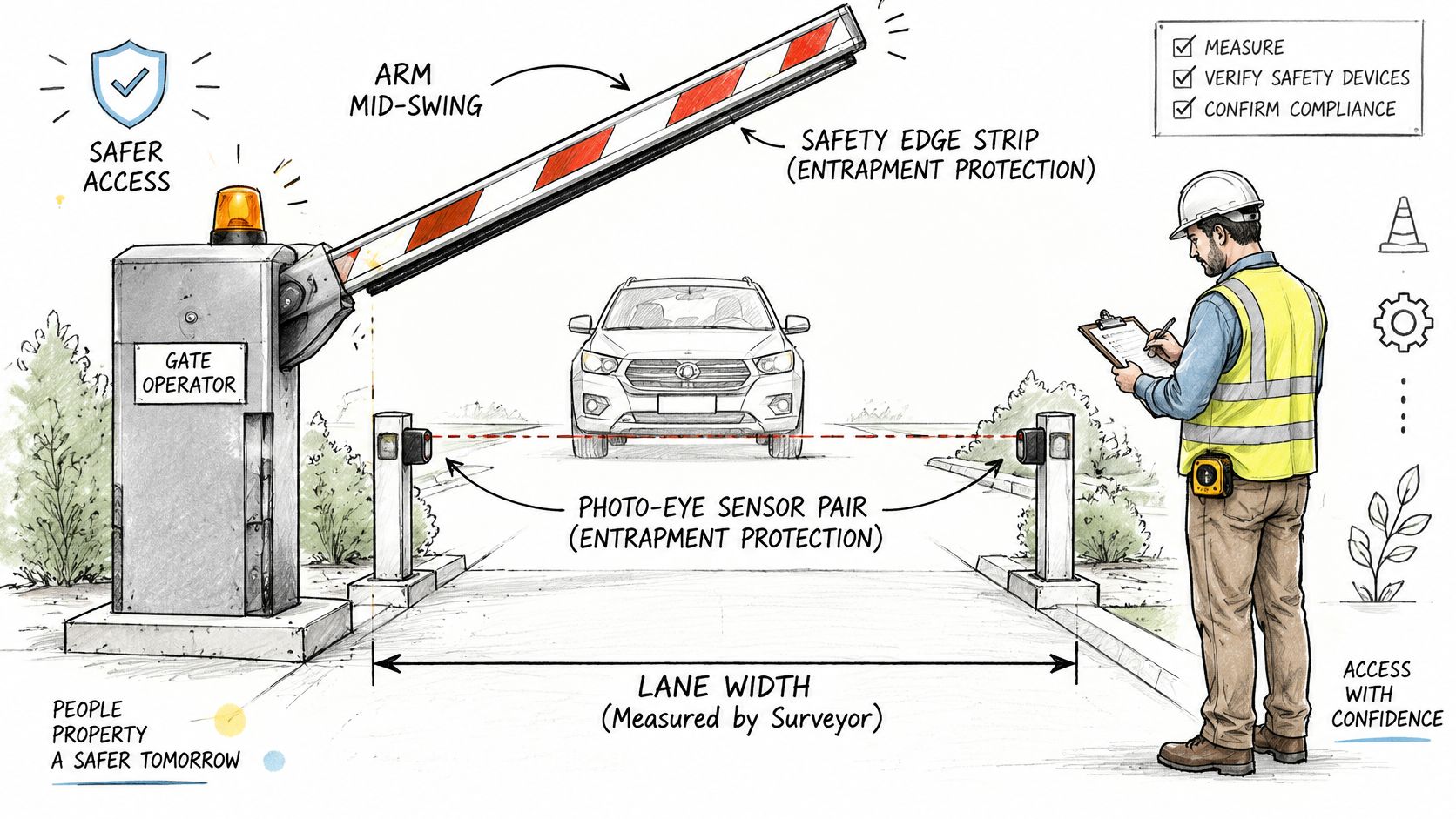
For applicable entrapment zones in United States and Canadian installations, ANSI/CAN/UL 325 requires at least two independent entrapment-protection means, with required devices installed and enabled before operation, as explained in DASMA's gate-operator safety guidance. Technologies include inherent obstruction sensing, monitored photoelectric sensors and contact edges, subject to the operator's supported arrangements; local requirements vary.
That rule must be considered alongside the barrier-arm exception, not treated as proof that every barrier needs an identical sensor layout. The installation geometry determines which hazards exist and which provisions apply.
Establish the hazards before choosing controls
UL's gate-operator guidance describes an exception where a barrier arm isn't intended to move closer than 2 feet to a rigid object and has no pinch points between moving parts; local requirements vary. Both conditions matter, and failure to satisfy either means the applicable protection provisions need evaluation.
A competent gate technician should conduct the survey and any powered testing using the exact operator's manual. Property managers can assemble drawings, identify users and document traffic problems, but shouldn't improvise obstruction or force tests.
- Measure the complete travel envelope. Include the arm, counterweight, support housing, pedestrian paths and vehicle lanes. A clear lowered position doesn't establish that the raising movement is clear.
- Record clearance to fixed objects. Flag any location that falls within the exception's clearance boundary. Include equipment added after the original installation, such as signs, reader pedestals and bollards.
- Map pinch and crush zones. Consider posts, curbs, nearby structures and the moving mechanism. A hazard beside the housing may be less obvious than the arm crossing the lane.
- Confirm detection coverage. Check relevant approach and departure directions against the proposed sensor arrangement. A device serving one function shouldn't be assumed to cover another.
- Confirm controller compatibility. Identify the exact operator, control board and supported external-command arrangement. Check the existing wiring against the manufacturer's diagram.
- Document acceptance tests. Record clearance and applicable force-test results after installation using the specified methods and equipment.
- Reassess after changes. Arm replacement, spring work, speed adjustment or a controller retrofit should trigger review and the relevant repeat tests.
This is a scope for professional assessment, not a universal commissioning procedure. Models differ, so the manufacturer's instructions and the authority having jurisdiction determine the final installation and acceptance requirements.
Keep construction and operator requirements separate
ASTM F2200 addresses automated vehicular gate construction across several powered gate configurations, while UL 325 addresses operator-system safety; local requirements vary. A suitable motor doesn't establish that every arm, support or surrounding structure is acceptable.
Installation requirements by site condition
| Site case | Requirement | Source |
|---|---|---|
| Arm stays at least 2 feet from rigid objects with no pinch points | Entrapment-protection exception may apply; confirm against UL guidance | UL gate-operator guidance identified above |
| Arm sweep reaches posts, curbs or walls | Evaluate applicable zones and directions for two independent entrapment-protection means | ANSI/CAN/UL 325 guidance identified above |
| Controller retrofit, arm replacement, spring or speed change | Re-test relevant clearance and force behavior after the change | Operator manual and applicable safety-test requirements |
| Gate type or operator standard unclear | Confirm both the gate construction standard and the operator standard | ASTM F2200 and UL 325 |
For adjacent pedestrian-gate planning, XTREME EDEALS INC.’s gate hardware tips for DIY homeowners can provide hardware context. They aren't a substitute for powered-barrier instructions or professional commissioning.
Assign installation responsibility
Nimbio recommends professional installation, with physical work completed by independent professional gate technicians or local low-voltage installers. Its technicians support people undertaking installation, while HOA, multifamily and commercial properties should confirm compliance with local gate-access regulations.
A remote opening command cannot replace an entrapment-protection system.
A lost network connection, delayed command or unauthorized trigger must never bypass local obstruction detection or emergency stopping. The acceptance record should identify who verified that separation, which tests were completed and who authorized the barrier's return to service.
Maintenance Records That Show a Barrier Stays Safe
An entry log shows that someone opened the gate. It doesn't establish that a photoelectric sensor worked, the arm stopped correctly or the manual release remained usable.
The gate-safety maintenance guidance published on Scribd recommends planned preventive maintenance, documented inspections and recorded test results. The maintenance record should follow the exact installed equipment, including changes made during repairs or upgrades.
Build an equipment record, not merely an event history
The inspection scope should include:
- Electrical condition: Wiring, junction boxes and visible signs of damage or deterioration.
- Mechanical condition: Gate structure, hinges or pivots, travel stops and drive components.
- Access during failure: Manual release condition and the results of the prescribed release test.
- Protective devices: Photo beams, safety edges and other fitted devices, tested by competent personnel using the manufacturer's procedure.
Each service entry should record the date, technician, equipment identity, tests completed, results and unresolved defects. A repair description without a recorded acceptance result leaves the manager unable to distinguish completed work from verified operation.
The inspection calendar should follow the manufacturer's maintenance schedule and reflect the property's service conditions. Collision damage, unusual movement or an unexplained safety-related shutdown should prompt a service review rather than waiting for the next planned visit.
Responsibilities for barrier safety records
| Role | Responsibility |
|---|---|
| Board or owner | Approves the inspection calendar and receives the service log summary |
| Property manager | Keeps the service log, schedules inspections and applies the escalation rule |
| Installer | Performs inspections and tests, and records results with competent service personnel |
| Tenant or resident | Reports defects and overrides and never bypasses a safety device |
This is a practical allocation of work, not a substitute for contractual or local legal responsibilities. Each property should name the actual person or service company performing each role.
Define when normal operation stops
A suitable escalation policy takes the barrier out of normal automatic service when a safety device is overridden, an emergency-release test fails or an unresolved defect affects safe operation. The manager should arrange a controlled alternative access plan with the service contractor, rather than asking residents to work around the fault.
Recordkeeping principle: An access event proves a command occurred, not that a safety test passed.
Access logs, maintenance records, outage reports and override records should be traceable by time and equipment identity. Documented hold-open periods and individually managed digital credentials can clarify who authorized access, but neither replaces a physical inspection.
Repairs should follow the manufacturer's instructions and be handled by a qualified technician. If a safety assessment can't be completed because access is unavailable, the maintenance guidance calls for recording “safety unknown”, rather than assuming the barrier is safe.
Choose Between Replacement and Retrofit
A retrofit fits when the existing operator and protective devices pass the site assessment and the exact model's manual confirms that it accepts the proposed external command. In that case, the project changes the triggering method without requiring a different mechanical operating system.
An upgrade comes first when required protective devices are missing, the hazard zones can't be adequately covered or the operator doesn't support the proposed control arrangement. That doesn't always mean replacing the entire barrier. A qualified technician may identify a suitable sensor or controller correction, while mechanical damage or inadequate operating capacity may justify operator replacement.
Use the exact model as the decision point
A generic wiring diagram can't establish compatibility. The model identifier, control-board version and manufacturer's wiring documentation should agree before an installer connects an add-on controller.
Information about retrofitting legacy gate operators can help frame the project, but the installer still needs the documentation for the equipment at the property. Wiring steps belong to a qualified technician, particularly when existing modifications aren't recorded.
For an uncertain gate model, Nimbio's support team can confirm wiring compatibility before installation. Customers can call 1-800-353-3422 before ordering, rather than relying on the appearance of the housing or a diagram for a similar model.
Separate the equipment decision from the approval decision
The commercial decision should state what the project is intended to solve. Remote credential administration, inadequate traffic capacity and unsafe movement are different problems, even when they appear at the same entrance.
A hypothetical warehouse property, for example, might have a serviceable operator but need a better way to withdraw a contractor's access. Another property might have convenient credentials but an arm assembly unsuitable for its traffic demand. The same retrofit proposal shouldn't be treated as the answer to both.
The final approval should settle which operator class and service rating fit the site, and which named person accepts the test records and owns the escalation rule. Without that assignment, the property may receive functioning equipment without a clear owner for its continued safe operation.
Nimbio offers cellular smartphone access for existing electric gates while keeping existing clickers, fobs and keypads working alongside the app. For a barrier arm gate operator that has passed its safety assessment, property managers can visit Nimbio to discuss remote access and confirm compatibility before arranging professional installation.