A resident can hear a visitor at the gate, press the release key, and still leave the visitor waiting outside. A telephone intercom system connects an entrance station to a resident's phone so the resident can identify the visitor and authorize entry. Traditional systems use a telephone connection; modern options use IP networks, video calls, or cellular connectivity. The important difference isn't how clearly the conversation sounds, but whether the authorization reaches the gate operator reliably.
Table of Contents
- How a Telephone Intercom System Connects Visitors and Residents
- Traditional and Modern Options Compared Side by Side
- How a Visitor Call Turns Into a Gate Release
- Wiring, Audio Quality and Cable Distance Limits
- Choosing the Right Setup for Each Property Type
- Confirm Compatibility Before You Order Hardware
- How to Upgrade Without Replacing the Whole Entry System
How a Telephone Intercom System Connects Visitors and Residents
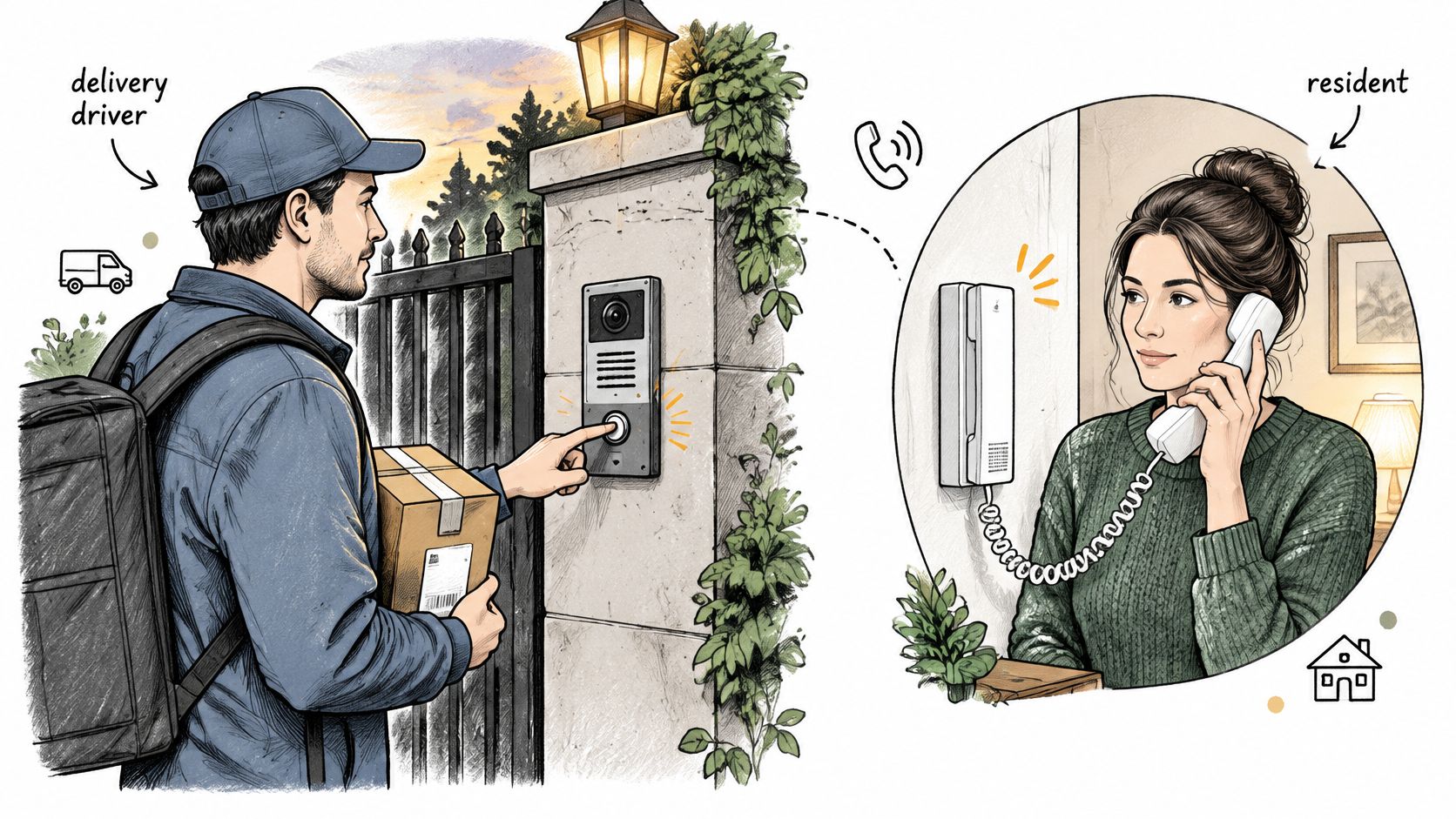
In a hypothetical example, a delivery driver reaches a gate at 7 p.m. The driver finds the resident's name on the call box, presses the call button, and waits while the resident's mobile phone rings. After confirming the delivery, the resident presses the configured release key.
That interaction involves three main parts:
- Entry station: The visitor-facing speaker, microphone, and call button or directory keypad.
- Controller: The equipment that routes the call and contains, or controls, the release relay.
- Resident's phone: The handset or mobile phone used to answer and authorize entry.
The controller and entry station may share an enclosure. Their functions still differ: one provides the visitor interface, while the other manages communication and the electrical release command.
Conversation and authorization are separate
The visitor starts the call, the resident answers, and both parties speak. Only after the resident sends the release command should the controller signal the gate operator or door-lock equipment.
A completed conversation proves that the voice path works. It doesn't prove that the release path works.
This distinction helps a property manager describe a fault accurately. “The intercom doesn't work” could mean the phone never rings, the visitor can't hear the resident, or the gate doesn't respond after authorization. Each symptom points to a different part of the system.
The same pattern applies to gate call boxes and building entry doors. Visual identification can supplement the conversation, including approaches such as video intercom without external cameras, but identification still needs a separate authorization action.
A useful acceptance check starts with a visitor call answered on an outside mobile phone. Where the equipment supports inbound testing, an outside phone can also call the entry station. With the entrance clear and the test supervised, the resident sends the configured command and the property manager confirms that the actual entrance responds.
Traditional and Modern Options Compared Side by Side
Telephone intercom system types compared
| System type | How the call reaches the resident | How the gate is released | Wiring and power needs | Typical fit |
|---|---|---|---|---|
| Traditional analog telephone intercom | Dialed telephone connection to the resident's phone | Resident presses the configured release key | Station wiring, compatible telephone service, and entry-station power | Older buildings with a working telephone connection |
| IP intercom | Voice over an IP network to a phone or software client | Supported DTMF signaling or an app command, with compatible settings | Network connection and station power | Properties with a reliable data network at the entrance |
| Video intercom | Voice and video connection to a phone, monitor, or app | Keypad, app, or resident command supported by the model | Camera-equipped station or supported visitor-video arrangement, connectivity, and power | Properties requiring visual visitor checks |
| Cellular gate controller | LTE connection supporting telephone entry or app-based access, according to the product | Supported DTMF or app command to the operator | Operator connection, controller power, and cellular service; no gate Wi-Fi required for a cellular-only path | Gates without a property data network at the entrance |
These categories overlap. Video describes the visitor-identification experience, while analog, IP, and cellular describe communication paths. A video system may use an IP connection, and a cellular controller may provide app access without placing a conventional voice call.
That last distinction matters during purchasing. A controller that accepts an app command isn't automatically a telephone intercom, and a cellular product doesn't automatically include a visitor directory or calling station. The equipment schedule should identify those functions separately.
Reading beyond the connection type
A traditional station can remain practical when its wiring, telephone service, and release interface are sound. Replacing it solely because it looks old can introduce work that the property doesn't need.
IP and video stations require attention to the network and power available at the entrance. A network socket inside the management office doesn't establish that a distant gate has a suitable connection.
Cellular equipment avoids dependence on gate Wi-Fi, but the installation still needs usable carrier coverage and electrical power. Reviewing what a cellular gate opener can do can help distinguish app-based access from telephone calling before a specification is written.
The comparison also leaves out two important purchasing questions: what happens during a slow or unavailable connection, and how an administrator changes or resets the authorization command.
The deciding question for each option is specific:
- Traditional analog: Will the carrier support the existing equipment and connection?
- IP: Who maintains the entrance network and investigates failed calls?
- Video: Can the intended resident device display useful visitor identification?
- Cellular: Has the proposed controller been tested at the actual gate location?
How a Visitor Call Turns Into a Gate Release
The resident's key press generates a DTMF signal, short for dual-tone multifrequency. The DASMA telephone-entry technical data sheet identifies pressing 9 as the most common release method, but the actual command belongs to the site's configuration.
The entry controller recognizes that command and activates a relay connected to the gate operator or lock-control circuit. For a gate, the relay ordinarily requests an action from the operator; it doesn't power the motor directly or replace the operator's safety controls.
The conversation helps the resident decide whether to grant access. The recognized command tells the controller to act on that decision.
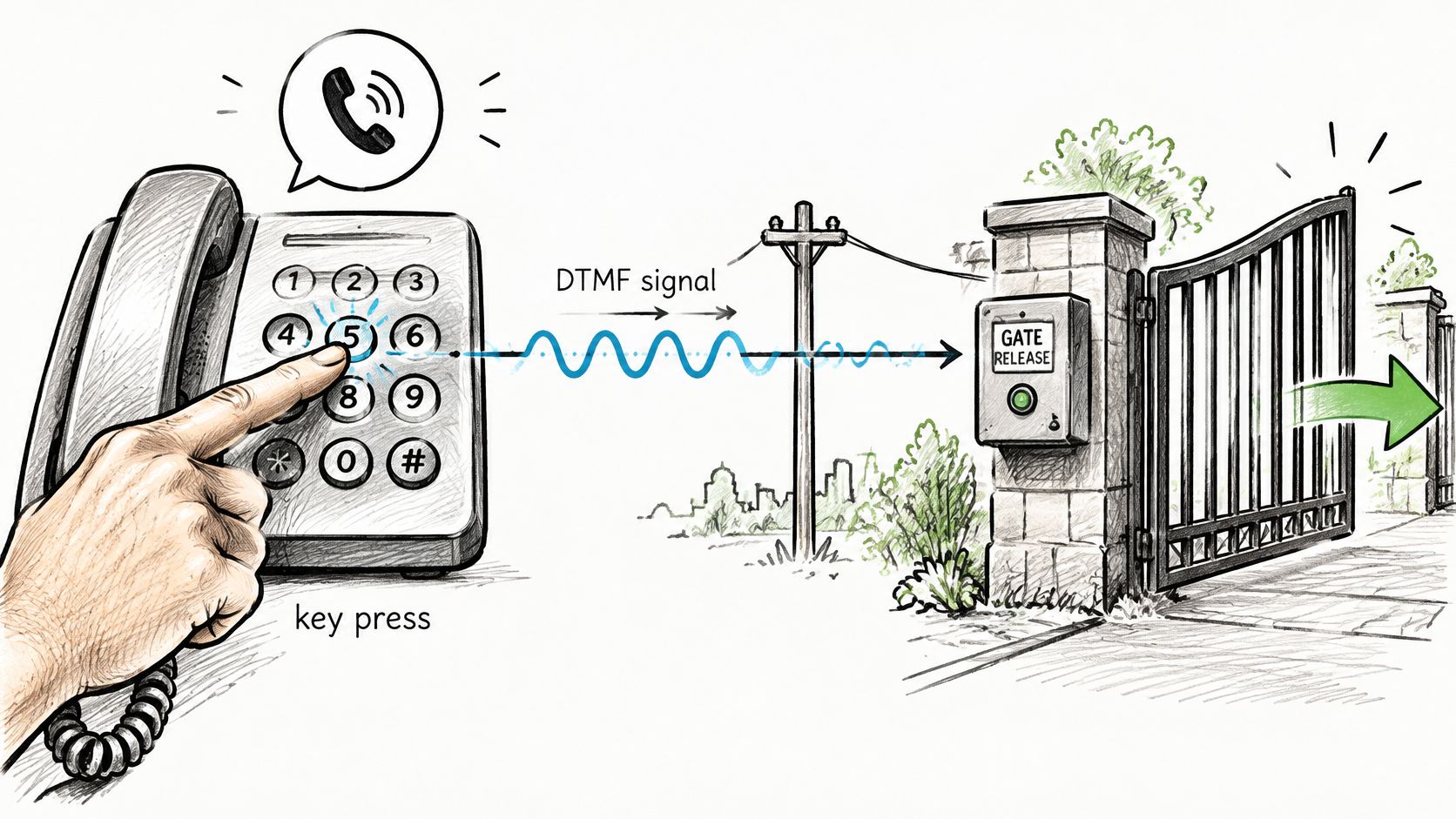
The illustrated keypad button isn't a universal release key. Residents need the command programmed for their property, rather than a digit copied from an illustration or another building.
Why clear audio can accompany a failed release
Telephone audio and keypad signaling can travel differently. An IP intercom technical manual lists Inband, RFC2833, Info+Inband, and Info+RFC2833 transport settings, and explains that compatible settings are needed for DTMF operation.
In-band signaling carries the tones within the audio. Voice compression can interfere with their recognition, while supported out-of-band methods carry the command through signaling or event packets. A technician needs to check the controller, gateway, and telephone service together rather than changing a setting at only one endpoint.
Diagnostic rule: A resident who can speak clearly but can't release the gate has demonstrated a working conversation, not a working authorization chain.
A safe troubleshooting order
The property manager can supervise functional checks and review documented settings. Cabinet access, electrical measurements, and configuration changes belong with a qualified technician following the equipment manual.
- Confirm the command. Place a visitor call to an outside phone and use the documented release key.
- Compare signaling settings. Have the technician check the intercom and any gateway against the installed model's manual.
- Review relay duration. Confirm that the output matches the operator's specified input behavior, rather than extending it by guesswork.
- Check call handling. Review caller timeout, unanswered calls, and what happens if the connection drops during authorization.
- Verify independent access. Test a separate local control and confirm that physical egress and emergency-release arrangements remain available.
For commercial installations, the DASMA access-control guidance identifies UL 294 as the access-control equipment standard; local requirements vary, and the installer should confirm applicability.
The physical entrance deserves the same attention as the signaling. FenceScape's guide to choosing a secure driveway gate provides context for considering the gate and access controls together, rather than treating a successful phone command as proof of a secure installation.
Wiring, Audio Quality and Cable Distance Limits
Example run lengths by cable construction
| Cable construction | Example run length |
|---|---|
| Single cable with two shielded twisted pairs | 10 feet |
| Dual-ribbed cable with two shielded twisted pairs | 30 feet |
| Separate cables with shielded twisted pair in each | 50 feet or more |
These examples come from the Telex Handbook of Intercom Systems Engineering, which associates the cable constructions above with 10 feet, 30 feet, and 50 feet or more, respectively. They aren't universal distance limits for telephone entry equipment, and they shouldn't become a substitute cable schedule.
Cable arrangement matters because adjacent circuits can interfere with each other. Shielding, conductor layout, and the electrical environment all affect whether speech remains intelligible at the far station.
A cable that looks suitable from its conductor count may still be wrong for the equipment. Some stations require a specific paired construction; others use a proprietary bus carrying both communication and power. The installed model's manual must determine the cable selection.
Audio bandwidth and electrical margin
An IP system can carry a wider speech range than conventional telephone audio. For example, TOA's IP intercom documentation describes voice bandwidth up to approximately 7 kHz, which helps preserve speech detail.
That capability doesn't guarantee that a resident can understand a visitor beside an idling truck. Microphone placement, background noise, speaker level, network behavior, and the receiving phone still affect the result.
Power deserves a separate check. On a bus carrying power and speech, conductor resistance reduces voltage along the run. A station may appear functional under light conditions yet behave intermittently when its load changes.
Checks for the installer
These are commissioning tasks for a qualified installer, carried out under the intercom and operator manufacturers' instructions:
- Calculate the far-end voltage. Use the actual conductor size, route length, supply characteristics, and station load. Confirm the result against the model's operating limits.
- Keep runs continuous where practical. Inspect necessary joints and terminations rather than assuming that concealed splices are sound.
- Separate wiring appropriately. Route audio and control circuits away from mains conductors in accordance with the equipment instructions and applicable electrical requirements.
- Assess interference sources. Where the manual permits or calls for shielding, account for transformers, dimmers, digital equipment, and high-current conductors. Shield termination must follow the manufacturer's method.
- Listen at the entrance. Test speech in both directions where visitors stand or stop their vehicles.
A quiet controller cabinet isn't a useful substitute for that last test. The resident needs to distinguish names and requests under normal entrance conditions, not merely hear a technician speaking beside the equipment rack.
Choosing the Right Setup for Each Property Type
Single-family driveway gates
A household with a small set of answering phones may need only a straightforward visitor station and a dependable release path. An analog or cellular arrangement can be appropriate when the household doesn't need a shared directory or centralized resident administration.
Station placement also needs review. The installer should prevent someone from reaching around, over, under, or through a spring-loaded pedestrian gate to operate an entry device, and should confirm the arrangement against local requirements.
For this property type, the acceptance demonstration should include call setup, understandable speech, release response, and access during a connectivity failure. The household also needs a documented plan for entering when nobody answers.
Multifamily buildings and gated communities
A shared entrance needs more than a successful demonstration call to the manager. Per-resident routing, a usable visitor directory, access records where required, and a tested fallback should be procurement requirements rather than assumptions.
In a hypothetical example, a 40-unit building loses its only visitor station at 6 p.m. on a weekday. Residents may retain separate credentials, but visitors, caregivers, and deliveries still need a managed alternative. If residents also rely on that station, the interruption becomes an immediate access problem.
A fallback is an assigned person, a working access method, and a tested procedure. An unanswered emergency contact number isn't a fallback.
The vendor should demonstrate retry behavior, outage notification, and continued resident access. Responsibility for updating telephone numbers and responding to alerts should be assigned before handover.
Commercial and logistics properties
Staff shifts, vendors, and delivery traffic can require different authorization rules. Access logs, scheduled hold-open functions where appropriate, and product-standard checks should be explicitly specified, with local requirements confirmed by the installer.
A cloud-intercom market overview can provide purchasing context, but a market category isn't evidence that a product will satisfy a particular site's operating needs. Acceptance needs to happen at the property.
Across these property types, the written test plan should record:
- Communication performance: Call setup time and two-way speech intelligibility.
- Control performance: Relay response and retry behavior.
- Continuity: Outage alerts, backup duration after power loss, and periodic failover tests.
The property's operating needs should determine which system type qualifies. A networked station suits an entrance with maintained data service; a cellular approach merits consideration where that infrastructure is absent, provided on-site coverage and fallback access pass testing.
Confirm Compatibility Before You Order Hardware
Selecting analog, IP, video, or cellular establishes a communication approach. It doesn't establish compatibility with the gate operator or electric lock already installed.
The purchasing decision should therefore follow a model-specific review. A proposal that says only “compatible with existing gates” leaves the release interface, wiring responsibilities, and commissioning work unresolved.
Evidence needed before purchase
- Record the equipment identity. Capture the operator or lock make, model, and relevant controller information. Include the call box and any separate access-control panel.
- Obtain the correct diagrams. Use the manufacturer's wiring diagram for the installed model and board revision. Require the proposed connection to be identified before installation.
- Document the release method. The installer should state how authorization reaches the controller and, where telephone signaling is used, which DTMF settings are required.
- Check local access rules. Before removing or replacing a call box, confirm requirements for resident access, emergency entry, and egress with the appropriate local authority.
- Name the commissioning owner. A qualified gate or low-voltage technician should provide a failover test plan and record the results.
An example of the add-on approach
Nimbio is one example: its cellular LTE controller wires into the existing gate operator in parallel, needs no Wi-Fi at the gate, and keeps existing clickers, fobs, and keypads working alongside its smartphone app. Its installation approach illustrates why retaining the operator and adding another authorization path are separate from replacing the gate.
For model-specific preparation, Nimbio's Help & Support Center has dedicated wiring diagrams covering operators from LiftMaster, Linear, Ghost Controls, Viking Access Systems, Eagle, Nice Apollo, All-O-Matic, DoorKing, Mighty Mule, USAutomatic, FAAC Technologies, HySecurity, BFT, Ramset, and Topens. Its support team can confirm wiring compatibility before installation, and a gate-model compatibility inquiry provides a practical route for that review.
Nimbio also recommends confirming local gate-access requirements before a call box is removed or replaced. Compatibility approval doesn't replace that compliance check.
Before comparing quotes, the property manager should send each vendor the operator model, call box model, and a list of every entry method that must remain operational. Each quote should identify what stays, what changes, and who proves that it works.
How to Upgrade Without Replacing the Whole Entry System
A telephone intercom upgrade doesn't have to begin with demolition. If the gate, operator, local credentials, and wiring remain serviceable, a staged retrofit can preserve daily access while a new communication path is commissioned.
Carrier changes still deserve attention. The property manager should ask the telephone provider whether the existing service and connected equipment will remain supported, then arrange testing before any migration. An adapter that produces dial tone isn't sufficient evidence that visitor calling and authorization will work.
A staged migration plan
- Inventory the working installation. Record the operator, call box, clickers, fobs, keypads, wiring routes, and resident routine. Identify maintenance ownership and any components already awaiting replacement.
- Establish a baseline. Under the equipment manuals, have the technician test power, dial tone where applicable, DTMF recognition, relay behavior, carrier compatibility, and backup power. Any emergency-calling function needs its own approved test arrangement.
- Add the new path without disabling the old one. A compatible controller can be installed in parallel according to the operator's wiring instructions. The connection must preserve safety circuits and existing controls. The approach to retrofitting legacy gate operators is relevant when the mechanical equipment remains useful.
- Run both paths during a defined transition. Tell residents which method to use, how to report a problem, and which fallback remains available. Keep a fault record that distinguishes unanswered calls from failed authorization.
- Test loss of service deliberately. A qualified technician should supervise power-loss, carrier-loss, and manual-access tests. Record call setup and relay response against the agreed acceptance criteria, including recovery after service returns.
- Plan the remaining equipment's retirement. Give each retained analog component an owner, a replacement trigger, and a support or service review date.
Judge the retrofit by its failure behavior
Wireless performance needs evaluation under changing conditions, not only during an installation-day demonstration. Salzburg Research's work on wireless intercom networks examines latency, jitter, and packet loss as measures relevant to dependable communication under changing network conditions.
For a property manager, the practical question is whether people can still obtain authorized access when the preferred path fails. The commissioning record should state who receives alerts, who can operate the fallback, and how normal service is restored.
The budget should include technician labor, gate integration, programming, connectivity charges, resident communication, and fallback arrangements. A full IP replacement isn't automatically the lowest-cost or lowest-risk choice, but neither is retaining unsupported equipment indefinitely.
A defensible retrofit needs documented failover results and an end-of-life plan. Installation and fault simulation should remain with a qualified technician working from the actual equipment manuals.
Nimbio offers a cellular LTE add-on controller and smartphone app for electric gates, allowing existing access devices to keep working alongside remote authorization. Property managers evaluating a telephone intercom system upgrade can visit Nimbio with their operator model, call box details, and required fallback methods to discuss whether an add-on approach fits the property.