A driveway gate sits half open, a resident is waiting behind it, and the replacement arm on the passenger seat looks long enough but won't reach full open without binding. That's the common starting point for actuator trouble. An actuator for gate work is the powered drive that moves the leaf, but choosing and fitting one starts with gate motion, leaf size, and entrapment protection, not with the strongest motor in a catalog. A listed operator, a gate built for powered use, and sensors that still work after wiring decide whether the result is safe.
Table of Contents
- Match the Actuator to the Gate Motion
- Size Force and Stroke From the Leaf
- Mount Wire and Set the Limits
- Prove Entrapment Protection Still Works
- Sort Failures by What the Gate Does
- Service the Actuator or Add Access Beside It
Match the Actuator to the Gate Motion
A swing gate turns on hinges and sweeps an arc across the driveway. A slide gate travels sideways along a track or cantilever rollers. Although both may span the same opening, their movement calls for different operators. Identify the gate motion before comparing actuator force.
An actuator for gate systems is the powered device that moves the leaf. A swing gate may use a linear arm or articulated arm; a slide gate may use a rack-and-pinion or chain drive. Vertical lift, pivot, and bifold gates need operators designed for their particular paths. The operator's manual is the first check: match the gate type to the drive the manufacturer specifies.
Gate Motion and the Actuator That Fits It
| Gate motion | Usual drive | Match to | First hazard to check |
|---|---|---|---|
| Horizontal swing | Linear arm or articulated arm | Leaf length, weight, wind and open angle | Hinge pinch and closing edge |
| Horizontal slide | Rack, chain or similar slide operator | Travel length, weight and track condition | Leading edge and openings a person could reach through |
| Vertical lift | Screw, chain or hydraulic lift in a listed operator | Lift height and whether the leaf is balanced | Leaf falling if hardware detaches |
| Vertical pivot or overhead pivot | Operator built for that pivot geometry | Balance so gravity cannot start continuous travel | Runaway leaf after the operator is disconnected |
| Horizontal bifold | Listed bifold-gate operator | Fold path of the panels, not a single swing arc | Speed and entrapment in the last part of closing |
For a horizontal swing gate, the arm must fit the post and leaf geometry. A linear arm suits a clear mounting line; an articulated arm can fit where a wide pillar blocks that line. Check the hinge side and closing edge for pinch hazards, and account for leaf length, opening angle, and wind exposure when consulting the operator's manual.
A horizontal slide gate moves parallel to the driveway rather than sweeping across it, but it needs space beside the opening. The operator pulls the leaf along a rack or chain. Check the full track for bends, worn wheels, and debris. Added resistance is a mechanical problem to correct, not a reason to choose a stronger motor.
Lift, Pivot, and Bifold Gates
Vertical lift, vertical pivot, and overhead pivot gates rely on balanced leaves and sound support hardware. Check that a failure cannot let the leaf fall, and that disconnecting the operator cannot allow gravity to set it moving continuously. Follow the operator manual's instructions for the specific gate motion. If the balance or support arrangement is unclear, have a qualified gate technician assess it before fitting an operator.
A horizontal bifold gate folds its panels as it opens. Its operator must suit that folding path, and the closing movement needs appropriate control near the end of travel. A standard swing arm is not a substitute for a listed bifold-gate operator.
The ASTM F2200 standard for automated vehicular gate construction covers automated vehicular gate types including horizontal slide, horizontal swing, vertical lift, vertical pivot, overhead pivot, and horizontal bifold gates in recent editions. Automated vehicular gate systems must also comply with UL 325. Check which local requirements apply, and follow the gate and operator manufacturers' instructions. A listed operator cannot make an improperly built gate safe.
Before shopping for a drive, record the gate type, number of leaves, approximate weight, and open angle.
Torque sizing for a gate actuator depends on its load and geometry, much as it does for a valve; see ball valve actuator torque sizing. Keep the gate's movement and operator compatibility as the basis for choosing a drive. For communities considering phone-based entry alongside their gate operator, mobile gate access for gated communities describes Nimbio's retrofit access approach.
Size Force and Stroke From the Leaf
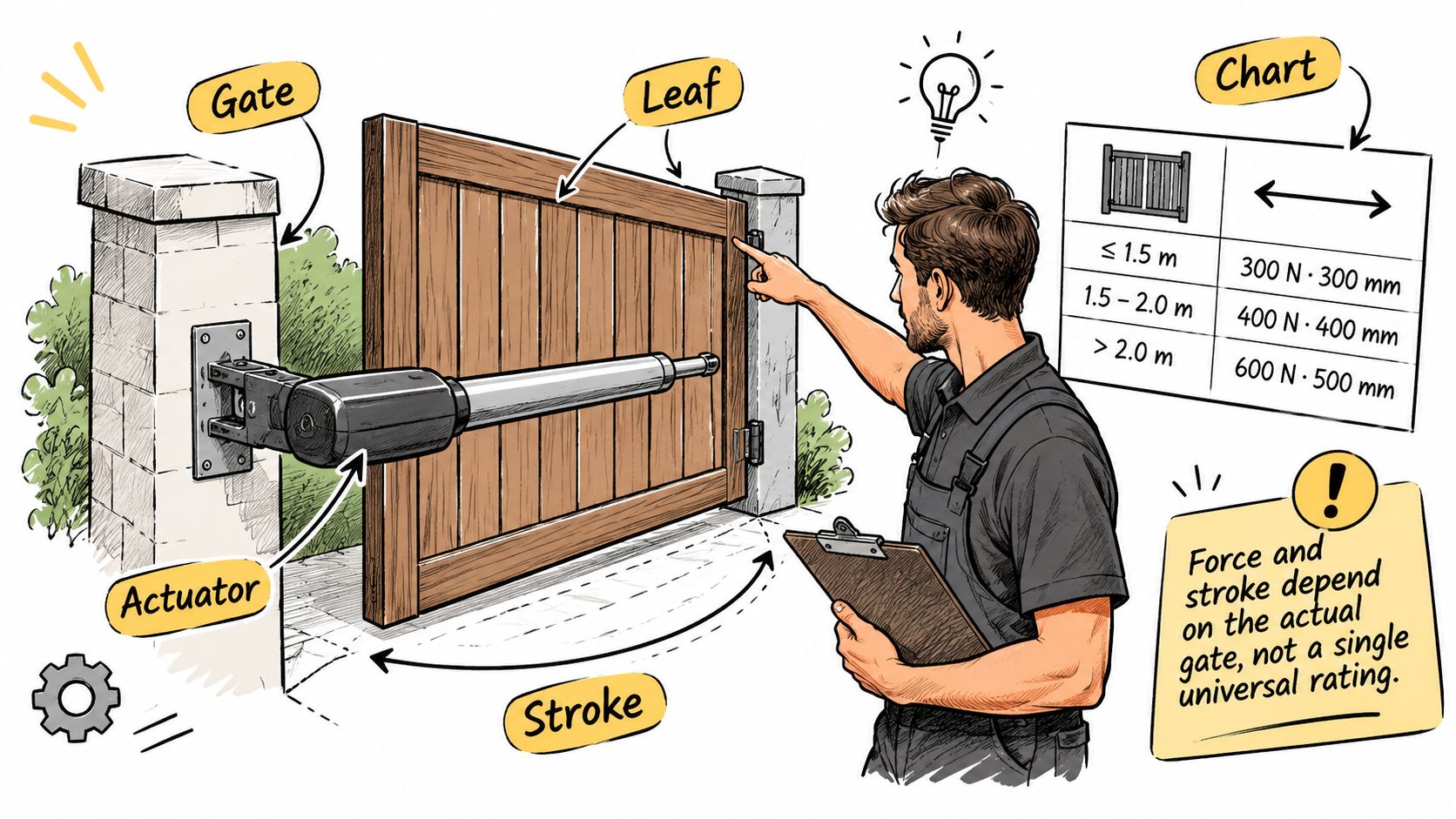
There's no single force number that fits every gate. A catalog rating means something only against that maker's chart for leaf length, leaf weight, mounting geometry, and duty. Two arms with the same headline force can behave differently once bracket position and opening angle change the mechanical advantage.
Seven Sizing Checks in Order
- Find the exact model: Identify the operator brand and model, then open its installation manual for the gate weight and gate length chart.
- Measure the leaf: Record each leaf's length and height and note the material, since a solid panel catches more wind than an open picket leaf of the same weight.
- Get a real weight: Take leaf weight from the gate maker or a scale reading on a removed leaf. If neither is practical, don't use an online guess, and wait until a technician weighs it.
- Check swing geometry: For a swing leaf, measure the opening angle and compare arm stroke and bracket positions with the manual's mounting diagram. A short stroke can stall before the leaf is fully open.
- Check slide travel: For a slide gate, measure full travel and confirm the rack or chain covers that distance while the limits still stop the panel clear of the posts.
- Confirm the supply: Use only the supply type the manual specifies for that operator. Don't substitute one supply arrangement for another because a terminal happens to fit.
- Check duty rating: A community entrance that cycles all day needs an operator rated for that duty, not a light residential arm. Heat, gearbox wear, and control board limits all follow cycle count.
Why Weight Alone Misleads
Wind load is the point readers most often miss. A solid leaf acts like a sail, and the force needed near the end of travel can rise sharply on an exposed lot. The manual's note on solid panels or wind exposure can move a leaf into a larger operator class even when its dead weight looks acceptable.
Practical rule: Geometry gets measured before force gets compared. A bracket placed closer to the hinge asks the arm to push harder through the whole arc.
Consider a hypothetical example. A 12-foot wood swing leaf on a windy lot may pass the weight row in a chart and still overload the arm on a gusty day. In that hypothetical, the chart's wind or solid panel note decides the choice, not the weight figure alone.
Track condition plays the same role for slide gates. A panel that rolls freely by hand on a clean track is a different load from the same panel dragging through grit or climbing a settled rail. Fix the binding first, then size the drive to the corrected leaf.
If the leaf falls outside every chart row, the answer is a larger listed operator or a lighter leaf. It isn't a higher force setting, a longer run time, or a bracket position outside the manual's diagram. Where the chart is unclear, the operator maker or a qualified technician should confirm the selection before purchase.
Mount Wire and Set the Limits
Models differ widely, so torque values, wire colors, terminal names, and limit adjustments all come from that operator's manual. This order of work helps a property manager brief a technician and helps an installer avoid skipped checks. On a shared entrance, a qualified technician should do the powered work.
Order of Work
- Kill power first: Turn off supply at the source the manual names and confirm the leaf can't move on its own before hands go near brackets or racks.
- Disable the old latch: If a manual gate is being converted, disable the existing latch. An automatic gate must not keep a latch the motor has to fight at the end of travel.
- Check failure behavior: Confirm the leaf, supports, and bottom edge meet the construction rules described below before the drive goes on.
- Fit brackets as drawn: Place brackets only where the mounting diagram shows them, so the arm isn't at a bad angle at full open or full close.
- Set limits before force: Set open and close limits so the leaf stops before it hits a post or hard stop. Force settings don't replace travel limits.
- Land wires by diagram: Put motor, limit, and entrapment device wires on the terminals that model's diagram names. Don't copy terminal choices from another brand.
- Prove the release: Test the manual release and confirm that releasing the operator doesn't let gravity start a continuous run.
- Test reversal last: Restore power and test obstruction reversal only in the way the manual describes, with the test object and positions it specifies.
Construction Checks That Get Missed
The ASTM F2200 provisions for automated gate construction state that a gate must be designed so it does not fall more than 45 degrees from vertical if detached from its supporting hardware. The same provisions say the bottom edge must be smooth, with vertical protrusions generally limited to 0.50 inch (12.7 mm), subject to listed exceptions. They also require an existing latch to be disabled when a manually operated gate is retrofitted with a powered operator, and the gate must be designed so disconnecting the operator doesn't allow gravity to initiate continuous, unimpeded travel.
Those points explain why fitting an actuator for gate use isn't only bracket and wire work. Hinge play, a sagging leaf, a rough bottom edge, or a leaf that rolls downhill after release all become powered hazards once a motor is attached. Each defect gets corrected as gate work, not hidden by operator settings.
General site entry guidance from GM GROUP Services is useful background on sequencing access work at an entry, but it doesn't replace the diagram for the operator on site. Managers coordinating several trades can also browse gate controller wiring guides to see how add-on wiring differs by operator model before work starts.
Nimbio hardware wires into an existing gate operator, but physical installation is completed by independent, professional gate technicians or local low-voltage installers. That division matters during limit setting too. The technician who sets travel and tests reversal needs the operator maker's correct manual, not a similar diagram found elsewhere.
Prove Entrapment Protection Still Works
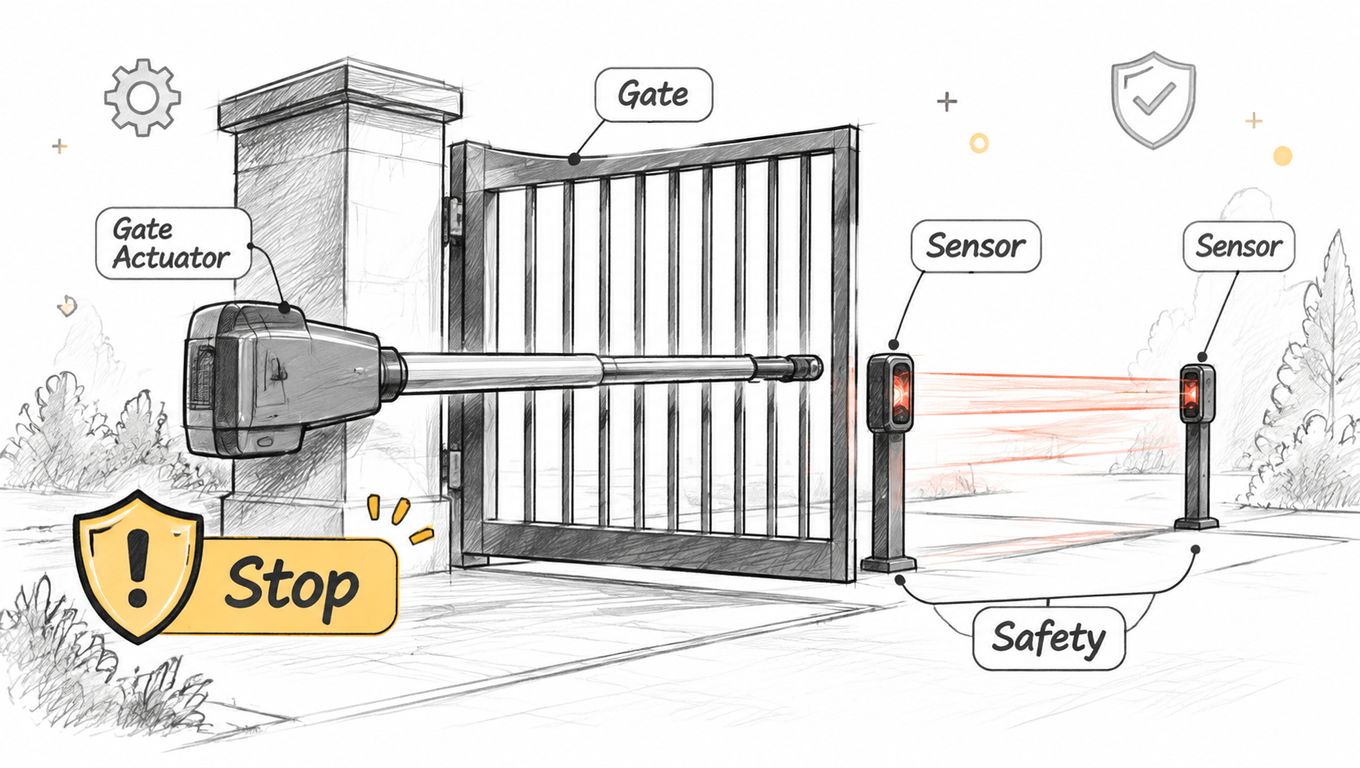
A gate leaf can be correctly sized for its operator and still create a hazard if it keeps moving after encountering a person or object. Entrapment protection combines safety devices with the operator's control logic to detect an obstruction and stop or reverse travel. Force ratings alone do not show that the protection works.
The Two Means Rule in Plain Words
Under UL 325, where an entrapment risk exists, an operator generally needs two independent means of entrapment protection for each direction of travel. Required external devices, such as photo eyes and contact edges, must be monitored. That lets the operator detect when a device is disconnected or faulty. Local adoption and enforcement vary, so use the operator manual to identify the monitored inputs for that model.
One means may be built into the operator, such as inherent obstruction sensing. A second is often an external photo eye across the opening or an edge on a closing face that senses contact. The means must be independent: two devices that share a failure do not provide the same protection as separate safeguards.
What Testing Actually Looks Like
The Intertek guidance on UL 325 entrapment protection tests requires entrapment protection devices to be operational and an alarm to function when a Type A entrapment protection device is used. For Class I or Class II horizontal bifold-gate operators, it states that gate speed during the final 16 inches (406 mm) of closing travel must not exceed 0.3 m/s (1 ft/s) when the operator applies a pull force of 333.6 N (75 lbf) under maximum rated supply conditions. The procedure also uses a solid rectangular obstruction measuring 1-5/8 by 3-1/2 inches and at least 6 inches long in each applicable entrapment zone.
- Test both directions: Trigger each photo eye and edge while the gate opens and closes, using the manual's test method.
- Test device loss: Disconnect one monitored device as the manual allows, then confirm the operator refuses to run or sounds an alarm instead of ignoring the loss.
- Test after wiring changes: Repeat both checks after changing an accessory, control board, or sensor, as well as after installation.
- Record the result: Note which device protects each zone, when it was tested, and who tested it.
If the gate runs normally with a required sensor unplugged, monitoring is not working. Follow the operator manual's troubleshooting steps and have a qualified gate technician correct the fault before the gate returns to service.
Remote access should send a normal open or close request through the operator's designated accessory input. It must not bypass photo eyes, edges, or reversal logic. A cellular add-on such as Nimbio wires into an existing gate operator, so the gate needs no Wi-Fi and existing clickers, fobs, and keypads can continue working alongside the app. It does not replace entrapment protection devices or the operator's safety logic. Use the operator manual to identify the correct input terminals.
Sort Failures by What the Gate Does
Random part swapping wastes visits. Failures sort more cleanly into three groups: the operator can't move the leaf, a command never arrives, or a safety device is holding the leaf on purpose. The leaf's behavior points to the group.
What the Gate Is Doing and What to Check
| What you see | Usual cause | Next check |
|---|---|---|
| Motor hums, leaf still | Binding hinge or track, bad arm angle, or a clutch that will not release | Free the leaf by hand with power off, then follow that model's clutch steps |
| Stops mid-travel | Limit set short, photo eye blocked by the leaf, or a sagging panel | Realign the leaf and eyes, then reset limits from the manual |
| Closes, then reverses | Edge or eye tripped, or wind read as an obstruction | Clean and test the sensor; change force only inside the manual's range |
| Alarm, no movement after a device is removed | Monitored entrapment input open | Restore the device; do not jumper a monitored input |
| Clicker works, keypad or app does not | That accessory or its link, not the motor | Use the working local control and service the accessory |
| Nothing works, including the clicker | Operator power, battery, or a failed control board | Check supply and battery per the manual, then call a technician |
A humming motor with a still leaf is a mechanical problem first. With power off and the release used as the manual directs, the leaf should move by hand without a hard bind. If it doesn't, hinges, wheels, track, and arm angle get corrected before anyone raises force.
Mid-travel stops often come from alignment, not power. A sagging panel can cross its own photo eye beam, and a limit set short can look like a weak motor. Realign the leaf and sensors, then reset limits from the manual for that model.
When No Movement Is the Correct Result
The DoorKing UL 325 operator guidance emphasizes that monitored external entrapment devices must be detected during operation and that systems must not be modified to defeat monitoring. So an alarm with no movement after a sensor is removed is monitoring doing its job. Restoring the device is the repair, and jumpering the input is not.
That distinction also separates operator failure from communications failure and authorization failure. If a clicker works at the gate, the actuator and board can clearly run, so attention shifts to the keypad, app link, or credential. If nothing works, supply and battery checks from the manual come first.
Don't decode a blinking light or error code from memory or from another brand's chart. Indicator meanings differ by model, and the manual for the installed operator is the only legend. After any repair, retest travel in both directions and force one sensor fault to confirm the operator responds safely before the gate returns to service.
A written fallback plan keeps those categories separate during an outage. It names who can release the gate on site, which local controls stay in service, and who the administrator contacts when the fault is authorization rather than machinery.
Service the Actuator or Add Access Beside It
Routine service is shorter work than troubleshooting, and it follows the interval the operator manual gives. Clean photo eye lenses, check the arm, rack, or chain for play, and listen for a gearbox that growls while moving a normal, free leaf. Confirm the manual release still turns and test any battery backup in the way the manual describes.
Grease only the points the manual names, with the product it names. Extra grease on a rack or screw collects grit and can turn a smooth drive into a grinding one. Loose bracket bolts, cracked mounts, and frayed sensor leads found during service get repaired before settings are touched.
When Replacement Is the Right Call
Replace the operator when the leaf falls outside the maker's chart and can't reasonably be lightened. Replacement is also the right call when the control board is obsolete and required sensors can't be monitored, or when the same mechanical fault returns after a proper repair. A qualified technician should confirm that call on a shared entrance.
Don't replace a sound operator just because visitors lack a clicker or a manager can't issue access from off site. That's an access control gap beside the actuator for gate work, not a drive failure. Keeping a listed, correctly sized operator and adding access to its accessory input often avoids new limits, new sensor wiring, and a fresh round of safety testing on the drive itself.
Decision check: If the leaf moves freely, limits hold, and entrapment tests pass, the operator isn't the problem to solve.
Plan for the Day Something Fails
Properties that plan ahead write separate answers for three events. An operator failure needs a named person who can attend, secure the leaf, and use the manual release without defeating safety devices. A communications failure needs working local controls, so existing remotes and keypads stay in service. An authorization failure, such as a wrong or expired credential, needs an administrator contact who can correct access without handing out a shared code.
That plan is where retrofitting legacy gate operators with a cellular controller can help without changing the drive. Nimbio is one example of that approach. It's hardware-agnostic and wires into the gate operator a property already has, with no need to replace the gate, and it needs no Wi-Fi at the gate. Property managers issue and revoke digital keys remotely and can set an expiration date on a key, and visitors can be let in remotely, including video verification of a visitor at the gate.
The written choice stays simple. If the operator fails its chart, its monitoring, or repeated repair, book a technician to repair or replace it. If it passes those checks and only access is missing, keep the operator and add access beside it.
Keep a sound, listed operator and add phone access beside it instead of replacing working gate hardware. Nimbio wires into the operator already on the property over cellular LTE, leaves existing clickers, fobs, and keypads working, and lets managers issue or revoke digital keys remotely. Visit the site to check compatibility with the installed operator before the next actuator or access change.