A delivery driver pulls up to a gated community at dinner time. The resident is home, the package is urgent, but the gate won't respond because the site's Wi-Fi dependent controller has dropped offline again.
That single failure ripples fast. Residents get frustrated, property managers get calls, installers get blamed, and security teams lose confidence in what should have been simple touchless entry.
That's why automatic door operation matters far beyond the motor itself. It now sits at the center of HOA security, cloud-based access control, visitor management, accessibility, and daily traffic flow. The broader market reflects that shift. The global automatic door market is projected to reach $6.1 billion by 2030, growing at a 5.8% CAGR from 2020, driven by contactless entry, hygiene, and accessibility demands, according to automatic door market projections.
For property teams trying to modernize without ripping out working equipment, the practical question isn't whether automation matters. It's how to make it reliable, code-aware, and manageable at scale. Systems built around Nimbio cellular access control point to that newer model, especially where consistent connectivity matters more than local network availability.
Table of Contents
- Introduction to Automatic Door Operation
- Core Concepts of Automatic Door Operation
- Types Sensors and Control Technologies
- Safety and Compliance Requirements
- Retrofit Strategies and Platform Integration
- Cost ROI and Maintenance Best Practices
- Decision Checklist for Buyers and Installers
- Conclusion
Introduction to Automatic Door Operation
Automatic door operation is the coordinated work of sensors, a controller, and a moving operator. One part detects a person, vehicle, or credential. Another part decides whether the opening should happen. The last part powers the door or gate safely through its travel.
In commercial buildings, that may mean a sliding lobby entrance. In a gated community, it may mean a swing gate operator reacting to a phone credential, vehicle loop, keypad, or photo eye. The logic is similar even when the hardware looks very different.
Readers often assume the sensor is the whole system. It isn't. A gate can have a working photo eye and still fail because the controller lost communication, the motor is overloaded, the closing logic is misconfigured, or the access layer can't verify the user.
Automatic door problems usually come from coordination failures, not just broken parts.
For property managers, that distinction matters. It changes troubleshooting from “replace the sensor” to “check detection, decision, movement, and safety as separate layers.”
Core Concepts of Automatic Door Operation
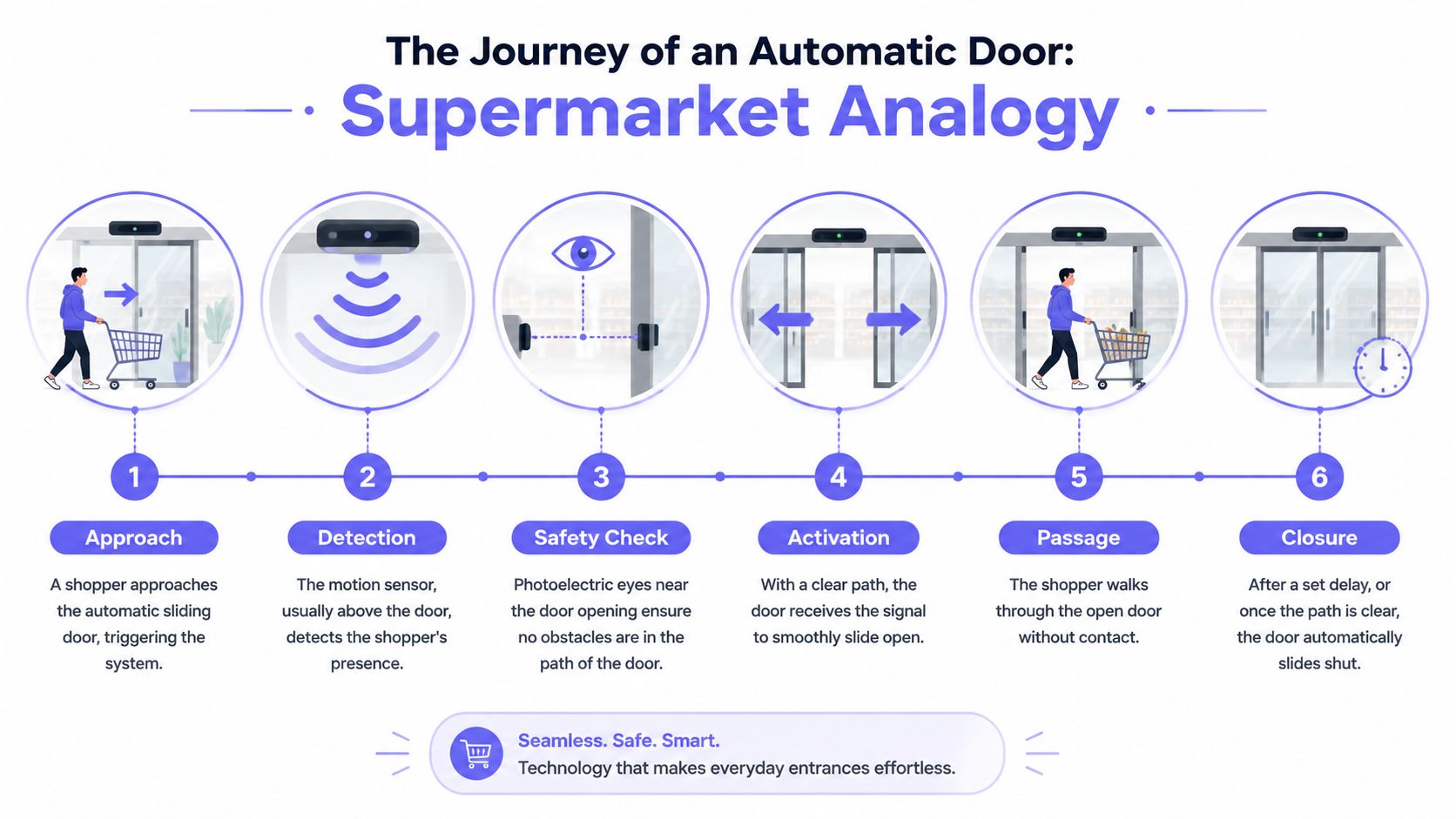
A supermarket sliding door offers the easiest mental model. A shopper walks toward the entrance, the detector sees movement, the controller checks whether it's safe to move, and the motor opens the panels. After the person passes through, the system waits briefly, then closes if the path is clear.
That same logic appears in many environments. A community pedestrian gate, a clubhouse entry, and a vehicular slide gate all rely on some version of detect, decide, move, confirm safe closure.
The three parts that do the work
Detection comes first. Motion sensors, photoelectric eyes, floor mats, loop detectors, push plates, card readers, and smartphone credentials all serve the same purpose. They tell the system that someone or something wants access.
Control logic comes second. The controller decides whether to open now, hold, reverse, or stay closed. It also handles timers, lock coordination, and safety checks.
Actuation comes last. The operator uses a motor and drive mechanism to move the panel, leaf, or gate arm.
A helpful analogy is a garage door opener with better judgment. The operator provides force, but the controller decides when force is allowed, and the sensors prevent the system from moving blindly.
Where modern systems came from
The principle of contactless entry is older than many readers expect. The first commercial automatic door was installed on June 19, 1931, at Wilcox's Pier Restaurant by Stanley Works, using a photoelectric eye to trigger contactless entry, as documented in this history of the first commercial automatic door.
That milestone still matters because it established the core idea behind modern automatic door operation. A person approaches, the system senses presence without touch, and the entrance responds automatically.
Later developments made the systems more practical in public buildings. Pneumatic doors, electric floor mats, motion detectors, handicapped access operators, and public sliding doors expanded what automatic entry could do in hospitals, restaurants, retail sites, and large facilities.
Why gate retrofits can feel different
Residential and multifamily gate systems add friction that indoor doors usually don't face. Outdoor heat, reflected sunlight, moving vehicles, wind pressure, and inconsistent local networks all affect performance.
That's why many gate upgrades focus not just on motors, but on the full command path. Property teams comparing traditional triggers with app-based entry often look at how cellular gate openers work because the opening event now includes both the access credential and the operator command.
Practical rule: If a team can explain what detects, what decides, and what moves, it can diagnose most automatic door issues faster.
Types Sensors and Control Technologies
Different openings need different sensor packages. A hospital sliding entrance doesn't behave like a vehicular slide gate, and a garage overhead operator doesn't behave like an ADA low-energy swing door. The best results come from matching the door type, traffic pattern, and control method.
Automatic door systems also rely on layered safety. They use active presence sensors such as overhead sensors and light beams, plus passive motor-effort monitoring that reverses on obstruction. In commercial settings, sliding doors account for about 60% of installations and swing doors 25%, according to automatic door safety and installation patterns.
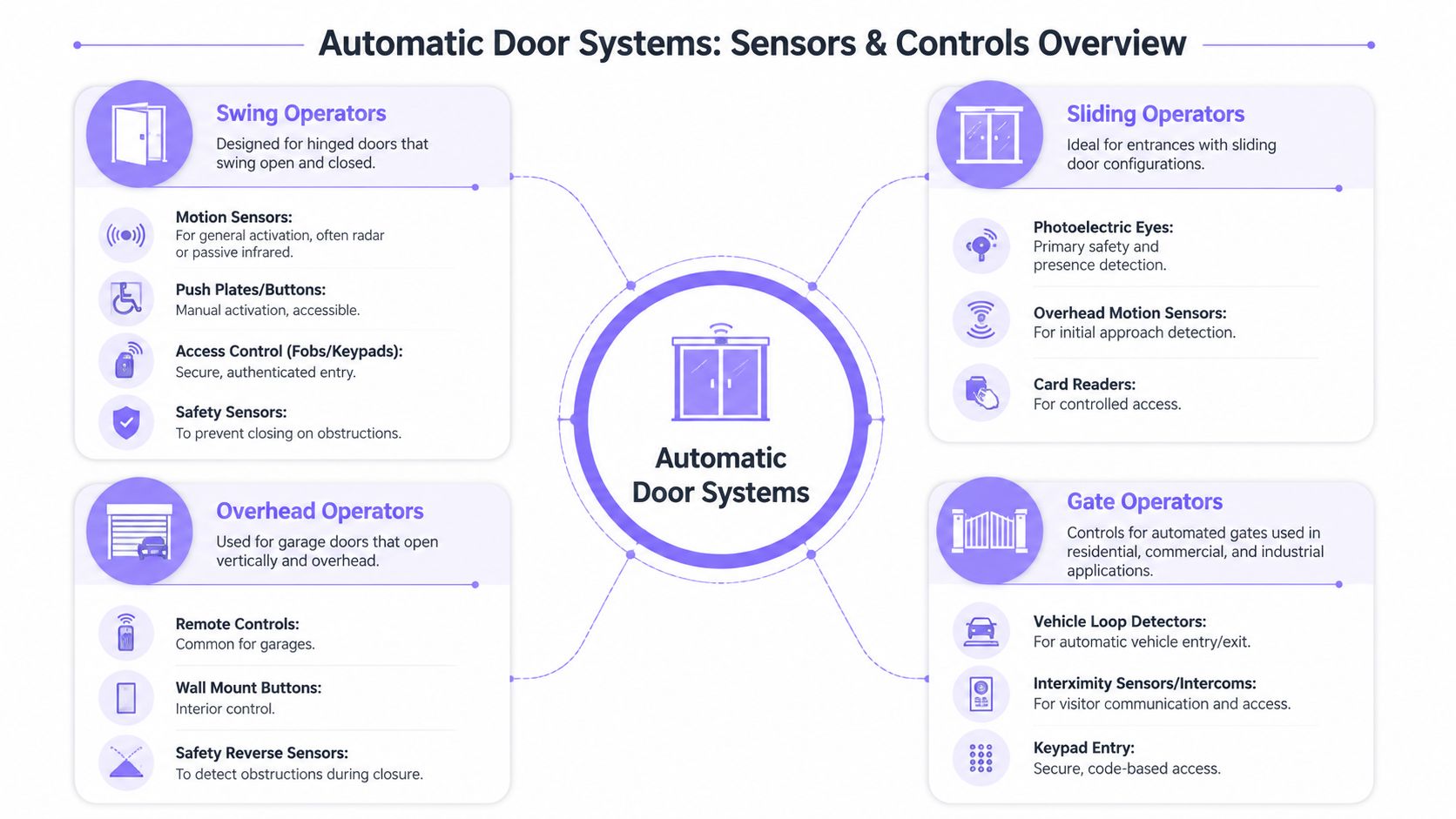
Swing operators
Swing operators are common on pedestrian entrances, amenity buildings, side doors, and accessible entries. They move a hinged panel inward or outward, so the safety zone includes the path of the swinging leaf.
Typical controls include:
- Motion activation: Radar or passive infrared sensors can trigger opening when someone approaches.
- Push plates and buttons: These are common where a deliberate accessible trigger is needed.
- Credential readers: Fobs, cards, keypads, and app-based access can authorize entry before motion begins.
- Zone safety sensors: These help prevent contact with the moving door panel.
Swing systems work well where there's enough clearance for the arc of travel. They're less ideal where furniture, landscaping, or foot traffic constantly occupies the swing path.
Sliding operators
Sliding doors are efficient in tight openings and heavy-traffic corridors. They move laterally, so they avoid the clearance demands of a swing door.
Their common sensor set usually includes:
- Overhead motion sensors: These detect approach from one or both directions.
- Photoelectric eyes: These confirm whether the opening is clear and help prevent closure on a person or object.
- Edge or path protection: These watch the moving path and trigger reversal if needed.
- Access readers: In controlled environments, card readers or smartphone credentials can act as the opening trigger.
For managers, sliding doors are usually easier to understand because the movement is visually simple. For technicians, the focus is alignment. A slightly misaligned sensor or dirty track can create hesitation, false obstruction readings, or incomplete closure.
Overhead operators
Overhead operators appear in garages, service bays, and roll-up or sectional applications. The motion is vertical, so their control logic often combines interior convenience with closure protection.
Common methods include:
| System part | Typical role | Common concern |
|---|---|---|
| Remote control | Opens or closes from a vehicle or interior space | Lost or shared remotes |
| Wall button | Local interior command | Limited remote management |
| Safety beam | Stops or reverses closure if the path isn't clear | Misalignment or blockage |
| Limit switch logic | Defines open and closed positions | Drift over time |
Overhead doors usually tolerate harsh duty cycles, but they need accurate travel limits. If the open or close limit drifts, the system may slam, stall, or reverse unexpectedly.
Gate operators
Gate operators are where automatic door operation gets more complex for HOAs and gated communities. A gate has to manage not only motion but also vehicle timing, visitor handling, credential security, and outdoor interference.
Typical gate controls include:
- Photo eyes: These stop or reverse a closing gate when the beam is blocked.
- Vehicle loop detectors: These detect cars at the entry or exit lane.
- Keypads: These provide code-based entry, though shared codes create audit and security problems.
- Intercom or call box functions: These let visitors request access.
- Smartphone apps: These send authenticated open commands without issuing physical credentials.
Some sites also use remotes and clickers. They're familiar, but they're hard to track once distributed widely.
How the sensor choice changes the outcome
A common mistake is choosing sensors based only on price or installer habit. The better method is to ask what the opening is trying to detect.
For example:
- Pedestrian intention needs reliable approach detection.
- Safe closure needs path protection and obstruction reversal.
- Vehicle presence needs loop logic or beam coverage that understands lane movement.
- Authorized access needs a credential layer, not just motion.
These are different jobs. One sensor rarely handles all of them well.
A property that uses the same detection logic for a lobby door and a driveway gate usually ends up troubleshooting the gate far more often.
Why outdoor gates fail differently
Indoor automatic doors operate in stable conditions. Residential gates don't. Heat reflection, wind, vehicle airflow, and shifting hardware can all create false triggers or nuisance reversals.
Existing commercial-focused guidance often misses this. It rarely addresses residential gate-specific sensor failures caused by environmental variables such as wind, heat reflection, and vehicle airflow, even though service calls often trace back to sensor misalignment or environmental interference rather than mechanical failure, as discussed in this guide to automatic door system operation gaps.
A few practical examples help:
- Reflected afternoon sun can interfere with poorly positioned photo eyes.
- A delivery van passing close to a gate can create air movement that triggers oversensitive detection.
- Gate posts that settle slightly can move a beam out of perfect alignment.
- Vegetation growth can enter the sensing zone gradually until nuisance trips begin.
Control technologies and modern access layers
A modern system has two decision layers. The first decides whether the user is authorized. The second decides whether the machine can move safely.
That's why cloud-based access control and local operator logic must work together. The access platform may say “open,” but the operator still has to honor safety sensors, travel limits, and obstruction logic.
For security-sensitive properties, legacy keypad-only systems raise a different issue. There's a documented lack of industry coverage around the cybersecurity and auditability risks of legacy gate systems, especially where shared PINs create untraceable entry and weak accountability. In those environments, administrators often shift away from broad code sharing toward individualized digital credentials and remote visitor workflows.
Quick matching guide
A simple decision map helps teams avoid overbuilding or under-specifying:
- Choose swing operators when pedestrian access is controlled, traffic is moderate, and side clearance exists.
- Choose sliding operators where traffic is heavy and space efficiency matters.
- Choose overhead operators for enclosed vehicle access, garages, and service openings.
- Choose gate operators when perimeter control, visitor handling, and outdoor resilience are all part of the job.
The right system isn't the one with the most features. It's the one whose sensors and controls match real use conditions.
Safety and Compliance Requirements
Safety compliance starts with a simple principle. An automatic opening can't trade convenience for injury risk, blocked egress, or inaccessible operation.
For property managers, three compliance areas shape most specifications. They are accessibility, life safety, and documented system performance.
ADA and accessible operation
ADA-related thinking affects how automatic pedestrian doors are triggered, how long they remain open, and how safely they move. The exact application depends on the entrance type and jurisdiction, but the operating principle is consistent. People with mobility devices, slower walking speeds, or limited upper-body strength must be able to use the entrance without unreasonable force or timing pressure.
That requirement affects more than the operator itself. It also affects push plate placement, approach clearance, and whether the opening sequence gives enough time for passage.
A useful field check is to observe the actual user experience. If a resident using a walker or stroller reaches the threshold and the door begins closing too quickly, the site may be operationally unsafe even if the hardware appears functional.
Fire egress and fail-safe behavior
A secure door still has to release appropriately during an emergency. Fire egress rules typically require doors tied to life-safety paths to become disengaged or allow free egress under the right alarm or power-loss conditions.
That point creates confusion in gated communities and mixed-use sites. Managers sometimes focus on keeping a perimeter secure, while code officials focus on ensuring no one is trapped behind an electrified opening during an emergency.
Field check: Every automatic opening should have a documented answer to one question. What happens if power fails during an emergency?
The answer should include lock behavior, gate release behavior, and whether the local operator can still complete essential tasks.
Local control still matters
Connected access systems are useful, but the opening can't depend entirely on a live cloud session. Advanced access control controllers must maintain local task management capabilities when network connections are lost, so locking, granting access, and status monitoring continue without interruption, according to guidance on local intelligence in access control devices.
That matters for both safety and operations. A network outage shouldn't prevent a safe egress event, and it shouldn't leave staff guessing whether the gate can still respond to programmed local logic.
Documentation and inspection habits
Compliance isn't only about hardware selection. It also depends on proof.
Property teams usually need a repeatable record of:
- Sensor testing: Confirming reversal and presence detection behavior.
- Opening behavior: Checking that timing and path protection remain appropriate.
- Emergency response logic: Verifying release and egress operation.
- Service records: Showing what was adjusted, replaced, or recalibrated.
Installers who document these items clearly make future inspections easier. They also reduce finger-pointing after an incident.
Retrofit Strategies and Platform Integration
Most properties don't need a full operator replacement to improve automatic door operation. In many cases, the operator is still mechanically serviceable. What's outdated is the control layer, the credential model, or the connectivity path.
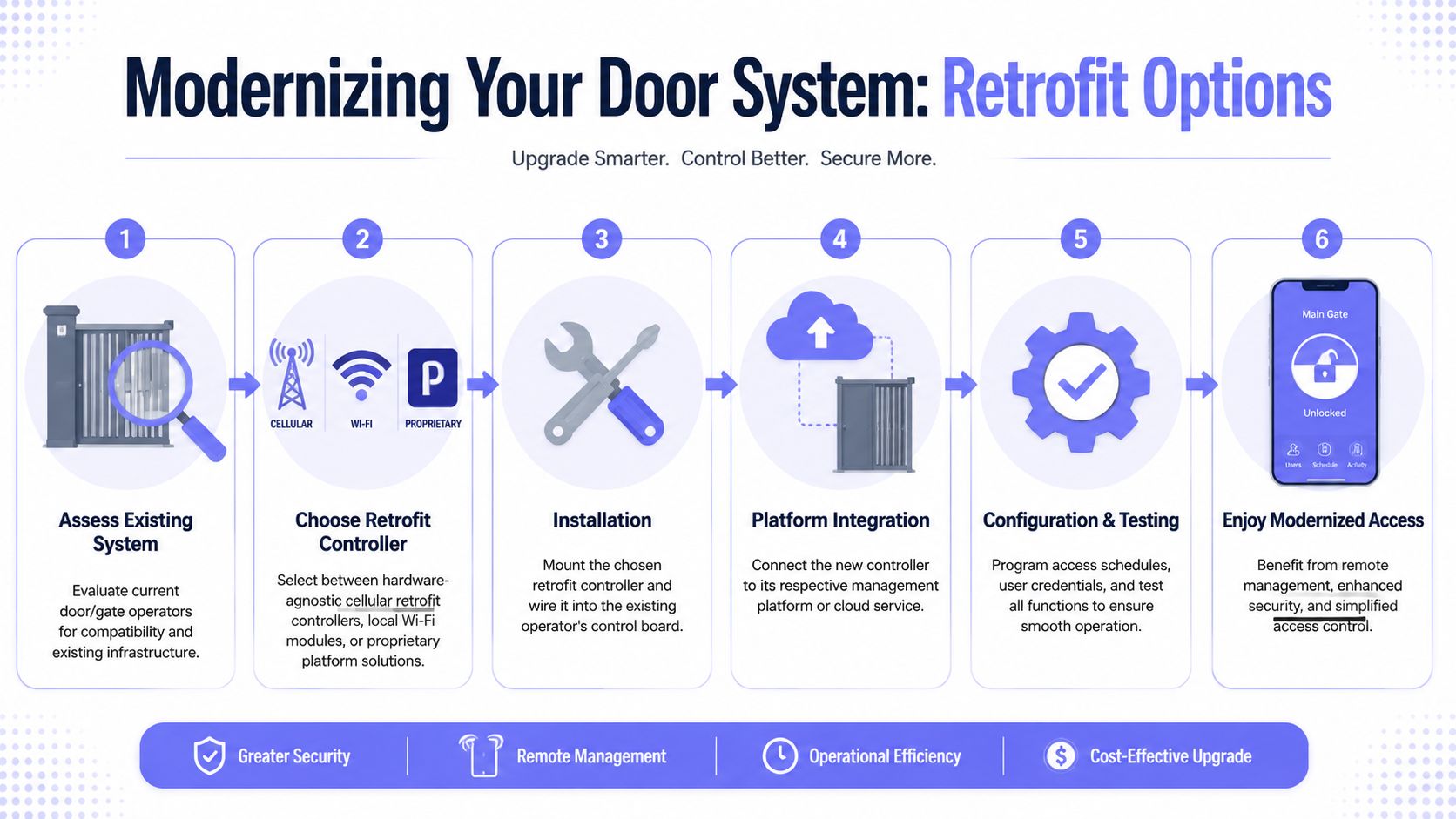
That creates a practical retrofit opportunity. A hardware-agnostic controller can connect to an existing gate or door operator, use the operator's dry-contact input, and add a modern access layer without replacing the whole machine.
Comparing retrofit paths
Not every retrofit path solves the same problem. A short comparison helps.
| Retrofit approach | Best fit | Main limitation |
|---|---|---|
| Cellular controller | Sites that need independent connectivity and remote access | Needs adequate carrier coverage |
| Wi-Fi module | Locations with very stable local network management | Vulnerable to local network drops or changes |
| Proprietary platform replacement | New builds or full standardization projects | Higher disruption and less flexibility |
Cellular systems have a specific operational advantage. Cellular-based remote monitoring systems use built-in SIMs to connect directly to carrier networks, which supports continued operation during Wi-Fi outages and reduces cybersecurity exposure to internal networks, according to this explanation of cellular remote monitoring architecture.
For rural entrances or long drive approaches, coverage planning matters. Installers evaluating weak-signal locations often review guides on best multi-carrier signal boosters before finalizing enclosure placement.
What a clean retrofit usually looks like
A disciplined retrofit typically follows this sequence:
- Assess the operator. Confirm the existing gate or door controller accepts an external trigger input and that safety devices are in working order.
- Mount the new controller. Place it where wiring is protected and signal conditions are stable.
- Wire into the control board. The retrofit controller typically lands on the operator's command input rather than replacing core motion logic.
- Pair credentials and admin roles. Residents, managers, or staff receive digital access based on role.
- Configure schedules. Hold-open windows, deliveries, vendor access, and temporary credentials are set in software.
- Test with the existing safety chain. The gate should still obey photo eyes, loops, and obstruction logic.
A retrofit should add command intelligence, not bypass safety logic already required by the operator.
Integration without ripping out what still works
Many communities already have remotes, keypads, or call boxes in the field. A thoughtful retrofit doesn't force immediate abandonment of every familiar method. It layers in better administration, cleaner auditability, and remote visitor workflows while preserving useful existing hardware during the transition.
That approach works well with mixed estates. A community may have older remotes for long-term residents, temporary app credentials for vendors, and remote visitor approval for guests. The goal is gradual modernization, not operational chaos.
The best retrofit is usually the one residents barely notice, except that access gets easier to manage.
Integration also matters beyond the gate. Communities that handle deliveries, service fleets, or amenity scheduling often look for an open API for smart fleet integration so access events can connect with broader property workflows.
Visitor management changes the front gate experience
Visitor handling is where older systems feel oldest. Shared gate codes, phone trees, and manual guard calls create delays and weak accountability.
A modern platform can shift that interaction toward:
- Remote credential assignment for approved vendors
- Scheduled access windows for recurring service visits
- Entry logs that show who triggered access and when
- Video-assisted guest verification before opening the gate
That's especially useful in communities where residents expect convenience but boards still need a defendable security posture.
Cost ROI and Maintenance Best Practices
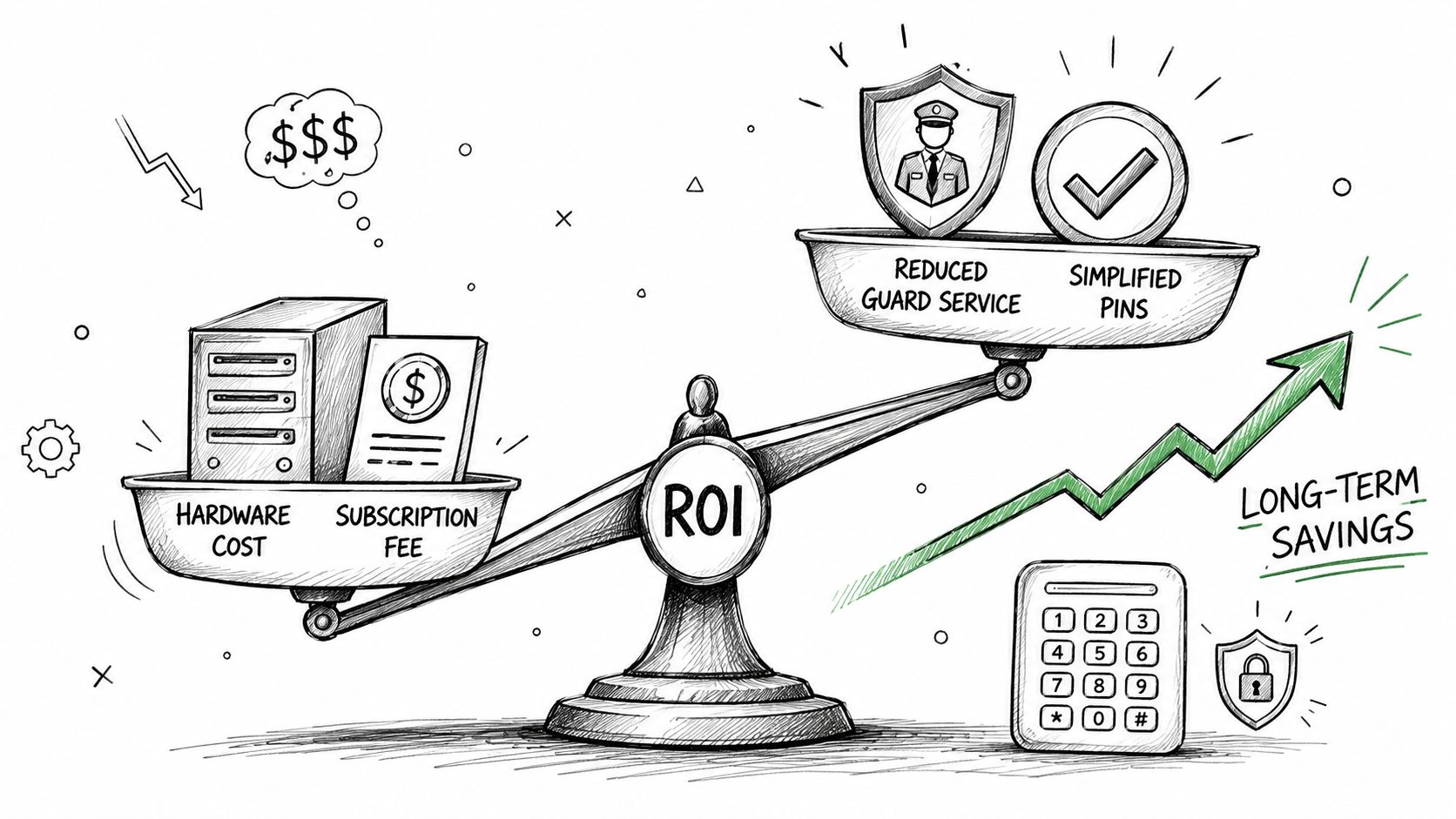
The cost of automatic door operation isn't just the motor or the controller. It includes service calls, credential churn, resident support time, nuisance closures, and the hidden overhead of systems nobody can audit cleanly.
That's why budget discussions work better when they separate capital cost, operating cost, and failure cost. A cheap control method can become expensive if it creates frequent truck rolls or constant admin work.
Where buyers usually underestimate cost
Teams often compare only the visible hardware line item. They forget the ongoing burden of replacing lost fobs, rotating shared PINs after resident turnover, dispatching staff to reprogram access, or troubleshooting openings that fail only under certain weather conditions.
A better ROI review asks:
- How much staff time goes into access changes
- How often residents need support
- Whether entry events are auditable
- How often sensors drift out of alignment
- Whether firmware and settings can be updated remotely
These questions don't produce one universal number. They do reveal whether a system is cheap to buy but expensive to live with.
Performance and operator sizing matter
Mechanical performance also influences cost over time. High-performance operators such as the AD500 draw 98 W at 60 VDC and deliver 40 Nm torque, balancing speed and reliability to reduce stall-related downtime, according to the AD500 operator specification sheet.
That matters because underpowered or poorly matched operators tend to create repeat service issues. A gate that struggles against wind load, friction, or slight misalignment may still “work,” but it often works expensively.
A practical maintenance routine
Maintenance should focus on the failures that create the most disruption.
Monthly checks
- Clean lenses and beam paths: Dust, insects, and spider webs can affect photo eyes.
- Observe opening and closing travel: Listen for strain, hesitation, or impact at end limits.
- Test credentials: Make sure current users and schedules behave as intended.
Quarterly checks
- Inspect alignment: Gate posts, sensor brackets, and reflective devices can shift over time.
- Review hardware wear: Hinges, rollers, tracks, and chain or arm assemblies should move smoothly.
- Audit permissions: Remove stale user access and review temporary credentials.
After severe weather or site work
- Recheck safety devices: Landscaping, paving, and electrical work often disturb sensor zones.
- Confirm egress behavior: Emergency release and free-exit logic should still operate properly.
- Retest any integrations: Video, call box, and management platform links may need validation.
Maintenance should target the cause of false activations and stalled movement, not just the symptom residents notice.
ROI thinking for property managers
For HOAs and multifamily operators, the strongest business case often comes from reduced friction. Fewer manual access changes, fewer resident complaints, cleaner visitor handling, and fewer avoidable service calls all improve operations even before hard savings are modeled.
A useful board-level framing is simple:
- Does the system reduce daily management effort
- Does it improve accountability
- Does it lower preventable disruption
- Can it be maintained without specialty dependence
If the answer is yes across all four, the investment usually makes sense long before the equipment reaches end of life.
Decision Checklist for Buyers and Installers
A strong buying decision comes from scoring the whole access workflow, not just the gate operator. The checklist below helps property managers, HOA boards, homeowners, and installers compare options side by side.
Core fit questions
- Existing operator compatibility: Can the solution work with the current gate operator or door controller without full replacement?
- Connectivity independence: Does the system keep working without relying on building Wi-Fi?
- Local logic support: Can the opening still manage essential behavior if cloud communication is interrupted?
- Safety chain integrity: Will the retrofit preserve photo eyes, loops, obstruction response, and egress behavior?
Compliance and risk review
Some questions should be essential.
- ADA awareness: Does the design support accessible entry behavior where pedestrian openings are involved?
- Fire egress coordination: Is emergency release or fail-safe behavior clearly documented?
- Audit trail quality: Can administrators see who accessed the property and when?
- Shared credential exposure: Does the system reduce dependence on broad, untracked codes?
Operational must-haves
The best systems make routine administration easier, not just possible.
- Remote credential scheduling: Staff should be able to grant and revoke access without a site visit.
- Visitor management: Residents or staff should be able to approve guests without gatehouse friction.
- Hold-open scheduling: Communities often need planned open windows for move-ins, vendors, or peak traffic.
- Role-based administration: Boards, managers, and installers shouldn't all have the same permissions.
Installer evaluation points
Integrators and low-voltage teams should also score the deployment itself.
| Evaluation area | What to confirm |
|---|---|
| Wiring simplicity | Whether the controller lands cleanly on existing dry-contact inputs |
| Enclosure planning | Whether the mount location protects hardware and supports signal quality |
| Serviceability | Whether future techs can understand and support the setup |
| Platform flexibility | Whether the system can scale from one gate to multiple access points |
Nice-to-have upgrades
These don't always decide the project, but they can improve user experience.
- Video-assisted guest verification: Useful where communities want visual confirmation before granting entry.
- API connectivity: Helpful for fleet, logistics, or broader proptech integration.
- Remote firmware updates: Valuable for keeping features and security controls current.
- Credential mix support: Important during transitions from remotes and keypads to smartphone-based access.
A final rule helps avoid many bad purchases. If a solution looks elegant in a demo but creates uncertainty around compatibility, egress, or ongoing administration, it isn't ready for deployment.
Conclusion
Reliable automatic door operation depends on more than a motor and a sensor. It depends on the right pairing of detection, control logic, safe movement, compliance planning, and manageable access workflows.
For gates and entry systems that are already installed, modernization often works best as a retrofit. The strongest setups preserve existing hardware where practical, improve credential control, support remote visitor management, and avoid the instability that comes from depending on fragile local network conditions.
Property managers and installers who use a structured checklist, maintain safety devices consistently, and choose connectivity with resilience in mind usually end up with fewer surprises and better accountability. This is the desired outcome: Smooth access for residents, safer operation for occupants, and clearer control for administrators.
Teams that want to modernize gates or building entry without replacing working hardware can explore Nimbio for a cellular, hardware-agnostic approach to smartphone-based access, remote visitor management, and auditable entry control.