If a resident can get into the pool house with a phone, but the gate to the clubhouse still depends on a fob that dies at the worst possible moment, the problem isn't the lock, it's the access model. That's why biometric door knobs keep coming up in HOA boardrooms and property manager conversations, they promise a simple answer to a messy daily reality.
The appeal is obvious. A knob can recognize a person instead of a card, code, or metal key, and the idea feels clean for amenity rooms, staff doors, and smaller shared entries. The hard part is deciding whether that convenience survives wet fingers, dead batteries, tenant turnover, and privacy questions, or whether a cellular smartphone-based controller does more of the work with less friction.
Table of Contents
- What a Biometric Door Knob Actually Does
- How Biometric Authentication Works on a Knob
- Types of Biometric Door Knobs and the Tech Behind Them
- Where Biometric Door Knobs Struggle in Practical Use
- Door Compatibility and Installation Considerations
- Biometric Knobs Versus Smartphone-Based Access
- Choosing the Right Setup for Your Property
What a Biometric Door Knob Actually Does
A property manager usually notices the pain before the category name. One contractor forgets the gate code, another shares it with a helper, and a resident calls again because a fob stopped working at the gym door. If the door only needs a simple, repeatable way to recognize the right person, a biometric door knob is one option.
A biometric door knob is a knob that grants access after it recognizes a body-based trait, usually a fingerprint, sometimes a palm or hand pattern, and in newer systems even a motion signature from how the knob gets turned. It replaces, or supplements, a key, card, or PIN with identity-based entry.
Practical rule: if the door serves a small, stable group, a biometric knob can feel effortless. If the user list changes constantly, the enrollment process becomes part of the daily workload.
That distinction matters. A standalone residential knob is usually meant for one door and one household, while a knob tied into a wider access-control setup has to behave like part of a smart community system, with logs, permissions, and fallback access. The bigger the property, the more the knob has to cooperate with other hardware instead of acting like a one-door gadget.
For readers comparing options, modern door access control 2026 is a useful reference point for how the category has moved beyond simple local hardware. For a broader operational view of unmanaged entries and remote control, check our unmanned building page shows how building access is usually discussed in practice.
A simple mental model helps. A biometric knob is a door handle that only opens for a recognized person, not for a shared credential.
How Biometric Authentication Works on a Knob
The basic sequence
A biometric knob usually follows four steps. It captures a live trait, turns that reading into a template, compares the template with what's stored, then grants access if the match is good enough.
That template part is what people often miss. A fingerprint reader is not supposed to store a full photo of the finger, it stores a mathematical representation that can be compared later. In well-designed residential locks, that matching happens on the device itself, which keeps the decision local rather than dependent on a remote server.
What changes with multiple users and app pairing
A single-user knob is easy to picture. A family or small office needs a way to enroll several people, remove one person later, and keep a backup method available if the sensor refuses a valid finger.
That's where mobile pairing and PIN fallback matter. The lock is no longer just checking a body trait, it's also managing enrollment, revocation, and recovery paths. For a homeowner, that feels like convenience. For an HOA, that's governance.
Operational takeaway: the best biometric workflow isn't just “read finger, open door.” It also includes who can be added, who can be removed, and what happens when the sensor says no.
Why local matching affects trust
Local matching changes the privacy conversation. If the template stays on the device, the system is less dependent on cloud availability and less exposed to broad account-level sharing. If identification moves into a cloud workflow, the property manager gets more centralized control, but the privacy and retention questions become harder to ignore.
That's where the decision gets less technical and more practical. Residents care less about the algorithm name than about whether the door opens reliably, whether the wrong person can use the credential, and whether the manager can still recover access if the phone app is unavailable.
For readers comparing a more hands-free approach, hands-free entry with face recognition door locks is a helpful way to think about how different recognition methods trade convenience for control.
Types of Biometric Door Knobs and the Tech Behind Them
Different sensing methods, different tradeoffs
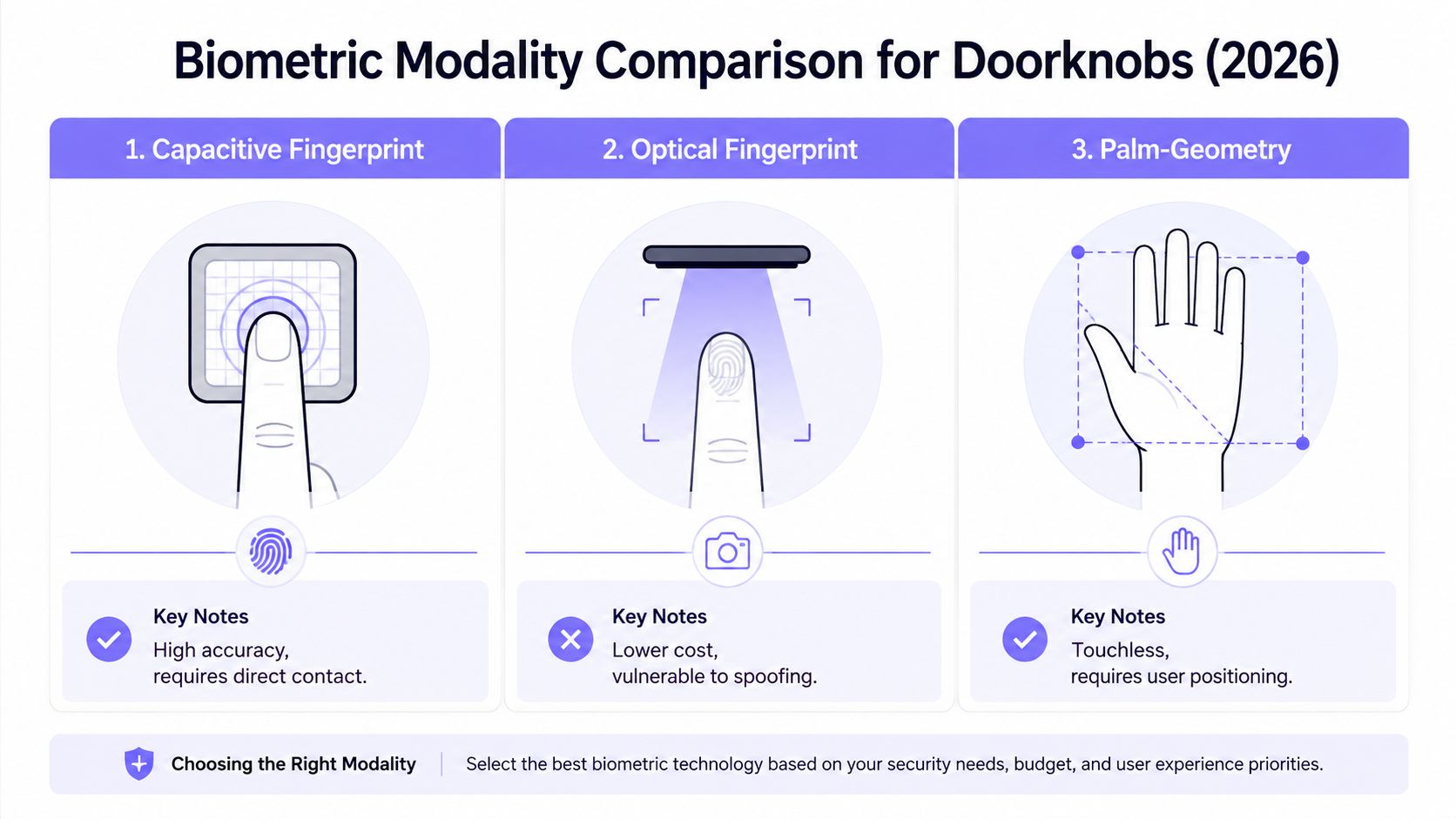
Not every biometric knob uses the same sensor. The most familiar version is a fingerprint reader, usually capacitive or optical. Fingerprint readers are easy to understand because they ask for a direct touch, but they also inherit the well-known problem of finger condition affecting recognition.
Palm-geometry and hand-image systems work differently. One research-based knob concept kept the normal look of a conventional knob while using an embedded imaging structure to capture hand images for identification, and it was tested on 12,000 images from 200 people with an equal error rate of 0.091% (source). That's a real sign that door-handle biometrics can be more than a demo, but it still depends on careful positioning and a specialized hardware design.
Behavioral and contact-based options
Some knobs don't try to identify the finger at all. A 2024 study used an embedded accelerometer and gyroscope on a doorknob and reported 90.2% identification accuracy across 47 users, with 68.5% accuracy from a 0.5-second sample (PubMed). That kind of system looks at how the person moves the knob, not just what touches it.
Another approach built ECG sensing into the knob itself. In the cited study, synchronized averaging with five consecutive wave segments improved accuracy by 10%, and the system reached 99.6% identification accuracy using SVM with five HFECG segments, with a separate result of 99% accuracy for 10 subjects on same-day data (PMC). That's an impressive technical result, but it also tells buyers something important, more sensing usually means more complexity.
How to read a product page
A useful product-page checklist looks like this:
- Fingerprint only: usually simplest, but sensitive to finger condition.
- Motion or grip sensing: useful as an added factor, not a cure-all.
- Hand or palm imaging: more unusual, often more demanding on positioning.
- ECG-style sensing: technically strong, but likely to be specialized.
- Face-linked entry: better reserved for environments where the camera setup is acceptable.
The main question is not which sensor sounds most advanced. It's which one stays dependable under daily use, in the weather, with the users who live there.
Where Biometric Door Knobs Struggle in Practical Use
The failures buyers don't put in the brochure
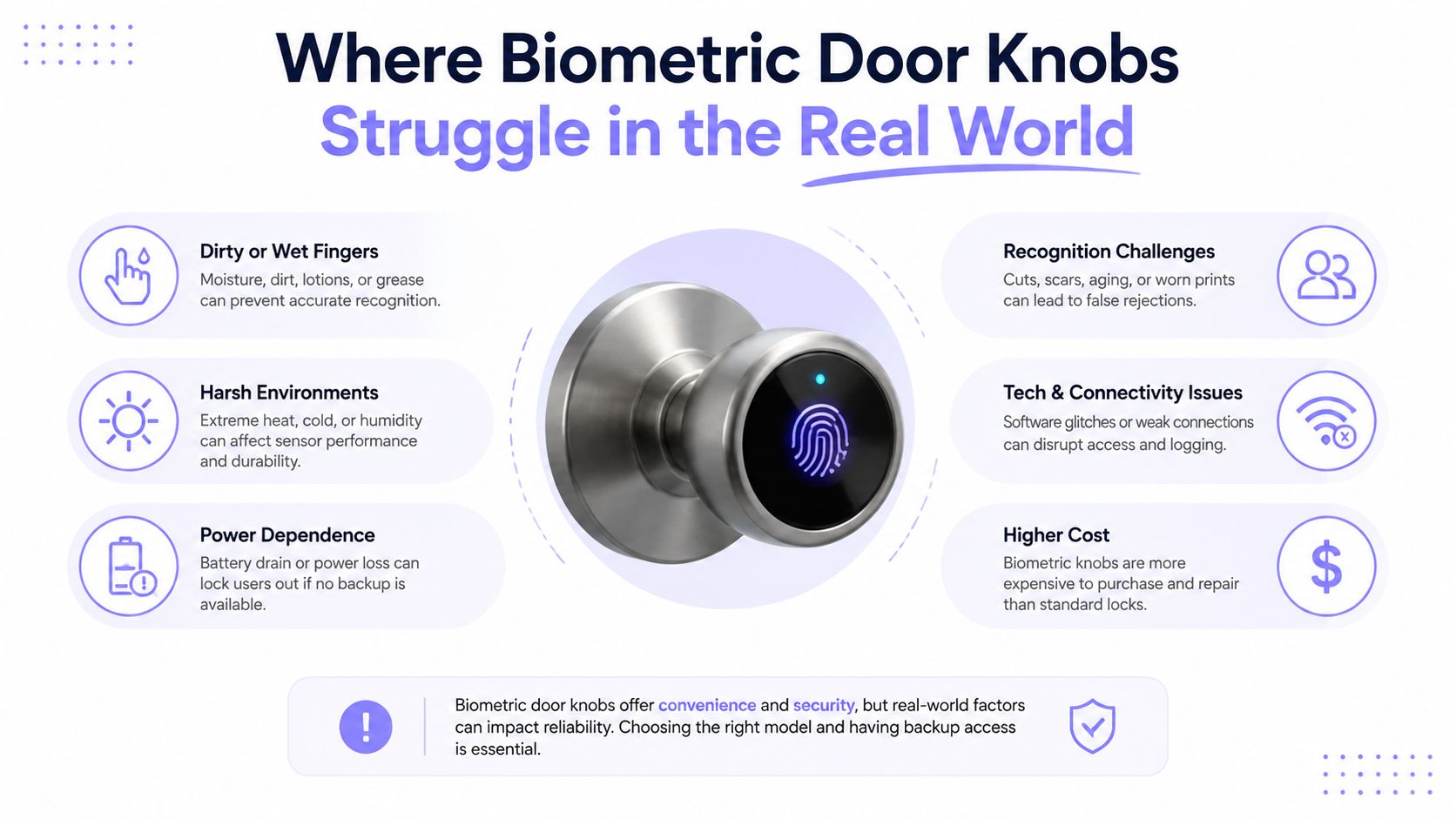
A biometric door knob looks straightforward in a product demo. In daily use, the weak spots show up fast. Wet skin, cuts, worn prints, moisture, dirt, and battery depletion all create failure points, and that is before anyone adds children, gardeners, or delivery workers to the mix.
A smart-lock roundup in Wired treats biometrics as useful but not foolproof, which matches what many access-control teams already see in practice. Fingerprints are convenient when conditions are good, and frustrating when they are not.
A lock that works for the board president but frustrates the cleaning crew is not a finished access strategy.
Shared properties make the problem worse
Tenant turnover adds work every time someone moves in or out. Each new resident needs enrollment, each departure needs revocation, and every exception, such as a vendor arriving after hours, needs a recovery path. That is manageable for one door in one home, but it becomes burdensome when the door sits in a shared property with many users and frequent exceptions.
Privacy and governance questions matter just as much. Buyers should ask who owns the fingerprint template, where it is stored, whether it stays on the device or moves to the cloud, and how long the audit logs are retained. Those are not abstract legal questions, they determine who can administer the system later and how easy it is to unwind.
A tenant meter reading guide is a useful analogy here, because the hard part is rarely the tool itself. It is the discipline around who submits what, who confirms it, and what happens when someone forgets. Biometric access has the same administrative burden once more than a few people need entry.
Reliability under stress matters more than novelty
Emergency access is the true test. A knob that is convenient most days but unreliable during a failure event creates risk, especially for HOA-managed buildings, shared amenities, or doors that must work for residents, contractors, and responders.
The cleanest way to think about biometrics is this. The reader is only as good as the failure handling around it. If there is no backup, no clear override, and no policy for turnover, the convenience can turn into a bottleneck. A cellular smartphone-based controller can cover some of those gaps more cleanly, because it gives admins a remote path for issuing, revoking, and updating access when a fingerprint reader cannot help.
Door Compatibility and Installation Considerations
Fit comes before features
A biometric knob can look universal online and still fail on a real door. The hardware has to match door thickness, stile width, backset, latch geometry, spindle length, and escutcheon seating. If any of those are off, the knob may bind, the latch may not throw fully, or the trim may not sit flush.
One commercialized platform lists support for 25 to 120 mm door thickness, while other models in the market commonly show 35 to 65 mm or 35 to 55 mm ranges with adjustable backsets around 60/70 mm (product reference). That spread is why installers measure first and order later.
What installers should check
A practical install checklist keeps mistakes down:
- Measure the door thickness. The knob's advertised range has to match the slab.
- Confirm the backset. The latch must land where the body expects it.
- Check the stile and trim clearance. The lock body still needs physical room.
- Verify power source planning. Battery or wiring changes maintenance later.
- Test the swing and latch throw before final tightening. A shallow misalignment becomes a service call.
For a manager accustomed to routine administrative workflows, tenant meter reading guide is a decent analogy for why measurement discipline matters. The numbers have to be right before the system can be trusted.
Where the installation story changes
A single front door is one thing. A 200-unit community is another. Shared gates, amenity rooms, and multi-tenant properties usually need something more centralized than a stand-alone knob, especially when the entry point already has a gate operator or a controller box.
That's where a cellular controller becomes relevant. The hardware can sit on the existing gate or entry point, while access is granted, revoked, and scheduled from a phone app without relying on local Wi-Fi.
Biometric Knobs Versus Smartphone-Based Access
| Criterion | Biometric Door Knob | Smartphone-Based Access (e.g., cellular controller) |
|---|---|---|
| User action | Touch or present a biometric trait | Open an app, tap to enter, or use a digital credential |
| Best fit | Single door, small and stable user group | Multi-door property, larger resident base, frequent turnover |
| Provisioning | Enroll each person locally or through a paired app | Grant, revoke, and schedule digital keys centrally |
| Audit trail | Often limited, depends on model | Usually stronger because entries and permissions are managed digitally |
| Remote management | May be limited or local-only | Designed for remote administration |
| Wi-Fi dependency | Varies by model | A cellular system avoids Wi-Fi drops |
| Fallback planning | Battery, sensor, and enrollment recovery matter | Phone access can coexist with other credentials and remote controls |
| Installation scope | Usually a door-level retrofit | Often a hardware retrofit on the existing entry system |
Where each one wins
A biometric knob makes sense when the door serves a small, recurring set of users, and the goal is quick entry without asking anyone to open an app. It's straightforward for a private office, a single household, or a low-turnover door inside a larger property.
A smartphone-based system wins when the job is operational control. That includes contractor access, time-bound permissions, visitor management, and remote decisions that need to happen even when nobody is standing at the gate.
Decision shortcut: choose the knob when the door is the product, choose the controller when the property is the product.
The two approaches can coexist. A residential unit might use a biometric knob, while the community gate uses a cellular controller. That layered setup often matches how properties work, one access point needs speed, another needs administration.
For a deeper look at a controller-style approach, complete guide to gateway door locks is a useful comparison point. In a property context, Nimbio is one example of a cellular smartphone-based access system that retrofits existing electronic gates and locks, so managers can control entry from an app without depending on Wi-Fi.
Choosing the Right Setup for Your Property
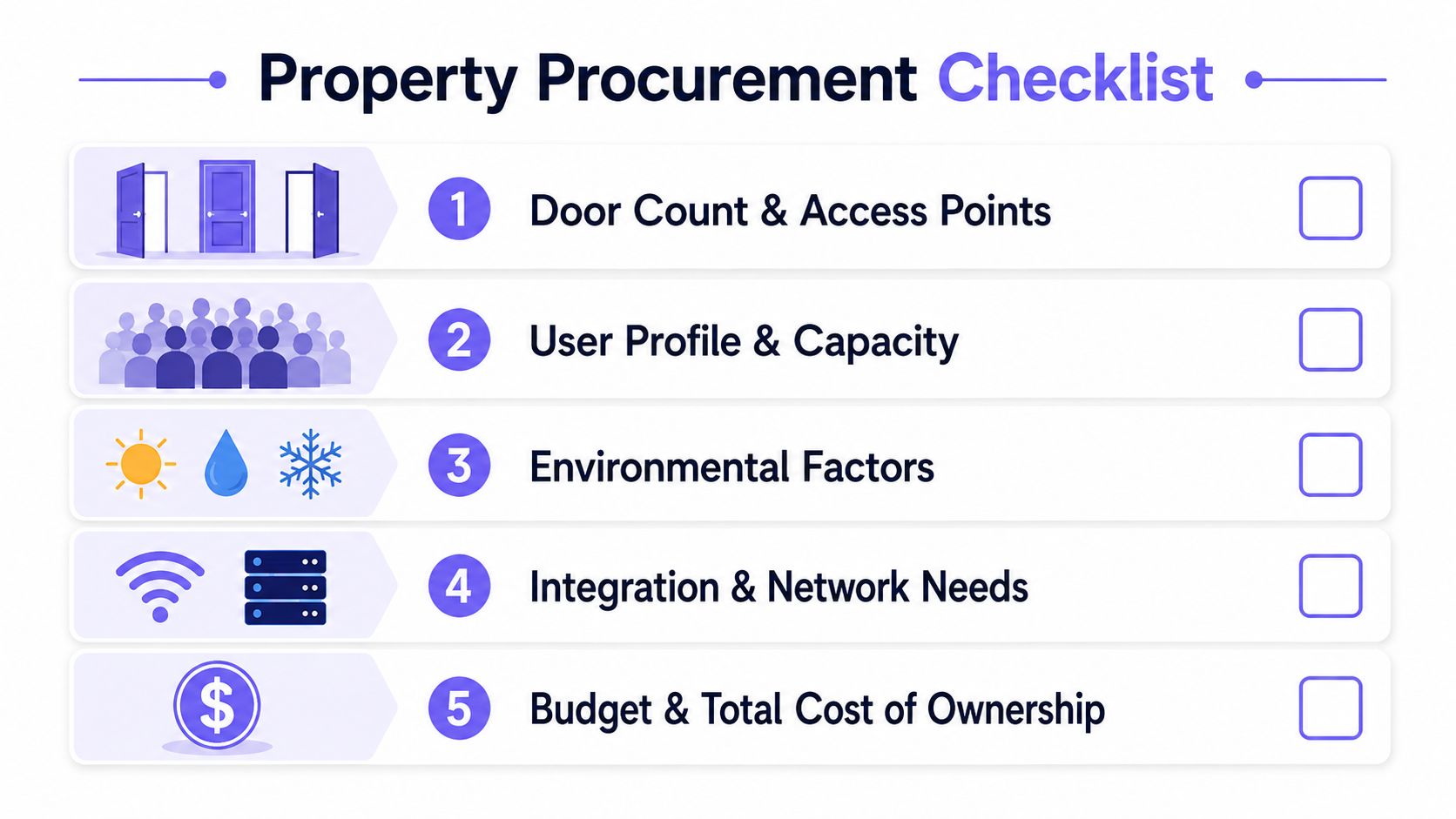
A short procurement checklist
The right answer usually depends on a few plain questions.
- How many doors need control? One door can justify a local biometric device more easily than a whole property.
- How often do users change? Frequent turnover pushes the decision toward centrally managed access.
- Does remote management matter? If managers need to grant or revoke access from anywhere, smartphone-based control becomes more attractive.
- Is there already a gate operator or electronic lock? Retrofitting existing hardware is usually simpler than replacing every entry point.
- What level of audit trail is required? Shared properties often need clearer logs than a private home.
The practical buying pattern
A biometric knob fits best where the user group is stable and the door is local. Smartphone-based access fits best where the manager needs remote control, visitor handling, and system-wide oversight. A mixed setup is often the most realistic choice for HOAs, with biometrics on selected interior doors and phone-based control on the main community entry.
What boards should remember
Budget questions matter, but so does operating burden. Biometric knobs are usually a per-door hardware purchase plus batteries or low-voltage wiring, while smartphone-based access typically combines a retrofit controller with an ongoing subscription model.
That makes the final decision less about gadget preference and more about the property's real operating pattern. If the door has a small, stable cast of users, biometrics can work well. If the site has turnover, visitors, contractors, or multiple access points, the smarter move is usually a layered system.
Nimbio helps property teams and HOA boards turn existing electronic gates and building entry points into smartphone-controlled access without depending on Wi-Fi. If a property needs remote credential management, visitor control, and a retrofit that works with the hardware already in place, visit Nimbio to see how a cellular access system can fit that workflow.