The board meeting usually starts with the same complaints. A resident lost a fob. A vendor still has the old gate code. Delivery drivers are stacked at the entrance because nobody knows which directory entry to press. The gate itself still works, but the access process around it no longer fits how people live.
That's where a modern door entry system changes the conversation. It turns access control from a patchwork of remotes, keypads, and call boxes into one managed system with credentials, logs, remote permissions, and better visitor handling. For older communities and commercial sites, the question isn't whether to modernize. It's how to upgrade without tearing out equipment that still has useful life.
That urgency is showing up in the market. The global door entry systems market reached USD 10.6 billion in 2024 and is projected to reach USD 16.9 billion by 2030, with a projected 8.1% CAGR, driven by demand for smart security and mobile-based access control, according to Strategic Market Research's door entry systems market analysis.
Properties that manage gates, doors, service vendors, and resident turnover also run into an operational issue. Access control only works when updates happen quickly and consistently. Teams that already manage maintenance workflows across sites may also find value in SaberTask's field service software guide, especially when access updates and service dispatch start intersecting.
For many HOAs and multifamily operators, the shortest path forward is to replace key fobs for gated communities without replacing the entire gate system.
Table of Contents
- Your Guide to Modern Property Access Control
- What Is a Door Entry System Core Components Explained
- Comparing Door Entry System Types From Keypads to Smartphones
- The Power of Cellular Retrofits for Existing Properties
- How to Choose the Right System for Your Property
- Installation Maintenance and Long-Term Costs
- Frequently Asked Questions About Door Entry Systems
Your Guide to Modern Property Access Control
Older properties rarely fail all at once. They drift into risk.
A keypad code gets shared too widely. A clicker never comes back after a move-out. A call box directory falls behind. Staff starts solving access issues manually, which usually means less auditability and more resident frustration.
A modern door entry system fixes that by treating access as an operating system for the property, not just a gate opener. Residents need convenient entry. Managers need control over who has access, when they have it, and how quickly permissions can be changed.
The pressure points boards can't ignore
Three problems usually push upgrades onto the agenda:
- Shared credentials create blind spots. When multiple people use the same code, nobody can confidently tie an entry event to a specific person.
- Physical credentials create admin drag. Fobs, remotes, and cards have to be issued, replaced, tracked, and deactivated.
- Visitor access breaks down first. Guests, vendors, and delivery drivers expose the weakness of outdated systems faster than daily resident entry does.
Practical rule: If staff is solving gate access with workarounds, the system isn't controlled access anymore. It's informal access.
The strongest upgrade plans focus on the property's current condition. That means evaluating the gate operator, existing readers, power availability, entry volume, and resident expectations before talking about features. A gated community with a functioning LiftMaster or Viking operator doesn't need a full rip-and-replace just to get smartphone access and remote credential control.
What modern access control should deliver
For an HOA board or property manager, the right outcome is straightforward:
- Residents enter without friction.
- Visitors can be managed remotely.
- Managers can grant and revoke access quickly.
- The property keeps a usable event trail.
- The upgrade doesn't create avoidable construction or wiring costs.
That's the lens that matters in 2026 planning. Not gadget count. Not feature bloat. Just whether the property becomes easier to secure and easier to run.
What Is a Door Entry System Core Components Explained
A door entry system isn't one device. It's a stack of parts that work together.
At the property level, that stack usually includes the controller, the reader or entry point device, the lock or gate release hardware, the communication layer, and the software used to manage everything. Once boards understand those pieces, vendor comparisons get much easier.
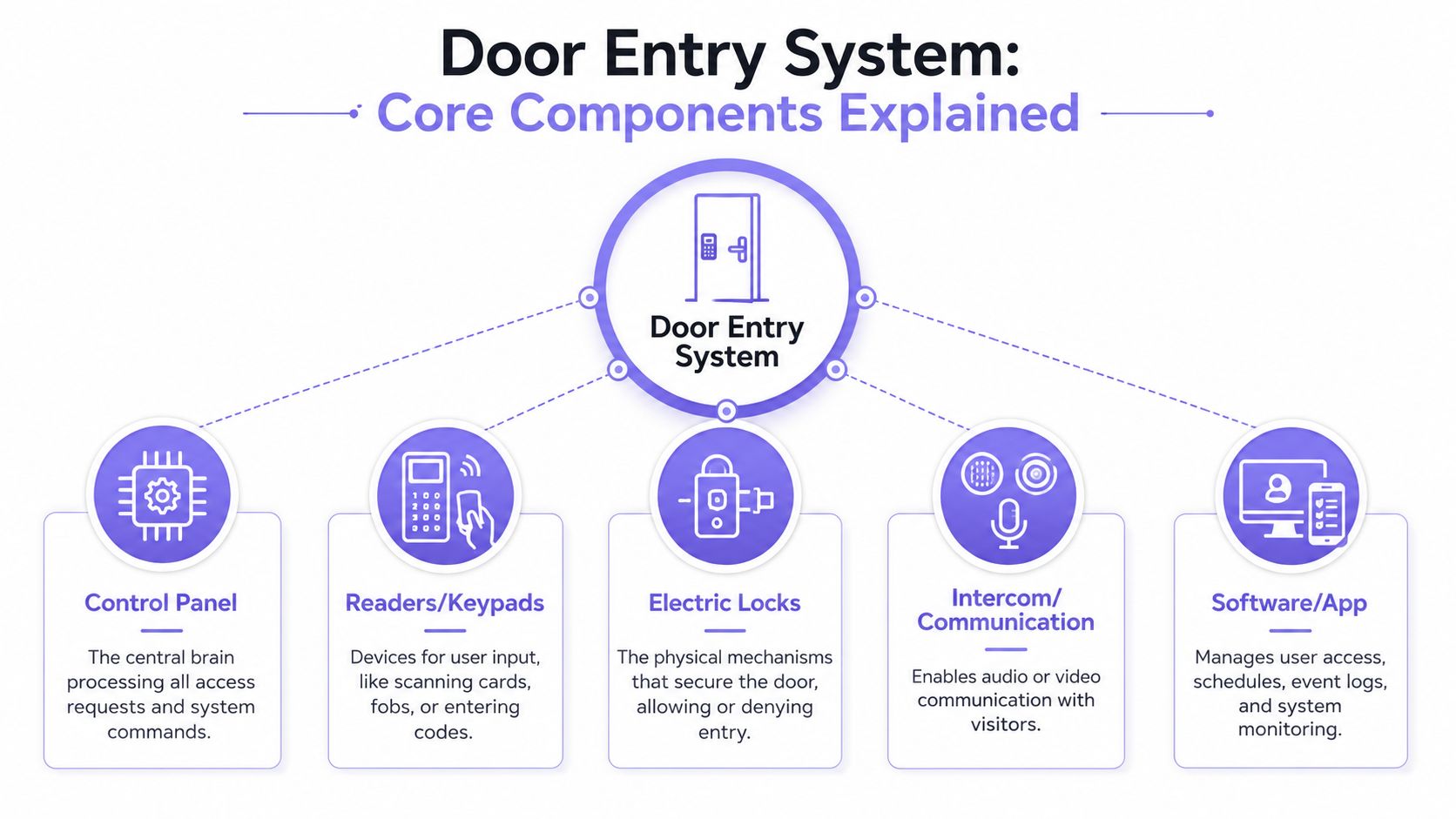
Control panel
The control panel is the brain.
It receives an access request, checks whether the credential is valid, and tells the lock or gate operator what to do next. If the property has schedules, hold-open periods, or different user types, the controller is where those rules are enforced.
Think of it as the decision-maker behind the scenes. Residents don't interact with it directly, but every successful and denied entry depends on it.
Readers keypads and intercom touchpoints
The reader is the part people use.
That can be a keypad, a card reader, an intercom, a video station, or a mobile-based trigger. On older systems, the reader often doubles as the weakest point because it encourages shared PINs or depends on physical tokens that can be passed around.
Not every property needs the same interface. A small private gate might only need app-based control, while a multifamily entrance may need a directory, visitor calling, and visual verification.
The user-facing device should match the traffic pattern at the entry, not just the budget line item.
Electric locks and release hardware
The electric lock or gate release hardware does the physical work.
This is the strike, magnetic lock, opener, or gate operator connection that opens the door or opens the gate after approval. It's easy to overlook this layer when vendors focus on apps and dashboards, but the physical mechanism still decides whether the opening event happens smoothly.
Intercom and communication
The communication layer handles visitor interaction.
For many properties, that means audio or video communication between the entrance and the resident or manager. This becomes especially important where guest verification matters, such as multifamily entrances, managed communities, and sites that receive frequent vendor traffic.
Software and app management
The software is where management gets practical.
That's where administrators add users, revoke credentials, review logs, assign schedules, and monitor activity. Good software shortens routine tasks. Weak software turns every access change into a support ticket.
A useful way to evaluate any door entry system is to ask five simple questions:
- Who makes the decision? The controller.
- How does the person identify themselves? The reader or entry point.
- What credential are they using? Code, fob, card, phone, or approved visitor flow.
- What physically opens? The lock or gate mechanism.
- Who manages changes later? The software layer.
If a vendor can't explain those five elements clearly, the system probably won't be easy to operate after installation.
Comparing Door Entry System Types From Keypads to Smartphones
Most properties choosing a new door entry system aren't comparing abstract technology. They're comparing real habits.
The old setup usually involves a keypad, an intercom, a stack of remotes, or RFID fobs. Those tools can still function, but they become harder to manage as resident turnover, delivery volume, and compliance expectations increase.
Modern contactless systems use technologies such as BLE, NFC, and RFID. BLE-based smartphone keys can offer an effective range of 100 meters, enterprise-grade systems typically require AES-128 or higher encryption, and contactless methods like BLE and NFC can reduce entry transaction time by 40 to 60% compared with physical key fobs or cards, according to CIE Group's contactless access control overview.
Where legacy methods still fit
Keypads and intercoms still have a role in some environments. They're familiar, simple to explain, and often already installed.
The problems start when convenience overrides control. Shared PINs are easy to pass along. Printed directories get outdated. A lost remote may remain active longer than anyone realizes.
RFID cards and fobs improve accountability compared with shared codes, but they add another physical inventory problem. Someone has to issue them, replace them, collect them, and disable them.
Why smartphone and cellular systems changed the standard
Smartphone access improves two things at once. It removes a physical credential from the process, and it gives managers a faster way to change permissions.
That matters most in active properties where residents move in and out, vendors need temporary access, and managers can't be onsite for every request. It also opens the door to better cloud-based access control, remote visitor handling, and software-level auditability.
A modern setup can also support broader integrations. For teams building custom workflows across properties, a gate access API can matter as much as the reader on the wall.
Door Entry System Technology Comparison
| Feature | Keypad / Intercom | Card / Fob (RFID) | Cellular / Smartphone System |
|---|---|---|---|
| Credential control | Often weak when codes are shared | Better than shared codes, but depends on issuing and collecting physical items | Stronger admin control because digital credentials can be granted and revoked remotely |
| Resident convenience | Familiar, but visitors may struggle with directories or codes | Simple for regular users who carry fobs | High convenience because residents can use their phones |
| Visitor management | Usually basic | Usually limited unless paired with other tools | Better suited for remote guest access and managed visitor workflows |
| Auditability | Limited when multiple users share a PIN | Better event attribution if each user has a unique fob | Strong audit trail when each credential is tied to a named user |
| Operational overhead | Low setup effort, but weak ongoing control | Ongoing burden from replacements and deactivation | Less physical credential handling for staff |
| Fit for retrofit projects | Often already present, but dated | Works if existing readers remain in place | Well suited when owners want modern access without replacing the entire gate operator |
Buyers often focus on how people get in. The better question is how quickly the property can remove access when it needs to.
The Power of Cellular Retrofits for Existing Properties
Most boards don't want a construction project. They want a working gate to become a smarter gate.
That's why retrofit strategy matters. A property may already have a reliable operator from LiftMaster, Viking, DoorKing, FAAC, Nice, or another established brand. Replacing all of that hardware just to add smartphone access is often unnecessary.
Why cellular solves the weak point in many upgrades
Cellular-based systems use 4G/5G mobile networks rather than depending on local Wi-Fi or onsite internet. That matters because the local router is often the first point of failure in internet-dependent setups. Cellular architecture removes that weak link and provides more reliable connectivity in remote or difficult locations, according to SpiderDoor's explanation of cellular gate access control.
For large properties, detached gate entrances, and rural or semi-remote communities, that design choice is practical, not cosmetic. The gate may be hundreds of feet from the building network. Even where broadband exists, local outages and router problems can still interrupt service.
What retrofit-friendly actually means
A good retrofit doesn't pretend the old hardware disappears. It works with the existing gate operator and modernizes control around it.
That usually means:
- Preserving the operator. If the current motor and control board are in solid condition, they can often stay in place.
- Adding a cellular controller. The upgrade happens at the control layer rather than through a full system replacement.
- Moving credential management into software. Managers stop relying on physical remotes and shared codes for every access need.
- Improving visitor handling. Guests can request entry without forcing staff or residents into awkward gate workarounds.
Properties evaluating this path should look closely at how a vendor handles retrofitting legacy gate operators, especially when the goal is to avoid trenching, rewiring, or replacing a still-serviceable gate system.
One practical example
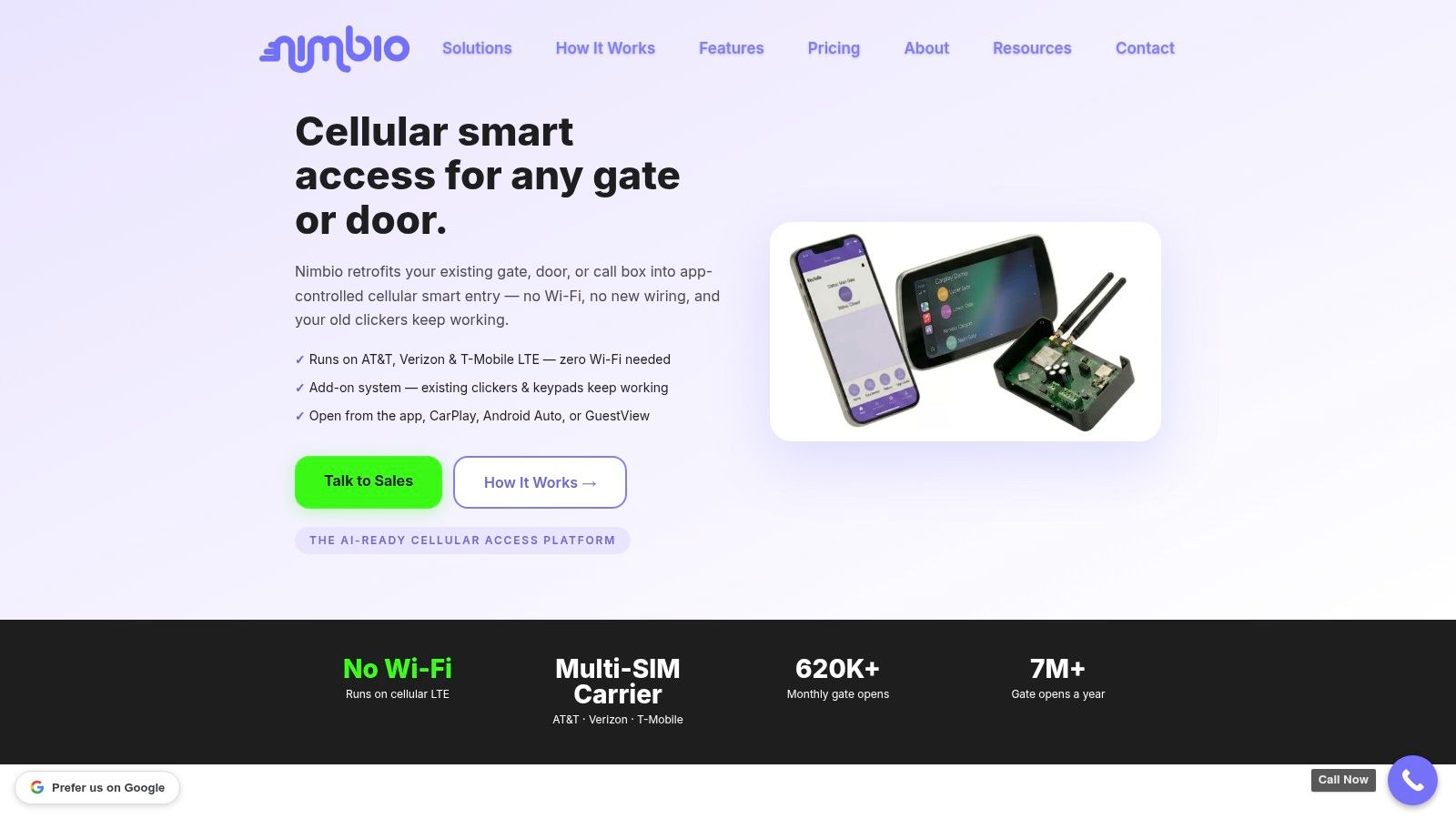
A vendor such as Nimbio fits this retrofit model by adding a cellular controller to existing electronic gates and allowing smartphone-based access management without requiring a full gate replacement. For boards and managers, that keeps capital planning focused on what needs replacing, not what's merely older.
There's another practical angle here. Modern cellular retrofit controllers can draw power from the existing gate operator and are compatible with solar-powered gate operators when the power requirement is met, which makes them useful for entrances where new wiring would be disruptive or expensive, based on Nimbio's mobile app product information.
How to Choose the Right System for Your Property
The right door entry system depends less on property size than on traffic pattern, staffing model, and risk tolerance.
A single-family driveway gate, a self-managed HOA, and a commercial yard may all want smartphone entry, but they won't evaluate the same details in the same order. Residential applications account for approximately 70 to 75% of total unit demand for video door entry systems, while the commercial segment is expanding faster, often due to compliance-driven access and video verification needs, according to IndexBox's market analysis of video door entry systems.
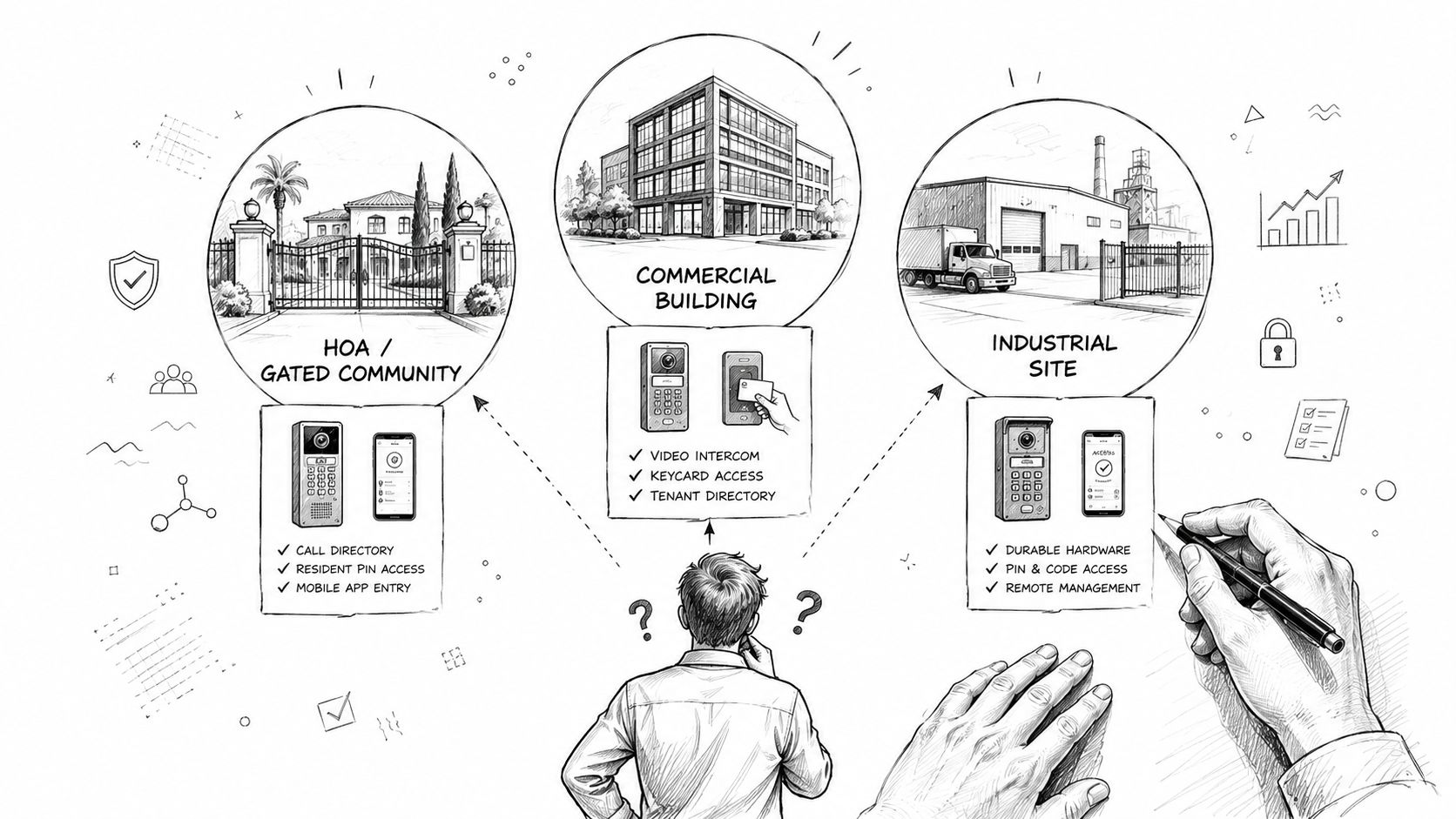
HOAs and Gated Communities
HOA boards usually care about three things first. Resident convenience, controlled guest access, and less administrative friction.
Questions worth asking:
- Can access be revoked instantly when a resident moves out or a contractor no longer needs entry?
- Can residents handle guest entry remotely without sharing a community-wide code?
- Are entry logs usable when there's a dispute about who accessed the property and when?
- Will the system work across multiple resident types, including owners, renters, staff, and vendors?
A poor fit for an HOA is any system that still relies on broad shared credentials for daily operation. That may feel simple at first, but it weakens accountability and creates cleanup work later.
Communities don't need more credentials. They need fewer shared ones and better control over the credentials that remain.
Commercial and Industrial Sites
Commercial sites usually need tighter policy enforcement.
That includes scheduled access for employees, narrower permissions for vendors, and reliable entry handling for deliveries. A site manager should look beyond front-gate convenience and ask how the system supports logs, supervision, and workflow when there are multiple shifts or mixed-use access points.
A practical checklist includes:
- Entry by role. Employees, contractors, and drivers shouldn't all have the same level of access.
- Time-based permissions. Temporary access should expire without manual follow-up.
- Vehicle and delivery flow. The entry method must support the pace of actual operations.
- Visibility for management. Supervisors need clear event history without piecing records together manually.
Single Family Homeowners
Single-family owners usually want simplicity without giving up security.
They don't need an enterprise dashboard overloaded with features. They do need a reliable way to open a driveway gate, manage guest access, and avoid the usual mess of remotes, keypad codes, and service-call confusion.
The best questions are simple:
- Can family members each have their own credential?
- Can temporary access be given to a dog walker, cleaner, or house sitter and then removed?
- Will the system work even if the gate is far from the home's main internet equipment?
Selection mistakes to avoid
Some buying mistakes repeat across all property types:
- Buying for the demo, not the site. A polished app doesn't fix a poor fit for the gate layout or traffic pattern.
- Ignoring emergency and accessibility behavior. Entry systems have to balance security with safe passage and egress.
- Overlooking admin workflow. If every credential change requires installer support, the system will become a burden.
The right system feels boring after deployment. That's a good sign. Residents get in, visitors are handled properly, and staff isn't improvising access every day.
Installation Maintenance and Long-Term Costs
The purchase price rarely tells the full story of a door entry system. The long-term cost usually shows up in labor, service calls, physical credential replacement, and preventable downtime.
That's why total cost of ownership matters more than the hardware invoice alone. A system that preserves a working gate operator and reduces ongoing admin work can be the more disciplined financial choice, even if the comparison isn't obvious on day one.
Installation choices that affect cost later
Retrofit projects often win on disruption alone. If the property can modernize control without replacing the gate operator, trenching new lines, or rebuilding the entrance experience for residents, the upgrade stays operationally manageable.
Installation questions are practical:
- What stays in place? Existing operator, existing power, existing lock release hardware.
- What must change? Controller, credential method, software management, visitor flow.
- Who owns routine admin after launch? Staff should be able to handle common tasks without depending on service calls.
Cloud-based smartphone entry systems can also change the cost structure by reducing or removing some onsite hardware requirements. For example, Gate Sentry's overview of mobile keyless entry describes cloud-based smartphone entry systems that operate through the cloud and resident smartphones rather than traditional readers and fob infrastructure.
The mechanical side still matters
Digital control doesn't rescue worn-out hardware.
A critical blind spot in many upgrades is the gap between digital features and physical condition. An estimated 40% of system failures originate from degraded physical hardware rather than software bugs, which is why faded buttons, cracked housings, loose wiring, and worn mechanical parts deserve inspection before any access upgrade, as described in this analysis of common door entry system issues.
A smartphone app can modernize permissions. It can't compensate for a failing relay, a damaged enclosure, or a gate operator that's already at the end of its service life.
What boards should budget for
A disciplined cost review should include:
- Ongoing credential administration. Digital credentials are easier to manage than fobs and remotes.
- Firmware and feature updates. Software-maintained systems age differently from static hardware.
- Service response model. Some vendors make basic changes easy for staff. Others push simple tasks into paid support.
- Mechanical upkeep. Hinges, operators, strike hardware, wiring, and enclosure condition still require maintenance.
The strongest long-term investment is the one that reduces access friction without hiding future maintenance problems behind a polished interface.
Frequently Asked Questions About Door Entry Systems
Can an older gate really be upgraded to a smart door entry system
Yes, if the gate operator and related hardware are still in serviceable condition. Many properties can modernize access through a retrofit controller instead of replacing the full operator.
Is a smartphone credential secure enough for property access
It can be, when the system uses modern encrypted credentials and gives administrators the ability to revoke access quickly. That's a major improvement over shared keypad codes that can't be traced to one person.
What happens if local internet goes down
Cellular-based systems are designed to avoid dependence on local Wi-Fi and onsite internet infrastructure. That's one reason they're a strong fit for gates located far from buildings or in areas where internet reliability is inconsistent.
Do residents have to give up remotes and keypads immediately
Not always. Some retrofit projects preserve parts of the existing setup during transition, which can make rollout easier for residents and staff.
What should a board inspect before approving an upgrade
Check the condition of the gate operator, power source, wiring, reader housing, lock or release hardware, and the day-to-day process for residents and visitors. The software matters, but the physical entry point still decides whether the system performs reliably.
A property doesn't need to start from scratch to modernize access. Nimbio provides a cellular retrofit path for electronic gates and building entry points, with smartphone-based access, remote credential management, and compatibility with existing operators so boards and managers can upgrade control without unnecessary replacement.