

A Monday morning at a gated property often exposes the weaknesses of yesterday's access system. A property manager may find paper key logs beside a gatehouse computer, a contractor waiting because a fob wasn't reissued, and a resident locked out because a clicker battery died overnight.
That isn't a reader problem. It's an identity, connectivity, and operations problem.
Next generation access control gives property managers, HOA boards, installers, and residents a software-managed entry layer that connects people to gates, doors, call boxes, and audit trails. The strongest systems don't begin with futuristic credentials. They begin with three practical decisions: whether existing hardware can be retained, whether entry remains reliable when Wi-Fi fails, and whether access rights can be provisioned and revoked with discipline.
Table of Contents
- What Next Generation Access Control Actually Means
- The Technology Stack Behind Modern Entry
- Why Identity Lifecycle Is the Real Upgrade
- How Residential, Multifamily, and Commercial Use It Differently
- Operational Benefits and the ROI Math
- Migration and Retrofit Strategies That Protect Existing Hardware
- Admin Workflows, Digital Keys, and Visitor Verification
- Evaluating Vendors and Avoiding Common Pitfalls
What Next Generation Access Control Actually Means
The old model treated a credential as a physical object. A fob, card, clicker, or keypad code was tied to a person only loosely, and the gate operator usually had no useful understanding of whether that person should still have access.
A modern platform treats access as a managed relationship between an identity, a permission, an entry point, and a time window. The credential may live on a phone, but the important change is that authorization lives in software.
The difference between a new reader and a new operating model
Replacing a card reader with a mobile reader doesn't automatically modernize a property. If staff still create accounts manually, vendors keep permanent permissions, former residents remain active, and administrators can't export entry history, the property has merely digitized the same weak workflow.
A modern system lets an authorized administrator:
- Onboard quickly: Assign access when a resident signs a lease, joins an HOA, or starts work.
- Set boundaries: Limit vendors, cleaners, and delivery personnel by entry point and schedule.
- Revoke immediately: Disable a credential after move-out, termination, phone replacement, or suspected theft.
- Review activity: Search time-stamped access events instead of reconstructing incidents from paper notes.
- Manage remotely: Change permissions across distributed properties without driving to every gate.
The access control market's scale reinforces why this operating model matters. The global market was estimated at USD 10.76 billion in 2024 and is projected to reach USD 17.30 billion by 2030, with an 8.4% CAGR from 2025 to 2030, according to Grand View Research's access control market analysis. This is infrastructure, not a niche gadget category.
Practical rule: A modern access system should make it easier to answer who had access, why they had it, where they could enter, and when the permission ended.
That standard applies differently to a gated community, an apartment building, and a logistics site, but the principle stays the same. The best next generation access control deployment reduces the number of manual decisions staff must make while improving the quality of the decisions that remain.
The Technology Stack Behind Modern Entry
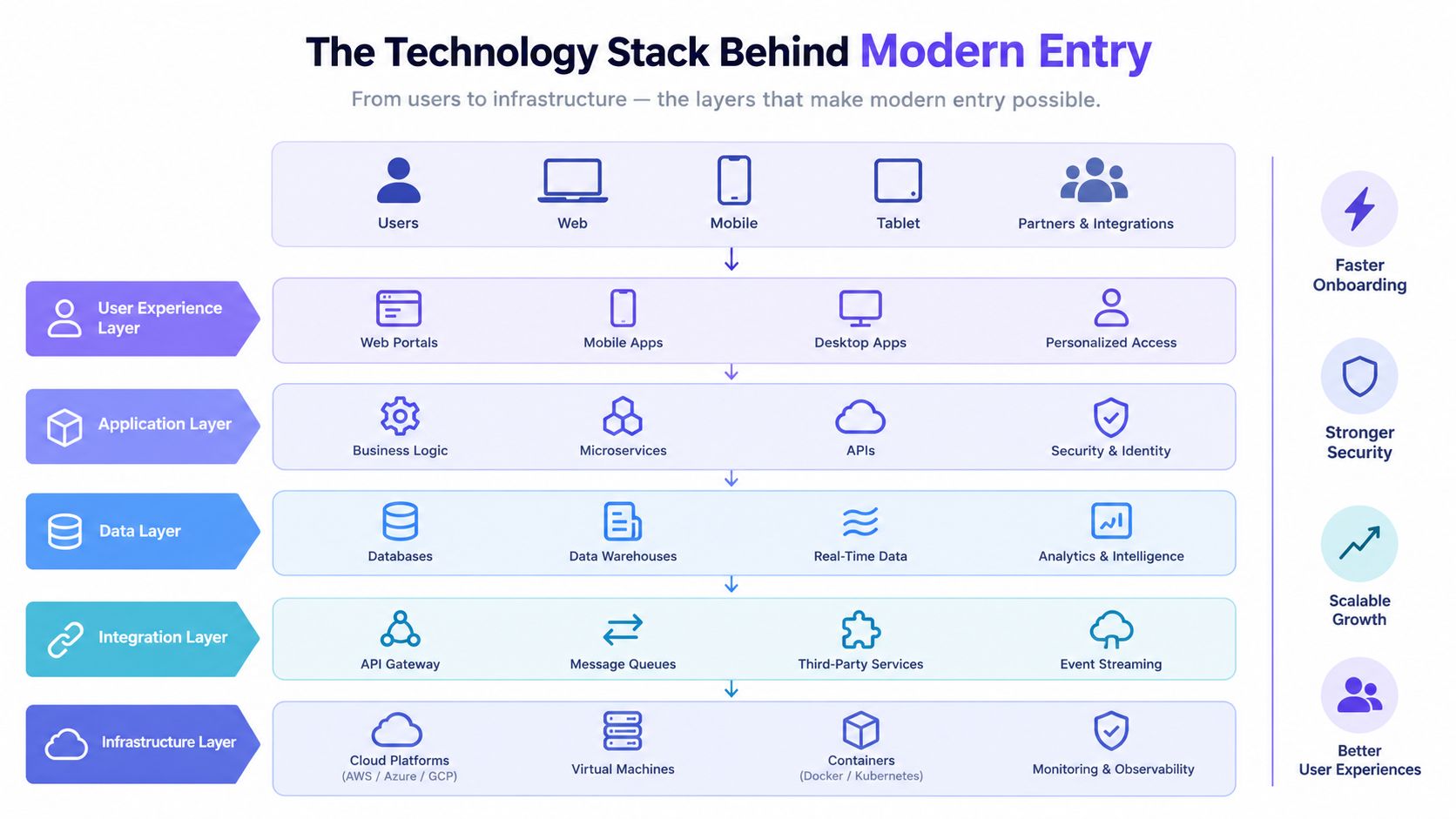
Modern entry works as a stack. Each layer solves a different operational failure, and the property shouldn't select one layer while ignoring the others.
Start with connectivity
At the bottom sits the connection between the property and its access controller. Cellular connectivity is often the practical choice for gates because it avoids dependence on resident or site Wi-Fi, long Ethernet runs, and aging phone-line modems.
A cellular controller can receive permission changes and report entry events remotely. Multi-carrier SIM capability can improve resilience where one carrier's signal is weaker than another's, but installers still need to survey signal strength at the actual gate, not at the leasing office.
The trade-off is straightforward. Cellular introduces an ongoing subscription and depends on carrier availability, while trench-run Ethernet can offer a stable wired path if the property already has suitable infrastructure. For distributed gates, construction-heavy sites, and retrofit projects, avoiding new trenching often matters more than theoretical network simplicity.
Preserve the equipment that already works
The controller layer should be hardware-agnostic. It needs to communicate with existing gate operators, magnetic locks, door strikes, and panels rather than forcing a property into a full replacement.
Modern systems increasingly support OSDP, which Honeywell describes as an encrypted, bi-directional communication path between a reader and control panel, while legacy Wiegand support helps with retrofits and takeovers. That combination lets an installer improve the management layer without discarding functioning equipment.
The credential layer then becomes a use-case decision:
- Bluetooth mobile credentials suit residents who carry smartphones and want hands-free or app-based entry.
- PINs work for simple, shared access, but they create weak accountability when codes are reused.
- QR codes fit temporary visitor permissions and event access.
- RFID cards remain useful where users need a physical credential or phones aren't practical.
- Biometrics can suit controlled commercial environments, but privacy, enrollment, and data-governance requirements deserve careful review.
Video intercoms add a verification step. An app-based directory can call a resident, while cameras and sensors can support occupancy awareness, tailgating detection, or incident review. The analytics layer ties those events to searchable logs, so managers can investigate without switching between disconnected systems.
For teams designing identity controls across digital and physical environments, an SSO access control guide can provide useful context on centralized authentication and permission management. Properties that need to connect entry events with other systems should also evaluate a documented gate access API before selecting a platform.
Why Identity Lifecycle Is the Real Upgrade
The credential is the least interesting decision a property makes. A phone, card, face, or code only becomes secure when the organization controls the complete lifecycle behind it.
Consider a multifamily building where a former resident's mobile credential remained active for nine months after move-out because the leasing record and access system were separate. The app looked modern, but the permission was unmanaged. In another community, the property management event triggers an automatic credential shutdown at move-out. The second deployment has stronger access control even if both properties use similar readers.
A credential needs an owner and an end date
Every permission should answer five questions:
- Who receives it?
- Which gates, doors, or amenities can it open?
- When does it become active?
- When does it expire?
- Who can revoke or review it?
That framework covers more than residents. Staff may need role-based access. Cleaning crews may need recurring daytime windows. A delivery provider may need a temporary pass. A replaced or stolen phone may require immediate revocation without waiting for a support visit.
Physical access teams can borrow the discipline of master asset lifecycle management, especially the emphasis on ownership, status changes, records, and retirement. The same thinking belongs in HOA security and property operations.
Auditability separates a modern platform from a polished fob system. HOA boards, insurers, and regulated operators may need authorization trails, periodic reviews, entry logs, and termination evidence. A platform that can't produce clear, exportable records leaves staff to defend access decisions from memory.
The right buying question isn't “Which credential feels most advanced?” It's “Can the property prove who had access, why they had it, and when the permission ended?”
How Residential, Multifamily, and Commercial Use It Differently
The same cloud-based access control platform can behave very differently depending on the property. A gated HOA prioritizes resident convenience and visitor verification, while a commercial campus may prioritize zones, role-based permissions, and audit evidence.
| Factor | Residential Gated | Multifamily | Commercial |
|---|---|---|---|
| Credential volume | Stable resident population with recurring visitor access | Frequent onboarding, move-outs, amenity permissions, and vendor changes | Employees, contractors, visitors, and operational teams with varied roles |
| Primary experience | Smartphone gate entry and resident-controlled visitors | Mobile keys, building doors, parking, elevators, and shared amenities | Zoned access across offices, warehouses, loading areas, and restricted rooms |
| Lifecycle pressure | Board-approved rules and homeowner changes | Lease dates, staff turnover, roommate changes, and temporary permissions | Employment status, contractor windows, investigations, and compliance reviews |
| Integration scope | Gate operator, directory, intercom, and resident notifications | Property management software, tenant apps, parking, elevators, and intercoms | HR or identity systems, visitor management, video, alarms, and facility tools |
| After-hours needs | Fewer on-site staff, stronger remote visitor handling | Lockout support and rapid leasing-office response | Security coverage, incident escalation, and operational continuity |
| Main risk | Shared clickers, lost remotes, and untracked codes | Delayed revocation and fragmented tenant records | Excessive permissions and incomplete audit trails |
Match the architecture to the property
Residential communities generally benefit from cellular gate control, resident apps, and a visitor workflow that doesn't require a guard at every entry. Multifamily properties need bulk onboarding and clean lease-driven revocation, plus enough flexibility to separate building, parking, package, and amenity access.
Commercial operators should demand stronger role separation and audit exports. Their access map often includes employee zones, loading areas, service corridors, and after-hours restrictions, so a single undifferentiated credential model creates unnecessary exposure.
Property managers comparing multifamily gate access control should evaluate the full operating environment, not just the reader. Hardware, cellular plan, credential type, and administrative features should follow the use case. Vendor presets rarely account for the difference between a 24-hour residential gate and a commercial facility with restricted zones.
Operational Benefits and the ROI Math
An access upgrade should survive a board meeting without relying on vague promises about convenience. The defensible business case comes from hard offsets: guard coverage, lost credentials, rekeying, lockouts, and administrative work.
A three-year model should include:
- Upfront hardware: Controllers, readers, intercoms, sensors, installation, power work, and surge protection.
- Connectivity and software: Cellular service, cloud administration, support, and any integration costs.
- Avoided operating costs: Guard hours, emergency callouts, replacement fobs, rekeying, manual data entry, and site visits.
- Residual value: Better auditability, easier visitor handling, and a cleaner resident experience.
A worked model for a 200-unit property
A 200-unit property can build its own scenario by documenting current annual costs rather than borrowing assumptions from a vendor. The worksheet should record:
- Guard coverage: Paid overnight hours that cellular entry, remote verification, or scheduled access could reduce.
- Credential waste: Fobs, clickers, batteries, rekeying, emergency replacements, and shipping.
- Administrative load: Hours spent creating accounts, updating directories, issuing visitor passes, and resolving lockouts.
- Failure costs: Vendor callouts, missed deliveries, resident complaints, and manual incident review.
The calculation is simple:
Three-year ROI = three years of avoided costs minus three years of hardware, installation, connectivity, and software costs.
A property shouldn't count every soft benefit as savings. Resident satisfaction, fewer complaints, and a smoother leasing process matter, but they should support the payback case rather than replace hard evidence.
Board-ready test: If the proposal can't show which current expense disappears, shrinks, or becomes more predictable, it isn't an ROI model yet.
Cellular reliability also has a financial dimension. A gate that stays manageable without local Wi-Fi can reduce emergency dispatches and prevent staff from treating every connectivity issue as a hardware failure. The strongest proposals document the baseline first, then model conservative offsets and test the result at one entry.
Migration and Retrofit Strategies That Protect Existing Hardware
A property doesn't need to rip out a functioning gate operator to modernize access. The safest rollout uses a hardware-agnostic controller as an intermediary between the existing operator and the new credential platform.
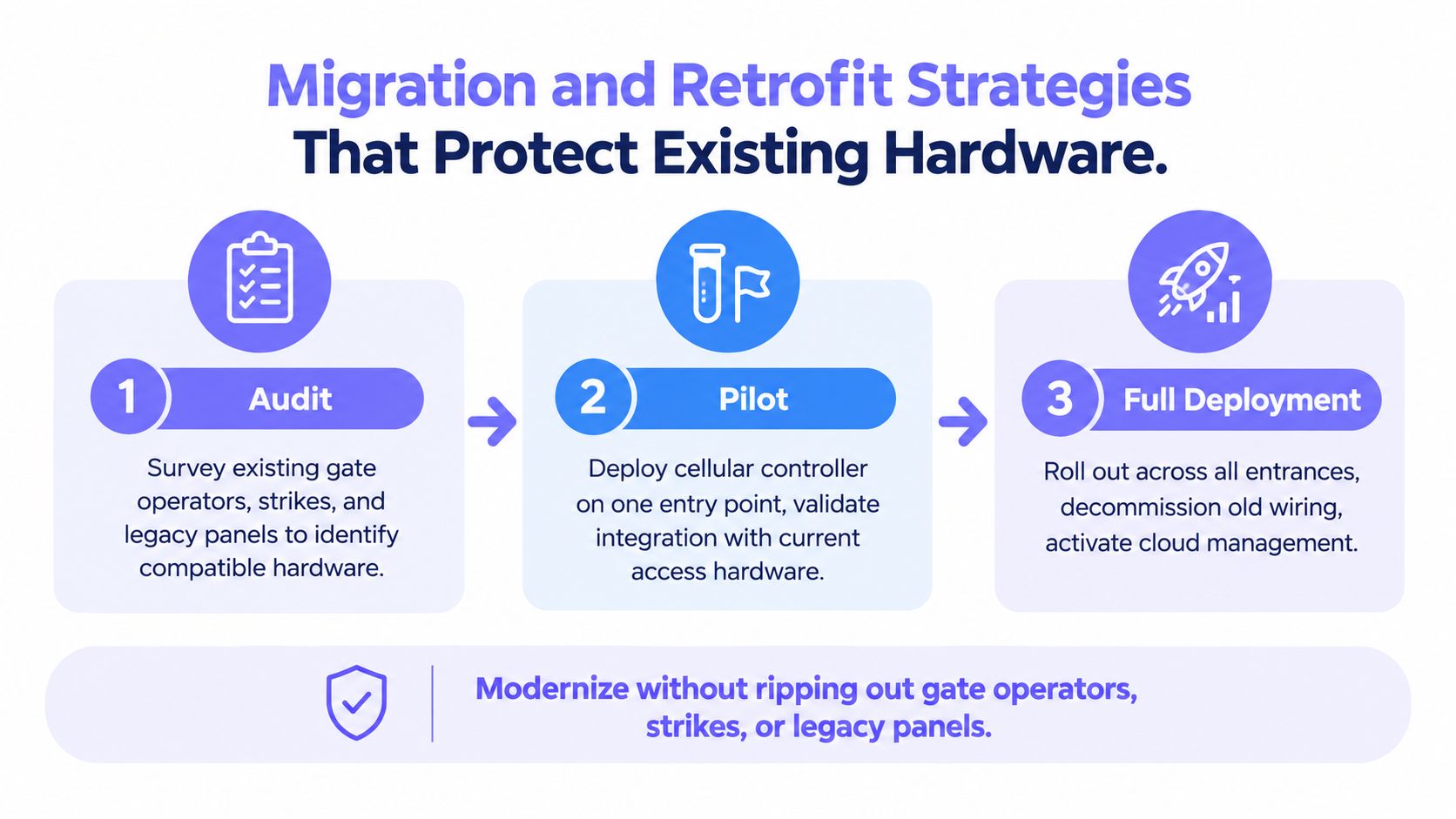
Phase one requires a physical audit
Before selecting equipment, the installer should document:
- Gate equipment: Operator brand, control inputs, loop detectors, safety edges, and existing remotes.
- Entry hardware: Call boxes, strikes, locks, readers, panels, and keypad wiring.
- Power: Available voltage, backup arrangements, enclosure space, and grounding.
- Connectivity: Cellular signal at the controller location, antenna position, and carrier options.
- Cabling: Conduit condition, cable paths, water exposure, and points vulnerable to vehicle impact.
- Fallback operation: Manual release, local controls, emergency access, and staff procedures.
A site survey often reveals that the gate operator is reliable while the communication path is the weak link. Preserving that operator protects capital already spent and limits the disruption of cutover.
Phase two should be a single-entry pilot
The pilot should run at one representative entrance, not the easiest entrance. It needs to test resident access, visitor calls, temporary credentials, admin revocation, event logging, power behavior, and cellular performance during normal traffic.
Staff should keep the previous access method available during a defined parallel-run window. That prevents a software configuration error from becoming a resident-access emergency.
Phase three expands only after acceptance testing
Full deployment should proceed after the pilot passes documented tests. Installers should verify antenna placement, surge protection, weather sealing, gate safety inputs, and local override procedures at every entrance.
A practical cutover checklist includes:
- Confirm the operator opens and closes safely.
- Test app access, visitor access, and emergency release.
- Verify event timestamps and administrator permissions.
- Confirm cellular communication and offline behavior.
- Keep legacy credentials available until the new workflow is stable.
- Train staff on revocation, support escalation, and manual fallback.
Teams evaluating retrofitting legacy gate operators should treat the migration as an operational change, not merely an installation appointment.
Admin Workflows, Digital Keys, and Visitor Verification
A usable platform makes routine administration predictable. The property manager should be able to complete the full workflow from one dashboard, with permissions that reflect the staff member's role.
The daily workflow should follow the identity lifecycle
Onboard the resident. Create or import the resident profile, associate the unit or property, and assign the correct gate, building, parking, and amenity permissions.
Issue the mobile key. Send the digital credential through the resident app. Mobile access control commonly uses Bluetooth communication with a mobile-capable reader, while Wi-Fi and NFC can serve other deployment needs, as explained in this guide to mobile access control systems.
Revoke at the right trigger. Move-out, employment termination, a stolen phone, or a change in lease status should disable access without waiting for a physical key return.
Schedule recurring access. A landscaping crew may need a defined service window. A vendor shouldn't receive permanent access merely because recurring visits are convenient for staff.
Pull the audit record. When a resident disputes an entry event or an HOA board asks for a review, staff should search by person, credential, location, date, or event type and export the result in a practical format.
Visitor verification should be proportional to risk
A low-friction visitor flow may use a directory call and resident approval. Higher-risk locations can add a PIN, license plate capture, video intercom confirmation, or a time-bound invitation.
The important feature is the record linking the visitor request, resident response, credential, entry point, and timestamp. Push alerts for repeated failed attempts or suspected tailgating can help staff act before a pattern becomes an incident.
Role-based permissions also matter. Leasing staff may onboard residents, maintenance staff may manage vendors, and board members may receive reports without gaining unrestricted credential-administration rights. A platform that grants every administrator the same power creates avoidable risk.
Evaluating Vendors and Avoiding Common Pitfalls
Feature lists make access control purchases look easier than they are. The serious evaluation starts at the gate and works backward through the property's infrastructure, identity records, and operating procedures.
Vendor evaluation checklist
- Confirm cellular coverage: Test the signal where the controller and antenna will be installed. Ask what happens during carrier degradation or an outage.
- Verify hardware compatibility: Require written confirmation that the controller supports the existing gate operator, strike, panel, or call box.
- Demand usable integrations: Ask for documented API access and identify which property management, tenant, parking, intercom, or facility systems need to connect.
- Inspect audit exports: Confirm that logs can be searched and exported in a plain, usable format for disputes, insurance, or board review.
- Test revocation: Ask whether one authorized administrator can disable a stolen phone or former resident's credential remotely.
- Clarify data ownership: Establish who owns credential records, visitor information, and event history, and how the property retrieves them if it changes vendors.
- Review security evidence: Request encryption details, update practices, access controls, incident procedures, and compliance-ready pentest reports.
Pitfalls that create expensive regret
Proprietary credentials can lock a property into one app and one reader ecosystem. Weak cellular planning can produce unreliable entry. Skipping the identity-lifecycle discussion leaves former residents, vendors, and staff with access that outlasts their business need.
Cybersecurity also shouldn't be treated as a checkbox. The buyer should ask how the vendor protects administrator accounts, separates roles, updates firmware, records changes, and responds when a credential or device is compromised.
The strongest decision usually isn't the platform with the longest feature list. It's the platform that can retrofit existing equipment, maintain a dependable connection without Wi-Fi drops, and give property staff a clear, repeatable way to issue, review, and revoke access.
Nimbio provides cellular keyless entry for electronic gates, call boxes, and building access while preserving compatible existing hardware and avoiding dependence on property Wi-Fi. Property managers and HOA boards can use its platform to issue, revoke, and schedule smartphone credentials, manage visitors remotely, and review entry activity, so they can evaluate a practical retrofit path at Nimbio.


