A lot of properties are stuck in the same place. The gate still opens, the old keypad still works most of the time, and nobody wants to start a major replacement project. But shared PINs, lost remotes, missing audit trails, and after-hours visitor issues turn that “working system” into a management problem.
That’s where panel access control matters. The panel is the part of the system that decides who gets in, when they get in, and what gets recorded. For property managers, HOA boards, and facility teams, understanding the panel is the difference between living with a legacy gate and controlling it.
Table of Contents
- What is Panel Access Control and Why Does It Matter
- How an Access Control Panel Works
- Choosing Your Panel Standalone vs Networked vs Cloud
- Essential Security and Management Features
- Use Case Modernizing a Gate with a Cellular Retrofit
- How to Budget Install and Maintain Your System
What is Panel Access Control and Why Does It Matter
Panel access control is the decision layer inside a physical entry system. A credential reader scans a card, fob, phone, or code, but the panel is what checks the rules and tells the door or gate to open. It’s the brain of the setup.
That distinction matters because many properties still treat access control as a keypad problem or a remote problem. It isn’t. The core issue is whether the property has a reliable control point that can authenticate users, apply schedules, record events, and support modern credentials.
For a simple primer on the broader concept, Overton Security’s guide to access control in security is a useful reference. A more practical walkthrough of the core model is also covered in Nimbio’s explanation of what access control is.
Why old systems break down operationally
Older systems usually fail in boring ways, not dramatic ones. Residents share a code with a dog walker. A vendor keeps a remote after the contract ends. A manager changes, and nobody knows who still has access.
The panel solves those problems only if it’s modern enough to do three things well:
- Apply permissions: It should know who can open which entry point and at what time.
- Create a record: It should log events so managers aren’t guessing after an incident.
- Support change: It should let staff revoke, update, or schedule access without reworking hardware every time.
Practical rule: If a property can’t quickly answer who entered, when they entered, and how they were authorized, the access system is creating risk instead of reducing it.
Why the category is growing
The market is moving in this direction because buyers want smarter entry management, not just electronic locks. The global Access Control Panel market was valued at USD 14,350.75 million in 2024 and is projected to reach USD 26,500.30 million by 2032, with a projected 7.6% CAGR from 2025 to 2032, according to Future Market Report’s access control panel market analysis.
That growth tracks with what property teams are asking for on the ground. They want smartphone-friendly access, cleaner audit trails, remote administration, and better integration with gates, doors, and visitor workflows. The panel sits at the center of all of it.
How an Access Control Panel Works
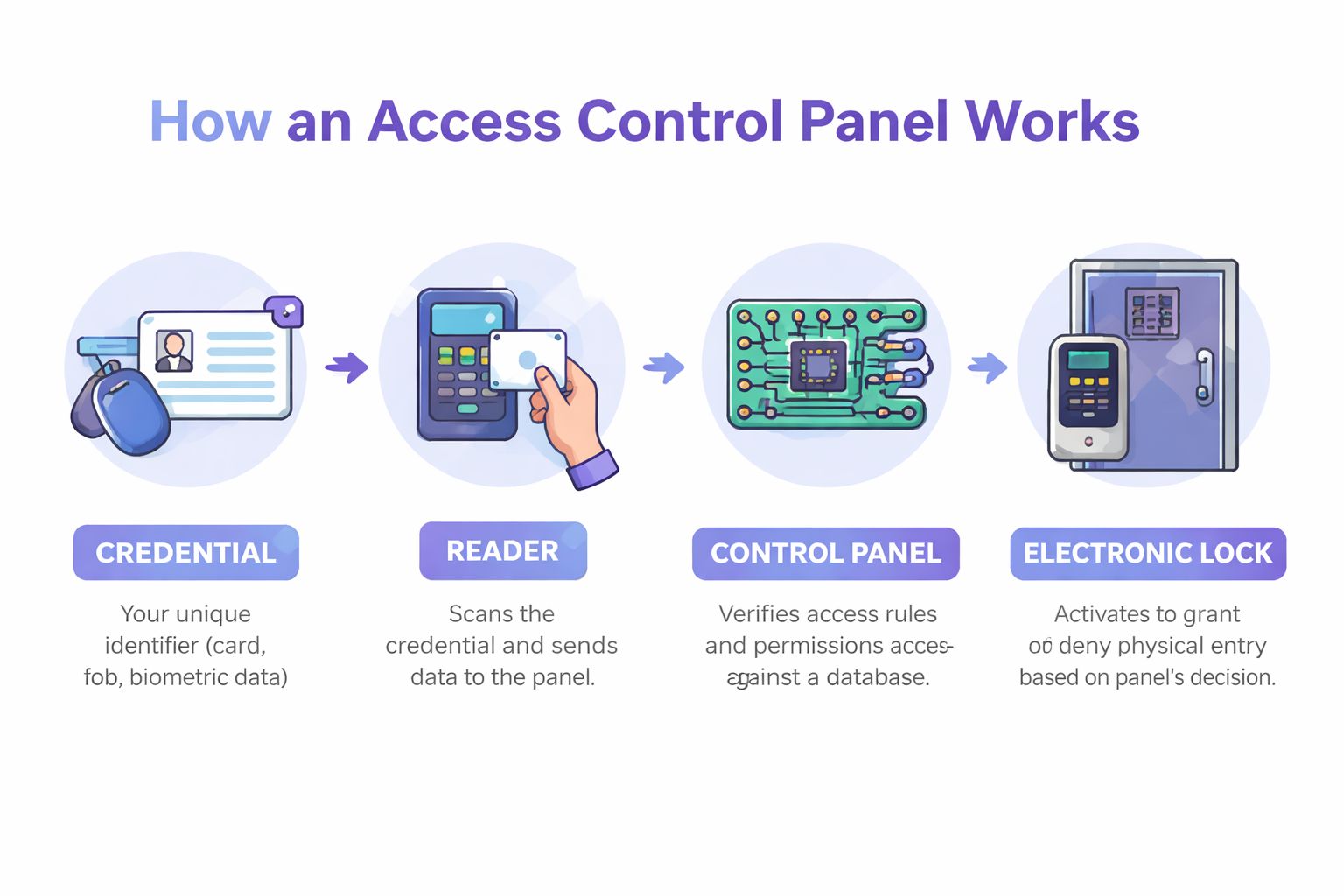
A good way to think about an access control panel is as a security guard with a perfect memory. The reader presents the “ID.” The panel checks the rules. The lock follows the decision.
The four parts that matter
Every panel access control system has four working pieces:
Credential
This is what the person presents. It might be a key card, a fob, a PIN, a mobile credential, or a biometric identifier.Reader
The reader captures the credential data. At a gate, that may be a keypad or proximity reader. At a secured door, it may be a wall reader or biometric unit.Control panel
This is the controller. It receives the credential data, checks permissions, applies schedules and rules, and sends the open or deny command.Electronic lock or gate operator
If the panel approves the request, the lock releases or the operator triggers the gate.
What the panel actually decides
The panel doesn’t just check whether a user exists. It checks whether that user should be allowed through that specific opening at that specific time, and whether any other rules apply. That’s why the panel is where system quality shows up.
A typical modern 2-door panel gives a clear sense of the hardware involved. According to New Tech Industries’ 2-door access control panel specifications, a standard unit can include a 32-bit processor, support up to 4 Wiegand readers, manage up to 10,000 users, process encrypted credential data, and continue operating offline.
That matters for real properties because access control can’t stop every time the network hiccups.
A typical event flow
- User presents credential: A resident taps a fob or uses an approved app.
- Reader sends data: The reader passes the credential to the panel.
- Panel checks rules: It compares the request against stored permissions, schedules, and door assignments.
- System responds: The panel triggers the gate or lock, or records a denied event and may trigger an alert.
A reader identifies. A panel authorizes. A lock obeys.
Why offline operation matters
Managers often focus on the app or the keypad because that’s what users touch. Integrators focus on the panel because that’s what keeps the site functioning when conditions aren’t perfect.
Offline capability is especially important at perimeter entries, warehouses, and remote properties. If the panel can continue validating approved credentials and logging events locally, the property doesn’t lose basic access control during connectivity issues. That’s the difference between an inconvenience and an outage.
Choosing Your Panel Standalone vs Networked vs Cloud
Not every property needs the same architecture. The wrong panel type usually creates one of two problems. It’s either too limited for daily operations, or it’s more system than the property can reasonably manage.
The biggest mistake is treating every upgrade as a full replacement job. That assumption breaks down fast in multifamily and gated properties with usable hardware already in place. According to a 2025 SIA Access Control Report, an estimated 62% of U.S. multifamily properties are still using pre-2015 gate systems, as cited on Napco Security’s access control product page. That’s a large installed base where retrofit strategy matters.
Access Control Panel Comparison
| Panel Type | Scalability | Management | Typical Cost | Best Use Case |
|---|---|---|---|---|
| Standalone | Low | Local, on-site changes | Lower upfront, limited flexibility | Single door, small office, basic utility room |
| Networked | Medium to high | Centralized across multiple openings | Higher hardware and programming burden | Multi-entry buildings, campuses, warehouses |
| Cloud | High | Remote dashboard, easier updates | Ongoing software costs, dependent on vendor model | Distributed properties, modern multifamily, commercial portfolios |
| Cellular retrofit | Targeted, practical scaling for existing sites | Remote control without relying on local WiFi | Often lower disruption than replacement | Legacy gates, remote sites, properties keeping existing operator hardware |
When standalone still makes sense
Standalone panels still have a place. For a single maintenance room, pool gate, or back office door, a simple controller can be enough if there’s no need for central reporting or frequent permission changes.
The trade-off is management friction. If staff has to walk to the opening to add users, remove credentials, or change schedules, that labor adds up. Standalone systems also tend to age poorly when the property adds more access points later.
Where cloud and retrofit options change the math
Networked and cloud systems solve the management problem. They centralize user permissions, logs, and scheduling, which is why they’re common in larger buildings and commercial sites. They’re usually the right answer when a property has many doors, multiple staff roles, or compliance requirements that depend on reliable records.
Cellular retrofit options fit a different need. They’re often the smarter path when the gate operator or entry hardware is still serviceable, but the management layer is outdated. That’s common with older LiftMaster and DoorKing setups where the physical gate is fine, but the property needs remote administration, cleaner audit trails, and modern credential options.
What works well:
- Keeping the operator: If the motor and gate mechanics are sound, replacing only the control layer is often the better use of budget.
- Reducing dependency on site internet: Cellular control is useful where WiFi is weak, unavailable, or unstable.
- Modernizing user access: Digital credentials are easier to revoke than shared remotes or persistent PINs.
What often doesn’t work:
- Layering more codes onto a bad workflow: Adding another keypad rarely solves accountability.
- Replacing hardware without fixing administration: A new reader won’t help if the property still can’t manage users cleanly.
- Overbuilding the system: Enterprise-grade architecture is wasted on a small site with one gate and basic access needs.
The right panel isn’t the one with the longest feature sheet. It’s the one that fits the site’s wiring, staffing, and daily management reality.
Essential Security and Management Features
A panel can be technically compatible with a property and still be a poor operational fit. The features inside the management layer are what determine whether staff can run the site without workarounds.
Management tools that save time
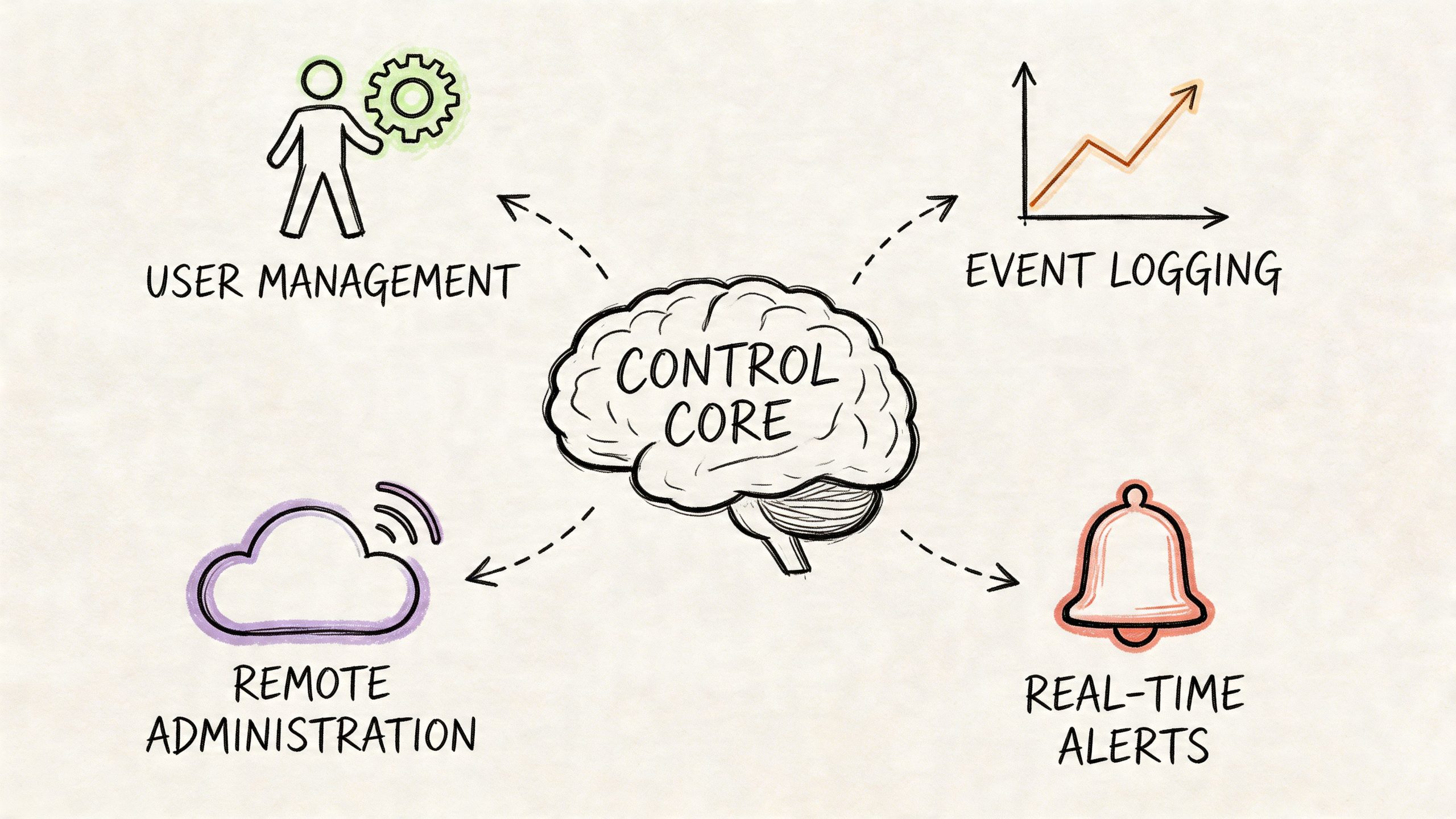
Property teams should look for features that reduce repetitive admin work and clean up accountability.
- Real-time event logs: Managers need a reliable record of granted access, denied attempts, and door or gate activity.
- Scheduled permissions: Cleaners, vendors, and delivery staff shouldn’t have 24/7 access if they only need a defined time window.
- Remote administration: Adding or revoking access from a dashboard is far better than collecting remotes or changing shared codes.
- Hold-open scheduling: Useful for leasing office hours, move-in windows, and predictable traffic periods.
- Role-based access: Staff, residents, vendors, and visitors shouldn’t all sit under the same permission set.
A modern panel should also support practical integration points. Readers, gate operators, video workflows, and reporting dashboards need to work together without creating a maintenance burden.
For teams evaluating the software layer, Nimbio’s feature overview for access management is a useful example of the kinds of controls modern admins now expect.
Security controls that prevent common failures
Good management features save time. Good security features stop known failure modes.
According to Matrix Comsec’s access control panel overview, advanced panels can include features such as Man Trap, which can reduce tailgating by over 70% in high-security zones, and Duress Detection, which lets a user send a silent alarm through a special code.
Those features aren’t for every property, but they show what modern panels can do beyond simple open-and-close commands.
High-value protections to prioritize
- Duress codes: Useful where staff may be pressured to open an entry point.
- Anti-tailgating logic: More relevant in interior secure zones, package rooms, and certain commercial settings.
- Tamper alerts: The system should report cabinet opens, forced doors, and unusual events.
- Audit trails: If an incident happens, the panel should provide evidence, not guesses.
- Credential revocation: The property should be able to remove access immediately when a tenant moves out or a vendor relationship ends.
Field note: The easiest systems to defeat are usually the ones that rely on shared codes and undocumented exceptions.
Why embedded reliability matters
Access panels are embedded devices, not just software subscriptions. That means reliability at the hardware and firmware level matters just as much as the admin dashboard. Sheridan Technologies’ article on security in embedded systems is a useful companion read for understanding why secure communication, tamper resistance, and update discipline matter in devices that control physical entry.
The practical takeaway is simple. A clean app interface doesn’t compensate for weak controller design. Managers should ask how the panel handles offline events, encrypted communication, firmware updates, and hardware tampering before they worry about cosmetic features.
Use Case Modernizing a Gate with a Cellular Retrofit
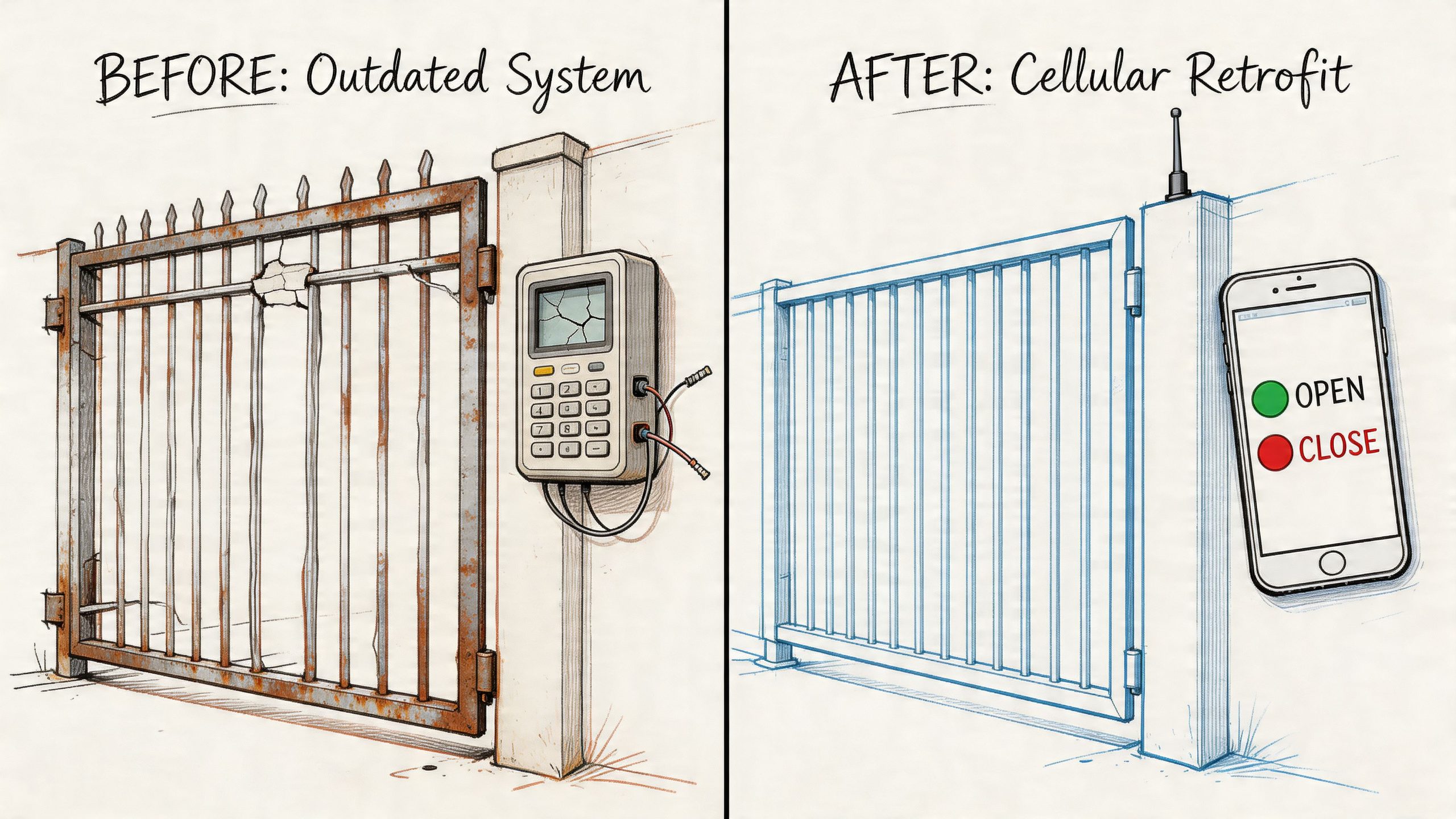
A common retrofit candidate is a gated community with an older operator, a fading keypad, and too many unofficial ways to get in. Residents have remotes in multiple cars. Former vendors still know the PIN. The manager has no clean event history and no practical way to verify visitors remotely.
Before the retrofit
The property’s existing gate operator still functions. Replacing the entire system would mean more cost, more disruption, and more coordination with residents and vendors. So the key question isn’t whether the gate must be replaced. It’s whether the control layer can be improved without disturbing everything else.
Typical pain points look like this:
- Shared keypad codes: Easy to distribute, impossible to track.
- Remote sprawl: Nobody knows how many are still active.
- No visitor workflow: Deliveries and guests depend on improvised calls or guard coverage.
- No remote admin: Managers have to be on site or depend on a gate company for small changes.
Cellular retrofits solve a different problem than traditional panel upgrades. They preserve the entry hardware that still works and replace the access experience that doesn’t.
After the upgrade
With a cellular-based control layer, the gate can keep its existing operator while shifting user management to digital credentials and remote administration. Residents can use a phone-based workflow, managers can issue or revoke access without collecting devices, and the property can finally create a usable event history.
Demand for this type of workflow is growing. Uniview’s access control page cites Google Trends data from 2026 showing a 180% spike in queries for “gate video access request,” and polls indicating 55% of property managers cite “visitor verification without guards” as their top unaddressed pain point.
That matters because gate management has changed. A property doesn’t just need a way to open the gate. It needs a way to verify visitors, control access remotely, and avoid paying for human intervention where software can handle the routine cases.
When a property can verify a visitor before opening the gate, it stops treating entry as a blind convenience function and starts treating it as a managed security event.
For gated communities, single-family driveway gates, and remote facilities, this approach usually works best when the existing operator is still mechanically sound. It doesn’t make sense to discard usable infrastructure just to gain app control or better logs. The stronger move is often to modernize the control layer and leave the motor, arm, and basic gate hardware in place.
For operators evaluating options, a practical example of this category is Nimbio’s page on smartphone-based gate access control.
How to Budget Install and Maintain Your System
Budgeting access control goes wrong when buyers focus only on the controller hardware. The more accurate question is what the system will cost to install, administer, support, and update over time.
That’s why full replacement projects often look better on paper than they do in practice. New panels, new readers, new wiring work, and new programming can be justified in some buildings. At a legacy gate, though, replacement often solves the wrong problem.
Budget the full lifecycle
A practical budget should account for four categories:
- Hardware: Controller, readers, enclosures, power supplies, and any gate or lock interfaces.
- Installation labor: Wiring, mounting, programming, testing, and any troubleshooting with the existing operator.
- Service model: Ongoing software or connectivity costs if the system uses cloud or cellular management.
- Administration burden: The hidden cost of every on-site credential change, service call, or manual exception.
A retrofit can win even before subscription math is considered if it avoids trenching, cabinet replacement, or a long outage window.
Installation and maintenance priorities
Benchmark data cited on the earlier Uniview source indicates that cellular retrofit installations can reduce installation time by up to 70% compared to fully replacing a wired panel system. The practical takeaway isn’t just speed. It’s reduced disruption.
That changes the install conversation for occupied properties. Fewer moving parts usually means less resident friction, fewer scheduling headaches, and less risk of creating a half-modernized system that nobody wants to maintain.
For buyers comparing vendors, Wilcox Door Service offers a useful reference point on access control system installation and the kinds of planning considerations that affect deployment quality.
What to ask before approving a system
Can the existing gate or door hardware stay in place?
If yes, the property may not need a full replacement.How are users added and removed?
If the answer involves manual on-site steps for every change, admin costs will keep climbing.What happens during connectivity loss?
A property needs predictable behavior when the network isn’t perfect.How are updates handled?
Systems that support over-the-air updates are easier to keep current.Who owns the maintenance burden?
Some systems look affordable until every small change requires a truck roll.
A budget system becomes an expensive system when every access change turns into labor.
The best long-term result usually comes from matching the architecture to the property’s actual needs. A large commercial site may need a deeper networked platform. A gated community with a working operator may get better value from a targeted retrofit that modernizes control without replacing the whole entry stack.
For properties that want modern access control without a full rip-and-replace project, Nimbio offers a cellular-based retrofit that turns existing electronic gates and entry systems into smartphone-controlled access points. It’s a practical fit for HOAs, multifamily sites, commercial properties, and installers who need remote management, digital keys, real-time logs, and a cleaner upgrade path than full replacement.