The most popular advice about an RFID key fob is also the least useful: “Just match the fob to the reader.” That approach ignores whether the credential can be cloned, whether its range fits the gate, how quickly staff can revoke it, and what happens when residents lose it.
Fobs still solve real access problems. They're compact, inexpensive physical tokens for users who don't want, or can't rely on, a smartphone. But they're no longer an automatic choice for every gate, apartment building, or HOA security program.
The practical question is narrower: does a fob fit the property's hardware, threat model, turnover, and management workload? The answer often depends on frequency, reader design, credential security, and whether the property needs remote visitor management or cloud-based access control.
Table of Contents
- Why RFID Key Fobs Still Matter for Access Control
- How an RFID Key Fob Actually Works
- Frequencies, Read Ranges, and Credential Types
- Common Use Cases at Gates and Entry Points
- Security Strengths and Weaknesses of RFID Fobs
- Deployment Best Practices for Property Managers and Installers
- When It Makes Sense to Move Beyond the Fob
Why RFID Key Fobs Still Matter for Access Control
RFID fobs are still useful, but they are no longer the obvious default. They remain a practical, increasingly legacy credential for properties that value simple physical access, while cellular and app-based systems are taking over where managers need remote control, identity context, and visitor workflows.
A resident presents a small token, the reader checks its credential, and the gate operator or door controller responds. There is no phone battery to manage, app to open, or dependence on a resident's comfort with mobile technology.
That makes a fob a sound choice for:
- Legacy panels: Older residential systems may already support 125 kHz credentials.
- Budget-conscious retrofits: Reusing existing readers can avoid a broader hardware replacement.
- Physical-token users: Some residents want a device that stays on a key ring.
- Outdoor amenities: A weather-resistant fob is often easier around pools, gyms, and parking areas than a wet phone screen.
The market still reflects that installed base. A 2025 RFID access control market report reported approximately 30.5% of market revenue for key fob-based access, compared with 36.8% for card-based credentials and 24.2% for mobile credentials. It also projected mobile credentials to grow at a 9.8% CAGR through 2033, pointing to a transition rather than the disappearance of fobs.
Where the default starts to fail
Many properties inherit a 125 kHz or 13.56 MHz system without checking whether it still fits daily operations. A credential can open a door reliably while still bringing weak cloning resistance, limited identity verification, or slow deactivation after a resident moves out.
The engineering trade-off extends to read behavior. Short-range fobs require deliberate presentation. Longer-range credentials create a wider read zone and a different threat model. A setup that works at a lobby door may perform poorly at a busy vehicle gate, where reader placement, vehicle positioning, and throughput all matter.
Practical rule: A fob is a credential format, not a complete security strategy.
RFID/NFC still represented 57.75% of connected access systems in 2025, according to Mordor Intelligence's access control market analysis, but that share does not determine the right credential for a particular property.
The decision should focus on mixed hardware generations, residents who lose phones, gate reliability, audit requirements, cellular coverage, and staff workload. Fobs often earn their keep as a transitional credential. They become a liability when managers need identity-aware access, instant remote changes, or better visitor control.
How an RFID Key Fob Actually Works
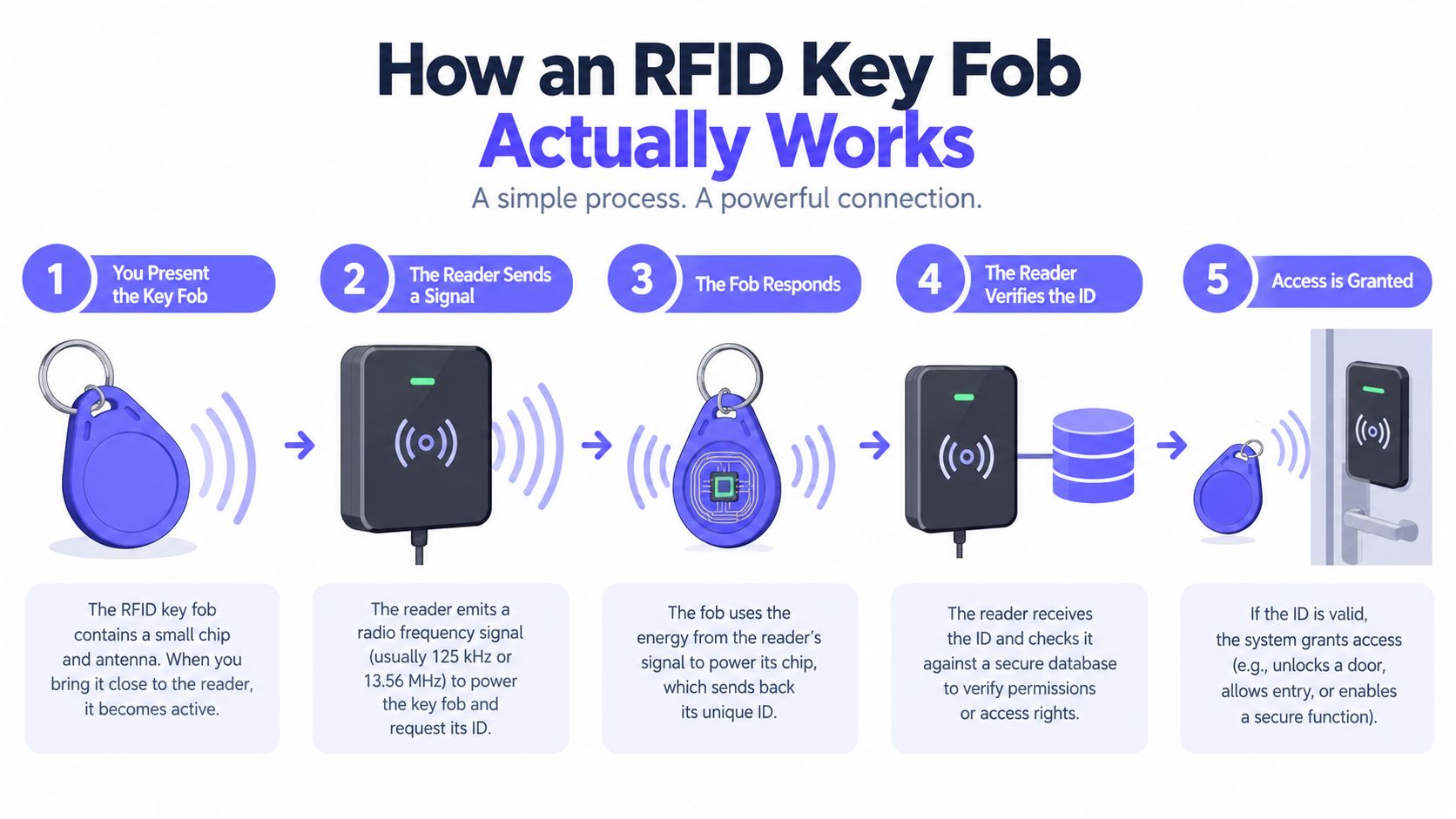
An RFID key fob system behaves like a stadium ticket checkpoint. The reader is the gate attendant, the fob is the ticket, and the access controller is the system checking whether that ticket belongs on the approved list.
The exchange happens in a few tightly coordinated stages:
- The reader creates a radio-frequency field. Its antenna energizes the area directly in front of the reader.
- A passive fob harvests energy. Most access-control fobs have no battery. The chip draws power from the reader's field.
- The chip responds. It modulates information back through the field, usually beginning with an identifier and, on more secure credentials, additional authentication data.
- The panel validates the credential. The controller compares the received data with authorized credentials, permissions, schedules, or access groups.
- The lock or gate responds. If the credential passes, the controller triggers the electric lock, gate operator, or request-to-exit sequence.
Passive and active credentials
A passive fob has no battery and normally works only within the coupling zone created by the reader. An active tag uses a battery to support longer communication distances and is more common in vehicle identification, logistics, or specialized gate workflows.
The credential itself may be little more than a chip, antenna, identifier, and memory. Security features such as encryption, mutual authentication, or AES-based protection depend on the chip and protocol, not on the fact that the device uses radio.
A 125 kHz credential commonly transmits a fixed identifier. A 13.56 MHz smart credential can support more advanced authentication and data handling. The essential access control reader info helps clarify why the reader and credential must be treated as a matched system rather than interchangeable accessories.
Why range is physical
Frequency affects how the reader and tag couple, how materials interfere with the field, and how far the exchange can work. That's why a short-range door fob and a vehicle credential shouldn't be evaluated by the same performance standard.
A fob also isn't a location tracker. Anyone trying to understand that distinction can review the practical discussion of key fob tracker limits. Access records can show a credential read at a specific reader, but they don't automatically show where the physical fob has traveled between reads.
Frequencies, Read Ranges, and Credential Types
Frequency affects more than reader compatibility. It shapes coupling, material sensitivity, practical range, credential options, and whether access feels deliberate or automatic. For installers, that makes frequency a design decision, not a label on the fob.
| Frequency | Typical Read Range | Common Credential Formats | Typical Use Case |
|---|---|---|---|
| LF, commonly 125 kHz | Approximately 2 to 10 cm, according to RFID access-control guidance | HID Prox, EM4100, TK4100 | Legacy apartment doors, amenity readers, simple proximity access |
| HF, 13.56 MHz | Approximately 2 to 8 cm, according to the RFID key fob range guide | MIFARE Classic, MIFARE DESFire, LEGIC, ISO 14443-compatible credentials | Newer commercial doors, multifamily entrances, higher-security access |
| UHF | Approximately 1 to 10 m | Vehicle and asset-oriented UHF tags | Vehicle identification, logistics, asset tracking |
LF remains common, with a clear ceiling
Low-frequency fobs are inexpensive, familiar, and straightforward to deploy on older residential panels. Their short read range also makes presentation intentional. A resident generally has to bring the fob close to the reader rather than merely pass within a broad detection zone.
The security limitation is more serious. Many legacy LF credentials transmit a fixed identifier. The CM Magazine overview of RFID cloning explains how a valid fob can be scanned and its identifier written to a blank credential. That exposure matters when the credential opens an exterior gate, shared entrance, or restricted amenity.
HF is usually the better direction for new doors
HF credentials at 13.56 MHz can support encryption, mutual authentication, and memory. MIFARE DESFire is often chosen for new commercial installations because it supports a more capable security and credential-management model than a basic fixed-ID fob.
The frequency alone does not determine protection. MIFARE Classic, DESFire, LEGIC, and other formats use different protocols and configurations. Confirm the exact chip, keys, reader, controller, and issuance process before specifying replacements. A secure credential paired with a poorly configured reader still leaves a weak deployment.
UHF solves a different problem
UHF covers a larger zone, which helps identify a vehicle without requiring the driver to present a fob at a pedestal. The trade-off is more unwanted reads, lane ambiguity, and harder credential isolation. Reader placement, antenna direction, and nearby vehicles require careful testing.
For pedestrian doors, short-range presentation usually gives better control over user intent. UHF fits vehicle, logistics, and asset workflows more naturally than ordinary person access.
Dual-frequency fobs can support a phased upgrade. Some combine a 125 kHz chip with a 13.56 MHz chip, as shown in this dual-technology fob example. This approach preserves compatibility with a legacy reader while a property adds newer HF equipment. It also preserves the older credential's limitations until the migration is complete.
Common Use Cases at Gates and Entry Points
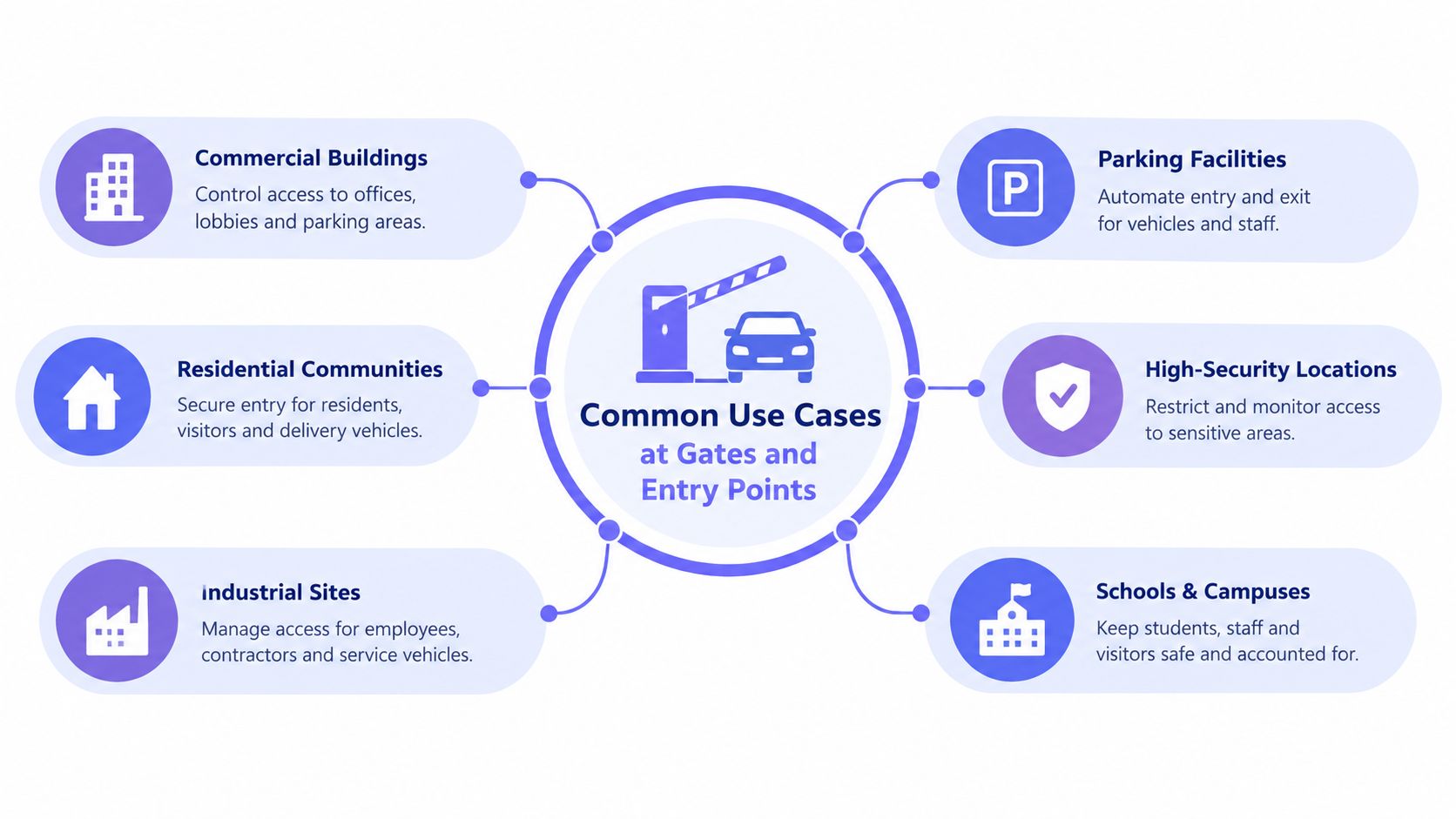
A fob earns its place when the physical environment rewards a small, durable credential and the property already has compatible readers.
At a multifamily vehicle gate, residents may use a windshield sticker, a long-range vehicle tag, or a mini-tag attached to a key ring. The reader must be positioned so it identifies the intended vehicle without opening the lane for a credential in a neighbouring car.
At pedestrian entrances, the requirements change. A short-range HF reader at a lobby door or elevator cab encourages a deliberate tap. The same approach works at a clubhouse, fitness room, storage area, or parking garage access point.
A practical retrofit example
Consider a 240-unit property with an older 125 kHz pedestal at the vehicle entrance and a new HF reader planned for the front door. Replacing every existing resident credential immediately would create avoidable disruption.
A more practical design issues dual-frequency fobs. The legacy pedestal can continue reading the 125 kHz side, while the new front-door reader uses the 13.56 MHz side. The property can then migrate readers and credentials in phases instead of forcing every resident through a single replacement event.
That approach only works if the chips, readers, controller, and software are fully compatible. A dual-frequency shell isn't a universal adapter, and the installer still needs to validate enrolment, read performance, access groups, and deactivation.
Where fobs work especially well
- Pool gates: Weatherproof physical tokens are often easier than opening a phone near water.
- Elevator readers: A short, controlled read zone can restrict floor access without adding a keypad.
- Clubhouses: Residents can use the same credential across several amenity points.
- Parking pedestals: A key-ring fob is easy to present while walking or exiting a vehicle.
- Service entries: Staff can receive individually assigned credentials with schedules tied to their role.
The common factor is predictable presentation. Fobs perform well when users can approach a known reader, present a credential intentionally, and report a lost device promptly.
They perform less well when residents need temporary guest access, managers work remotely, or the property experiences frequent move-ins and move-outs. Those conditions turn credential administration into the main cost, even when the hardware itself remains reliable.
Security Strengths and Weaknesses of RFID Fobs
RFID fobs are not automatically insecure, but they are increasingly a legacy credential. Their value comes from predictable operation and simple administration. Their weakness appears when a property needs to prove which person entered, respond quickly to a lost credential, or manage access without someone standing at a controller.
The chip and protocol determine the security profile. “RFID” describes a communication method, not a security grade. Earlier frequency guidance, including credential technology guidance and RFID range guidance, helps explain the hardware differences. This section focuses on what those differences mean after installation.
A properly managed fob system offers several practical strengths:
- Contactless operation: The reader has no exposed electrical contacts to corrode.
- Fast presentation: A resident can present the fob and receive a quick access decision.
- Credential revocation: An administrator can remove a credential ID from the authorized list.
- Panel-based records: The controller can record which credential was read at a controlled point.
The risk rises when a property treats the credential number as proof of identity. A legacy 125 kHz fob may use a fixed, openly readable identifier, making unauthorized duplication easier. Encrypted HF credentials raise the difficulty, but protection still depends on key management, reader firmware, controller security, configuration, and disciplined credential issuance.
Security trade-offs by frequency
| Frequency | Cloning Risk | Encryption | Audit Granularity |
|---|---|---|---|
| 125 kHz LF | Higher for fixed-ID legacy credentials | Often limited or absent | Usually credential number plus reader event |
| 13.56 MHz HF | Lower when a secure smart credential is correctly deployed | Can support encryption and mutual authentication | Credential event, with detail depending on controller and software |
| UHF | Depends on tag, protocol, and vehicle deployment | Varies by implementation | Vehicle or tag event, with possible zone ambiguity |
The auditability gap
A panel may record that credential number 8472 was read at the vehicle gate. It may not identify the person carrying it, show whether another resident borrowed it, or reveal that the credential was copied. That distinction matters during disputes and incident reviews.
Mobile access can bind an entry event to a managed phone identity and user account. Depending on the platform and permissions, administrators may also receive more context about the user, time, and access activity. A phone is not secure by nature, and a compromised account creates its own risk. Still, person-level administration is often easier to maintain than a ring of physical tokens.
Staff should treat online material about copying an apartment key fob as a risk-assessment topic, not an authorization to duplicate credentials. Understanding the attack path helps managers ask better questions. Testing or copying a live credential without permission can create a serious security and legal problem.
Lost fobs expose a quieter weakness. Residents may delay reporting them, while managers may not see unusual activity until someone complains. A secure chip reduces cloning exposure, but it cannot correct shared credentials, weak offboarding, or an administrator who cannot change access remotely.
A fob remains suitable when access risk is modest and revocation is disciplined. It becomes a liability when the property needs reliable identity binding, rapid response, and evidence that can withstand an incident review.
Deployment Best Practices for Property Managers and Installers
A reliable fob deployment starts before the reader is mounted. The installer and property manager should document the existing hardware, credential technology, access points, gate operator, controller, and administrative workflow.
A field checklist
- Identify the credential technology. Confirm whether the site uses 125 kHz LF, 13.56 MHz HF, UHF, or a dual-frequency credential. Don't infer frequency from the fob's shape.
- Match the threat model. Use a stronger HF credential for new access points where cloning resistance and lifecycle management matter.
- Assign one credential per person. Shared pool fobs destroy accountability and make deactivation ambiguous.
- Test the installed environment. Metal, electrical equipment, mounting surfaces, gate geometry, and antenna placement can affect read performance, especially with longer-range systems.
- Create a move-out workflow. Deactivate credentials as part of the documented turnover process, not after a later audit.
- Record exceptions. Note replacement fobs, temporary access, staff credentials, contractor permissions, and any emergency overrides.
- Review events routinely. Look for credentials used at unusual times, repeated denied reads, and fobs that remain active after a resident or employee leaves.
New installations should usually use HF or dual-frequency readers even when existing credentials are LF. That preserves a migration path and avoids locking the property into a weak credential format during the next hardware cycle.
A simple decision matrix
| Property condition | Practical direction |
|---|---|
| Small site with stable occupancy | Keep fobs if administration remains controlled |
| Existing LF hardware with limited budget | Continue temporarily, but plan a secure reader migration |
| New commercial or multifamily doors | Specify HF credentials with documented key management |
| High visitor volume or frequent turnover | Evaluate mobile credentials and remote administration |
| Vehicle gate needing hands-free recognition | Consider the appropriate vehicle-oriented credential and validate lane control |
A gate operator also needs resilience beyond credential selection. Installers should check power behavior, backup operation, controller recovery, and the communications path used for remote management. A credential that reads correctly won't compensate for a controller that loses state after a power event.
When It Makes Sense to Move Beyond the Fob
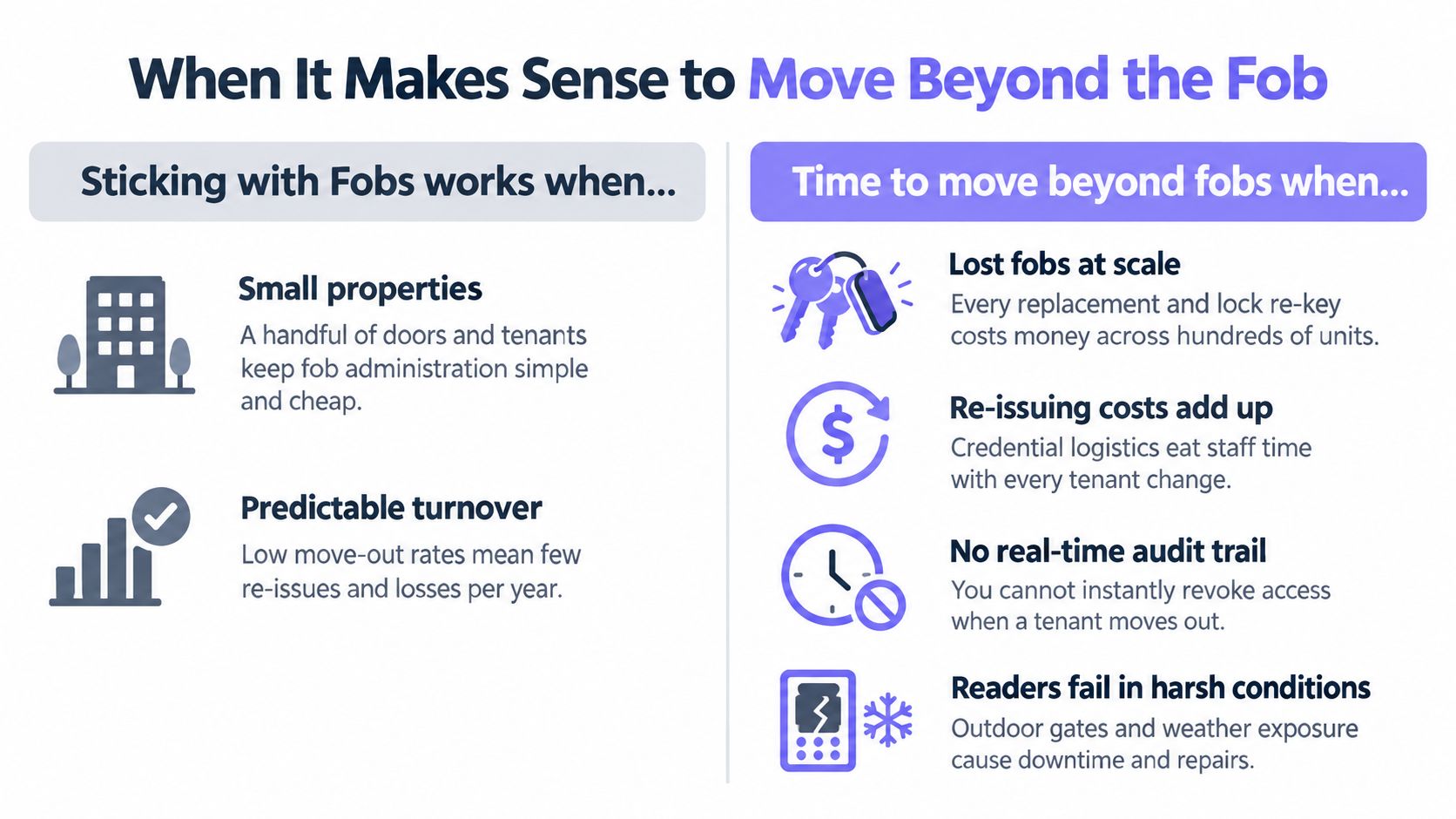
Properties usually move beyond RFID fobs because administration becomes harder than the tap-to-open experience. Lost fobs require replacement, resident turnover requires deactivation, and shared credentials make event logs less useful.
The trigger is often operational rather than technical:
- Lost fobs at scale: Replacements consume staff time and create uncertainty about old credentials.
- Frequent move-outs: Managers need to revoke access immediately, including outside office hours.
- Visitor-heavy properties: Temporary access is awkward when every guest requires a physical credential or shared code.
- Remote management needs: HOA boards and property managers may need to control a gate without visiting the site.
- Weak audit requirements: A card number at a reader may not provide enough context after an incident.
- Outdoor reliability concerns: Readers and controllers still need protection from weather, surges, and local power failures.
Cellular access as a parallel migration path
Cellular, app-based access doesn't have to replace every fob on day one. A sensible rollout can leave existing fobs active while adding smartphone credentials for residents who want them, temporary visitors, vendors, and property staff.
That hybrid model matters for gated communities with mixed preferences. Residents who prefer a physical token can continue using it, while management gains a separate channel for remotely issued credentials and visitor access.
A cellular controller also avoids dependence on local Wi-Fi drops. It can connect the gate to cloud-based management through cellular connectivity, while hardware-agnostic integration can retrofit an existing gate operator instead of replacing the entire gate.
Nimbio is one example of this approach. Its system can operate alongside existing fobs, add smartphone access and cloud management, and support remote credential administration for gates and building entry. Property managers evaluating cellular vs NFC gate access should compare connectivity, retrofit requirements, credential control, visitor workflows, and failure handling rather than focusing only on the reader technology.
Decision rule: Keep fobs when the property is small, stable, and simple. Add cellular access when turnover, visitor management, remote administration, or audit visibility starts consuming real staff time.
The right modernization plan is rarely a forced replacement. It's a controlled transition that keeps useful hardware operating while introducing credentials that are easier to grant, revoke, schedule, and review.
Nimbio adds cellular, smartphone-based access to existing electronic gates and entry systems, without requiring Wi-Fi or a complete gate replacement. Property managers can preserve working fobs during migration while adding remote visitor management and digital credentials, so visit Nimbio to assess a practical path beyond RFID key fobs.