

An automatic gate control board is the electronic brain that tells a gate operator when to open, close, stop, and reverse based on inputs from readers, sensors, and remote systems. The wider gate automation market is estimated at USD 20.31 billion in 2025 and projected to reach USD 34.00 billion by 2032, with a 7.63% CAGR, showing why the control-board layer matters in a growing access ecosystem.
A resident arrives at a gated community, presses a phone button, and expects the gate to respond. If the gate stays closed, reverses unexpectedly, or opens without a clear record of who triggered it, the problem may involve more than the motor. The control board, access credentials, safety devices, wiring, and communications layer all work together.
For property managers, HOA boards, residents, and installers, understanding that relationship makes upgrades easier to evaluate. A modern cellular retrofit can preserve a functioning gate operator while improving credential management, visitor access, and auditability.
Table of Contents
- What an Automatic Gate Control Board Actually Does
- How Automatic Gate Control Boards Work
- Gate Control Compatibility and Cellular Integration
- How to Choose the Right Gate Control Setup
- Installation and Wiring Considerations
- Troubleshooting and Routine Maintenance
- Safety Compliance and Cybersecurity Expectations
- Frequently Asked Questions About Gate Control Boards
What an Automatic Gate Control Board Actually Does
A control board sits between the request to move and the mechanism that moves the gate. It receives signals, applies programmed logic, checks safety conditions, and sends commands to the gate operator and connected accessories.
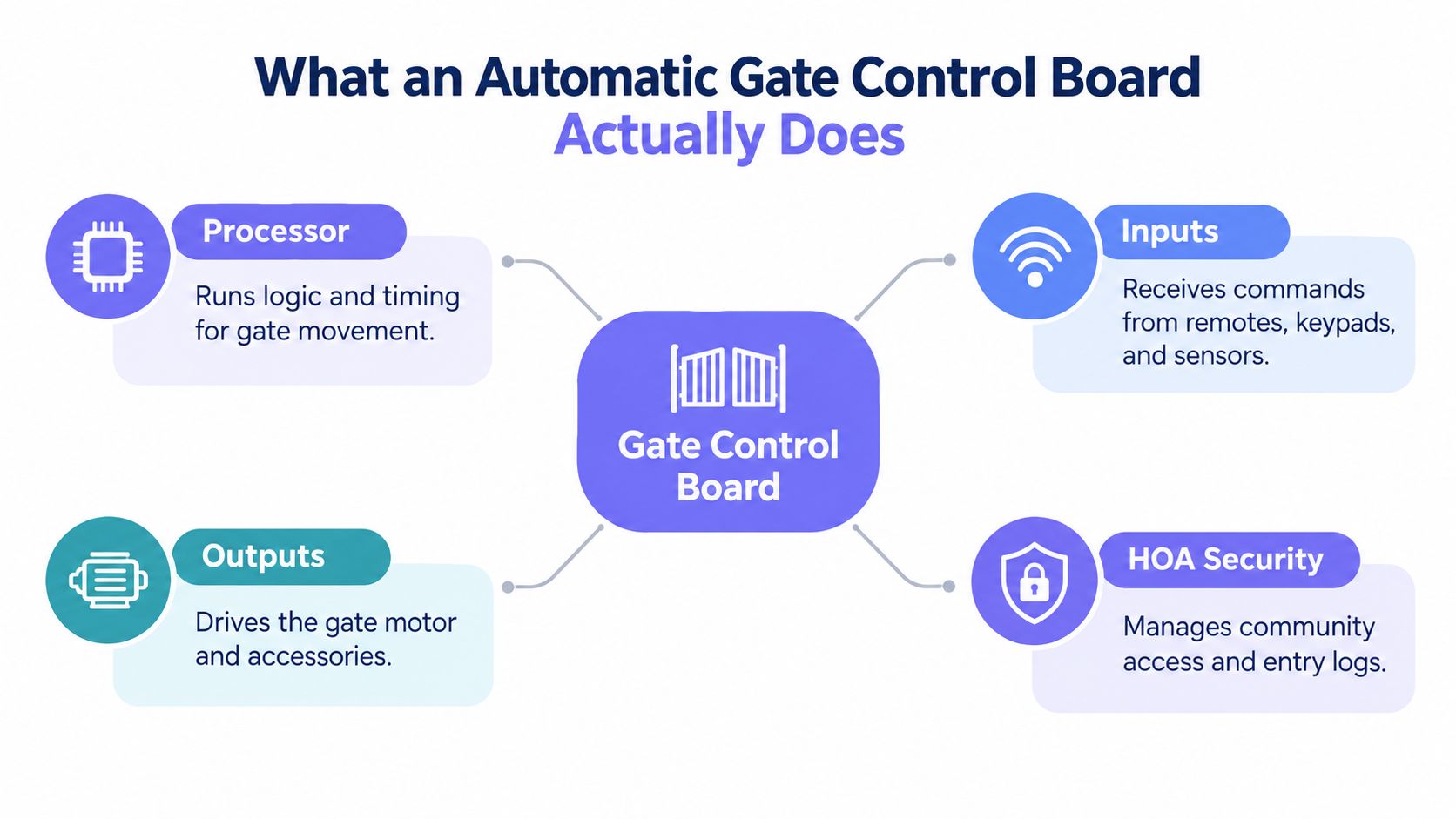
A useful mental model separates the system into four layers:
- Access inputs: A remote, keypad, card reader, intercom, loop detector, photo-eye, or mobile credential sends a signal.
- Processing logic: The board decides whether the request is valid and whether movement is safe.
- Operator outputs: Relays and terminals command the motor, actuator, lock, warning light, or other accessory.
- Management and security: The system controls who receives access and records relevant activity.
The board isn't the same thing as the gate operator. The operator contains the motor or hydraulic actuator that physically moves a sliding, swing, or barrier gate. The board controls that equipment, much like a building automation controller directs equipment without being the equipment itself.
That distinction matters during a retrofit. If the operator, mechanical structure, and safety devices remain serviceable, a property may not need a complete gate replacement. An added access controller can connect to the operator's control interface and extend how authorized users trigger it.
Automatic gate technology developed from mechanically driven systems into electronically supervised equipment. FAAC traces the first automatic gate handling system to 1965, when Giuseppe Manini applied hydraulic technology, with mass production following in 1970. These developments helped establish the safety sensing, obstacle detection, and movement logic expected from today's systems. FAAC's company history provides the historical account.
Practical rule: The motor creates movement, but the control board decides whether movement should begin, continue, stop, or reverse.
How Automatic Gate Control Boards Work
A gate-control sequence starts with an input and ends with a controlled physical action. The board does not just pass electricity from a button to a motor. It evaluates the request alongside timing, position, and safety information.
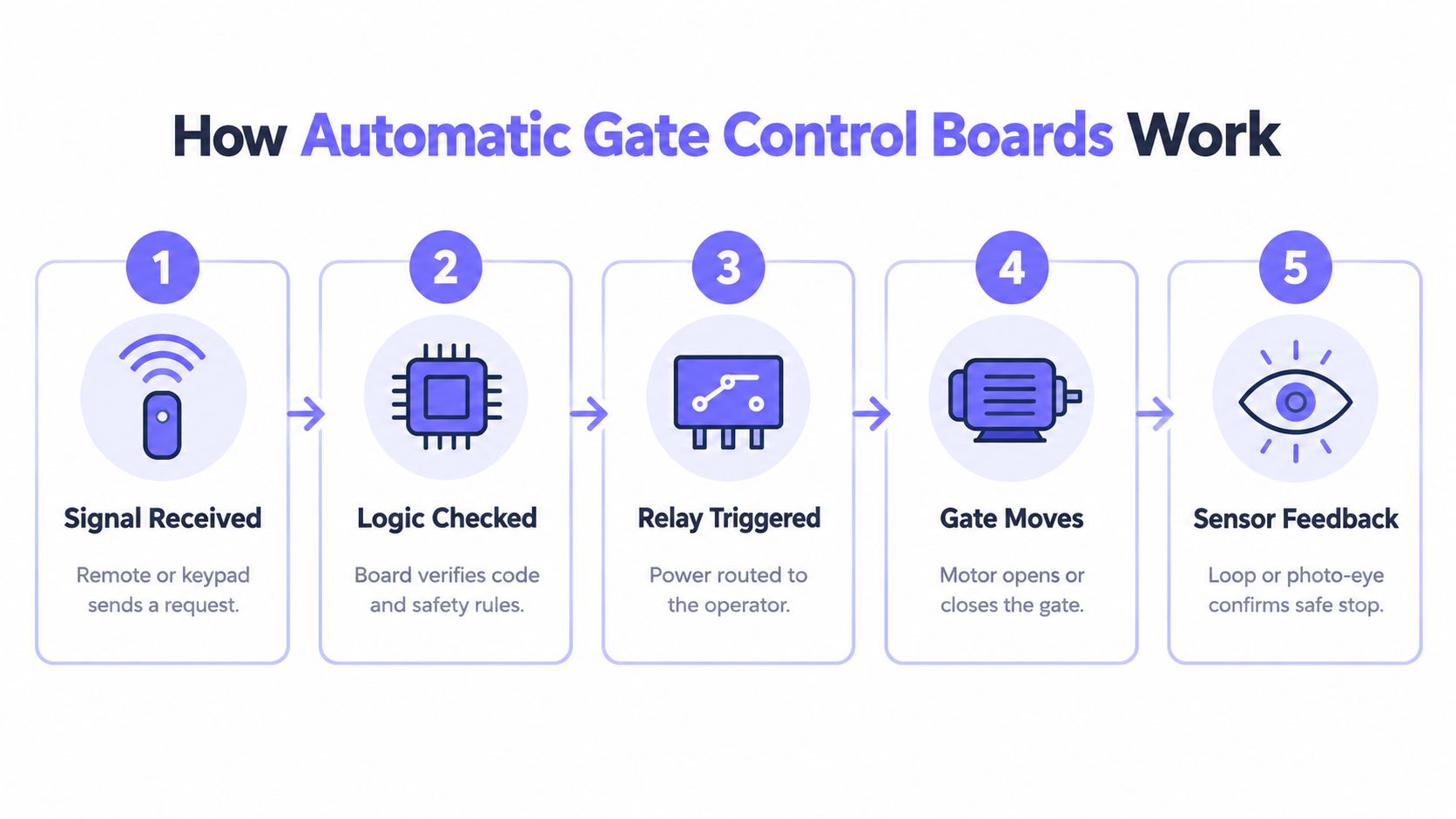
A typical sequence looks like this:
- A signal arrives. A resident uses a remote, enters a keypad code, presents a credential, or sends a command through a mobile access platform.
- The board checks the request. Local programming determines whether the input is accepted and whether an active safety condition blocks movement.
- A relay changes state. The board routes a control signal to the operator's open, close, stop, or auxiliary input.
- The operator moves the gate. The motor or actuator performs the requested action through the mechanical drive system.
- Sensors report conditions. Photo eyes, safety loops, limit switches, and other devices tell the board whether the path is clear and whether the gate reached its expected position.
The board also manages accessories such as warning lights, locks, vehicle detectors, and status indicators. A failed sensor can therefore look like a failed board because the logic may correctly refuse to move the gate when a safety input is missing.
Cloud-based access control adds another layer above this local process. The cloud service manages users, permissions, visitor credentials, schedules, and logs, while the local operator and board continue to handle immediate movement and safety logic.
Cellular connectivity is useful where gate Wi-Fi is unreliable or unavailable. A cellular controller can send a trigger through a relay connection to the operator, so a property can modernize access without depending on Wi-Fi drops at the driveway. Property teams can review how cellular gate access works before comparing specific retrofit architectures.
Gate Control Compatibility and Cellular Integration
Legacy gate access often depends on shared clickers, fixed PINs, or a keypad mounted beside the driveway. Those methods can still operate a gate, but they make access changes and accountability harder when residents move, vendors change, or temporary visitors need entry.
A cellular retrofit approaches the problem differently. It can preserve the existing gate operator and connect through a compatible control input, while the management layer handles individual digital credentials and remote visitor workflows.
| Approach | Security | Management | Best For |
|---|---|---|---|
| Shared remotes | Access depends on possession, and lost devices can remain active | Physical collection or reprogramming is often required | Small properties with stable users |
| Shared keypad PIN | A code can spread beyond the intended group and offers limited identity context | Managers must change and distribute codes manually | Basic residential access |
| Local card or fob system | Individual credentials can improve accountability, but lost credentials require administration | Requires credential enrollment and reader maintenance | Communities with established access staff |
| Cellular smartphone access | Individual mobile credentials can be granted or revoked remotely, subject to platform and network controls | Supports remote permissions, visitor access, schedules, and logs | HOAs, multifamily properties, and distributed sites |
| Hybrid retrofit | Existing readers, remotes, and keypads can remain while a digital layer adds another access path | Enables gradual modernization instead of a full operator replacement | Mixed-operator communities and retrofit projects |
The key compatibility question is whether the existing operator exposes a suitable trigger input and provides appropriate power for the added equipment. Hardware-agnostic systems are valuable in communities that use different operator brands across entrances, because the access-management experience can become more consistent without standardizing every motor and enclosure.
Nimbio offers one example of this approach. Its cellular controller can retrofit existing electronic gates, connect to an operator's dry-contact input through a relay, and support smartphone access without requiring Wi-Fi at the gate. Administrators can grant or revoke digital keys, manage visitors remotely, review entry logs, and retain existing remotes or keypads where the operating plan calls for a hybrid system.
The operational benefit is less about replacing a relay and more about replacing informal access habits. A property manager can issue a time-limited credential to a contractor instead of sharing a permanent code, then remove it without visiting the entrance.
How to Choose the Right Gate Control Setup
The right setup depends on the gate's mechanical condition, the operator's interface, the community's access policy, and the required safety and security controls. A new installation and a retrofit should follow the same disciplined evaluation, even though the hardware decisions differ.
Start with the existing operator
Record the operator type, model, voltage requirements, available trigger terminals, safety inputs, enclosure condition, and movement behavior. Sliding, swinging, vertical lift, and barrier systems may use different mechanical arrangements, but the control strategy still needs a clean relationship between command inputs and safety feedback.
For mixed communities, a hardware-agnostic access layer can reduce the need to replace functioning operators just to achieve consistent credential management. That can be especially useful where entrances have been upgraded at different times.
Verify safety and listing information
Automatic vehicular gate operators are commonly expected to comply with ANSI/CAN/UL 325. DASMA advises buyers to look for a listing mark from a recognized agency such as UL, ETL, or CSA, and explains that model building and fire codes require listed operators bearing such a label. The DASMA operator electronics guidance provides that compliance context.
ASTM F2200 addresses several automated gate types, including horizontal slide, horizontal swing, vertical lift, vertical pivot, overhead pivot, and horizontal bifold gates. Its scope includes fall-over protection, hazardous protrusions, and positive stops that help the gate stop in the intended position. ASTM's automated gate safety summary outlines those design concerns.
Evaluate access operations, not only hardware
A property should decide how it will handle residents, guests, deliveries, contractors, emergency access, expired credentials, and audit requests. The gate access system evaluation criteria can help teams organize those questions before selecting a platform.
Finally, assess cybersecurity and growth. A system that works for one entrance may become difficult to administer when multiple gates, buildings, and user groups share credentials or network dependencies.
Installation and Wiring Considerations
Installation quality determines whether a capable control board performs reliably. The first responsibility is separating line-voltage power, low-voltage control wiring, and communications equipment so each is handled according to its requirements.
A gate operator may contain high-voltage connections alongside low-voltage terminals for accessories. Installers should identify the operator's wiring diagram before connecting a controller, verify the power source, and isolate power before touching internal components.
A pre-power checklist should include:
- Confirm terminal purpose: Identify open, close, stop, common, accessory power, safety, and auxiliary terminals from the operator documentation.
- Match voltage requirements: Don't assume an accessory can use the same supply as the operator. Verify the controller's accepted AC or DC range and polarity where applicable.
- Separate high-draw equipment: Cameras, intercoms, lights, and locks may need their own supply rather than drawing from the control board.
- Protect the enclosure: Check seals, conduit entries, condensation risk, corrosion, and water paths before mounting electronics outdoors.
- Ground correctly: Proper grounding and surge protection help reduce damage from electrical disturbances and support stable operation.
- Test safety devices: Confirm photo eyes, loops, edges, limit switches, and emergency-release arrangements before normal use.
The communications layer should be treated separately from the local control layer. A cellular access platform may use a relay to trigger the operator, but it doesn't replace the operator's own safety logic or excuse an incomplete sensor circuit.
Retrofits are often simpler when the existing operator has a clearly documented dry-contact input and a suitable power source. If wiring is undocumented, terminals are corroded, or the gate has mechanical drag, a low-voltage professional should inspect the system before any access controller is added. Nimbio's installation troubleshooting for Nimbio offers product-specific support for its deployment process.
Troubleshooting and Routine Maintenance
A gate that ignores every command doesn't automatically need a new control board. The fault may sit in the power supply, a safety input, a damaged accessory, the operator motor, or the communications path.
A safe diagnostic sequence starts outside the enclosure:
- Observe the symptom. Note whether the gate is completely inactive, stops mid-cycle, reverses, opens only partway, or responds to one input but not another.
- Check visible status indicators. Error LEDs can point toward sensor, logic, or power conditions, but the operator manual should determine their meaning.
- Confirm power safely. A qualified technician can verify whether the operator receives the correct supply and whether fuses or protection devices have operated.
- Test safety inputs. Inspect photo-eye alignment, loop detection, edge devices, and wiring continuity. A board may block movement because it is receiving a legitimate obstruction signal.
- Separate the access path. Test a local open command independently from a mobile or remote command. If local controls work but remote access fails, the issue may be in the communications or credential layer.
- Inspect the board. Look for moisture, corrosion, loose terminals, burnt areas, damaged connectors, or unusual component swelling after power is isolated.
A reset can clear a temporary logic condition, but it shouldn't substitute for finding the cause of repeated failures. Reprogramming may also remove access codes, timers, or other settings, so installers should document configuration before restoring defaults.
Routine maintenance should include:
- Credential review: Remove former residents, vendors, and temporary users.
- Event-log review: Investigate repeated denied entries or unusual trigger patterns.
- Safety verification: Test sensors and reversal behavior according to the operator's maintenance procedure.
- Enclosure inspection: Check weather sealing, corrosion, insects, and condensation.
- Mechanical observation: Watch for dragging, misalignment, unusual noise, or slow movement.
A control board can report a safety problem correctly even when the visible symptom looks like an access problem.
Safety Compliance and Cybersecurity Expectations
A connected gate has two responsibilities. It must move people and vehicles safely, and it must restrict operation to authorized users without exposing the access system unnecessarily.
UL 325 is commonly used for automatic gate operators and systems. DASMA guidance says that, for most installations, there must be at least two independent entrapment-protection means in each direction of travel, and that all installations require at least two independent means wherever there is a risk of entrapment. It also states that external entrapment-protection devices must be monitored. The DASMA entrapment-protection guidance explains those requirements.
ASTM F2200 addresses physical gate hazards, while access-control equipment introduces a separate evaluation layer. UL describes UL 325 as the common standard for automatic gates and their systems, while UL 294 complements it for access-control system units by addressing authorized access, security-related safety, digital security, and performance. UL's access-control and gate-operator guidance explains how the categories work together.
Connected access requires operational discipline
Networked controllers expand the access chain. A deployment may include the control board, cellular or network gateway, cameras, cloud portal, mobile credentials, and third-party integrators. Each connected component can add administrative and security responsibilities.
Facility guidance for 2026 recommends:
- Change default credentials before remote access is enabled.
- Maintain a firmware inventory so teams know which devices require updates.
- Isolate controllers on a dedicated VLAN where networked equipment is used.
- Use VPN or zero-trust access instead of exposing controllers directly to the internet.
- Centralize event logging for incident review and access investigations.
These measures don't replace physical entrapment protection. They complement it by helping property teams control digital access, investigate events, and reduce unnecessary exposure.
For HOAs and property managers, the strongest policy combines verified safety devices, listed equipment, unique credentials, documented firmware, and a clear visitor process. Convenience becomes safer when the property can identify who received access, when it was valid, and how it was revoked.
Frequently Asked Questions About Gate Control Boards
Does a cellular upgrade require a new gate operator?
Not necessarily. If the existing operator is mechanically sound and exposes a compatible control input, an added cellular controller may trigger it through a relay while the original board continues handling movement and safety logic. An installer should verify the model, terminals, power, and enclosure before approval.
Can existing remotes and keypads remain in service?
Often, yes. A hybrid plan can retain local credentials while adding smartphone access for residents, managers, or visitors. The community should document which access methods remain active and remove credentials that no longer belong to authorized users.
How does smartphone access improve HOA security?
Individual digital credentials can be granted and revoked without distributing a shared code or collecting a physical clicker. Remote visitor management also gives managers and residents a clearer way to issue temporary access and review entry activity.
What should a property manager ask an installer?
The manager should request the operator model, control-input method, power requirements, safety-device status, listing information, credential workflow, event-log capabilities, firmware process, and outage procedure. The installer should also explain which functions remain local if the communications layer is unavailable.
When should the board be replaced?
Replacement becomes more likely when the board shows physical damage, repeatedly loses accessory power, fails to process valid inputs, or produces persistent output faults after wiring and safety devices have been checked. A qualified technician should make that decision after isolating the fault.
Nimbio provides a cellular retrofit that connects smartphone credentials, remote visitor management, and access logs to compatible electronic gates while preserving existing operator hardware. Property managers, HOA boards, and installers can review Nimbio to evaluate a practical path from legacy gate control to connected access management.


