A resident arrives at the community gate, taps the access button, and waits. Nothing happens. The resident calls the property office, the office calls the installer, and the HOA board learns about a failing gate only after access has already been disrupted.
That pattern is a monitoring failure, not just a hardware failure. System performance monitoring for electronic gates gives property managers visibility into uptime, cellular connectivity, access events, command latency, and recurring errors before a resident complaint becomes the first diagnostic signal.
For gated communities, reliable access control is part of daily operations and HOA security. A gate operator can be mechanically functional yet operationally unavailable if its network connection drops, credentials fail, or commands reach the controller too slowly. Modern cloud-based access control changes the response by reporting device health and entry activity to a dashboard instead of leaving staff to discover problems on site.
Table of Contents
- Why System Performance Monitoring Matters for Electronic Gates
- Key Metrics Every Gate System Should Track
- Cellular Telemetry vs Traditional Monitoring Approaches
- Setting Up Dashboards and Alerting for Access Control
- Testing Routines and Preventive Maintenance Schedules
- Best Practices for Property Managers and Installers
- Putting It All Together – Your Monitoring Action Plan
Why System Performance Monitoring Matters for Electronic Gates

Traditional access systems often fail without warning. A damaged controller, weak network connection, stuck relay, or expired credential may produce no visible signal until a driver is waiting at the entrance.
A monitored gate produces a different operating picture. The system records whether the controller is reachable, whether the gate reports open or closed, whether a command was accepted, and whether an access attempt failed. That information lets staff distinguish between a resident credential problem, a connectivity issue, and a physical gate-operator fault.
The monitoring loop for a gate operator
Effective monitoring follows a simple sequence:
- Observe the device. Capture gate status, controller availability, signal quality, command responses, and access events.
- Collect telemetry. Send those signals through a reliable connection to a cloud service.
- Analyze exceptions. Compare current behavior with an established baseline and identify repeated failures.
- Present an actionable alert. Notify the person responsible for access control, not every staff member who happens to have dashboard access.
This approach follows the established performance-monitoring flow of observation, collection, analysis, and presentation. Guidance on measurement also recommends tracking event counts, time intervals, and parameter sizes, while warning that metrics need representative workloads and controlled benchmarks to be meaningful. The performance measurement methodology provides useful context for applying those principles beyond conventional IT infrastructure.
Why proactive visibility affects residents
A property manager can't prevent every equipment fault. The manager can, however, reduce the time between degradation and intervention.
A useful operational dashboard should answer four questions quickly:
- Is the gate controller online?
- Is the connection stable enough to deliver commands?
- Are access attempts completing normally?
- Who needs to act, and what evidence supports the diagnosis?
That visibility protects resident experience without weakening security. It also creates an audit trail for disputed entries, temporary visitor credentials, and maintenance decisions. A single tool can simplify ownership, although the 2024 observability benchmark found that organizations using a single observability tool reported less downtime than those using multiple tools. The lesson for a smart community is practical: collect the signals that matter in one place, then assign clear responsibility for responding to them.
Key Metrics Every Gate System Should Track
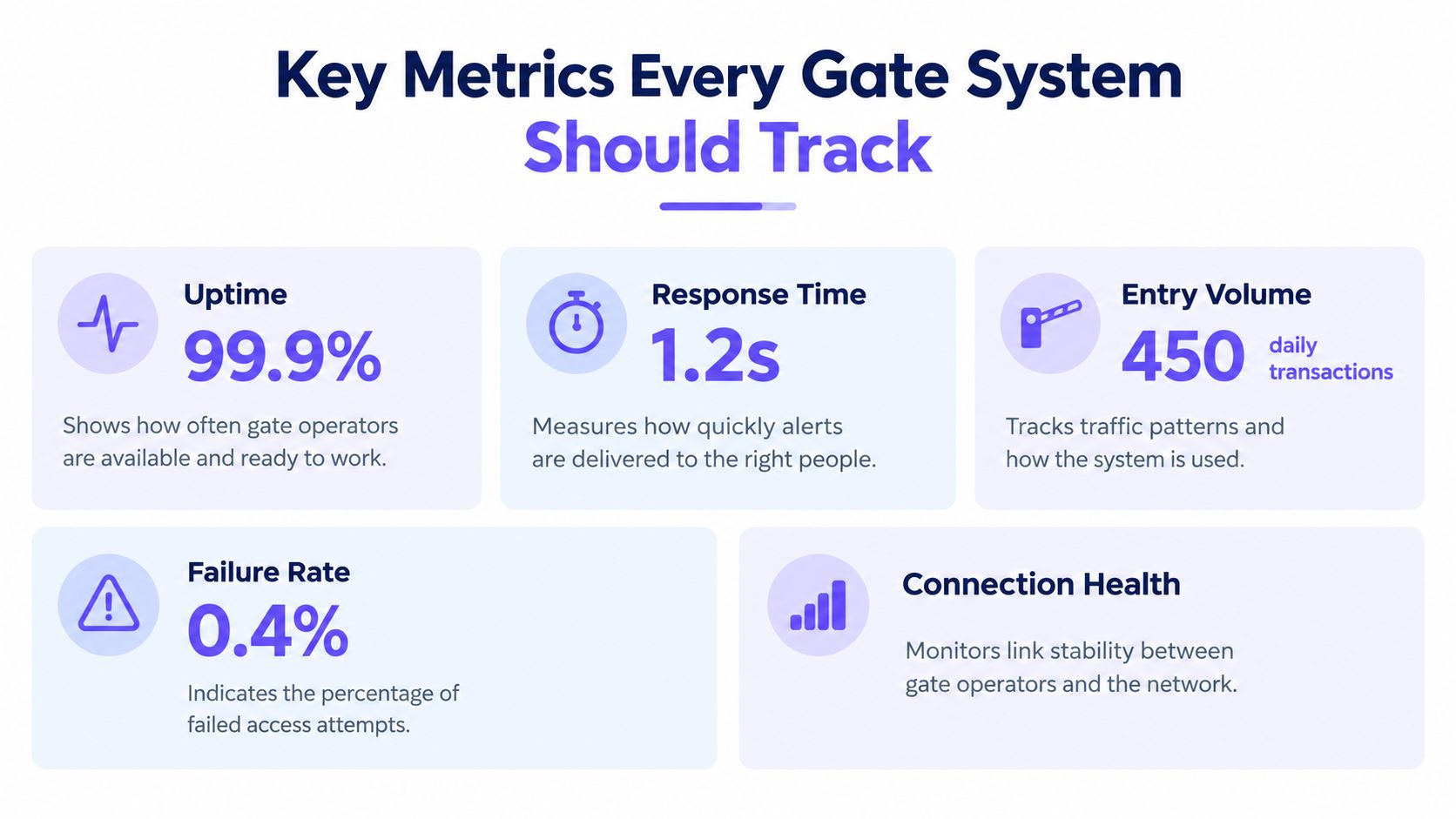
A gate dashboard should be compact enough for daily use. Five indicators provide a strong starting point for installers and property managers.
1. Uptime
Uptime measures availability, not whether the gate is physically attractive or recently serviced. It shows whether the controller and its communication path are available when a resident or authorized visitor sends an access request.
A useful baseline includes controller reachability, gate-status reporting, and successful command completion. A controller that appears online but fails to report a state change needs investigation, even if its uptime screen looks healthy.
2. Signal strength and connection health
Cellular signal strength reveals whether the communication path is stable. A gradual decline can precede delayed status updates, incomplete commands, or intermittent access failures.
Installers should record signal conditions during deployment and after environmental changes, such as landscaping, construction, enclosure modifications, or equipment relocation. Signal data becomes more useful when reviewed alongside failed commands and delayed responses.
3. Entry logs
An entry log connects an access event to a credential, guest key, timestamp, and gate action. It supports resident verification, maintenance review, and security investigations without relying on memory or shared PINs.
Property staff should investigate gate open events by checking the actor, authorization method, requested action, and resulting gate state. A log that records only “opened” offers less operational value than one that preserves the complete event context.
4. Latency
Latency measures the delay between a command and the gate response. Residents experience latency as hesitation, repeated taps, or uncertainty about whether the gate will open.
Track command delivery time separately from mechanical movement time. The distinction helps installers determine whether the problem sits in the cellular path, cloud service, controller, relay, or gate operator.
5. Error rate
Error rate identifies failed access requests, rejected credentials, controller faults, and communication interruptions. A single failure may be harmless, but repeated failures tied to one gate, credential type, or time window deserve attention.
The four-signal model of latency, traffic, errors, and saturation is widely used for system health because it connects responsiveness with workload and resource exhaustion. For an access system, traffic means entry activity, errors mean failed requests, and saturation may appear as controller capacity, queueing, or mechanical strain. Microsoft's Performance Monitor troubleshooting guidance offers a related model for infrastructure, including processor time, processor queue length, calls per second, and context switches.
Cellular Telemetry vs Traditional Monitoring Approaches
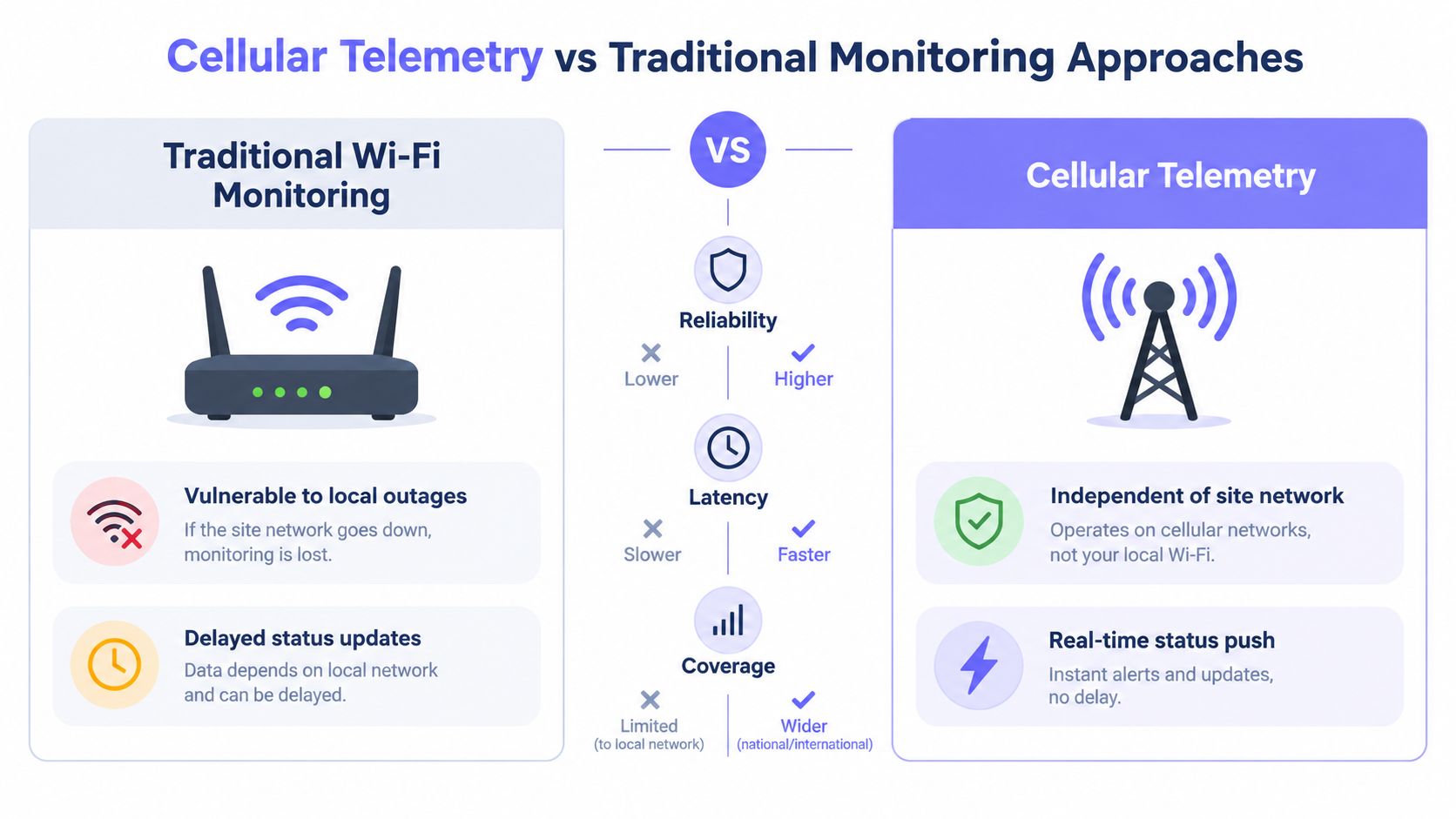
A Wi-Fi-dependent gate can work perfectly until the property's router reboots, the access point loses power, or a local network change blocks communication. The gate operator may still open with a local remote, yet the monitoring system loses visibility precisely when staff need it.
Cellular telemetry separates gate communications from the property's ordinary network. That design reduces dependence on resident or office Wi-Fi and removes one common point of failure from the access-control path.
The practical comparison
| Consideration | Wi-Fi-dependent monitoring | Cellular telemetry |
|---|---|---|
| Network dependency | Relies on local infrastructure and its power | Uses a separate cellular connection |
| Installation | May require network access, configuration, and coverage planning | Can simplify deployment where cellular coverage is available |
| Failure visibility | A local outage can hide the controller's status | The monitoring path can remain independent of site Wi-Fi |
| Maintenance | Network changes may affect the gate system | Cellular service and device health require their own review |
| Retrofit potential | May be constrained by network reach at the gate | Often suits remote entrances and distributed properties |
Cellular connectivity isn't a guarantee of perfect performance. Installers still need to verify coverage, antenna placement, enclosure conditions, power stability, and carrier availability. A practical deployment records signal health and establishes an escalation path for communication faults instead of assuming that “cellular” means “unreachable by problems.”
For teams deploying access technology across different regions, cellular service planning also matters. A resource such as eSIM data plans for Brazil can help clarify local connectivity considerations when evaluating mobile data options, although a production gate deployment still needs device-specific compatibility and coverage validation.
The technical distinction is straightforward: Wi-Fi monitoring observes the gate through the property's network, while cellular telemetry gives the controller an independent communications route. Nimbio's explanation of how cellular gate openers work provides a useful reference for understanding that architecture in an access-control context.
Setting Up Dashboards and Alerting for Access Control
A dashboard should help a property manager make a decision, not merely display a wall of telemetry. The most useful layout puts current gate state, controller reachability, recent access activity, signal health, and unresolved alerts within one view.
Build the dashboard around operational questions
Start with the entrance, not the software menu.
- Current state: Show whether each gate is open, closed, moving, or unavailable.
- Connection state: Display the last successful heartbeat and current signal condition.
- Access activity: List recent requests, approved credentials, guest access, and failed attempts.
- Command outcome: Separate accepted commands from delayed, rejected, or incomplete actions.
- Ownership: Assign each alert to a named role, such as the property manager, installer, or on-call maintenance contact.
Nimbio can serve as one example of this operating model. Its cellular controller and mobile app support smartphone-based gate access, digital credential management, remote visitor access, real-time status, and timestamped entry logs. Administrators can manage access without replacing an existing compatible gate operator, which is important for communities that need a retrofit rather than a full gate replacement.
Configure alerts for action
A single alarm threshold creates noise. Multi-level thresholds are more useful because they distinguish an emerging issue from an immediate service condition.
ManageEngine's threshold guidance describes severity levels including Attention, Trouble, Critical, and Rearm, along with consecutive-violation requirements before an alert fires. That model translates well to access control:
- Attention: Signal quality is weakening or a heartbeat is late.
- Trouble: Several status reports are delayed, or command latency is repeatedly raised.
- Critical: The controller is unreachable, repeated access attempts fail, or the gate reports an unsafe state.
- Rearm: The system has recovered and remains stable.
The alert should include the gate name, event time, observed condition, recent history, and recommended owner. “Gate offline” is less useful than “north entrance controller has missed status reports and needs a power and connectivity check.”
Create an escalation path
Notifications should match the operational risk:
- Send a low-severity event to the dashboard for routine review.
- Send a sustained degradation alert to the property manager or installer.
- Escalate an unavailable entrance through the established emergency channel.
- Record the resolution, including whether the fault was network, power, credential, controller, or mechanical.
The objective isn't to alert everyone. It's to ensure that the right person receives enough context to act before residents start reporting failures.
Testing Routines and Preventive Maintenance Schedules
Monitoring confirms what the system reports. Testing confirms that the report reflects reality.
A gate may appear online while its relay, safety loop, photo-eye, or mechanical operator is malfunctioning. Preventive routines should therefore combine telemetry review with controlled physical checks.
Weekly checks
Property staff can complete these without advanced technical skills:
- Review unresolved alerts and confirm that each has an owner.
- Check recent entry logs for unexplained failures or unusual patterns.
- Confirm that the dashboard state matches the physical gate.
- Test an authorized resident credential during a low-traffic period.
- Verify that a visitor credential grants only the intended access.
A controlled test should never rely on repeated taps. One request, one observed response, and one recorded result gives the team a cleaner diagnostic trail.
Monthly checks
Monthly maintenance should include a deeper review:
- Inspect controller power, enclosure condition, and visible cabling.
- Compare current signal health with the installation baseline.
- Test remote commands from more than one authorized phone.
- Review expired, duplicated, or unnecessary credentials.
- Confirm that staff notifications reach the assigned recipients.
- Check that gate-open and gate-closed states are reported correctly.
Installers can use these checks to identify environmental changes before they become service calls. Property managers can retain the results as part of the community's maintenance record.
Quarterly checks
Quarterly reviews should examine patterns rather than individual events:
- Identify recurring latency or failed-request windows.
- Test access during a planned high-traffic scenario.
- Review hold-open schedules and temporary visitor permissions.
- Confirm firmware and software update procedures.
- Rehearse the response to a controller outage.
- Validate that residents and staff know the fallback access process.
Maintenance principle: A system that reports healthy status still needs a physical test, because telemetry and gate mechanics measure different failure modes.
Testing also protects resident trust. Consistent checks reveal weak batteries, worn operators, unstable power, and degraded communications while repairs remain planned instead of urgent.
Best Practices for Property Managers and Installers
Reliable monitoring depends as much on operating discipline as on hardware. Property managers, HOA boards, and installers should agree on ownership before the first alert arrives.
Use a minimum viable monitoring stack
Tool sprawl creates cost and accountability problems. One recent observability report found that only 15% of organizations had reached observability maturity, with tool cost identified as the main barrier and skill gaps also slowing adoption. That finding comes from ManageEngine's observability research.
A gate operation rarely needs every available signal. It needs a clear minimum set:
- Controller availability
- Connection health
- Gate state
- Access events
- Command outcome
- Ownership and escalation
Prevent alert fatigue
Set warnings for sustained degradation, not every transient event. Consecutive violations, severity levels, and rearm conditions help staff focus on faults that require action.
Installers should document what each alert means. Property managers should know which alerts they can resolve remotely and which require a site visit.
Keep security and operations aligned
Access logs are both operational evidence and security records. Staff should use role-based permissions, revoke credentials promptly, review guest access, and avoid shared PINs that can't be reliably attributed to one person.
Seasonal and high-traffic planning also matters. Before holidays, community events, or construction activity, verify temporary credentials, hold-open schedules, notification coverage, and the fallback procedure.
Putting It All Together – Your Monitoring Action Plan
A professional gate operation can start without building an enterprise IT program. The practical path is to establish a baseline, monitor the signals that affect entry, and assign a response before an incident occurs.
Begin with a single entrance if the property has several gates. Record normal controller availability, connection health, command behavior, access activity, and physical gate state. Then define what counts as a warning, what requires an installer, and what demands immediate attention.
The action plan
- Inventory the system. List each gate operator, controller, power source, communication method, safety device, and responsible contact.
- Separate failure domains. Distinguish connectivity, credentials, controller logic, relay behavior, and mechanical movement.
- Choose the monitoring path. Prefer cellular telemetry where local Wi-Fi is unreliable or unavailable, and validate coverage during installation.
- Create a focused dashboard. Show live state, recent events, signal condition, and unresolved alerts.
- Test on a schedule. Combine automated status checks with manual entry requests and physical gate verification.
- Review the economics. Compare subscription, maintenance, emergency service, and tool-management costs against the operational value of earlier detection.
The business case is not limited to convenience. A 2024 industry study reported that high-impact outages can cost businesses up to US$1.9 million per hour, while organizations with full-stack observability recorded 70 hours of annual downtime compared with 338 hours without it. The findings are reported in New Relic's 2024 observability release. Gate access isn't identical to a cloud application, but the operating lesson applies: visibility and response capability influence continuity.
For HOA boards and property managers, the next step is a gap review. Identify which gates lack live status, which access events can't be attributed, which alerts go nowhere, and where Wi-Fi remains a hidden dependency. An AI-ready gate access platform can provide a foundation for cellular connectivity, remote credentials, visitor management, and event visibility without requiring replacement of the existing gate operator.
Nimbio provides cellular smartphone access control for electronic gates, with remote visitor management, digital credentials, real-time status, and entry logs that support practical system performance monitoring. Property managers, HOA boards, and installers can visit Nimbio to evaluate a retrofit approach for more reliable, auditable gate operations.