A resident taps a faded clicker. Nothing happens. A delivery van queues at the entrance, another car starts tailgating, and the manager gets the same call they got last week: “Can someone open the gate?”
That scene still plays out every day at communities with old remotes, shared PINs, and no visibility into who's requesting entry. It's also why the video gate entry system with app has moved from a nice-to-have to an operational tool for HOAs, multifamily teams, and installers who are tired of patching the same access problems.
Most buyers aren't starting with a blank slate. They already have a gate operator, a resident base with mixed comfort levels around technology, and a board that wants better security without unnecessary replacement costs. The practical question isn't whether app-based access sounds modern. It's whether the system will work reliably on a real property, with legacy hardware, inconsistent network conditions, and visitors who won't download anything.
Table of Contents
- The End of Fobs and Frustration
- What Is a Video Gate Entry System with an App
- How These Systems Work Architectures and Connectivity
- Core Features That Redefine Property Access
- Real World Applications and ROI
- Installation Compatibility and Retrofitting Legacy Gates
- A Buyer Checklist for Managers and Installers
The End of Fobs and Frustration
Fobs get lost. Clickers get shared. PINs end up on sticky notes, vendor phones, and old move-in packets no one can track. When a gate system depends on those habits, access control turns into a management burden instead of a security layer.
A video gate entry system with app fixes the core problem by shifting control into software, adding visual verification, and giving managers a live record of who was granted access and when. That matters more than cosmetic modernization. It changes how a property handles daily entry requests, resident turnover, and visitor exceptions.
The demand behind this shift is large, not niche. The global gate automation market was valued at $3.2 billion in 2025 and is projected to reach $5.6 billion by 2034, while residential applications represent 36.4% of the market, according to gate automation market data from Market Intelo.
Practical rule: If a community can't revoke access instantly and verify visitors visually, it isn't running modern gate security. It's managing exceptions all day.
The old model creates predictable failure points:
- Shared credentials drift: A gate code meant for one contractor becomes a long-term backdoor.
- Physical devices multiply: Residents want extra remotes, then boards lose track of who has them.
- No context at the gate: Staff can open remotely, but they can't always see who they're letting in.
- Deliveries clog entry lanes: Drivers don't have the right code, won't download an app, and need a fast answer.
That's why boards and operators are reevaluating the entire workflow, not just the hardware on the post. The right system reduces resident friction, tightens control, and avoids the expensive habit of replacing equipment that still works mechanically.
What Is a Video Gate Entry System with an App
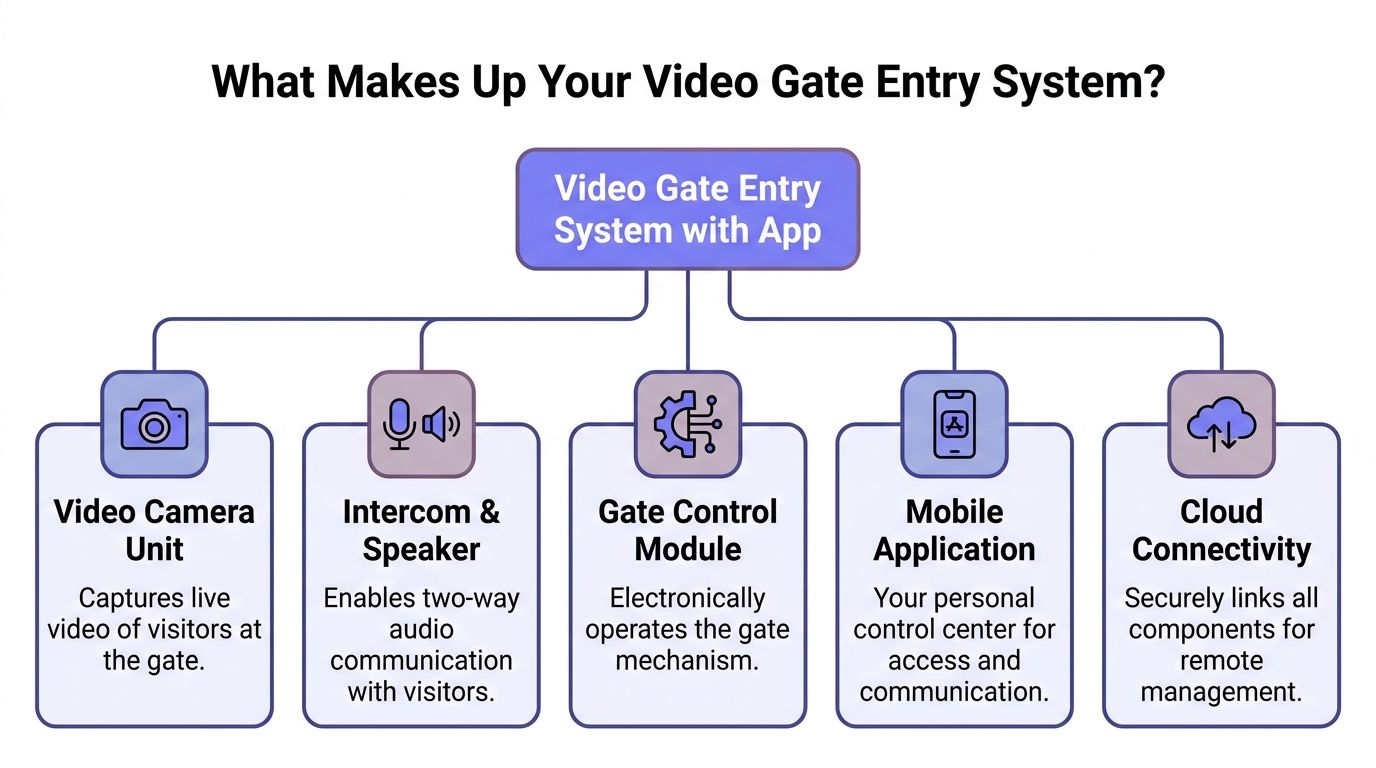
A video gate entry system with app is easiest to understand as three connected parts. There's the device at the gate, the software people use every day, and the connection layer that ties everything together.
When those three parts are designed well, an older gate operator starts behaving like a cloud-based access system. Residents use phones instead of remotes. Managers update permissions remotely. Visitors can be verified before the gate opens.
The hardware at the gate
The hardware is the control layer installed near the operator or call box. Think of it as a translator between an existing gate and modern access software.
It doesn't have to replace the operator. In a retrofit-friendly setup, it connects to the gate mechanism electronically and adds smart control, video, and communication functions without forcing a full rip-and-replace.
For many buyers, that's the difference between a feasible upgrade and a budget fight.
The app in the resident's hand
The app is the daily control center. It turns a phone into a digital key and removes the need for physical fobs, clickers, and keypad-only workflows.
Managers use it for tasks that used to require site visits or manual coordination, such as:
- Granting access to new residents or vendors
- Revoking credentials when someone moves out or a contract ends
- Scheduling entry permissions for cleaners, pool vendors, and recurring service providers
- Reviewing logs when the board asks who opened the gate and when
Modern keyless systems also rely on encrypted digital credential checks rather than static physical matching, which is one reason property teams prefer remote administration, as outlined in Swiftlane's overview of keyless entry systems for businesses.
The connectivity layer that decides reliability
This is the part many buyers underestimate. A gate can have a sharp app interface and decent hardware, but if the connection path is weak, the whole experience feels unreliable.
That's especially important when choosing the best intercom system because the access method and the network design affect usability just as much as camera quality. Video alone doesn't solve gate operations if residents can't reliably respond or open from wherever they are.
Here's a simple perspective:
| Component | What it does | Why it matters |
|---|---|---|
| Gate control module | Sends the open command to the operator | Determines whether legacy hardware can be modernized |
| Video and audio layer | Shows and connects the visitor | Adds verification before access is granted |
| Mobile app | Lets residents and staff manage entry remotely | Replaces physical distribution and on-site programming |
| Cloud connection | Syncs users, logs, and commands | Enables remote administration across the property |
How These Systems Work Architectures and Connectivity
Connectivity is where a polished demo either survives real property conditions or falls apart. Gate access is a mission-critical function. If the network path is fragile, residents don't care how modern the app looks.
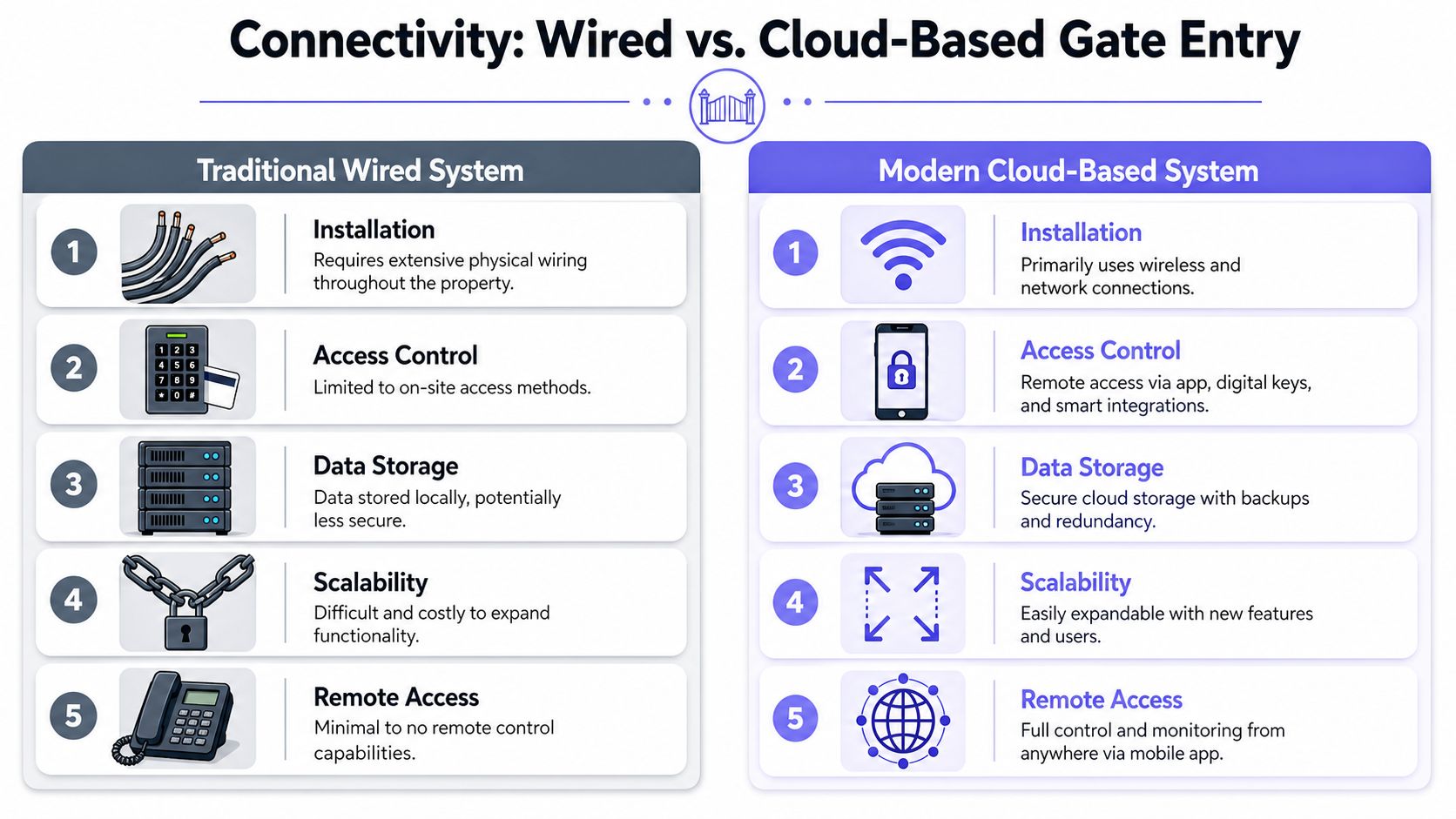
Two architectures dominate this category. One depends heavily on local Wi-Fi or on-site internet at the gate. The other uses cellular communication as the primary path for remote access control.
Why Wi-Fi becomes a weak link at the gate
Wi-Fi sounds convenient until the gate is far from the building, the signal has to cross walls or landscaping, or the router gets reset by a resident or maintenance tech. Then access control starts depending on consumer networking conditions that weren't designed around perimeter security.
Gate motors can also create interference. So can poor signal penetration near entry columns, metal enclosures, and perimeter installations.
That's why Wi-Fi-first designs often create these field problems:
- Router dependency: If the local internet drops, remote gate control may disappear with it.
- Coverage gaps: A strong signal inside the office doesn't guarantee a stable connection at the entrance.
- Support confusion: The property blames the installer, the installer blames the network, and no one wants ownership of the outage.
A gate should never be as fragile as the property's least reliable router.
Why cellular is the professional architecture
A cellular-based controller bypasses the local router and uses dedicated mobile network connectivity for remote commands. That matters because it removes a common single point of failure from the access chain.
According to ButterflyMX's gate intercom system overview, cellular access control units maintain a 99.9% connection reliability rate, compared with 85% to 90% reliability for WiFi-only gate intercoms in environments with high electromagnetic interference or poor signal penetration. The same source notes gate release latency is typically under 2 seconds for LTE or 4G-based release signals.
For a manager, the practical result is simple. The gate still responds even when the property's local internet has a bad day.
A strong cellular architecture also supports the remote use case that buyers care about:
- Residents open from anywhere with mobile access
- Managers update credentials remotely without driving on-site
- Installers avoid gate-side internet workarounds that complicate support
- Boards get better uptime without replacing mechanical gate equipment
Readers who want the practical model behind this setup can review how cellular gate openers work.
A quick comparison makes the trade-off clearer:
| Decision point | Wi-Fi dependent setup | Cellular-based setup |
|---|---|---|
| Gate-side internet required | Often yes | No local Wi-Fi dependency |
| Outage exposure | Tied to router and property internet | Isolated from local router failures |
| Support burden | Networking issues can stall resolution | Cleaner responsibility boundary |
| Best fit | Simple sites with stable coverage | Remote gates and reliability-focused properties |
Core Features That Redefine Property Access
Features only matter when they solve a recurring property problem. The strongest systems don't just add convenience. They remove the daily friction that leads to gate calls, resident complaints, and weak security habits.
Visual verification without forcing every guest into an app
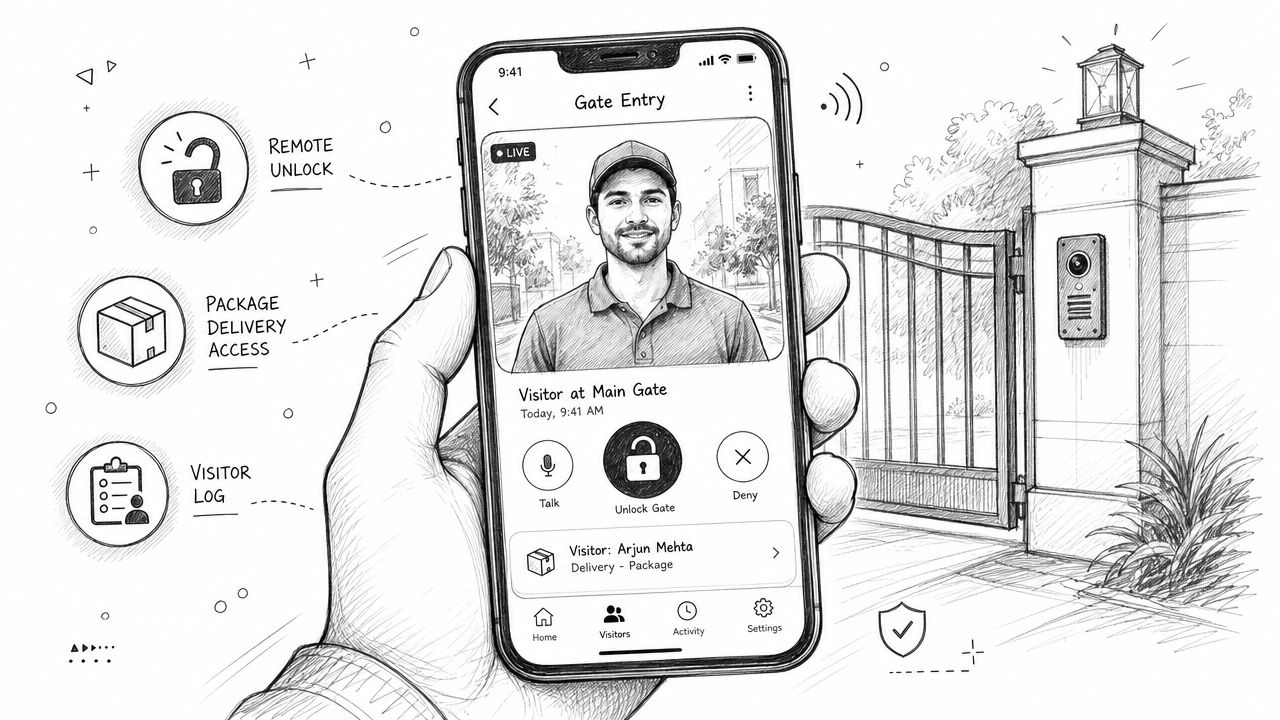
The most overlooked question in gate access is also the most practical: what happens when the visitor doesn't have the app and won't install it?
That's not a fringe case. According to Avigilon's video intercom systems article, systems that require visitors to download an app increase entry failure rates by 35%, and 78% of gated community entry incidents in 2025 involved visitor app limitations. The same source notes that only 22% of video intercom guides mention one-way video or web-based visitor calls without requiring app installation.
That's why one-way video and browser-based visitor calling matter. A resident can verify the person at the gate without forcing the visitor into account creation, app setup, or a support call.
One practical example is video intercom without external cameras, where a resident receives visual context directly through the access workflow instead of depending on a separate camera system.
Digital credentials instead of physical distribution
Physical access tools create administrative drag. Someone has to hand them out, replace them, track them, and recover them after turnover.
A mobile-first system changes that routine:
- Residents use phones as digital keys: No clicker handoff is required.
- Managers grant and revoke remotely: Access changes happen from a dashboard, not a maintenance cart.
- Permissions can be customized: Vendors can receive time-bound or role-specific access instead of permanent generic credentials.
This matters in more than housing. Properties that also manage controlled package areas or device restrictions often evaluate related tools such as lockers for secure environments because the same principle applies. Security improves when administrators control access centrally instead of relying on unmanaged physical items.
Field note: The more a property depends on things residents can lose, lend, copy, or forget, the less control it actually has.
Operational controls that matter every day
The most valuable features are usually the least flashy.
A solid system should support:
- Access scheduling: Useful for recurring service windows, pool hours, or contractor arrival periods.
- Entry logs: Critical when management needs auditability instead of guesswork.
- Remote hold-open settings: Helpful for move-ins, scheduled outdoor maintenance periods, and planned traffic periods.
- Over-the-air updates: Important for keeping the system current without replacing hardware.
Nimbio fits this model as a cellular retrofit platform that adds smartphone access, remote credential management, entry logs, and GuestView-style one-way visitor verification to existing electronic gates and entry points.
Real World Applications and ROI
The business case for a video gate entry system with app changes slightly by property type, but the pattern is consistent. Teams invest because they want fewer manual access tasks, better visibility, and less dependence on physical credentials that can't be tracked well.
The market demand reflects that operational value. The residential sector accounts for approximately 70% to 75% of total demand in the video door entry systems market, according to video door entry systems market data from Pro Market Reports.
HOAs and gated communities
For HOA boards, the return usually shows up in reduced friction and cleaner governance.
A board can move away from unmanaged shared codes and toward named digital access. That improves accountability. It also makes it easier to answer resident complaints, investigate incidents, and remove access when a home changes hands.
The biggest gains are often operational, not dramatic:
- Fewer remote replacements
- Less onsite credential coordination
- Better records for disputes and policy enforcement
- More controlled vendor and guest access
Multifamily properties
In multifamily, access control also functions as an amenity. Residents expect phone-based entry because that's how they already manage deliveries, visitor coordination, and day-to-day building access.
Property teams benefit when leasing, maintenance, and management share the same access framework. Move-ins and move-outs become easier to administer. Temporary credentials no longer require a physical handoff every time a vendor needs the gate.
A practical table helps frame it:
| Property type | Main pain point | Operational return |
|---|---|---|
| HOA | Shared codes and resident turnover | Better auditability and cleaner credential control |
| Multifamily | Frequent visitor and vendor access | Faster remote administration and resident convenience |
| Mixed-use or private community | Multiple user types | Centralized oversight across different access needs |
Commercial yards and service entrances
Commercial sites value the same control, but the emphasis shifts toward throughput and accountability. Managers want to know who entered, who approved it, and whether gate access can be managed without constant site intervention.
That's especially useful where vendors, drivers, and service technicians arrive outside the manager's physical location. A mobile-controlled system helps maintain continuity without turning the gate into a full-time staffing issue.
Installation Compatibility and Retrofitting Legacy Gates
Many buyers assume smart access means replacing the operator, trenching new lines, and rebuilding the entrance around new infrastructure. In most retrofit scenarios, that assumption is wrong.
The gate operator may still be mechanically sound. The primary problem is usually the access layer. It's outdated, hard to manage, and tied to remotes or static codes.
Why full replacement is often the wrong first move
Legacy gates are still common. According to ButterflyMX's review of mobile-app video intercom retrofits, 68% of residential gates in major markets still operate on legacy systems without gate-side internet, while 90% of online guides focus on new installations and there's been a 42% rise in HOA inquiries about retrofitting existing systems.
That gap matters because it leaves boards with bad advice. They're often told to replace the whole system when what they need is a hardware-agnostic add-on that can work with the existing operator.
For installers, this is the practical opportunity. If the operator can accept the proper control interface, a retrofit can modernize access without discarding functioning gate equipment.
Retrofitting is usually the smarter first question. Replacement should be the answer only when the operator itself has reached end of life or can't support safe integration.
This is also why many property teams research articles on how to enhance home security with new intercoms before they approve a project. They're trying to separate true access modernization from unnecessary hardware churn.
What installers should verify before retrofit
Compatibility work is straightforward when it's approached in the right order.
Check these items first:
- Existing operator type: Many sites already use common platforms such as LiftMaster, DoorKing, Viking, FAAC, Nice, or Mighty Mule.
- Control input availability: The operator needs an appropriate way to receive open commands from the add-on controller.
- Power and enclosure conditions: The hardware needs a clean, protected installation environment.
- Cellular signal quality at the gate: Reliability starts with the connection path, not just the app.
- Resident workflow requirements: Visitor calling, admin permissions, and delivery handling should be mapped before installation.
For teams evaluating retrofit pathways, modernizing access control for properties is usually less about replacing metal and motors and more about replacing outdated credential management.
A Buyer Checklist for Managers and Installers
A good demo can hide a weak deployment model. The better approach is to evaluate the system like an operator, not a shopper.
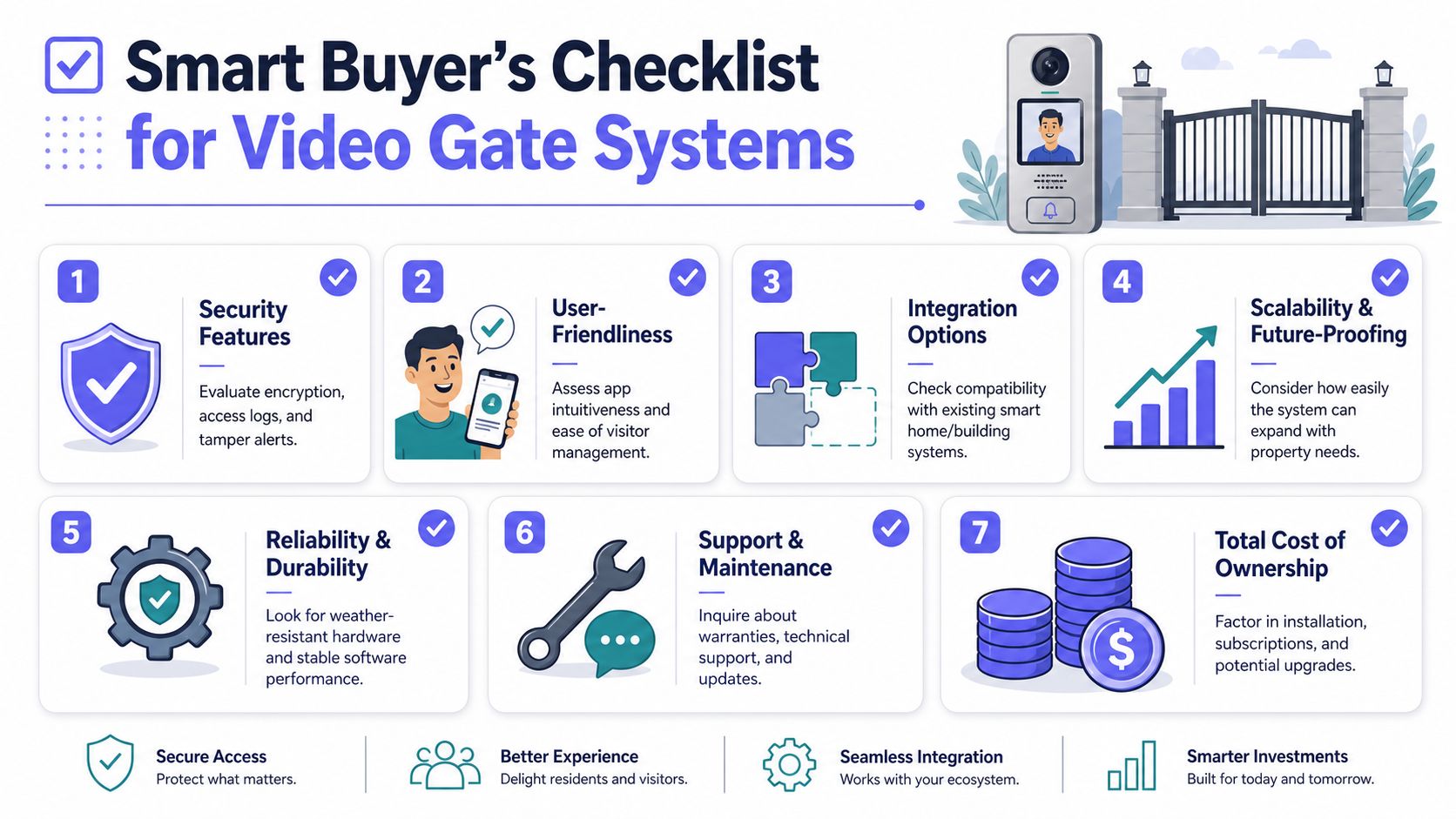
Questions worth asking before approval
Use this checklist when comparing options:
- What is the primary connectivity method? If the answer depends on local Wi-Fi at the gate, ask how the system behaves when that network fails.
- Can it retrofit existing gate operators? A property shouldn't pay for replacement hardware unless replacement is necessary.
- How are visitors handled if they won't use an app? This question exposes whether the system works in real life or only in ideal user scenarios.
- What admin controls are included? Look for remote credential changes, scheduling, entry logs, and hold-open settings.
- How clear is the pricing model? Ask what the hardware cost includes, what the recurring fees cover, and what support or warranty terms apply.
- What happens after installation? Updates, technical support, and hardware replacement policies matter because access control isn't a one-time event.
- Are audit logs and access records easy to review? Boards and managers need usable records, not just a promise that data exists.
A final screening rule helps. If a vendor spends more time describing sleek hardware than explaining failure handling, retrofit compatibility, and visitor exceptions, that's usually a warning sign.
A practical next step is to compare your current gate operator, visitor workflow, and admin needs against a cellular retrofit model. Nimbio provides that kind of path for electronic gates and building entry systems, with smartphone-based control, remote credential management, and gate modernization that doesn't depend on local Wi-Fi.