

The usual scene starts with friction. A resident loses a fob, a vendor still has last month's gate code, the HOA board wants an entry report before the next meeting, and the gate operator starts acting up after a network issue.
That's where an access control dashboard stops being a nice extra and starts acting like the operating system for the property. For property managers, installers, and gated community boards, it's the fastest way to move from scattered entry tools to a single view of who can enter, when they can enter, and what happened at every door or gate.
Table of Contents
- What Is an Access Control Dashboard
- The Modern Dashboard's Foundation
- Key Features Every Property Manager Needs
- Practical Workflows for Smart Communities
- Security Audits and Performance Metrics
- Your Path to Modern Access Control
What Is an Access Control Dashboard
An access control dashboard is the digital command center for a property's entry system. It brings gates, building doors, resident credentials, vendor schedules, event history, and alerts into one operating view.
That matters because most legacy setups create blind spots. Physical keys get copied, shared PINs spread, and lost remotes turn a simple access issue into a security problem.
A modern dashboard replaces that patchwork with centralized control. Staff can grant access, revoke it, schedule it, and review it without standing at the gate or sorting through handwritten notes.
Why properties are moving this direction
The category itself is growing. The U.S. market for Electronic Access Control System Manufacturing is projected to reach $3.2 billion in 2026, with a 2.8% CAGR between 2020 and 2025, according to IBISWorld's industry outlook.
That growth reflects a practical shift in the field. Owners don't want to rip out every existing gate operator or entry device if a retrofit can modernize the system and keep the site running.
Older systems force managers to work around the hardware. A good dashboard reverses that and makes the hardware follow policy.
The dashboard also improves the resident experience. People expect smartphone-based access, quick visitor handling, and fewer lockout calls. In many communities, that convenience now sits next to security on the priority list.
What it actually controls day to day
A useful dashboard usually handles tasks like these:
- Resident access: Add a new tenant, suspend a departing resident, or update permissions without collecting old fobs.
- Vendor access: Give maintenance personnel, cleaners, or delivery teams limited entry windows tied to real schedules.
- Property oversight: Check whether a door is secure, whether a gate is open, and whether repeated denials are happening at a specific entrance.
- Board reporting: Pull a clear record of activity for incidents, disputes, or policy reviews.
Properties evaluating different entry methods can also compare tools such as QR, PIN, and Face ID access to understand where traditional credentials still fit and where mobile credentials reduce risk.
The Modern Dashboard's Foundation
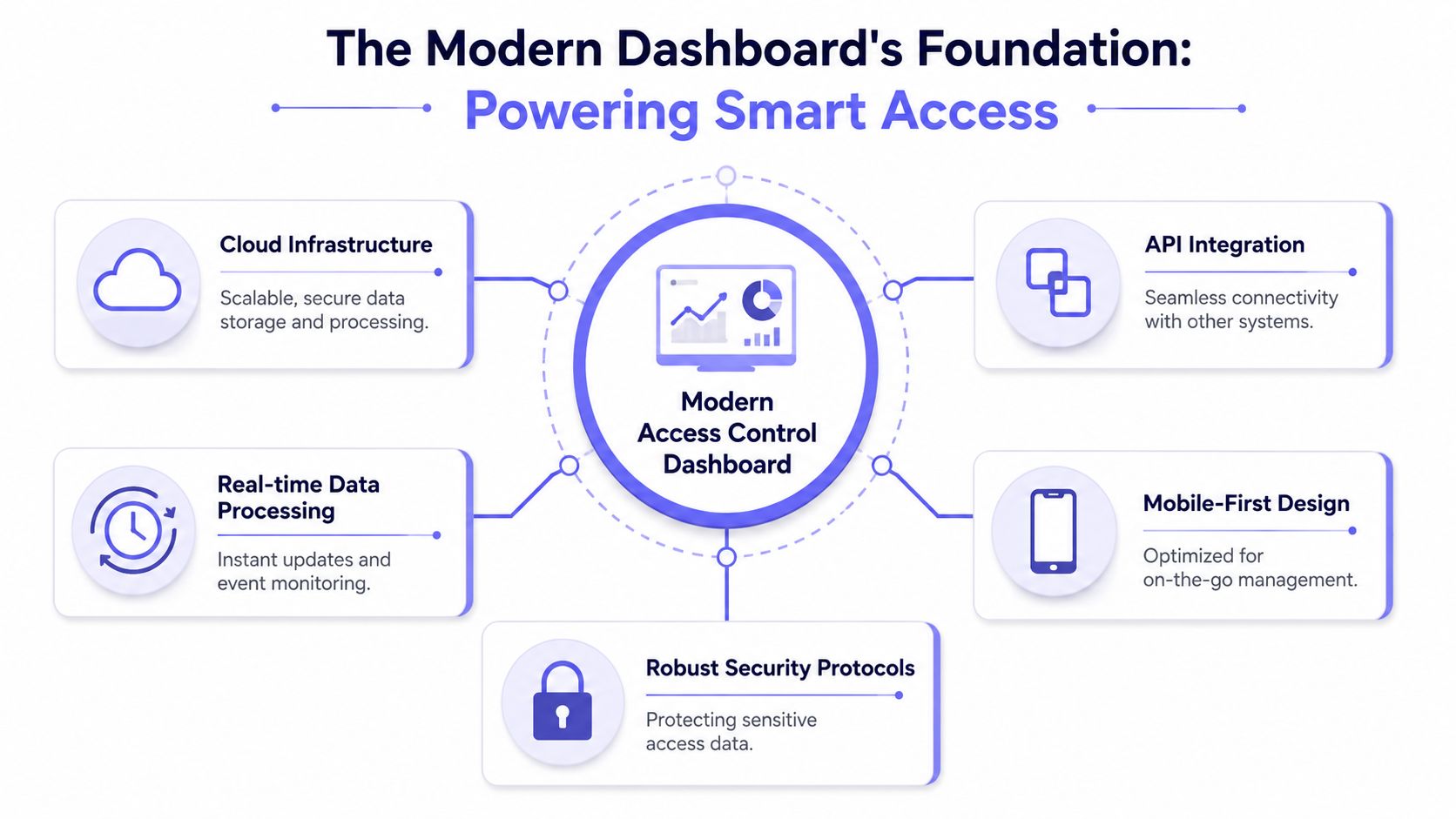
The dashboard only works as well as the stack beneath it. When the controller is weak, the local network is unstable, or the software depends too heavily on one building's Wi-Fi, the interface may look modern while the operation stays fragile.
The stronger model has three layers. Local control at the gate or door, resilient connectivity, and cloud software that administrators can reach from anywhere.
Start at the edge device
The door or gate controller has to keep doing its job even if the network connection drops. That's not a preference. It's core architecture.
According to Nedap's guidance on access control devices, optimal architecture requires a controller that can manage tasks locally when network connections are lost, while still monitoring lock status and door position for real-time dashboard visibility.
That's why installers should be skeptical of designs that make the opening decision entirely dependent on a flaky site network. If Wi-Fi stalls, the property shouldn't lose functional entry control.
A simple visual helps frame the technology stack:
Why cellular beats Wi-Fi for entry control
Wi-Fi works well for many property amenities. It's far less dependable as the backbone of perimeter access.
Wi-Fi depends on local routers, passwords, ISP uptime, tenant interference, and constant configuration discipline. Cellular-based systems avoid most of those failure points because they don't rely on the property's resident-facing network to keep the gate online.
For retrofit jobs, that difference is often decisive. It cuts the coordination burden with internet providers, avoids coverage gaps near perimeter entrances, and gives managers a cleaner support path when something goes wrong.
A hardware-agnostic controller also matters. If a community already uses LiftMaster, FAAC, DoorKing, Viking, Nice, or another common gate operator, the smartest upgrade usually adds intelligence to the existing equipment instead of replacing working hardware.
The cloud layer that makes management useful
Once the controller and connection are reliable, the cloud layer becomes valuable. That's where administrators manage credentials, view activity, set rules, and support multiple locations from a single login.
For teams focused on boosting property management efficiency, that centralized model fits how modern operations already work. Staff handle leasing, vendors, maintenance, and security across sites, not from a single front desk.
One example is cellular building entry solutions, which pair a retrofit controller with remote management so building access can be updated without depending on local Wi-Fi availability.
Field rule: If the gate must keep working during a network headache, the controller needs local intelligence and the connection shouldn't depend on building Wi-Fi.
Key Features Every Property Manager Needs
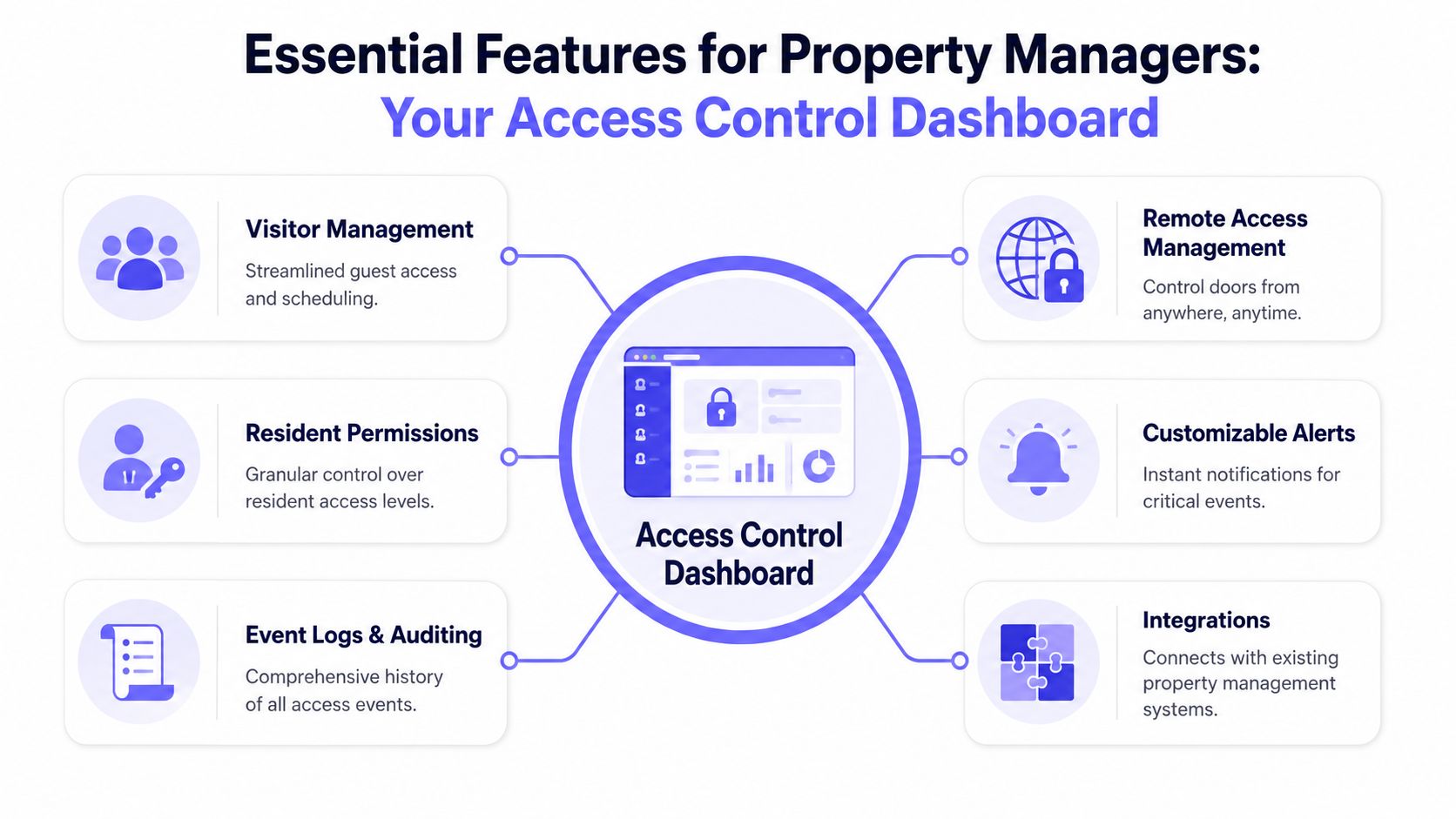
The best dashboard features aren't the ones that look advanced in a demo. They're the ones that remove repetitive work for staff and close the security gaps that communities deal with every week.
Smart buildings increasingly use smartphones as digital keys, replacing fobs and keypads while giving security teams instant real-time alerts through integrated surveillance and access monitoring, as described by Koorsen's overview of smart building access control.
That shift changes what a property manager should expect from an access control dashboard.
User and credential control
A property should be able to issue and remove access as quickly as occupancy changes.
The minimum standard includes:
- Resident onboarding: New occupants get mobile credentials without waiting for office pickup hours.
- Instant revocation: Former tenants, ex-employees, or lost devices can be removed immediately.
- Role-based assignment: Boards, managers, maintenance staff, and vendors shouldn't all carry the same permissions.
Mobile credentials outperform shared codes. A code often stays in circulation long after it should've been retired. An app-based credential is easier to tie to a person and easier to remove.
Scheduling that matches real operations
Most communities don't need flat, always-on access for every user. They need rules that mirror real schedules.
Useful scheduling options include:
- Vendor windows for cleaners, pool technicians, and groundskeepers.
- Hold-open periods for predictable rushes like weekday move-ins or package delivery blocks.
- Temporary permissions for contractors during active projects.
A landscaping crew, for example, might only need access on Tuesday mornings. That's cleaner than giving out a permanent code and hoping nobody reuses it later.
Live visibility and alerts
Managers need to know what's happening now, not after a complaint arrives. Live status changes the dashboard from a records system into an operations tool.
The most practical live functions are:
- Gate and door status: Open, closed, forced, held, or offline.
- Entry attempts: Successful and denied events in one stream.
- Custom alerts: Notices for unusual activity, repeated denials, or a gate left open too long.
A dashboard earns its keep when staff can spot a problem before residents start calling.
For multifamily and HOA operations, fast visibility also reduces finger-pointing. If a resident says the gate never opened, the activity trail usually shows whether the credential failed, the gate was offline, or the request was never sent.
Logs, audits, and integrations
Event history is where long-term value shows up. A searchable log helps with disputes, incident reviews, and internal policy enforcement.
Strong log design should answer four questions quickly:
| Question | Why it matters |
|---|---|
| Who entered or attempted entry | Ties activity to a user or credential |
| Which gate or door was involved | Isolates problem locations |
| When it happened | Supports incident review and resident complaints |
| What the system did | Shows grant, denial, hold-open, or exception events |
Integrations matter too, but only when they remove work. Good connections with property management systems, surveillance tools, or directories should reduce duplicate entry, not create another admin layer.
Managers evaluating platforms can use a detailed cloud-based access control guide to compare credentialing, remote control, and reporting capabilities before a retrofit decision.
Practical Workflows for Smart Communities
Features are easy to list. Workflows show whether the system fits a property.
Recent data from Oloid's access control analysis says 68% of multifamily property managers in 2025 prioritize visual guest verification, yet only 12% of dashboard vendor guides include video-based guest entry workflows. That gap is visible in the field. Many platforms still treat guest access like a static code problem.
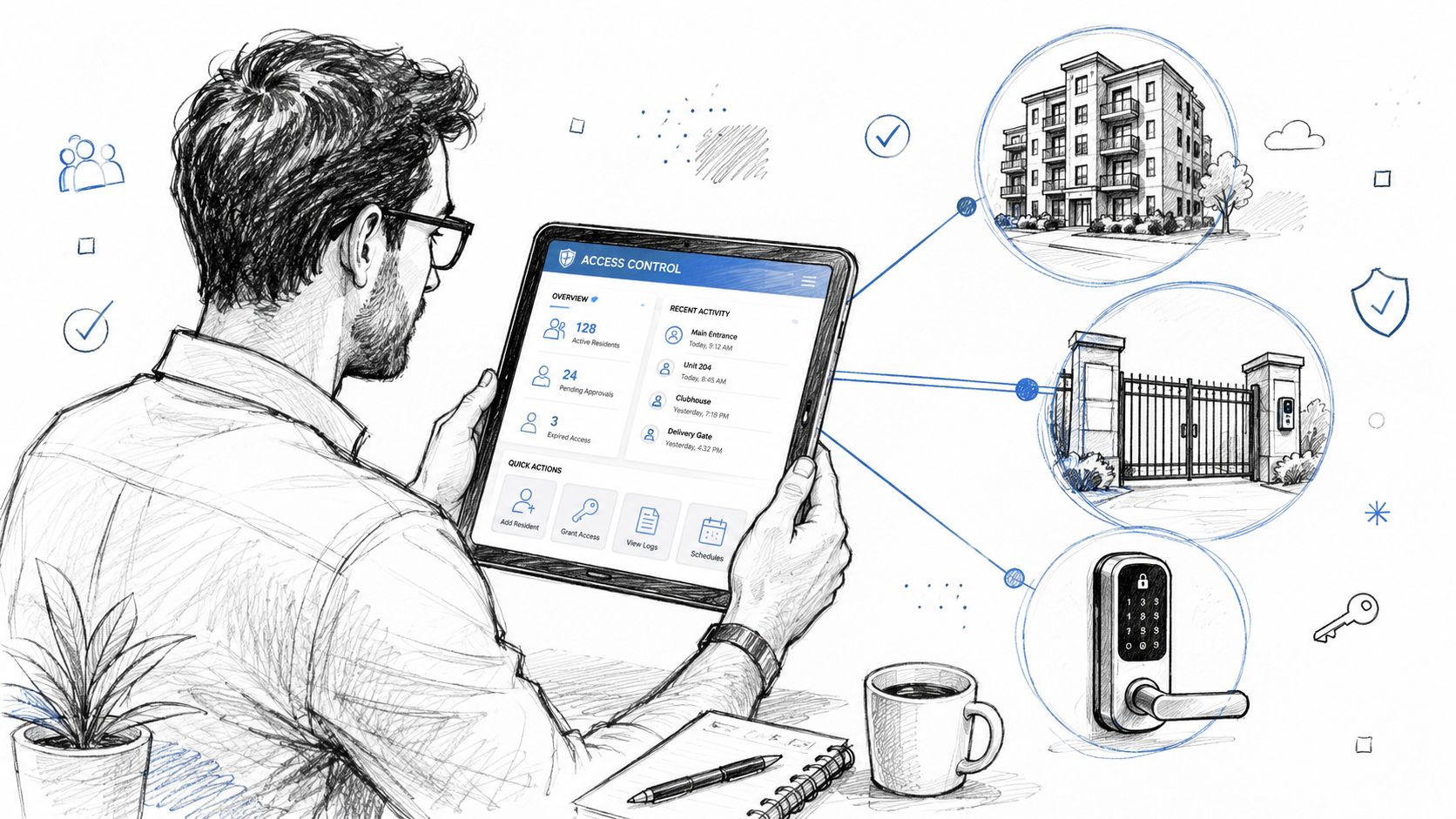
Resident onboarding without gate chaos
A new resident signs a lease on Friday afternoon and plans to move in over the weekend. In a legacy setup, staff might scramble to hand off a remote, explain an outdated keypad process, or share a temporary code that lingers too long.
A modern workflow is cleaner:
- The manager creates the resident profile and assigns a digital credential.
- The system applies the right permissions to the gate, building entry, or common areas.
- The resident uses a phone instead of waiting for a physical device handoff.
If movers need timed access, the manager can add a short access window rather than opening the site indefinitely. That reduces calls, prevents confusion at the gate, and keeps the move-in process documented.
Installer support without a truck roll
Installers judge dashboards by one question. Can the system solve problems remotely, or does every small issue become a site visit?
A useful installer workflow includes remote diagnostics, status checks, and over-the-air updates when supported. If a board reports that the main entry is inconsistent, the installer should be able to inspect event history, verify whether the gate operator is responding, and confirm whether the controller is online before sending a technician.
That matters even more on retrofits. Existing equipment often stays in place, so the dashboard has to expose enough operational detail to distinguish a controller issue from a gate hardware issue.
One option in that category is Nimbio, which retrofits existing electronic gates and building entry points with a cellular controller, supports remote credential changes, and adds smartphone-based access without requiring a full hardware replacement.
Guest entry with visual verification
Guest access is where many properties still rely on weak habits. Static guest codes get forwarded. Temporary PINs get reused. Residents open the gate without knowing who's there.
A better workflow adds visual confirmation:
- The visitor requests entry from a directory or entry point.
- The resident receives a one-way video view of the visitor.
- The resident verifies the person visually before opening the gate.
- The event is logged so management has a record of the interaction.
This model fits how communities operate. Residents want convenience, but they also want confidence that the person at the gate is the person claiming to be there.
Guest entry shouldn't force a choice between convenience and verification.
For teams focused on managing visitor access effectively, the critical requirement is simple. The guest flow should be fast for residents, auditable for management, and strong enough to reduce dependence on permanent shared codes.
Security Audits and Performance Metrics
Convenience gets attention first. Auditability is usually what justifies the upgrade once a board, owner, or regional manager starts asking hard questions.
A strong access control dashboard creates a defensible record. That's a major difference from old keypad habits where a shared code may open the gate, but nobody can say with confidence who used it.
Why auditability changes everything
Industry benchmarks reported by Genea's global dashboard review indicate that effective access control dashboards reduce audit preparation time by 75% and eliminate untrackable shared PIN code usage entirely by enforcing crypto-based digital key authentication with automatic revocation upon termination or device loss.
Those two outcomes matter for every stakeholder:
- Property managers spend less time assembling records for incidents or compliance reviews.
- HOA boards get a clearer basis for policy decisions.
- Installers and integrators can support systems that are easier to prove and troubleshoot.
- Residents benefit from tighter control over who still has access.
The operational lesson is straightforward. If a credential can't be tied to a person and revoked quickly, it will eventually create a reporting problem.
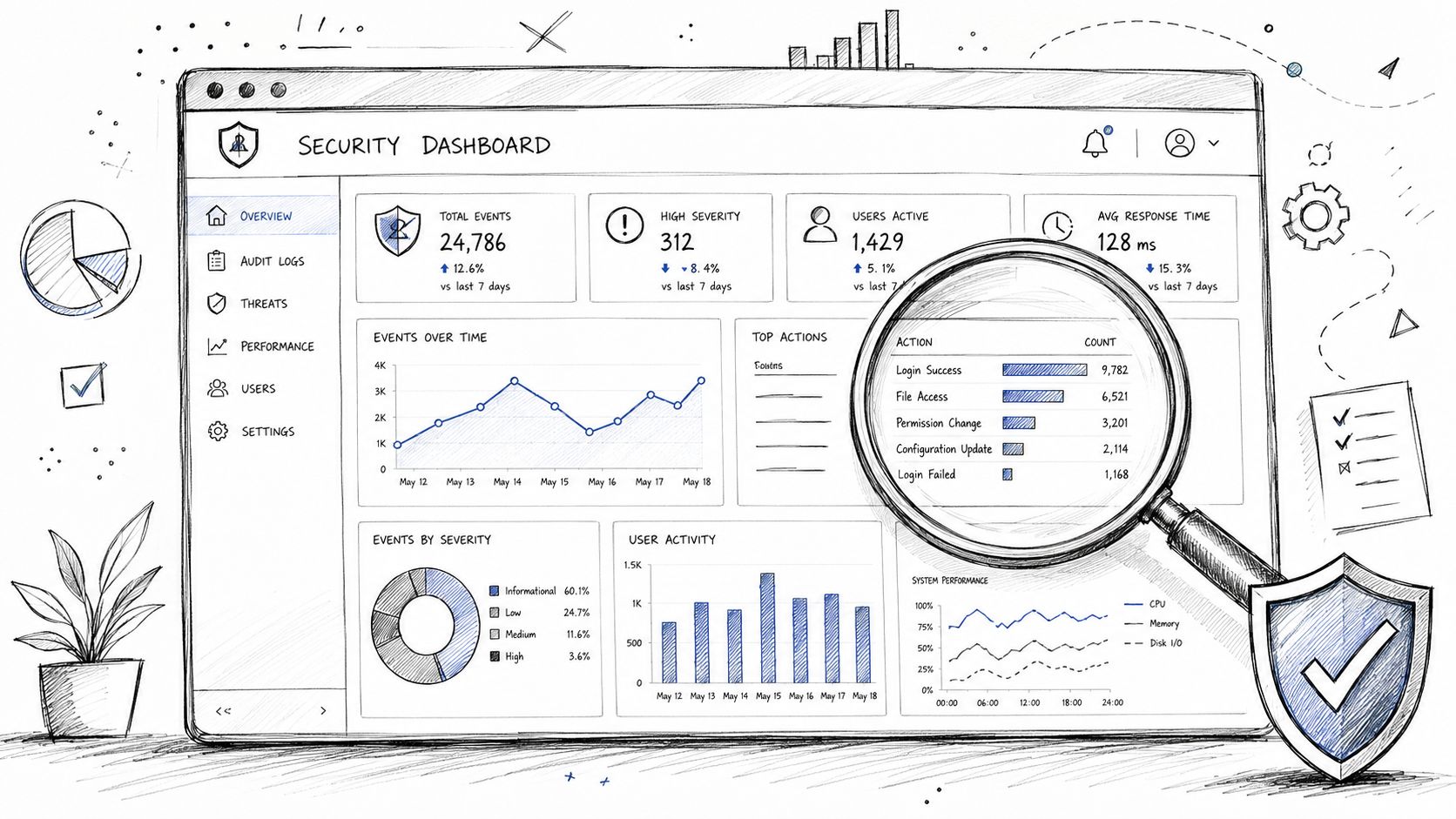
Which signals deserve attention
A dashboard's data becomes more useful when teams watch the right indicators. The most actionable signals are usually simple.
- Repeated denials at one entrance: May indicate a user problem, a bad credential, or someone probing for access.
- Unexpected hold-open patterns: Suggest process drift, convenience shortcuts, or a failing closing cycle.
- Access requests outside normal hours: Useful when reviewing vendor permissions and perimeter policy.
- Admin changes to credential rules: Important for accountability, especially in shared management environments.
Role-based permissions matter here too. A leasing team may need to issue resident access, while only senior admins should change community-wide schedules or gate policies. That separation lowers the chance of accidental misconfiguration and gives managers a cleaner approval structure.
Operational takeaway: The dashboard shouldn't just show activity. It should show who changed the rules, who used the credentials, and which patterns need attention.
Your Path to Modern Access Control
A modern access control dashboard does more than replace a keypad or organize entry logs. It gives a property one operating layer for gates, building access, residents, vendors, and guests.
For managers and HOA boards, the practical benefits are clear:
- Centralized control instead of scattered remotes, fobs, and shared codes
- More reliable operation when connectivity doesn't depend on fragile local Wi-Fi
- Cleaner retrofits that preserve existing gate operators where replacement isn't necessary
- Better guest handling through remote workflows that support visual verification
- Stronger oversight through searchable records, alerts, and permission controls
For installers, the right system reduces avoidable service calls and supports remote administration. For residents, it removes daily friction. For owners, it turns access control into an operational asset rather than a recurring headache.
Communities don't need more entry devices. They need a system that keeps working, stays auditable, and fits how people live and manage property today.
Properties evaluating a smarter upgrade can explore Nimbio to see how cellular-based retrofit access control supports smartphone entry, remote credential management, and modern visitor workflows without relying on property Wi-Fi.
For a full rundown of the app and platform capabilities, see the Nimbio features overview.


