A property manager often reaches the same breaking point with entry systems. Keys go missing, gate codes get shared, clickers pile up in drawers, and no one has a clean record of who still has access.
That frustration is why access control door systems have moved from a specialty security product to a mainstream property tool. For HOAs, multifamily communities, commercial buildings, and gated sites, the true shift isn't just better locking. It's better control, better visibility, and fewer daily headaches.
Table of Contents
- What Are Access Control Door Systems
- Understanding Access Control Components and Architectures
- From Key Fobs to Smartphones A Look at Credential Types
- Where Access Control Systems Are Used
- Security and Compliance in Access Control
- How to Choose the Right Access Control System
- Installation and Long-Term System Management
- The Future of Property Access Is Here
What Are Access Control Door Systems
At the simplest level, access control door systems decide who can enter, where they can enter, and when they can enter. Instead of relying only on metal keys or shared keypad codes, the system checks a credential and then either grants access to the opening or keeps it secure.
That sounds technical, but the daily benefit is easy to understand. A property team can grant access to a new resident, remove access for a former vendor, or limit a contractor to specific hours without replacing locks across the property.
The category has grown into a major part of modern building operations. The global access control market was valued at USD 11.62 billion in 2025 and is projected to reach USD 26.22 billion by 2034, growing at a 9.46% CAGR, with North America holding the largest market share according to Fortune Business Insights' access control market analysis.
Practical rule: If a property regularly issues keys, fobs, remotes, or gate codes, it already has an access management problem. It just may not be using access control software yet.
Why older methods feel harder every year
Traditional locks still have a place, but they weren't designed for modern property operations.
Common pain points include:
- Physical keys: Hard to track, expensive to replace operationally, and awkward when residents or staff turn over.
- Shared gate codes: Convenient at first, but they spread fast and become difficult to contain.
- Clickers and fobs: Familiar, but someone still has to issue them, collect them, replace them, and keep a current list.
Modern systems changed the conversation. A door or gate is no longer just a barrier. It becomes a managed access point tied to permissions, schedules, and recorded activity.
For property managers, that means less guesswork. For residents, it usually means smoother entry. For boards and owners, it means a path away from outdated systems that feel easy until something goes wrong.
Understanding Access Control Components and Architectures
Most systems look confusing until the moving parts are separated. Once that happens, the logic becomes straightforward.
The four parts that matter most
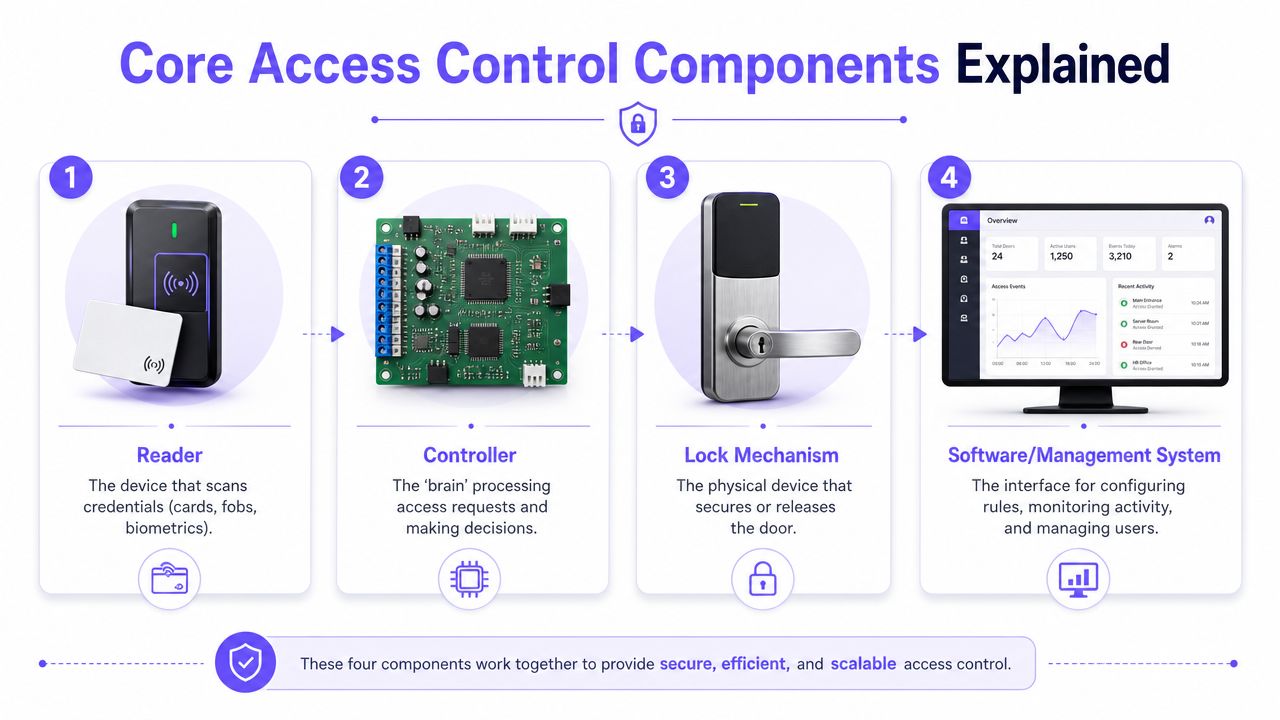
Every access control setup is built around four core pieces:
Reader
This is the device people interact with. It might read a card, a fob, a mobile credential, or another approved form of access.Controller
This is the decision-maker. It receives the credential data, checks permissions, and tells the lock what to do.Lock mechanism
This is the hardware that physically secures or releases the opening. On a gate, it may trigger the operator. On a building door, it may release an electric strike or magnetic lock.Software
Software enables managers to handle users, schedules, permissions, and logs. It's the part that turns a locked opening into a manageable system.
A reader alone isn't the system. A smart lock alone isn't the system either. The value comes from how all four parts work together.
For teams comparing vendors, it helps to review examples of Nimbio door access solutions alongside other setups, because the key differences often appear in connectivity, retrofit effort, and day-to-day management.
How the main architectures compare
The architecture behind the system usually matters more than the credential on the front end. A sleek app won't solve much if the gate depends on unstable connectivity or complicated site wiring.
| Architecture | Best understood as | Main advantage | Common limitation |
|---|---|---|---|
| Hardwired | Traditional infrastructure-based deployment | Stable local connection when built correctly | Installation can require conduit, pull paths, and significant building work |
| IP or Wi-Fi | Network-connected access using local internet infrastructure | Remote management can be simple on well-managed networks | Reliability depends on the local network and signal quality |
| Cellular | Access control using dedicated cellular connectivity | Avoids dependence on property Wi-Fi and suits perimeter locations well | Requires evaluating carrier coverage and device compatibility |
A lot of confusion starts here. Buyers often assume “cloud-based” and “Wi-Fi-based” mean the same thing. They don't. Cloud management describes how the system is administered. Wi-Fi is only one possible way a device connects.
That distinction matters at gates and perimeter doors. Those are often the exact places where signal quality, power conditions, and local network support are least reliable.
GetKisi's guide to electronic access control highlights a question many buyers miss: what happens during an internet outage? For perimeter entries where connectivity varies, operational resilience matters because systems still need to preserve logs and maintain control when cloud services or Wi-Fi are interrupted. That's one reason cellular-based systems are especially relevant at gates and remote entry points.
Connectivity should be treated as a security decision, not just an IT detail.
When a gate depends on a finicky local network, the access issue quickly becomes a resident issue, a vendor issue, and then a management issue. That's why many retrofit projects now favor cellular architecture for perimeter access. It reduces one of the most common causes of real-world failure: dependence on a network no one on site fully controls.
From Key Fobs to Smartphones A Look at Credential Types
Credentials are the “keys” of modern access control. The difference is that today's key may be a code, a card, a fob, or a phone.
Older credentials still work but create overhead
Physical credentials remain common because they're familiar. A keypad code is simple to issue. A fob is easy to hand to a resident. A card works well for staff.
But each older method creates a management burden:
- PIN codes: Easy to share, hard to contain once widely known.
- Physical keys: No audit trail, no remote revocation, and no quick way to limit time windows.
- Cards and fobs: Better than loose keys in many settings, but still physical inventory that must be issued and recovered.
Many properties stall by improving the door hardware yet retaining the old operating model. The result is a newer-looking system with the same administrative problems.
Why smartphone credentials change the workflow
A smartphone credential changes more than the method of entry. It changes how the property handles access across residents, visitors, staff, and vendors.
Instead of asking, “Who has a spare fob?” the manager can ask, “Who should have permission right now?”
That shift improves several daily tasks:
- Resident onboarding: Access can be issued without waiting for an in-person handoff.
- Vendor scheduling: A cleaner can receive access only during approved service hours.
- Visitor entry: Guests can be granted temporary digital access instead of permanent codes.
- Offboarding: Access can be removed without chasing down physical devices.
A shared gate code is convenient until no one knows who else has it.
Smartphone-based credentials also reduce the clutter of mixed systems. Residents don't need a separate clicker for the gate, a fob for the lobby, and a paper list of visitor instructions. The phone becomes the managed credential.
That doesn't mean every property should eliminate all backups. Some sites still want a hybrid approach with remotes, cards, or call boxes preserved during transition. But the management center of gravity keeps moving toward mobile access because it's easier to grant, change, and revoke without touching the physical opening.
For property teams, that usually leads to the biggest operational win of all: fewer untrackable exceptions.
Where Access Control Systems Are Used
Access control isn't just for office towers. It fits wherever a property needs controlled entry without constant manual intervention.
HOAs and gated communities
An HOA usually feels access issues at the front gate first. Residents want convenience. Boards want stronger HOA security. Delivery traffic keeps growing. Visitors arrive after hours. Old keypad codes circulate far beyond the original intended users.
That's why retrofits matter so much in community settings. Many associations don't want to replace a working gate operator just to modernize access. They want to keep the existing hardware and improve how access is granted and tracked.
The residential segment reflects that broader shift. MarketsandMarkets' access control market report notes that the residential access control market is expanding rapidly, driven by smart-home adoption and demand for DIY-friendly security solutions, which is especially relevant for retrofitting gates and doors where easy installation and lower upfront friction matter to homeowners and HOAs.
A community that adopts cellular-based building access can often modernize entry without rebuilding the entire perimeter setup. That's especially useful when the gate works mechanically but the credential process is outdated.
Multifamily buildings
Multifamily properties face a different pattern. The front entrance matters, but it's rarely the only opening.
A typical building may need controlled access for:
- Main entry doors
- Amenity spaces
- Package or service areas
- Parking garage entry
- Side and secondary entries
The challenge isn't just security. It's coordination. New residents move in, roommates change, vendors rotate, and management teams need a clean way to keep permissions current.
Smart community operations depend on reducing manual steps. If the team has to program fobs one by one, collect remotes in person, and track access in spreadsheets, the building ends up paying an administrative tax every week.
Commercial and industrial properties
Commercial sites usually care most about control, accountability, and staff turnover. A warehouse manager, office tenant, or industrial operator needs to know who entered, which door they used, and whether access can be changed immediately when roles shift.
These properties also have more mixed traffic. Employees, contractors, drivers, and service providers often need different rules.
A practical fit for access control in these settings includes:
- Employee entries: Assigned by role or schedule
- Back-of-house doors: Restricted to trained staff
- Yards and gates: Managed remotely when the property isn't fully staffed
- Remote or off-site facilities: Better suited to systems that don't require constant local IT involvement
The common thread across all three property types is simple. The closer the system aligns with the way the property already operates, the more likely the project succeeds.
Security and Compliance in Access Control
Convenience gets attention first. Auditability is what makes modern access control worth the investment.
Why event logs matter more than many buyers realize
A strong access system does more than open a door. It checks a credential, applies a permission rule, and records what happened.
Avigilon's guide to choosing a door access system explains this clearly: a modern controller authenticates credentials, authorizes entry based on permissions, and creates a detailed event log. That log enables auditability and lets administrators revoke access remotely and instantly without changing physical hardware.
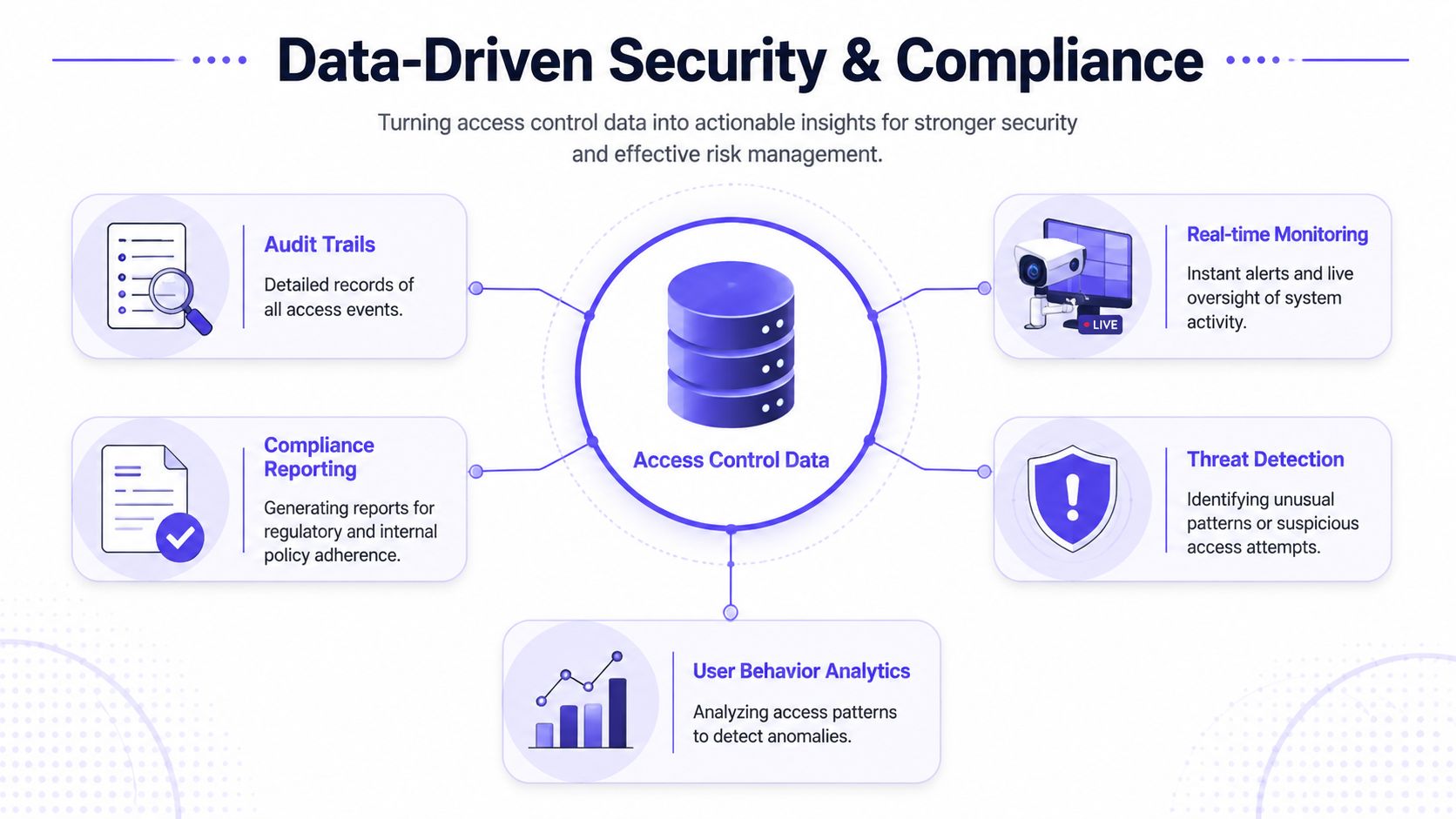
That single capability changes security operations in several ways:
- Incident review: Staff can check who used a door and when.
- Credential cleanup: Former residents, employees, or vendors can be removed without rekeying.
- Policy enforcement: Doors can follow time-based and role-based rules.
- Operational accountability: Teams stop relying on memory or handwritten logs.
A metal key can open a door. It can't explain what happened afterward.
Security policy is only as strong as daily administration
Most access failures don't start with advanced hacking. They start with ordinary shortcuts. Shared codes. Old credentials that were never removed. A vendor who still has access long after the job ended.
That's why access control should be paired with disciplined admin habits and broader IT hygiene. Property teams that manage cloud-connected systems can benefit from reviewing actionable cybersecurity best practices for password policies, user access management, device security, and routine review processes.
Operational note: The safest credential is often the one that can be revoked fastest and verified most clearly.
Three habits make a major difference:
Review active users regularly
Remove stale accounts, old contractors, and temporary access that lingered too long.Separate roles cleanly
Staff, residents, vendors, and board members usually shouldn't share the same permission model.Use the logs
If the system records events but no one reviews them after incidents or during audits, much of the value gets wasted.
Compliance needs vary by property type, but the principle stays the same. Good access control creates a defensible record. That record helps managers answer basic but important questions quickly, without hunting through emails, notebooks, or front-desk memory.
How to Choose the Right Access Control System
The wrong buying process usually starts with a feature demo. The better process starts with property constraints.
Questions that expose weak systems quickly
A vendor may present polished software and attractive hardware. The true test is whether the system fits the site that already exists.
Useful questions include:
Can the system retrofit existing gates or doors?
A property should ask whether current gate operators, electric strikes, maglocks, call boxes, or remotes can stay in place.What connectivity does the system depend on?
If it relies on local Wi-Fi, the buyer should ask what happens when coverage is weak at the perimeter.How are credentials issued and revoked?
The process should be quick enough for normal turnover, not a special project every time someone moves out or changes roles.Who manages the system day to day?
Some products assume a dedicated IT or security team. Many properties don't have one.What happens if the internet fails?
A system should have a clear answer for continuity, control, and logging.
A practical buying checklist
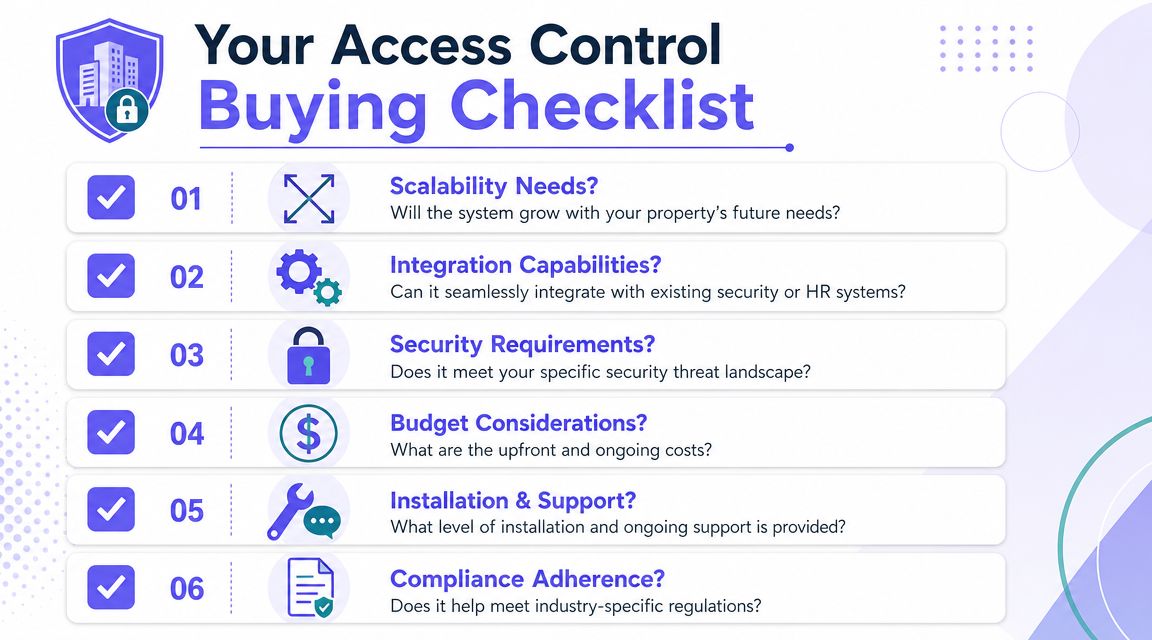
A reliable buying checklist doesn't focus only on shiny features.
It should cover these decision areas:
- Scalability: Can the property add more doors, gates, or buildings without starting over?
- Integration: Will the system coexist with current gate operators, call boxes, or resident workflows?
- Security model: Are permissions granular enough for residents, vendors, and temporary guests?
- Budget fit: Does the cost structure align with how the property prefers to buy technology?
- Support model: Who helps when hardware, onboarding, or admin issues arise?
- Compliance and recordkeeping: Are event logs accessible and useful when questions come up?
A good system reduces dependence on workarounds. A weak system creates new workarounds within months.
How to think about cost without guesswork
Cost decisions often go wrong because buyers compare only hardware prices. That misses the bigger picture.
The total cost includes:
| Cost area | What to examine |
|---|---|
| Upfront equipment | Controllers, readers, locks, or interface hardware |
| Installation labor | Wiring, mounting, configuration, and any building work |
| Connectivity | Whether the system depends on local network upgrades |
| Software or subscription | Ongoing administration platform costs |
| Admin time | The staff effort required to manage users and visitor access |
| Future changes | Adding openings, changing credentials, and supporting turnover |
For existing properties, installation labor often drives the decision more than the hardware itself. A lower-priced device can become the more expensive choice if it requires network work, trenching, conduit, or repeated technician visits.
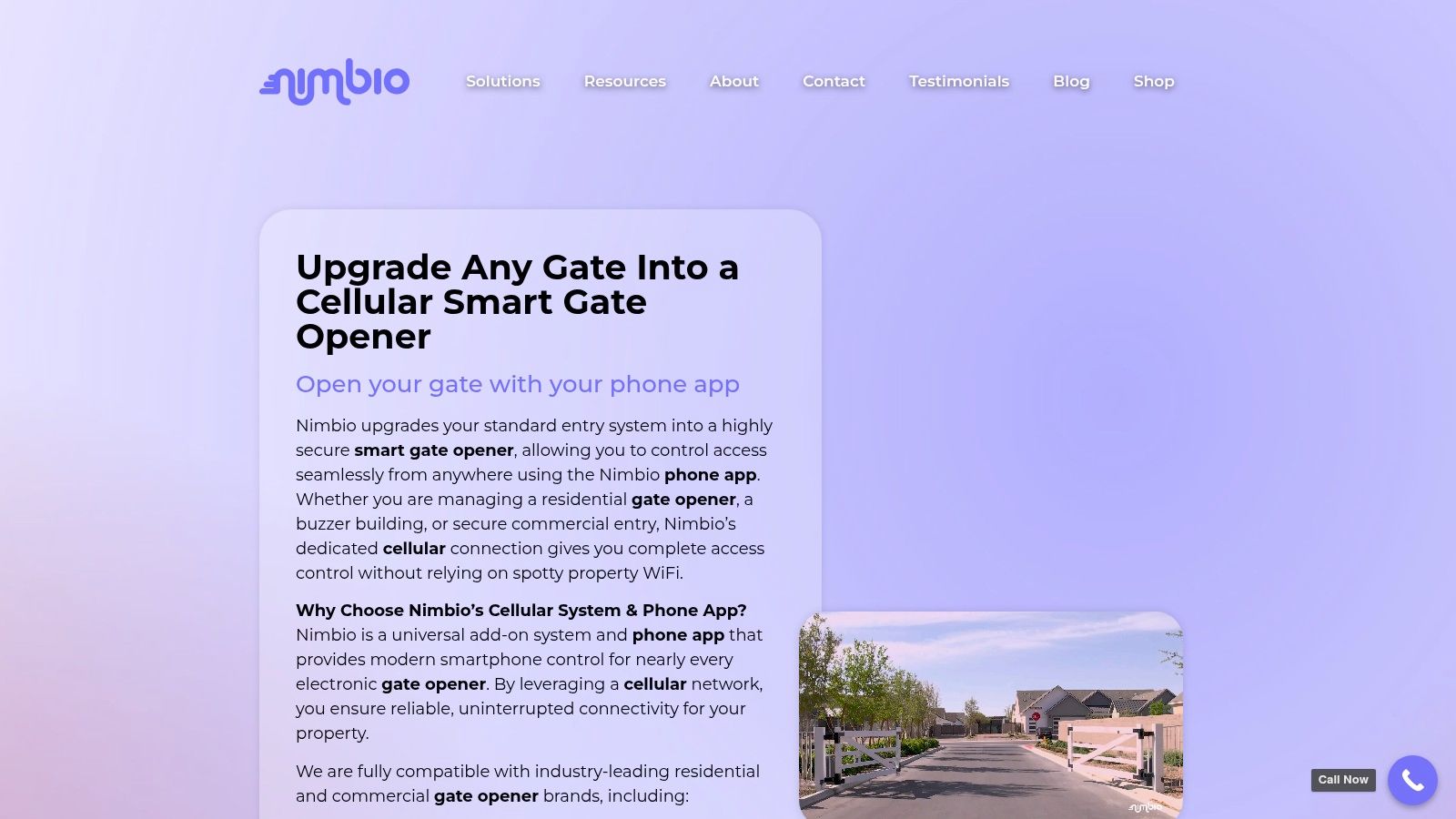
Hardware-agnostic retrofit models particularly excel. For example, one option in the market is a cellular controller such as Nimbio, which is designed to add smartphone-based control to existing electronic gates, call boxes, and entry systems without requiring a full replacement of the original hardware.
The right question isn't “What does the box cost?” It's “What will this property need to change in order to use it well?”
Many buyers also compare automation with staffing. Exact savings vary by site, so it's better to evaluate that qualitatively unless a property has its own labor data. In practice, automated access can reduce repetitive front-gate tasks, after-hours call handling, credential distribution, and manual visitor coordination. That doesn't eliminate all staffing needs, but it can shift staff time toward higher-value work.
For a property manager, the smart choice is rarely the system with the longest feature sheet. It's the one that fits the building, survives real-world conditions, and stays manageable after the installer leaves.
Installation and Long-Term System Management
A project can look perfect on paper and still fail during install. That usually happens when the system requires more building work than the property expected.
Retrofit work decides many projects
Hardwired systems can be excellent in the right environment, especially during new construction or major renovation. Existing properties are different.
The University of Houston guidance distinguishes between hardwired, PoE, and wireless battery-powered door technologies and notes that hardwired and PoE deployments require infrastructure such as conduit, pull boxes, and floor-closet support, as reflected in the University of Houston access control and intrusion design guide. For older doors, gates, and off-site facilities, retrofit feasibility often decides whether a project is financially viable at all.
That's why experienced buyers start with the opening, not the app. They ask:
- What hardware is already installed?
- Can the existing gate operator or entry device stay in place?
- Will new conduit, trenching, or building penetration be required?
- Does the site have reliable local network support where the opening sits?
Properties with mixed hardware estates benefit most from retrofit-friendly systems. A front gate, side pedestrian gate, and building lobby rarely share the same physical constraints.
Management after install matters just as much
Installation is only the beginning. The property still has to run the system every day.
A strong long-term setup should make managing access for properties easier in four practical ways:
- Remote admin: Staff can grant or revoke access without being on site.
- Clean event history: Managers can review incidents and confirm entry activity.
- Flexible permissions: Residents, visitors, and vendors can follow different rules.
- Remote updates: Over-the-air improvements reduce the need for on-site service just to keep the system current.
A system isn't modern because it has an app. It's modern when routine changes stop requiring a truck roll, a wiring change, or a manual workaround.
Periodic audits help keep the system healthy. Property teams should review active users, test critical openings, confirm scheduled permissions, and check logs after incidents or unusual reports. That simple discipline prevents many of the problems that older systems allow to accumulate over time.
The Future of Property Access Is Here
Property access is moving away from loose credentials and toward managed permissions. That shift affects gates, building entries, amenity doors, and perimeter points across residential and commercial sites.
The most practical systems share a few traits. They support remote administration, create useful audit trails, work well with existing hardware, and don't collapse when the local network becomes unreliable. For many properties, that makes cellular connectivity especially attractive.
The broader smart-property trend points the same way. Readers interested in the residential side of connected building upgrades may find this Brisbane smart home installation guide useful for understanding how automation planning affects real-world deployment decisions.
Access control door systems no longer need to mean a disruptive rip-and-replace project. For many sites, the smarter path is a retrofit that keeps the hardware that still works and upgrades the part that doesn't: how access is managed.
Properties that are ready to move beyond keys, shared codes, and aging remotes can learn more about Nimbio and how its cellular keyless entry approach modernizes existing gates, call boxes, and building entry systems with smartphone-based control and remote access management.
For a broader framework on evaluating vendors and systems, see the guide on how to choose a cellular gate access system.