Why does a building have a cabinet in the machine room that can decide who rides, when doors move, and whether the lift runs at all? That question usually comes up only after a fault, but it points to the fundamental role of lift control panels. They are the central controller, the part that turns button presses, sensor signals, door requests, and safety logic into one coordinated system.
Older systems used electromechanical relay-and-contactor logic, while later microprocessor-based control made group control and more advanced behavior practical in the 1980s. Today, modern panels often support remote access, cloud communication, and IoT connectivity, so technicians can examine and change parameters without being on-site, as noted by Elevator World's history of operatorless elevator controls. That shift matters because the panel is no longer just wiring, it's part of the building's operating network.
The same logic shows up in access control. A gate operator or lobby entry system still needs a controller, but a separate access layer decides who can issue a command in the first place. For properties that want to modernize entry without ripping out working hardware, that distinction is the key.
Table of Contents
- What a Lift Control Panel Actually Does
- Core Components Inside a Modern Panel
- Comparing Relay, PLC, Microcontroller, and Safety PLC Panels
- Standards and Certifications That Shape Every Panel
- Installation, Wiring, and Working Space Basics
- Where Access Control Meets the Panel
- Troubleshooting and Maintenance That Actually Works
- Choosing and Buying the Right Panel for Your Site
What a Lift Control Panel Actually Does
What is this cabinet doing in the machine room?
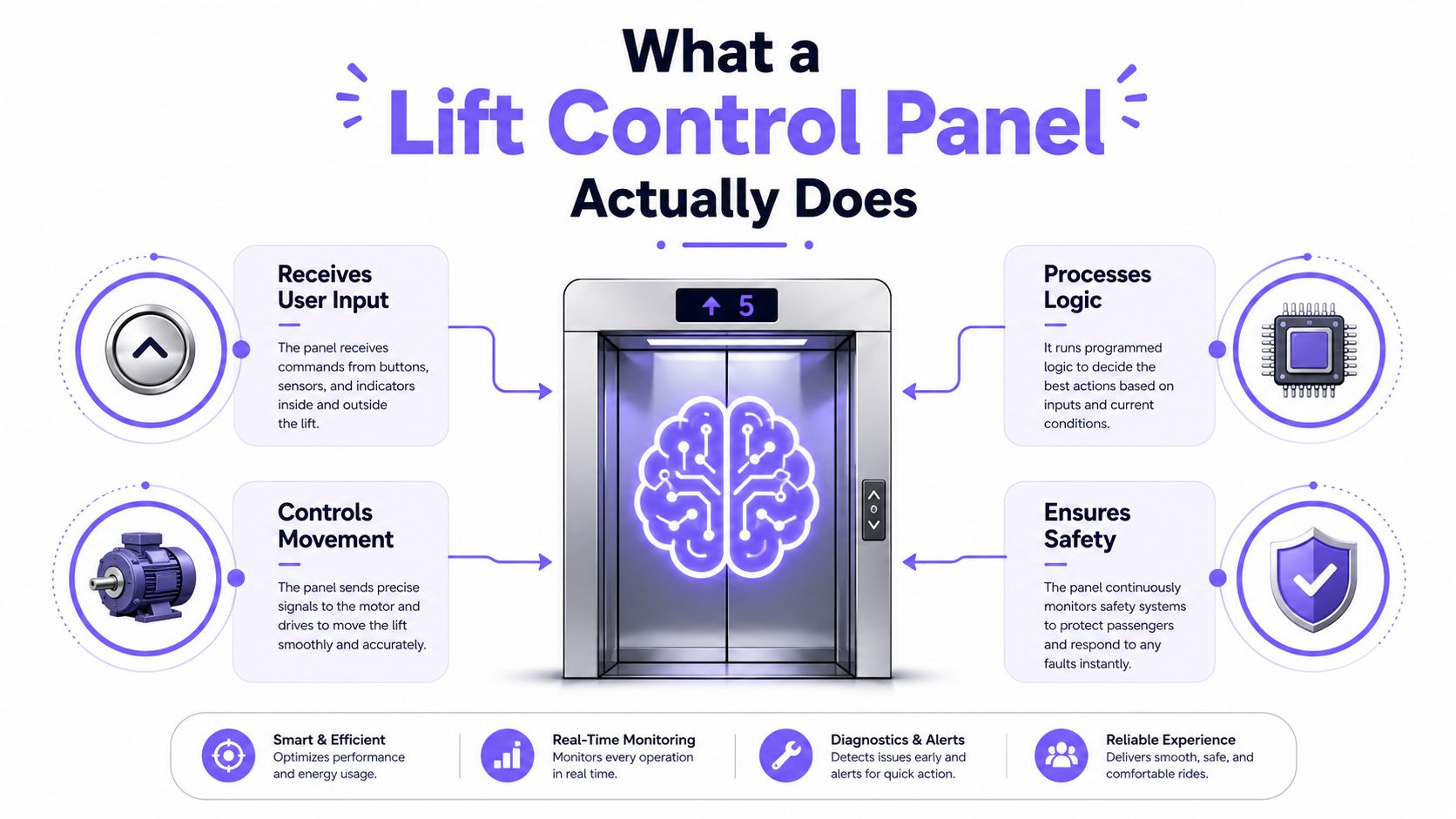
A lift control panel is the system's decision-maker. It houses the power-supply units and coordinates car-call registration and cancellation, door control, car-load measurement, and speed management, which is why misconfiguration inside the cabinet can affect both ride logic and safety interlocks. That's not a wiring detail, it's the core operating logic of the elevator, as described by ISF Elevator's overview of the control panel as the brain of lifts.
The simplest way to think about it
Think of the panel as a building manager standing at a switchboard. Every floor request, every door signal, and every safety input comes in, and the panel decides what happens next.
A rider sees a button light up or a door open. The panel sees a set of conditions, then decides whether movement is allowed, which direction makes sense, and whether anything needs to stop first.
Practical rule: if a lift behaves oddly, the panel is usually the place where several symptoms meet. A door issue, a level issue, and a no-start issue can all trace back to different inputs inside the same cabinet.
Why this matters to property managers
Most non-engineers only think about the panel when something breaks. That's understandable, because the cabinet is usually hidden behind a locked door and it doesn't look like much from the outside.
Inside, though, it is the policy engine for the entire lift. If the panel receives a call but the door interlock is open, the lift should not move. If the load condition is wrong, the ride logic can change or stop. That relationship between command and permission is why the panel is more than a switch box.
Core Components Inside a Modern Panel
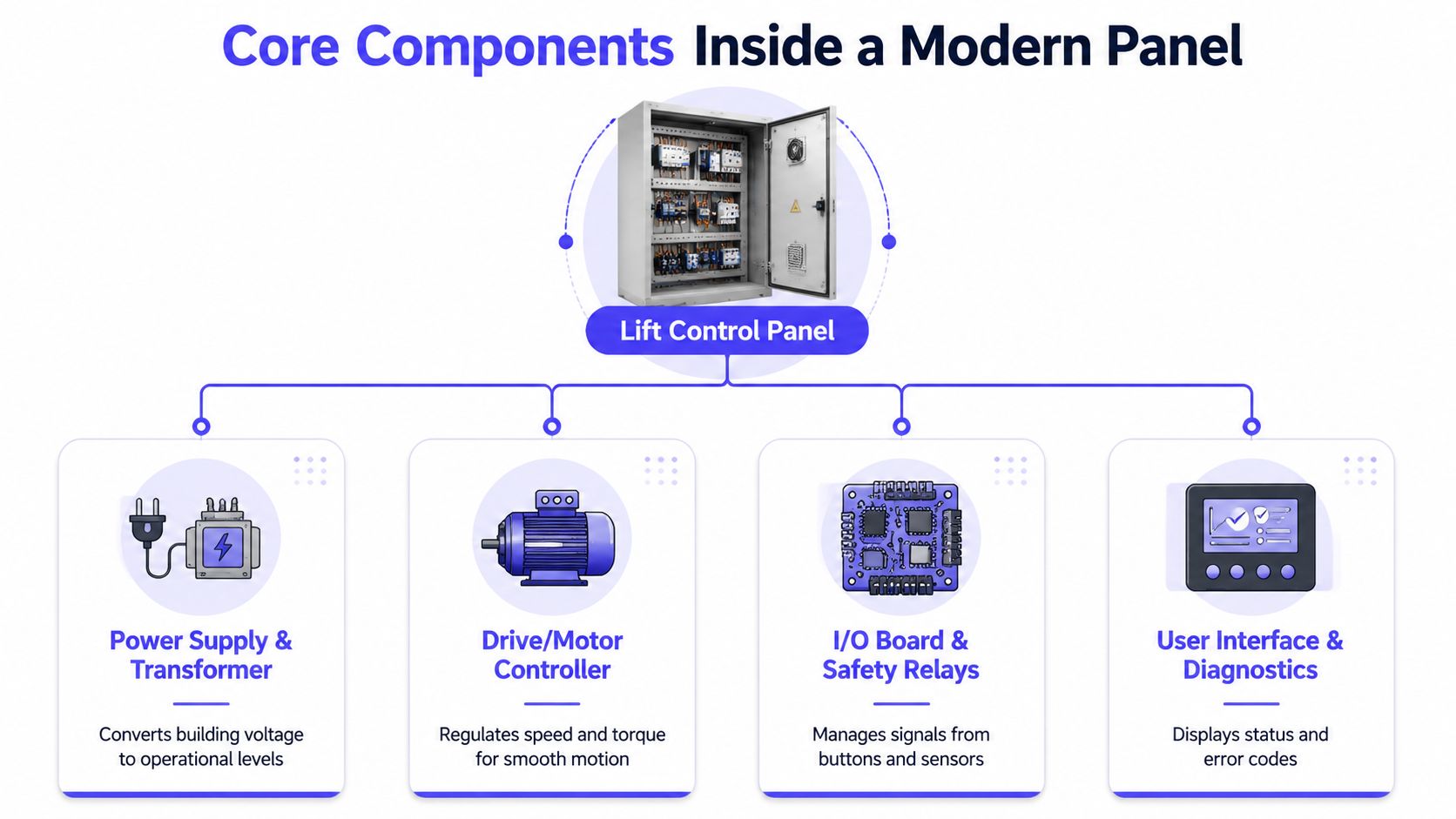
A modern panel is easiest to understand if each part gets one job. The cabinet can look crowded, but most of the components fit into a small number of functions. If one piece fails, the rider usually feels it as a delay, a refusal to start, a rough stop, or a door that won't behave correctly.
Power, motion, and signal logic
The power supply and transformer convert building power into the voltages the control electronics need. If this section is weak, the lift may reboot, drop signals, or fail to come out of standby.
The drive or motor controller handles motion. In hydraulic systems, the panel's drive and control logic is responsible for motor speed and direction, so the lift can accelerate, slow down, and reverse safely during lifting and lowering, rather than just flipping a relay, as explained by Tablotian's hydraulic lift control panel overview.
The relay and contactor logic used to be the core decision layer in older cabinets. In newer panels, that logic is often handled by a microprocessor board, but the job is the same, move the right signals in the right order.
The parts riders never see
The call registration boards collect floor requests. When they fail, a button may do nothing, or the wrong request may seem to stick.
The door operator interface coordinates open and close commands with the safety chain. If this interface drifts out of calibration, the door can hunt, hesitate, or refuse to close.
The safety circuit board is the lift's deadman's switch. If a safety loop is open, the lift should refuse to run, and that refusal is the correct behavior.
The communication module lets the panel talk to monitors, diagnostics, and remote tools. In connected systems, that module often becomes the part that turns a local controller into part of a larger building network.
Comparing Relay, PLC, Microcontroller, and Safety PLC Panels
Different panel architectures solve different problems. The right choice depends on the building's age, traffic, service expectations, and code environment. There isn't a universal winner, only a better fit for a specific site.
| Architecture | Typical Use Case | Strengths | Limitations | Best For |
|---|---|---|---|---|
| Relay and contactor | Older lifts, simpler installations | Familiar to technicians, rugged, easy to trace physically | Limited logic, more mechanical wear, harder to expand | Smaller buildings, legacy modernization |
| PLC | Complex group control, modernization projects | Flexible logic, strong troubleshooting, common industrial support | More programming skill needed, may still rely on external safety hardware | Mid-rise buildings, mixed-use sites |
| Microcontroller | Purpose-built elevator controllers | Compact, efficient, tuned ride behavior, modern diagnostics | More vendor-specific, less field-modifiable | Newer builds, premium ride control |
| Safety PLC | Safety-critical environments | Designed for certified safety logic and stricter compliance paths | Higher engineering and integration discipline required | High-rise and code-driven projects |
What each architecture is good at
Relay panels are still respected because technicians can trace them by hand. That matters in buildings where the service team already knows the old layout and parts are still available.
PLC panels suit more complex control logic. They're often the practical choice when a building needs group control, modernization, or easier integration with building systems.
Microcontroller-based panels are purpose-built for elevator behavior. They tend to handle ride quality, dispatch logic, and energy use more cleanly than older discrete systems.
Safety PLCs add a more formal safety layer. They're most useful where the project needs stricter certification discipline and the design team wants safety logic handled in a controlled architecture.
Bottom line: older buildings often do better with proven relay or PLC retrofits, while higher-density or code-sensitive sites usually benefit from microcontroller or safety PLC approaches.
Standards and Certifications That Shape Every Panel
A panel can look fine on paper and still fail a real inspection if the code side isn't handled correctly. That's why standards matter as much as wiring diagrams. They define what must be present, how it must be marked, and what installers are allowed to put in service.
The rules that most affect buyers
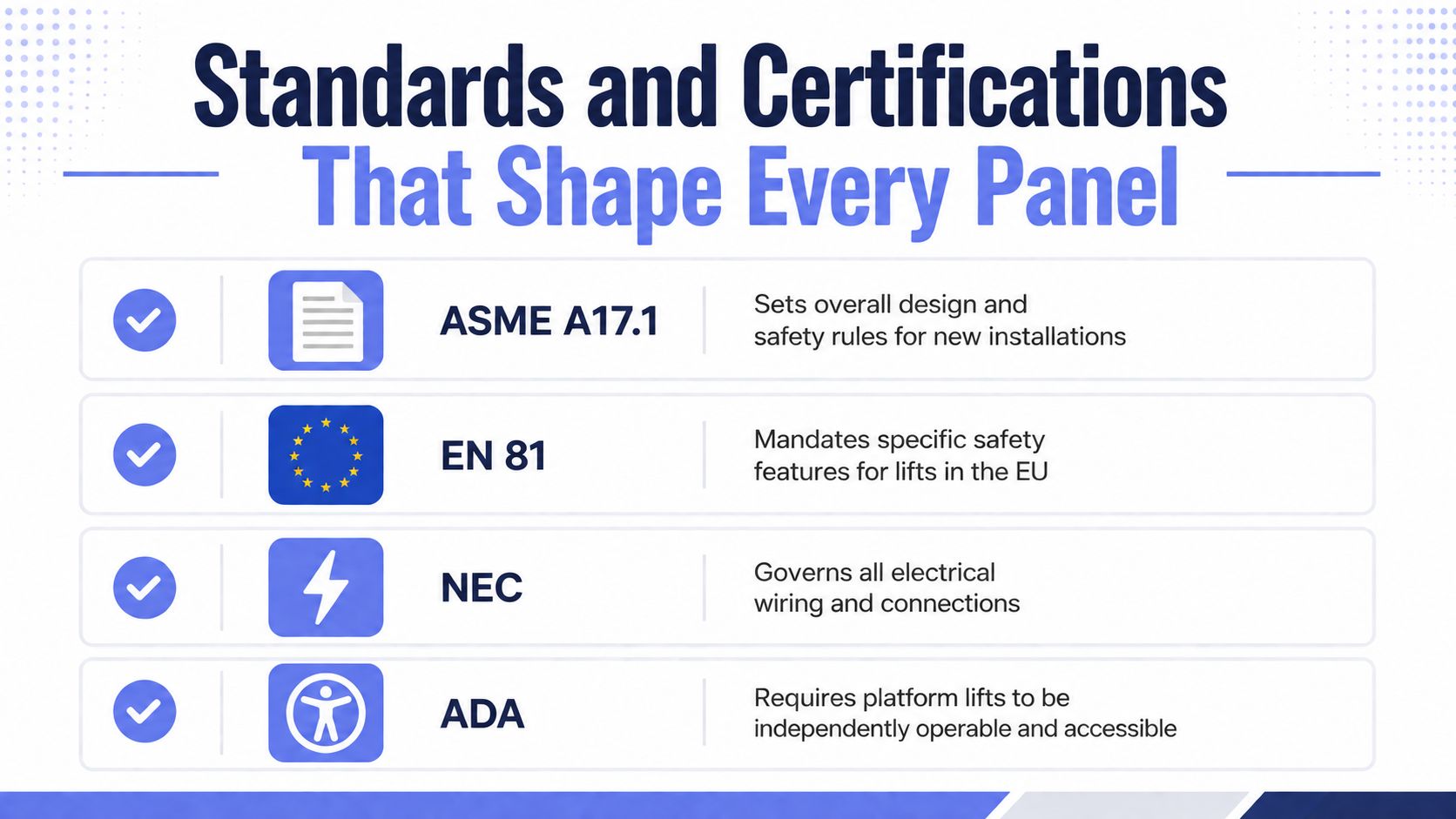
ADA matters for platform lifts because they must be independently operable and allow unassisted entry and exit from the lift, according to the Access Board's ADA guide for elevators and platform lifts. If a control scheme requires staff intervention, that can break the operating expectation for public and multifamily settings.
NEC requirements for elevator controllers became more explicit in 2017. Elevator control panels must be marked with an equipment SCCR, and they cannot be installed if that SCCR is lower than the available fault current, as detailed in Elevator World's coverage of NEC compliance for elevator controllers. The panel also needs field marking for the maximum available fault current and the date the calculation was made.
ASME A17.1, EN 81, and listing marks such as UL or equivalent regional approvals matter because inspectors use them as the basis for acceptance. They're not paperwork for the file cabinet, they're part of the installation's legitimacy.
One practical resource for load planning
Any panel change also needs the electrical side checked carefully. For teams comparing controller upgrades with feeder capacity and distribution changes, the BIM Heroes load calculations guide is a useful companion reference before hardware is ordered.
A modern panel is a compliance object as much as it is a control device. If the code side is wrong, the smartest controller in the world still can't be handed over.
Installation, Wiring, and Working Space Basics
The field reality is simpler than the spec book, but less forgiving. If the panel is boxed into a corner, wired loosely, or documented badly, the next service call becomes expensive. The installation has to work for the first crew and the fifth one.
Space around the cabinet
The NEC guidance summarized in the video calls for minimum clear distances of 3 ft, 3.5 ft, or 4 ft depending on the condition in Table 110.26(A), with 3.5 ft generally applying in front of elevator control panels because grounded parts are often present on the opposite side of the working space. The same source says the working space must extend upward from the grade floor or platform to at least 6.5 ft or the equipment height, whichever is greater, and the width must be at least 30 in. or the width of the equipment, whichever is greater, as shown in this working-space guidance video.
That spacing is not a nicety. If a contractor cannot stand, reach, and test safely, future diagnostics get slower and riskier.
Wiring discipline that prevents nuisance calls
A clean panel starts with dedicated circuits, good grounding, and separation of low-voltage signal wiring from power wiring. Labeled conductors matter because a technician who arrives six months later needs to know what each wire does without guessing.
Loose terminations, shared neutrals where they don't belong, and bundled signal and power runs can create intermittent faults that look random to residents. They usually aren't random, they're the result of weak installation discipline.
What should be handed over at completion
- As-built drawings so the next technician sees the actual installation, not the original assumption.
- SCCR marking and fault-current data so replacement decisions are defensible.
- Maintenance log entries so recurring faults don't get rediscovered from scratch.
For installers who also handle gate or access work, the same discipline applies on the low-voltage side. A practical reference is the gate entry system wiring guide, which reflects the same need for separation, labeling, and clean handoff.
Where Access Control Meets the Panel
A lift control panel runs the machine. Access control decides who can ask it to move the machine in the first place. That distinction matters more now that building entry, visitor management, and mobility control are increasingly tied to the same networked property ecosystem.
Three ways the layers work together
A cellular retrofit can sit on top of an existing gate operator's control board. The gate still opens through its own hardware, but the command path can come from a smartphone app instead of a fob or keypad.
A building entry system can be wired into a call box or lobby panel. In that setup, the access layer handles credentials, while the building panel handles the physical command to release or admit entry.
A smart credential layer lets residents open a gate or summon access without depending on fobs, PINs, or on-site Wi-Fi. That's where cellular connectivity matters, because the system doesn't depend on a local wireless network that may drop during a service outage.
Why retrofit logic matters
A lot of owners assume modernization means replacing hardware. It doesn't always. Hardware-agnostic cellular controllers can add remote visitor management and scheduled access on top of an existing operator, which keeps the mechanical side intact while modernizing the command layer.
For property managers, that usually means fewer disruptions to the site and a cleaner upgrade path. For installers, it means the panel stays in place while the access experience changes.
One useful reference for that kind of layered setup is the guide to panel access control in 2026, which shows how a separate access layer can work alongside existing panels without replacing them.
The cleanest modernization projects don't confuse control with permission. The panel keeps running the equipment, while the access layer decides who gets to issue the command.
Troubleshooting and Maintenance That Actually Works
“Just reset the breaker” is not a troubleshooting method. It's a guess. Real maintenance starts by separating symptoms, then matching each symptom to the subsystem most likely causing it.
Symptom first, guess later
- Door won't close. Check the door sensor alignment, wiring, and the safety chain before assuming the drive is bad.
- Car won't level. Look at leveling sensors and drive parameters, then verify whether the controller has drifted out of calibration.
- Intermittent operation. Inspect power connections and review fault logs before replacing major boards.
- No response at all. Start with incoming power, then move to control power, then look at the logic board and safety circuit.
Modern connected panels add a newer failure class. Firmware that did not finish updating, a remote configuration change that was never documented, or a network segment that lost power can all look like hardware failure at the floor landing. That's why software and network checks now belong in the same service routine as relays and sensors, as discussed in Felevator's overview of lift control panel issues.
A realistic maintenance cadence
- Quarterly visual inspection for loose wiring, contamination, and physical damage.
- Annual full safety test to verify the system still behaves correctly under fault conditions.
- Annual firmware and configuration review for connected panels.
- Visit-by-visit logging so changes are traceable.
For teams also commissioning access hardware, the same structured approach applies. The how to commission access control process is a useful model for documenting settings, confirming behavior, and avoiding mystery failures later.
Choosing and Buying the Right Panel for Your Site
The right panel is the one that fits the building, the service team, and the code environment. Buyers often focus on headline price and forget the long tail, which is where uptime, auditability, and maintenance contracts live. That's usually the part that shows up later.
What each buyer should care about
HOA boards and property managers should ask about uptime, audit logging, and service support, not just controller brand. A cheap panel with poor documentation can become expensive the first time a resident is stuck waiting for a technician.
Single-site owners with a smaller lift should favor proven, listed controllers with local support. A newer architecture only helps if someone nearby can service it.
Commercial and multifamily owners should look at total cost of ownership, including downtime and integration with modern access control. In many sites, the controller is only one line item in a larger operating system.
Questions to bring to the bid meeting
- Can the vendor provide SCCR documentation and fault-current marking?
- What safety certifications and regional listings apply to this model?
- Which group-control modes are supported, and are they field-configurable?
- What is the update policy for firmware and configuration changes?
- What documentation and training come with handover?
If the answers are vague, the bid is incomplete.
Nimbio's cellular retrofit approach is one option for sites that want to modernize access without replacing existing gate hardware, especially where remote visitor management and smartphone credentials matter. For lift projects, the same mindset applies, keep the working equipment, then modernize the layer around it.
For property managers, HOA boards, and installers trying to modernize a site without disturbing the hardware that already works, the next move is to look at how control, access, and documentation fit together. Visit Nimbio to see how cellular-based access control can add smartphone entry, remote credential management, and retrofit flexibility to an existing property setup.