What should a property manager trust more, a warranty, an insurance policy, or a device protection plan that sounds like both and behaves like neither? That question matters on gates and access-control hardware, because a failure doesn't just inconvenience one user, it can lock out residents, vendors, and emergency access in a single shot. For outdoor, cellular, cloud-based access control, the contract language matters as much as the hardware.
Table of Contents
- What a Device Protection Plan Actually Is
- Protection Plans vs Warranties vs Insurance
- What to Look for in Gate and Access-Control Coverage
- Enrollment Windows, Deductibles, and Claim Workflows
- Costs, Premiums, and Total Cost of Ownership
- Decision Criteria for HOAs, Property Managers, Homeowners, and Installers
- Choosing the Right Provider and Planning Your Next Step
What a Device Protection Plan Actually Is
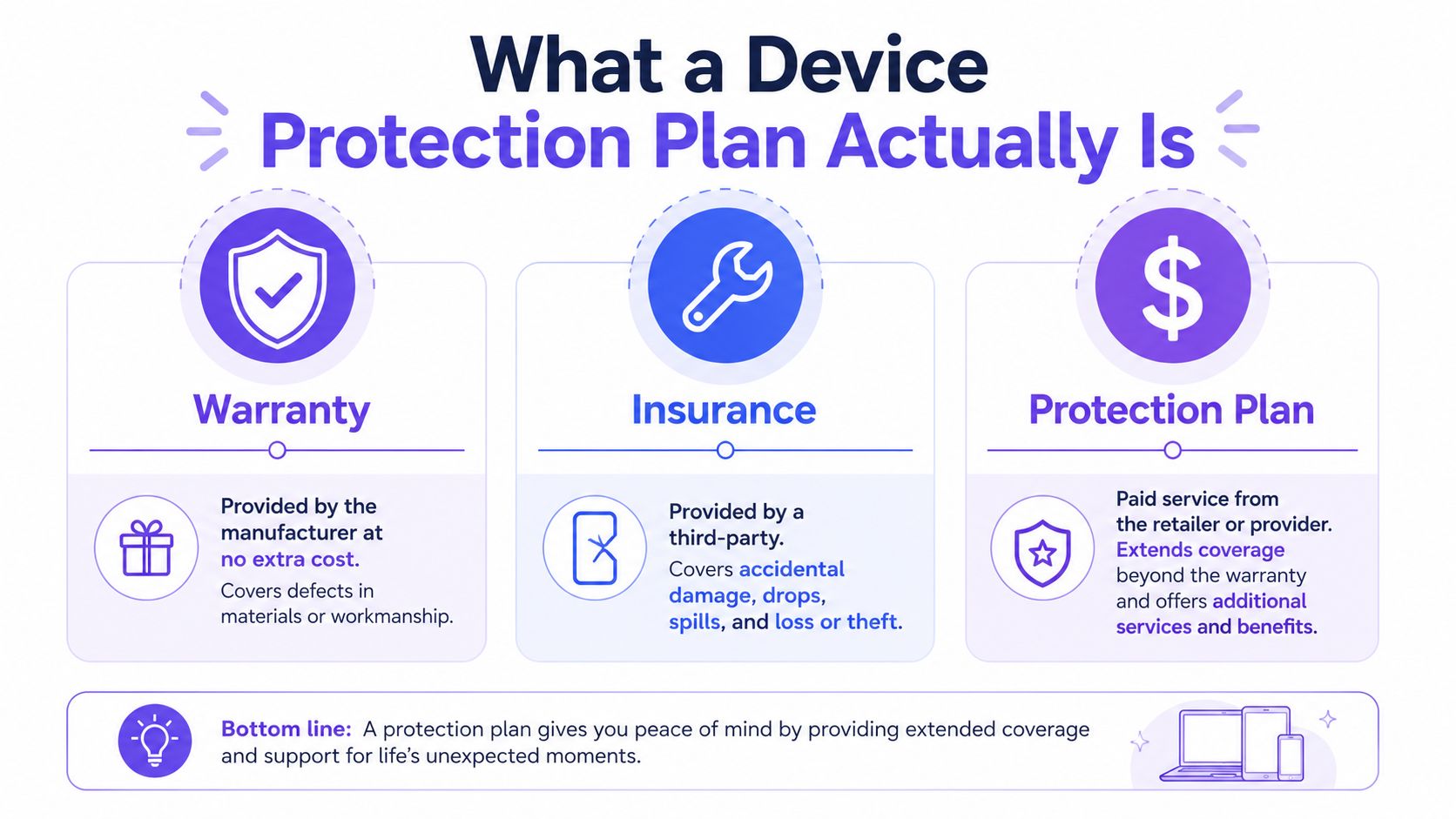
A device protection plan is a paid agreement that covers specific damage, failure, or loss scenarios for a defined device or device group. It usually sits between a warranty and insurance, which is why so many buyers confuse the three.
The cleanest way to define it
A warranty comes with the product and normally covers defects. Insurance is a regulated risk-transfer product that pays on covered losses. A protection plan is the in-between option, sold by a provider, priced as a fee, and tied to a menu of events it will and won't cover.
That matters in access control because a gate operator, cellular controller, or call box is not just another consumer gadget. It lives outdoors, runs constantly, and serves a shared space where downtime has operational consequences.
What it does and doesn't do
A protection plan can extend coverage beyond the manufacturer's promise, but it doesn't erase exclusions. It also doesn't automatically replace a property policy, a service contract, or a maintenance agreement.
Practical rule: if the contract does not name the failure mode, the claim probably won't be paid.
That is the decision framework for the whole topic. First, classify the product correctly. Then check what triggers coverage, who handles claims, and whether the same risk is already covered elsewhere.
Protection Plans vs Warranties vs Insurance
A smart contract review starts with a blunt comparison. If the document doesn't make the trigger, duration, and claims path obvious, the buyer is already at a disadvantage.
Side by side
| Product type | Trigger | Who Pays | Duration | Typical Exclusions | Who Administers |
|---|---|---|---|---|---|
| Warranty | Manufacturing defect or workmanship failure | Manufacturer or seller | Fixed term tied to purchase | Wear, misuse, accidental damage | Manufacturer or authorized service network |
| Insurance | Covered peril or loss event | Insurer | Policy term, often renewable | Policy exclusions, deductibles, limits, undisclosed conditions | Licensed insurer or claims administrator |
| Device protection plan | Named device incident, failure, damage, or loss | Plan provider or administrator | Monthly or term-based agreement | Pre-existing damage, cosmetic issues, broad weather exclusions, abuse | Retailer, carrier, or third-party administrator |
For gate and access hardware, the overlap trap is real. A property manager can end up paying for a plan that duplicates part of a homeowners, condo, or commercial property policy and still leaves the important outage scenarios uncovered.
If a community policy already addresses some equipment loss or theft exposure, the protection plan has to justify its own premium and deductible structure. That comparison is especially important for anyone shopping for renters coverage in California, because the same household often has multiple overlapping policies and assumptions.
Read the label, not the marketing
The simplest mistake is treating every protection product like a warranty extension. Some plans are really loss-and-theft products. Others are repair-and-support products. The label can look similar while the actual risk transfer is completely different.
A useful anchor for property buyers is the lifetime warranty for property managers. The logic is straightforward, if hardware failure is the core concern, long-term hardware coverage has to be judged differently from a short service plan or an incident-only policy.
Bottom line: the buyer should know exactly when coverage starts, what causes a claim, and whether the plan is doing anything the existing policy does not already do.
What to Look for in Gate and Access-Control Coverage
Gate hardware fails differently from phones. It is exposed to weather, electrical noise, mechanical wear, repeated cycles, and physical impact. A plan that works for a handset can still be the wrong plan for a gate operator.
Coverage that actually matters
For access control, the important categories are accidental damage, mechanical failure, electrical failure, surge damage, vandalism, and the post-warranty breakdown window. Allstate's phone protection examples show how plans can cover cracked screens, liquid damage, battery failure, touchscreen or speaker failure, and charging-port failure, while T-Mobile's Protection 360 adds mechanical and electrical failure after the manufacturer's warranty ends (Allstate phone insurance).
That list translates well to gates and entry systems. A cracked enclosure after impact, a fried controller after a power spike, or a failed relay after the warranty period are all real-world cases a buyer should expect a good plan to address.
What outdoor hardware needs first
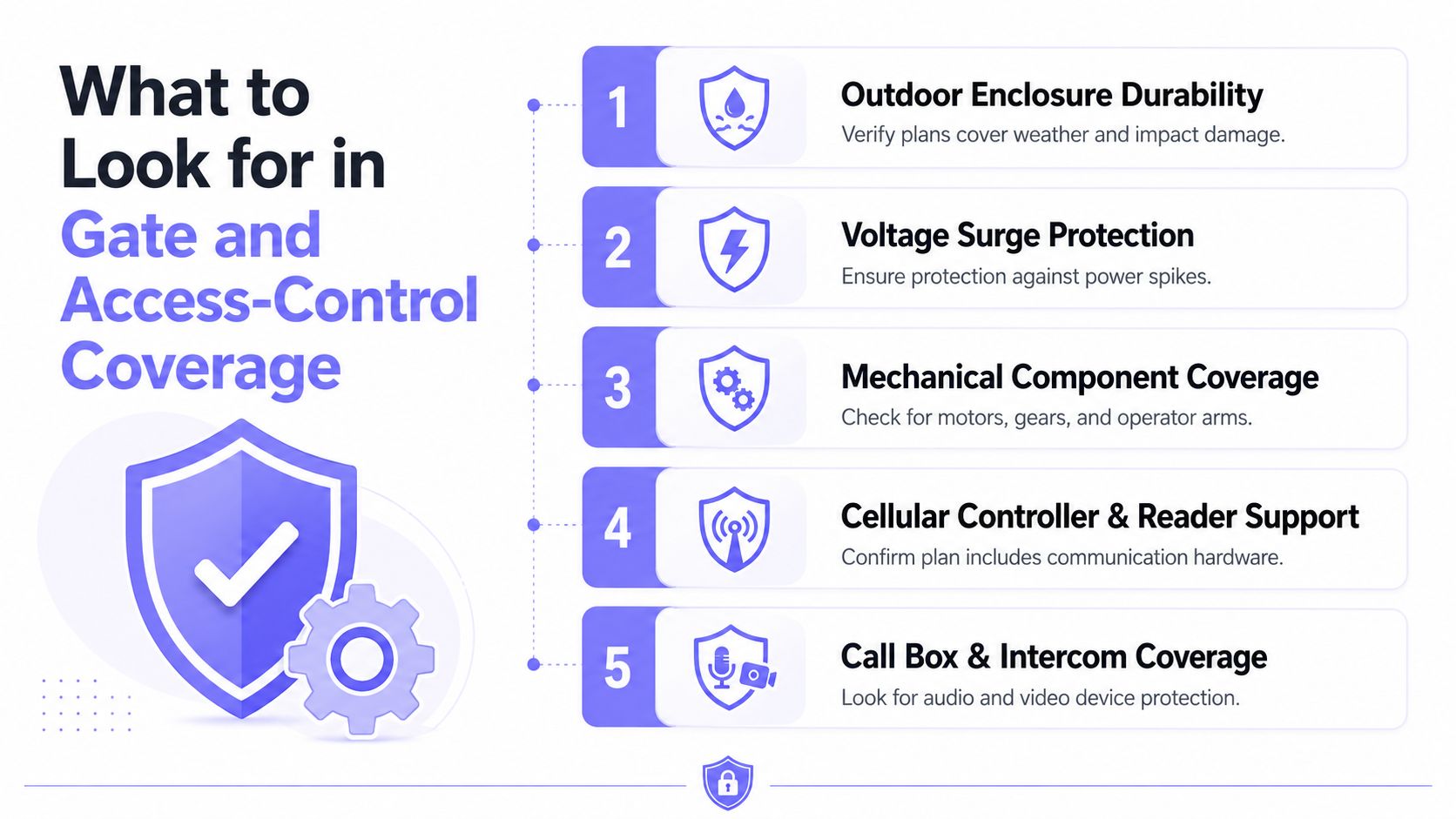
- Outdoor enclosure durability: The plan should say whether impact, moisture intrusion, and environmental wear are included.
- Electrical protection: Surge-related failure needs explicit language, not a vague promise.
- Mechanical component support: Motors, arms, gears, and latch hardware should be named if the site depends on them.
- Communications hardware: Cellular controllers and readers need coverage just as much as the gate arm.
- Interface devices: Call boxes and intercom equipment should not be treated as afterthoughts.
A security installer's plan review should start with that list, then move to exclusions. The safest assumption is that anything not named is excluded.
Common exclusions buyers miss
Cosmetic damage is often excluded. So are losses tied to pre-existing damage, misuse, or installation issues. Some plans also draw hard lines around major weather events or similar force-magnitude thresholds.
If a gate operator lives outdoors and the plan never mentions environmental exposure, the contract is incomplete for real access-control use.
For install-side perspective, Cardiff gate installation advice is useful as a practical reminder that gate systems are only as reliable as their setup, environment, and maintenance discipline.
Enrollment Windows, Deductibles, and Claim Workflows
The fine print on timing is where many buyers get trapped. Providers often require enrollment soon after activation, and they usually want the device to be working at the moment coverage begins. Verizon Mobile Protect, for example, requires enrollment within 30 days of activating a new device or bringing your own device, and BYOD devices must be fully functioning and not already lost or stolen (Verizon Mobile Protect; AT&T device protection).
The workflow buyers should expect
- Incident happens. The gate stops responding, a reader fails, or a unit is damaged or stolen.
- Evidence gets captured. Photos, logs, and device identifiers should be collected immediately.
- Claim is filed inside the deadline. Cellcom gives customers 60 days from the incident to file a claim, and Rogers requires service requests within 30 days of failure (Cellcom device protection; Rogers plan terms).
- Provider reviews the case. Approval usually depends on the facts matching the contract.
- Repair or replacement follows. The result depends on the tier, device type, and claim limit.
The claim file should exist before the argument does.
That means documentation has to be routine, not improvised. For theft, a police report is often required, as shown in a school device protection plan that also distinguishes between damage and stolen-device deductibles (student device costs plan).
What to keep on hand
- Device identifiers: Serial numbers, controller IDs, and asset records.
- Photos of damage: Close-up and context shots taken right away.
- Incident timing: Exact date, not a vague estimate.
- Police report for theft: Especially when the plan requires documented loss.
- Install records: Useful when the provider checks for pre-existing conditions.
A prevention-first operation should also maintain inspection discipline, which is why the prevent gate breakdowns mindset matters. Good documentation and scheduled checks make claims cleaner and disputes weaker.
Costs, Premiums, and Total Cost of Ownership
The sticker price is never the complete cost. The total includes the premium, the deductible or service fee, and any claim caps or replacement limits, plus the time it takes to get the hardware back online.
Build the math honestly
Rogers' device protection plan shows the structure plainly. It charges C$10 per month for eligible phones and tablets, with replacement service fees from C$25 to C$200 depending on device tier, and replacement service limits from **C$350 to C$1,500 per device (Rogers plan terms). That tells the buyer what a claim can really cost, not just what the ad copy says.
Assurant's T-Mobile plan adds a different wrinkle, with no limit on accidental-damage claims and up to five loss or theft claims in a rolling 12-month period (T-Mobile device protection details). That may sound generous, but the buyer still pays the monthly fee and any applicable service charges, so the economics still depend on how often the plan gets used.
The hidden cost buckets
- Monthly premium: Easy to see, easy to underestimate.
- Per-claim deductible or service fee: Claim economics change fast here.
- Coverage overlap: Paying twice for the same exposure wastes spend.
- Administrative drag: Time spent filing, proving loss, and waiting for fulfillment has value too.
For gate and access-control hardware, subscription coverage makes more sense when it folds support, firmware updates, and hardware replacement into one predictable line item. That setup fits systems judged by uptime, not by how convenient a replacement is for a single user.
If a gate controls daily entry for residents, vendors, or emergency access, unpredictable replacement math is a liability. A low monthly premium does not matter if the claim limit leaves the owner paying most of the repair bill anyway.
Boards and managers should also check whether they are already paying for the same exposure through another policy. For a broader vendor comparison, the compare Florida property manager plans resource is a useful reminder that commercial policy overlap should be checked before signing any add-on protection.
The point is simple. Pay for the protection that reduces real ownership cost, and walk away from plans that only look cheap until the first failure.
Decision Criteria for HOAs, Property Managers, Homeowners, and Installers
Different buyers need different filters. A board, a manager, a homeowner, and an installer should not evaluate the same contract with the same checklist.
HOA boards and multifamily operators
HOA boards should require a master agreement that spells out coverage scope, claim timing, service response, and ownership of logs and updates. If a plan does not explain who is responsible when the gate is down, it is not board-ready.
For a broader vendor comparison that helps frame risk, the compare Florida property manager plans resource is a useful reminder that commercial policy overlap should be checked before signing any add-on protection.
Property managers
Property managers need a scorecard. The essentials are simple.
- Response time: If the provider cannot restore access quickly, the plan is weak.
- Audit logs: Access events need to be traceable.
- Remote administration: The system should support changes without truck rolls.
- Over-the-air updates: If firmware can't be updated remotely, future support becomes expensive.
- Hardware coverage: Long-term replacement terms matter more than marketing language.
Homeowners and installers
Homeowners with driveway gates should ask one direct question, what happens after the warranty ends? If the answer is vague, the plan is weak.
Installers should push for clarity on the service path, not just the sale. They should know how failure is documented, how support tickets are handled, and whether the equipment can be upgraded without replacing the whole system.
A modern access platform should also expose a gate access API when integrations matter, because operators increasingly want software control, not just a box on the wall.
Pass or fail test
- Pass: The provider names coverage, exclusions, timing, and replacement terms in plain language.
- Fail: The provider sells “protection” without showing the actual claim path or the full cost.
- Pass: The hardware can be updated and supported without ripping out the whole gate system.
- Fail: Every failure means a new install.
For teams that manage outdoor gates, that last point is decisive. Cellular connectivity, hardware-agnostic retrofit support, and remote visitor management are not extras anymore. They are the baseline for any serious smart community.
Choosing the Right Provider and Planning Your Next Step
Which provider will still make sense after the gate has lived through weather, daily traffic, and a few hardware failures? Pick the one that makes ownership predictable. For gate and access-control hardware, that means clear total cost, explicit exclusions, a documented claims workflow, durable hardware coverage, and a real path for updates after installation.
The five required checks
- Total cost is clear. Premium, deductible, tax, and fees should all be visible before you sign.
- Exclusions are explicit. Pre-existing damage, misuse, and weather-related gaps should be spelled out in plain language.
- Claims are documented. Deadlines, device identifiers, approval steps, and replacement rules should be written down.
- Hardware is covered long term. Short warranty language does not fit gate infrastructure that has to run outdoors every day.
- The system can evolve. Over-the-air updates matter when access rules, integrations, or controller settings change.
Each reader should take one concrete step this week. HOAs should ask current vendors for a side-by-side contract summary. Property managers should audit existing policies for overlap and dead terms. Homeowners should ask installers what happens after the warranty expires and who pays when the controller fails. Installers should evaluate partner programs that support long-term service, not just the initial sale. If the answer is unclear, push back.
Build the math transparently. Compare the premium against expected service calls, replacement parts, truck rolls, and the cost of downtime if the gate stops working. For outdoor access control, a subscription model only works if it buys real continuity, not just another monthly line item. Lifetime hardware warranties also change the math, but only if the claim path is simple and the replacement terms are usable.
The smart move is to treat device protection as uptime coverage for the community, not as a retail add-on. That matters most for outdoor access control, where one failure can keep residents, vendors, and visitors stuck outside. For teams that want software control as well as hardware coverage, the gate access API at https://nimbio.com/developers/ should sit in the evaluation process alongside the contract terms.