What happens to an automatic driveway gate opener when the app works but the gate itself can't reverse safely? The command arrives, the motor turns, and the weakest part of the system decides the outcome. Choosing well means separating the moving leaf, the operator that moves it, and the phone, clicker, or keypad that only asks it to start.
Table of Contents
- What an Automatic Driveway Gate Opener Actually Moves
- Which Opener Fits the Driveway
- Ways to Command the Gate
- Entrapment Protection and Safe Installation
- Standards Behind the Gate and Operator
- Upkeep That Keeps Reversal Working
- Keep the Operator or Add a Phone
What an Automatic Driveway Gate Opener Actually Moves
An automatic driveway gate opener is the motorized unit that moves a driveway gate and stops or reverses it when a person or vehicle is in the path. It isn't the metal leaf, and it isn't the clicker in a driver's hand.
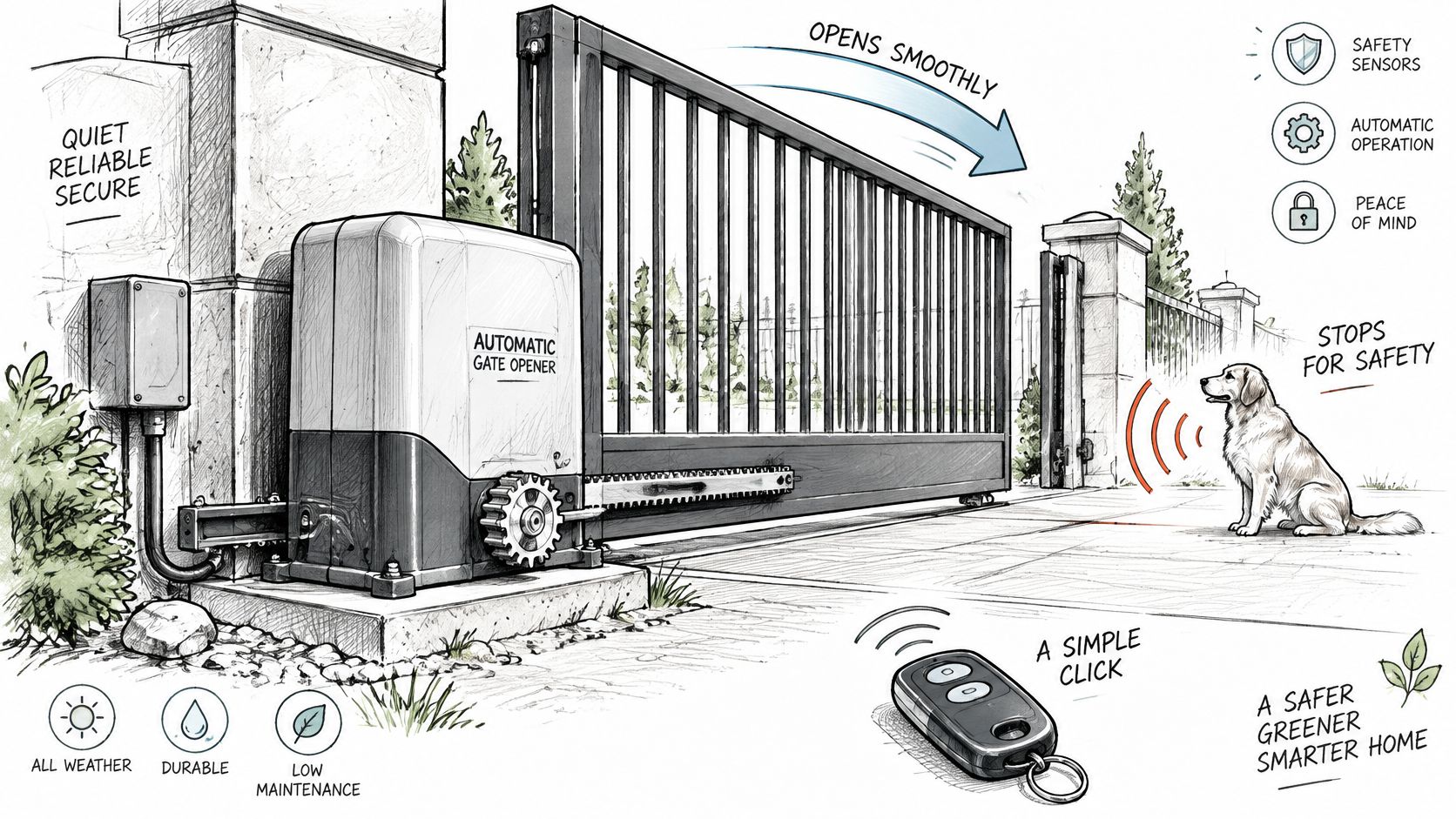
Say a homeowner presses a remote at the street. The leaf is the swing or slide panel that crosses the driveway. The operator is the motor, gearbox, limit switches, and control board at the hinge post or beside the track. The command is the remote signal that asks for one cycle.
A Garage Door Moved Outdoors
A garage door opener gives a useful comparison. Indoors, a door rides a straight track in still air, with the floor and walls limiting where people stand. Outdoors, a driveway leaf meets wind, slope, gravel, delivery vans, children, and drivers who stop partway through the opening.
That difference changes the buying order. A property manager shouldn't start with the newest app screen. The first checks are whether the operator matches the leaf's weight and travel, whether travel limits are set correctly, and whether safety circuits remain in charge after any remote or phone control is added.
Practical rule: Name the leaf, the operator, and the command method separately before comparing brands. A fault in one part rarely gets fixed by upgrading another.
For a homeowner, that split prevents a common mistake, buying a stronger motor for a leaf that's dragging because a hinge has sagged. For an HOA board, it prevents approving a phone system while nobody has checked the photo eyes. Installers use the same split on a service call, because a gate that won't close may have a sound motor and a blocked sensor, or a sound sensor and a leaf binding on its track.
Once those three pieces are clear, the driveway layout points to a small number of operator types that can work at all.
Which Opener Fits the Driveway
Driveway layout and the operator that usually fits
| Driveway situation | Operator type | Why it fits | Main limit |
|---|---|---|---|
| Short drive with swing clearance | Single-leaf swing, arm or in-ground | Leaf has room to arc clear of the road | Wind and slope load the arm; entrapment protection needed while opening and closing |
| Wide entrance with two leaves | Dual swing operators | Each leaf has its own motor | Limits must stay synced and each leaf needs its own protection |
| Little room to swing on a level run | Sliding operator on a track | Gate travels along the fence line | Track and rollers collect debris |
| Tight or uneven apron | Cantilever slide | No ground track across the drive | Heavier leaf and a long counterbalance |
| Vehicle lane only, not a full barrier | Barrier arm | Fast cycle for a lane | Does not secure the property like a gate leaf |
When to Move to a Different Row
A single swing leaf looks simple until the arc is measured with a car waiting inside. If the leaf would sweep over the sidewalk, clip a parked car, or force drivers to stop in the street, there's no swing clearance in practice. A visible arm operator is easier to inspect, while an in-ground unit hides the hardware, but both need room for the full swing and protection in both directions.
A wide entrance with two leaves splits the load between two motors. That only helps if both sides stay synced. If one leaf lags, the meeting edges bind, limits drift, and residents start reporting a gate that looks closed but isn't latched or fully shut. Each leaf needs its own checks, because a sensor on one side doesn't protect a pinch point at the other post.
A sliding operator suits a tight apron because the leaf travels along the fence line instead of sweeping across the drive. The trade is housekeeping. A ground track collects gravel, leaves, and ice, and rollers wear when they grind through debris. Properties planning surface work should check levels and drainage before the track is set, and readers weighing that surface work can review concrete driveway upgrades for homeowners from Atlanta Concrete Solutions as background on the apron the gate has to cross.
A cantilever slide removes the track from the drive, which helps on uneven aprons and where plows or heavy vehicles would damage a rail. The leaf is longer and heavier because a counterbalance section stays on the support side. That section needs clear, guarded travel space along the fence, and installers need room to service its rollers.
A barrier arm is the row readers most often misread. It controls a vehicle lane and cycles fast, which suits a parking entrance. It doesn't close a property boundary the way a full leaf does, and a person on foot can walk around it. Boards comparing gate access management for gated communities should decide first whether the goal is lane control or a secured opening, because those are different purchases.
If there's not enough swing clearance, the grade loads the operator through the whole arc, or the leaf can't reverse freely, go back a row. A larger motor doesn't correct a layout that fights the gate.
Three limits send a reader back to the table. The first is clearance, measured with real vehicles waiting where they wait. The second is grade, since a swing leaf on a slope gains load in one direction and can run away from the operator in the other. The third is reversal, because a leaf that binds can't be trusted to stop and back off cleanly. A gate that already runs gets a different test later in this article, keep the operator or rebuild first.
Ways to Command the Gate
A gate operator moves the leaf; a command method tells the operator to start. Choose the command based on who needs access and what must still work if power, coverage, or a phone is unavailable.
Command methods and what fails first
| Command | Needs at the gate | Suits | Fails first when |
|---|---|---|---|
| Clicker or fob | Receiver in the operator | Daily residents and staff | Remote is lost, copied or out of range |
| Keypad | Wired keypad and a shared or personal code | Guests who can enter a code | The code is shared widely or forgotten |
| Vehicle loop or exit sensor | In-ground or overhead detector | Vehicles leaving | Detector is dirty, mis-set or tripped by the wrong object |
| Wi-Fi app | Property Wi-Fi that reaches the gate | Gates close to the building network | Wi-Fi or the router is down |
| Cellular add-on | Cellular coverage and a wire to an existing input | Gates with no reliable Wi-Fi | Coverage or the phone is unavailable |
| Physical release | Manual disconnect on the operator | Power or operator failure | Release is blocked, seized or left unsecured |
Reading the Failure Column
A clicker is quick for residents and staff, and does not need a network. Its weakness is credential control: a lost or copied remote can remain in circulation, especially after residents or staff change.
A keypad gives guests a way to enter without a remote. A shared code can spread among contractors, cleaners, and former residents. Individual codes that can be revoked are easier to manage than one permanent code known by many people.
A vehicle loop or exit sensor lets vehicles leave without a credential. If it is dirty, damaged, or mis-set, it may fail to call for a cycle or may hold the gate open. Test exit detection with the vehicles that use the property, including small cars and service trucks.
A Wi-Fi app depends on the property network reaching the gate. A long drive, rural entrance, or masonry walls can leave the gate outside reliable Wi-Fi coverage. A cellular add-on instead connects over cellular coverage and wires to an existing operator input. It still depends on coverage and the user having access to a phone.
For example, how cellular gate openers work describes Nimbio's cellular hardware retrofit. Managers can grant, revoke, and schedule digital keys remotely, while existing clickers, fobs, and keypads keep working. Residents and staff can also use the app to command the gate remotely.
Fallback order: Use a local remote or keypad for routine entry. Keep the physical release available for an operator or power failure. Safety devices, not the phone or remote, govern whether the gate can move safely.
Check the physical release separately. Someone inside must be able to reach it, while it remains difficult to use as an unauthorized way in. If staff cannot locate the release during an outage, the property has no usable fallback.
Entrapment Protection and Safe Installation
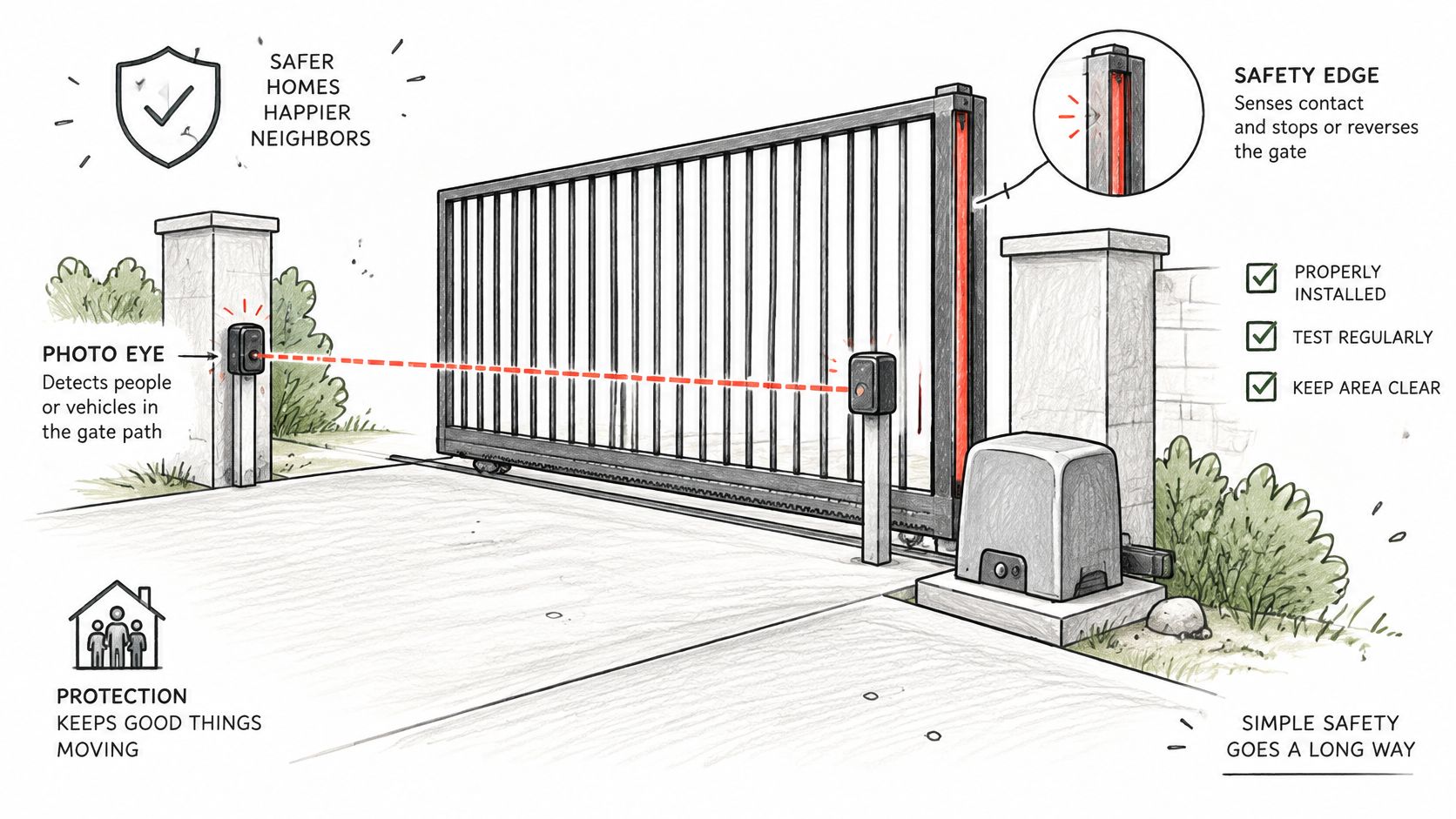
Entrapment protection is an engineering and installation requirement, not an optional accessory. The DASMA technical data sheet on gate operator entrapment protection states that ANSI/CAN/UL 325 generally requires two independent entrapment-protection means for each entrapment zone and direction of travel, which for typical horizontal slide and horizontal swing gates means two while opening and two while closing.
Independent means functionally different. An operator's inherent force-limiting system paired with a monitored photoelectric sensor or contact edge is one pattern. Two copies of the same sensor don't give the same protection, because one shared fault can disable both.
The operator should be configured so it won't run unless required monitored devices are correctly connected and operational. That single check tells a property manager a great deal during an inspection. If the gate cycles happily with a photo eye disconnected, the installation needs attention before any new control is added.
The No-Bypass Boundary for Retrofits
Adding a cellular or smartphone controller must not bypass the operator's existing safety inputs, emergency release provisions, or monitored sensor logic. A remote retrofit should issue only a momentary open or close command. The certified operator's local control stays responsible for obstacle detection, travel limits, and reversal.
That boundary matters when a gate is commanded from out of sight. The person tapping a phone can't see a child at the hinge post or a car stopped under the leaf. Local sensors at the gate are the only devices that can react in that moment, so they can't be bridged, jumpered, or left unmonitored to make a retrofit easier to wire.
Event logs need the same caution. A log entry shows that a command was sent or a credential was used. It doesn't prove the gate completed its cycle, reversed on an obstruction, or ended fully closed. Managers should read logs against the operator's actual state and safety events, especially after a complaint that the gate was found open.
Commissioning Tests With Numbers Attached
The UL gate operator guide for code authorities describes inherent protection that must stop and reverse the gate within two seconds when an obstruction is detected, and an adjustable clutch or pressure-relief mechanism that must limit closing force to no more than 40 lbf and must not increase the initial stopping force by more than 10%.
Those figures turn commissioning into a test, not a walkthrough. An installer should walk the full travel path and name the pinch, crush, and projection zones before the first powered cycle. Sensor alignment should be verified under realistic sunlight and weather, because a photo eye that works on a cloudy morning can misbehave in low afternoon sun.
- Test both directions: Confirm stop and reverse behavior while opening and while closing, at the leading edge and at other entrapment zones.
- Disconnect check: Confirm the operator won't run with a required monitored device disconnected.
- Repeat after changes: Retest after work on springs, hinges, rollers, speed settings, or control electronics.
- Check state awareness: Make sure there's a clear way to tell whether the gate is open, closed, or moving before another remote command is sent.
Repeated or conflicting remote commands deserve safeguards too. Two users sending opposite commands shouldn't leave the operator hunting between limits. The installer's settings and the manufacturer's manual for that model govern how that's handled, so readers shouldn't guess what an indicator light or error code means. Where behavior doesn't match the manual, a qualified technician should diagnose it.
An automatic driveway gate opener that passes these tests can accept new command methods with far less risk. One that fails needs repair first, because remote access only makes an unsafe gate easier to start from farther away. UL 325 is the named standard here, and local requirements vary, so permitting and inspection rules should be confirmed with the local authority.
Standards Behind the Gate and Operator
Two standards cover different parts of one installation, and accepting a gate on the strength of one leaves the other half unchecked.
Which standard covers which part
| Standard | What it governs | Inspect on site |
|---|---|---|
| ASTM F2200 | Gate construction and design | Leaf, hinges, travel path and physical hazards |
| UL 325 | Operator safety and entrapment protection | Operator, monitored devices and stop-and-reverse |
| Local rules | Permits and who may work on the gate | Local authority or HOA requirements |
The ASTM F2200 specification listing covers automated vehicular gate construction and design and states that automated vehicular gate systems must also be compliant with UL 325. In plain terms, ASTM F2200 addresses the gate, and UL 325 governs safety requirements for the operator and its entrapment protection system.
That division explains a common inspection miss. A new operator with correct monitored sensors can sit on a leaf with worn hinges, sharp projections, or a travel path that creates a crush zone. The operator paperwork looks complete, and the property still has an unsafe gate.
The reverse miss happens too. A well-built leaf with sound posts and smooth travel can be paired with an older operator that runs without monitored protection. The gate looks solid, and the powered half of the system is where the risk sits.
Certification of one component isn't proof that the complete system is safe. The leaf and the operator each need their own documents and their own inspection.
Buyers can ask the installer or manufacturer for documentation covering both the operator and the gate structure, then check those documents against the table on site. Does the paperwork name the operator model installed? Do the monitored devices listed match the devices on the posts? Does the gate construction paperwork describe the leaf type in the driveway?
Local requirements vary, including permits and rules on who may install or service powered gates. An HOA may add its own requirements on appearance, access for emergency vehicles, or work hours. Those local layers sit on top of the two standards, they don't replace them.
Upkeep That Keeps Reversal Working
A gate that reversed correctly at commissioning can stop doing so as hardware wears. Dirt, sagging hinges, and a bent contact edge all change how the leaf moves and how much force the operator needs, and that extra force eats into the margin that reversal depends on.
Start With the Leaf, Not the Motor
The ASTM page on standards for hidden dangers of gates notes that ASTM F2200 construction requirements include protection against a gate falling more than 45 degrees from vertical if it becomes detached from supporting hardware, plus smooth bottom surfaces and no protrusions that could cut, scrape, or puncture a person while the gate moves.
That standard covers horizontal slide, horizontal swing, vertical lift, vertical pivot, overhead pivot, and horizontal bifold gates. Its focus is the gate itself, not the control board. Replacing or adding an opener doesn't make an unsafe leaf acceptable, so the structure, travel path, and physical hazards need evaluation on their own. Local requirements vary.
Checks a Reader Can See
On each recurring visit, the mechanical path comes first. A technician or trained staff member can work through the visible hardware before touching any settings.
- Hinges and rollers: Look for sag, wobble, flat spots, and grinding through the full travel.
- Chain, rack, or arm: Check tension, mounting bolts, and points where the drive connects to the leaf.
- Cantilever counterbalance: Confirm the counterbalance section travels clear and its supports stay aligned.
- Track and photo-eye path: Clear gravel, vegetation, and webs, and confirm nothing new blocks the beam.
- Contact edges: Check for cuts, crushed sections, and loose mounting along the leading edge.
- Manual release: Exercise it so it isn't seized, then confirm it re-engages and secures properly.
After any of that work, the stop and reverse test from commissioning should run again in both directions. Monitored devices should also be confirmed the hard way, by checking that the operator stops being willing to run when one is disconnected, following the manual for that model.
A sensor that has been bridged to keep a gate running is a stop sign, not a repair. The gate should stay out of automatic use until the device is fixed or replaced.
Three symptoms justify taking an automatic driveway gate opener out of service and calling a qualified technician. The leaf drags or needs a push to finish travel. The gate reverses with no visible obstruction, which can point to binding, misalignment, or a failing device. Or a safety device has been disconnected or jumpered. Error codes and indicator lights shouldn't be guessed at, since meanings differ by model, and service intervals shouldn't be invented where the manufacturer's manual sets them.
Keep the Operator or Add a Phone
Keep the existing operator and add a command method only if it passes two checks. The leaf is sound, with no drag, sag, or sharp projections. The gate still stops and reverses with its monitored devices connected, and it refuses to run when one is disconnected.
Replace or rebuild first if any of those fail. A motor that runs with a safety device disconnected, a leaf that drags, or an operator with no working emergency release won't be fixed by a phone. A new command layer on that hardware only gives more people a way to start a gate that shouldn't be running.
Where a Cellular Add-On Fits
Where the hardware passes, a cellular add-on is one way to issue and revoke keys without Wi-Fi at the gate, as long as it wires in parallel to an existing input and leaves the operator's safety logic in charge. Readers comparing smartphone gate access features can use Nimbio as one example, since its hardware retrofits directly to an existing automatic gate operator or electronic door lock and connects over cellular LTE. Existing clickers, fobs, and keypads keep working alongside the app.
For the physical work, Nimbio recommends a licensed professional gate or low-voltage technician for installation, and can put customers in touch with an installer who has worked with Nimbio before on request. Installation cost is set by the technician and the site, since operators, wiring condition, and access to the control box differ by property.
Say a small HOA has a swing gate that reverses correctly on both leaves, monitored photo eyes on both posts, and a shared keypad code that half the town seems to know. That property doesn't need a new operator. It needs better credentials, and a parallel wired add-on keeps the working hardware while individual keys replace the shared code.
Say instead the same gate drags at the meeting edges and runs with one photo eye unplugged. That property needs mechanical repair and safety work before any credential upgrade. The order matters more than the product.
The next step is concrete. Identify the operator brand and model from the label inside the control box, confirm the safety devices still stop the gate, exercise the manual release, and only then choose a command method for the automatic driveway gate opener that leaves those devices in charge.
If a property's gate already reverses correctly and the operator is sound, Nimbio offers a cellular add-on controller and smartphone app that wire into that existing operator with no Wi-Fi needed at the gate, while clickers, fobs, and keypads keep working. Property managers can issue and revoke digital keys remotely, set expiration dates, and let visitors in remotely with video verification. Visit the site to check whether that retrofit approach fits the operator already on site.