

A resident shares a four-digit PIN in a community group chat. A delivery driver waits at a closed gate while staff search for a working remote. On Tuesday, an administrator needs to know who entered the building, but the available log only shows that someone used a shared credential.
That's the daily reality behind many outdated commercial and community entry systems. Keys, fobs, clickers, and keypads still have a place, but they become liabilities when nobody can quickly assign, revoke, schedule, or audit access.
A modern commercial access control system connects credentials, readers, controllers, locking hardware, connectivity, and management software into one controlled workflow. For HOAs, property managers, security installers, and facility operators, the right decision usually isn't a full hardware replacement. It's a retrofit-first, cloud-managed access strategy that preserves reliable equipment while adding better administration and visibility.
Table of Contents
- Why Commercial Sites Are Rethinking Access Control
- What a Commercial Access Control System Actually Includes
- Credential Types and How to Choose Between Them
- Wired, Wi-Fi, and Cellular Deployment Compared
- Security Standards and Compliance Considerations
- Operational Benefits and the ROI of Going Digital
- Selection Checklist and Installation Workflow
Why Commercial Sites Are Rethinking Access Control
A gate can open on command and still expose the property to avoidable risk. The failure usually sits in administration: shared credentials, delayed revocations, unclear visitor handling, and incomplete entry records. That is why commercial access control has moved beyond a narrow hardware purchase.
One 2026 industry report estimated the global commercial and physical access control market at USD 10.64 billion in 2025, with projected revenue of USD 26.84 billion by 2035 and an implied 8.8% CAGR from 2026 to 2035 (Emergen Research commercial and physical access control market analysis). A separate summary estimated the broader access control market at USD 10.76 billion in 2024, projecting USD 17.30 billion by 2030 at an 8.4% CAGR from 2025 to 2030 (Coherent Market Insights physical access control market summary).
The practical takeaway is clear. Offices, gated communities, self-storage properties, logistics sites, and mixed-use buildings need entry rules that can change as users, vendors, vehicles, and operating hours change.
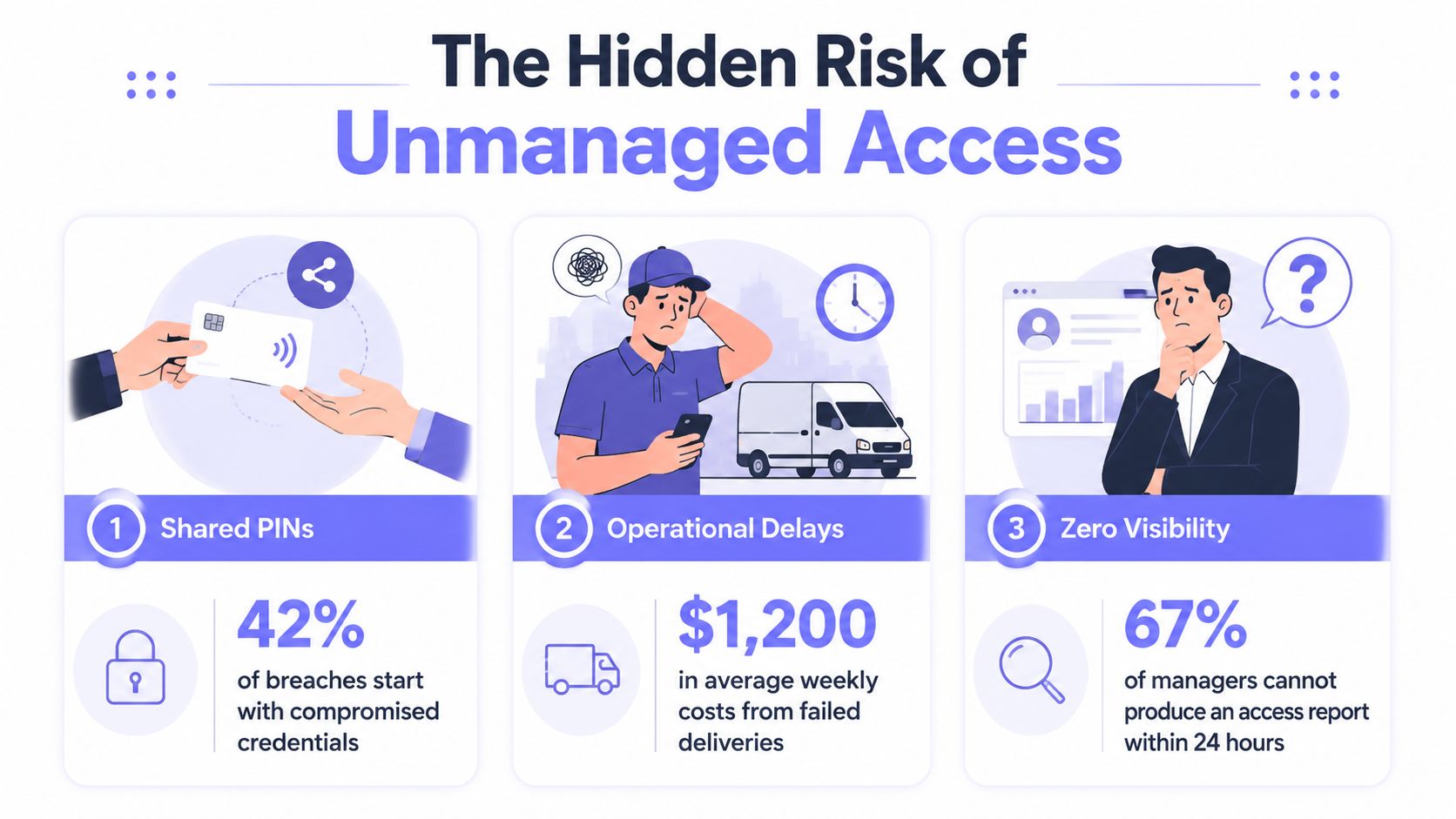
The management gap drives the risk
A physical gate operator may still work correctly. The exposure appears around it:
- Shared credentials: A PIN or clicker can pass between users without administrator visibility.
- Lost credentials: Staff may have to identify, deactivate, and replace a fob manually.
- Permission drift: Former employees, vendors, or residents can retain access beyond the intended period.
- Visitor uncertainty: A delivery driver or contractor may wait because nobody can grant temporary entry remotely.
- Audit gaps: Administrators may lack a dependable record of identity, time, and access point.
The market is shifting from hardware-centered deployments toward software-connected systems. Card-based systems were estimated to hold 60.8% share in 2026, while North America led with 36.9% share and Asia Pacific was identified as the fastest-growing region with 24.3% share in the same physical access control report. Another source reported that on-premises systems held 58% of deployment share in 2022, while cloud-based systems were projected to grow at a 13.5% CAGR (market deployment analysis).
The buying recommendation is straightforward: inspect the existing gate, lock, reader, and wiring first. Replace components that create risk, then add centralized software, remote credential management, and dependable connectivity. HOAs should verify resident and visitor workflows. Property managers should test revocation and audit procedures. Installers should confirm that the retrofit preserves reliable hardware before proposing a full replacement.
What a Commercial Access Control System Actually Includes
A commercial access control system isn't one smart lock attached to one door. It's a coordinated set of components that identifies a user, checks authorization rules, operates the entry point, and records the event.
Core definition: A commercial access control system combines credentials, readers, controllers, locking hardware, connectivity, and management software to decide who can enter, when they can enter, and how the event is recorded.
The four core building blocks are easy to understand:
- Credentials identify the person or authorized device. They can include cards, fobs, mobile phones, PINs, intercom approval, or biometrics.
- Readers receive and verify the credential. At a vehicle gate, the reader may be a call box, license plate device, or mobile access trigger. At a building door, it may be a card reader, keypad, or biometric scanner.
- Controllers apply the access rules. The controller decides whether the credential is valid for that user, entry point, and schedule.
- Management software lets administrators create users, assign permissions, revoke access, schedule entry windows, review logs, and manage multiple locations.
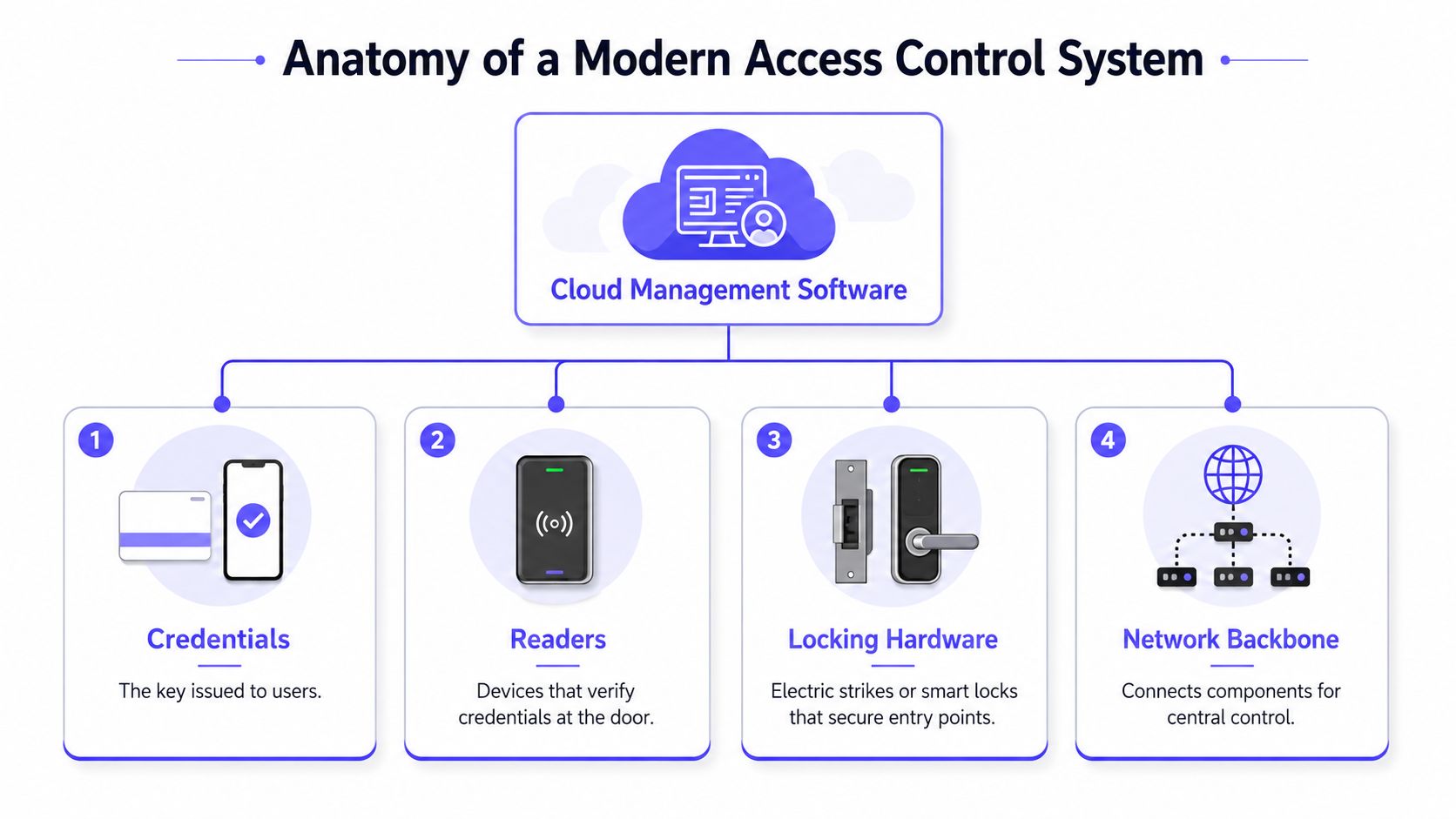
A complete proposal should also identify the locking hardware and network backbone. Electric strikes, electromagnetic locks, smart locks, gate operators, call boxes, relays, power supplies, and backup systems determine how the command becomes physical entry.
Component comparison
| Component | Role | Commercial Example |
|---|---|---|
| Credential | Identifies an authorized user | Mobile credential for a resident, card for staff, temporary vendor pass |
| Reader | Accepts and verifies the credential | Gate call box, keypad, card reader, intercom, biometric reader |
| Controller | Applies permission rules and operates the relay | Gate controller connected to an existing operator |
| Locking hardware | Secures the door or gate | Electric strike, smart lock, magnetic lock, or gate operator |
| Management software | Administers users, schedules, events, and reports | Cloud dashboard for an HOA portfolio or office building |
| Network backbone | Connects field hardware to centralized management | Wired Ethernet, Wi-Fi, or cellular connection |
The most important buying question is compatibility. If the existing gate operator or electric lock works reliably, a vendor should explain how the proposed system will integrate with it rather than automatically recommending replacement.
A practical overview of the subject is available through secure your venue with access control, especially for operators mapping entry points, credentials, and administrative responsibilities.
Credential Types and How to Choose Between Them
A gate is busy, a vendor needs entry, and a former employee still has a working card. Credential policy determines whether the administrator resolves that situation in minutes or starts tracing shared access. Choose credentials by user group, turnover, visitor volume, and the controls the existing site can support. Retrofit first. Keep reliable readers and locks where possible, then add cloud management and better credentials around them.
Key fobs and cards
Cards and fobs remain practical for staff, residents, and contractors who need predictable entry. They are also a sensible retrofit choice when existing readers are serviceable. Do not replace functioning hardware just to change the credential format.
The administrative cost appears when a fob goes missing or a user leaves. Staff must identify the credential, deactivate it, issue a replacement, and confirm that access rules remain correct. Shared cards create weak accountability because the event log identifies the credential, not the person using it.
Card-based systems remain widespread, while commercial operators add cloud administration and mobile options. That combination supports a gradual upgrade instead of a disruptive hardware refresh.
PIN keypads
Keypads suit service providers, residents, and visitors who need quick entry without carrying a card or phone. They work best at lower-volume doors and gates where administrators can control who receives each code.
Shared PINs undermine the audit trail. Issue individual codes where the system allows it, restrict each code by schedule, and revoke it when the relationship ends. If shared codes are unavoidable, assign them to a defined role and review their use regularly.
Mobile credentials
Mobile credentials use a smartphone as the access method. They reduce physical credential handling, support remote administration, and make temporary access easier to issue and remove.
They fit several commercial situations:
- HOAs and gated communities: Residents use app-based entry while administrators manage digital keys.
- Mixed-use properties: Tenants, staff, and vendors receive separate permissions.
- Distributed portfolios: Property managers update access without visiting every gate.
- Visitor workflows: A temporary credential expires after the approved access period.
Mobile access is gaining ground, but many sites still rely on simpler credential models. For retrofit projects, confirm phone compatibility, resident adoption, offline behavior, and a fallback process before making mobile the only option.
Intercoms, video entry, and biometrics
Intercoms work well at public-facing gates and building entrances where visitors require approval. Video helps staff verify the person requesting entry, but the property must assign call coverage and define how approvals are recorded.
Biometrics can fit restricted areas with a stable, trained user group. Enrollment, privacy, hygiene, and replacement procedures add operational requirements. For most HOAs and ordinary commercial entrances, mobile credentials paired with controlled visitor approval provide a more practical balance.
Selection rule: Use mobile credentials for routine users, individual PINs only where the operating model supports them, and video or intercom approval for visitors who need human verification. Keep cards or fobs as a fallback when the retrofit site requires them.
Wired, Wi-Fi, and Cellular Deployment Compared
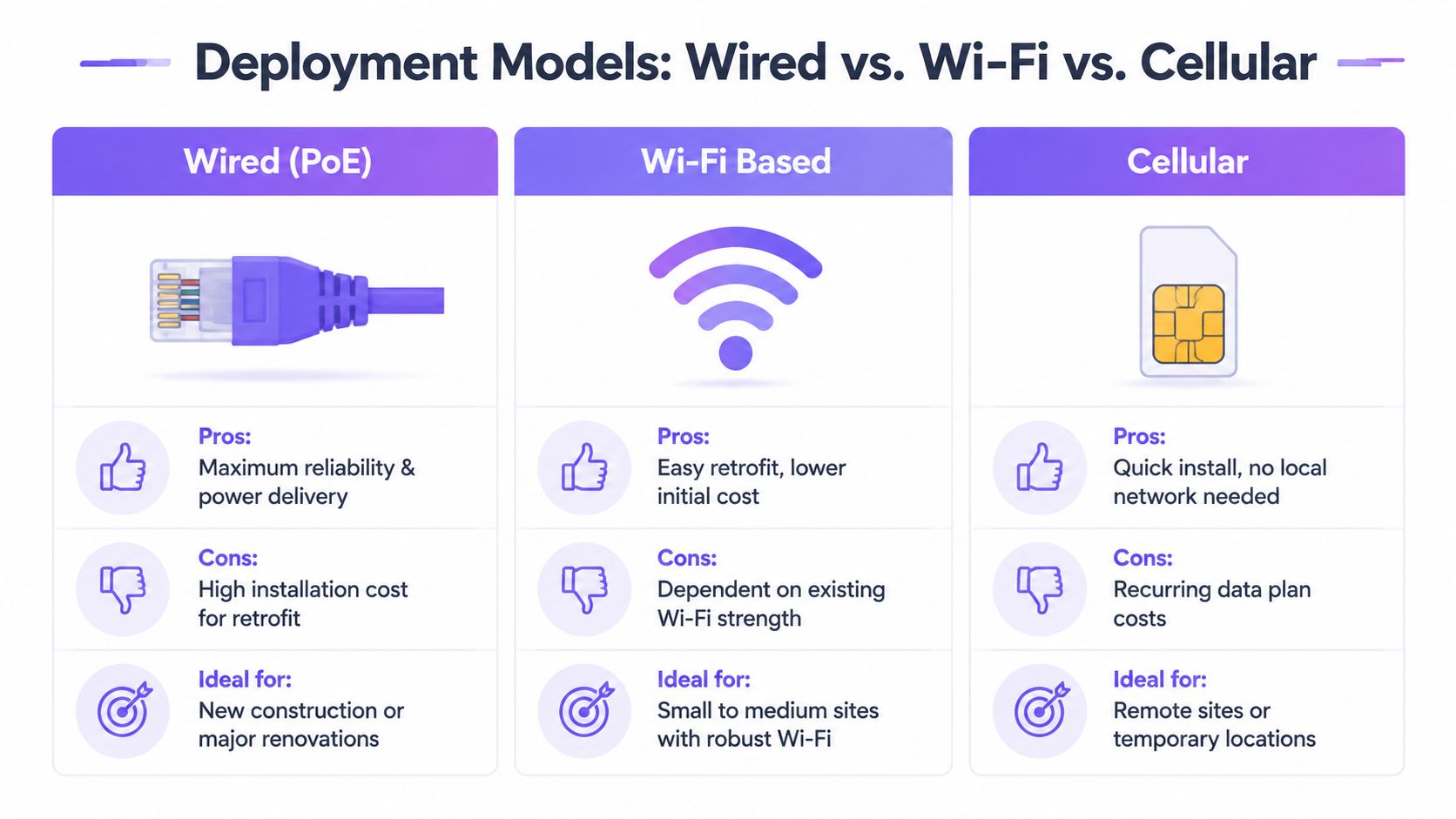
Connectivity determines whether a commercial access control system can communicate with its management platform and whether administrators can act when conditions change. The three common approaches are wired Ethernet, Wi-Fi, and cellular.
Wired Ethernet
Wired systems provide a strong connection and can deliver power through suitable network infrastructure. They're the right choice for new construction, major renovations, and facilities with accessible pathways for cabling.
Retrofit costs rise when a gate sits far from the building, conduit is damaged, or a property needs trenching across asphalt and planted areas. A wired design can be excellent technically while still being the wrong commercial decision for an existing site.
Wi-Fi
Wi-Fi often appears attractive because the property already has a wireless network. That assumption fails at many gates. Metal enclosures, long distances, interference, outdoor conditions, network changes, and local outages can interrupt communication.
Wi-Fi can work for small or medium sites with strong, professionally managed coverage. It shouldn't be selected merely because installation appears simple.
Cellular
Cellular connectivity gives a gate controller or entry device a direct path to the cloud without depending on the property's local Wi-Fi. That makes it a strong fit for remote gates, call boxes, long driveways, metal equipment cabinets, and sites where network access is unreliable.
The trade-off is an ongoing data plan and the need to verify signal quality during the site survey. For many retrofit projects, those recurring costs are easier to control than new trenching, cabling, and network maintenance.
Retrofit principle: Preserve reliable gate and lock hardware whenever possible. Add a managed cellular controller before approving a disruptive rip-and-replace project.
| Approach | Best For | Limitations |
|---|---|---|
| Wired Ethernet | New construction and major renovations | Retrofit cabling can be expensive and disruptive |
| Wi-Fi | Small or medium sites with dependable coverage | Performance depends on the local wireless network |
| Cellular | Remote gates, long runs, and retrofit projects | Requires a recurring data plan and signal validation |
Installers and property managers comparing network choices can use this Wi-Fi vs LTE gate security comparison when evaluating a retrofit design.
The strongest architecture may also be hybrid. A building can use wired readers indoors, Wi-Fi where coverage is controlled, and cellular at vehicle gates where local networking creates unnecessary risk.
Security Standards and Compliance Considerations
A retrofit proposal should prove how the system protects credentials, supervises communications, records events, and controls administrator access. Require those details in writing before approving new hardware. A hardware refresh without clear operating controls leaves the property with a newer system, not necessarily a safer one.
Require supervised reader communication
Wiegand sends credential data one way across two data lines. OSDP supports bidirectional communication, AES-128 encryption, tamper detection, and standardized interoperability under IEC recognition, according to Axis OSDP protocol guidance.
The practical difference is fault visibility. Supervised communication lets a controller identify a disconnected reader or compromised link. A basic one-way connection may continue receiving raw badge data without clearly reporting what happened.
For new reader work, make OSDP the default requirement unless a documented site constraint prevents it. Keep existing Wiegand hardware when it remains serviceable, but have the installer document its security and maintenance limitations before extending that infrastructure.
Define a useful audit trail
A defensible physical access log should capture:
- Identity: The person or account associated with the credential.
- Date: The calendar date of the event.
- Entry and exit times: Both sides of the movement where the system supports them.
- Identification method: Badge, card, mobile credential, PIN, or another method.
- Access point: The specific door, gate, or controlled entry location.
- Result: Successful or unsuccessful attempt.
- Supporting evidence: A visitor image or camera event where the system integrates with those tools.
Commercial platforms can record the credential, assigned user, entry point, date, and time for successful and unsuccessful attempts. They may also store a photo when visitor management or integrated cameras are connected, as described in this commercial access control logging overview.
Related control guidance calls for physical access logs and visitor escorting in secure areas. It also states that logs should be reviewed regularly and retained for at least three months, unless law or another requirement sets a different period, as outlined in this physical access log retention guidance.
Use identity, entry and exit times, date, identification method, and access point as the core fields, consistent with this physical access logging guidance. The property manager should assign log reviewers, define incident escalation, and restrict export rights.
For camera planning, a DIY security camera setup guide can help installers assess placement and coverage. Camera deployment must still follow the property's privacy, legal, and retention requirements. Boards and installers can also review Nimbio's documentation resource when assembling records for administrators and stakeholders.
Operational Benefits and the ROI of Going Digital
A gate fails at 6 a.m., a contractor needs entry, and a former employee still has a physical credential. A digital system earns its cost by reducing the staff time and uncertainty tied to credentials, permissions, deliveries, visitors, and incident review. Treat the project as a retrofit-first workflow, not an automatic hardware replacement.
A 2024 industry survey identified cybersecurity vulnerabilities as the top concern at 39% and outdated technology at 34%. It also listed lost or stolen credentials at 26%, power outages at 22%, inadequate integration at 21%, and difficulty managing permissions at 20% (2024 industry survey on security concerns).
For an HOA board or facility manager, the ROI test is practical:
- How much staff time goes into issuing, collecting, and replacing fobs?
- How quickly can an administrator revoke access after a loss or termination?
- Can the system separate resident, employee, vendor, and visitor permissions?
- Can a manager open a gate remotely without dispatching staff?
- Can an incident review identify the credential and access point involved?
- Does the platform connect with cameras, visitor workflows, or property software?
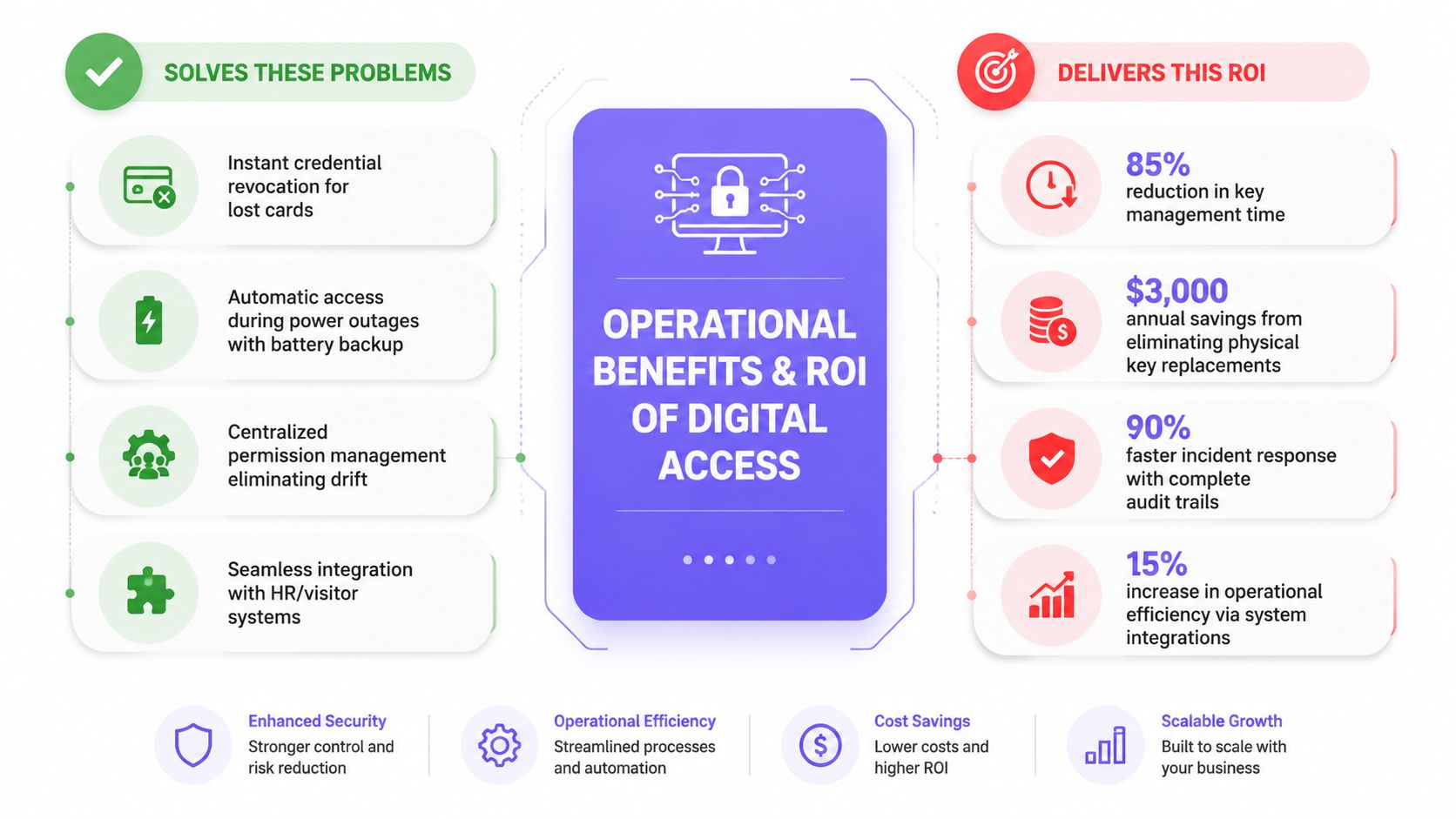
Where savings usually appear
Credential administration improves when managers can revoke digital keys without recovering physical devices. That limits access retained by former users and reduces work caused by lost cards.
Visitor management improves when delivery drivers, contractors, and guests can receive temporary access or request approval remotely. Staff no longer need to handle every arrival as an unscheduled interruption.
Permission control improves when administrators assign access by role and time window. Scheduled permissions reduce manual door openings and keep vendor access contained.
Incident response improves when logs show the credential, user, entry point, and time. Managers get a usable starting record instead of reconstructing events from memory.
The commercial-building segment represents a substantial share of demand in the access control market, reinforcing the operational case. Access control is a recurring property-management workflow, not only a security purchase.
Boards comparing subscription, hardware, and usage structures should review access control pricing models for property managers and compare ongoing administration costs with the installation quote. For installers, the recommendation is direct: preserve functioning operators where possible, add cloud management when it solves a documented workflow problem, and replace hardware only when compatibility, reliability, or security requires it.
Selection Checklist and Installation Workflow
A strong procurement process starts with the existing property, not a vendor's preferred hardware stack. HOA boards, property managers, and installers should document the current system before approving a design.
HOA and property manager checklist
- Retrofit compatibility: Confirm integration with existing operators such as LiftMaster, Viking, FAAC, Nice, DoorKing, and Mighty Mule.
- Credential control: Require individual digital keys, clear revocation, scheduled permissions, and separate resident, vendor, staff, and visitor roles.
- Audit records: Verify identity, credential method, access point, date, time, success or failure, and export options.
- Connectivity: Test cellular signal, Wi-Fi stability, wired pathways, and backup behavior at every controlled entry.
- Gate operations: Confirm hold-open schedules, emergency procedures, obstruction safety, and manual override.
- Administration: Check remote management, role-based administrator permissions, over-the-air updates, and notification settings.
- Commercial terms: Review hardware warranty, subscription structure, data ownership, support response, and installer responsibilities.
Installer workflow
- Survey the site. Map gates, doors, call boxes, readers, controllers, power supplies, network paths, and vehicle flow.
- Confirm compatibility. Test the existing operator or lock before selecting the retrofit controller.
- Install and secure hardware. Protect controllers, verify power, label wiring, and document the final configuration.
- Connect the management platform. Establish administrator roles, site hierarchy, entry points, and event settings.
- Provision credentials. Create user groups for residents, employees, vendors, and visitors, then apply least-privilege access.
- Configure schedules. Set hold-open periods, vendor windows, and temporary visitor permissions.
- Test failure modes. Simulate lost credentials, network interruption, power loss, reader disconnect, and manual release.
- Train operators. Show staff how to revoke access, approve visitors, investigate events, and export records.
- Review logs routinely. Assign a responsible administrator and retain records according to the property's compliance requirements.
For visitor workflows, one-way video verification can let a visitor request entry through a web directory while the resident or administrator visually confirms the person before release. That approach is particularly useful for gated communities and facilities that need remote oversight without stationing staff at every entrance.
The practical recommendation is to modernize in layers. Keep reliable gates and locks, replace weak credential practices, add dependable connectivity, and require cloud administration with audit-ready records.
Nimbio offers a cellular-based retrofit approach that connects existing electronic gates, call boxes, and building entry systems to smartphone-controlled access without relying on Wi-Fi. Property managers can use Nimbio to manage digital credentials, visitor access, hold-open schedules, and entry logs while preserving compatible gate hardware.
Securing gates or doors at a commercial property?
See how cellular access control works for commercial sites. Explore Commercial Gate & Door Access Control →


