

A property manager checks the gate log after a resident reports an unknown vehicle tailgated into the community. The old system shows almost nothing useful. A shared keypad code is still active, a remote might have been copied, and nobody can tell whether the signal sent from the entry device was genuine or spoofed.
That's where encrypted communications stop being an abstract IT topic and become a property protection issue. In a modern gate or building entry system, every instruction sent between a phone, controller, reader, dashboard, and gate operator needs protection while it travels. If that communication isn't protected, the front entrance of a smart community can become the weakest part of its security stack.
Table of Contents
- Why Your Gate's Security Depends on Invisible Protection
- The Core Concepts of Encryption Explained
- Key Protocols Securing Your Property's Communications
- Common Threats to Modern Access Control Systems
- Key Considerations for Secure Implementation
- How to Evaluate Access Control Vendors and Retrofit Solutions
- The Future of Secure Access is Connected and Encrypted
Why Your Gate's Security Depends on Invisible Protection
A gate can look solid and still be digitally fragile. That's the hidden risk with older access systems that rely on shared PINs, unmanaged remotes, and limited event logs.
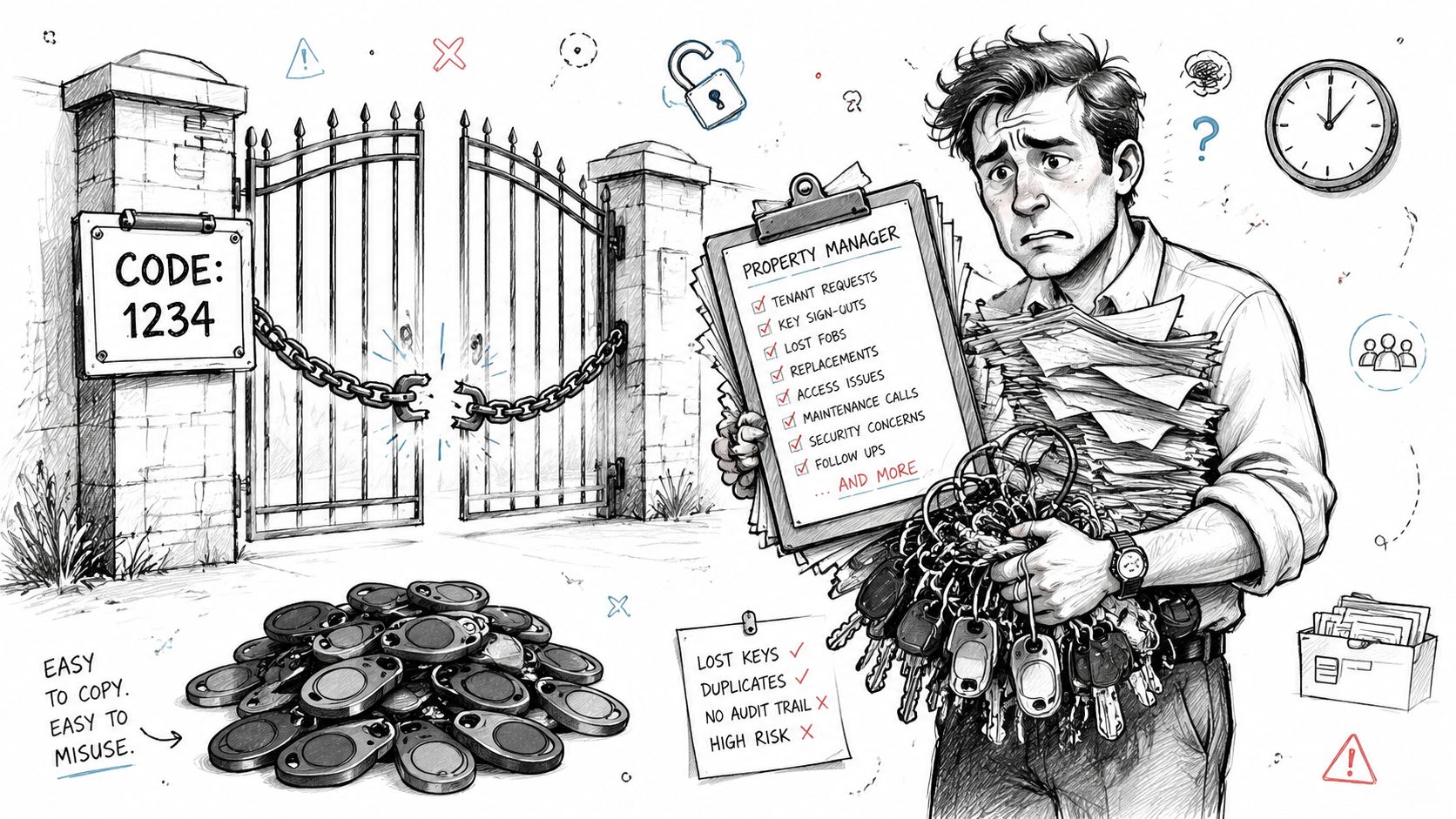
In many communities, the daily problems are familiar. Vendors need temporary access. Residents lose clickers. Board members want accountability. A front gate that should support HOA security often turns into an administrative burden because the system was designed for convenience first and traceability second.
The gap between a locked gate and a secure gate
A locked gate only controls the barrier. A secure gate also protects the signals that tell the barrier when to open, who requested entry, and whether that request should be trusted.
That distinction matters. Nedap Security notes that encrypted communications between access control readers and controllers are critical to prevent vulnerabilities, because unencrypted transmission can let attackers intercept or spoof authentication credentials.
Practical rule: If a system protects the metal gate but not the message telling it to open, the property still has an entry risk.
Property teams often assume the threat is physical tampering at the pedestal or call box. In reality, the bigger issue may be invisible traffic moving between components without proper protection.
Why modern properties need auditable communications
A cloud-based access control system depends on trusted communication every step of the way. That includes:
- Resident credentials: A phone app, mobile credential, or remote command has to prove it came from an authorized user.
- Visitor workflows: Temporary permissions, deliveries, and guest approvals need secure transmission between users and the management platform.
- Entry records: Audit trails only help if the event data itself can't be manipulated in transit.
Short-term convenience often creates long-term exposure. Shared gate codes spread beyond residents. Old fobs stay active after move-out. Local keypads rarely provide the clean permission control that a busy multifamily or HOA environment needs.
A well-designed modern system replaces that uncertainty with controlled digital credentials, remote management, and event visibility. For property managers, that means fewer gray areas after an incident and a clearer chain of accountability when someone asks, “Who opened the gate?”
The Core Concepts of Encryption Explained
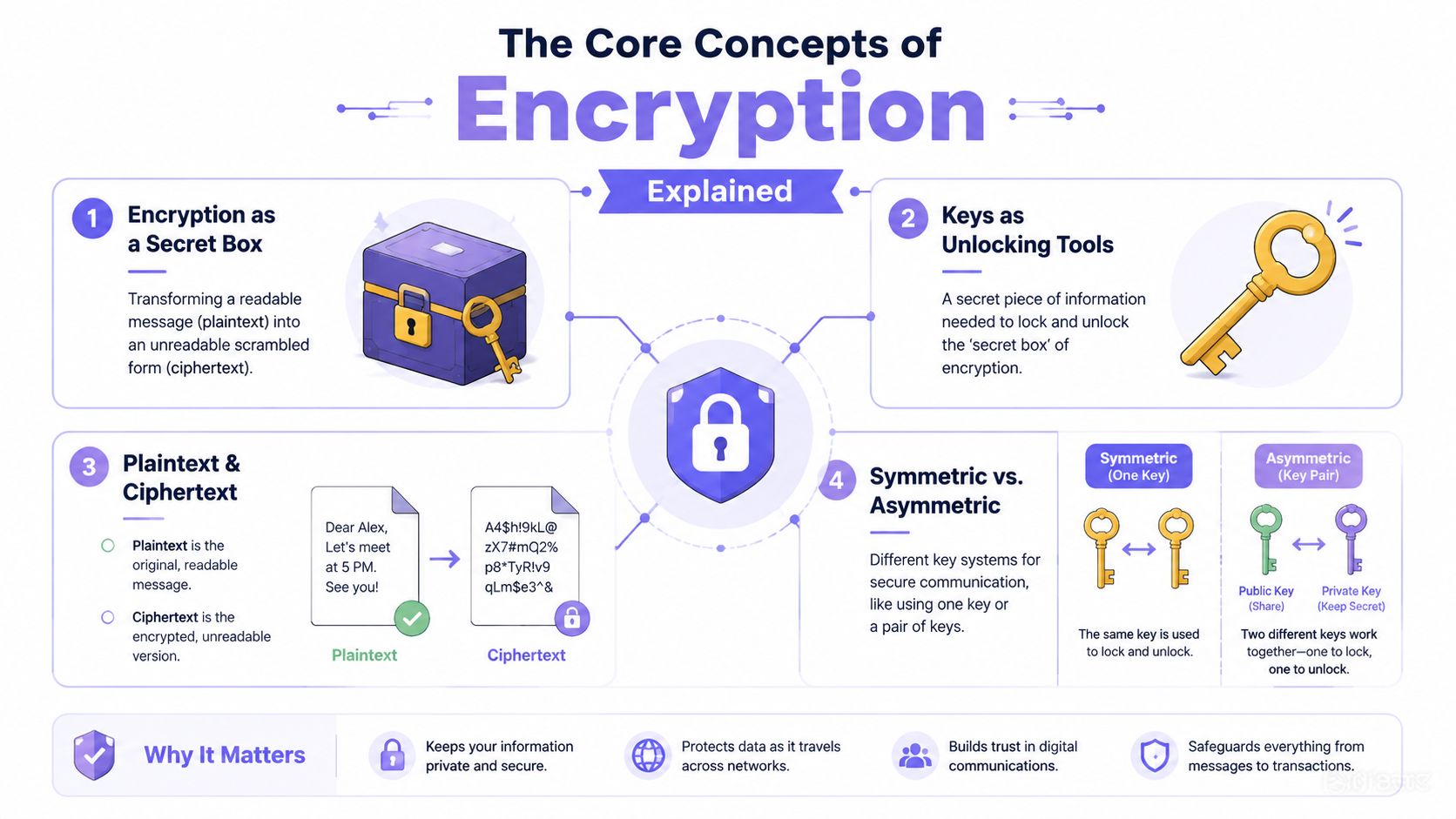
Most confusion starts with the word itself. Encryption sounds complicated because people picture advanced math, but the basic idea is simple. It turns readable information into scrambled information so only the right party can read it.
What encryption actually does
A helpful analogy is a locked box.
The original message is the paper inside the box. In security language, that readable message is plaintext. Once the box is locked, anyone watching can still see a box moving around, but they can't read what's inside. That protected version is ciphertext.
For a property manager, the “message” could be:
- a resident's command to open the gate
- a visitor approval sent from a phone
- an access event recorded in a cloud dashboard
- a credential update delivered to a community entry device
Without encryption, those messages are more like postcards. Anyone who intercepts them may be able to read or alter them.
Encryption protects data in motion. It doesn't make a community invincible, but it does make silent interception much harder.
Symmetric and asymmetric encryption in plain English
Two ideas matter most.
Symmetric encryption uses one shared secret key. It works like a house key that locks and opens the same door. Both sides need the same key, and that makes it fast and efficient for ongoing communication.
Asymmetric encryption uses a pair of keys. One is public, and one is private. The public key can be shared openly. The private key stays secret. A mailbox is a good analogy. Anyone can drop mail through the slot, but only the person with the key can open the box and read it.
In secure digital systems, these methods usually work together.
- Asymmetric encryption starts the conversation. It helps two parties confirm identity and establish trust.
- A secure handshake follows. This is the process of agreeing on how to communicate safely.
- Symmetric encryption takes over for speed. Once both sides share a session key, they can exchange data efficiently.
That's why enterprise encryption standards don't rely on one tool alone. Johns Hopkins University's encryption standards state that modern protocols such as TLS 1.3 use symmetric algorithms like AES-256 for data confidentiality, and that no cipher suites should be allowed with bit lengths under 128.
For a non-technical reader, the practical takeaway is straightforward. The secure setup phase and the fast day-to-day communication phase are different jobs, and strong systems use different cryptographic tools for each.
Readers who want a consumer-friendly explanation of encrypted messaging can also review Doczen's guide on E2EE, which gives a useful parallel from messaging apps to private digital exchanges.
Key Protocols Securing Your Property's Communications
Security teams throw around acronyms because protocols matter. In access control, those protocols define how a resident's phone, an admin dashboard, and a field device exchange information safely.
TLS 1.3 in everyday property operations
The protocol most property managers are most likely to encounter indirectly is TLS, short for Transport Layer Security. It protects data moving between systems, especially when a device or browser connects to a cloud service over HTTPS.
A practical example helps. A manager logs into a dashboard to revoke a former vendor's access. TLS protects the session carrying that request to the server. A resident checks visitor activity from a phone app. TLS protects the trip between the app and the platform.
The current benchmark is TLS 1.3. Government guidance on TLS 1.3 explains that it removes vulnerable features from older versions, requires forward secrecy for all connections, and uses X.509 version 3 certificates for mutual authentication.
That one sentence carries a lot of meaning for property operations:
- Older weak options are removed: insecure legacy settings aren't left hanging around for convenience.
- Certificates verify identity: the system can confirm it's talking to the expected server or device.
- Forward secrecy limits damage: if a long-term private key is compromised later, earlier sessions still remain protected.
Where DTLS and end-to-end encryption fit
Some systems also use DTLS, which is designed for situations where speed matters and communications may happen in short bursts rather than in a classic web session. A property team doesn't need to memorize the acronym. It's enough to know that different transport methods may call for different protections.
End-to-end encryption, often shortened to E2EE, is a different concept. It means only the sender and intended receiver can read the message content. That model is common in secure messaging, and parts of that logic may influence access workflows where privacy and integrity matter.
A useful way to separate the terms is this:
| Protocol or concept | Main job in practice | Property example |
|---|---|---|
| TLS | Secures traffic between a client and a service | App to cloud dashboard |
| DTLS | Protects low-latency or datagram-style traffic | Time-sensitive device communication |
| E2EE | Limits message readability to endpoints | Private communication between two approved parties |
Property managers don't need to become cryptographers. They do need to ask vendors which protocol protects app sessions, which one secures device traffic, and how identity is verified before an open command is accepted.
Teams evaluating vendor claims often get the most clarity by tracing one event end to end: who requested access, how the request traveled, and what verified it before the gate moved.
For readers who want a practical primer on preventing man-in-the-middle attacks, that resource helps explain why verified sessions matter. Technical teams evaluating integrations should also review the platform's cellular access control API documentation to understand how secure requests and device actions are handled in production environments.
Common Threats to Modern Access Control Systems
Threats to access control rarely announce themselves. Most arrive disguised as normal traffic, reused credentials, or devices that still appear to work.
What attackers look for in older systems
The most common weak points are predictable.
- Replay attacks: An attacker captures a valid signal and tries to send it again later.
- Spoofing: Someone impersonates a trusted device or credential source.
- Man-in-the-middle interception: A third party sits between two systems and tampers with the exchange.
- Credential abuse: Shared codes, lingering permissions, and old remotes create avoidable openings.
A keypad with one community-wide code may feel manageable until turnover rises. A gate remote passed between contractors may solve a short-term access issue while creating a long-term accountability problem.
Older access systems also tend to split responsibility in unhelpful ways. The installer manages one piece, the property team manages another, and nobody has a clean view of how commands move from user to gate operator.
Why encryption changes the attack surface
Strong encrypted communications don't remove every risk. They do change the economics of an attack by making simple interception less useful.
A protected system can help by:
- Scrambling the message in transit: interception alone won't reveal readable commands.
- Authenticating the exchange: the system checks whether the sender is who it claims to be.
- Reducing silent tampering: altered traffic is more likely to fail validation.
- Supporting cleaner audit trails: suspicious events are easier to investigate when each action is tied to a user, credential, or session.
That's especially important in communities where multiple stakeholders use the same infrastructure. Residents, delivery drivers, maintenance vendors, board members, and security installers all interact with access control differently. A weak system blurs those lines. A well-secured one preserves them.
A useful reality check for boards reviewing older infrastructure is Nimbio on cellular gate vulnerabilities, which outlines the kinds of practical exposures that show up when communication security is treated as an afterthought.
The most dangerous access control weakness often isn't a broken gate. It's a gate that opens on commands nobody can verify.
Key Considerations for Secure Implementation
Choosing encrypted communications is only the beginning. Security depends on how the system is implemented, updated, and managed over time.
Key management matters as much as the lock
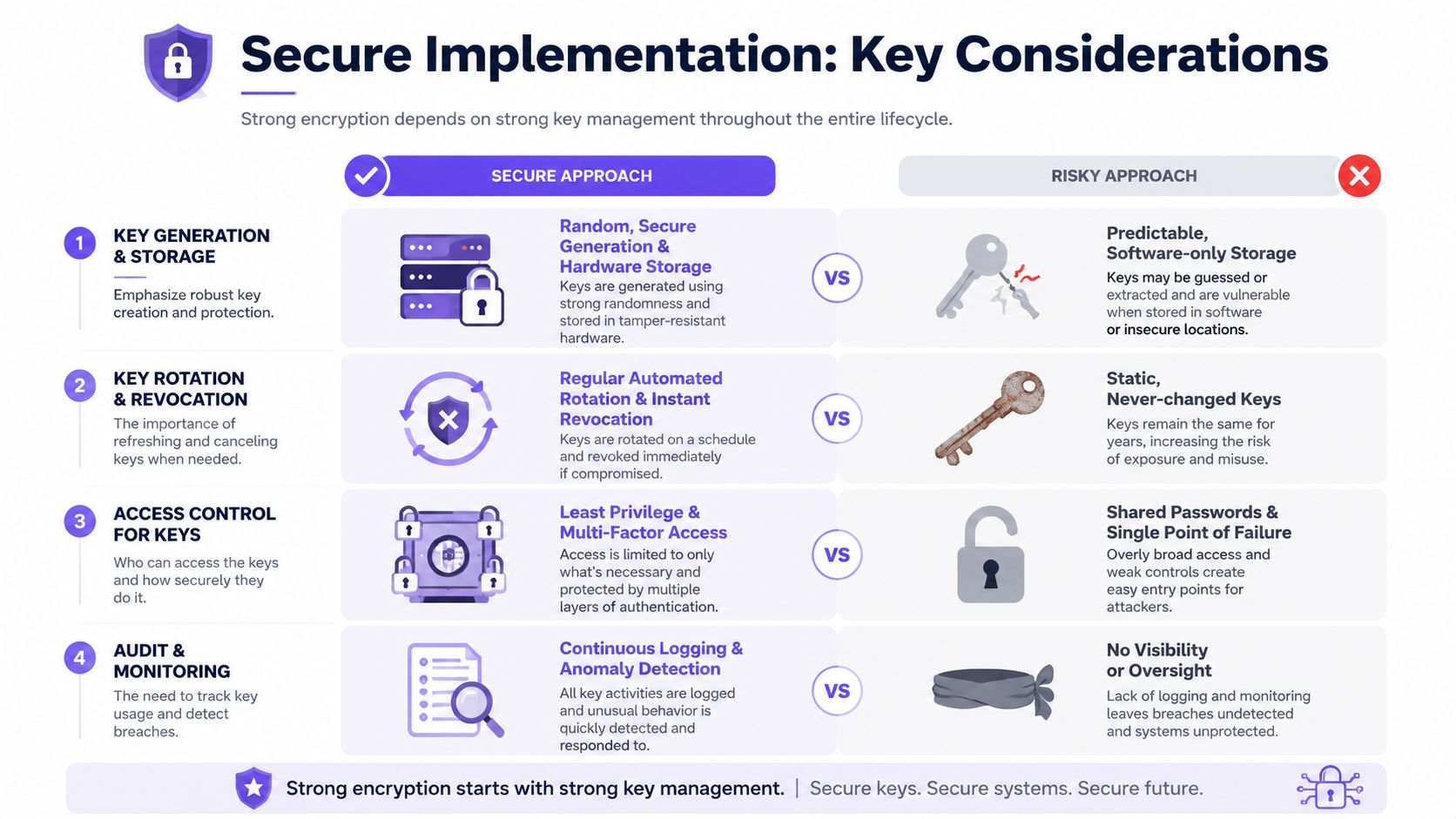
Encryption keys are the secrets that make the whole system work. If they're handled poorly, even strong encryption can be undermined by weak operations.
Property teams don't need to manage keys directly, but they should understand what competent vendors do behind the scenes.
- Generate keys securely: keys shouldn't be predictable or manually improvised.
- Store keys carefully: private material should be protected from casual access and device compromise.
- Rotate and revoke keys: when users leave, devices are replaced, or risk changes, stale trust must be removed.
- Audit key use: teams should be able to detect unusual patterns and investigate incidents.
A property manager can think of key management the same way they think about master keys in a building. The lock hardware matters, but the procedures around issuance, storage, and revocation matter just as much.
Cellular and Wi-Fi are not equal in the field
Connectivity is often treated like a convenience decision. It's also a security decision.
A Wi-Fi-based gate device depends on the local network at the property. That means security can be affected by weak router settings, password sharing, network outages, poor coverage at the gate, or changes made by local staff and vendors who weren't focused on security.
A cellular-based access device avoids many of those local dependencies. It uses carrier-backed connectivity instead of relying on the property's own Wi-Fi environment, which reduces exposure to local tampering and misconfiguration. For remote gates, detached entries, and multi-building communities, that can simplify operations while lowering the number of moving parts.
Here's the practical comparison:
| Connectivity option | Common operational reality | Security implication |
|---|---|---|
| Wi-Fi | Depends on local network quality and local administration | More exposure to on-site misconfiguration |
| Cellular | Independent of the property's Wi-Fi and router setup | Fewer local network failure points |
That difference becomes more valuable when access rights change frequently. Visitor credentials, temporary contractor access, and remote resident permissions work best when the communication path is stable and centrally managed.
Updates and identity checks can't be optional
Two final implementation details separate modern systems from stagnant ones.
First, digital certificates help devices verify who they're talking to. Without reliable identity checks, encrypted traffic can still be directed to the wrong party.
Second, over-the-air updates matter because security isn't static. Devices in the field need a secure way to receive patches, feature improvements, and protocol updates without requiring costly on-site intervention each time a risk changes.
One tested IoT security study found that encrypted pathways in a dual-factor wireless system contributed to 98.5% authentication accuracy and response times under 2 seconds in that environment, showing that strong protection and usable performance can coexist in connected security systems (JAIEA study download).
How to Evaluate Access Control Vendors and Retrofit Solutions
A polished sales demo doesn't prove a system is secure. The better test is whether a vendor can answer specific operational questions without dodging into vague marketing language.
Questions that expose weak security claims
A property manager or HOA board should ask direct questions such as:
- Which encryption protocols protect app, cloud, and device communications? Specific answers are stronger than broad claims like “bank-grade security.”
- How are keys stored, rotated, and revoked? If the answer is fuzzy, the operational discipline may be weak.
- How are firmware and software updates delivered securely? A connected device that can't be maintained becomes a future liability.
- How does the system verify device identity before accepting commands? This gets to the heart of spoofing resistance.
- What audit logs are available to administrators? Good logs help resolve disputes and speed investigations.
- Can the system retrofit existing hardware? Replacing every gate operator is often unnecessary if the security layer can modernize what's already installed.
What a strong retrofit decision looks like
Retrofitting matters because many communities don't need a new gate. They need a better access layer around the gate they already have.
That market is substantial. IBISWorld projects that the U.S. Electronic Access Control System Manufacturing industry, which includes retrofit technologies for existing gate operators and keypad systems, will reach $3.2 billion in 2026, reflecting demand for modernized secure access solutions.
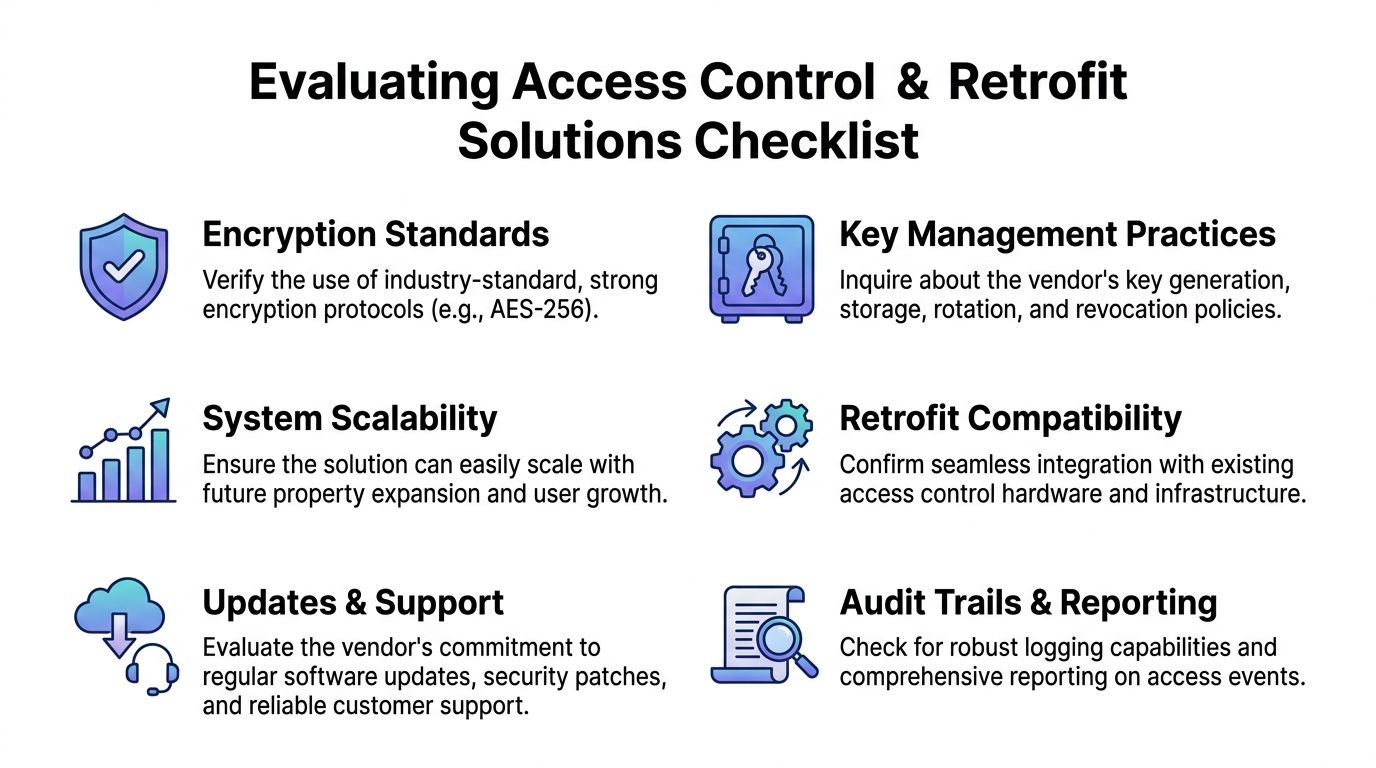
A practical evaluation checklist should include more than cryptography alone:
- Retrofit compatibility: Will the solution work with existing LiftMaster, Viking, DoorKing, FAAC, Nice, or other installed equipment?
- Remote credential control: Can managers grant, revoke, and schedule access without site visits?
- Visitor management: Does the platform support controlled guest workflows instead of unmanaged shared codes?
- Cloud reporting: Are logs easy to search when a resident dispute or security incident occurs?
- Installer support: Can security integrators deploy and maintain it without reinventing the site infrastructure?
Boards comparing options should pay close attention to vendors that support retrofitting legacy gate operators rather than forcing a full rip-and-replace approach. A good retrofit lowers disruption, preserves working hardware, and upgrades the part that most affects daily security and control.
A vendor earns trust when it can explain not just how a gate opens, but how the system proves that opening request was legitimate.
The Future of Secure Access is Connected and Encrypted
Modern property security depends on more than gates, readers, and call boxes. It depends on the integrity of the communications moving between them.
That's why encrypted communications belong at the center of every access control decision. They protect commands in transit, strengthen identity checks, support auditability, and reduce the risks that come with shared codes and unmanaged legacy credentials.
For multifamily buildings, gated communities, and commercial properties, the direction is clear. Secure access is becoming more connected, more remote, and more software-driven. The systems that hold up best are the ones built around protected communications, reliable connectivity, and manageable credentials rather than local workarounds.
Property teams that want a modern path forward can explore Nimbio to see how cellular keyless entry, hardware-agnostic retrofit compatibility, and remote visitor management can modernize gates and building access without replacing existing infrastructure.


