An intercom telephone system is an entry panel that calls a resident's phone or handset, carries two-way voice, and can send a separate release command to a door or gate. Those two jobs ride different circuits, so a clear conversation does not, by itself, mean the gate motor will run.
A delivery driver is at the entrance after hours. The resident answers, hears a name, and presses a key. The speaker stays live and the gate stays shut. The fault is in the release path, the operator input, or power to the motor, not in the call. Property managers get a clearer picture when they follow one visitor from the panel to the gate motor and write down what still works if power, the network, or a piece of hardware drops out.
Table of Contents
- Audio and Video Intercom Telephone Systems Compared
- How an Intercom Call Reaches the Gate Operator
- Security Standards and Local Rules for Intercoms
- Outage Behavior and Emergency Access Settings
- Accessibility and Visitor Verification for Every User
- Smartphone Intercoms Compared With Hardwired Systems
- Confirm Your Gate Wiring Before Choosing a System
Audio and Video Intercom Telephone Systems Compared
Two residents answer the same visitor. One hears a voice through a speaker and decides on sound alone. The other sees a face at the panel before deciding. The release command that follows is identical in both cases: a key press or app tap that closes a relay on a separate circuit from the call. That split matters more than the screen, because a sharper picture never makes the gate motor more likely to run.
Audio-only units carry voice alone, so the resident opens or refuses based on what they hear. Audio-video units add a live picture of the visitor at the panel, which lets the resident check who is standing there before that release command goes out.
Audio-only works like a voice through a speaker at a shop door. A video model adds the window.
Audio-only and audio-video intercom telephone systems at a glance
| Feature | Audio-only | Audio-video |
|---|---|---|
| Visitor identified by | Voice only | Voice plus a live picture at the panel |
| Resident answers on | Handset or phone | Handset, phone or screen, depending on the model |
| Cabling | Dedicated low-voltage wiring; older buildings often ran several conductors to each apartment | Needs more conductors or a digital link for the picture; some newer designs run on fewer wires |
| Gate or door release | Resident sends a release command after the voice call | Same release command, made after checking the picture |
| Typical fit | Low-traffic residential entries and simple retrofits | Multifamily entries, gated communities and commercial sites with many visitors |
Cabling decides more retrofit jobs than panel style. Older intercom wiring often ran several dedicated conductors from the entrance equipment to each apartment, while some newer video designs need fewer. Before choosing a system, count the conductors at your entry and check their condition, since a panel built for a digital link will not run on wiring sized for voice alone.
Video also adds failure points worth pricing in. The picture depends on lighting, camera placement, and whether the conductors can carry it, while the release path sits on its own circuit either way. Judge each option by what still works when something drops: if the camera feed fails, voice and release may still function; if power to the panel fails, the picture and the release go down together. If the property already has cameras on the grounds, it still pays to configure your home camera system so aim and light match the entry, separate from the intercom lens. Some gated communities look instead at a video intercom without external cameras when they don't want a second camera run out at the gate.
How an Intercom Call Reaches the Gate Operator
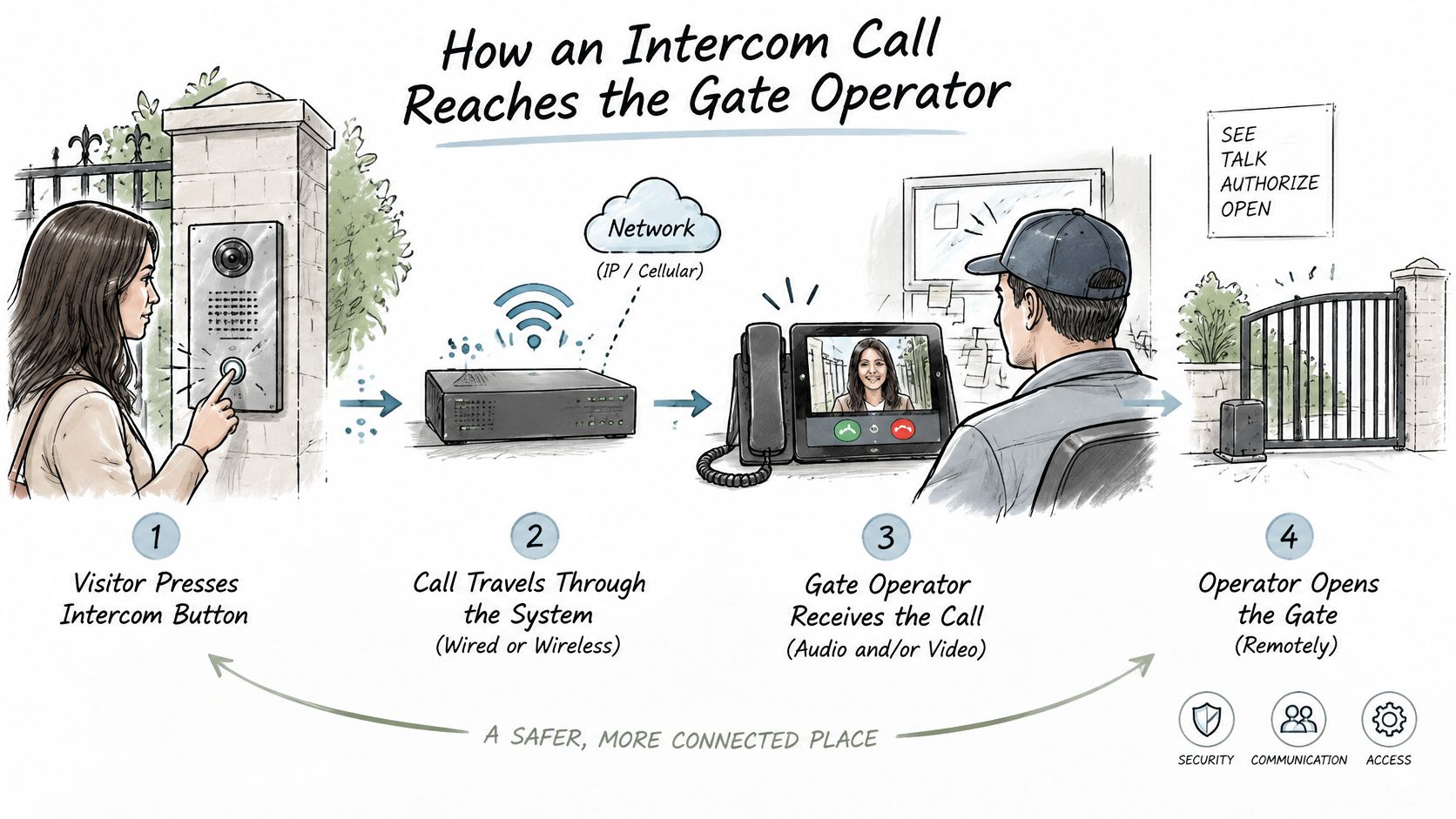
Walk one call in order. Each step has a job, and a later step can fail while an earlier one still looks fine.
- The visitor selects a unit number or a name at the entry panel.
- The panel calls that resident's phone, handset, or app.
- The voice path opens and the two people talk.
- The resident chooses to release the entry, usually with a key press or an app tap. On many telephone entry panels that key is 9, and the tones from the handset are what the panel treats as permission.
- The control unit closes a relay, a switch that sends a dry-contact signal to the gate operator. The call itself does not spin the motor.
- The operator runs the gate open. If the system keeps a log, the event is written there.
Think of a hotel front desk phone next to a separate button that buzzes the door. The conversation and the door share a moment, not a circuit. A working voice call does not prove the gate will move.
Parts a manager should be able to name
- Entry panel: Speaker, microphone, and on video models a camera, plus the directory the visitor uses.
- Resident endpoint: Handset, desk phone, mobile phone, or app. The voice arrives on this device.
- Control unit: Routes the call and watches for the release signal.
- Relay or dry-contact input: The electrical handshake into the operator. It is not the speaker wire.
- Gate operator: Runs the motor when that input closes.
- Clickers and keypads already on site: They often share the same operator input and can still open the gate when the phone path is down.
Practical rule: If you can talk and the gate does not move, test the relay and the operator input before you replace the panel.
Wiring diagrams differ by operator model. Check that operator's own manual, or ask a qualified technician, before anyone touches a wire. Don't guess what a status light means on a board you have not looked up.
Security Standards and Local Rules for Intercoms
A visitor calls, a resident answers, the gate swings open. Standards exist because each of those steps can fail on its own, and the paperwork at handover is what proves the release circuit worked alongside the conversation.
The IEC 62820 family treats a building intercom as an access-control and communications system, one that happens to end at a handset or an app. It sets graded requirements for security use, with a lower grade for general applications and a higher grade where a wrong opening carries real consequences. A gated community entrance, a multifamily lobby, or a commercial gate belongs in the higher grade when the risk supports it.
IEC 62820-2 expects advanced-security intercoms to do more than host a visitor chat. It covers rapid voice verification of emergencies or hazards, warnings to occupants, notice to responsible emergency or intervention services, and instructions sent over the system. The concept starts with a risk assessment and a defined protection target. A logistics yard with vehicle gates may need different call-point locations, priority handling, power resilience, and escalation steps than a small residential entrance.
What to prove before handover
Commissioning and maintenance are separate from buying the hardware. Skipping them leaves capable gear unproven. Before handover, ask for measured checks of intelligibility, call routing, gate-release operation, backup power, and incident logging.
Run the audio path and the release input as two distinct tests. A clear call proves the speaker and microphone work. Only a triggered relay proves the gate will move.
Document who receives calls, how an incident is verified, what happens when the primary path fails, and how an operator issues instructions from somewhere else. If an indoor network shares a closet with the entry gear, secure your home Wi-Fi too, since a weak household router can become the quiet failure sitting next to a listed intercom.
Local requirements vary. Confirm them with the authority having jurisdiction and with the installer before anyone removes or replaces a call box.
Nimbio recommends having a licensed professional gate or low-voltage technician do the work, and confirming compliance with local regulations governing gate access before a callbox comes out. Nimbio’s support team helps the installer by phone and with wiring diagrams, and HOA, multifamily, and commercial properties should verify the finished installation meets those same local rules.
Outage Behavior and Emergency Access Settings
A fail-safe lock or gate releases when power drops. A fail-secure one stays locked. Keeping an entrance locked can protect the property and slow an emergency exit. Automatic release helps people leave and can raise intrusion risk. Maximum security and maximum availability pull in opposite directions, and the property has to pick a side in writing.
A cellular or networked path does not guarantee the gate works. The power supply, the gate operator, the lock, and a local credential all have to be available. oSIST prEN IEC 62820-1-1:2025, a draft on general requirements for building intercom systems, is one sign that buyers are being pushed toward formal system requirements rather than a feature list.
Outage points to check for a gate or entry door
| Failure point | What to check | Question to ask |
|---|---|---|
| Building or circuit power loss | Battery backup and what the gate or lock does when power returns | How long does the controller run on battery, and does the gate stay open or closed? |
| Mobile network loss | Whether clickers, keypads or local codes still open the gate | Which access methods work when the network is down? |
| Gate operator or lock failure | Location of the manual release and who holds the key | How is manual release done, and who can perform it? |
| Controller failure | Replacement path and spare parts | What is the replacement process, and how long does it take? |
| Emergency exit | An exit path that does not depend on a call or code | Can occupants leave without calling anyone or entering a code? |
| Administrator recovery | Access logs and remote revocation during degraded operation | Can administrators still view the log and change keys while the system is degraded? |
Hypothetical: mains power drops overnight and residents need to leave. Ask what the gate does in that hour, and whether a manual release path exists that does not need a call.
Write down the degraded-mode settings before you buy.
- Hold-open schedules: Whether a timer forces the gate open, and who can cancel it.
- Offline credentials: Which clickers, fobs, or codes still work with no network.
- Audit trail: What the log records while the system runs on backup, and what it drops.
Sites that also carry voice over the internet can configure a backup connection for VoIP so a dead broadband line is not the only reason a desk can't hear the gate. Battery duration, release behavior, and manual release differ by model. Read the operator and controller manuals, and have the installer confirm the settings in writing.
Accessibility and Visitor Verification for Every User
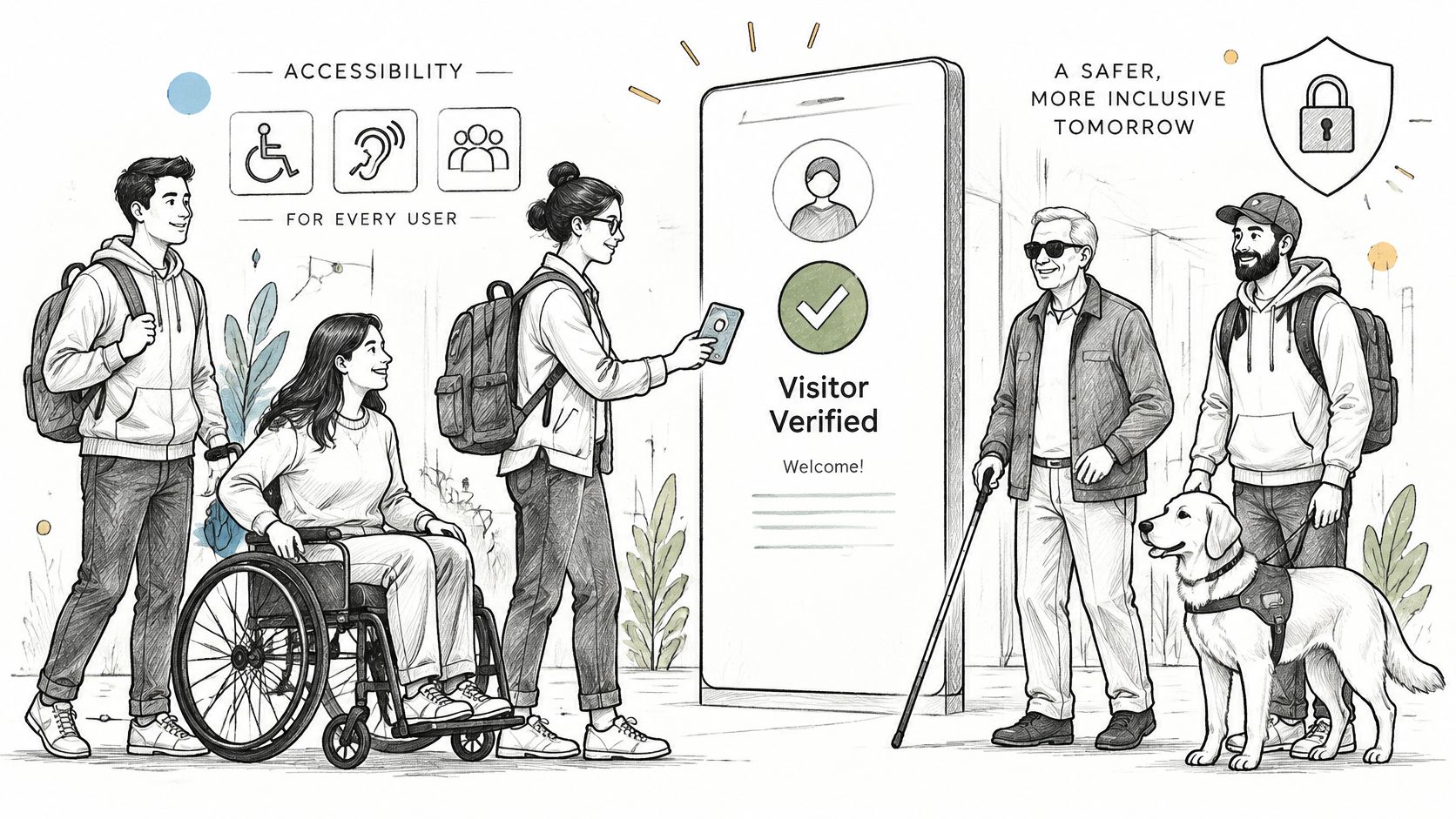
Adding video does not automatically make an intercom more accessible or safer. A one-way video call can help confirm identity. It can also leave out people on a weak connection, people who can't see the screen, and visitors whose faces are hidden by lighting, helmets, masks, or cultural coverings.
The system has to serve residents and visitors who can't hear, speak, see, use a touchscreen, or hold a phone camera steady. NIST guidance on building emergency communication notes that emergency and directional systems can fail to reach people with hearing or vision impairments, and it recommends combining visual, acoustic, and tactile information rather than trusting one channel. Visitor convenience and life-safety communication are different jobs. A pretty call screen is not an evacuation plan.
Flows to confirm on site
- Alerts: Both a visual cue and an audible cue when a visitor calls.
- Text path: A text-based alternative when voice isn't possible, plus relay or captioning support.
- Directory: Navigation that works without a touchscreen.
- Camera and light: Position and lighting at the panel so a face isn't a silhouette.
- Language: Options that match the people who live there.
- No smartphone: A fallback for residents who don't carry one.
Can every legitimate visitor and resident finish the access flow without one sensory channel or one device?
The proof is a test, not a spec sheet. Have someone who uses each alternative complete a full visitor entry at the panel, including the release, and fix any step that only works for a person who can see, hear, and hold a phone.
Smartphone Intercoms Compared With Hardwired Systems
A visitor calls during a storm and the building's internet is down. Two separate circuits decide whether the gate still opens: the call has to reach the resident, and the release has to reach the gate motor. Judge each system by which of those circuits survives a power, network, or hardware outage, not by how the call screen looks.
A hardwired telephone intercom carries the call on dedicated cable from the entry panel to each unit and on to the gate, and the release rides that same copper. A smartphone system for electric gates takes a different path: a controller wires in parallel to the dry-contact input on the operator the property already owns, and the call and release travel over a cellular network instead. A technical history of intercoms calls the internal wire run highly labor-intensive and potentially the most expensive part of a conventional install, which is why wireless and powerline designs were built to cut that cable dependence. Wireless still needs clean radio coverage, and powerline still depends on how the building's electrical circuits carry the signal.
Hardwired intercom telephone system compared with a smartphone cellular add-on
| Criterion | Hardwired telephone intercom | Smartphone cellular add-on (example: Nimbio) |
|---|---|---|
| Network to the gate | Dedicated wiring from the entry panel | Cellular LTE connection; no Wi-Fi needed at the gate |
| Work on the existing gate | Often needs cable runs to each unit and the gate | Wires into the gate operator a property already has |
| Existing clickers and keypads | Depends on the panel and wiring design | Keep working alongside the app |
| Issuing access | Physical keys, fobs or panel-programmed codes | Digital keys issued by the property manager |
| Withdrawing access | Re-keying or changing codes | Keys revoked remotely |
| Expiring access | Depends on the system | Digital keys can be scheduled by the administrator |
| Visitor verification | Camera at the panel on video models | Video verification of a visitor at the gate |
Each approach fails differently. A hardwired panel never touches a cellular network, so a carrier outage leaves it alone, but it may need new cable before it works at all. A cellular add-on needs carrier coverage at the gate and a phone in the resident's hand, so a local fallback stays necessary. Nimbio is one example of the cellular approach: a retrofit controller and smartphone app for electric gates, with electric locks as a secondary use. It wires in parallel to the existing operator's dry-contact input so legacy clickers, fobs, and keypads keep working, and it connects over a pre-installed multi-carrier LTE SIM (AT&T, Verizon, T-Mobile) rather than Wi-Fi at the gate. Managers issue, revoke, and schedule digital keys remotely and can verify a visitor by video before granting entry.
It is one approach among several. Compare options on the rows above, including a Wi-Fi vs LTE gate security comparison when the entrance has no building network.
Confirm Your Gate Wiring Before Choosing a System
Don't pick a panel from a brochure and discover the conductors later. Run this sequence, and point each answer at the check that already belongs to it.
- Pull the existing cable plan and count conductors between the entry panel, each unit, and the gate, using the cabling row in the audio and video comparison.
- Record the gate operator model and find its dry-contact or accessory input in that operator's manual.
- Write down outage behavior: fail-safe or fail-secure, battery duration, manual release, and who holds the key.
- List the accessibility paths the property must support, including a fallback for residents without smartphones.
- Confirm the local rules and the system grade the installer will specify.
If the wiring or the gate model is unclear, stop before any work starts. Nimbio's support team will confirm wiring compatibility before installation when a customer is unsure about a specific gate model, and customers can call 1-800-353-3422. Customers can also get a custom retrofit plan by sharing a few property details, and Nimbio's access experts will map a cellular upgrade for that gate or door. Installers can use wiring help for access control installers for operator-specific diagrams, and a question about one gate can go through the contact page. Bring the completed sequence to the installer so the first site visit starts from counted wires, not from a guess.
Nimbio makes a cellular add-on controller and a smartphone app for electric gates, and for electric locks as a secondary use, so a property can add remote release and visitor checks without replacing the operator it already has. If you are weighing that path against an intercom telephone system on site, begin with the gate model and the outage questions above. Visit Nimbio when you want that comparison tied to the entrance you manage.