

Tuesday starts with three access problems at once. A delivery driver is stuck at the gate, a resident is locked out after losing a fob, and a contractor needs one-time entry before the office opens.
That's where an IP intercom system stops being a gadget and starts acting like part of the property's operating system. For property managers, HOA boards, and installers, the question isn't whether an intercom can ring. It's whether the entry point can identify a visitor, route the request to the right person, open the right opening, and leave a record behind.
Older call boxes, analog buzzers, and standalone keypads can handle pieces of that workflow. A modern smart community usually needs the whole chain. That's why networked intercoms have moved into the mainstream. One industry estimate valued the global IP intercom market at USD 2.23 billion in 2020 and projected USD 4.92 billion by 2030, implying 8.5% CAGR over 2021 to 2030 according to Allied Market Research coverage of the IP intercom market.
For buyers, that growth matters less as a headline and more as a signal. It means wider adoption, a larger installed base, and continued vendor investment in mobile access, cloud-connected workflows, and remote management.
Table of Contents
- What an IP Intercom System Actually Does
- The Building Blocks Inside an IP Intercom
- Why IP Is Replacing Analog at the Gate
- Where IP Intercom Systems Are Deployed Today
- Making an IP Intercom Work With the Rest of Your Stack
- Security, Networking, and Installation Essentials
- Selection Checklist, ROI, and Common Questions
What an IP Intercom System Actually Does
A property manager usually experiences an intercom system as a string of interruptions. Someone needs in. Someone else says they belong there. Another person claims they forgot their credential.
An IP intercom system turns that chaos into a controlled process. It's a network-connected entry device that sends audio, video, and door-release commands over a standard network instead of relying only on older dedicated intercom wiring.
What replaces what
At the door or gate, the outdoor station is really a small network endpoint. It usually includes:
- Camera: for visual verification
- Microphone and speaker: for two-way conversation
- Relay output: to trigger a strike, maglock, or gate operator
- Reader or keypad in some models: to support PINs, cards, or credentials
On the receiving side, the “answering station” no longer has to be a wall handset inside one unit. It can be:
- An indoor station
- A desk phone
- A security desk client
- A mobile app
- A video management or operator workflow tied into the property's stack
Industry product material from Axis network intercoms reflects this convergence. The same device can combine two-way communication, remote entry control, and video surveillance in one endpoint, and it can be managed through smartphone apps, SIP phones, or video platforms.
Practical rule: If the device can only buzz a door open but can't route calls, verify visitors visually, or log events cleanly, it's not acting like a modern access layer.
The three jobs every intercom must handle
At a working property, an intercom isn't there to impress anyone. Its job is operational.
It needs to do three things well:
Identify the visitor
Audio helps. Video helps more. Directory logic, reader inputs, and call routing help even more.Let someone decide
A resident, concierge, guard, or property manager needs a reliable way to approve or deny entry.Record what happened
Time-stamped events matter when there's a dispute about access, a missed visitor, or a security incident.
That third piece is where analog systems often fall short. A legacy buzzer panel may open a door, but it usually can't create a usable audit trail or support remote visitor management in a clean way.
Why this matters at gated properties
For HOA security and gated community operations, the intercom is no longer just a speaker at the entrance. It's part of cloud-based access control.
That shift matters because some sites still need more than a networked door station can provide on its own. A cellular overlay can keep gate access independent of local Wi-Fi stability, preserve an existing gate operator, and let staff grant or revoke credentials remotely without replacing every piece of hardware. That's often the difference between a simple device upgrade and a practical property-wide access strategy.
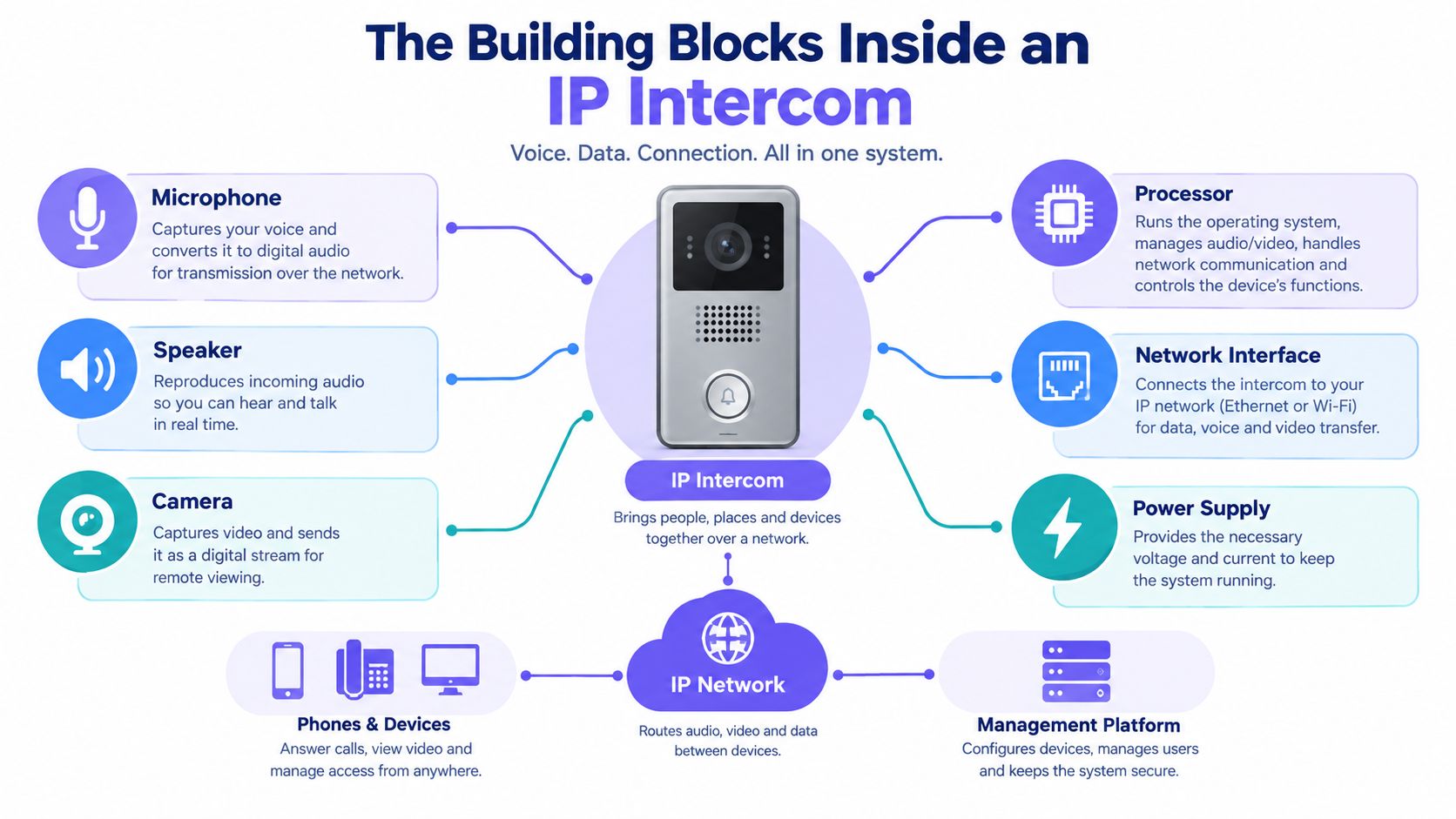
The Building Blocks Inside an IP Intercom
A good way to picture an IP intercom is to treat it like a small office phone, a camera, and a door relay sharing the same lane on the building network.
Four building blocks make that possible.
SIP is the call engine
SIP stands for Session Initiation Protocol. In plain language, it's the call setup language that tells the system who should ring, where the audio goes, and how the conversation starts.
A useful analogy is a front desk transfer. The door station “calls,” SIP decides where that call should go, and the receiving device answers like a phone extension.
According to Genetec's 2N IP intercom integration overview, IP intercoms commonly use SIP for voice integration and ONVIF Profile S for video interoperability. That's what allows remote answering, call transfer, and use with existing telephony or operator software.
PoE is one cable doing two jobs
PoE, or Power over Ethernet, is one of the most practical reasons installers and property teams like IP hardware. One network cable can carry both data and electrical power to the station.
That reduces separate power wiring at the entry point, which is especially useful in retrofits. Axis lists PoE support to IEEE 802.3af/802.3at Type 1 on its network video intercom datasheet.
For a property manager, the simple version is this:
- No extra local power supply may be needed
- Cable runs stay cleaner
- Retrofit work is usually easier to scope
Teams that are newer to connected building devices may find this broader IoT guide for business useful because it explains how networked devices fit into day-to-day operations beyond just IT theory.
Codecs and latency shape the conversation
Audio quality at a gate doesn't depend only on the microphone. It depends on compression choices, network stability, and traffic priority.
The engineering side matters more than many buyers realize. One independent IP intercom engineering reference specifies an ideal latency target under 20 ms, maximum 50 ms, jitter capped at 10 ms, and baseline bandwidth of 200 kbit/s plus 200 kbit/s per active audio channel on this IP intercom engineering panel reference.
That's why clean LAN design matters. If audio shares space poorly with high-bitrate devices, people start talking over each other.
Keep intercom traffic predictable. A separate VLAN and sensible QoS policy usually matter more than raw internet speed.
ONVIF lets the intercom join the camera ecosystem
ONVIF is the video-side standard that helps the intercom act like a discoverable security device instead of a closed appliance.
A 2N configuration manual notes that ONVIF depends on setting a user account and access level correctly, and that it's used for camera search, configuration, and administration in IP networks through the 2N IP configuration manual. In practical terms, that means the VMS can often pull the door video and operators can work from a familiar interface.
For property teams comparing network intercoms with cellular overlays, this is also where architecture choices matter. A pure IP deployment may sit inside the site network, while a cellular system can separate gate access from local Wi-Fi conditions. For buyers evaluating retrofit options, this comparison helps clarify how cellular gate access works.
Why IP Is Replacing Analog at the Gate
Analog intercoms aren't useless. They're often the right answer for a small, simple site with one entrance, one tenant, and no expectation of mobile answering or software integration.
The problem is that many properties aren't simple anymore. A gate, lobby, service entrance, and delivery workflow all tend to converge into one access-control problem.
Where analog still makes sense
Analog can still win when the brief is narrow:
- Single-door simplicity: one residence or one small office
- Minimal training needs: press button, talk, open
- No network dependency: useful where the owner wants the system isolated from the data network
- Lower upfront scope: especially when there's no need for apps, logs, or integrations
That honesty matters because not every site needs a feature-rich platform.
Where IP pulls ahead
IP starts to separate itself when the property needs flexibility.
Common advantages include:
- Video verification
- Remote answering from phones or apps
- Centralized management
- Software updates instead of site visits for every change
- Audit trails for access events
- Expansion without dedicated homerun wiring to every new station
A key historical shift is the move from analog hardware to Internet Protocol-based systems that send voice, video, and access-control data over standard networks. One 2024 report said visible IP intercom devices accounted for 78% of global installations, while another market estimate reported the visible segment held 63% share in 2024 and North America represented 38% of the global market, according to market coverage on IP intercom adoption and segmentation. That points to a market where camera-based, visibly mounted systems are becoming the normal expectation.
IP vs. Analog Intercom Side-by-Side Comparison
| Criterion | IP Intercom | Analog Intercom |
|---|---|---|
| Wiring model | Uses standard network infrastructure | Typically needs dedicated intercom wiring |
| Video handling | Usually easier to integrate and route | Often limited or more isolated |
| Remote management | Strong fit for off-site administration | Usually requires on-site changes |
| Scalability | Easier to expand across entrances and buildings | Expansion can mean more dedicated wiring |
| Mobile answering | Common design pattern | Often limited or absent |
| Auditability | Better fit for event logs and software workflows | Usually weaker recordkeeping |
| Network independence | Depends on sound network design | Can be simpler where no network is desired |
| Best-fit use case | Multifamily, gated communities, offices, larger sites | Small, simple, single-entry deployments |
The upgrade from analog to IP usually isn't just a hardware swap. It's a move from a door buzzer to a software-managed entry workflow.
For property managers, that's the budget question. It's not only “what does the panel cost?” It's “what happens every time a tenant changes, a delivery arrives after hours, or a second entrance needs the same controls?”
Where IP Intercom Systems Are Deployed Today
An IP intercom system isn't one product shape. It's a pattern. The door station, call routing, credential logic, and release command stay familiar, but the deployment changes with the property.
Gated communities
A gated community often needs two things at once. It needs visitor communication at the vehicle entrance, and it needs a practical way to avoid sending every call through a guardhouse or management office.
In that setup, the intercom usually ties the gate call to resident phones or approved operators. Residents verify the visitor, then open the gate remotely if appropriate.
The operational result is straightforward:
- Fewer routine interruptions for staff
- Better remote visitor management
- Cleaner records of who requested access and when
For HOA security, this is also where cellular overlays can still beat a pure LAN design. A gate at the perimeter may be far from stable building networking, and a cellular controller can modernize the entrance without requiring a full replacement of the existing gate operator.
Multifamily buildings
A mid-rise multifamily site often uses a lobby station as part of a broader access workflow. The station handles visitor calls, the property routes those calls to residents or staff, and approved entry can tie into elevator or door-release logic.
The value isn't just convenience. It's control.
Property teams usually care about:
- Move-ins and move-outs
- Visitor access after leasing hours
- Credential changes without rekeying hardware
- A cleaner path from resident directory to door release
Network intercoms fit this environment because they combine two-way communication, entry control, and camera-based verification in one endpoint, as reflected in Axis network intercom product guidance.
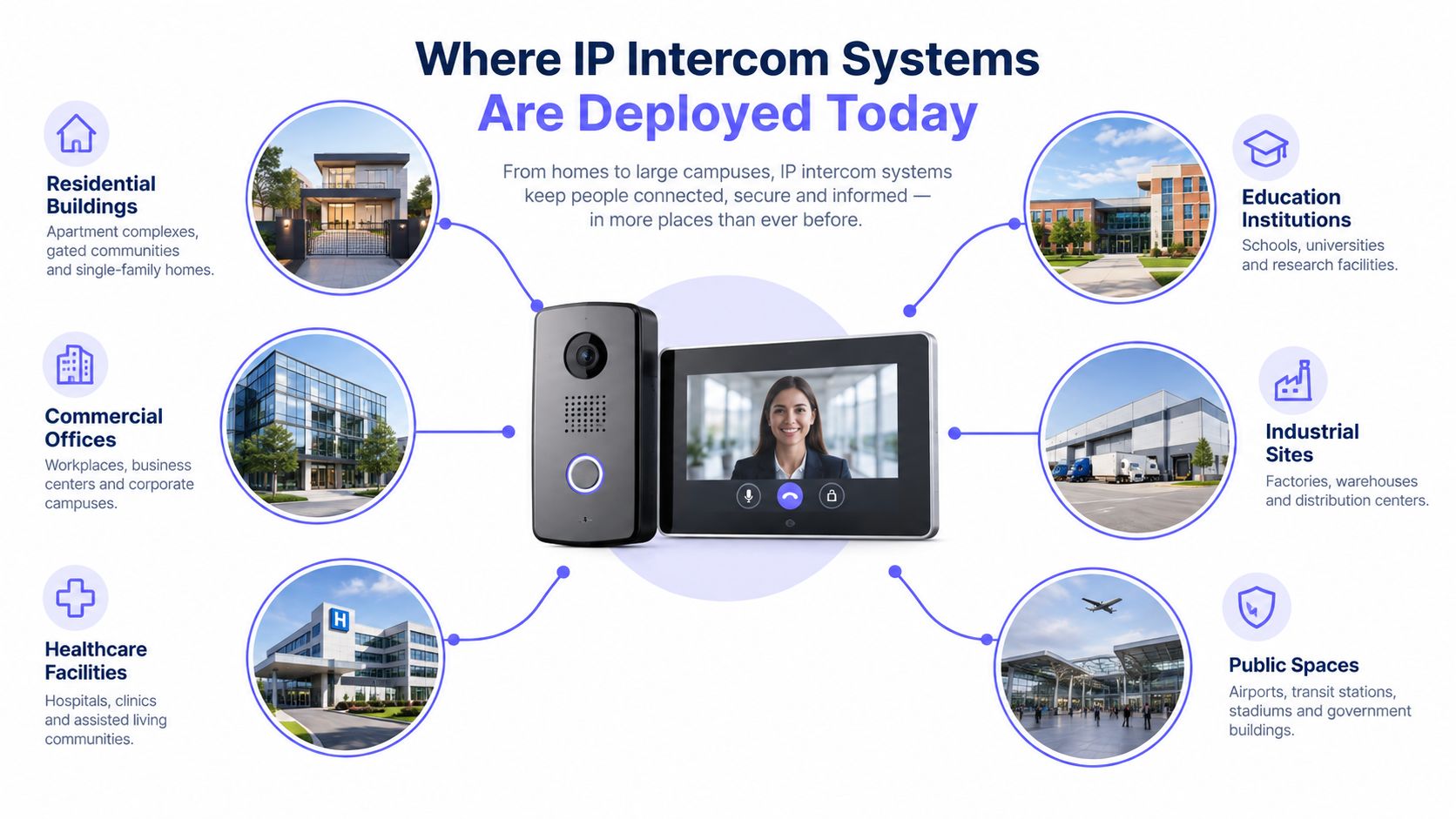
Logistics yards and service entrances
A logistics yard has a different pressure point. The site doesn't need elegant lobby aesthetics. It needs rugged communication, clear verification, and fast throughput.
An outdoor-rated station at a bay or vehicle gate can support:
- Driver communication
- Visual verification with an integrated camera
- Entry decisions based on dispatch or manifest checks
- Single-cable installation through PoE where appropriate
That matters because trucks waiting at a gate create operational drag fast. A cleaner entry decision process reduces idle confusion, especially when a site wants a record tied to each access event.
Small offices and mixed-use entries
A small office may only need one flush-mounted station and one clean way to avoid proprietary indoor handsets. In many cases, the useful move is tying the door station into the organization's existing call workflow.
That can remove extra endpoint clutter and shorten training. If the staff already know how to answer routed calls, the intercom behaves like part of the same communications environment instead of a separate appliance.
A deployment is usually successful when the user doesn't need to learn a new ritual. The gate or door should fit the workflow people already use.
Making an IP Intercom Work With the Rest of Your Stack
An intercom rarely fails because the speaker or camera is bad. It usually fails because somebody assumed “integrates with” meant “works cleanly in this exact property.”
That assumption causes support tickets.
Verify the call path first
If the intercom will register to a SIP PBX or hosted voice platform, the buyer should get the compatibility details in writing.
The checklist should include:
- Supported SIP registration method
- Codec support
- DTMF behavior for door release
- TLS support if encrypted signaling is required
- Call routing for tenants, concierge, or overflow handling
An intercom may work nicely with one telephony platform and become awkward with another. That's not unusual. It just needs to be tested before procurement, not after installation.
Treat video integration as a separate question
Many buyers hear “ONVIF” and assume all video workflows are covered. They aren't.
The practical questions are:
- Can the VMS discover the device reliably?
- Does the station expose video in the format the recorder or client expects?
- Do user permissions limit admin functions or stream access?
- Is there a fallback path if the older recorder prefers RTSP-style workflows?
Industry guidance has also started to focus more directly on lock-in and standards churn. A useful summary in this intercom software features discussion highlights why buyers should verify third-party PBX registration, standards-based video exposure, and whether the product forces a proprietary app or cloud.
Gate operators and mobile apps need hard questions
At the physical layer, the intercom still has to trigger something real. That means confirming relay behavior, release logic, and whether the output is appropriate for the gate operator or lock control method on site.
For app-based access, teams should verify:
- How visitor calls reach users
- Whether multi-tenant routing is supported
- What happens if the local property network is unavailable
- How credentials are granted, revoked, and scheduled
- Whether the app is mandatory for all users or optional
For properties that want a separate access layer over an existing gate, one option is a cellular controller and visitor workflow that operates independently of local Wi-Fi. Nimbio, for example, offers smartphone-based gate control, remote credential management, and developer tooling through its gate access API.
Put every claimed integration in writing before signing. “Compatible” should mean tested call flow, tested release behavior, and a named support boundary.
Security, Networking, and Installation Essentials
Many intercom projects get scoped as wiring jobs. That's too narrow.
A networked door station sits at the physical edge of the property and on the logical edge of the network. That makes security, segmentation, and maintenance buyer decisions, not just installer preferences.
Encryption and hardening aren't optional
Intercom traffic should be protected from day one.
Higher-end ecosystems explicitly list controls such as HTTPS, IP address filtering, 802.1X authentication, SIPS, and SRTP in TOA technical intercom materials. Those features matter because perimeter devices can become weak points if signaling, audio, or management traffic is left exposed.
The hardware side of the market reflects this as well. The Axis datasheet cited earlier references HTTPS/HSTS and TLS v1.2/v1.3, showing that reputable devices are commonly designed with regulated and security-conscious environments in mind.
A practical baseline looks like this:
- Use HTTPS for the web interface
- Use encrypted signaling and media where supported
- Disable default or weak credentials immediately
- Restrict who can administer the device
- Log changes and release events
Segment the network and plan for patching
A good IP intercom install treats the network as a security boundary. The station should live on a dedicated VLAN or similarly segmented part of the environment, with tightly scoped access to what it needs.
That reduces the blast radius if a device is compromised.
Neutral market commentary also points to cybersecurity and governance concerns around connected intercoms, especially where credentials, logs, or biometric data are involved, as discussed in this market discussion of IP intercom security and compliance pressures.
Installation decisions that buyers should own
Some site details shouldn't be left vague in an installer proposal.
The buyer should confirm:
- PoE budget: outdoor stations, added readers, or heated components may change power requirements
- Surge protection: especially at gates and perimeter entries
- Conduit path and cable protection: outdoor runs fail early when this is ignored
- Commissioning checklist: call flow, release behavior, video stream, logs, and fail states should all be signed off
- Patch responsibility: someone must own firmware review and update timing
For broader operational thinking around policy and documentation, these access control compliance tips are a useful companion read. For teams planning rollout at the property level, this practical guide on how to install intercom system for property managers helps frame the handoff from design to day-to-day use.
Buy the maintenance model along with the hardware. An unpatched intercom at the gate is both a network device and a perimeter device. It can't be treated casually.
Selection Checklist, ROI, and Common Questions
The easiest way to buy the wrong intercom is to shop by feature list alone. Cameras, apps, and touchscreens look impressive in a proposal. Compatibility, support boundaries, and operating fit matter more after handoff.
The shortlist that actually matters
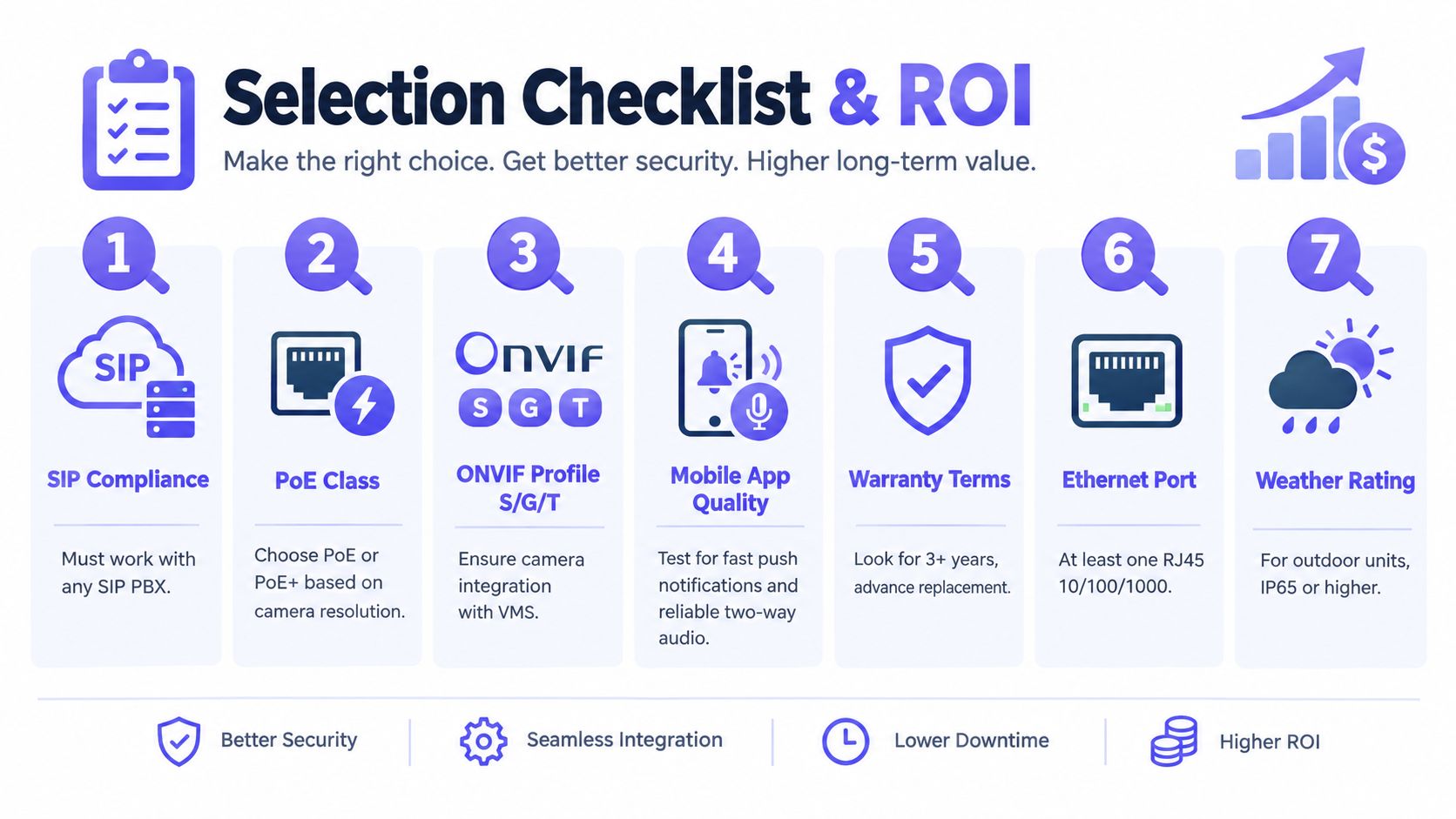
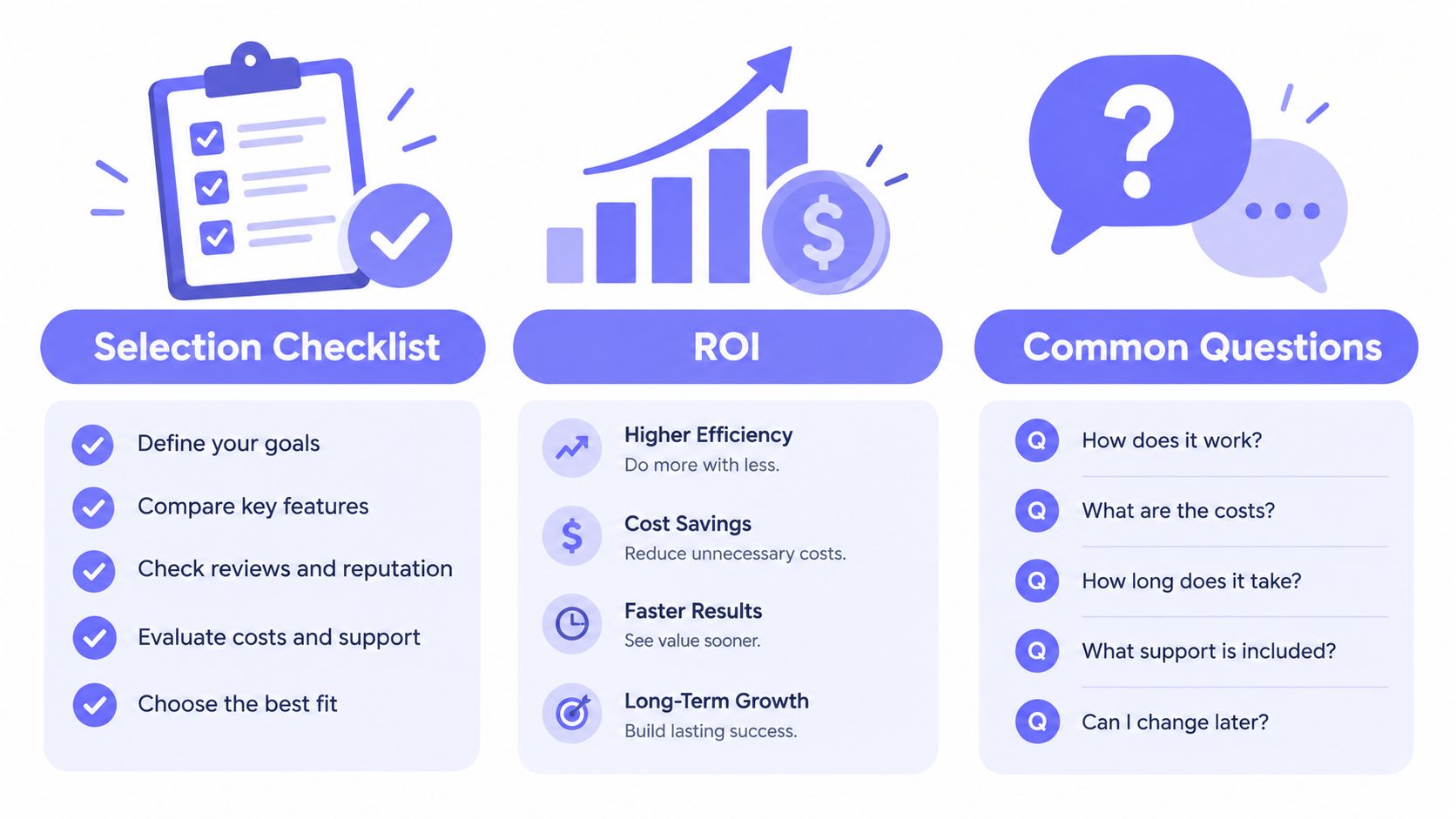
A buyer checklist should include:
- SIP compliance: can it register cleanly to the PBX or call platform the site uses?
- PoE class and cabling needs: does the switch infrastructure match the station's power draw?
- ONVIF or standards-based video support: can the existing video stack use the stream without workarounds?
- Mobile workflow quality: how are calls routed, and how quickly can users respond?
- Warranty and replacement process: what happens when an outdoor unit fails?
- Integrator track record: who owns testing, commissioning, and support after turnover?
A practical way to think about ROI
For a property manager or HOA board, return on investment usually comes from three buckets:
Fewer truck rolls or after-hours site visits
Remote answering and remote release reduce avoidable trips.Lower credential churn
Digital access is easier to grant, revoke, and schedule than unmanaged shared codes or physical devices.Faster resident and visitor handling
Move-ins, contractor access, and recurring guest workflows become less manual.
A simple payback sketch is enough for early evaluation. List the current pain points, identify which ones create recurring labor or service calls, and compare that with the upgrade scope and ongoing administration model.
Common questions buyers still ask
Does every IP intercom work with every SIP PBX?
No. Buyers should verify registration behavior, codec support, and release logic in writing.
Is cellular fallback worth considering?
Yes, especially at gates or remote entries where local Wi-Fi or LAN reliability is a concern. Cellular designs can isolate access control from the property's internet headaches.
How often should firmware be reviewed?
That depends on the vendor's release and security process, but somebody on the owner side should be assigned responsibility. If that role is unclear, the risk is already visible.
When is audio-only still the right choice?
When the site has a simple entry pattern, low abuse risk, and no strong need for visual verification. Video adds value, but not every opening needs the same treatment.
The best buying decision usually comes from one clear judgment. The property isn't choosing a speaker at the door. It's choosing how the entry point will behave inside the broader access-control system for years to come.
Nimbio gives properties a way to modernize gates and building entry without replacing existing hardware, using a cellular-based retrofit that supports smartphone access, remote visitor management, and controlled digital credentials. For gated communities, multifamily sites, and commercial properties that want a cloud-managed access layer without depending on local Wi-Fi, Nimbio is a practical next step to evaluate.
Not sure which setup fits your property?
Nimbio covers gates and doors across property types. Explore all Nimbio solutions →


