

Office intercom systems are now IP-connected access control platforms capable of video verification, remote entry management, and smartphone integration. The IP intercom systems market was estimated at $2.8 billion in 2025 and projected to reach $5.9 billion by 2034, while commercial applications represented 38.5% of revenue. MarketIntelo's cloud intercom market analysis
A property manager may still be dealing with an old call box, a shared gate code, or a lobby handset that rings at a desk nobody occupies all day. Visitors wait, staff members forward calls, and access records remain incomplete. Modern office intercom systems address that problem by connecting visitor communication with identity verification, door release, access credentials, and audit trails.
Table of Contents
- What Are Office Intercom Systems Today
- Core Components of a Modern Intercom Platform
- How Intercoms Connect to Access Control Systems
- Cellular Retrofit Solutions for Legacy Hardware
- Evaluating Intercom Options by Deployment Type
- Cost Structures and Return on Investment
- Procurement Checklist and Deployment Roadmap
What Are Office Intercom Systems Today
The familiar office intercom used to do one thing well: carry a voice between an entry point and an indoor handset. Analog systems served a useful purpose, but they generally operated as isolated communication tools. They weren't designed to manage digital credentials, route calls to mobile devices, or provide a searchable record of every access decision.
A modern platform works differently. A visitor presses a call button at a lobby, side entrance, loading dock, or controlled gate. The system can send the request to a desk phone, desktop browser, security station, or smartphone. Staff can then communicate with the visitor, verify the request, and release the connected door or gate when appropriate.
From shared codes to verified entry
A shared PIN creates a basic convenience, but it doesn't identify the person using it. Anyone who receives the code may be able to use it, and a property manager may have no reliable way to determine when the credential was used or whether it should still be active.
An integrated intercom platform supports a more deliberate workflow:
- The visitor requests entry at the panel.
- The assigned employee or team receives the call through the configured routing path.
- Audio or video helps staff verify the visitor and understand the reason for the visit.
- An authorized user releases the entry point remotely.
- The platform records the event for later review.
Video matters most where staff need to distinguish a scheduled visitor from an unknown person, delivery driver, or contractor. Audio still has a place, especially at controlled internal doors, but visual verification reduces uncertainty at busy or unstaffed entrances.
Why network connectivity changes the category
The move from analog transmission to digital technology became a major milestone in intercom development. A history of intercom systems from Techwalla describes that transition as a shift that enabled clearer audio, remote administration, access-control integration, and later video and IP communication.
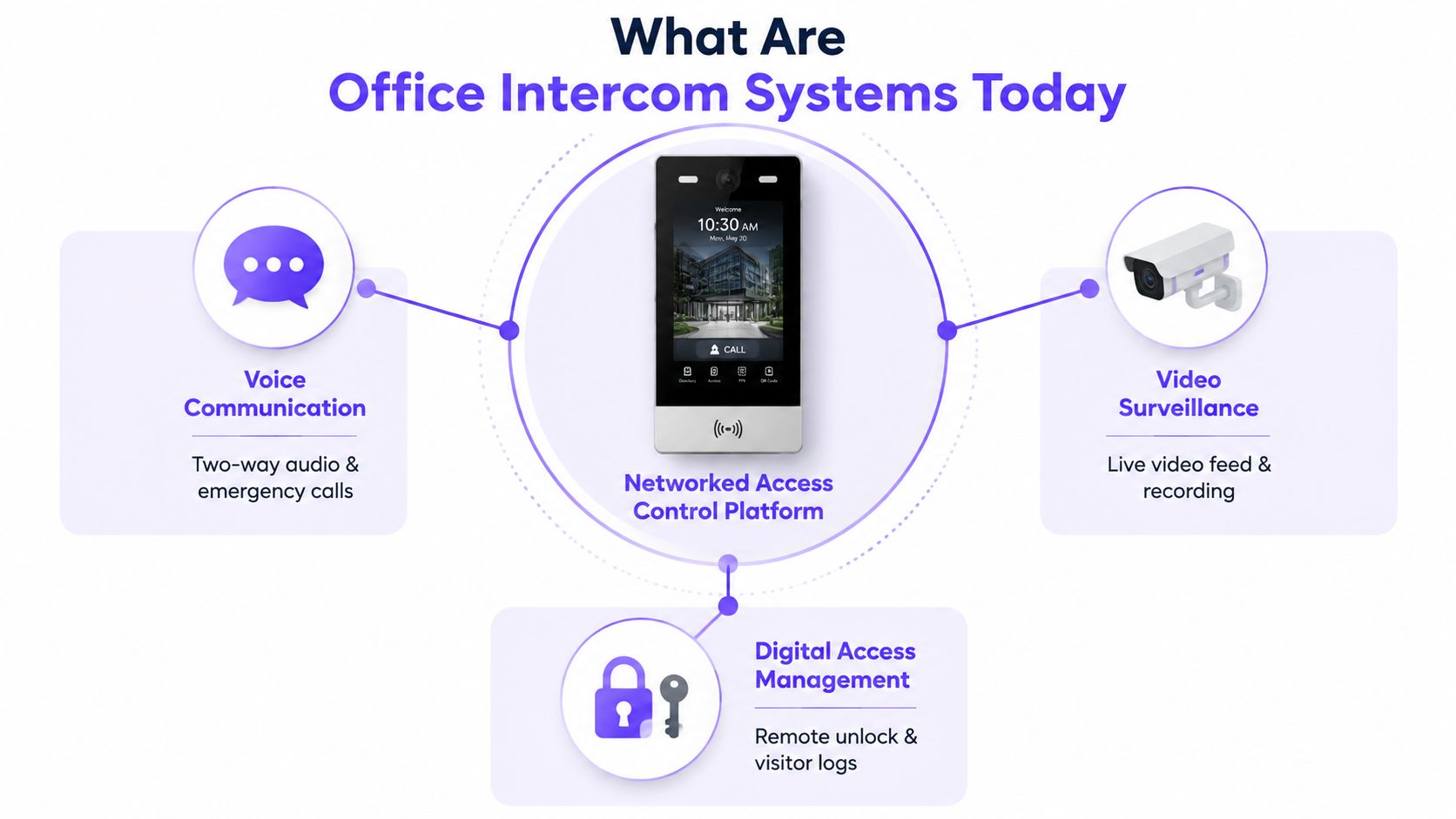
That evolution has changed how buyers classify the equipment. The system is no longer just a lobby speaker. It can become a networked security endpoint that connects:
- Voice communication, including two-way calls and emergency communication.
- Video verification, including live views of the person requesting entry.
- Digital access management, including remote door releases, user permissions, and event records.
- Mobile workflows, allowing authorized staff to respond when they aren't at reception.
The distinction is important for corporate offices, multi-tenant buildings, gated office parks, and hybrid workplaces. A property manager evaluating an intercom should ask how it handles identity, credentials, connectivity, and records, not only whether the speaker sounds clear.
Core Components of a Modern Intercom Platform
An office intercom system is an ecosystem, not a single wall-mounted device. The entry station, door controller, network, software, and user endpoint must work together during a real access event.
The first layer sits at the door or gate. An outdoor panel normally includes a microphone, speaker, call button, and, where video is required, a camera. Some panels also include a directory, credential reader, keypad, or display. The connected control unit sends the command to an electric strike, magnetic lock, gate operator, or other access hardware.
The physical and network layers
Professional IP installations commonly use Power over Ethernet, or PoE. A single Ethernet connection can carry both network communication and electrical power to a compatible device, which can simplify cabling and reduce the number of separate power runs required at the entry point.
One professional intercom datasheet lists IEEE 802.3af PoE, SIP compatibility, 10/100/1000 Mbps Ethernet, full-duplex audio, echo cancellation, and noise suppression. Those specifications are documented in the office and residential building intercom datasheet. For installers, the practical value is straightforward: the network design, power budget, audio performance, and call-routing method can be evaluated before equipment reaches the site.
The network layer may include:
- PoE switches, which provide connectivity and power to compatible panels.
- Routers and firewalls, which connect the system to required services.
- Secure wireless networks, where wireless endpoints are appropriate.
- Segmentation controls, which can separate building systems from ordinary employee traffic.
Wireless connectivity can be useful for user devices, but entry points deserve careful engineering. A door station that intermittently loses connection creates a security and service problem, not merely an inconvenience.
SIP and cloud management
Session Initiation Protocol, commonly called SIP, is used to establish and route communication sessions across networks. In plain terms, SIP helps an intercom call reach the right endpoint, whether that endpoint is a desk phone, a software client, or another compatible device.
Cloud-based management adds a separate administrative layer. Property managers can use a web portal to maintain directories, assign permissions, review activity, and configure call routing. Smartphone applications provide another endpoint for approved users who need to answer calls or manage entry away from the building.
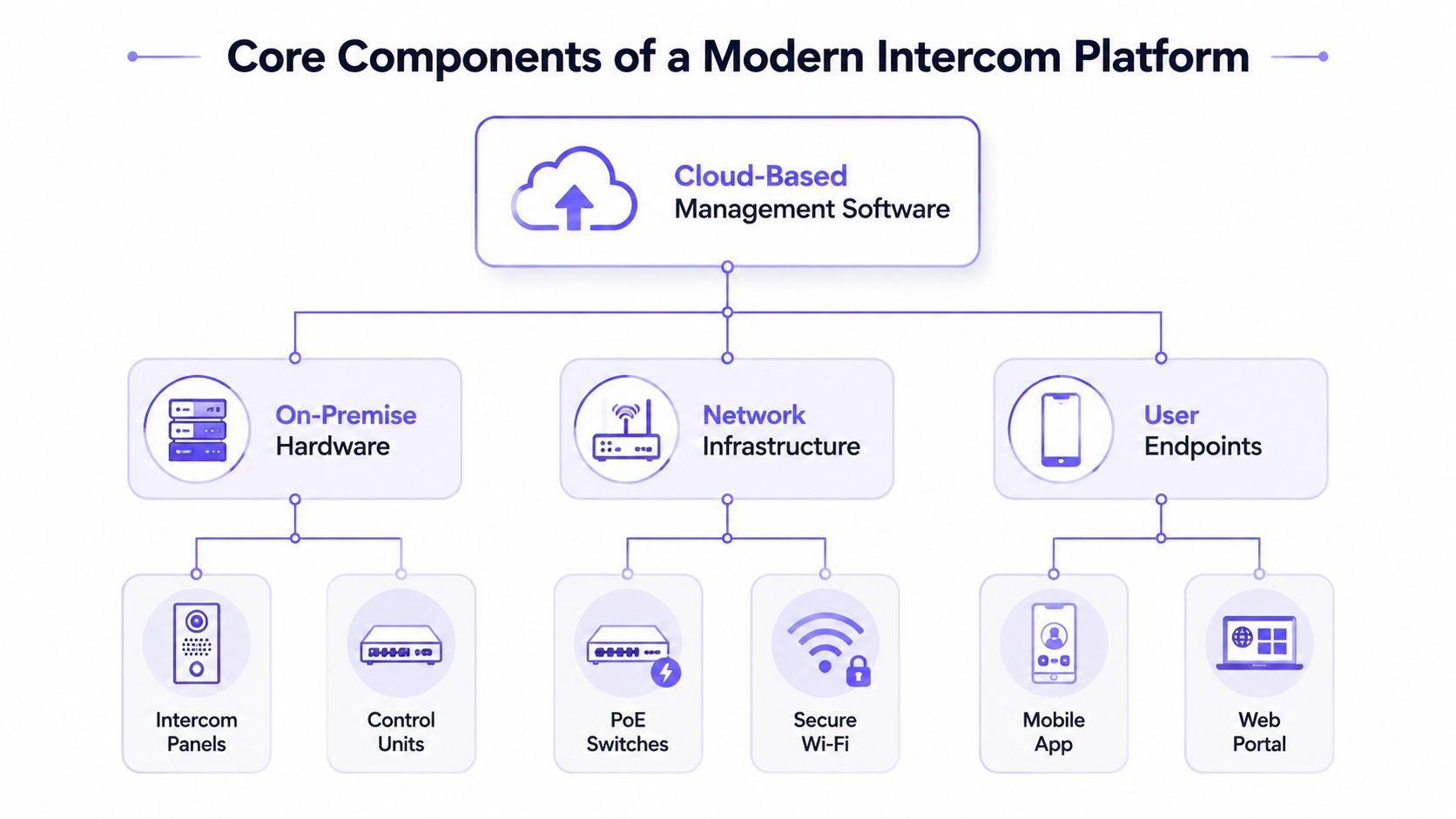
Compatibility should be tested at every layer. A buyer can also review a vendor's gate access API when the intercom needs to exchange commands or events with an existing property platform.
Installer's rule: A proposal should identify the entry hardware, communication protocol, power method, network path, management software, and user endpoints. “Cloud-enabled” alone doesn't describe a deployable system.
Audio performance deserves equal attention. IEC technical material treats one-way delay as a measurable intercom parameter, with a maximum audio delay of 300 milliseconds and audio switching time of 200 milliseconds. The Secure Systems brochure explains why timing matters. Excessive delay makes conversational turn-taking awkward and can make a legitimate door-release decision feel uncertain.
How Intercoms Connect to Access Control Systems
The meaningful upgrade isn't just louder audio or a sharper camera. It's the connection between a visitor conversation and an access decision.
A basic call-and-release arrangement allows a staff member to speak with someone at the entry and press a button to grant access. An integrated platform can associate that action with a user, a specific opening, and a recorded event. The difference gives security teams more context when they investigate an incident or review an unusual entry.
Video adds another verification layer. Staff can compare the visitor's appearance with the expected person, inspect the surrounding situation, and decide whether the request fits the building's operating rules. That doesn't eliminate tailgating or guarantee identity, but it gives the authorized person more information before releasing the door.
Audit logs are a security control
An access log is useful only when it captures enough detail to support a real investigation. Relevant records include:
- User activity, including login and logout events.
- Permission changes, including additions, removals, and role updates.
- Failed authentication attempts and unauthorized access attempts.
- Configuration changes, policy changes, system errors, and critical events.
- Entry decisions, including who acted, which door was involved, the time, and whether access was granted or denied.
Legistify's monitoring and audit logging policy describes these categories and emphasizes restricting log access to authorized personnel under least-privilege principles. A separate Verkada guide to viewing audit logs describes administrator-controlled access and CSV export for custom reporting.
Integrating the wider building
An office intercom may connect with access control, visitor management, cameras, elevator permissions, and property-management software. The appropriate integration depends on the site, but the operating principle is consistent: the property manager should be able to understand the access event without searching through unrelated systems.
The result is a security platform built around workflows. A contractor can be routed to facilities, a delivery request can reach a designated team, and an after-hours visitor can be handled through an approved escalation path. Staff still make the access decision, but the platform gives them a consistent way to make and document it.
Cellular Retrofit Solutions for Legacy Hardware
Full replacement isn't always the right modernization strategy. Many offices, business parks, HOAs, and commercial properties already have functional gate operators, electric locks, call boxes, or door hardware. Replacing every component can introduce construction work, downtime, compatibility risks, and unnecessary disposal of equipment that still performs its core function.
A cellular retrofit adds a connected controller around existing access hardware. The controller communicates over a cellular network and sends the appropriate command to the gate operator or electronic entry system. The property can then add smartphone control, remote visitor management, digital credentials, and entry records without requiring a complete gate or lock replacement.
Why connectivity deserves a separate decision
Wi-Fi depends on the property's primary internet service and local wireless conditions. Cellular access control uses a different connection path, so a system can remain online during a building internet outage when cellular coverage is strong. ButterflyMX's cellular and Wi-Fi comparison explains this resilience distinction.
That doesn't mean cellular is automatically suitable for every site. A survey should confirm coverage, controller placement, power availability, gate or lock compatibility, and the required behavior during a power or network interruption.
A retrofit approach can suit:
- Older buildings, where new cable routes are difficult.
- Gated office parks, where existing gate operators remain serviceable.
- Hybrid offices, where staff need to answer visitor requests away from reception.
- Managed communities, where administrators need to revoke shared credentials.
- Commercial properties, where access must be assigned to users without distributing permanent codes.
Nimbio provides a cellular controller and smartphone application that can connect to existing electronic gates, call boxes, and building entry systems while preserving compatible remotes and keypads. Its platform supports remote credentials, visitor entry workflows, and access records. Property managers evaluating this path can review how to retrofit a cellular gate opener before deciding whether existing hardware can remain in service.
The central trade-off is simple. IP-wired systems can offer a strong local network foundation, while cellular retrofits can reduce dependence on new building wiring. The correct choice depends on the site survey and the hardware already installed.
Evaluating Intercom Options by Deployment Type
Traditional analog, IP-wired, and cellular retrofit systems solve different problems. A property manager should compare the deployment model against the building's existing hardware, staffing pattern, network conditions, and access-control objectives.
| Evaluation Criteria | Traditional Analog | IP-Wired Systems | Cellular Retrofit |
|---|---|---|---|
| Installation complexity | Often simpler where legacy wiring is usable | Requires network planning, PoE, and compatible cabling | Uses an add-on controller and existing access hardware where compatible |
| Ongoing maintenance | Hardware and wiring remain separate from modern software tools | Centralized management can simplify administration | Cellular controller and platform require service management |
| Connectivity reliability | Limited by analog wiring and local equipment | Strong when the LAN and PoE design are sound | Independent of the primary property internet connection when cellular coverage is strong |
| Integration capability | Usually limited | Broad potential through IP, SIP, and platform integrations | Focused on mobile entry, credentials, visitor workflows, and connected control |
| Retrofit suitability | Useful for preserving older systems | Best where network infrastructure is available or can be installed | Useful where existing gates, locks, or call boxes should remain |
| Hybrid-work support | Usually weak | Strong with mobile and cloud endpoints | Strong for remote entry and smartphone-based workflows |
A traditional analog system can still make sense for a small, stable environment that needs only local voice communication. It becomes less attractive when the building needs remote answering, identity verification, or searchable event history.
IP-wired systems suit new construction and properties with a well-managed Ethernet environment. Cellular retrofits suit owners who want connected access without treating modernization as a full hardware replacement.
Property managers comparing software and property operations platforms may also find a broader VerticalRent Doorloop comparison guide useful for evaluating how access workflows fit into the surrounding management stack. For sites with multiple entry points or managed tenants, a dedicated commercial property access control approach can keep credential administration separate from ordinary intercom calling.
Cost Structures and Return on Investment
Intercom pricing becomes difficult to compare when one proposal emphasizes hardware and another emphasizes a recurring service. A fair review separates equipment, installation, software or connectivity, support, and the operational work required to keep credentials and directories accurate.
Analog systems may carry more of their cost in equipment, wiring, and service visits. IP platforms can add PoE infrastructure, network configuration, cloud management, software licensing, and integration work. Cellular retrofit models commonly combine a controller purchase or installation charge with an ongoing subscription for connectivity and platform functions.
The costs that don't appear on the first quote
A property manager should account for operational effects, not just the invoice:
- Front-desk coverage: Remote answering can reduce the need to keep a person stationed at an entry point, depending on visitor volume and organizational policy.
- Credential administration: Individual digital credentials can be revoked or scheduled, unlike a shared code that must be redistributed after compromise.
- Service calls: New wiring and replacement hardware may create installation and maintenance requirements that a retrofit avoids.
- Incident review: Searchable logs can reduce the time required to determine who changed a permission or released an opening.
- Visitor handling: Clear routing can reduce unnecessary interruptions for employees who aren't responsible for deliveries or contractors.
A simple scenario illustrates the structure without pretending that every property will receive the same result. A commercial platform with a $300 monthly subscription creates a recurring service cost that must be compared with the property's actual front-desk coverage, incident response, credential administration, and maintenance burden. That $300 monthly figure comes from the defined scenario, not a universal market price.
The calculation should use the property's own records:
- Estimate annual staffing or coverage costs tied specifically to entry handling.
- Record service calls and repairs related to the current system.
- Identify the administrative time spent issuing, recovering, or changing credentials.
- Add the proposed hardware, installation, subscription, connectivity, and support charges.
- Compare the expected workflow changes with the current baseline.
A credible ROI case doesn't rely on a claimed percentage improvement. It shows which tasks change, who performs them, what remains under staff control, and which costs continue after installation.
Financial discipline: Ask vendors to separate one-time installation from recurring platform charges. A low hardware price can hide a long-term service obligation, while a higher initial quote may include infrastructure that prevents later change orders.
Procurement Checklist and Deployment Roadmap
A sound purchase begins with the building, not the product catalog. Property managers, HOA boards, facilities teams, and installers should document the entry points, existing locks or gate operators, visitor workflows, staffing coverage, network conditions, and outage requirements before requesting a final proposal.
Procurement checklist
- Define access roles: Identify employees, contractors, visitors, tenants, administrators, and emergency responders who need different permissions.
- Review compatibility: Confirm the proposed controller works with the existing strike, maglock, gate operator, call box, power supply, and release hardware.
- Require security controls: Verify role-based access control, MFA for administrator accounts, audit-log export, and a documented data-retention policy. Swiftlane's door-phone guidance identifies these controls as important purchase checks.
- Test the workflow: Ask the vendor to demonstrate visitor calls, video verification, remote door release, failed-call escalation, credential revocation, and event review.
- Clarify resilience: Document how the system behaves during internet loss, cellular disruption, local power failure, and a failed door controller.
- Assign ownership: Name the person or team responsible for directories, permissions, firmware, support tickets, and periodic log review.
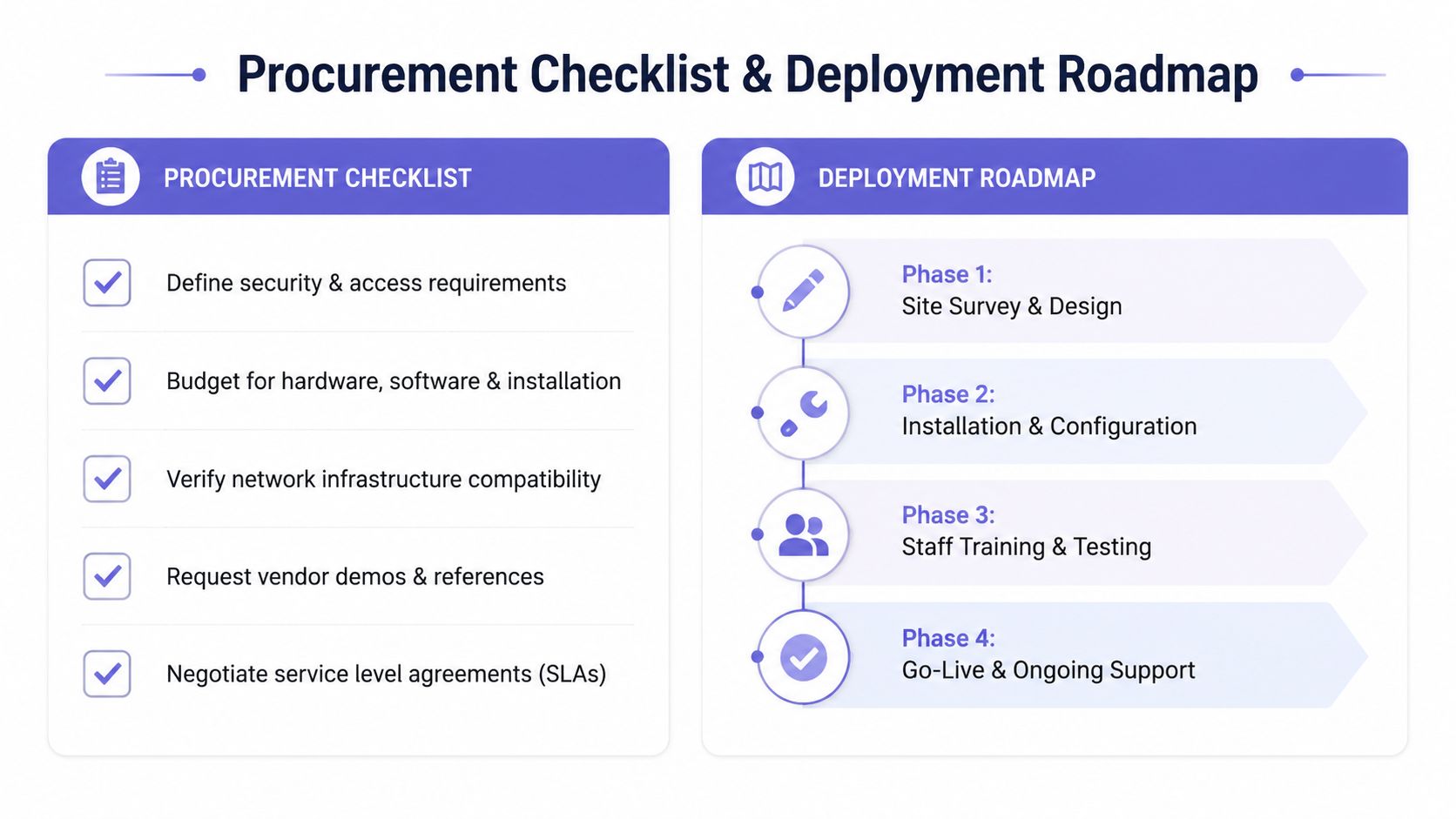
Deployment roadmap
- Site survey and design: Map cable paths, power, network coverage, door behavior, emergency egress, and mounting locations.
- Installation and configuration: Mount panels and controllers, configure call routing, create roles, connect the release hardware, and apply the approved security settings.
- Training and testing: Have staff test ordinary visitors, deliveries, contractors, after-hours requests, denied access, and escalation paths.
- Go-live and support: Review the first access events, confirm logs and notifications, document support contacts, and schedule recurring permission reviews.
The final acceptance test should verify that every approved action produces the expected door or gate response and that every important event appears in the appropriate log. The installer should also provide wiring documentation, administrator procedures, and a clear handover to the team responsible for daily operation.
Nimbio helps property managers modernize compatible gates, call boxes, and building entry points with cellular connectivity, smartphone control, remote visitor management, and digital access credentials. Visit Nimbio to review retrofit options and determine whether existing access hardware can support a connected office intercom workflow without a full replacement.
Securing gates or doors at a commercial property?
See how cellular access control works for commercial sites. Explore Commercial Gate & Door Access Control →


