
Security systems integration connects separate security devices into one coordinated system. Its main benefit is unified control and better decision-making, because staff can see events, manage access, and respond from one place instead of juggling disconnected tools.
The global security system integrators market reached USD 12.45 billion in 2024 and is projected to reach USD 28.90 billion by 2032, with an 11.1% CAGR. For property managers and HOA boards, that growth reflects a simple reality. Running gates, doors, cameras, alarms, fobs, clickers, and PIN codes as separate systems creates friction, delays, and blind spots.
Many readers are dealing with that problem right now.
A resident loses a remote. A vendor needs temporary gate access. A board member wants an audit trail after an incident. The gate works on one system, the building entry runs on another, and the camera footage lives somewhere else. Nothing is technically broken, but nothing works together.
That's where security systems integration matters most. It turns a stack of isolated devices into an operational system that's easier to manage, easier to secure, and easier to update without forcing a full rip-and-replace project.
Table of Contents
- What Is Security Systems Integration
- Core Components of an Integrated Security System
- The Language of Security Protocols and Standards
- Key Network and Cybersecurity Best Practices
- How Cellular Retrofits Modernize Legacy Systems
- Security Integration Use Cases and ROI
- The Future Is Integrated and Connected
What Is Security Systems Integration
Security systems integration is the process of connecting disparate security components into a single, cohesive system. In practice, that means access control, cameras, alarms, gates, intercoms, and software start working as one operating environment instead of a pile of unrelated products.
For a property manager, the easiest way to understand it is this. Integration replaces a ring full of keys, a drawer of remotes, a list of keypad codes, and three different admin portals with one coordinated workflow.
Why it matters to property operations
A disconnected setup creates small problems all day long.
- Access changes take too long: Staff have to update multiple tools when a resident moves out or a vendor's schedule changes.
- Events are hard to verify: A gate opening, an intercom call, and a camera clip may exist, but they don't line up cleanly.
- Legacy hardware gets stranded: Old gate operators and entry panels often still work, but the management layer around them is outdated.
Integrated security has moved from a nice upgrade to a standard operating requirement. The global security system integrators market reached USD 12.45 billion in 2024 and is projected to surge to USD 28.90 billion by 2032, with a 11.1% CAGR. That growth reflects rising demand for systems that combine hardware, software, and services into one manageable platform.
Practical rule: A property doesn't need more devices first. It needs existing devices to work together.
This is why conversations about modernization increasingly focus on interoperability instead of replacement. Many sites already have usable hardware at the edge, such as a LiftMaster gate operator, a DoorKing call box, or an existing strike on a pedestrian door. The question isn't always “What should be removed?” It's often “What can be connected?”
For readers evaluating vendors, a useful primer on optimizing integrated security shows how integration improves day-to-day control when systems are designed as a whole. Readers comparing implementation partners can also review what a modern security system integrator should handle, including planning, compatibility, and long-term support.
What integration changes on the ground
A good integrated system usually delivers three practical improvements:
- One dashboard for access activity
- Cleaner audit trails for boards and managers
- Faster response when something goes wrong
That's the operational side. The technical side comes next, and it starts with the core components already installed across most communities and properties.
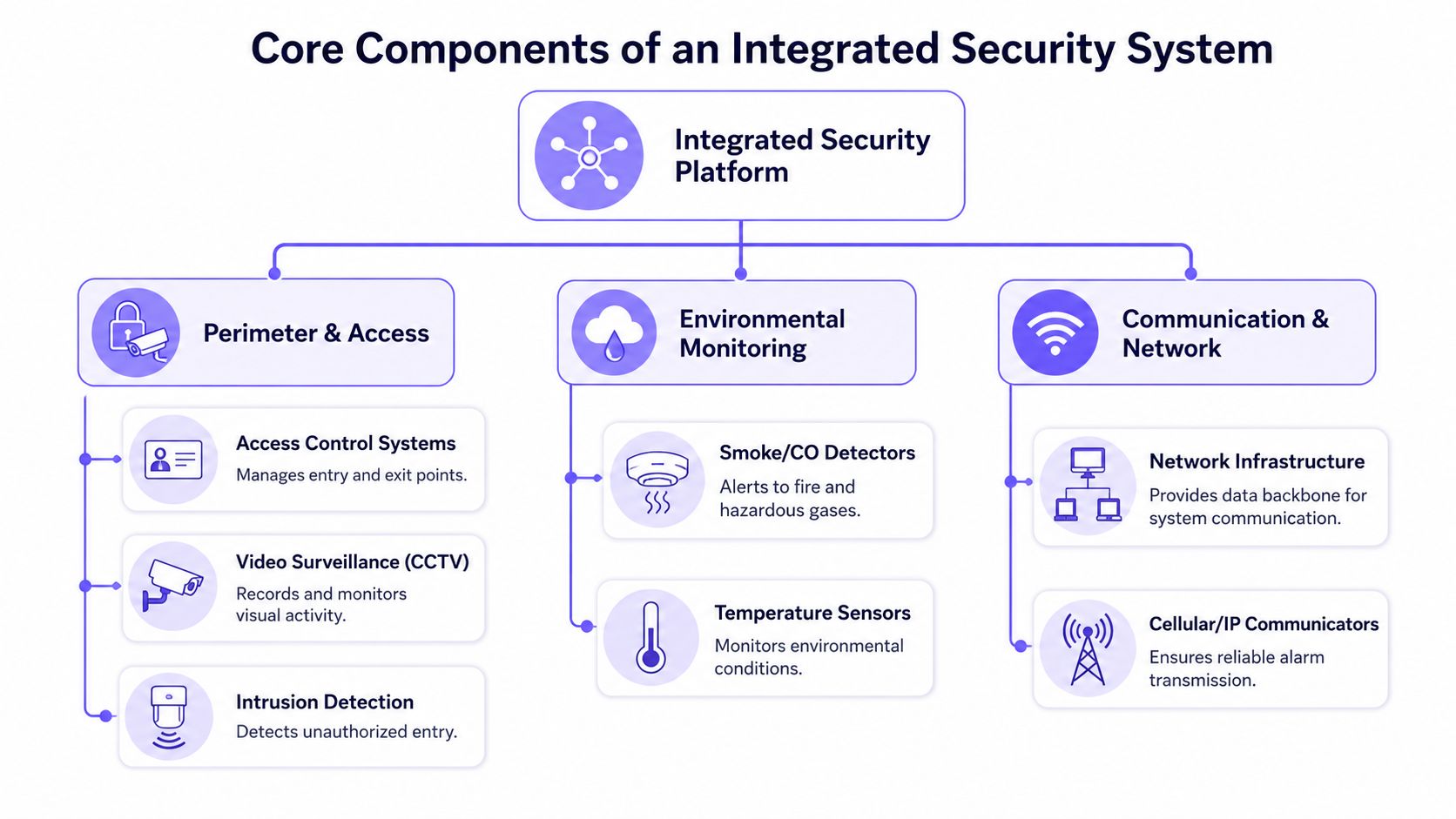
Core Components of an Integrated Security System
An integrated security system works like an orchestra. Each instrument can play alone, but the performance only makes sense when a conductor keeps timing, roles, and signals aligned.
In security, the conductor is the platform or management layer. The instruments are the devices spread across the property.
How the pieces work together
Some components control movement. Others confirm what happened. Others carry the data from one point to another.
Access control systems
These decide who can enter, when they can enter, and through which door, gate, or amenity. Credentials may include smartphones, fobs, PINs, or scheduled permissions.Video surveillance CCTV
Cameras provide visual context. When tied to access events, footage becomes much more useful because staff can review who entered and what happened around that event.Alarm and intrusion detection
These devices detect unauthorized entry, tampering, or forced access. Integration helps alarms trigger the right actions, such as alerts, camera bookmarks, or lockdown workflows.Gate operators
A gate operator is the motorized hardware that physically opens and closes a community or facility gate. Operators from brands such as LiftMaster, Viking, FAAC, Nice, DoorKing, and Mighty Mule often remain in place for years, which makes them prime candidates for integration.Intercoms and call boxes
These sit at the communication layer between visitor and resident or staff. When integrated well, they connect visitor requests, identity checks, and remote entry decisions in one workflow.
What property teams usually already have
Most properties don't start from zero. They start with a patchwork.
| Component | What it does alone | What it does when integrated |
|---|---|---|
| Access control | Opens a door or gate | Ties entry to schedules, identities, and logs |
| Camera system | Records video | Verifies access events and incidents |
| Alarm panel | Sends alerts | Triggers cross-system responses |
| Gate operator | Moves the gate | Becomes part of managed visitor and resident access |
| Intercom | Places a call | Supports remote approval and event tracking |
A useful parallel exists outside property security. In fleet operations, Fleetalyse integrated fleet solutions show the same principle. GPS and dashcams are more valuable when they're coordinated, not isolated. Property security follows that same logic.
When systems stay separate, staff become the integration layer. That's expensive, slow, and prone to mistakes.
The strongest integrated setups don't just add more hardware. They create shared awareness across perimeter access, monitoring, environmental signals, and network communication. That's why the language those devices use matters so much.
The Language of Security Protocols and Standards
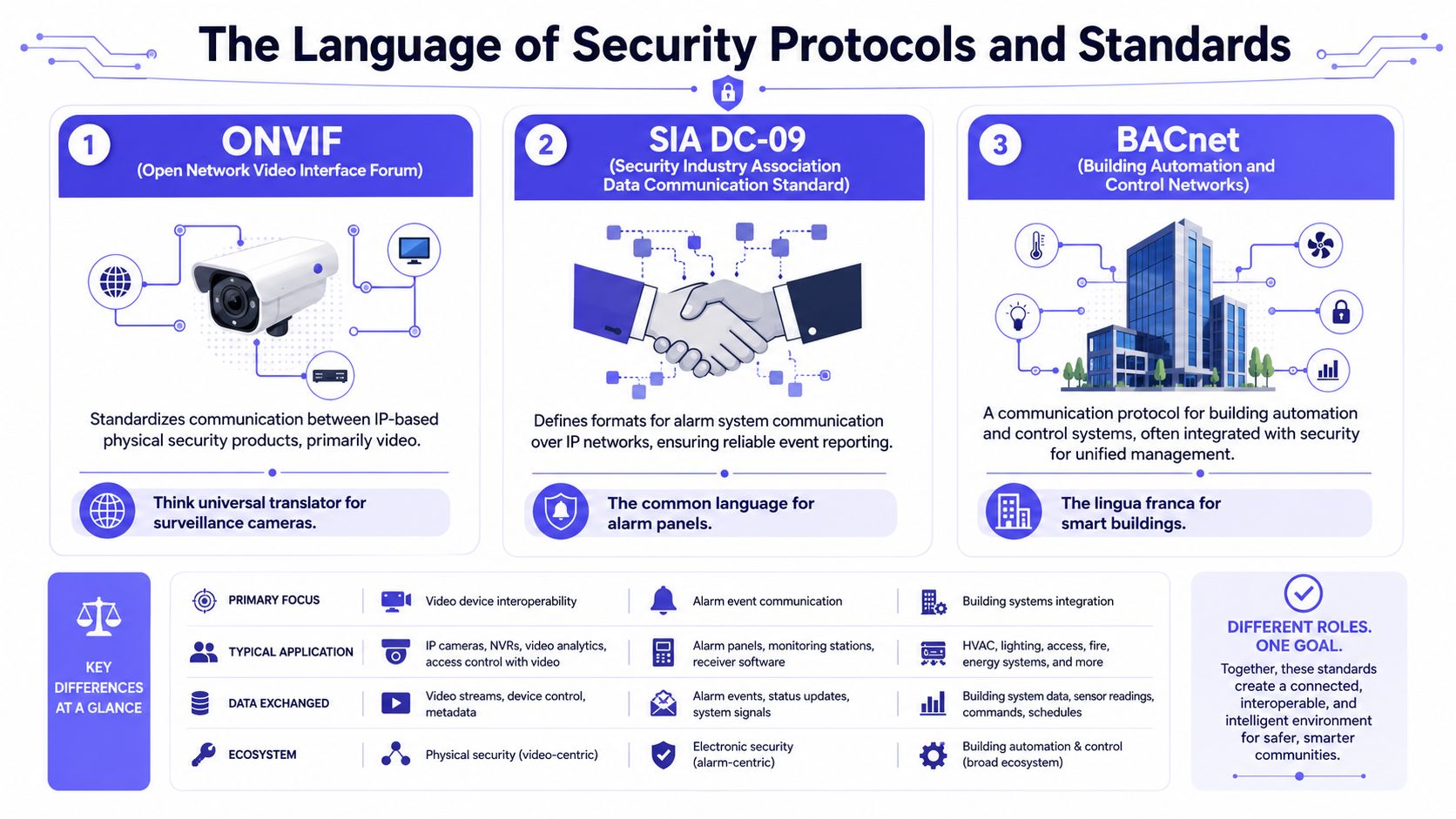
Security devices don't communicate by magic. They communicate through protocols and standards.
A simple analogy helps. Protocols are the language devices speak. Standards are the grammar rules that keep the conversation understandable across different manufacturers.
Protocols are the language
A property manager doesn't need to become an engineer, but it helps to know what questions to ask.
Consider these common examples:
Wiegand
This is a long-used access control protocol found in many legacy card reader environments. It's common, but older technology often lacks the security and flexibility expected in newer deployments.OSDP
This is a newer access control communication approach that many installers prefer for modern projects. In simple terms, it supports a more current way for readers and controllers to talk, which helps with security and device management.ONVIF
This matters in video surveillance. It acts as a common standard for many IP-based security video products, which can reduce vendor lock-in and improve compatibility between cameras, recorders, and software.SIA DC-09
This appears in alarm communications over IP networks. It helps alarm signals move in a more standardized way between panels and receiving systems.BACnet
This belongs to building automation. It becomes relevant when security needs to interact with broader building systems, such as doors, schedules, or other smart building functions.
Standards reduce guesswork
Standards matter because they improve the odds that products can work together without a custom workaround.
That doesn't mean every “open” system is automatically simple. Compatibility still depends on firmware, feature support, and how a vendor implemented the standard. But standards give buyers a better starting point.
A strong integration plan asks two questions early. What protocol does this device use, and what standard does it support?
Many non-technical decision makers often get stuck. They hear terms like “IP-based,” “open API,” or “interoperable,” but those terms can hide major differences.
A practical checklist helps:
Ask what each edge device speaks
The gate controller, intercom, camera, and access panel may all use different communication methods.Ask what the management platform understands
A platform may support a standard for basic functions but not advanced features.Ask what happens during expansion
A small single-gate setup may work fine today, but adding another entrance or building often exposes compatibility gaps.Ask who owns the upgrade path
If the site changes later, the property should know whether future devices can be added without replacing the core system.
What a board or manager should listen for
A competent installer should be able to explain protocol choices in plain English.
That explanation should cover:
- How devices communicate
- Whether the system depends on one manufacturer
- What happens if a component is replaced later
- Whether the system supports future integration with cloud-based access control or building software
The goal isn't to collect jargon. The goal is to avoid buying equipment that works fine by itself but becomes difficult or expensive to connect later.
Key Network and Cybersecurity Best Practices
The moment a gate, camera, or entry device touches a network, the conversation changes. It's no longer just about convenience. It's about reliability, isolation, and risk control.
Many sites still take the simplest route and attach security equipment to an existing shared network. That can work for basic connectivity, but it's rarely the professional standard for critical access infrastructure.
Why shared networks create risk
Security hardware generates sensitive events. Entry logs, alarm traffic, and device control commands shouldn't move through a loosely managed environment if a better architecture is available.
According to Mammoth Security, best practices mandate placing the security system behind a hardware firewall and routing it through a VPN, which completely isolates and encrypts security data from the business IT network when VLANs are incompatible in protocol or addressing, as outlined in this security system integration guide.
That recommendation matters because many properties grow into integration rather than planning for it from day one. A single gate controller may begin on a separate setup, then later need to coordinate with cameras, staff devices, or management software across multiple locations.
What good architecture looks like
Property teams don't need to design the network themselves. They do need to insist on a few basics.
Segmentation first
Security devices should live on their own protected segment or equivalent isolated environment whenever possible.Protected traffic paths
Firewalls and VPN routing help keep security traffic separate from routine business use.Dedicated connectivity for critical entry points
Gates and perimeter access points often sit in places where shared Wi-Fi is weakest or most inconsistent.
Shared Wi-Fi is convenient for light office traffic. It's a poor foundation for the device that decides who enters the property.
This is one reason many operators review outside guidance when they compare business internet backup options. Redundancy and path diversity matter when downtime affects access, deliveries, or resident movement.
For HOA security and multifamily access control, the practical takeaway is straightforward. The more critical the device, the less it should depend on a crowded, shared local network with unpredictable coverage.
How Cellular Retrofits Modernize Legacy Systems
Most integration guides spend too much time on new construction and not enough time on existing properties. That misses the actual situation facing many gated communities, multifamily sites, and commercial facilities.
A large share of these properties already have gates, call boxes, keypads, and operators that still function mechanically. The weakness is usually the management layer around them.
Why retrofit matters
The retrofit angle is badly underserved in industry content. Omdia market data notes that 68% of gated communities in the U.S. still rely on analog or proprietary remotes that can't be digitally managed.
That finding explains a common pattern across HOA security projects. The gate hardware still opens and closes, but administrators can't easily grant temporary access, revoke credentials quickly, or maintain a dependable audit trail.
The same source also notes that 52% of multifamily properties still rely on dominant but untrackable 4-digit PIN codes. For boards and managers, that creates a simple accountability problem. If many people know the same code, no one person owns the credential.
What changes after modernization
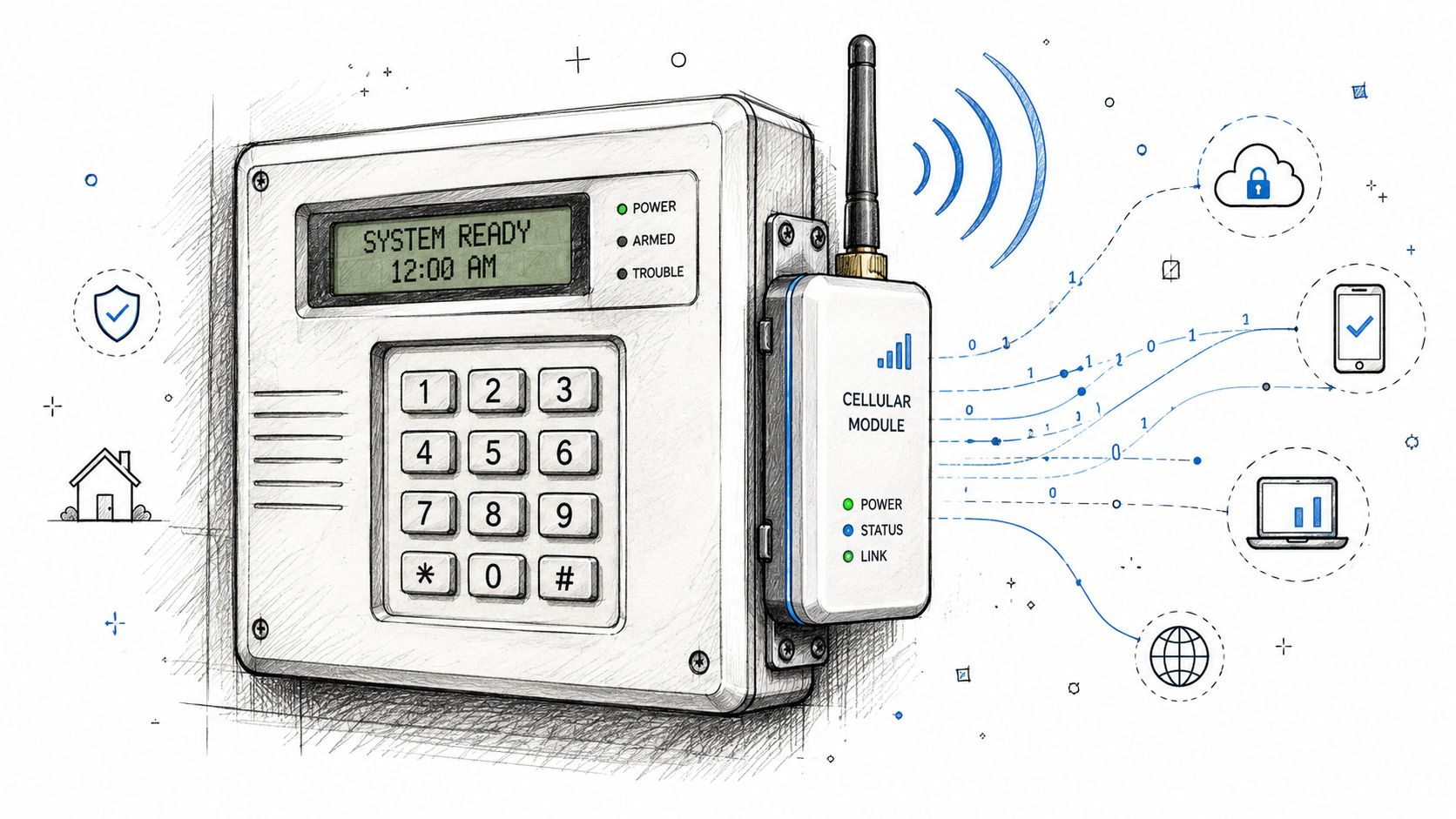
A hardware-agnostic retrofit adds a modern controller to the existing gate operator or door hardware instead of replacing the whole system. That preserves the original equipment investment while upgrading the way access is managed.
Readers evaluating this model can review how retrofitting legacy gate operators works in practice. The core idea is straightforward. Keep the operator that still does its physical job, then add a smarter control layer around it.
That approach usually improves operations in several ways:
Smartphone-based credentials
Access can move from shared remotes and static codes to individual user permissions.Remote visitor management
Staff or residents can grant access without being physically present at the gate.Audit logs
Digital records help boards and property teams review who accessed the property and when.Scheduled access rules
Vendors, cleaners, delivery windows, and amenity access can be aligned with actual operating hours.
The most cost-effective modernization often keeps the motor, the gate arm, and the wiring that still work. It replaces the outdated decision layer.
Cellular connectivity is especially useful here. Perimeter locations often have weak Wi-Fi, unreliable coverage, or no practical network path at all. A cellular controller avoids tying the gate to a local Wi-Fi environment that may be unstable or hard to secure.
Another overlooked benefit is visual verification. Some properties want a visitor to request entry through a one-way video interaction before a resident or manager opens the gate. That workflow is difficult when systems are scattered across incompatible devices, but much easier when communication, access, and event logging are coordinated in one platform.
For boards trying to balance cost and modernization, retrofitting is often the most practical answer. It delivers cloud-based access control behavior without forcing a full hardware reset across the property.
Security Integration Use Cases and ROI
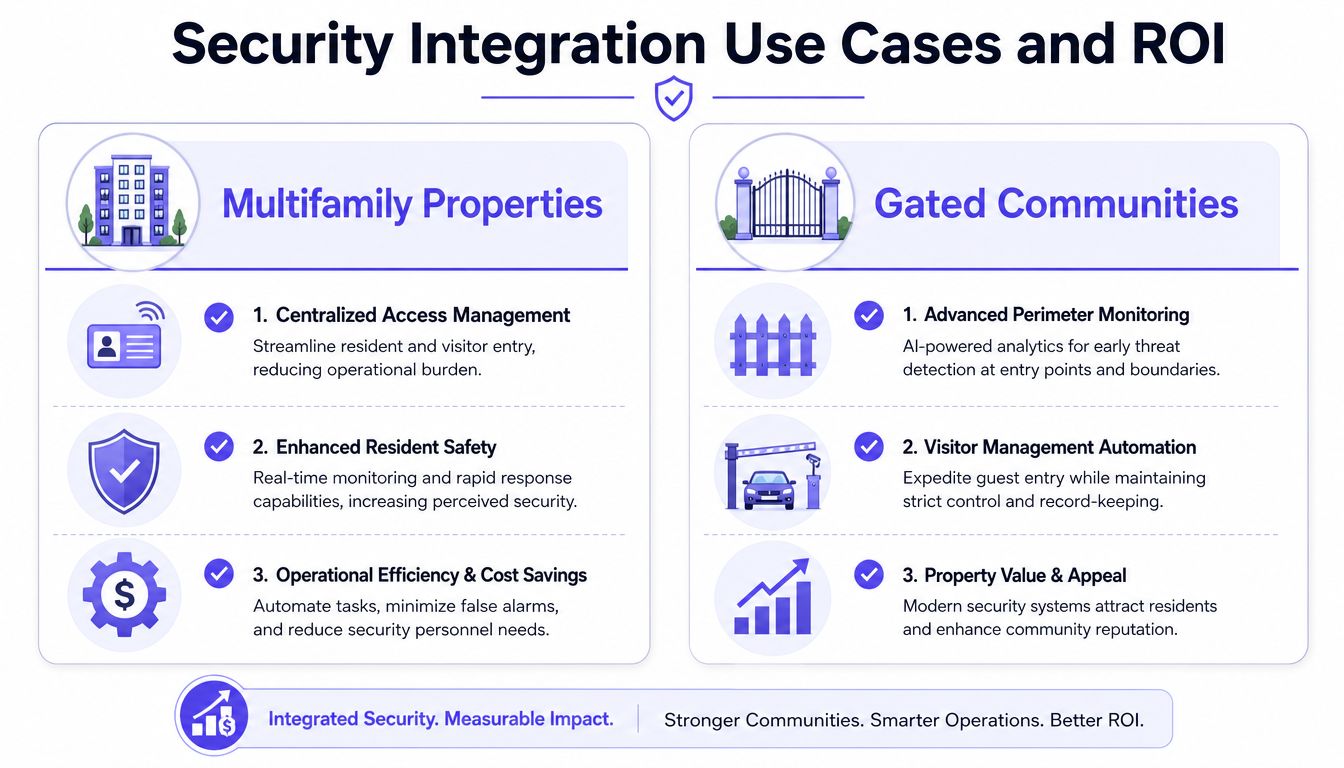
Integration becomes easier to justify when it's tied to daily operations. The value usually appears in reduced admin work, cleaner records, and a smoother experience for residents, staff, and visitors.
In the broader commercial security sector, 60% of new commercial installations now use cloud-based security systems, and 55% incorporate wireless IoT devices for connectivity, according to SNS Insider commercial security market data. That shift reflects how buyers increasingly want flexible, connected systems instead of isolated hardware.
Multifamily operations
A multifamily manager often starts with recurring access headaches.
Residents lose fobs. Staff share keypad codes with vendors. Entry changes during move-ins and move-outs pile up. When someone asks who entered a side gate or amenity area, the answer may be incomplete.
An integrated setup improves that workflow by linking access permissions, event logs, and entry points under one system.
Centralized user management
Staff can issue, update, and revoke access from a single interface.Better resident experience
Residents get simpler entry methods and fewer reasons to visit the leasing office for access help.Cleaner incident review
Management can review access history without piecing together separate records.
HOA and gated community management
HOA boards usually care about two things at the same time. They want tighter control, and they don't want a disruptive or expensive overhaul.
A retrofit-based integration model suits that environment because it can preserve the gate operator while modernizing resident and guest access. That means fewer shared remotes, fewer permanent codes floating around, and better oversight of visitor entry.
A gated community doesn't need to choose between convenience and control when credentials are individual, revocable, and logged.
A practical checklist for HOA boards includes:
Inventory existing hardware
Note the gate operator, call box, keypad, and any current access method.Identify unmanaged credentials
Shared PINs, lost clickers, and old remotes are usually the first cleanup targets.Set policy before purchase
Decide who can issue credentials, approve guests, and review logs.Plan resident communication
Adoption improves when residents know exactly how entry and guest access will change.
Commercial and fleet access
Commercial sites often have a different challenge. Access isn't just about residents and guests. It also includes employees, vendors, drivers, and scheduled deliveries.
For those environments, integration supports controlled entry without constant on-site intervention. Teams evaluating deeper automation may also explore programmatic gate control for fleets when vehicle access needs to be tied to software, dispatch, or logistics workflows.
The return on investment here is usually operational rather than theoretical:
- Less manual gate management
- Fewer interruptions for on-site staff
- More defensible access records
- A more modern amenity for tenants, residents, and partners
The Future Is Integrated and Connected
The direction of the market is clear. Properties are moving away from isolated entry devices and toward connected, manageable systems that support remote control, auditability, and easier upgrades.
That trend is visible in access control as well. The global keyless entry system market was valued at USD 3.38 billion in 2024 and is projected to reach USD 8.19 billion by 2032, growing at a 11.7% CAGR. The momentum reflects strong demand for cellular-dependent, Wi-Fi-free access solutions.
For property managers and HOA boards, the strategic lesson is simple. Security systems integration isn't just about connecting devices. It's about replacing fragmented operations with a system that can adapt as the property changes.
That matters because most sites don't have the budget or appetite for constant replacement cycles. They need upgrades that work with existing infrastructure, support cloud-based access control, and improve oversight without adding management burden.
A modern integration plan should leave a property with:
- One clearer operating picture
- More flexible credential management
- Better support for visitors, vendors, and residents
- A future-ready path that doesn't depend on rip-and-replace hardware projects
The most effective projects usually start small. One gate. One building entry point. One recurring operational problem. Then the system expands from there with better architecture and cleaner policy.
Nimbio helps properties modernize access without tearing out working hardware. Its cellular, hardware-agnostic platform turns existing gates, call boxes, and entry systems into smartphone-controlled access points with remote visitor management and digital credentials. Property managers, HOA boards, installers, and commercial operators can learn more at Nimbio.


