

A resident arrives at the community gate with a delivery driver behind the vehicle. One neighbor has lost a clicker, another still shares a keypad code with contractors, and the property manager is trying to determine who entered after hours. The gate operator works, but the access process has become difficult to control.
A smart lock app changes that model by turning a smartphone into the user interface for cloud-based access control. Instead of relying only on fobs, remotes, or shared PINs, residents and administrators can use digital credentials to manage gates, doors, lobbies, garages, and amenities.
The global smart lock market is scaling quickly, from about USD 3.23 billion in 2025 to a projected USD 7.52 billion by 2031, with a 15.11% compound annual growth rate during 2026–2031, according to Mordor Intelligence's smart lock market analysis. That growth reflects more than consumer interest in opening a front door. It also signals wider adoption of smartphone-based access across residential, multifamily, HOA, and commercial properties.
For community infrastructure, the important questions are practical:
- Can the system work without depending on local Wi-Fi?
- Can an administrator revoke access immediately?
- Can an installer retrofit the existing gate operator?
- Can the HOA review a reliable entry history?
- What happens when the cloud connection or power supply fails?
Nimbio cellular access control addresses this category through cellular-connected hardware and smartphone-based credentials for electronic gates and building entry. The following guide explains how the technology works, how to assess its security model, and how property teams can deploy it without treating access control as merely a convenience feature.
Table of Contents
- Introduction to Smart Lock Apps for Modern Access Control
- What a Smart Lock App Actually Does
- Core Features and Security Models Explained
- Admin and Guest Workflows in Action
- Integration and Compatibility for Gates and Building Entry
- Common Pitfalls and How to Avoid Them
- How to Choose and Deploy the Right Smart Lock App
Introduction to Smart Lock Apps for Modern Access Control
A smart lock app is best understood as the control panel for a digital key system. The phone doesn't replace the physical gate operator, strike, or locking mechanism. Instead, it sends an authorized instruction through the access platform, which then tells the on-site hardware whether to permit entry.
That distinction matters for HOAs and property managers. A consumer guide may focus on a single residential door, while a community access system must coordinate many users, multiple entry points, visitor requests, temporary credentials, and audit records.
A modern access platform can support:
- Vehicle gates and pedestrian gates
- Building doors, lobbies, and garages
- Amenity areas and shared facilities
- Resident credentials and contractor access
- Visitor approvals and temporary entry
- Activity records for administrative review
The shift is from hardware-centric access to identity-centric access. A clicker identifies a device, but it usually doesn't tell an administrator which person used it at a particular time. A shared PIN creates an even larger problem because it can circulate beyond the people originally authorized to use it.
A digital credential can be associated with a specific resident, guest, employee, or service provider. Administrators can then apply permissions, set access windows, and revoke the credential without collecting a physical device.
Practical rule: A gate access app should be judged by the control it gives administrators, not only by how quickly a resident can open a gate.
The technology also changes installation decisions. A Wi-Fi-dependent system may require network coverage near each gate, while a cellular retrofit can communicate through the cellular network without adding a local wireless network to the property. That can be especially useful where gates are separated from buildings, located at property boundaries, or connected to older infrastructure.
The right question isn't whether an app can open a lock. It's whether the complete system can provide reliable connectivity, secure identity management, hardware compatibility, and accountable administration.
What a Smart Lock App Actually Does
The simplest analogy is a digital keychain connected to a cloud concierge.
The keychain is the mobile app. The concierge is the cloud service that checks identity and permissions. The mechanism at the property is the on-site controller, which connects the approved command to the gate operator, electronic lock, or access device.
The three operating layers
The mobile app gives a resident or administrator a practical interface. A resident may see an entry button, receive a visitor request, or access an assigned gate. An administrator may create credentials, change permissions, review logs, and manage several entry points from a dashboard.
The cloud service handles identity and policy. It determines whether the person is authorized, whether the credential is active, and whether the requested action is permitted at that location and time. In a properly designed system, the app shouldn't be trusted to make the final authorization decision on its own.
The on-site controller receives the approved instruction and activates the physical equipment. It may connect to a gate operator, door strike, call box, or other electronic access mechanism. The controller is the bridge between the software decision and the physical action.
What the app controls
A smart lock app commonly manages four categories of work:
- Entry commands, such as opening a vehicle gate or opening a building door.
- Credential administration, including granting, scheduling, changing, and revoking access.
- Visitor handling, where a resident approves or denies a request from a guest.
- Audit information, such as access events, timestamps, and administrative actions.
The hardware still performs the mechanical job. Motors, relays, locks, sensors, and gate operators determine whether the physical opening action can occur. The app provides the authorized instruction and the administrative context.
This separation helps installers troubleshoot problems. If a user can authenticate but the gate doesn't move, the issue may involve the controller, wiring, power, or gate operator. If the gate works locally but a user can't open it remotely, the issue may involve identity, permissions, connectivity, or the cloud service.
A smart lock app therefore isn't a standalone lock. It's one layer in a cloud-based access control system, and its reliability depends on how well all layers work together.
Core Features and Security Models Explained
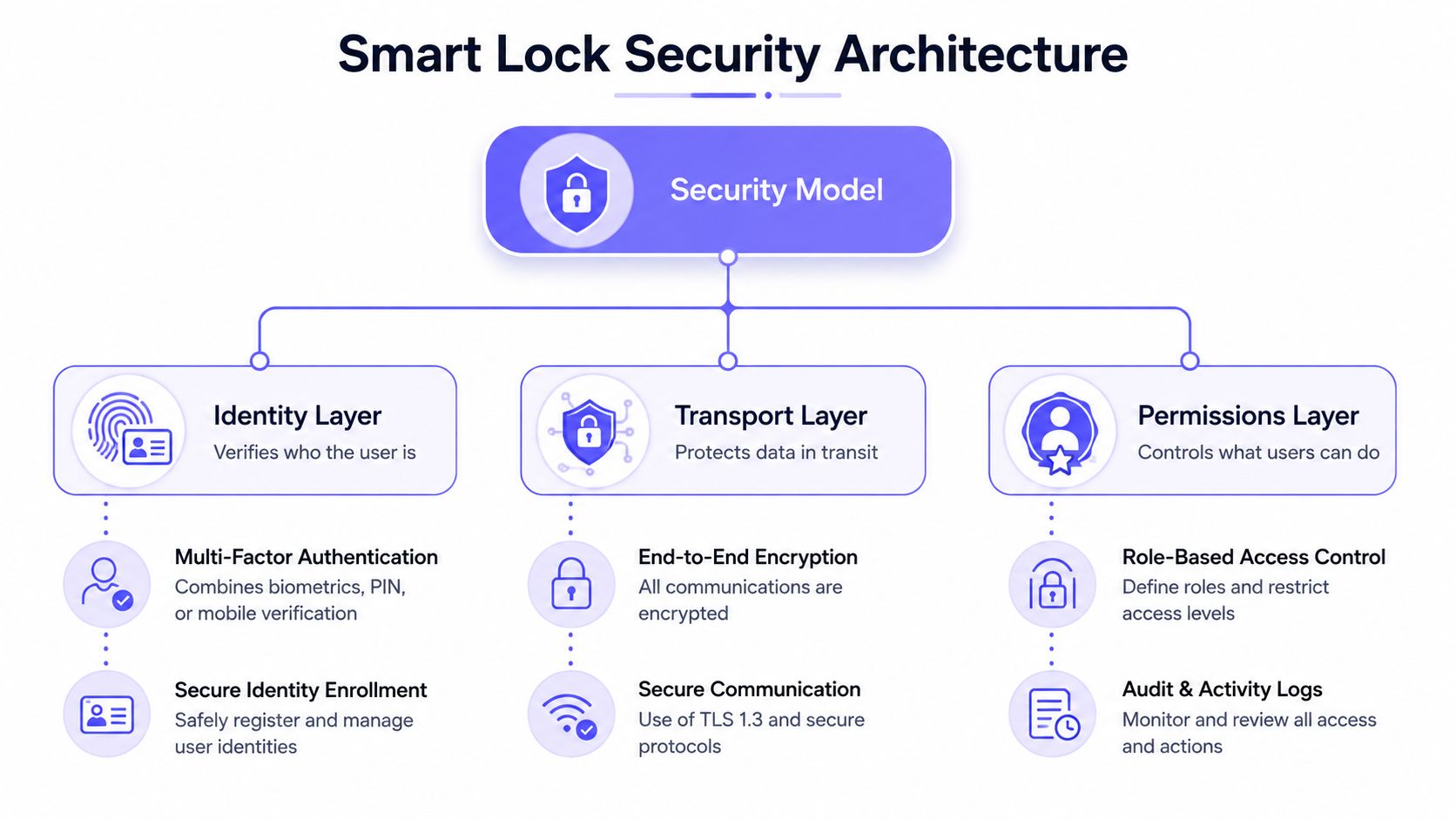
A secure smart lock app needs more than a polished control button. The strongest evaluation method separates the system into identity, transport, and permissions.
The identity layer answers a basic question: Who is requesting access? This may involve an account, device authentication, multifactor protection, or biometric controls on the phone. Readers who need a plain-language explanation of phone-based authentication can consult this mobile app biometric security guide.
The transport layer asks: How does the command travel? Communications between the app, cloud service, controller, and local devices should use encrypted transport. Encryption protects the instruction while it moves through the system, but it doesn't solve every identity or authorization problem.
The permissions layer asks: What is this person allowed to do? A resident may access a vehicle gate but not a mechanical room. A contractor may receive access during an approved service window. An administrator may manage credentials but still require separate controls for sensitive system settings.
Features that deserve close review
- Server-side authorization: Every opening, guest-management, and credential action should be checked by the server. The app shouldn't be able to grant itself permission.
- Credential revocation: Administrators should be able to remove access without retrieving a physical fob or changing a community-wide code.
- Role-based administration: Board members, property managers, guards, installers, and residents shouldn't automatically receive identical capabilities.
- Audit logs: The system should record meaningful events so administrators can investigate access activity and credential changes.
- Session protection: Reusable secrets shouldn't be stored in plaintext, and session handling should limit the consequences of a stolen device or token.
- Trust boundaries: BLE pairing, cloud endpoints, controller communication, and audit-log storage should be evaluated as separate security areas.
Security research on commercially deployed smart locks shows that companion mobile apps can be a primary attack surface. One case study documented handshake-key leakage, owner-account leakage, personal-information leakage, and denial-of-service paths, as reported in the commercial smart lock security case study.
That finding changes the buying conversation. A strong lock body can't compensate for weak account security or poor session handling. Security teams should ask how the vendor protects credentials, limits repeated requests, handles lost phones, records administrative activity, and separates local control from cloud authorization.
Security principle: Encryption protects the road. Identity and permissions determine who is allowed to travel on it.
Admin and Guest Workflows in Action
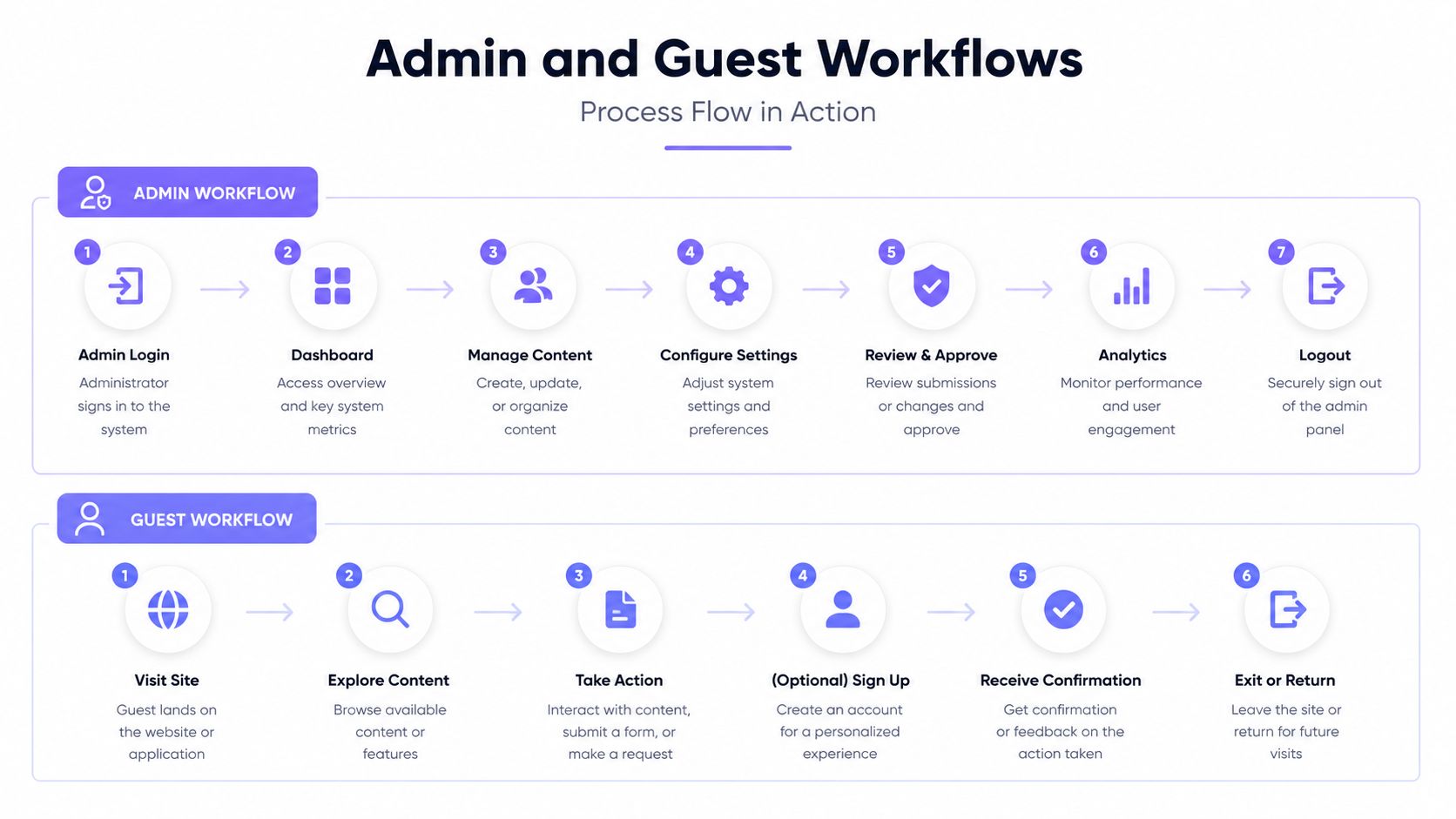
A community access platform serves two very different users. The administrator needs control and evidence. The resident or guest needs a quick, understandable path to entry.
The administrator journey
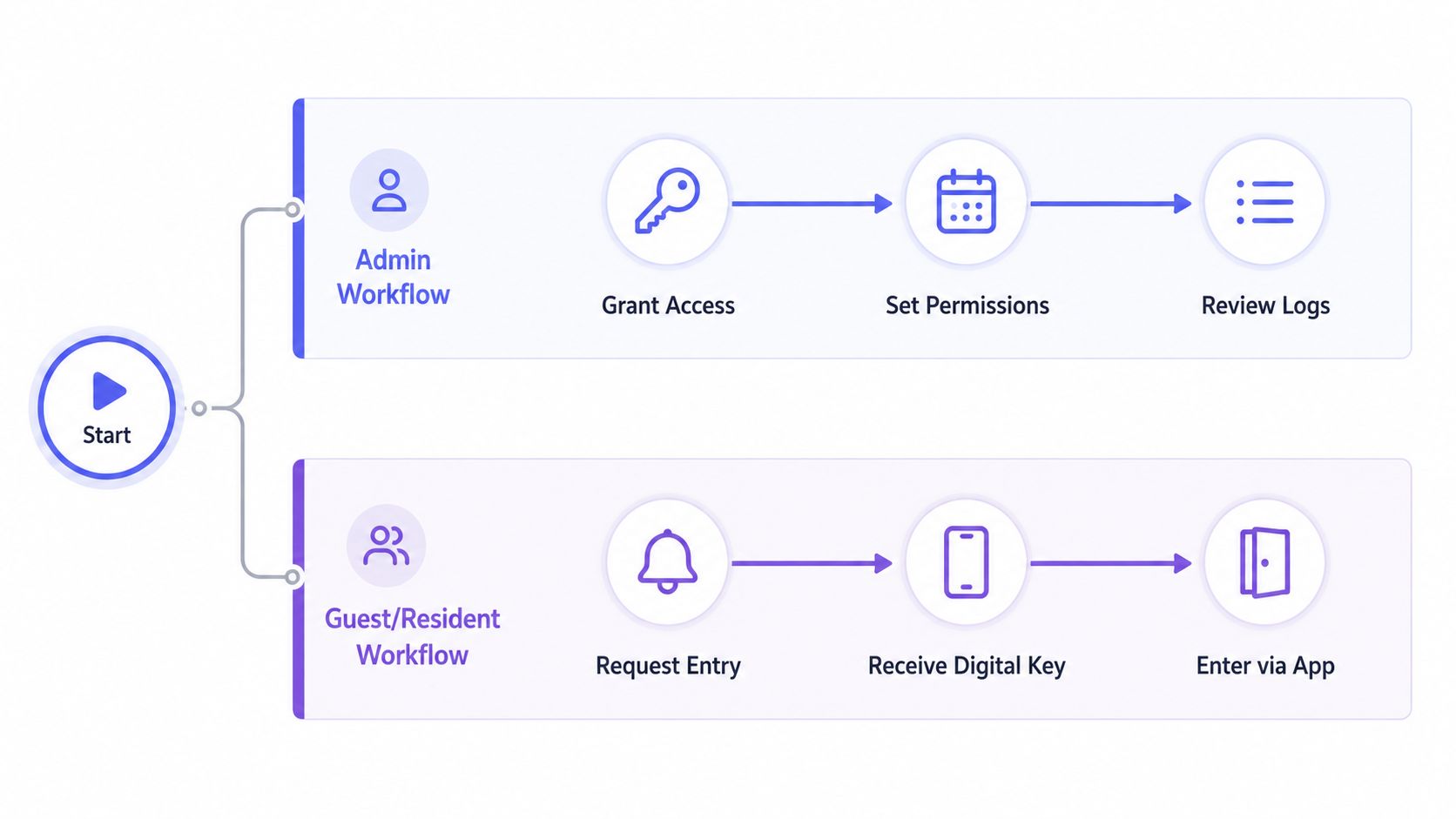
A property manager may start by creating a resident profile and assigning access to specific locations. The same dashboard can then apply different rules to a vehicle gate, pedestrian gate, garage, lobby, or amenity area.
A practical administrative sequence looks like this:
- Grant a credential. Associate the user with the relevant property, entry point, or role.
- Set the permission. Define whether access is ongoing, scheduled, temporary, or limited to certain locations.
- Review activity. Confirm successful entries, denied requests, and changes made by other administrators.
- Revoke when needed. Remove access after a move-out, contractor visit, lease change, or security concern.
- Adjust operating rules. Configure approved hold-open periods or other property-specific access behavior.
The value is not remote access. It's the ability to manage the entire credential lifecycle without depending on shared codes or manual collection of devices.
Visitor management adds another layer. A resident can receive an entry request, review available information, and approve or deny the visitor. Community visitor-management software such as MyGate's visitor-management workflow describes real-time resident decisions, guard records with photos and timestamps, and administrative rules such as whitelists and access limits.
The visitor and resident journey
A visitor may use a directory or designated request process to contact a resident. The resident receives the request on a phone, verifies the visitor using the available information, and grants entry if the request is legitimate.
One-way video verification can make that decision more concrete. Nimbio's Guestview smartphone gate control lets a visitor request entry through a web directory and the phone's camera, allowing the resident to visually verify the person before approving access.
Nimbio's own company description states that its access control system is cellular-powered and works over the cellular network, so there is no Wi-Fi to install or local network to maintain. It also describes retrofitting existing gates, doors, and call boxes instead of requiring a rip-and-replace installation, as detailed on Gate Sentry's cellular access-control page.
For HOAs, the operational advantage is clear: the resident handles a simple approval, while the system preserves an administrative record. That creates a better balance between convenience, visitor privacy, and accountability.
Integration and Compatibility for Gates and Building Entry
A smart lock app can look impressive in a demonstration and still fail during installation if the existing access hardware isn't evaluated first. The deployment decision usually comes down to retrofit versus replacement, cellular versus Wi-Fi, and single-entry control versus centralized administration.
Retrofit or replacement
A retrofit controller adds digital access capability to an existing electronic gate, door, or call box. This approach can preserve the gate operator and reduce disruption, provided the installer confirms electrical, relay, power, and control compatibility.
Replacement may make sense when the existing operator is obsolete, damaged, or unable to support the required control method. It can also simplify standardization across a new development, but it creates more construction work and may require changes to gates, doors, wiring, or access panels.
For an established community, the installer should document:
- Gate operator model and control input
- Available power and enclosure space
- Existing remotes, keypads, call boxes, and sensors
- Cellular signal at the controller location
- Emergency release and manual-entry procedures
- Whether multiple entry points need one administrative dashboard
Compatible gate operators may include LiftMaster, Viking, FAAC, Nice, DoorKing, and Mighty Mule, but compatibility should be confirmed for the exact model and installation environment.
Cellular versus Wi-Fi
Wi-Fi can work well where the network is stable, secure, and available at the entry point. Gates often sit at property edges, across driveways, or away from a building's network equipment, which can make local network extension expensive or fragile.
Cellular connectivity avoids the need to install and maintain a local Wi-Fi network at the gate. It also separates the access controller from resident networks, reducing the number of local dependencies an installer must troubleshoot.
A centralized platform can manage vehicle gates, pedestrian gates, garages, lobbies, and amenities together. Gate Sentry's centralized access-control software illustrates this single-dashboard model for gated communities and multifamily properties.
The security review matters as much as physical compatibility. Independent analysis of 54 Android companion apps found that every tested app contained at least one vulnerability in scope, while a separate smart-lock study assessed AES-backed Bluetooth links as high security and unencrypted Bluetooth links as insecure. Those findings appear in the independent smart security app analysis.
Installers should therefore treat BLE, cloud services, controller communications, and audit-log uploads as separate trust boundaries. The explanation of how cellular gate access works can help property teams understand the connectivity path before approving a retrofit.
Common Pitfalls and How to Avoid Them
Convenience-first buying often hides the failure modes that matter most after deployment. A gate can still operate locally while remote app functions fail, and an attractive dashboard can't compensate for weak account hygiene.
Independent coverage notes that app-controlled locks can lose remote functionality during an internet outage even when local operation remains available. The same coverage recommends checking backup power, physical-key fallback, and real-time logs before purchase, as described in this guide to outage resilience and smart-lock buying factors.
Pitfall one, treating connectivity as an afterthought
A property team may assume that the nearest building's Wi-Fi will reach the gate. Signal quality, network changes, power interruptions, and router maintenance can make that assumption unreliable.
Prevention: Require the installer to document the connectivity path, local fallback behavior, controller power, and manual access procedure before approval.
Pitfall two, sharing credentials
Shared PINs and unmanaged fobs make it difficult to identify a person or revoke access cleanly. A contractor who keeps a community-wide code can remain authorized long after the work ends.
Prevention: Issue individual or role-specific credentials, set expiration rules, and remove access as soon as the business need ends.
Pitfall three, ignoring account hygiene
A 2025 independent security review cited that 67% of smart lock users don't enable two-factor authentication, 41% reuse passwords, and 23% share access codes instead of issuing unique ones, according to the smart lock security statistics review.
Prevention: Require multifactor authentication where available, prohibit reused administrative passwords, and train residents and staff to approve unique visitor credentials rather than sharing permanent codes.
Pitfall four, skipping auditability
A system that opens the gate but can't show who made the request leaves the HOA with limited evidence during a dispute.
Prevention: Confirm that logs cover entry events, denied requests, credential changes, and administrator actions. Logs should also remain useful to the people responsible for investigations, not only to the vendor's support team.
How to Choose and Deploy the Right Smart Lock App
The best smart lock app for a property is the one that matches the site's infrastructure and administrative process. A residential driveway gate, multifamily building, and gated HOA may all need smartphone entry, but they won't have identical credential, visitor, or reporting requirements.
Start with a site assessment
An installer or property manager should record the current equipment before comparing vendors:
- Entry points: List vehicle gates, pedestrian gates, doors, garages, lobbies, and amenities.
- Operator hardware: Identify the exact gate operator, call box, lock, relay, and sensor configuration.
- Connectivity: Determine whether the site can support dependable Wi-Fi or whether cellular service is the more practical path.
- Fallback access: Document physical keys, manual releases, local controls, backup power, and emergency procedures.
- User groups: Separate residents, board members, property staff, guards, vendors, guests, and delivery personnel.
This inventory prevents a common mistake, selecting an app before confirming what the on-site controller can operate.
Score the platform against operational needs
A useful evaluation can use a simple qualitative rating such as strong, acceptable, or unsuitable for each category:
| Evaluation area | Questions to ask |
|---|---|
| Connectivity | Does the system remain dependable at every entry point, and what happens during an outage? |
| Compatibility | Can it retrofit the existing operator without unnecessary replacement? |
| Security | Are authentication, encrypted transport, server-side authorization, and session controls clearly documented? |
| Administration | Can staff grant, schedule, revoke, and review credentials from one dashboard? |
| Auditability | Do logs show meaningful access and administrative events? |
| Resident experience | Can residents approve visitors and use entry without complicated training? |
| Maintenance | Are firmware updates, support, warranty, and subscription terms clearly explained? |
Pilot before community-wide rollout
A pilot should include at least one representative gate or building entry, several user roles, a visitor request, a revoked credential, and an outage or fallback test. The property team should verify that the gate operator responds correctly and that the resulting event appears in the administrative log.
Resident communication also matters. A rollout message should explain how to install the app, protect the account, request guest access, report a lost phone, and use the backup entry method. Residents need to understand that a digital credential is personal, not a replacement for a shared community code.
Property managers should schedule ongoing log reviews and credential cleanups. Installers should leave behind wiring documentation, controller details, emergency procedures, and a clear support path.
Independent coverage specifically recommends checking backup power, physical-key fallback, and real-time logs before buying, especially because remote functions may depend on an active internet connection. Those checks should become part of the acceptance test, not an afterthought.
For an HOA, modernization doesn't require replacing every gate. A properly assessed retrofit can preserve functioning equipment while adding cellular connectivity, digital credentials, visitor management, and accountable administration.
Nimbio provides cellular keyless entry for electronic gates, call boxes, and building access, with smartphone credentials, remote visitor management, and retrofit-friendly hardware that doesn't require local Wi-Fi. Property managers, HOA boards, and installers can visit Nimbio to evaluate a practical path from shared remotes and codes to auditable community access control.


