

Most vendor access control advice starts with the wrong question. It asks how a company should authenticate an outside user into an enterprise system, while a property manager is usually dealing with a far simpler and more dangerous problem: who still has the gate credential, when it expires, and how fast it can be revoked.
A shared PIN passed between vendors can outlive every vendor relationship it was created to support. Paper logs and guard notebooks may record activity, but they rarely give a property manager the control needed to issue, scope, expire, and revoke access without delay.
That distinction matters across HOA security, multifamily entries, logistics yards, and smart communities. Third-party compromises accounted for at least 35.5% of all data breaches in 2024, according to the SecurityScorecard findings summarized in this vendor access management checklist. Physical access at a residential property is a different environment from enterprise IT, but the underlying lesson is the same: unmanaged vendor identities create avoidable exposure.
Table of Contents
- The Real Problem With Vendor Access at the Gate
- What Vendor Access Control Actually Means
- Common Vendor Access Risks You Should Know
- Comparing the Main Vendor Access Options
- Implementation Checklist for HOAs and Property Managers
- Two Real-World Scenarios That Worked
- Why Cellular Retrofit Fits Typical Deployments
- Monitoring and Audit Best Practices That Stick
The Real Problem With Vendor Access at the Gate
Vendor access control is often presented as a cybersecurity issue involving directories, single sign-on, multi-factor authentication, and privileged accounts. Those controls matter in enterprise environments, but they don't solve the most common gate problem at a residential property. A pest-control technician doesn't need a privileged workstation. The technician needs a credential that works for a defined service window and stops working when the assignment ends.
The primary failure is lifecycle governance. Someone issues a code, fob, or digital key, but nobody owns the expiration date. When the vendor leaves, the credential remains active because revocation depends on a manual database edit, a guard's memory, or a technician visit.
Shared access hides accountability
A four-digit gate PIN creates convenience by removing identity from the transaction. Every person with the code appears identical in the access record, if the property records anything at all.
That creates several blind spots:
- No individual accountability: The property can't reliably connect an entry to a specific worker.
- No clean offboarding: Changing the code disrupts every legitimate vendor using it.
- No useful scope: The same PIN can often open the gate outside the vendor's service window.
- No rapid response: Staff may need to reprogram a keypad or notify several people before access stops.
ISACA's third-party access guidance describes a more controlled model, including formal requests, manager approval, complete user audit trails, and automatic revocation when employment or contract need ends. More recent governance guidance also emphasizes explicit expiration dates, least privilege, session recording for privileged vendor sessions, and offboarding within 24 hours of contract completion or end. Those principles translate directly to physical entry.
Practical rule: The most valuable vendor access metric is revocation speed. If a property can't remove a credential immediately, it doesn't control that credential.
A governed digital key changes the question from “Does this vendor know the gate code?” to “Which named vendor received access, for which location, during what period, and who can terminate it?” That is the foundation of physical-entry governance.
What Vendor Access Control Actually Means
Vendor access control is the combination of policy, process, and technology that determines whether an external service provider can enter a property. It defines who may enter, which gate or building they can access, when the permission applies, and how the property takes that permission away.
The category includes far more than a single maintenance company. A typical gated community or multifamily property may need to manage:
- Routine service providers: Landscapers, pool technicians, pest-control crews, cleaners, and waste contractors.
- Deliveries: Amazon, FedEx, food delivery drivers, appliance installers, and furniture carriers.
- Resident-arranged services: Dog walkers, housekeepers, caregivers, and repair technicians.
- Specialist contractors: Cable and internet technicians, elevator vendors, HVAC crews, and access-control installers.
- Emergency providers: Utility teams, restoration contractors, and emergency services.
Each group has a different reason to enter, and each should receive only the access required for that reason. A pool company may need a service gate during scheduled hours. An appliance technician may need a one-time building entry. A landscaping crew may need access to the community but not a restricted amenity or staff area.
The four decisions every policy must make
A useful policy answers four operational questions:
- Who is the vendor? The property should identify the company and, where possible, the individual worker.
- Where can the vendor go? Access should cover the necessary gate, door, elevator, or amenity, not the entire property.
- When can the vendor enter? Time-bound credentials reduce the exposure created by standing permissions.
- When does access end? Expiration should be automatic, with immediate revocation available when a contract changes.
This framework borrows from logical access control concepts such as least privilege, role-based assignment, time-bound entitlements, and audit logging. It applies those concepts to physical assets, including gates, call boxes, building entrances, storage areas, and amenity spaces.
Vendor access is its own governance category. Resident access is generally long-lived and may support multiple credentials. Guest access is usually one-time or host-approved. Vendor access must support recurring work while remaining limited, traceable, and easy to revoke.
For readers evaluating adjacent physical-entry systems, Material Handling USA's Dasco storage access control guide offers useful context on controlled access hardware and storage environments. The same discipline applies at a community gate: define the authorized user, restrict the entry point, and preserve an access record.
Common Vendor Access Risks You Should Know
Four recurring patterns create most of the avoidable exposure at residential properties. They aren't exotic attacks. They are ordinary process failures that persist because access ownership is unclear.
The broader third-party risk is substantial. The same SecurityScorecard reporting says 48% of 2024 breaches came through third-party vendor connections, and 70% of those involved overly permissive accounts. Verizon's 2024 Data Breach Investigations Report found that supply-chain breaches represented 15% of all breaches, a 68% year-over-year increase. These figures concern broader security environments, but they reinforce why least privilege and disciplined vendor offboarding matter at the physical perimeter as well.
Four patterns that keep recurring
Shared gate codes are the most visible weakness. A single PIN may be printed on an old flyer, stored in a text thread, or passed from one crew member to another. Once a vendor relationship ends, changing the code can feel too disruptive, so the property leaves the backdoor open.
Standing credentials create a quieter version of the same problem. A fob issued to a contractor remains active because nobody scheduled a review or assigned responsibility for collecting it. The credential may work perfectly, which makes the failure harder to notice.
Weak audit trails prevent useful investigation. A paper sign-in sheet can show that someone entered, but it may not identify the worker, the exact gate event, the approved service window, or the person who authorized entry. The property manager then has to reconstruct events from incomplete records.
Slow revocation turns a manageable termination into an exposure window. If removing access requires a service call, a manual controller edit, or a guard callback, staff may postpone the action until the next business day.
The gaps often combine. A shared code has no person-level accountability. A standing fob has no automatic expiration. A paper log has limited searchability. Together, they form an unmanaged key.
| Risk Pattern | Typical Cause | Primary Consequence |
|---|---|---|
| Shared gate code | Convenience and code reuse | No individual accountability or clean offboarding |
| Standing credential | No expiration owner or review process | Former vendors retain unnecessary access |
| Weak audit trail | Paper logs, guard notebooks, or disconnected spreadsheets | Staff can't reconstruct who entered and why |
| Slow revocation | Manual controller changes or technician dependence | Terminated access remains active during a preventable gap |
Industry coverage identifies the same lifecycle weakness beyond residential properties. Only half of organizations in a 2025 to 2026 third-party access survey reported a complete inventory of all third-party access, while 58% said they lacked a consistently applied strategy, according to Security Magazine's coverage of third-party and vendor access. The practical property-management lesson is direct: inventory and revocation deserve as much attention as authentication.
Comparing the Main Vendor Access Options
No access method solves every property problem. The right choice depends on gate count, vendor volume, staffing, existing hardware, and the level of accountability the property needs.
Temporary digital keys are the strongest fit when a property wants named access, defined schedules, rapid revocation, and searchable logs. They do require compatible hardware or a retrofit, and vendors need a phone capable of receiving or using the credential.
Scheduled access windows work well for recurring services. A controller can permit landscaping on an agreed schedule without handing the crew a permanent code. The limitation is accountability. A schedule may show that an authorized window was used, but it may not identify which person arrived unless the system also assigns named credentials.
RFID badges and fobs remain familiar and practical in many buildings. They work well where staff can issue and collect them consistently. The burden appears during turnover, lost-card incidents, and vendor changes, especially when one company has several workers rotating through a property.
Shared PINs are cheap to deploy and easy to explain. They also provide the weakest governance because the property can't reliably identify the person using the code, and changing it affects every recipient.
Human guards add judgment. A trained guard can question a suspicious worker, check a vehicle, and deny entry when something doesn't look right. Guarding also introduces recurring staffing costs, shift coverage requirements, and the risk that a clipboard becomes the only audit record.
| Option | Upfront Cost | Revocation Speed | Audit Trail | Resident Friction |
|---|---|---|---|---|
| Temporary digital key | Moderate, depending on hardware | Immediate when centrally managed | Strong, especially with named credentials | Low after onboarding |
| Scheduled access window | Moderate controller investment | Immediate schedule change | Moderate, unless tied to an individual | Low for recurring vendors |
| RFID badge or fob | Low to moderate | Fast only when inventory is accurate | Moderate | Moderate, due to issuing and returns |
| Shared PIN | Low | Slow or disruptive if the code must change | Weak | Low initially, high after incidents |
| Human guard | High recurring labor commitment | Immediate at the post | Variable, depending on logging discipline | Low for residents, but service flow can slow |
A property doesn't need to eliminate every existing method on day one. A sensible transition often keeps resident remotes or keypads in place while moving vendors to named, scheduled credentials. The goal is to remove the unmanaged shared path first.
Implementation Checklist for HOAs and Property Managers
A vendor access program should begin with a short written policy, not a new device. The policy gives the property manager, board, security lead, and installer a shared operating standard.
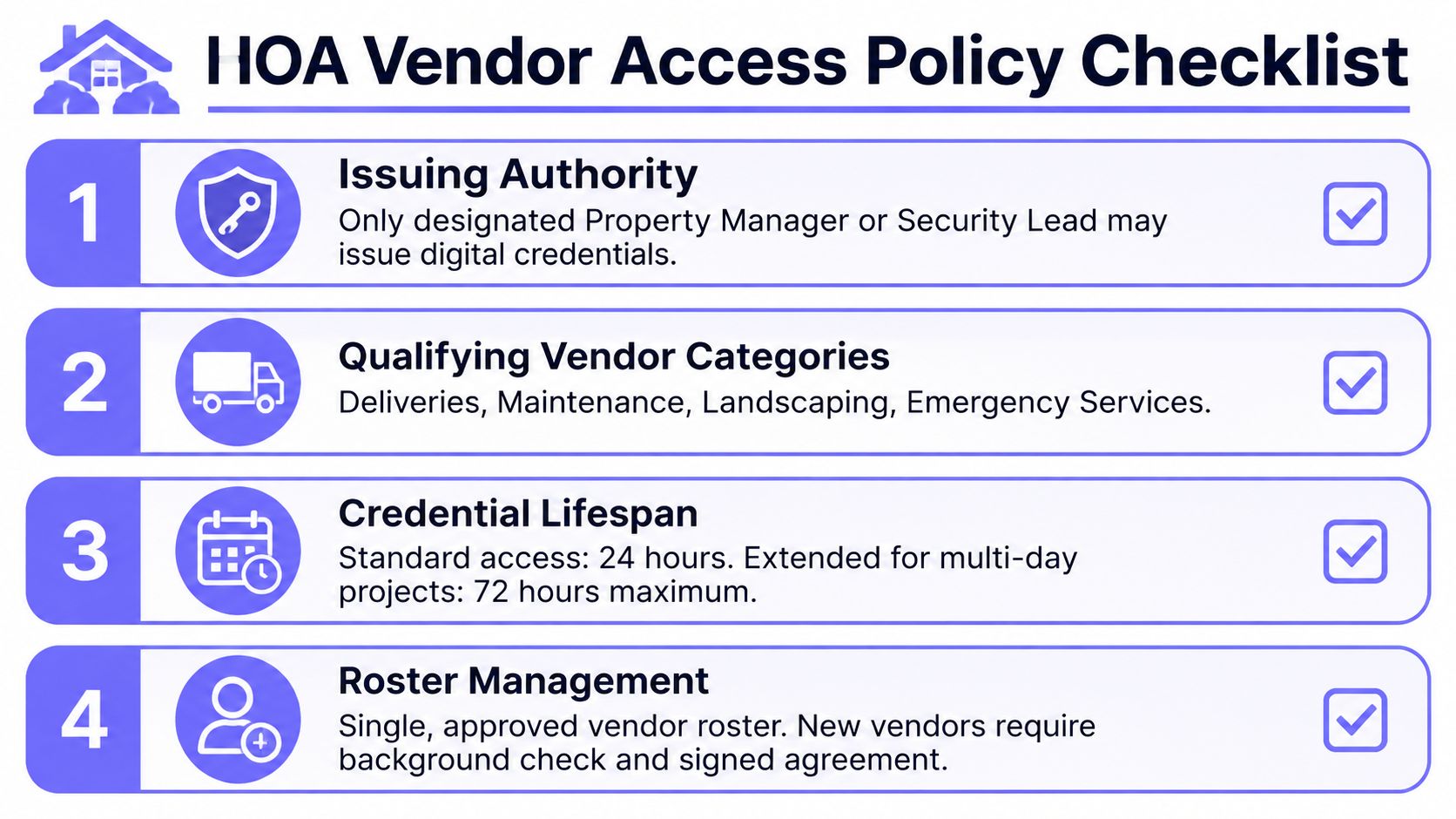
1. Assign authority before issuing anything
Name the person or role allowed to approve and issue vendor credentials. In many communities, that will be the property manager or a designated security lead.
The policy should define:
- Issuing authority: Who may create, modify, and revoke a credential.
- Approval evidence: What request, work order, contract, or resident authorization is required.
- Credential ownership: Whether access belongs to the company, the named worker, or both.
- Emergency process: Who can suspend access during an incident or suspected misuse.
2. Build one approved vendor roster
A spreadsheet can be a starting point, but it shouldn't be the system of record for active credentials. Record the vendor company, contact details, service category, contract status, insurance certificate expiry, approved locations, and residents or units served.
The roster should distinguish recurring vendors from one-time providers. A resident-arranged dog walker and a community-wide pool contractor shouldn't receive the same access scope.
3. Issue credentials outside email chains
Email can document a request, but it shouldn't control access. Use a controller or cloud-based access-control platform that creates named, time-bound credentials and preserves the approval trail.
Require the vendor to acknowledge the property's access and security terms before the first entry. For controlled information environments, a sample vendor access policy recommends separate vendor accounts, MFA, least privilege, time-bound access, enhanced logging, contract security terms, and quarterly reviews, as shown in this vendor access policy sample.
A property evaluating an HOA gate access system should confirm that the platform can handle scheduled credentials, centralized administration, access logs, and rapid revocation without requiring a full gate replacement.
4. Review active access on a fixed cadence
Set a recurring review date rather than waiting for an incident. The reviewer should compare every active credential with the approved roster, current contracts, insurance status, and actual service need.
A practical review asks:
- Does this vendor still work at the property?
- Is the access location still correct?
- Is the schedule broader than necessary?
- Has the worker or company changed?
- Has the credential been used in an unexpected way?
5. Make offboarding a same-day event
When a contract ends or a vendor is terminated, revoke the credential immediately. Confirm the access log shows no later activity, document the action, and notify relevant staff.
The policy should also cover physical devices. Cornell's physical security policy requires vendor physical access authorization to be reviewed at least every six months and requires entry and exit records to include the time, purpose, and workforce member who enabled access, as described in Cornell's physical security requirements. ND-ISAC's CMMC guidance similarly addresses escorts, visitor monitoring, physical access logs, and control of access devices, with records maintained through written or electronic methods, as outlined in its physical access logging guidance.
Two Real-World Scenarios That Worked
A central Florida HOA illustrates why lifecycle governance beats code rotation. The 180-unit community had relied on a shared gate PIN for nearly a decade, and groundskeepers, pest-control crews, and food delivery drivers all used it. After bogus solicitation entries, the board retired the code and moved vendors to scheduled digital keys through a cloud-managed controller.
Each vendor received a weekday access window tied to the service agreement. The system recorded the timestamp and company name, and the manager revoked 36 stale credentials within one quarter that had remained active without a clear business reason. The important result wasn't the technology alone. The property finally had an owner, a schedule, and an offboarding action for every credential.
A logistics yard chose control over a permanent guard post
A logistics yard in northern California made a different trade-off. The operator replaced two full-time guard booths with cellular-controlled gates and a video intercom after determining that annual guard payroll exceeded the controller and intercom cost.
Drivers received a smartphone entry link. A dispatcher approved access from a tablet, and the gate log replaced the guard clipboard as the audit source of record.
Both deployments preserved the existing gate operators and used cellular retrofits. Each installation was completed in a single day, avoiding a full replacement of the gate equipment and reducing disruption to daily operations.
These scenarios don't prove that every property should remove guards or choose the same credential model. They do show the decision criteria that matter: whether the property needs visual judgment, whether a remote approver can handle routine entry, whether the gate log is reliable, and whether the system can revoke access without a truck roll.
Why Cellular Retrofit Fits Typical Deployments
Most HOA and multifamily properties already have functioning gate operators. Replacing them to solve vendor access is usually unnecessary. A cellular retrofit adds a governed access layer while preserving the equipment that opens and closes the gate.
The strongest argument is operational simplicity:
- No Wi-Fi dependency: Cellular connectivity avoids Wi-Fi drops and keeps the access controller separate from a property's often-insecure resident network.
- Hardware compatibility: A hardware-agnostic retrofit can connect to existing gate operators instead of forcing a full replacement.
- Remote administration: Managers can issue, schedule, monitor, and revoke digital keys from a cloud portal.
- Vendor-friendly delivery: A time-boxed key sent by text or managed through a smartphone is easier for an outside worker to use than a new fob pickup process.
- Auditability: Each approved entry can be associated with a credential and time, creating a more useful record than a shared PIN.
Cellular access control also avoids trenching and new network wiring in many deployments. That can reduce installation friction, especially where a gate sits far from a building network or where the property doesn't want vendors touching its internal infrastructure.
Decision rule: If the gate works today, the first question should be whether the controller can govern access to it. Replacement should be the exception, not the default.
The trade-offs are real. Cellular systems require a recurring data service, and coverage can be weak in a dead zone. A property should test signal strength at the gate, confirm backup procedures, and document what staff do if connectivity is temporarily unavailable.
Even with those limits, a retrofit is often more practical than reprogramming a keypad whenever a landscaping crew changes. It creates a migration path from a shared PIN to named credentials without asking residents to replace every remote at once. Nimbio's retrofitting legacy gate operators approach is one example of a cellular model that preserves existing gate hardware while adding smartphone-based administration.
Monitoring and Audit Best Practices That Stick
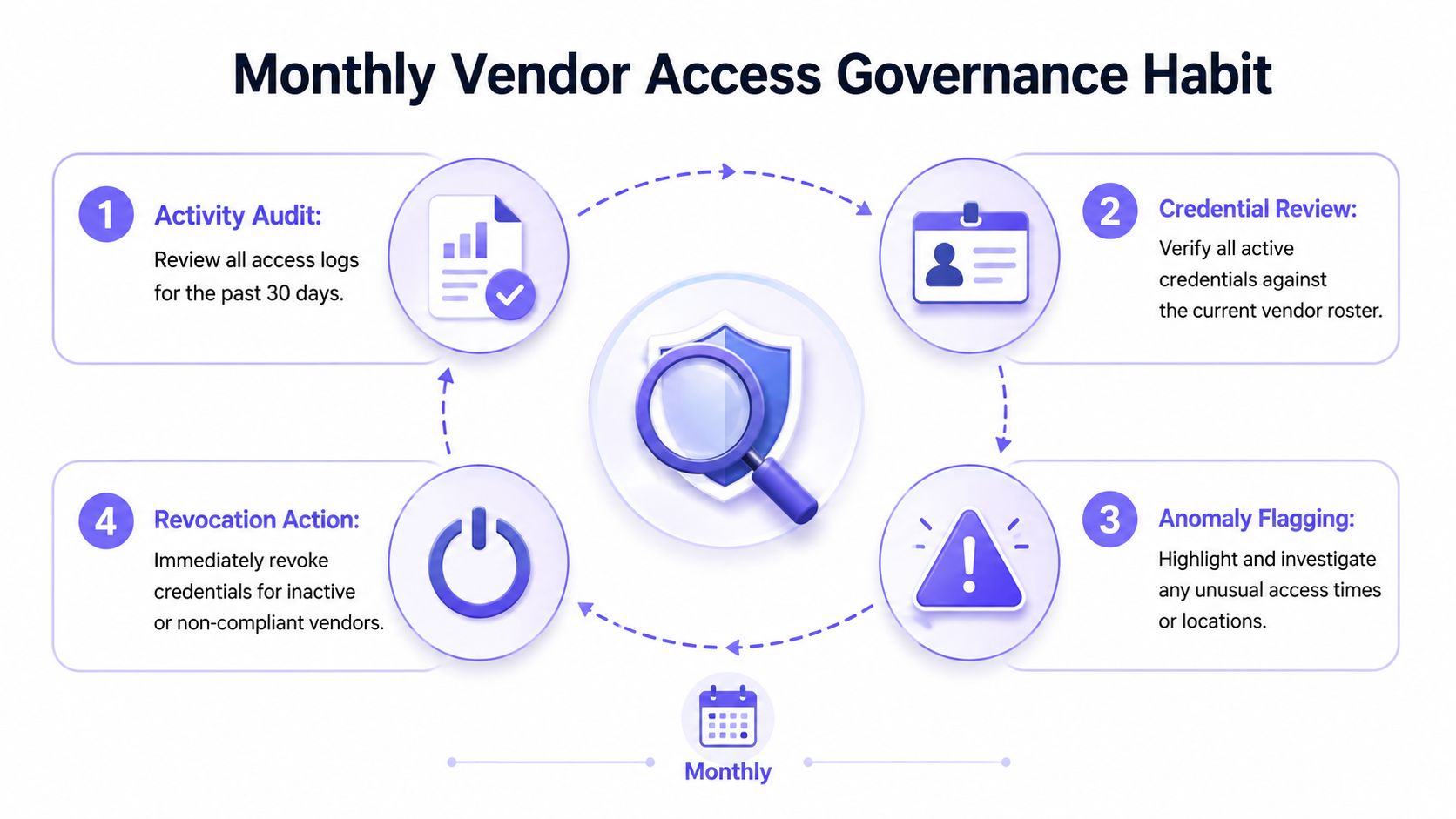
Audit logs don't reduce risk merely because a platform stores them. A property manager has to review the records, investigate exceptions, and revoke access when the facts change.
The strongest operating habit combines three actions:
- Review active credentials monthly. Identify unused keys and set automatic expiration at 90 days for any key that hasn't been used.
- Reconcile the roster quarterly. Compare active access with current vendors, contracts, service locations, and insurance records.
- Revoke on the same day. End access when a contract ends, a worker leaves, or misuse is suspected.
Alerting should focus staff attention instead of flooding them with events. Useful thresholds include three failed entries within 10 minutes or any vendor credential used outside its approved schedule. Each alert needs a response owner and a short incident playbook that states who receives the notification, who suspends the credential, and how the property documents the decision.
Session-level visibility is becoming especially important in industrial, logistics, and OT settings. A 2026 report summarized in finance coverage found that only 43% of organizations could provide full audit trails for vendor sessions, while organizations with 21 to 100 external vendors reported the highest risk levels, as reported by coverage of the industrial remote access findings. Physical gate systems don't record OT sessions, but the principle carries over: an entry log is useful only when it is complete, attributable, and reviewed.
The responsible role is usually a property manager or community security liaison. A standing calendar reminder turns review into routine work rather than an annual cleanup.
Property teams can use these Nimbio property security tips to reinforce the operating process around access records, credential reviews, and incident response.
Priority order: Revoke first, reconcile second, expand third.
Nimbio provides cellular, smartphone-controlled access for gates and building entries, with named digital credentials, scheduled vendor access, remote revocation, and searchable entry logs. Property managers and HOA boards can review Nimbio to assess a hardware-agnostic retrofit that adds governed vendor access without replacing functioning gate operators.
Securing gates or doors at a commercial property?
See how cellular access control works for commercial sites. Explore Commercial Gate & Door Access Control →


