A hospital lobby at 7:10 a.m. is rarely quiet. Families arrive with questions, contractors show up with tool bags, transport staff move in and out, and front-desk teams try to keep the line moving while still checking names, units, and access rules.
That's where a visitor management system for hospitals stops being a convenience feature and becomes a control point. Paper logs and basic sign-in tablets can record a name, but they can't consistently enforce policy, support auditability, or hold up when the lobby, the unit, and the network are all under stress.
Table of Contents
- Why Hospitals Need More Than a Sign-In Sheet
- How Hospital Visitor Management Systems Actually Work
- Essential Features for Healthcare Security and Compliance
- Integration Requirements That Make or Break Your Deployment
- Planning for System Failures and Emergency Operations
- Staged Deployment Strategy With Measurable Outcomes
- Evaluating Vendors and Calculating Real ROI
Why Hospitals Need More Than a Sign-In Sheet
A busy hospital entrance is a terrible place for manual tracking. One visitor wants maternity, another is headed to a specialty ward, a vendor needs access to a back corridor, and a security officer is trying to figure out whether the person at the desk has already been screened somewhere else on campus.
A clipboard or basic tablet app gives the appearance of control, but it usually stops at registration. It doesn't reliably tie a visitor to a unit, a policy, a badge, a time window, or an exit record, which is why it falls short for real healthcare operations.
The front desk is not the control layer
Hospital security teams need more than a name and a timestamp. They need a way to determine who should enter, where that person can go, and when that access expires.
That matters for patient safety, privacy, infection control, and the daily load on reception teams. A manual process also makes it harder to spot repeat issues, reconstruct a timeline after an incident, or keep rules consistent across multiple entrances.
Practical rule: if a process depends on the memory of the person at the desk, it isn't a policy. It's a workaround.
Ekipa AI's healthcare expertise offers a useful lens here, because healthcare access work is rarely just about check-in speed. It's about how a workflow supports safety, auditability, and operational discipline across the whole site, not just the lobby. See Ekipa AI's healthcare expertise for a broader view of how healthcare operations often need structured, policy-aware systems.
What the right system changes
A proper hospital visitor management system shifts the work upstream. Visitors can be pre-registered, screened, and issued the right access before they ever reach a sensitive area, which cuts down on improvisation at the door.
That difference is visible in real-world scale. A 2020 deployment at Taipei Veterans General Hospital recorded 22,336 visits in 21 days, averaging 1,064 visits per day, and 18.1% of those visits were pre-reserved online within 48 hours, which shows how digital pre-registration can move meaningful traffic away from manual handling while supporting screening and monitoring (journal source).
For hospitals, the practical takeaway is simple. The goal isn't to digitize the sign-in sheet, it's to turn visitor flow into a controlled workflow that front-desk staff, security, and unit managers can all trust.
How Hospital Visitor Management Systems Actually Work
A hospital-grade system is built as a policy-driven workflow engine, not as a digital guestbook. That's the architectural difference that separates a real security tool from a faster sign-in form.
At a minimum, the system combines pre-registration, ID screening, badge issuance, and access-control logic. The value comes from enforcing rules before a visitor reaches sensitive spaces, not from asking a receptionist to make every judgment call by hand (HID Global).
The visitor lifecycle has to be machine-readable
The strongest hospital systems treat each step as an event. Registration, verification, pass creation, badge printing, entry, and exit logging all become records that can be audited later.
That matters because hospitals don't run one visitor policy. They run many, often by unit, entrance, host type, or time of day. A centralized policy layer keeps those rules consistent, while still allowing exceptions when a unit needs them.
A system that only records a name on arrival misses the core work. A system that creates machine-readable events can support authorization, monitoring, and incident review without asking staff to rebuild the story after the fact.
The lifecycle should end with sign-out
Hospital visitor management is not complete when a badge is printed. The journey needs to end with sign-out and retained records, so the hospital can confirm who was on site, where access was granted, and when that access stopped (Gallagher).
That lifecycle view also helps security teams distinguish between convenience and control. A fast sign-in is useful, but a traceable visitor record is what supports auditability, policy enforcement, and post-incident investigation.
A good rule of thumb is this:
If the platform can't tell security who entered, when they entered, where they were allowed to go, and when they left, it's not really managing visitors. It's just logging them.
Essential Features for Healthcare Security and Compliance
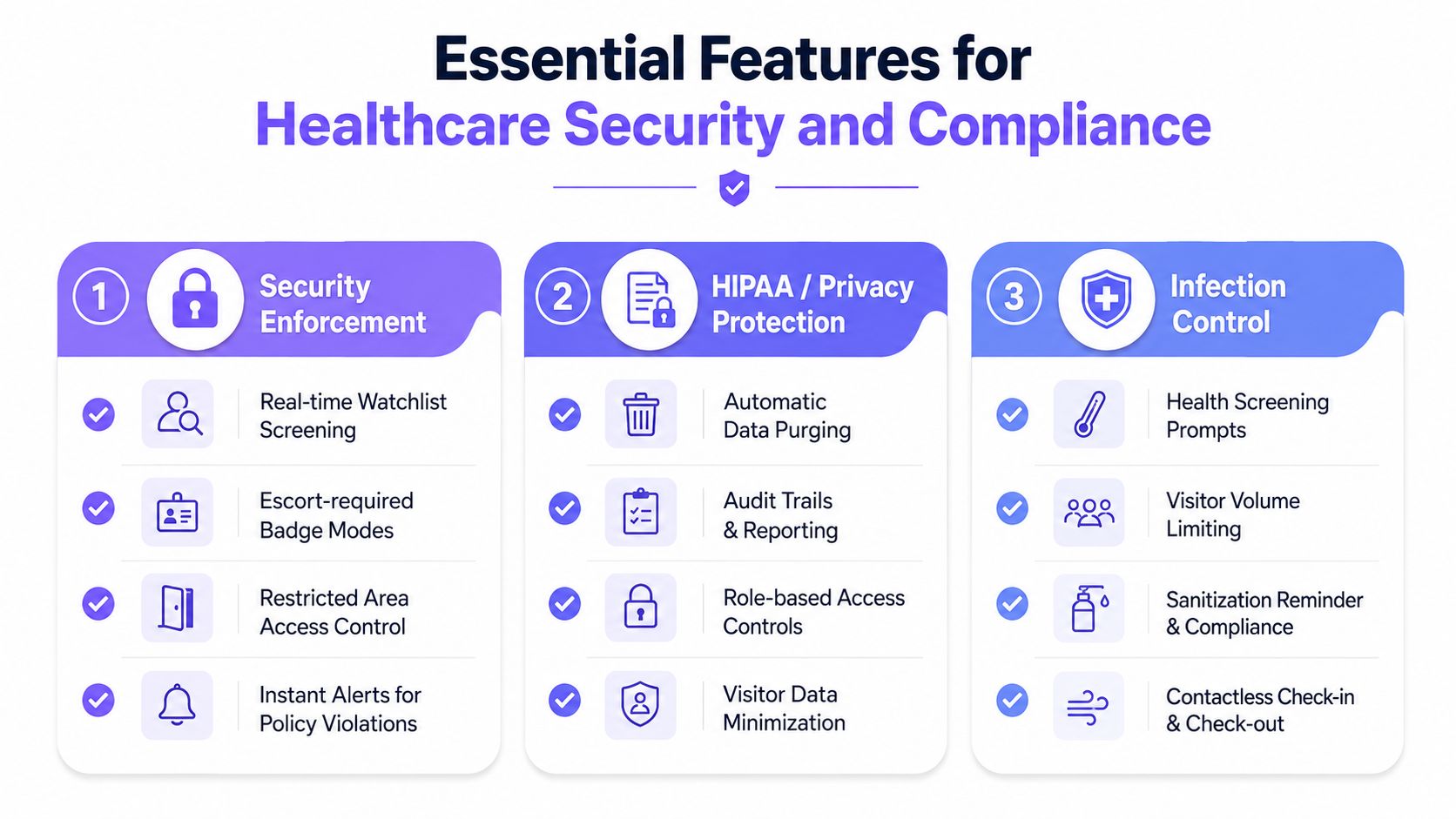
The most useful feature lists in healthcare are the ones that map each capability to a real operational need. Hospitals need features for security enforcement, privacy protection, and infection control, and each category serves a different job.
Security enforcement comes first
Start with formal policy, because the software can't fix a loose process. Hospital access control best practices include writing a policy, pre-registering visitors, issuing badges with photos and time limits, screening against watchlists, controlling access to restricted zones, integrating door access controls, and planning for emergencies (Censinet).
That badge detail matters more than many teams expect. Censinet notes that visitor badges should include the visitor's photo, name, department, purpose of visit, check-in and expiration times, and approved access zones, which gives staff a fast visual check and gives security a clearer control point.
Compliance features only work if they're operational
For privacy and healthcare data handling, the right tools reduce guesswork. Use a workflow that keeps the system's records tightly tied to policy, and pair that with managing access control policies so the operational rules stay documented, reviewable, and consistent.
That is also where visitor badges and digital records help. If access permissions are structured from the start, teams have a cleaner record for audits and a better path for revoking access when needed.
A separate resource on securing healthcare patient data is useful context here, because visitor workflows and patient data protection often overlap in the same physical and digital spaces. The key lesson is that access control isn't isolated, it sits next to privacy, identity, and record handling.
Infection control needs its own logic
Hospitals also need ways to shape visitor volume and screening at the point of entry. Contactless check-in, pre-registration, and unit-specific visiting hour enforcement all help reduce the chaos that comes from ad hoc arrivals.
Useful systems let teams tailor rules by ward or department, because a maternity unit, an ICU, and an outpatient area don't need the same visitation logic. The technology should support the policy instead of flattening it.
Integration Requirements That Make or Break Your Deployment
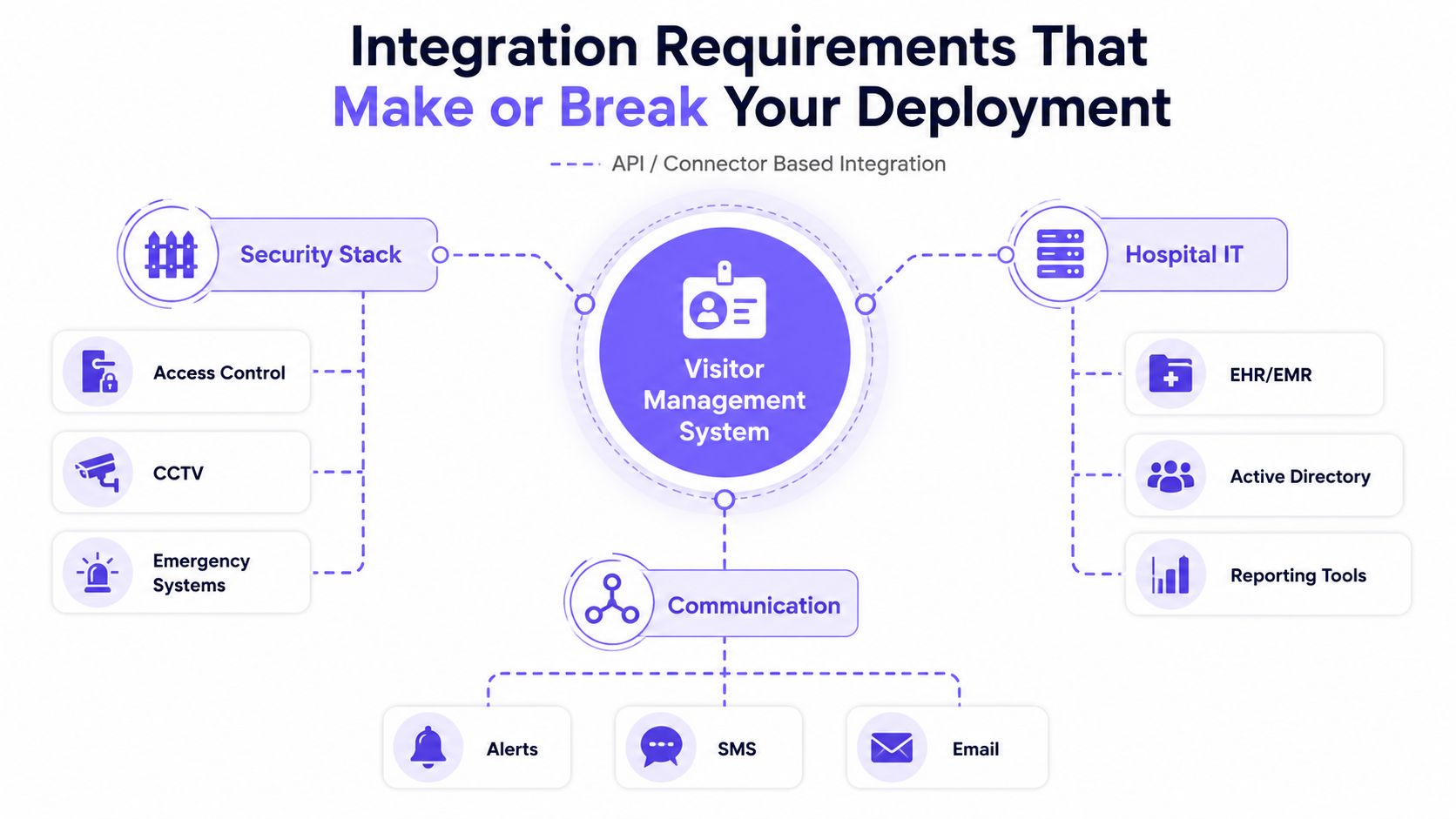
The biggest mistake in hospital visitor management is buying a standalone kiosk and calling it a security program. If the system can't talk to the rest of the hospital stack, it may improve sign-in speed while creating a new silo.
For hospitals, the most technically important requirement is integration and scalability. The platform should connect with access control, notifications, and hospital systems such as EHR-related workflows where policy allows, because visitor management is part of a broader operating environment, not a separate island (Avigilon).
APIs matter more than shiny interfaces
An API-ready or connector-based deployment can trigger host alerts, enforce unit-specific permissions, and preserve auditable records across multiple buildings and entrances. That's the difference between one efficient desk and centralized governance.
A standalone kiosk can look polished and still fail operationally. It may print badges and move lines quickly, but if it can't revoke access, sync with security, or support reporting across the campus, the hospital ends up managing exceptions by hand.
The internal side matters too. A technical team that understands the cellular access control API documentation can evaluate whether a system is built for real integration work or just simple check-in.
Integration should support the full response chain
The best deployments connect visitor events to security workflows, not just visitor records. If a hospital needs to send an alert, lock down a zone, or confirm who is in a restricted area, the visitor system has to participate in that chain.
That is especially important in emergency departments, maternity units, and inpatient wards where rules shift by unit and by situation. A central policy layer, combined with integrated notifications, keeps staff from making inconsistent decisions at the door.
A practical test is straightforward. Ask whether the system can support centralized permissions, revocation, and reporting across all entrances without reworking the physical entry process. If the answer is no, the hospital has likely bought convenience, not control.
Planning for System Failures and Emergency Operations
A lot of hospital visitor-management content stops right when operations get hard. It covers digital check-in, badges, watchlists, and audit logs, but it rarely explains what happens when the network, kiosks, or power fail during a fire alarm, lockdown, surge event, or evacuation.
That gap matters because healthcare systems do get stressed. 60% of NHS trusts reported at least one cyber incident in the 2024/25 period, which is a reminder that digital dependence has to be paired with continuity planning (VizitorApp).
Offline resilience is a requirement, not a nice-to-have
A hospital needs to know whether the visitor platform can run on cached credentials, how logs are reconciled after an outage, and what happens when staff must move people quickly during an emergency. Those questions are more important than a glossy feature sheet.
If a facility can't preserve chain-of-custody during a disruption, the visitor record becomes unreliable right when it matters most. That affects family visitation, contractor access, and patient transport teams in very practical ways.
Operational rule: build for the interruption first, then optimize for the normal day.
Emergency modes need defined owners
A lockdown procedure is only useful if someone knows who can activate it and how visitors are handled afterward. Hospitals should define the emergency-access mode for each major scenario, then make sure front-desk staff and security can execute it without improvising.
The most resilient programs also separate temporary exceptions from standard access. That keeps emergency operations from turning into permanent workarounds that weaken control over time.
The broader point is simple. A hospital that can't continue visitor accountability during a failure hasn't solved visitor management, it has only moved the problem into a digital system.
Staged Deployment Strategy With Measurable Outcomes
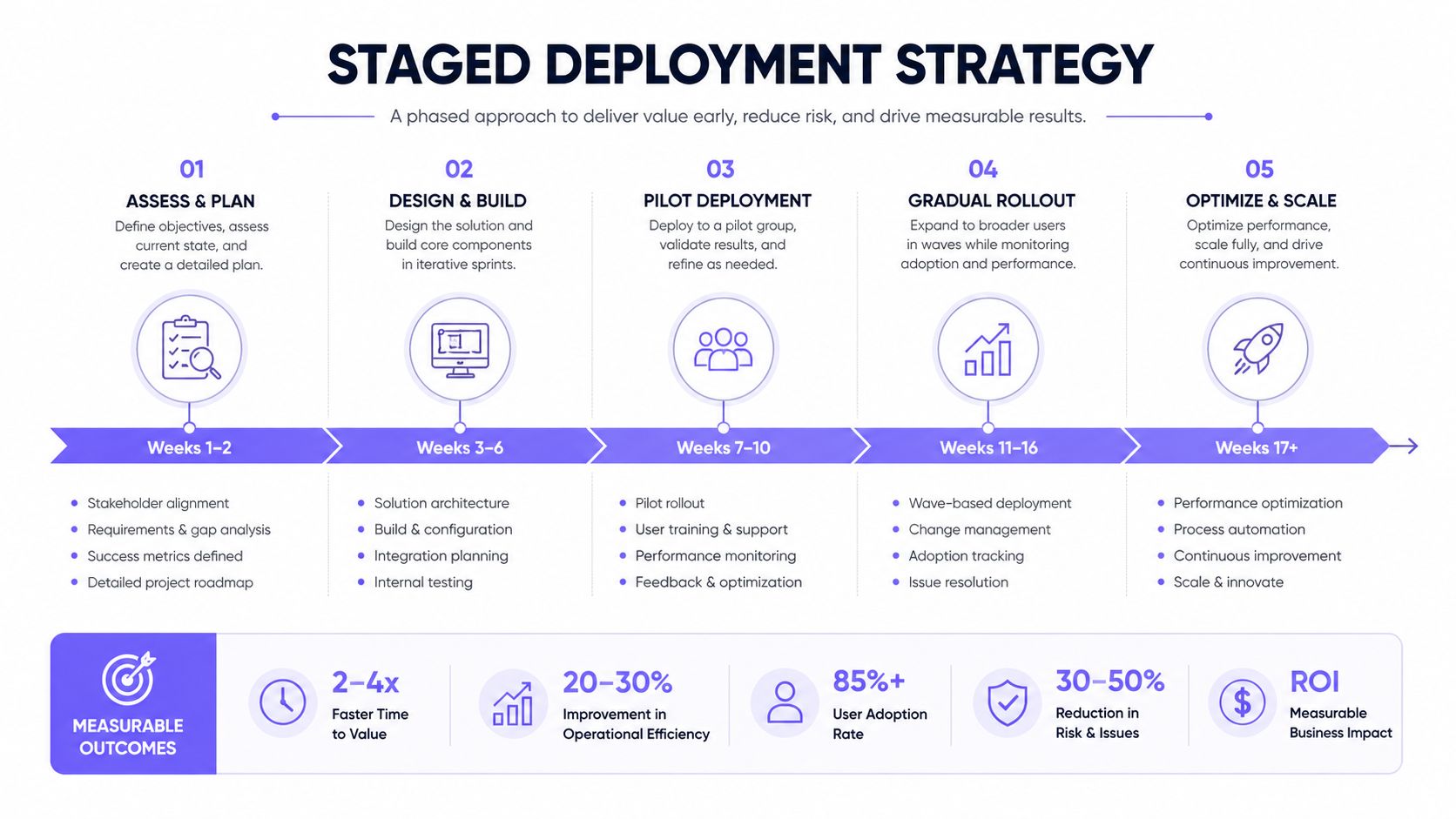
The cleanest rollouts don't start with a campus-wide launch. They start with one entrance, one team, and one measurable set of outcomes.
A strong hospital visitor-management rollout is often staged rather than deployed everywhere at once. VizMan recommends piloting at a single entrance first, choosing a moderately busy location, and measuring baseline KPIs before launch, including average check-in time per visitor, queue length during peak hours, security incidents per month, and front-desk labor hours spent on visitor tasks. The pilot should run for 4 to 6 weeks so teams can compare pre- and post-launch performance and catch technical issues early (VizMan).
Pick the right entrance first
Choose a location with enough traffic to reveal problems, but not so much that failures become unmanageable. A moderately busy entrance gives security and reception enough data to see whether workflows are holding up under real conditions.
That pilot site should also represent normal complexity. If the entrance handles a mix of visitors, vendors, and family members, it will show whether the system can handle policy variation without slowing the desk to a crawl.
Measure the operational basics before launch
Baseline data should be captured before the pilot begins, not after. That lets the hospital compare the old process against the new one using the same categories of work.
Useful pilot metrics include:
- Check-in time per visitor, so teams can see whether the new workflow shortens processing.
- Queue length at peak times, because lobby congestion is an operational issue, not just a customer service issue.
- Security incidents per month, which gives security leaders a direct way to track risk exposure.
- Front-desk labor hours spent on visitor tasks, so operations can see whether staff time is being freed for higher-value work.
Use the pilot to expose integration gaps
The first entrance usually reveals hidden dependency issues. Badge printers, access-control links, host notifications, and staff workflows tend to break in different ways once the system touches real traffic.
That's why a pilot should be treated as a control test, not a soft launch. If the hospital fixes problems before wider rollout, it avoids multiplying the same issue across every entrance and unit.
Evaluating Vendors and Calculating Real ROI
The market is expanding because hospitals are still investing in digital access control, tracking, and compliance tools. Independent market research indicates the global market for visitor management solutions for hospitals was valued at $2.1 billion in 2025 and is projected to reach $5.9 billion by 2034, implying a 13.2% CAGR (Marketintelo).
That growth doesn't mean every product is worth buying. It means the cost of a bad choice gets more visible as hospitals keep tightening security, compliance, and integration expectations.
Compare vendors on operational reality, not demos
A good demo can show fast sign-in. A good deployment has to survive multiple entrances, mixed visitor types, policy changes, and outages.
| Evaluation Category | Critical Questions | Red Flags |
|---|---|---|
| Integration | Does it connect with access control, notifications, and hospital systems where policy allows? | Standalone kiosk with no API or connector path |
| Offline resilience | Can it support emergency access, cached credentials, and log reconciliation after an outage? | No documented fallback workflow |
| Scalability | Can it handle multiple entrances and unit-specific rules without rework? | Works at one desk, breaks at campus scale |
| Policy enforcement | Can it issue badges, enforce time limits, and restrict zones consistently? | Relies on receptionist judgment |
| Reporting | Are visitor events searchable and audit-ready? | Paper exports and manual reporting |
ROI should include labor, risk, and audit readiness
A narrow ROI model that only counts software cost misses the biggest gains. Reduced front-desk labor, fewer manual exceptions, faster incident review, and cleaner audit trails all matter in a hospital setting.
A useful question is whether the system reduces dependence on ad hoc human decisions. If it does, the hospital usually gets better consistency at the desk and a more reliable record behind the scenes.
For teams comparing options, the phrase secure smartphone-controlled access captures the broader direction many facilities are heading in, even though hospitals have stricter workflow and compliance needs than typical property access. The principle is the same, access should be granted, tracked, and revoked through a managed system, not by scattered one-off decisions.
Buy for governance, not just speed
Fast check-in matters, but it's not the only outcome that counts. Hospitals need systems that support policy, scale cleanly, and keep working when conditions get messy.
That's why the best purchase is rarely the cheapest one. It's the one that fits the hospital's security stack, reporting needs, and emergency procedures without forcing staff to improvise around the tool.
If your team is comparing access control platforms for hospitals, take the same disciplined approach to visitor workflows, policy enforcement, and emergency readiness. Nimbio helps property teams modernize access with smartphone-based control, cellular connectivity, and retrofit-friendly hardware, and those same design principles matter when access needs to be managed cleanly and audibly. Visit Nimbio to see how secure, managed access can fit into a modern control strategy.