

A truck driver arrives during the morning surge while contractors queue behind the cab and an inspector waits at a second entrance. The guard is trying to confirm identities, call hosts, issue badges, answer the intercom, and keep vehicles moving, all while a paper logbook records incomplete information. The gate becomes a bottleneck because the facility treats access as reception paperwork instead of part of the yard operation.
That distinction matters. A visitor management system for logistics connects registration, identity checks, temporary credentials, gate activity, dock permissions, and departure records. It gives security, warehouse, and property teams a shared view of who is arriving, where each person may go, and whether the visit has ended.
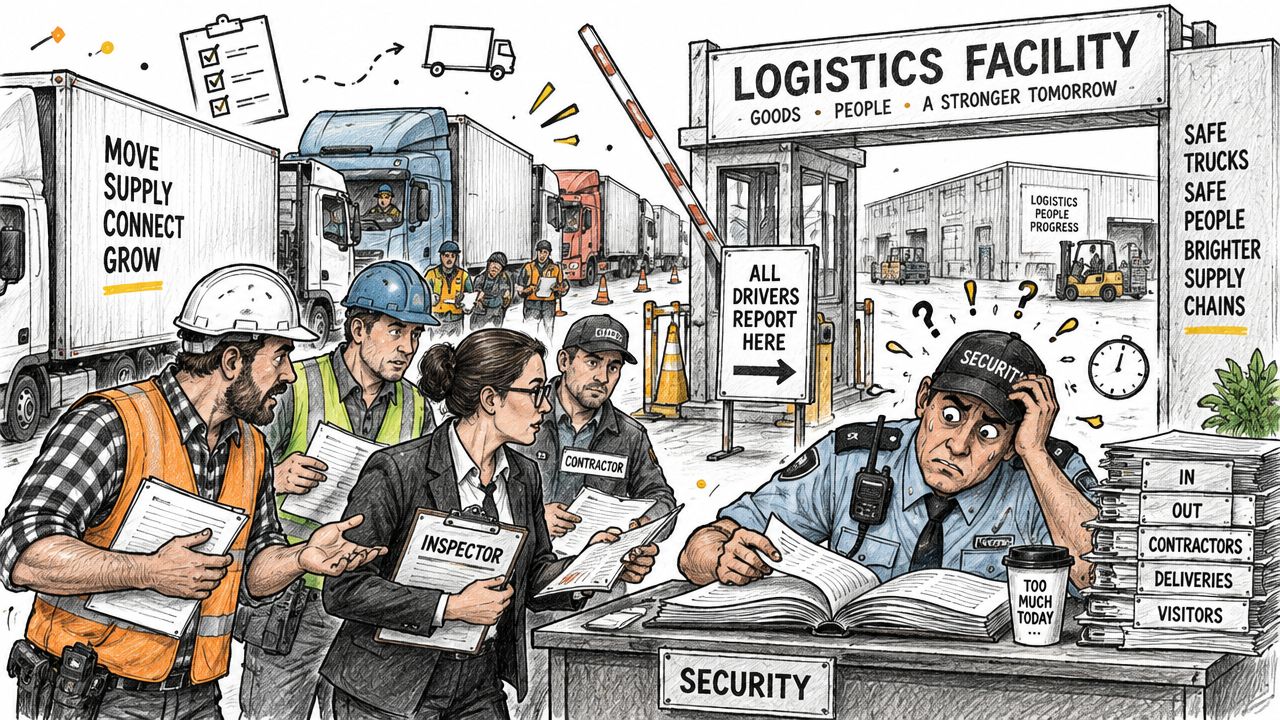
Table of Contents
- Introduction Why Logistics Sites Need More Than a Sign In Sheet
- What a Visitor Management System for Logistics Really Is
- Must Have Features for Driver Workflows and Gate Operations
- Security Compliance and Audit Readiness Without the Paper Chase
- Operational Benefits and ROI When Gate Friction Disappears
- Integration and Deployment Checklist for Logistics Facilities
- Common Pitfalls and Best Practices That Keep Yards Moving
Introduction Why Logistics Sites Need More Than a Sign In Sheet
Manual visitor handling remains common. ASIS International reports that 40% of organizations still rely exclusively on manual visitor-tracking methods, including paper and spreadsheets, while another 20% combine manual and digital methods across sites. Only 41% of respondents had integrated visitor management with access control technology.
For a logistics operator, those gaps affect more than administrative efficiency. A handwritten name may not show which host approved the visit, which gate admitted the person, which temporary credential was issued, or whether the visitor checked out before entering another controlled area.
A connected workflow works more like a traffic-control system than a lobby kiosk. It should help a facility:
- Prepare arrivals: Collect driver, carrier, vehicle, and visit details before the truck reaches the gate.
- Verify people: Confirm identity and capture the purpose, host, and permitted area.
- Control movement: Issue temporary access tied to a time window, host, and zone.
- Coordinate operations: Notify the dock team and direct the visitor to the correct waiting area or entrance.
- Close the visit: Record departure and revoke temporary access automatically.
Operational rule: A visitor record becomes useful evidence only when it connects the person, credential, location, and time in one searchable trail.
For facilities with electronic gates, smartphone access can replace shared PINs, fobs, and manual gate opening. Nimbio cellular access control can be reviewed as a retrofit approach because cellular connectivity avoids dependence on local Wi-Fi, while hardware-agnostic installation can preserve an existing gate operator, keypad, or remote during the transition.
This guide covers the system definition, driver workflows, gate features, audit requirements, operational value, deployment decisions, and common mistakes that leave yards exposed or congested.
What a Visitor Management System for Logistics Really Is
A general visitor management system records someone's arrival. A logistics-ready system coordinates that arrival with the physical movement of people and vehicles across a facility.
The simplest analogy is air traffic control for a yard. Air traffic control doesn't merely note that an aircraft landed. It manages identity, timing, route, runway permissions, conflicts, and departure status. A logistics VMS applies the same logic to drivers, carriers, contractors, inspectors, and vendors moving through gates, yards, docks, and secure rooms.
The workflow in plain language
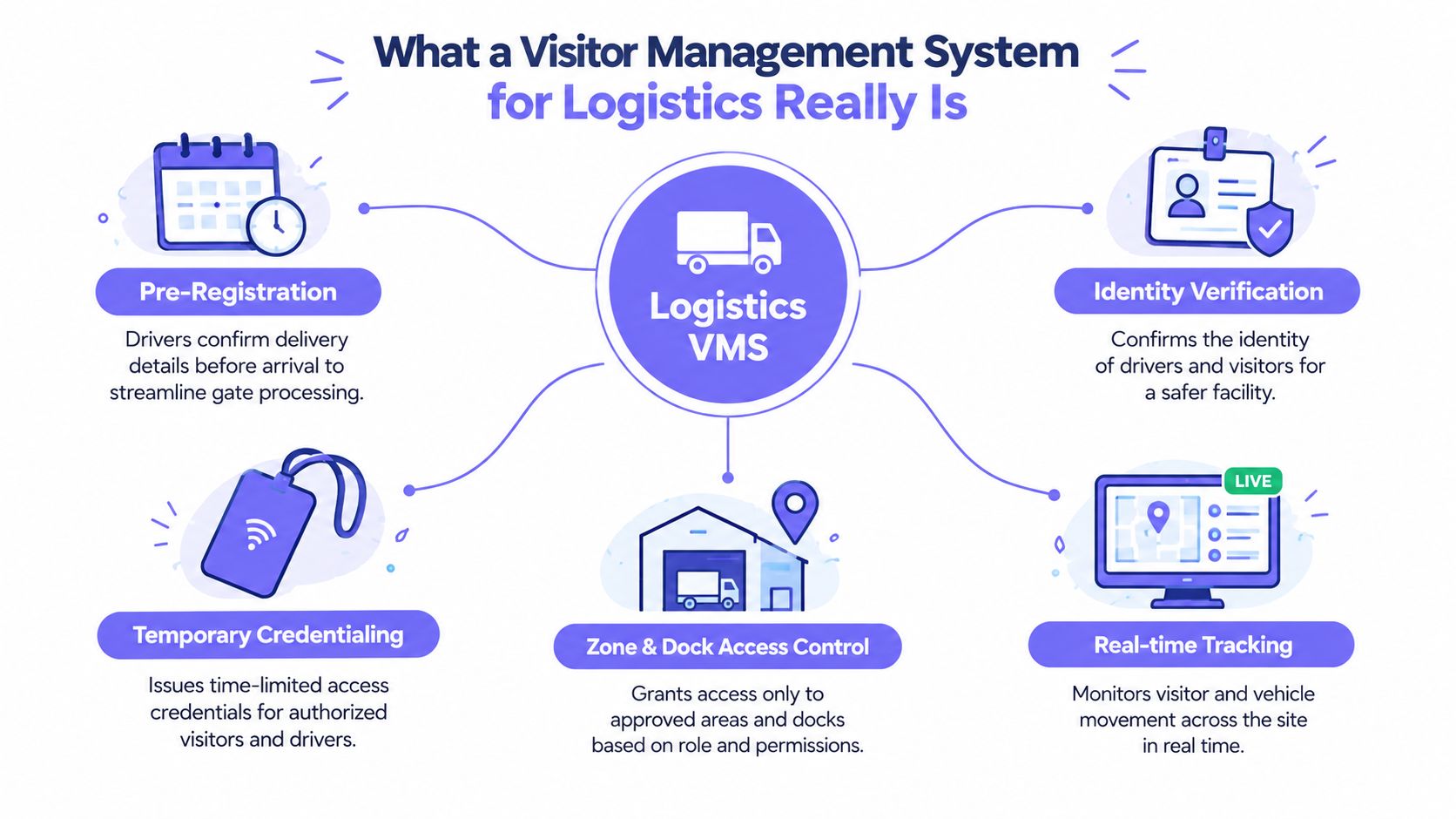
A complete visit typically follows these stages:
Pre-registration
A host, planner, carrier, or visitor enters the expected arrival details. The record can identify the visitor type, purpose, host, vehicle information, and anticipated access needs.Identity verification
Gate staff or a self-service workflow confirms the visitor's identity. The system can associate the verification with the visit rather than leaving a handwritten name that may be difficult to interpret.Temporary credentialing
The visitor receives a badge, QR pass, mobile key, or other temporary credential. The permission should be limited by time, host, and access zone.Zone and dock control
The credential opens only the approved gate, door, or controlled area. A carrier going to a loading dock shouldn't automatically receive access to offices, inventory rooms, or maintenance areas.Real-time tracking and check-out
Entry, zone attempts, badge assignment, exit, and check-out are recorded. When the visit ends, the temporary permission should be revoked so it doesn't linger.
Why office VMS software often falls short
An office visitor system may be designed around one lobby, a receptionist, and a small number of scheduled guests. A logistics facility may have multiple vehicle entrances, an employee gate, dock doors, contractor access, shift changes, and visitors who spend most of their time outside the main building.
That environment requires cloud-based access control, mobile notifications, gate operator integration, and rules that distinguish a driver from an electrician or inspector. The system must also support unplanned arrivals without allowing the guard to bypass the record entirely.
The practical definition is straightforward: a visitor management system for logistics is a digital control layer for arrival, movement, and departure. It links a person's visit record to the physical access points that shape the yard.
Must Have Features for Driver Workflows and Gate Operations
A logistics VMS earns its place by removing a specific obstruction from the arrival process. The strongest systems don't digitize a sign-in sheet. They connect the driver's pre-arrival information to gate decisions, host notifications, dock instructions, and temporary access.
Pre-registration and mobile check-in
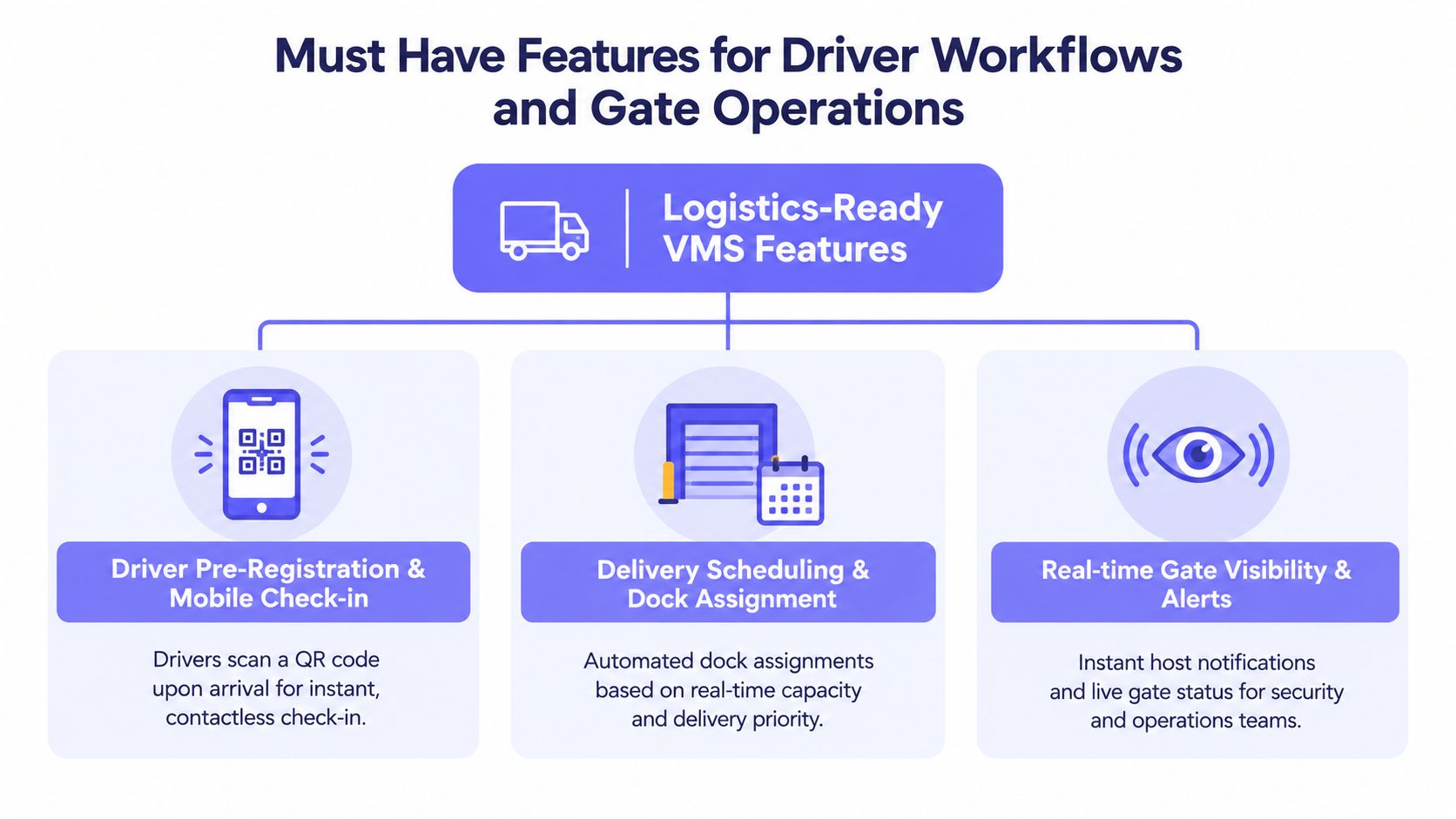
A carrier or host can submit the driver's expected visit details before arrival. A QR code or mobile pass then gives the driver a faster way to confirm the visit at the gate, while an unannounced visitor can follow a separate registration path.
This removes repeated data entry and reduces the chance that a guard must call several departments to identify the shipment. It also creates a clear distinction between a scheduled arrival and an exception that requires review.
Delivery scheduling and dock assignment
Gate activity and dock planning shouldn't operate as separate islands. Once the driver checks in, the system should notify the responsible host or warehouse team and indicate the next approved step, such as a waiting zone or assigned dock.
If the dock is occupied, the driver can remain in a designated area rather than moving through the yard without direction. Better coordination between the gate and dock helps reduce dwell time in yards by limiting unnecessary vehicle movement and avoidable waiting.
Gate and yard integration
The VMS should connect with the gate operator and relevant access-control hardware. Each approved entry can then trigger the correct barrier or door action, while every denied attempt remains part of the security record.
Cellular connectivity is valuable at remote gates, yards, and secondary entrances because the access controller doesn't depend on a facility's Wi-Fi remaining stable. A hardware-agnostic retrofit can also modernize an existing LiftMaster, Viking, FAAC, Nice, DoorKing, or Mighty Mule installation without requiring a complete gate replacement. Facility teams can review how cellular gate openers work before selecting the control architecture.
Video verification and host response
A guard or host may need to see who is requesting access, particularly at an unmanned entrance or during an unexpected visit. A one-way video workflow, such as a GuestView-style call, lets the visitor use a phone camera while the responsible person verifies the request remotely.
This approach addresses a common weakness in remote visitor access. A digital credential should support a decision, not remove the decision entirely when identity or purpose is unclear.
Temporary, scope-limited credentials
Credentials should be tied to:
- A named visitor or driver
- An approved host or escort
- A defined time window
- A specific gate, door, dock, or zone
- An automatic revocation event
A credential that remains active after the truck departs creates unnecessary exposure. Automatic revocation at check-out reduces the chance that a visitor can return later using access originally issued for a completed delivery.
Searchable logs and mobile management
Security supervisors and property managers need more than a record stored at the gatehouse. They should be able to search entries, review alerts, see current presence, and approve or revoke access from a mobile device or centralized dashboard.
Mobile access also helps hosts respond without walking to the gate. The goal isn't to eliminate human judgment. It's to give the right person enough context to make a fast, documented decision.
Security Compliance and Audit Readiness Without the Paper Chase
An audit-ready visitor record answers five practical questions: who arrived, why they arrived, who approved them, where they went, and when they left. A paper log may capture only a name and a signature, often without enough detail to reconstruct the visit.
For logistics and transportation facilities, guidance recommends recording visitor type, purpose, host or escort, entry and exit timestamps, badge or credential identifier, and the specific access point used. Records should be searchable and exportable so a security team can respond to an inspection, incident, or customer inquiry without sorting through binders.
Fields that turn activity into evidence
| Data Field | Why It Matters for Logistics |
|---|---|
| Visitor type | Distinguishes drivers, carriers, vendors, contractors, and inspectors so different rules can apply. |
| Full name | Identifies the individual associated with the visit. |
| Photo ID verification | Provides a documented identity check instead of relying on a handwritten name. |
| Purpose of visit | Connects access to a delivery, pickup, repair, inspection, or other approved activity. |
| Host or escort identity | Establishes who accepted responsibility for the visitor. |
| Declared access zone | Shows which gate, dock, yard, building, or secure room the visitor was authorized to use. |
| Badge or credential identifier | Links the physical or digital permission to the visit record. |
| Entry and exit timestamps | Supports presence checks, incident reconstruction, and departure verification. |
| Specific access point | Shows where the visitor entered or attempted to enter. |
Industrial security guidance commonly limits visitors and contractors to approved zones and requires escorting outside reception or gate areas. Connecting the check-in record to access control helps ensure that a temporary credential opens only the approved doors.
Compliance programs need traceability
Physical access records can support NIST-based access controls by helping teams verify whether restrictions function as intended. Complete visitor traceability is also operationally useful for logistics programs and frameworks such as C-TPAT, ISO 28000, FMCSA, and CBSA, particularly when an organization must explain who was present during a shipment, inspection, or safety event.
Retention must follow the facility's policy, legal obligations, and data-minimization requirements. Some industrial guidance recommends system-generated visitor records retained for at least one year, with five years for injury-related data where applicable. Waymap's guidance on compliance system design offers useful context for structuring records around operational accountability rather than collecting disconnected fields.
Audit principle: The strongest log isn't the longest log. It's the one that captures necessary evidence consistently and can be retrieved when a real question arises.
A dashboard with real-time entry logs can replace shared PINs and informal gate calls with accountable permissions. For Nimbio deployments, the relevant access events can be reviewed alongside the broader visitor workflow, helping managers connect remote approval, gate activity, and credential status.
Operational Benefits and ROI When Gate Friction Disappears
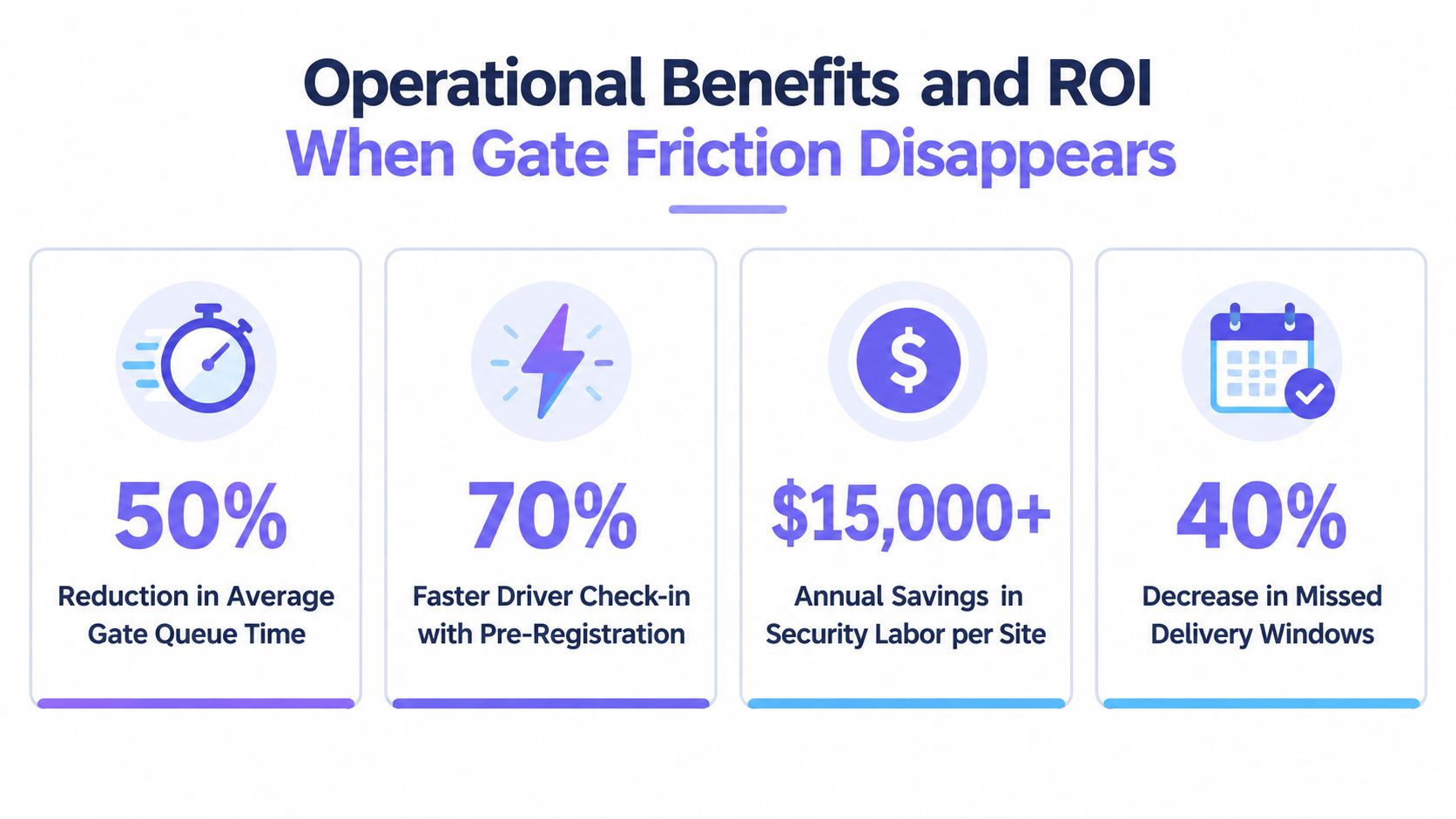
The financial case for a logistics VMS begins with throughput, not badge printing. A driver waiting for approval occupies space, delays the dock sequence, increases radio traffic, and can push later arrivals into the same queue.
Pre-registration moves information gathering before the vehicle reaches the gate. QR check-in reduces repeated typing, host alerts remove phone-call dependency, and dock instructions prevent drivers from circulating through a yard that isn't ready for them.
The result is a cleaner operating pattern:
- Before arrival: The carrier or host submits the visit details.
- At the gate: The driver verifies the record and receives the correct instruction.
- In the yard: Access follows the approved zone and dock assignment.
- At departure: Check-out closes the visit and revokes temporary permissions.
Manual versus integrated operations
| Manual approach | Integrated digital approach |
|---|---|
| Guards copy names and details into paper records. | Drivers or hosts submit information before arrival, with staff reviewing exceptions. |
| Hosts learn about arrivals through calls or radio messages. | Notifications reach the responsible host or warehouse team automatically. |
| Temporary access may remain active after the visit. | Permissions can be limited by time and zone, then revoked at check-out. |
| Managers reconcile separate gate, dock, and badge records. | A unified event trail supports presence review and reporting. |
| Each site maintains its own visibility. | Multi-site teams can review activity through a shared dashboard where supported. |
The business case should measure the process rather than assume a result. Useful measures include queue duration, time from arrival to approval, time spent waiting for a dock, manual corrections, missed handoffs, denied access attempts, and unresolved check-outs.
Market context supports the shift toward software-led workflows. One industry report values the global visitor management systems for warehouses market at $1.8 billion in 2025 and projects $4.2 billion by 2034, a 12.4% CAGR. The same report assigns 46.2% of 2025 market value to software, about $831 million, and gives Asia Pacific 35.8% of revenue share. These figures are projections and market estimates from the warehouse visitor management market report, not a guaranteed return for an individual facility.
Integration and Deployment Checklist for Logistics Facilities
Deployment should start with the physical site, not the software settings. A logistics facility may have a main truck gate, employee entrance, visitor gate, dock doors, pedestrian doors, and an after-hours access point, each with different risk and throughput requirements.
Map the existing access environment
The first assessment should document:
- Gate operators: Check compatibility with LiftMaster, Viking, FAAC, Nice, DoorKing, Mighty Mule, and other installed equipment.
- Connectivity: Confirm cellular coverage at each controller location and identify areas where Wi-Fi is unreliable.
- Entry points: Record every gate, door, dock, and pedestrian route that requires a decision.
- Zones: Separate public, visitor, yard, dock, office, inventory, and restricted areas.
- Fallback procedures: Define what happens during a power, cellular, or system outage.
A hardware-agnostic retrofit is useful when the facility wants modern smartphone access without replacing functioning gate machinery. Existing remotes and keypads can remain during the transition, which gives operations teams time to train staff and visitors.
Configure rules by visitor type
A carrier shouldn't receive the same permission as a maintenance contractor. Create role-based workflows for:
- Drivers: Delivery or pickup purpose, vehicle details, dock or waiting-zone permission.
- Vendors: Host approval and limited access to the agreed work area.
- Contractors: Escort requirements, safety acknowledgment, and scheduled access window.
- Inspectors: Named host, defined route, and access to required records or zones.
- Employees: Separate credentials and rules from temporary visitors.
Connect the VMS to physical access control, watchlist screening, scheduling tools, or yard systems where the facility requires those functions. Configure over-the-air updates and hold-open schedules carefully, especially for gates that must remain open during planned operating periods.
Choose the commercial model
| Facility condition | Pricing approach to evaluate |
|---|---|
| Stable residential, multifamily, or predictable site access | Fixed monthly pricing can simplify budgeting. |
| Variable commercial traffic or usage across sites | Usage-based pricing can align cost with activity. |
| Mixed operations with seasonal peaks | A hybrid structure may better reflect changing demand. |
The final test should include a real arrival simulation. Confirm that a host can approve access from a phone, the gate responds, the credential opens only the intended point, the log records the event, and check-out closes the permission. Facilities needing programmatic gate control for fleets should also test the relevant integration path before rollout.
Common Pitfalls and Best Practices That Keep Yards Moving
A check-in screen and a badge printer don't automatically create secure logistics access. They can turn a weak paper process into a digital record while leaving the gate, yard, and credential rules disconnected.
Several mistakes appear repeatedly:
- Treating every visitor alike: Drivers, contractors, inspectors, and carriers need different approval and zone rules.
- Using shared four-digit codes: A shared code identifies no individual and provides weak accountability.
- Issuing open-ended credentials: A pass without an expiry or zone restriction can outlive the original delivery.
- Skipping visual verification: Remote approval is weaker when the host can't assess an unexpected visitor.
- Ignoring secondary entrances: An audited main gate doesn't compensate for untracked employee, dock, or contractor access.
- Reviewing logs only after an incident: Regular review can reveal repeated denied attempts, incomplete check-outs, or unusual access patterns earlier.
The stronger practice is to design the workflow around the yard's busiest moments. Use mobile pre-registration for expected arrivals, provide a clear exception path for unscheduled visitors, notify an accountable host, require escorts where appropriate, and revoke temporary access when the visit ends.
A cellular smartphone-controlled system can support this model at existing gates without relying on Wi-Fi drops or forcing an immediate hardware replacement. It can also preserve familiar remotes and keypads while the facility moves away from untrackable shared access.
Practical test: If a manager can't identify the person, purpose, access point, host, and departure status from one record, the workflow still has an audit gap.
Nimbio provides cellular, smartphone-controlled access for electronic gates and building entries, with remote visitor credentials, real-time entry logs, hardware-agnostic retrofit options, and video verification through GuestView. Logistics and facility managers can visit Nimbio to review the platform and discuss a practical deployment for gates, yards, docks, and controlled entrances.
Managing gate access at a yard, terminal, or truck parking site?
See how cellular access control works for trucking and logistics sites. Explore Trucking, Logistics & Truck Parking →


