

A resident presses a worn gate remote, hears the motor start, and waits. Nothing happens. A visitor calls from the call box, a former tenant still knows the shared keypad code, and the property manager spends the morning sorting out access complaints instead of managing the property. The hardware may still work, but the access process no longer gives people reliable control or useful accountability.
That's why choosing an access control integrator is no longer just a search for someone who can mount a reader or connect a relay. Property managers, HOA boards, installers, and facility teams need a partner who can coordinate gate operators, controllers, mobile credentials, cloud software, visitor workflows, audit logs, and ongoing support.
The modern integrator connects generations of equipment. A cellular retrofit can preserve an existing gate operator while adding smartphone access, remote visitor management, and credential controls without depending on unreliable property Wi-Fi. The result is a more practical path from legacy entry hardware to cloud-based access control.
Table of Contents
- Introduction What an Access Control Integrator Really Does Today
- Understanding the Role and Responsibilities of an Access Control Integrator
- Why Demand for Professional Integration Keeps Growing
- How to Evaluate Access Control Solutions Like an Integrator
- Integration Checklist for Hardware Retrofit and Cellular Connectivity
- Business Case for Partnering With a Platform Like Nimbio
- Onboarding Technical Support and Next Steps for Integrators
Introduction What an Access Control Integrator Really Does Today
A gated community often exposes access problems before anyone labels them as system problems. A keypad code gets shared beyond the intended residents, a clicker disappears, a delivery driver waits outside, and the HOA board asks whether anyone can verify who opened the gate. Each issue looks small on its own, but together they reveal a gap between physical equipment and access governance.
An access control integrator closes that gap. The role combines field installation, low-voltage wiring, system configuration, credential administration, connectivity planning, and user support. Instead of treating the gate operator, reader, call box, and software dashboard as separate products, the integrator designs how they should operate as one access environment.
That distinction matters because access control has evolved through several technology transitions. Callboxes appeared in Berlin in 1881, PIN-based keypads emerged in the 1960s, touchscreen kiosks entered access-control-style use cases by the late 1970s, and electronic access control gained popularity in the 1970s as organizations looked beyond mechanical locks. This history is summarized in the evolution of access control, and it explains why many properties now contain several generations of equipment.
The integrator's modern responsibility
A locksmith may focus on the lock and physical security hardware. An IT vendor may focus on networking, identity systems, or cloud applications. An access control integrator has to make those pieces function together while respecting gate safety, electrical requirements, tenant workflows, and administrative responsibilities.
A strong integrator helps a property team answer practical questions:
- Who can enter, and during which schedules?
- How are credentials issued, suspended, and revoked?
- Can a manager provide temporary visitor access without sharing a permanent code?
- What happens if Wi-Fi drops?
- Can an administrator review an entry event later?
- Which existing remotes, keypads, or operators can remain in service?
For organizations managing sensitive identities, the broader discipline of identity governance also matters. Property and security teams can learn from resources such as this guide to IAM for healthcare organizations, particularly its focus on access ownership, lifecycle controls, and the consequences of unclear permissions.
The practical promise of an integrator is simple: entry should be convenient for authorized users, difficult to misuse, and visible to the people responsible for the property. The sections ahead focus on how to evaluate that capability, execute a retrofit, and build a support model that lasts beyond installation.
Understanding the Role and Responsibilities of an Access Control Integrator
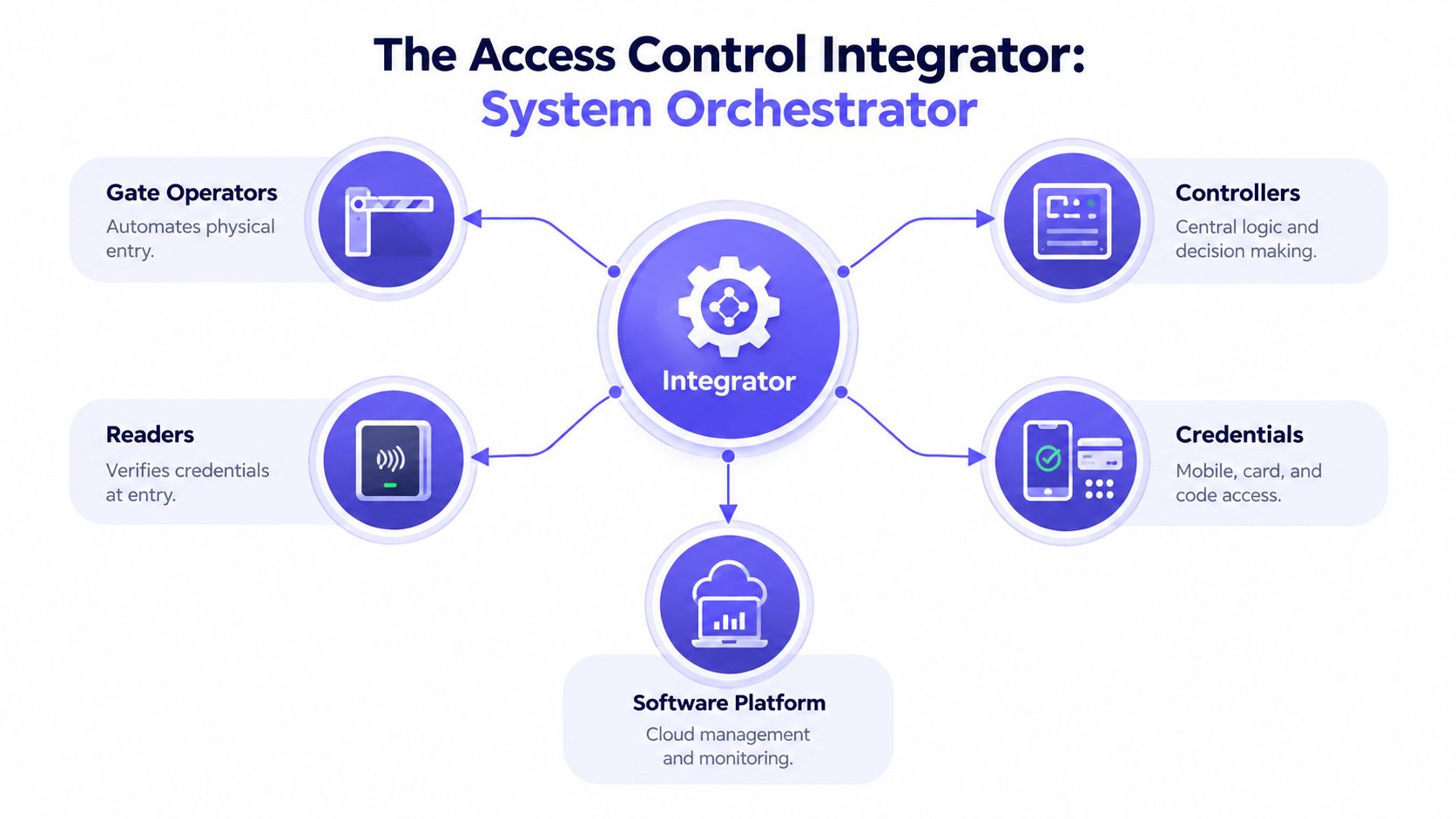
An access control integrator works like a general contractor for entry systems. A general contractor coordinates trades, materials, sequencing, and inspections. An integrator coordinates the gate operator, controller, reader, credential, communications path, and management platform.
The comparison is useful because no single device decides whether a property has a dependable access system. The gate operator moves the barrier. The controller applies rules. The reader or mobile credential identifies the user. The software records events and gives administrators control.
The work begins with system design
Before an installer selects a controller, the property needs a clear access model. A small residential gate may need resident credentials, visitor access, and an activity log. A multifamily or commercial site may also need role-based permissions, multiple schedules, contractor access, and centralized administration.
The integrator typically evaluates:
- Entry points: Gates, pedestrian doors, vehicle lanes, call boxes, and service entrances.
- Existing equipment: Operator models, control boards, readers, keypads, remotes, safety devices, and power supplies.
- Credential policy: Mobile credentials, cards, codes, temporary passes, and revocation procedures.
- Administrative ownership: Whether property management, security, IT, HR, or an HOA board controls specific decisions.
- Operational continuity: How the site behaves during a power issue, connectivity interruption, maintenance period, or emergency.
This discovery work prevents a common mistake, buying a technically capable device without defining who controls access or how exceptions get handled.
Installation is only one responsibility
Field work includes mounting hardware, confirming low-voltage paths, connecting inputs and outputs, protecting equipment from weather, and testing the operator's safety functions. It also includes configuration in the software platform, credential enrollment, permission assignment, and administrator training.
After launch, the integrator may support:
- Credential activation, suspension, and removal.
- Visitor and contractor workflows.
- Audit-log review and event troubleshooting.
- Firmware and configuration management.
- Device replacement and maintenance coordination.
- Expansion to additional buildings, gates, or properties.
Practical rule: A successful installation isn't complete when the gate opens. It's complete when the right people can manage access without calling the installer for every routine change.
Governance becomes critical across properties
Multi-site environments create ownership questions that hardware alone can't solve. Human resources may know when an employee leaves, IT may control identity accounts, and security may own physical access rules. If those systems disagree, the integrator needs a defined hierarchy for which record governs the decision.
The same issue appears in residential settings. A tenant may move between buildings, a contractor may need temporary access, or a resident may lose a phone. Good integration turns those status changes into manageable lifecycle events rather than informal requests and shared credentials.
Why Demand for Professional Integration Keeps Growing
The access control market reached an estimated USD 10.76 billion in 2024 and is projected to reach USD 17.30 billion by 2030, with an 8.4% compound annual growth rate from 2025 to 2030, according to Grand View Research's access control market analysis. For integrators, the significance isn't only the market size. It's the installed base of doors, gates, readers, controllers, and software that needs design, migration, maintenance, and standardization.
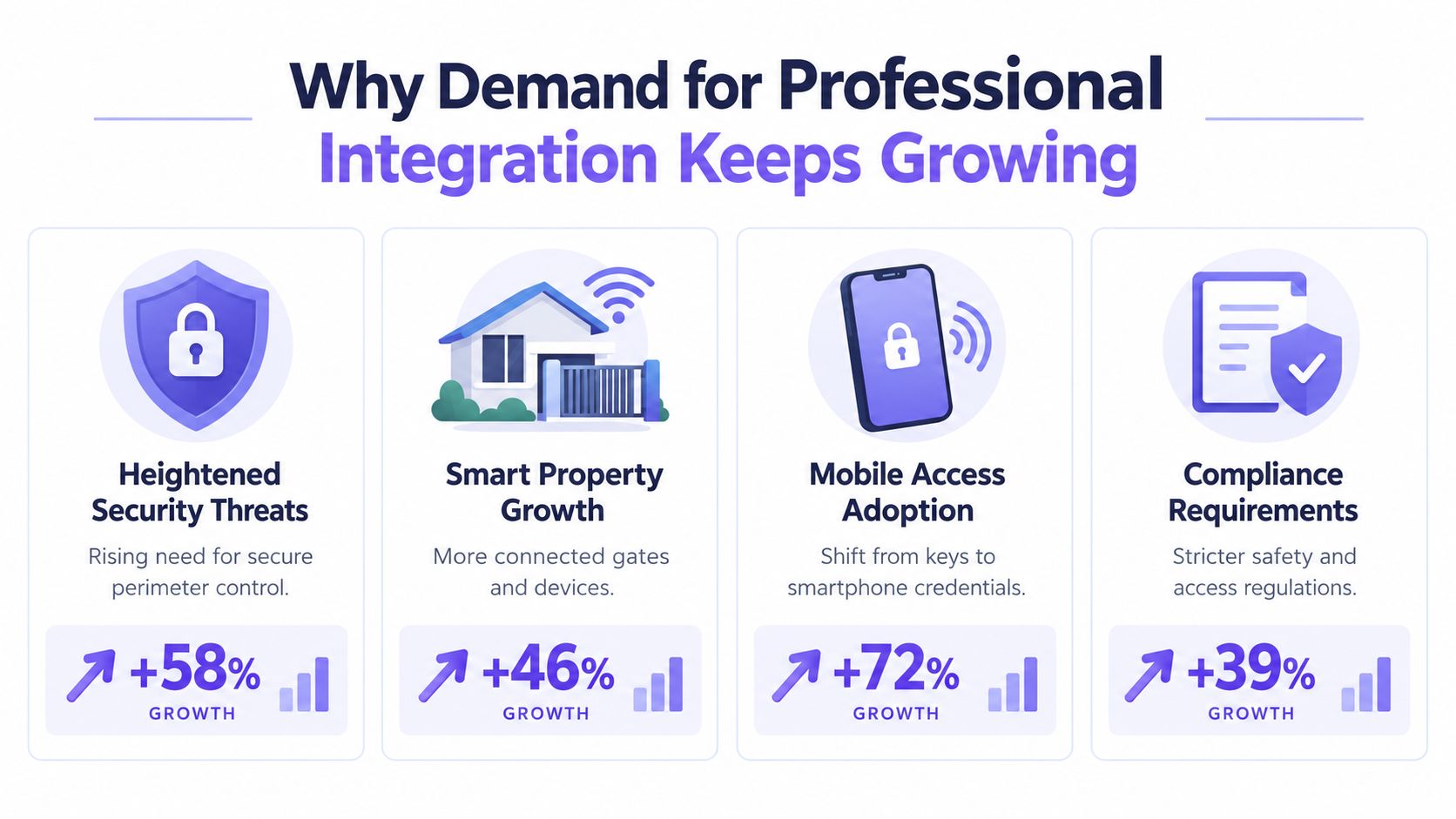
Three pressures are expanding the role.
First, property owners face heightened security threats and stronger expectations for auditability. A shared PIN may open a gate, but it rarely tells a manager which individual used it. Mobile credentials, controlled permissions, and event logs create a more accountable operating model.
Second, regulatory and compliance requirements make informal access processes harder to defend. Integrators help teams connect access decisions with documented policies, safety interfaces, administrative permissions, and maintenance records.
Third, connected property technology is changing what users expect. Residents want smartphone entry. Managers want remote administration. Commercial operators want systems that can connect with visitor management, video, identity, and facility workflows.
Installed hardware creates retrofit work
Most properties don't replace every component at once. An operator may still be reliable while its keypad is outdated. A community may want mobile access without removing functioning remotes. A commercial facility may need centralized reporting while preserving existing field devices.
That creates work in:
- Interoperability: Connecting new control layers to existing operators and readers.
- Migration: Moving users from shared codes or legacy cards to managed credentials.
- Standardization: Applying consistent policies across multiple gates or buildings.
- Maintenance: Monitoring faults, replacing failed components, and keeping firmware current.
- Lifecycle services: Managing credentials, logs, visitor access, and remote support after installation.
Hardware margin isn't the whole business
Industry coverage identifies technician shortages, hardware margin compression, capital scrutiny, and the need for customer education as challenges for integrators. Security Dealer & Integrator's access control market coverage also highlights the shift toward positioning access control as an operational solution instead of a device sale.
That shift changes the commercial conversation. An installer can provide value through recurring credential administration, remote troubleshooting, audit review, policy updates, and system expansion. The customer isn't only paying for equipment. The customer is paying for a functioning access process.
A related governance gap appears in converged environments. ASMag's coverage of access control architecture and market direction points to problems involving system hierarchy, project governance, and data ownership across identity, visitor management, and lifecycle events. An integrator who defines those responsibilities early can prevent the most expensive failures, even when every individual device is technically compatible.
How to Evaluate Access Control Solutions Like an Integrator
A property team should compare access solutions by operational behavior, not by the feature list on a product box. The central question is whether the system can connect existing equipment, protect credential exchanges, maintain service during connectivity problems, and give authorized administrators clear control.
| Evaluation Criteria | What to Look For | Why It Matters |
|---|---|---|
| Retrofit compatibility | Support for existing gate operators, relays, readers, and safety devices | Avoids unnecessary replacement and reduces disruption |
| Connectivity | Cellular communication where Wi-Fi is unreliable, with clear offline behavior | Prevents a local network issue from becoming an entry failure |
| Reader protocol | OSDP with encryption, bidirectional communication, and mutual authentication | Improves communication security and device supervision |
| Credential management | Mobile credentials, schedules, temporary access, suspension, and revocation | Replaces informal sharing with controlled lifecycle management |
| Visitor workflows | Temporary invitations, remote approval, and visitor records | Helps staff manage guests without issuing permanent credentials |
| Auditability | Searchable entry logs, administrative activity, and status visibility | Gives property teams evidence for review and troubleshooting |
| Governance | Defined ownership across property management, IT, HR, and security | Prevents conflicting access decisions |
Connectivity should match the property
Wi-Fi can work well where coverage, power, network ownership, and maintenance are dependable. It can also introduce an avoidable dependency at a remote gate. A cellular-first design gives the access controller its own communications path, which helps avoid Wi-Fi drops and can eliminate the need to trench new network cable.
Hardware-agnostic design deserves equal attention. A platform should add a control layer to a compatible operator rather than forcing a property to replace a working gate. For a deeper decision framework, property teams can use this cellular gate opener buying guide.
Protocol security belongs in the specification
Legacy Wiegand transmits credentials without encryption or mutual authentication. That means a tapped cable or compromised reader may expose credential traffic without giving the controller a strong way to verify the device.
OSDP v2 uses encrypted, bidirectional communication and mutual authentication over RS-485. The comparison is detailed in this access control integration guide, which also explains why supervised device status improves detection of tampering or device loss.
A design that pairs the reader protocol with segmented networking, authenticated administrator access, and firmware management. Protecting one reader isn't enough if an unmanaged network path can provide access to the wider system.
Ask who owns the data
A cloud dashboard can centralize control, but centralization doesn't automatically create governance. During evaluation, the integrator should identify the authoritative source for employee, resident, tenant, contractor, and visitor status.
The purchasing team should request clear answers to these questions:
- Who can issue and revoke credentials?
- Which events appear in the audit log?
- How are administrator permissions separated?
- What happens when a person changes status across sites?
- How are integrations supported through APIs or exports?
- Which settings can property staff change without technical assistance?
Integration Checklist for Hardware Retrofit and Cellular Connectivity
A gate may open normally for residents yet still be a poor retrofit candidate if its wiring, safety circuits, or power arrangement is undocumented. The integrator's first job is to replace assumptions with a field record. Operators that look alike can use different control inputs, enclosure layouts, and trigger methods.
This checklist applies to residential communities, multifamily properties, commercial facilities, and other smart community environments. It also helps installers identify work that belongs in the retrofit and work that requires a separate electrical service.
1. Document the existing gate
Photograph the operator label, control board, terminals, safety devices, enclosure, and nearby power equipment. Record the operator model, then trace how remotes, keypads, call boxes, and access readers currently trigger the gate.
Use the practical process in this legacy system integration guide. A clear record of the hardware and wiring path gives the project a reference point before any connection changes.
2. Verify power and low-voltage paths
Confirm available power, grounding, enclosure space, cable condition, and the route to the proposed controller. Check cellular signal quality where the equipment will be mounted. The enclosure must also protect the added device from weather and tampering.
If the site needs broader electrical remediation, coordinate with a qualified provider of commercial electrical repair. Keeping that work separate from access-control configuration clarifies responsibility and reduces troubleshooting confusion.
3. Select a compatible controller
Match the controller to the operator's input method and the property's access policy. Compatible gate families may include LiftMaster, Viking, FAAC, Nice, DoorKing, and Mighty Mule, among others.
A cellular controller can typically connect on the low-voltage side of an existing electronic gate operator. Review this guide to retrofitting legacy gate operators before deciding whether replacement is necessary. This approach can add smartphone credentials, temporary visitor access, and remote audit logs without replacing the operator or depending on site Wi-Fi.
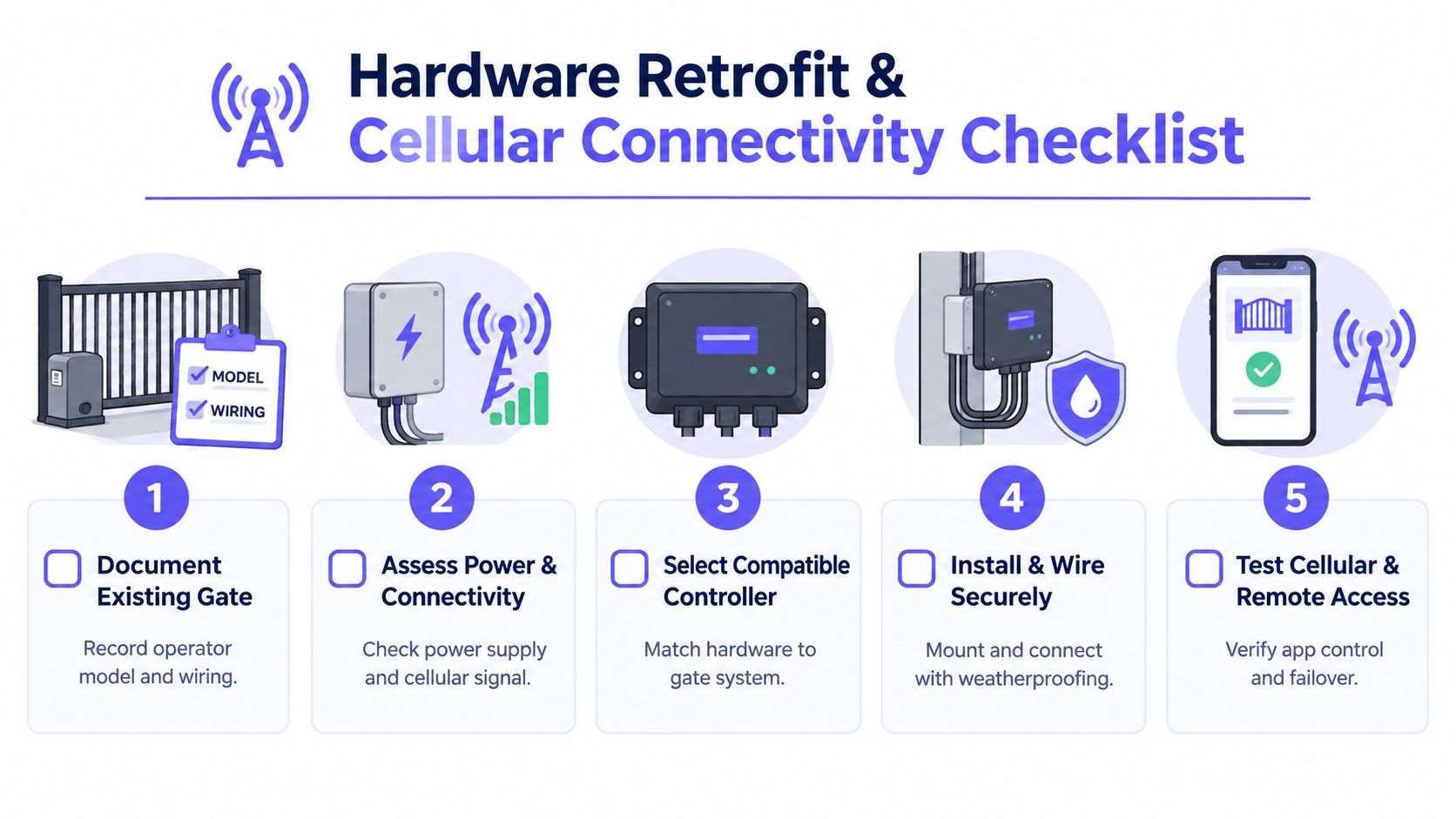
4. Install and preserve useful equipment
Mount the controller securely, protect every connection, and organize wiring for future service. Existing remotes and keypads may remain in operation during a transition if the property's security policy permits them.
Before changing the system, document normal operation. That baseline helps isolate a later fault to the operator, safety device, power supply, communications path, or new controller. It also gives the property manager a clear before-and-after record.
5. Test every access path
A successful gate opening is only one test. Verify each path below:
- Mobile credentials: Authorized users can open the gate through the app.
- Temporary visitors: Invitations expire or can be revoked as intended.
- Remote management: An administrator can grant and remove access away from the property.
- Event records: Entry activity appears in the remote log with useful context.
- Existing controls: Approved remotes, keypads, and call-box workflows behave as planned.
- Failure behavior: The team understands what happens during connectivity, power, or operator faults.
Cellular connectivity separates gate access from local Wi-Fi performance, but it does not remove the need for a proper handoff. Provide wiring and device documentation, administrator training, and a maintenance contact. The property should know who can manage credentials, interpret events, and respond when the operator or communications path fails.
Business Case for Partnering With a Platform Like Nimbio
For an installer, the business case for modern access control extends beyond the initial hardware invoice. A platform partnership can create a repeatable service around configuration, credential administration, remote support, system expansion, and customer education.
The commercial structure should be transparent. Residential and multifamily properties can use fixed monthly rates, while commercial sites can use variable, usage-based pricing. A hardware-plus-subscription model gives integrators a way to discuss ongoing operational value instead of treating every project as a one-time equipment sale.
Services create durable customer value
Property managers often need help with routine tasks that don't justify a truck roll but still matter to security:
- Credential scheduling: Set access windows for residents, contractors, vendors, and staff.
- Remote revocation: Remove access when a resident moves, a device is lost, or a contractor finishes work.
- Entry monitoring: Review real-time activity and investigate unusual events.
- Hold-open automation: Schedule approved periods when a gate should remain open for move-ins, deliveries, or events.
- Software maintenance: Apply over-the-air updates without replacing field hardware.
- Visitor verification: Use GuestView video verification so a resident can review a visitor's request before granting entry.
A lifetime hardware warranty can also simplify replacement planning when a device needs service. The integrator still provides value through site knowledge, installation support, configuration, and customer communication.
The partner model addresses labor pressure
Technician shortages and margin pressure make inefficient deployments harder to sustain. A platform that supports simple retrofits, remote provisioning, clear documentation, and dedicated partner assistance can reduce avoidable field work while giving installers a service package to offer customers.
The platform should also support integration beyond a single dashboard. Nimbio provides an AI-ready gate access platform that connects electronic gates and building entry systems through cellular hardware, smartphone credentials, remote administration, visitor access, and access-log functions. The relevant business question isn't whether every customer needs every feature. It's whether the integrator can package the features that solve the customer's actual operational problem.
Business principle: Recurring access services work when they remove recurring work for the property team.
A practical partner offer might combine initial site assessment, retrofit installation, administrator onboarding, credential policy setup, and an ongoing support plan. That structure makes the integrator responsible for outcomes without requiring the property owner to build a new access-control department.
Onboarding Technical Support and Next Steps for Integrators
Strong onboarding begins before the installer arrives. The platform and integrator should exchange operator documentation, site photos, wiring information, access-policy requirements, administrator details, and a clear test plan.
Support quality becomes visible in the handoff. Property managers and HOA boards should receive concise operating instructions, credential procedures, visitor workflows, escalation contacts, and guidance for reviewing audit logs. Installers should have wiring references, compatibility checks, remote troubleshooting tools, and a defined process for replacement or firmware issues.
A useful onboarding review asks:
- Can the integrator verify hardware compatibility before the site visit?
- Can the property team manage credentials without technical assistance?
- Can support distinguish a cellular issue from an operator or power issue?
- Are audit logs understandable to nontechnical administrators?
- Can the system receive over-the-air updates as requirements change?
- Can the same operating model expand to other gates or properties?
The next step should be controlled rather than broad. Select a representative gate, document its existing equipment, install the cellular controller, test resident and visitor workflows, train administrators, and review the results with the integrator. Once the process is reliable, the property can standardize the same documentation and support model across additional sites.
An access control integrator earns long-term trust by making the technology understandable, the retrofit predictable, and the operating responsibilities clear. That combination turns legacy gate hardware into a manageable part of a modern cloud access environment.
Nimbio offers cellular keyless entry for electronic gates and building access, with smartphone credentials, remote visitor management, audit logs, and retrofit compatibility that preserves existing operators. Property managers, HOA boards, and installers can visit Nimbio to evaluate a practical path from legacy access hardware to connected cellular control.


