
A property manager usually notices the dashboard problem before noticing the hardware problem. The gate still opens, residents still call, but the office spends too much time resetting codes, tracking down lost fobs, and guessing who let a vendor in after hours. That friction turns access control into a daily administrative burden instead of a controlled system.
For HOAs and multifamily teams, the dashboard is where security, convenience, and accountability either come together or fall apart. The right admin dashboard features reduce manual work, tighten permissions, and make remote access management practical for a modern smart community.
Table of Contents
- Why Your Access Control System Is Only as Good as Its Dashboard
- The Foundation Core Admin Dashboard Features
- Real-Time Monitoring and Proactive Alerts
- Ensuring Security with Audits and Permissions
- Advanced Features for Operational Efficiency
- Prioritizing Features for Your Property Type
- Implementing a Modern Access Control Dashboard
Why Your Access Control System Is Only as Good as Its Dashboard
An access control system can have capable hardware and still create chaos if the dashboard is weak. That happens when managers rely on disconnected tools, shared PINs, handwritten vendor notes, and a patchwork of fobs that nobody can fully account for. The system exists, but the control doesn't.
For gated communities and apartment buildings, the dashboard is the operating layer. It decides whether staff can grant temporary access without opening security gaps, whether residents can be managed without office bottlenecks, and whether the board can verify what happened when an incident occurs.
That matters even more as the industry moves toward modern, scalable platforms. The global electronic access control systems market is projected to grow from US$51.2 billion in 2025 to US$102.6 billion by 2032, with a CAGR of 10.5%, according to Persistence Market Research's electronic access control systems outlook. For property managers, that projection isn't just market trivia. It signals that cloud-based access control is becoming standard operating infrastructure.
Old access methods fail in predictable ways
Legacy methods usually break down in the same places:
- Shared codes spread too far: A vendor, former resident, or short-term guest may still know the code long after access should've ended.
- Fobs create inventory headaches: Staff must issue them, replace them, track deposits, and hope they're returned.
- On-site dependence slows everything down: If a manager must be physically present to change access, every urgent request becomes a disruption.
- Fragmented records weaken accountability: It's hard to verify who changed permissions or who entered at a specific time.
Practical rule: If a manager can't answer “who has access right now?” in a few clicks, the system isn't under control.
A smart community needs more than a functioning gate operator. It needs an interface that centralizes credentials, user roles, event visibility, and administrative decisions in one place. That's why evaluating admin dashboard features is often more important than comparing entry devices alone.
The Foundation Core Admin Dashboard Features
The baseline for modern access control is no longer a keypad and a management portal with a few settings pages. A usable dashboard must support the daily realities of resident turnover, service vendors, after-hours access, and multi-person administration across a property.
Industry direction supports that shift. In 2024, networked access control systems accounted for 79% of revenue share in the card-based electronic access control market because they support centralized, scalable control and integrate well with surveillance systems, according to SNS Insider's market report on card-based electronic access control systems.
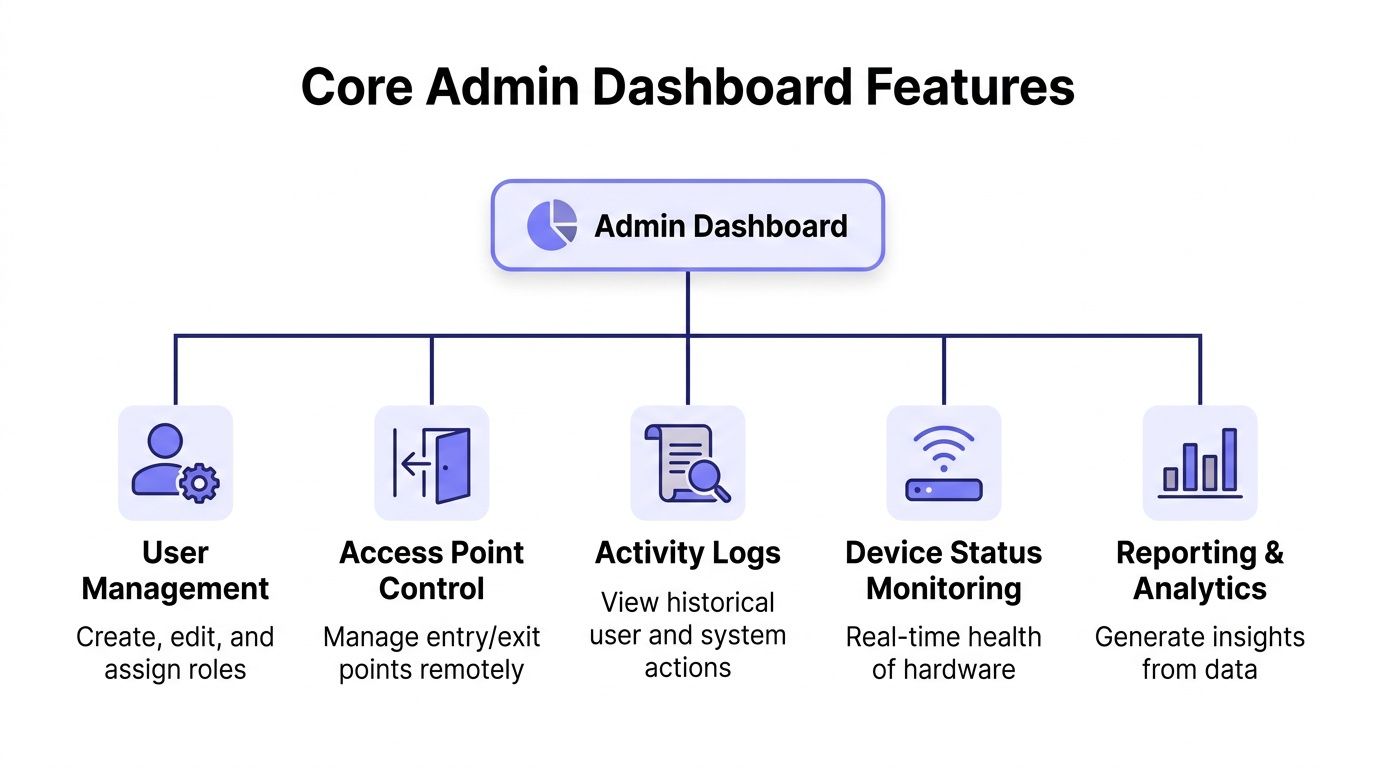
User roles must match real property operations
The first essential feature is user and role management. Not everyone on a property should have the same authority, and dashboards fail when they treat admin access as all-or-nothing.
A strong system separates permissions by responsibility:
- Property managers usually need full control over resident access, guest settings, schedules, and reports.
- Front office or concierge staff may need to approve visitors or review logs without changing system-wide rules.
- Maintenance teams may need limited operational access tied to work hours and selected entry points.
- Board members often need visibility and oversight, not day-to-day administrative power.
What doesn't work is giving every staff member the same login or using a single shared admin account. That makes training harder, increases risk, and turns every mistake into a mystery.
Credentials and schedules should be digital first
The second core function is digital credential management. In practice, this means administrators can grant, revoke, and update access without collecting hardware or visiting the gate.
The best dashboards make credential management feel operational, not technical:
- A new resident moves in. Access is issued immediately.
- A resident moves out. Access is revoked without waiting for a fob return.
- A vendor needs temporary entry. Access is scheduled for a specific window.
- A recurring service team needs weekly access. Rules are set once, then managed centrally.
A property doesn't need more credentials. It needs fewer unmanaged credentials.
Smartphone-based access control has a clear advantage over fobs and clickers. Digital credentials are easier to update, easier to schedule, and easier to remove when circumstances change.
The third foundational feature is access scheduling. Delivery staff, gardeners, cleaners, pool technicians, and contractors rarely need permanent access. Dashboards should support one-time, recurring, and time-bound entry rules without creating ad hoc exceptions that staff later forget to clean up.
A practical dashboard also needs access point control, activity logs, device status visibility, and reporting. Without those pieces, the interface becomes a credential list rather than a true control center.
Real-Time Monitoring and Proactive Alerts
Static dashboards are fine for recordkeeping. They're weak for operations. A property team needs to know what's happening now, not only what happened after the fact.
That's why real-time monitoring has become a defining requirement in modern admin dashboard features. A foundational feature of modern dashboards is the ability to track critical metrics and system alerts instantly, which helps organizations respond within seconds rather than hours, as described in Mokkup's overview of modern dashboard capabilities.
A useful visual model appears below.
Live visibility changes response time
For a gated community, real-time visibility should include the status of gates and doors, recent entry events, and the health of connected devices. If a gate is held open, if an access attempt fails repeatedly, or if a controller drops offline, staff should see it quickly.
That changes how teams work:
- Security becomes active instead of reactive
- Resident complaints get verified faster
- Vendors can be checked against actual entry events
- Device problems are spotted before they turn into service chaos
In practical terms, this is what separates a dashboard that helps from one that merely documents. Teams don't need more screens. They need a single operational view with current status and clear signals.
For readers comparing broader operational models, real-time monitoring for business agility offers a helpful explanation of why live system visibility improves responsiveness across environments, not just property operations.
Alerts should be selective and actionable
Too many dashboards treat alerts like a volume game. That leads to noise, and noisy systems get ignored. Good alerts are tied to events that require attention.
The most useful alert categories are usually:
- Forced or unusual entry activity: Something happened that may require review right away.
- Offline device status: A gate controller or entry device stopped reporting.
- Repeated denied attempts: This can indicate user confusion, stale permissions, or suspicious behavior.
- Unexpected open states: A gate or door didn't return to its expected condition.
Operational insight: An alert should tell staff what changed, where it happened, and whether immediate action is needed.
Reliability matters here. If a dashboard depends on unstable local connectivity, live status becomes less trustworthy. That's one reason cloud-based access control with cellular communication has gained traction in properties where Wi-Fi dead zones, router reboots, and signal inconsistency create operational blind spots.
Ensuring Security with Audits and Permissions
When a resident disputes an entry event or a board asks who changed a gate schedule, the answer shouldn't come from memory. It should come from the system. Here, auditability stops being an IT concept and becomes a property management requirement.
Detailed audit logging records user actions, permission changes, and access requests, making it possible to identify who granted or revoked access and when those actions occurred, according to DronaHQ's discussion of essential admin panel features. For access control, that's one of the most important admin dashboard features in the entire stack.
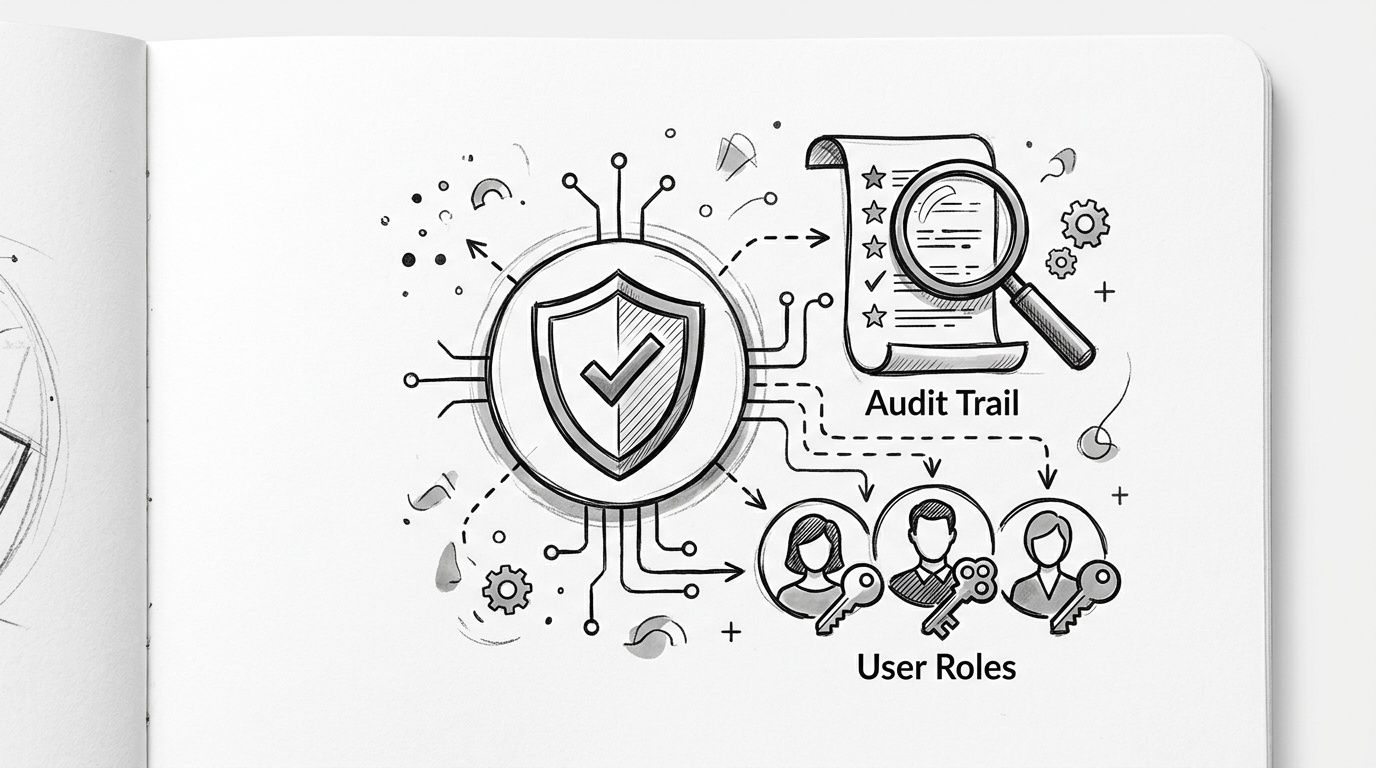
Audit trails protect more than compliance
A complete audit trail protects the property in several ways at once. It gives administrators a timeline of changes, it supports incident review, and it helps demonstrate due diligence when questions arise.
That matters in routine situations, not just extreme ones:
| Situation | What the dashboard should show |
|---|---|
| Former vendor still entered the property | Who issued the credential, when it was created, and whether it was ever revoked |
| Resident says access stopped working | Recent permission changes, denied attempts, and schedule details |
| Board reviews a security complaint | Event history tied to timestamps and user actions |
| Staff member changed settings incorrectly | The exact change, the account used, and when it happened |
Without that history, teams fall back on email threads, text messages, and guesswork. None of those are reliable operational records.
Shared 4-digit gate codes feel convenient until nobody can prove who still has them.
Permissions should reflect job scope
Audit logs work best when paired with granular permissions. If every admin can edit every setting, the dashboard creates unnecessary risk. Sensitive actions should require the right level of authority, while routine tasks remain quick for the staff who handle them every day.
A mature permission model typically limits who can:
- Issue or revoke resident credentials
- Change gate schedules or hold-open settings
- View or export sensitive records
- Manage staff accounts and privileges
- Delete data or alter high-impact configuration
This approach gives a property team operational speed without giving everyone master keys in software form. It also makes training cleaner because each role sees the tools relevant to that role.
For teams evaluating how this should be structured in practice, user role management for properties is a useful reference point for assigning access based on real responsibilities rather than generic admin labels.
Advanced Features for Operational Efficiency
Core controls protect the property. Advanced features protect staff time. That distinction matters because many access systems are secure enough on paper but expensive in labor because every exception, change, and maintenance issue requires manual effort.
The strongest admin dashboard features reduce repeat work. They turn resident onboarding, diagnostics, and system maintenance into efficient tasks rather than office interruptions.
Remote administration reduces field work
One of the biggest operational advantages in modern systems is remote device management. If staff can check status, adjust settings, and diagnose issues from the dashboard, many trips to the gate or entry panel disappear.
That matters for both management teams and installers.
Some of the most valuable efficiency features include:
- Remote configuration changes: Staff can update credentials, schedules, or access rules without visiting the property edge device.
- Bulk user management: New move-ins, staff changes, or portfolio-wide updates can be handled in batches instead of one account at a time.
- Over-the-air updates: Firmware and feature improvements can be delivered without replacing hardware or dispatching a technician for routine updates.
- Remote diagnostics: Installers can verify status before deciding whether a truck roll is necessary.
What doesn't work is a dashboard that only changes database settings while the physical system remains hard to manage. Operational efficiency comes from closing the gap between software control and field reality.
Field rule: If every small change still requires a site visit, the software isn't doing enough work.
Hardware compatibility also matters. A system that can retrofit existing gate operators and building entry hardware is usually easier to justify than one that requires wholesale replacement just to gain modern management tools. That's especially important in older communities where boards want better control without reopening every capital budget conversation.
Analytics should support decisions, not just reporting
Reporting is useful. Actionable analytics are better. Property teams should be able to see patterns that help them manage staffing, vendor access, and resident experience more effectively.
Useful dashboard reporting often answers questions like:
- Which entry points generate the most activity and support load?
- Which access windows create recurring exceptions?
- Are certain vendors repeatedly requesting unscheduled entry?
- Are there recurring denied attempts tied to outdated permissions?
- Which devices show patterns that suggest maintenance attention?
A common mistake is overloading the dashboard with charts that look visually impressive but don't support decisions. The better approach is focused reporting tied to concrete management actions.
For cloud-based access control, the most useful analytics usually stay close to operations. Entry trends, failed attempts, role changes, schedule usage, and device health all help staff plan better and respond faster.
Prioritizing Features for Your Property Type
No property team should evaluate admin dashboard features in the abstract. A high-rise multifamily building, a gated HOA, and a commercial site may all use electronic access control, but their operational priorities aren't identical.
That's one reason hosted platforms continue to gain attention. Hosted Access Control as a Service is projected to hold the largest market share by 2030 because of cost-effectiveness, scalability, and easier deployment, according to MarketsandMarkets research on the access control market. For properties that want remote control without guard-heavy workflows, that model fits well.
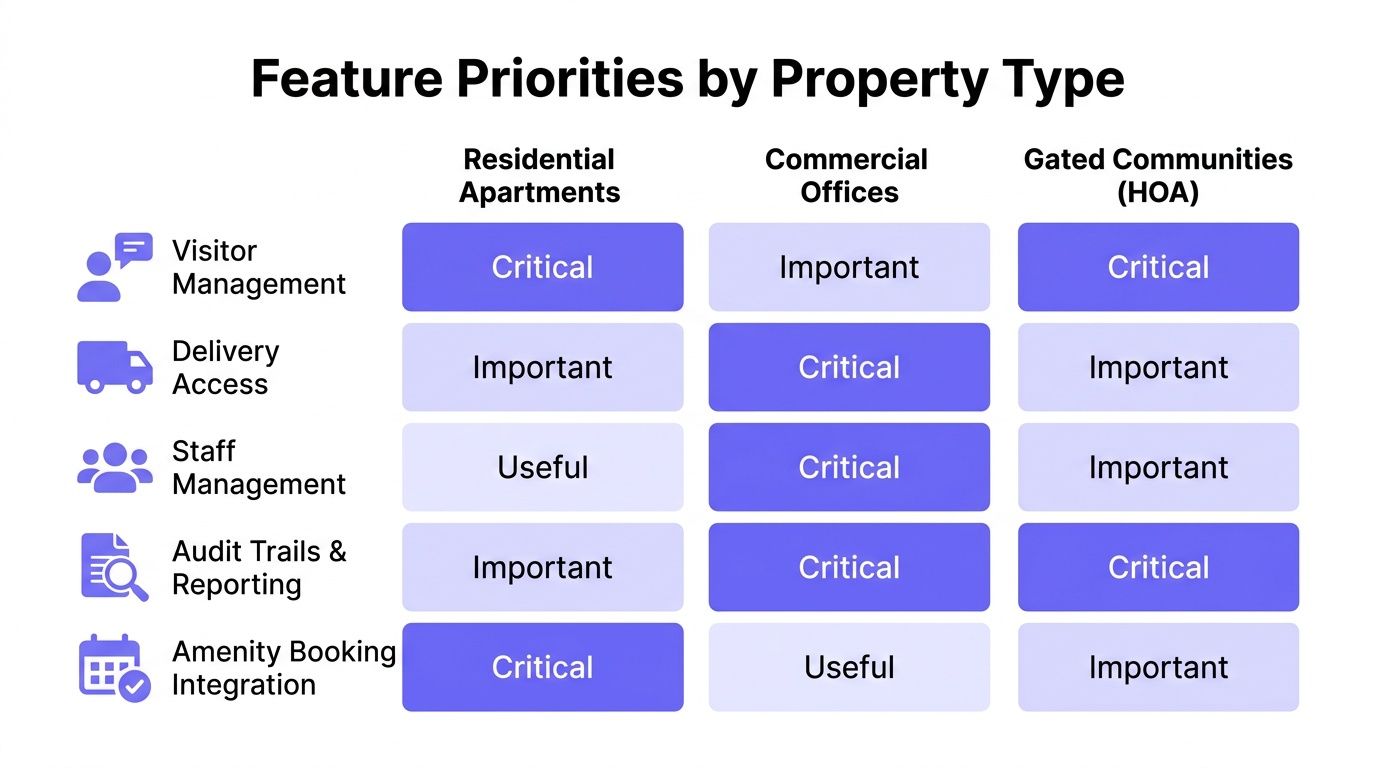
What HOAs and property managers need first
HOAs and property managers usually care most about resident convenience, visitor flow, and defensible records. Their dashboard should make routine access easy while keeping community rules enforceable.
For these teams, the highest-priority features are usually:
- Visitor management: Guests, deliveries, and temporary access should be simple to approve and easy to review later.
- Recurring service schedules: Groundskeeping teams, cleaning crews, and pool vendors need predictable access without permanent privileges.
- Audit trails: Boards and managers need a reliable event history when disputes happen.
- Remote credential control: Move-ins, move-outs, and staff turnover should never depend on collecting physical devices first.
In multifamily settings, building entry often matters as much as the vehicular gate. Teams evaluating this path can explore how to upgrade building entry systems when they want one approach across gates, doors, and shared access points.
What installers and integrators should prioritize
Installers and security integrators look at the same dashboard through a different lens. They're usually focused on deployment effort, compatibility, serviceability, and long-term support burden.
Their priority list often looks different:
| Audience | Highest-value dashboard traits |
|---|---|
| HOA boards | Accountability, guest controls, policy enforcement |
| Property managers | Fast onboarding, remote changes, resident support efficiency |
| Security installers | Hardware compatibility, remote diagnostics, OTA updates |
| Integrators | Scalable administration across multiple sites and client roles |
For installers, a polished interface means less training friction and fewer support calls. For integrators, hardware-agnostic design matters because it preserves existing gate operator investments instead of forcing a full rip-and-replace approach.
Implementing a Modern Access Control Dashboard
A modern dashboard shouldn't be treated as a software add-on. It's the control layer that determines whether the property can manage access cleanly, securely, and at scale.
The right implementation starts with operational pain points, not feature lists. If the current system produces resident complaints, gate code sprawl, unclear accountability, and too many field visits, those problems should shape the platform decision.
A practical rollout checklist
Property teams usually make better decisions when they evaluate the dashboard against actual workflows.
A practical checklist looks like this:
- Audit the current pain points: List where staff lose time, where security is weakest, and where resident support breaks down.
- Map roles and permissions: Decide who should approve visitors, manage schedules, revoke access, and review logs.
- Review credential strategy: Move away from unmanaged fobs, shared keypads, and broad permanent access where possible.
- Test remote operations: Confirm that staff can perform common actions without being on site.
- Verify reporting and auditability: Make sure the system can answer basic accountability questions quickly.
- Check deployment fit: Prefer solutions that work with existing gate operators and building entry hardware when replacement isn't necessary.
The best dashboard is the one staff will actually use correctly under pressure.
What a strong platform should already solve
A modern system should remove old dependencies rather than digitize them. It should support remote visitor management, make credential changes immediate, and provide dependable oversight even when local network conditions are unreliable.
For many properties, the most practical path is a platform built around smartphone-controlled gate access that combines cloud administration with straightforward field deployment. Teams considering that model can review smartphone-controlled gate access to see how cloud-based access control aligns with day-to-day property operations.
The final standard is simple. If the dashboard reduces manual work, improves accountability, and helps staff manage access from anywhere, it's doing its job. If it still leaves teams relying on shared codes, physical inventory, and after-the-fact guesswork, it's not modern enough for the property it serves.
Property teams that want a cleaner way to manage gates, building entry, and visitor access can explore Nimbio. Its cellular, hardware-agnostic platform helps modernize existing access points without replacing the entire system, while giving managers remote credential control, live visibility, and a practical path away from fobs, clickers, and shared keypads.


