

A resident arrives at a gated community with a visitor, but the old clicker is missing. The keypad still uses a shared PIN, the property manager can't confirm who entered earlier, and granting temporary access requires an on-site call or manual programming. The gate opens, but the process leaves gaps in HOA security, accountability, and convenience.
Automatic gate access control replaces that fragmented experience with a coordinated system for verifying credentials, operating the gate, protecting people from moving equipment, and recording access activity. The most practical modernization path usually doesn't involve removing a working gate. A cellular retrofit can preserve existing hardware while adding smartphone control, remote visitor management, and cloud-based administration.
Gate access control has evolved from communication-based entry to intelligent remote management. A history documented by this overview of gate access technology traces the first callbox to Berlin in 1881, PIN-based keypads to the 1960s, touchscreen kiosks to the 2000s, and cloud-based smartphone systems to the modern era, a progression spanning more than 140 years.
Table of Contents
- What Is Automatic Gate Access Control
- The Core Components of an Automatic Gate System
- Exploring Common Types of Access Control
- Key Security and Safety Benefits
- Deployment Scenarios and Use Cases
- Choosing and Retrofitting an Access Control System
- The Future of Secure Property Access
What Is Automatic Gate Access Control
Automatic gate access control is the combination of a physical gate, an automated operator, safety equipment, and a credential system that decides who can trigger entry. It is not merely a motor that opens when someone presses a button. The complete arrangement connects identity verification, gate movement, safety monitoring, and administrative records.
Legacy properties often depend on tools that were designed for a simpler operating environment:
- Shared PINs: A code may circulate among residents, contractors, delivery drivers, and former occupants without a reliable record of who used it.
- Clickers and remotes: A lost device can remain active until someone discovers the loss and manually updates the system.
- Standalone keypads: Visitors may need a resident to meet them at the entrance or provide a permanent code.
- On-site programming: Property staff may need to visit the gate to add or remove users.
A modern system creates individual credentials and lets authorized administrators manage them remotely. A property manager can issue access for a resident, contractor, or visitor, then revoke or adjust that permission when circumstances change. The gate operator still performs the physical work, but software determines how access is requested, approved, and documented.
Why the distinction matters
A gate operator answers one question, can the gate move? Access control answers a more important question, should this person or vehicle be allowed through now? Effective cloud-based access control brings those functions together without forcing a property to replace every existing component.
This makes automatic gate access control part of broader proptech and smart community infrastructure. The same platform can support resident entry, visitor permissions, property oversight, and audit trails while reducing dependence on physical credentials.
For property managers and HOA boards, the practical evaluation should begin with four questions:
- Who needs access?
- How quickly must access be granted or revoked?
- What record should the system retain?
- What happens if the local internet connection fails?
Those answers determine whether a keypad, remote, card reader, cellular controller, or integrated platform fits the site. The technology should serve the gate's actual traffic, safety design, connectivity, and management needs.
The Core Components of an Automatic Gate System
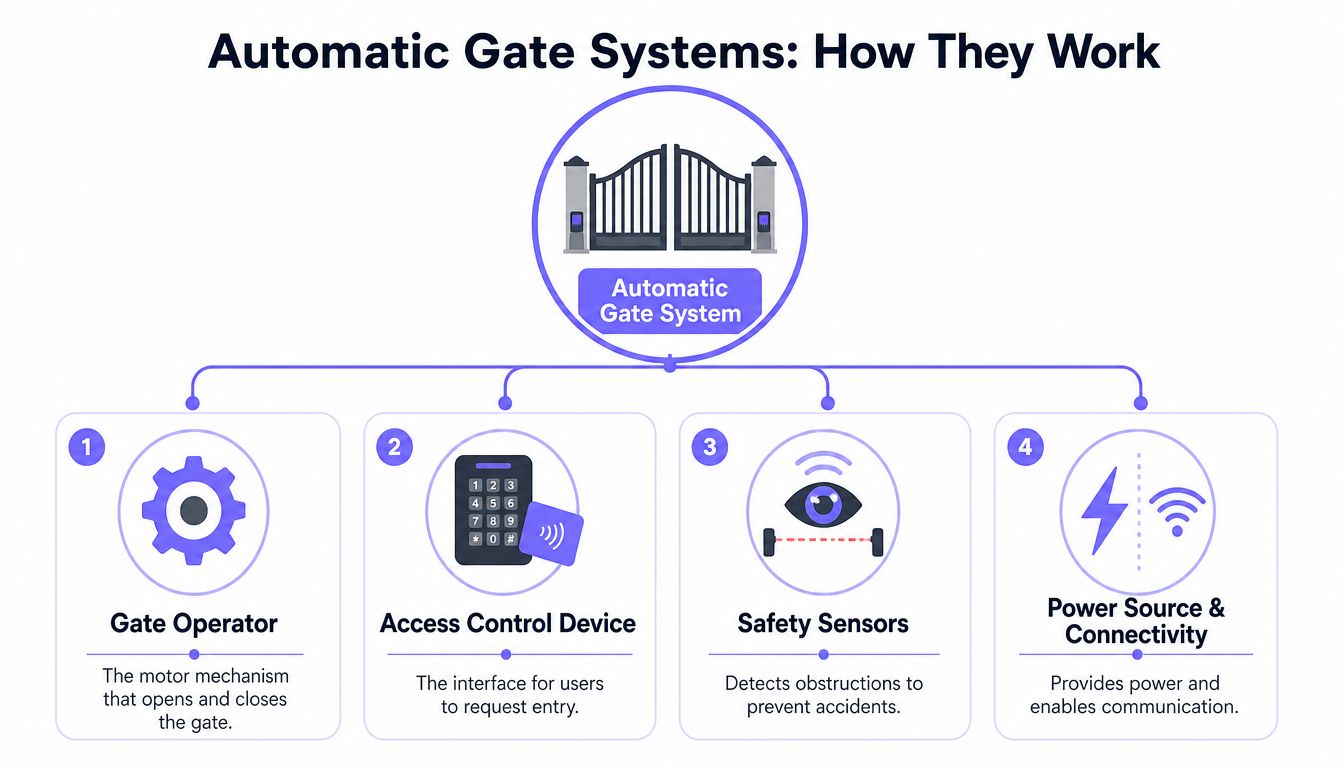
A gate retrofit succeeds when the existing barrier, operator, controls, and safety devices are treated as one system. The barrier sets the physical limits, the operator provides movement, the access interface receives the request, and the safety subsystem protects people and vehicles.
The four operating components
- Physical gate: The sliding, swinging, or bi-folding barrier controls how vehicles enter and leave. Its weight, geometry, travel path, and clearances determine the operator and safety requirements.
- Gate operator: This electromechanical or hydraulic mechanism supplies the force to open and close the barrier. It must suit the gate's construction and expected traffic.
- Access-control interface: A keypad, reader, remote receiver, intercom, mobile credential, or cellular controller receives a request and sends an authorized open command.
- Entrapment-protection subsystem: Photocells, vehicle detectors, safety edges, and related devices identify obstructions or unsafe conditions. They stop or reverse movement where required.
A reliable installation depends on these four elements working together. Automatic gate system guidance describes the same structure, including the barrier, operator, entrapment protection, and access interface. Networked communication can also support event logging, remote credential management, and fail-safe or manual overrides.
Replacing the operator is not always the right answer. If the barrier and safety equipment remain suitable, a property may be able to add a modern controller and cellular connection instead of removing the entire gate system.
What happens during an entry event
A typical entry sequence follows a controlled path:
- A resident presents a credential or opens an authorized mobile application.
- The access-control unit verifies the permission.
- The controller sends an open command to the gate operator.
- Sensors monitor movement and the surrounding area.
- The system records the event when logging is available.
- The gate closes according to its configured timing after the vehicle clears the opening.
The connectivity layer determines how administrators manage credentials and review events. Cellular communication can provide remote operation and administration without depending on the property's local Wi-Fi network. That matters for older communities where network access at the entrance is limited or difficult to maintain.
The electronic controls still have to match the physical installation. A compatible controller can fail as a deployment if sensor coverage is poor, guarding is unsuitable, power is inadequate, or the operator does not match the barrier. Property managers reviewing a retrofit can read how cellular gate access works before asking an installer to assess the existing equipment.
Exploring Common Types of Access Control
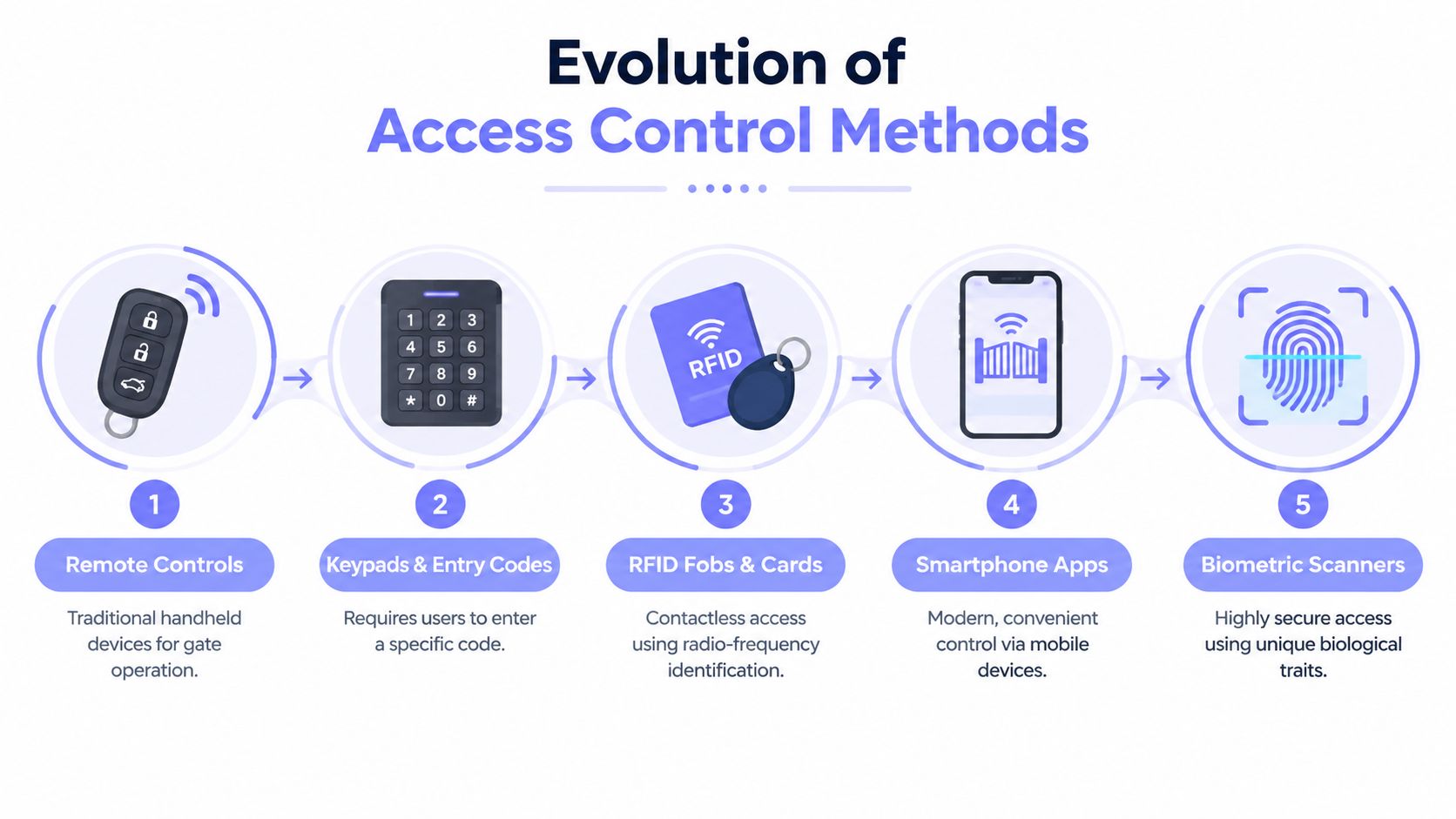
Access methods have followed a recognizable progression. Each generation solved a practical problem, but older credentials also introduced weaknesses that become more visible as a property grows.
Remotes and clickers
A remote is familiar and easy to use. Residents press a button from their vehicle, and a receiver triggers the gate operator.
The drawback is administrative control. A property may know that a remote was issued, but it may not know who used it at a particular moment. Lost devices require prompt deactivation, and replacement creates recurring coordination for residents and staff.
Remotes also don't solve visitor management. A resident generally has to share a device, meet the visitor, or rely on a separate callbox or keypad.
Keypads and PIN codes
Keypads avoid the need to distribute a physical transmitter. They work well for limited-access locations where a small, stable group can remember a code.
Shared PINs create a different problem. Once a code reaches contractors, guests, delivery personnel, or former residents, administrators may have limited visibility into its use. Changing the code can also inconvenience every authorized user, which encourages properties to leave old codes active longer than intended.
A keypad can remain useful as one credential option, especially for service access or emergency procedures. It shouldn't be treated as the entire security model when the site needs individual accountability and remote administration.
RFID cards and fobs
RFID credentials create a more individualized experience than one shared code. Administrators can assign a credential to a user and deactivate it when the person no longer needs entry.
The operating burden remains physical. Cards and fobs can be lost, loaned, damaged, or forgotten. Residents may also expect replacements to be available quickly, which adds work for management teams and installers.
RFID is often appropriate for controlled facilities with existing readers and established credential processes. It becomes less attractive when a property wants residents to use a device they already carry and managers to make changes from anywhere.
Smartphone and cellular access
A smartphone credential connects the user's identity to an application rather than a shared code or dedicated clicker. A cellular controller can communicate with the gate without depending on the property's Wi-Fi, which is particularly useful at detached entrances, rural driveways, older communities, and large campuses.
Modern mobile access can support:
- Individual permissions for residents, staff, and contractors.
- Remote visitor management without distributing permanent credentials.
- Credential revocation when a lease, contract, or authorization ends.
- Administrative logs that show access activity.
- Retrofit deployment alongside existing operators, readers, or remotes.
Biometric readers offer a different trade-off. They can provide stronger identity binding in high-security environments, but they introduce specialized hardware, privacy considerations, and more complex deployment requirements. For many residential and commercial gates, cellular smartphone access offers a practical balance of convenience, individual accountability, and retrofit flexibility.
Key Security and Safety Benefits
The strongest automatic gate access control deployments improve more than the entry experience. They give property managers a clearer way to manage permissions, investigate events, and reduce reliance on credentials that can't be tied to a specific person.
Auditability and administrative control
A cloud-based platform can create an audit trail for entry attempts and approved access events. That record helps a manager answer operational questions without relying on memory or a resident's account of what happened.
Compliance-oriented physical-access practices also emphasize documenting who entered, when entry and exit occurred, which method was used, and which access point was involved. Guidance on CMMC visitor logging requirements treats visitor oversight and tamper-resistant, reviewable records as security controls rather than optional conveniences.
Practical benefits include:
- Faster revocation: Remove a former resident, contractor, or employee without collecting every physical credential first.
- Temporary permissions: Issue access for a defined visit or work period rather than sharing a permanent code.
- Clearer investigations: Review recorded activity when a resident reports an unexpected entry.
- Consistent administration: Apply one process across multiple gates or properties.
- Reduced credential exposure: Replace broadly shared PINs with individual permissions.
Tailgating deserves specific attention
Tailgating, also called piggybacking, occurs when an unauthorized vehicle follows an authorized vehicle through the gate. It remains a serious weakness because a valid credential can open the barrier for more than one vehicle.
An ASIS International survey cited by this analysis of smart access control for HOA security found that 61% of organizations reported tailgating or piggybacking as their most common access-control issue.
Mobile credentials alone can't eliminate tailgating. The gate's geometry, closing delay, vehicle detectors, photocells, resident behavior, and traffic pattern all affect exposure. A properly configured system can use detection and re-close logic to keep the opening active only as long as necessary, while cameras or intercom tools can support investigation and visitor verification.
Practical rule: Treat the credential, the vehicle path, the sensor layout, and the closing behavior as one security control.
Safety is part of security
UL 325 is the core safety standard for vehicular gate operators, while UL 294 addresses security-related safety and performance for access-control units. For slide gates, UL 325 guidance requires at least two entrapment-protection devices for each potential entrapment area in each direction of travel, controls installed at least 6 feet from the gate, and guarding or screening for openings up to 72 inches high to prevent passage of a 2.25-inch sphere, as explained in UL's gate operator and access-control guidance.
A connected access system that ignores these requirements isn't a modern security solution. Sensor placement, physical guarding, operator configuration, and manual override procedures must be reviewed together before activation.
For properties using temporary offices or modular facilities, access-control planning should also account for doors, site circulation, and visitor procedures. A resource on secure mobile office buildings provides useful context for extending physical-access thinking beyond the main gate.
Deployment Scenarios and Use Cases
The same gate technology serves different purposes depending on who enters, how often access changes, and what staff need to document.
Single-family driveways
A homeowner with an electronic driveway gate may need to let in a cleaner, contractor, delivery driver, or guest without handing over a permanent remote. Smartphone control allows the authorized resident to approve entry remotely while preserving the existing operator.
The design still needs local safety devices, reliable power, and a signal assessment. A cellular connection is especially useful when the driveway gate sits away from the house or lacks a dependable internet path.
Homeowners associations and multifamily communities
An HOA or multifamily property has a larger credential lifecycle. Residents move in and out, vehicles change, contractors rotate, and visitors arrive outside office hours.
A practical operating model can separate access by role:
- Residents: Individual mobile credentials or retained legacy credentials during transition.
- Guests: Temporary permissions managed by residents or staff.
- Vendors: Scheduled access linked to service windows.
- Emergency personnel: Clearly defined procedures and appropriate overrides.
- Property staff: Administrative permissions with reviewable activity.
The property manager should also define how the system handles deliveries, resident directories, gate faults, and lost phones. A platform designed for multifamily gate access control can support those workflows while allowing the existing gate operator to remain in service when compatible.
Commercial and logistics facilities
Commercial gates often serve employees, vendors, drivers, and scheduled visitors. The priority may be after-hours access, traffic separation, or a record that can be reviewed during an incident.
A logistics yard can use separate permissions for staff vehicles and third-party drivers, with administrators adjusting access as schedules change. A gate that opens reliably but lacks an audit trail may still leave the facility unable to reconstruct an event.
Safety and site engineering
UL 325 applies across these settings. The operator, entrapment devices, controls, guarding, and access interface need a coordinated review before deployment.
ASTM F2200 addresses the physical construction and installation of automated vehicular gates separately from the operator. The standard was first published in 2002, according to this explanation of UL 325 and ASTM F2200. Installers should evaluate the barrier itself, not only the controller being added.
Choosing and Retrofitting an Access Control System
A working gate is valuable infrastructure. Replacing it before checking compatibility can create unnecessary construction, downtime, and commissioning work. A better approach starts with the existing operator, safety equipment, wiring, power source, connectivity options, and management requirements.
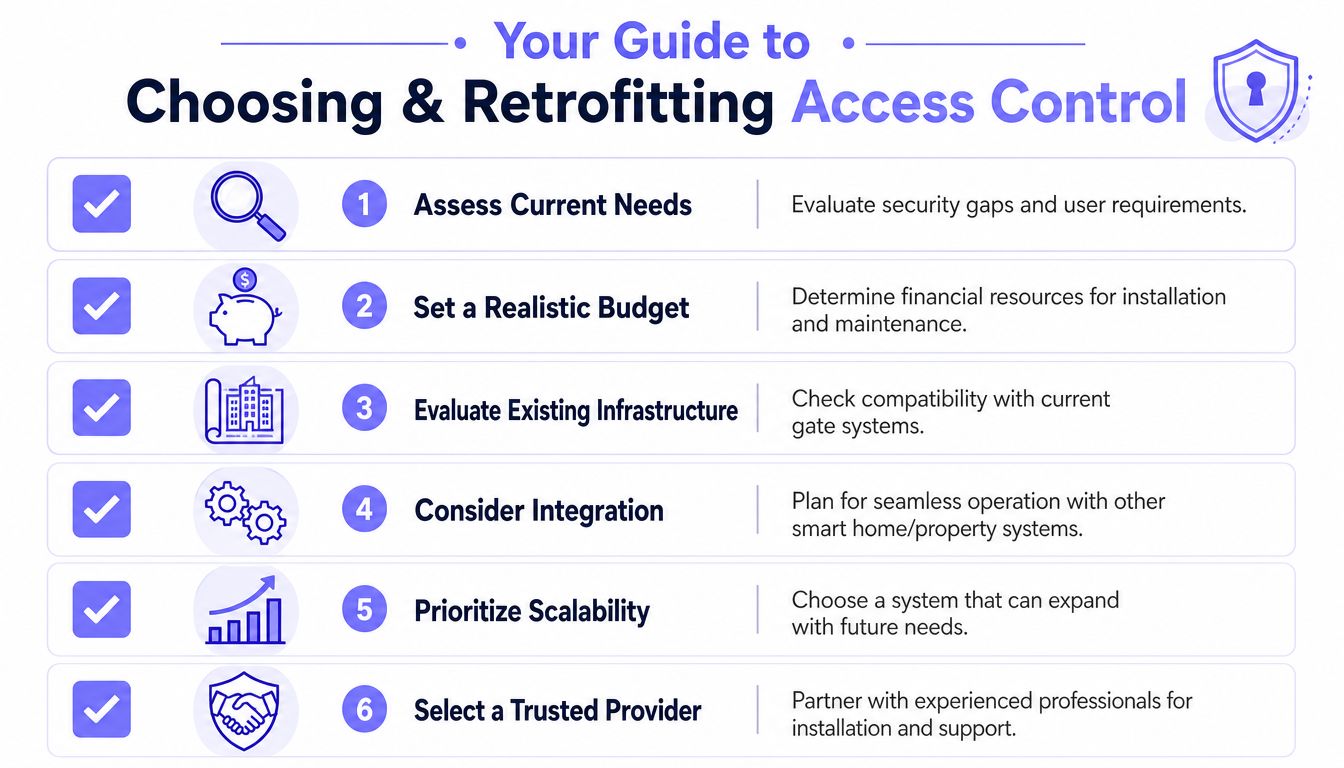
A practical retrofit assessment
- Inspect the current gate. Confirm the operator model, gate type, safety devices, control inputs, power arrangement, and maintenance condition.
- Map the access population. Separate residents, staff, contractors, guests, vendors, and emergency users instead of treating every credential alike.
- Test connectivity at the entrance. Cellular service can be more dependable than local Wi-Fi at remote or detached gates, but installers should verify signal conditions before selecting equipment.
- Define administrative workflows. Decide who can issue credentials, who can revoke them, how visitor access works, and how events are reviewed.
- Plan for failure. Document manual release, local operation, power-loss behavior, network interruption, and support escalation.
- Confirm future compatibility. Choose a controller and software platform that can support additional gates, readers, cameras, or building entry points if the property expands.
A 2026 market discussion identifies a shift toward cellular connectivity and cloud-based logs because Wi-Fi can be unreliable in gate deployments, with particular relevance to retrofits, HOAs, rural properties, and sites with limited infrastructure. The discussion appears in this overview of cellular and cloud-based gate access.
Why hardware-agnostic design matters
A hardware-agnostic controller communicates with compatible gate operators through available control interfaces rather than requiring a property to replace the barrier and motor. That approach preserves sunk investment and reduces disruption, provided the existing equipment is safe, serviceable, and compatible.
Nimbio is one example of a cellular retrofit approach. Its controller and smartphone application can add remote gate operation, digital credential management, visitor access, and entry logs while allowing compatible existing operators, remotes, and keypads to remain in service during a phased transition.
The management interface matters as much as the device at the gate. Property teams should see whether the platform supports role-based administration, scheduled access, revocation, event review, and clear support procedures.
Electrical work and low-voltage integration should be handled by qualified professionals. For properties in Ireland, guidance on choosing a qualified Dublin electrician can help managers evaluate the electrical expertise needed around power, controls, and site safety.
For a focused vendor evaluation, Nimbio's gate access buyer's guide can help teams compare connectivity, retrofit compatibility, credential administration, and operational requirements before approving a project.
The Future of Secure Property Access
The next phase of automatic gate access control isn't defined by a more elaborate keypad. It depends on reliable connectivity, individual digital credentials, remote visitor management, safety-aware automation, and records that property teams can review.
The history of gate access shows a clear movement from callboxes and shared codes toward cloud-based smartphone control. The practical lesson is equally clear: modernize the management layer first when the existing barrier and operator remain safe and serviceable.
Cellular connectivity helps properties avoid dependence on unstable gate Wi-Fi. Hardware-agnostic retrofits reduce disruption. Cloud administration gives managers a faster way to grant, revoke, schedule, and review access. Those capabilities make a smart community more manageable without requiring a complete rip-and-replace project.
For HOAs, property managers, installers, and commercial operators, the strongest purchasing decision is the one that aligns the gate's physical design with its access policy. A connected credential cannot compensate for poor sensors, unsafe geometry, or unclear operating procedures.
Nimbio provides cellular, smartphone-controlled access for compatible electronic gates and building entry systems, with remote credentials, visitor management, and access logs designed for retrofit deployments. Visit Nimbio to evaluate a modern automatic gate access control approach for a residence, HOA, multifamily community, or commercial property.
Managing access for a gated community or multifamily property?
See how cellular access control works for communities like yours. Explore Multifamily & Gated Communities →


