

Tuesday morning starts with a familiar mess. A property manager finds a resident locked out after an early shift, a delivery driver has propped the gate open, and an unanswered fire marshal letter is buried under renewal paperwork. The sticky notes aren't really about a broken keypad or an old gate operator. They show that the property's access workflow has stopped working.
A building access control system has to manage more than entry hardware. It has to handle resident onboarding, visitor access, credential revocation, audit records, outages, maintenance, and the daily reality that fobs disappear, PINs get shared, and vendor lists become inaccurate. For property managers and HOA boards, the perimeter often becomes an extension of the phone, and every failure becomes a service call.
The market reflects that operational importance. One industry report values the global building access control market at USD 12.8 billion in 2025 and projects USD 25.4 billion by 2034, at an 8.2% compound annual growth rate over the period, while another estimates the broader access control market at USD 10.62 billion in 2025 and USD 15.80 billion by 2030, at an 8.3% CAGR (market outlook for building access control). The important takeaway is simple: access control is now a core building system, not a niche security accessory.
Table of Contents
- The Real Problem Behind Every Building Access Control System
- What a Building Access Control System Actually Does
- Comparing Credentials and Controllers in the Real World
- Use Cases That Shape the Right System
- Security, Compliance, and Outage Resilience
- Cost Models and ROI Beyond the Sticker Price
- Deployment and Admin Workflows That Actually Scale
- Choosing a System That Still Works in Five Years
The Real Problem Behind Every Building Access Control System
The property manager doesn't experience access control as a product category. The manager experiences it as interruptions.
A resident loses a fob and needs immediate access. A former tenant still knows the community PIN. A contractor arrives outside the approved window. A gate remote works intermittently, but nobody knows whether the problem is the remote, receiver, wiring, or gate operator.
Those incidents create a chain of administrative work:
- Credential replacement: Staff issue another fob, remote, or code without always knowing whether the old credential was disabled.
- Resident support: Every failed entry creates a call, message, or office visit.
- Visitor coordination: Staff manually confirm guests, vendors, deliveries, and emergency access.
- Record keeping: Paper logs and informal spreadsheets make incident review slow and incomplete.
- Vendor control: Outdated access lists leave former contractors or residents active longer than intended.
A keypad appears inexpensive because the hardware is visible and the administrative burden is hidden. Shared PINs are easy to distribute, but they don't identify the individual who entered. Clicker remotes feel familiar, yet a lost remote can remain active until someone notices and changes the receiver configuration.
Operational rule: If staff can't issue, change, and revoke access without a service call, the property owns a device, not a dependable access workflow.
Boards evaluating HOA security should track access-related calls, failed entries, credential changes, visitor events, and vendor response times. Resources such as track KPIs for multi-tenant buildings can help teams turn recurring complaints into measurable operating issues rather than anecdotal board discussions.
The right question isn't “Which keypad should the property buy?” It's “How should authorized people enter, how should visitors be handled, and how should the property prove what happened later?”
That shift changes the buying process. Hardware still matters, but the winning system is the one that keeps working during resident turnover, staffing changes, internet interruptions, and future gate or door upgrades.
What a Building Access Control System Actually Does
A useful building access control system behaves like a nightclub bouncer who never sleeps, never takes a tip, and remembers everyone. The bouncer checks identity, applies the guest list, decides who enters, and keeps a record of trouble.
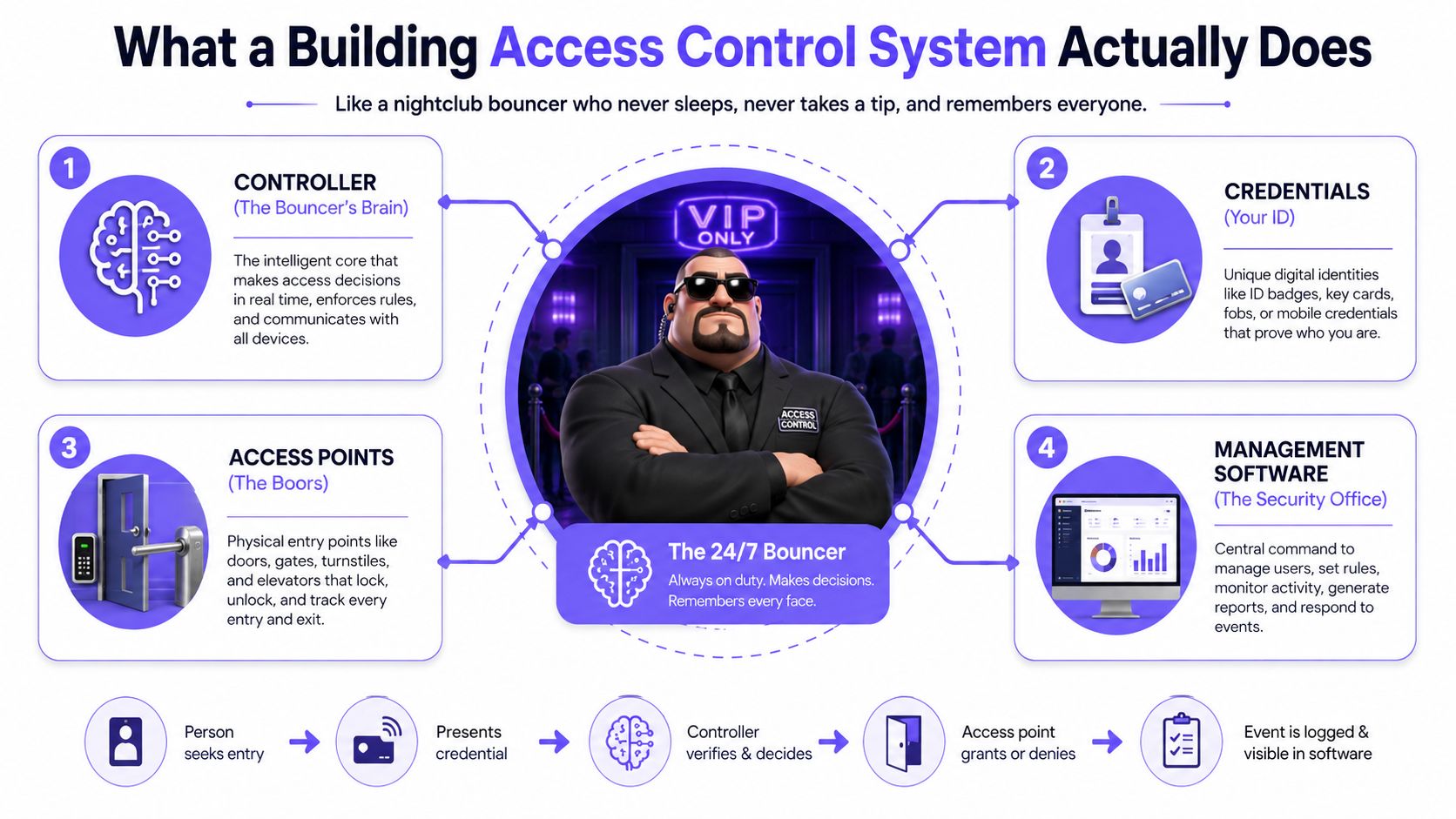
The metaphor works because modern entry depends on several connected layers, not one magic device.
The controller makes the decision
The controller is the system's decision-maker, usually installed near a gate, door, or access panel. It receives credential information, checks the applicable permissions, triggers the release mechanism, and records the event.
A controller can be connected to a local network, a cellular network, or both. For retrofit properties, its compatibility with the existing gate operator, electric lock, door strike, or barrier arm matters more than its appearance.
The reader receives the credential
The reader is the point where a person or vehicle presents authorization. It might be a keypad, card reader, long-range vehicle receiver, mobile credential interface, or call box.
The reader's job is to capture the credential and pass the relevant information to the controller. A camera may show who is standing at the entrance, but it doesn't make the access decision.
The credential identifies the user
Credentials include PINs, fobs, clicker remotes, smartphone apps, QR codes, and SMS or email links. A mobile credential is a digital key delivered through an app, QR code, or link, and the associated portal can display access events and alerts (mobile credentials explained).
The credential choice determines convenience, traceability, replacement effort, and how easily the property can revoke access.
Software manages the property
The software layer stores users, schedules, permissions, visitor records, and event history. Modern systems outclass older installations. An administrator can manage access remotely, assign time windows, revoke a departing resident, and review activity without opening a server room or waiting for an installer.
A typical audit trail records the user, entry point, credential type, timestamp, and whether access was granted or denied (building access control audit trail). That record answers the questions cameras alone can't answer: who was authorized, what credential they used, and whether the system approved entry.
Surveillance and access control should work together, but they aren't interchangeable. Cameras watch. Access control decides and remembers.
Comparing Credentials and Controllers in the Real World
Property managers usually face four credential choices, each with a different operational cost.
PIN keypads are inexpensive and familiar. They work for casual access, but residents share codes, former users retain them, and the log often identifies a code rather than a person.
Clicker remotes offer low-friction vehicle entry. They also create an inventory problem. Staff need to issue, replace, and deactivate physical devices, while the system may not provide a reliable record of which individual used a remote.
Mobile credentials give each resident or employee a digital identity connected to a smartphone. They support remote issuance and revocation, but adoption matters. A property needs a clear fallback process for residents without a charged phone, a compatible device, or willingness to use an app.
Long-range RFID tags suit vehicle-heavy communities and logistics yards. They reduce stopping at the gate, but they still require tag distribution, vehicle association, and prompt revocation when ownership or tenancy changes.
| Option | Best For | Retrofit Ease | Admin Overhead | Key Trade-Off |
|---|---|---|---|---|
| PIN keypad | Shared or low-complexity entry | High when existing wiring supports it | High when codes are shared | Low friction, weak individual accountability |
| Clicker remote | Familiar vehicle access | Often high | High because devices must be issued and replaced | Convenient, difficult to audit by person |
| Mobile credential | Residents, staff, and visitors | High with compatible electronic entry hardware | Lower after onboarding | Strong remote control, requires user adoption |
| Long-range RFID tag | Vehicle gates and logistics yards | Depends on reader and mounting conditions | Moderate | Fast vehicle entry, physical tag lifecycle |
| Wi-Fi controller | Sites with dependable network infrastructure | Variable, often constrained by conduit and signal | Moderate | No separate cellular subscription, exposed to local network failures |
| Cellular controller | Retrofit gates and remote entry points | Strong where cellular signal is usable | Low after installation | Predictable connectivity, recurring subscription |
The controller path creates a second decision. Wi-Fi-dependent controllers need reliable on-site networking, suitable coverage, network credentials, and a property team prepared to troubleshoot the connection. A gate may be perfectly functional while the access system fails because the site network changed or the internet service dropped.
Cellular controllers use a mobile network rather than the property's Wi-Fi. They trade a subscription fee for simpler installation and better separation from the site's internet service. That makes them particularly practical when an existing gate has power but no convenient conduit, uncertain network coverage, or a history of ISP-related outages.
The retrofit test is unforgiving:
- Can the controller connect to the existing gate operator or lock?
- Can the installer mount it without extensive trenching?
- Can residents enter without learning a new process?
- Can staff revoke access immediately?
- Can the property keep operating when the local internet connection fails?
For many gated communities, a cellular add-on preserves existing remotes and keypads while adding smartphone access and remote administration. Nimbio is one example of this approach, offering cellular control for electronic gates and building entry without relying on Wi-Fi.
Use Cases That Shape the Right System
A single-family driveway gate doesn't need the same administrative model as a logistics yard. Treating both as identical usually produces either unnecessary complexity or weak control.
| Property Type | Primary Credential | Admin Workflow Need | Reader Priority |
|---|---|---|---|
| Single-family residential | Smartphone or remote | Simple household access and guest sharing | Reliable gate receiver or mobile interface |
| Multifamily and HOA community | Mobile credential, vehicle tag, or hybrid | Bulk onboarding, resident turnover, visitor access, revocation | Vehicle and pedestrian entry support |
| Commercial office | Mobile credential, card, or badge | Role-based permissions, schedules, tenant and employee changes | Door readers with policy flexibility |
| Logistics yard | Long-range RFID or vehicle credential | Vehicle assignment, contractor access, gate-cycle records | Long-range vehicle reader and durable gate interface |
Single-family residential
A household usually needs simple access, not a complex security console. Smartphone credentials work well for family members, while temporary guest access handles cleaners, tradespeople, and visitors.
A remote can remain useful as a fallback, but the household should know which device is active and how to disable it. The homeowner's biggest risk isn't insufficient configuration. It's losing control of old credentials.
Multifamily and HOA communities
Multifamily properties and gated communities need a repeatable resident lifecycle. New residents need invitations, existing residents need changes for transfers or renewals, and departing residents need prompt revocation.
Visitor management also becomes central. A guest, delivery driver, or service worker may need access to a specific entrance for a limited period, while the property retains a record of the authorization and entry event. Visitor systems can preserve timestamps, badge assignments, host information, purpose, and authorized areas for later review (audit-ready visitor logs).
Commercial offices
Commercial properties need role-based permissions rather than one broad community code. Employees, tenants, cleaning teams, contractors, and building engineers may require different doors and schedules.
The access system should support scheduled windows and directory changes without forcing facility staff to edit multiple disconnected lists. For sensitive areas, administrators should separate general building entry from restricted rooms and equipment spaces.
Logistics yards
Logistics facilities prioritize vehicles, throughput, and evidence. Long-range tags or RFID credentials can reduce stopping and keep vehicle access distinct from pedestrian access.
The administrator should be able to review gate cycles, associate credentials with vehicles or contractors, and revoke access when a carrier, employee, or vendor relationship ends. Durability and antenna placement may matter more than a polished tenant-facing app.
The property type determines the workflow. The reader and controller should follow that workflow, not the other way around.
Security, Compliance, and Outage Resilience
More features don't automatically create a safer property. A system with facial recognition, visitor passes, video integrations, and mobile credentials can still fail if administrators share accounts, skip firmware updates, or can't prove when access was revoked.
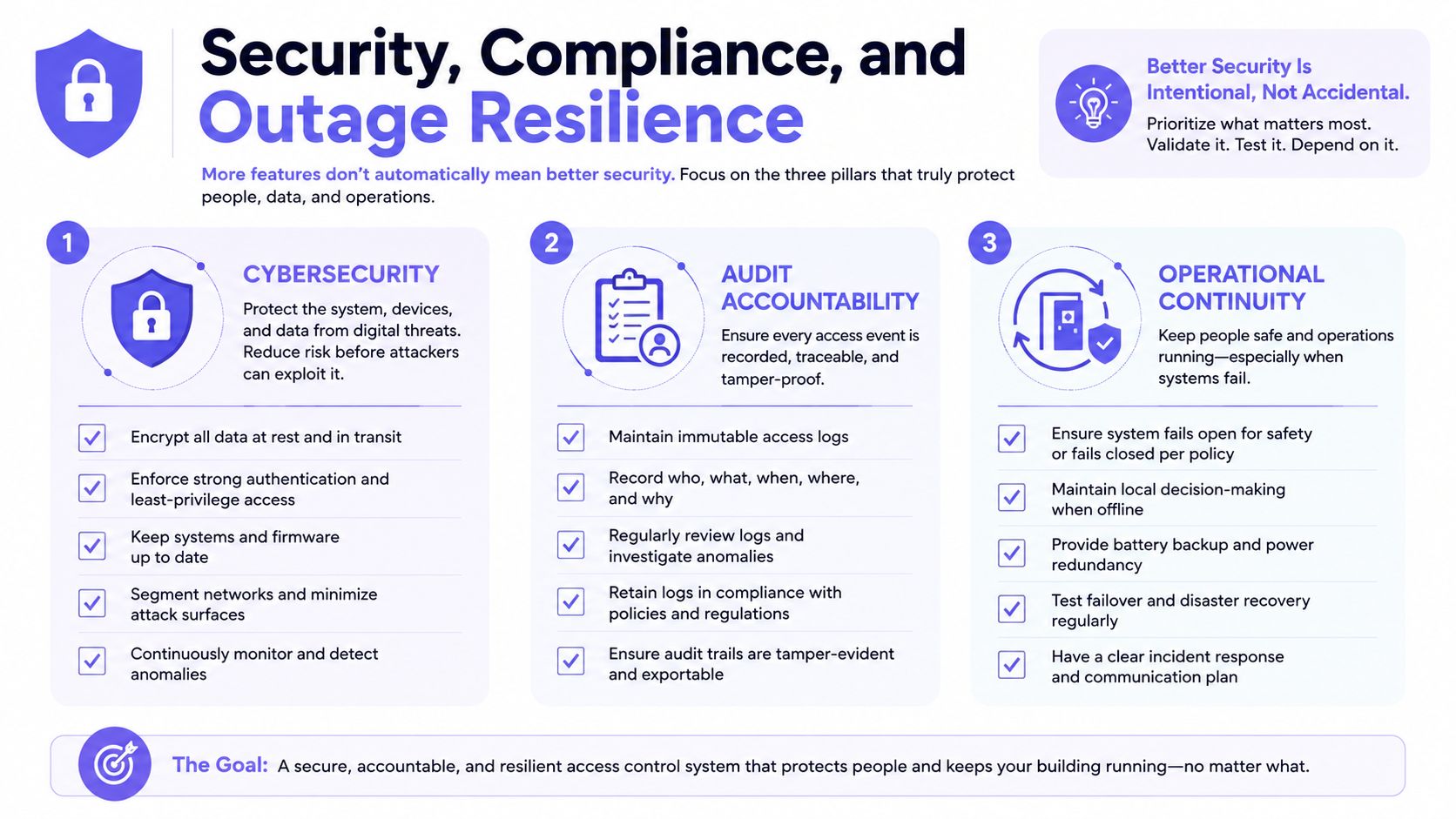
A stronger evaluation uses three pillars.
Cybersecurity protects the credential path
A secure system should encrypt credential data in transit and at rest, protect administrative accounts with two-factor authentication, support secure firmware updates, and limit permissions by role. Buyers should also ask whether the controller supports secure boot, modern cryptography, and OSDP where relevant.
Cybersecurity has become a mainstream buying criterion. A 2025 controller trend report says 90% of respondents consider alignment with cybersecurity standards essential, while more than 71% cite secure boot, OSDP, and cryptography as key purchase drivers. The same report says 21% of respondents report that current controllers still lack critical protections (access-controller security trends).
The controller deserves the same scrutiny as the cloud dashboard. A weak controller can undermine an otherwise attractive mobile credential program.
Audit accountability makes decisions defensible
IEC, EN, and AS/NZS standards for electronic access control cover minimum functionality, performance, testing, logging, identification, and information control (AS/NZS IEC 60839-11-1). Administrators should require tamper-resistant records, role-based credential management, and documented commissioning and maintenance.
A serious audit trail should show:
- Identity: The resident, employee, visitor, contractor, or credential record involved.
- Location: The door, gate, or entry point.
- Event detail: The credential type, timestamp, and access result.
- Lifecycle action: When access was issued, changed, or revoked.
Visitor activity also deserves structured monitoring. Federal cyber-physical guidance emphasizes escorting visitors, monitoring their activity, and maintaining records of physical access devices and visitor presence (visitor management controls).
For adjacent secured spaces, even choices such as storage locker door materials belong in a wider physical security conversation. Strong locks don't compensate for weak credential administration.
Operational continuity keeps the gate usable
Every project needs an outage policy. The property should define what happens during an internet outage, power failure, controller failure, emergency lockdown, or vendor cloud interruption.
Edge-stored permissions can keep approved credentials working during an internet interruption. Cellular connectivity avoids dependence on the property's ISP, but it doesn't remove the need for backup power, local operating rules, and emergency procedures.
Standards and campus specifications commonly require compliance with UL 294 and related electronic access control standards, including controlled fail-safe and fail-secure behavior (electronic safety and security specifications). The right behavior depends on the door, hazard, life-safety policy, and local requirements. Administrators should document it before installation, not discover it during an emergency.
Teams evaluating a cloud-connected model can review Nimbio cloud access control 2026 alongside the security and continuity questions above. The product page should never replace a written outage and credential-revocation policy.
Cost Models and ROI Beyond the Sticker Price
A guard, a keypad, and a cellular retrofit solve different problems. Comparing only purchase prices guarantees a distorted budget request.
The plan should include hardware, installation, subscriptions, labor, credential replacement, support calls, outage exposure, and staff time. A cheap entry device can become expensive when every tenant change requires manual work.
| Cost Factor | Guard Service | Keypad System | Cellular Retrofit |
|---|---|---|---|
| Primary spend | Ongoing staffing | Hardware, installation, and maintenance | Hardware, installation, and subscription |
| Access decision | Human approval | Shared or individual code entry | Remote or automated digital authorization |
| Administrative labor | Scheduling and supervision | Code changes and complaint handling | Credential provisioning and revocation |
| Visitor management | Guard interaction | Manual process or intercom | Digital credentials and remote approval |
| Auditability | Depends on guard logs and procedures | Limited when codes are shared | Stronger when credentials are individual and events are logged |
| Outage exposure | Depends on staffing and site conditions | Depends on local power and controller | Depends on cellular service, power, and local cache |
| Lifecycle question | Staffing continuity | Hardware obsolescence and service calls | Subscription continuity, updates, and replacement policy |
Guard services are often appropriate for properties needing a continuous human presence, identity checks, package handling, or active response. They're a poor fit when the guard mainly opens a gate for known residents. In that case, the property may be paying for a person to perform a repetitive authorization task.
Keypads reduce staffing but shift work to property staff. Shared codes create disputes, and code changes rarely happen as quickly as the property's risk profile changes. Firmware updates, intercom repairs, and truck rolls add costs that don't appear on the original quote.
Cellular retrofits shift the budget toward a predictable recurring subscription and remote administration. For properties replacing guard coverage, the board should model whether the investment pays back within the target period, including the cost of staffing, support, and recovered administrative hours. The provided industry plan specifically frames 18 to 30 months as a common ROI window for properties previously using guards, but each site must validate that estimate against its own guard schedule, installation cost, and subscription terms.
A defensible board proposal should show:
- Current annual guard and service spending.
- Credential replacement and staff labor.
- Expected installation and recurring subscription costs.
- Hardware warranty and replacement terms.
- The administrative workflow that disappears after deployment.
ROI isn't just lower security spending. It's fewer interruptions, faster revocation, clearer records, and less dependence on a person standing beside the gate.
Deployment and Admin Workflows That Actually Scale
An access control rollout should be managed as an operational change, not treated as a simple installation appointment. The installer can mount a controller correctly and still leave the property with a broken credential process.
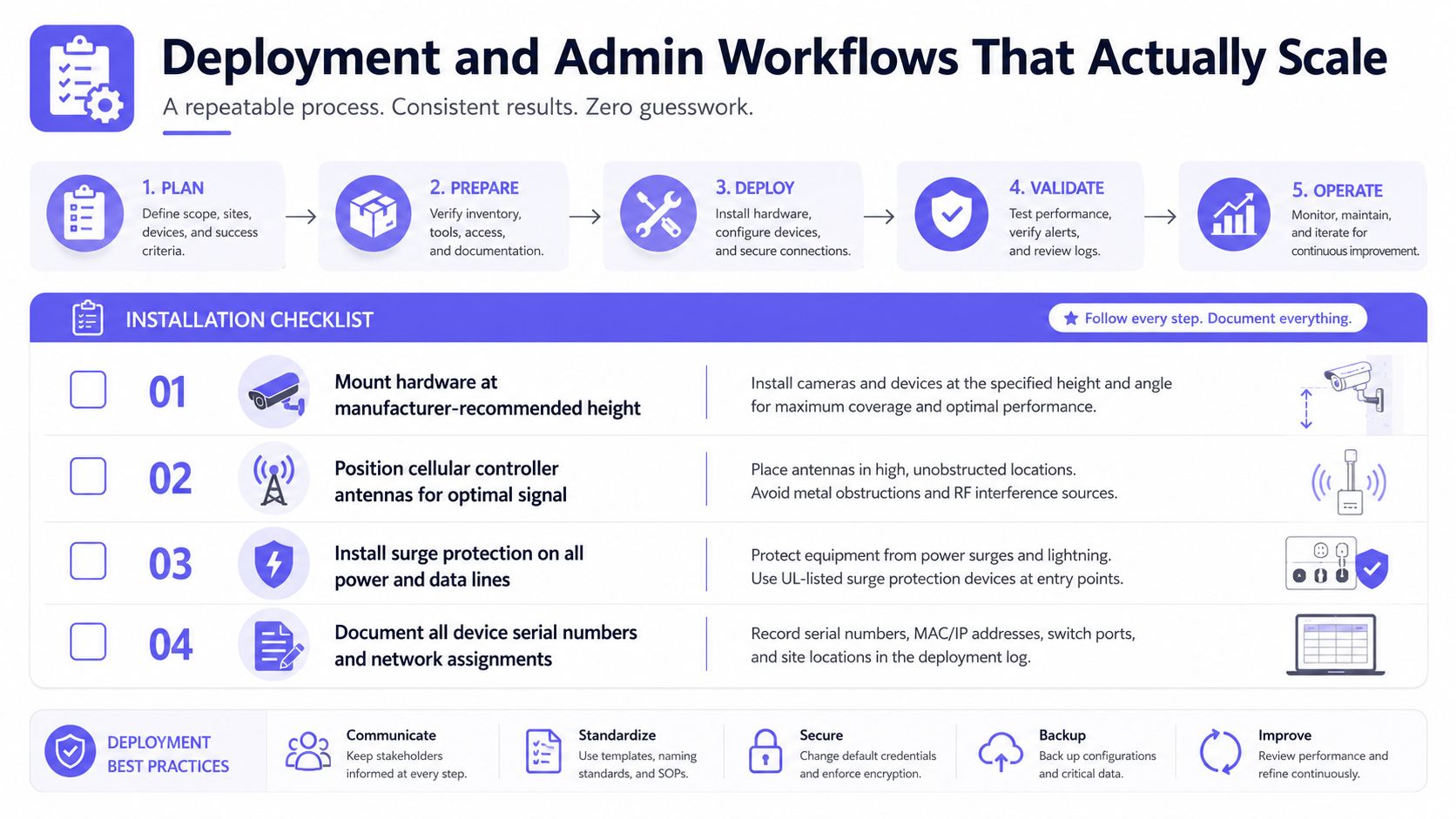
Installation checklist
Before powering the system, the installer and property manager should confirm:
- Hardware position: Mount hardware at the manufacturer-recommended height.
- Cellular signal: Position controller antennas for dependable communication.
- Electrical protection: Install surge protection on relevant power and data lines.
- Gate compatibility: Test the existing operator, lock, relay, sensors, and release behavior.
- Documentation: Record device serial numbers, wiring, network assignments, and emergency procedures.
The installer should test real entry scenarios, not just a single successful opening. A resident, visitor, revoked user, delivery credential, and outage condition should each have an expected result.
Credential lifecycle
The property needs a written process for every credential:
- Onboarding: Send the resident or employee invitation, verify the record, and issue the appropriate mobile, vehicle, or physical credential.
- Change management: Update access after unit transfers, lease renewals, job changes, or vehicle changes.
- Visitor access: Create temporary permissions with clear duration, entry point, host, and purpose.
- Offboarding: Revoke access promptly and verify that later attempts are denied and logged.
Hold-open schedules should cover deliveries, holidays, move-ins, fire drills, and planned maintenance. They should have an owner, an expiration rule, and an audit record. Permanent manual codes are not a schedule. They're an unmanaged exception.
Administrators comparing platforms should focus on modern access control dashboard features such as bulk issuance, search, revocation, event review, and schedule management. The practical test is whether one administrator can issue, audit, and revoke a large credential set in an afternoon without opening a vendor ticket.
The workflows that break first are predictable: shared PINs, paper logbooks, manual vendor lists, and credentials that remain active after move-out. Those should be replaced on day one, not after the first security incident.
Choosing a System That Still Works in Five Years
Most access systems don't fail during the sales demonstration. They fail later, when the controller is obsolete, the app is no longer supported, or the property needs to add an amenity that the original architecture can't handle.
A five-year evaluation should examine three forms of continuity.
| Criterion | Legacy Wired | Cloud-Native Wi-Fi | Cellular Retrofit |
|---|---|---|---|
| Existing infrastructure | Often depends on proprietary wiring or local servers | Depends on reliable site networking | Uses existing entry hardware with cellular connectivity |
| Hardware lifecycle | Can be difficult to replace or expand | May require compatible network equipment | Should use field-replaceable, standard-connected controllers |
| Software continuity | Local updates and technician dependence | Remote updates, subject to network availability | Remote updates with cellular connection |
| Expansion | May require new wiring and panels | Requires network planning at each point | Suits added gates and doors where cellular coverage exists |
| Vendor risk | High if parts are proprietary | High if architecture is closed | Lower when hardware, APIs, and credentials remain portable |
| Outage planning | Local operation may continue, but remote administration can stop | Local network or ISP failure can interrupt service | Cellular path reduces dependence on the property ISP |
The strongest architecture uses standard wiring, field-replaceable controllers, documented integrations, and an open API. A buyer should ask whether credentials can move to another platform, whether the vendor supports multi-tenant administration, and whether firmware updates arrive over the air without replacement hardware.
Connectivity deserves separate scrutiny. A single-carrier radio can become a liability if coverage changes. Multi-carrier LTE or 5G support offers a stronger path than a module tied to one network, although the board still needs written service and replacement terms.
Open architecture is also under pressure. The 2025 Wireless Access Control Report says 42% of end users deploy wireless locks, while the share rating open architecture as very important fell from 90% in 2023 to 72% in the later survey (wireless access control report). That doesn't make mobile access a mistake. It shows that convenience can advance faster than interoperability planning.
For a practical buyer framework, property teams can review what to look for in a gate access system. The final decision should favor a cellular-first retrofit when existing gates work, trenching is undesirable, and the property needs remote credentials without replacing functioning equipment.
The right system still makes sense after the salesperson leaves. It has a clear hardware lifecycle, defensible security controls, dependable outage behavior, and an admin workflow that a future property manager can understand.
Nimbio offers cellular keyless entry that can retrofit existing electronic gates and building access points, letting property managers issue, schedule, and revoke smartphone credentials without relying on Wi-Fi. Visit Nimbio to evaluate a practical retrofit path for a gated community, multifamily property, commercial site, or logistics facility.
Securing gates or doors at a commercial property?
See how cellular access control works for commercial sites. Explore Commercial Gate & Door Access Control →


