You're standing at a gate with a dead intercom, a resident who can't get in, and a vendor quote that assumes the whole system gets ripped out. That's usually when property managers, HOA boards, and installers start searching for ButterflyMX alternatives, not because the platform is unknown, but because the property type, wiring, and budget don't match the sales deck.
For gated communities and older multifamily sites, the primary issue is rarely “Which app looks best?” It's whether the new system works with the existing gate operator, avoids Wi-Fi drama in metal gate houses, and doesn't turn a routine upgrade into a capital project.
| Category | Connectivity | Install Model | Best Fit |
|---|---|---|---|
| Cloud-native intercom and access platforms | Browser-based, mobile-first, often Wi-Fi or network dependent | Often closer to rip-and-replace | High-rise multifamily, newer buildings, centralized operations |
| Retrofit controllers | Cellular, wired, or hybrid depending on design | Add-on to existing gates and call boxes | HOAs, gated communities, garden-style properties, sites with working hardware |
| Legacy and hybrid enterprise systems | Wired, server-based, or hybrid | Expanded around existing security infrastructure | Commercial campuses, larger facilities, multi-system security environments |
Table of Contents
- Why Property Managers Start Looking at ButterflyMX Alternatives
- What ButterflyMX Does Well and Where It Falls Short
- The Main Categories of ButterflyMX Alternatives
- Side-by-Side Comparison Criteria That Matter
- Best-Fit Recommendations by Buyer Type
- Migration Steps, Installation Effort, and ROI Levers
- Recommendation Framework and Next Steps to Trial or Contact
Why Property Managers Start Looking at ButterflyMX Alternatives
A property manager usually doesn't start with a shopping list. The search begins after the third resident report about a shared PIN, the gate house loses connectivity again, or the installer says the quote only works if the whole entry system gets replaced.
That's the moment the trade-off becomes obvious. A pretty app does not help if the gate operator is still fine, but the upgrade plan assumes brand-new hardware, new wiring, and extra site downtime.
The trigger is usually operational, not technical
The strongest buyer pain points are predictable. Aging intercom hardware fails at the wrong time, residents share credentials when access is clumsy, and missed deliveries create noise for the office.
For HOAs and gated communities, the hidden problem is often the installation model. If the system demands a rip-and-replace approach, the quote can stop being a technology decision and become a construction decision.
A better comparison starts with the property itself. A high-rise, a garden-style community, and a gate-served HOA do not buy the same way, even if they all want mobile access.
Practical rule: If the current gate hardware still works, treat full replacement as the last option, not the starting point.
That's why buyer education matters so much. Property teams that are comparing intercom and workflow tools can benefit from a broader lens, including resources like comparing Intercom and Zendesk features, because the core issue is often whether the platform fits the support model, not just the user interface.
For gated communities, the smart first move is to assess whether the site needs a true replacement or a hardware-aware retrofit. If the answer is retrofit, buyers should replace key fobs for gated communities without forcing residents through a major hardware swap.
What keeps pushing buyers away
ButterflyMX alternatives tend to get reconsidered when one or more of these show up:
- Connectivity problems: Wi-Fi in gate houses is unreliable, especially around metal enclosures and long driveways.
- Budget creep: Subscription tiers or platform scope can expand as unit count and admin needs grow.
- Entry-point mismatch: Surface-mounted intercoms fit some buildings better than gate-focused properties.
- Operational friction: Managing visitors, residents, and service access from separate tools creates more work, not less.
The point isn't that one product category is bad. The point is that properties buy access control based on how they operate, not on a generic feature grid.
What ButterflyMX Does Well and Where It Falls Short
ButterflyMX is strong where multifamily buyers expect it to be strong. The platform is built around video intercom, mobile credentials, and a broad presence in apartment and high-rise environments, which makes sense for properties that want a familiar resident app and a centralized entry experience.
That strength matters. It means the platform fits many buildings that want a modern front-door workflow without layering on separate visitor tools.
Where the fit gets narrow
The limitations show up when the property isn't a clean multifamily match. Gate-served communities often care less about a surface-mounted video station and more about preserving the existing gate operator, existing wiring, and existing call box.
That's where the fit can get awkward. A platform designed around high-rise entry points may be a poor match for a community that needs fast retrofit work with minimal disruption, especially when the gate house has no dependable network path.
The other issue is deployment philosophy. If a vendor assumes a full system swap, the property pays for more than access control. It also pays for labor, downtime, resident retraining, and the administrative cost of a migration.
Use how to pick gate controllers as the primary filter, not just a brand comparison. A gate-aware buyer should ask whether the platform works with the current site layout, not whether it looks good in a demo.
The right question is fit, not fame
ButterflyMX may still be the right starting point for a high-rise or apartment building with centralized needs. It's less compelling for HOA boards and garden-style communities that already have functioning gates and want to modernize access without rebuilding the entry infrastructure.
The wrong platform can turn a simple access upgrade into a resident disruption project.
A useful mental test is simple. If the property's biggest pain is visitor workflow, a cloud intercom may fit. If the biggest pain is existing gate compatibility, the shortlist should shift toward retrofit-first systems that preserve current hardware.
The Main Categories of ButterflyMX Alternatives
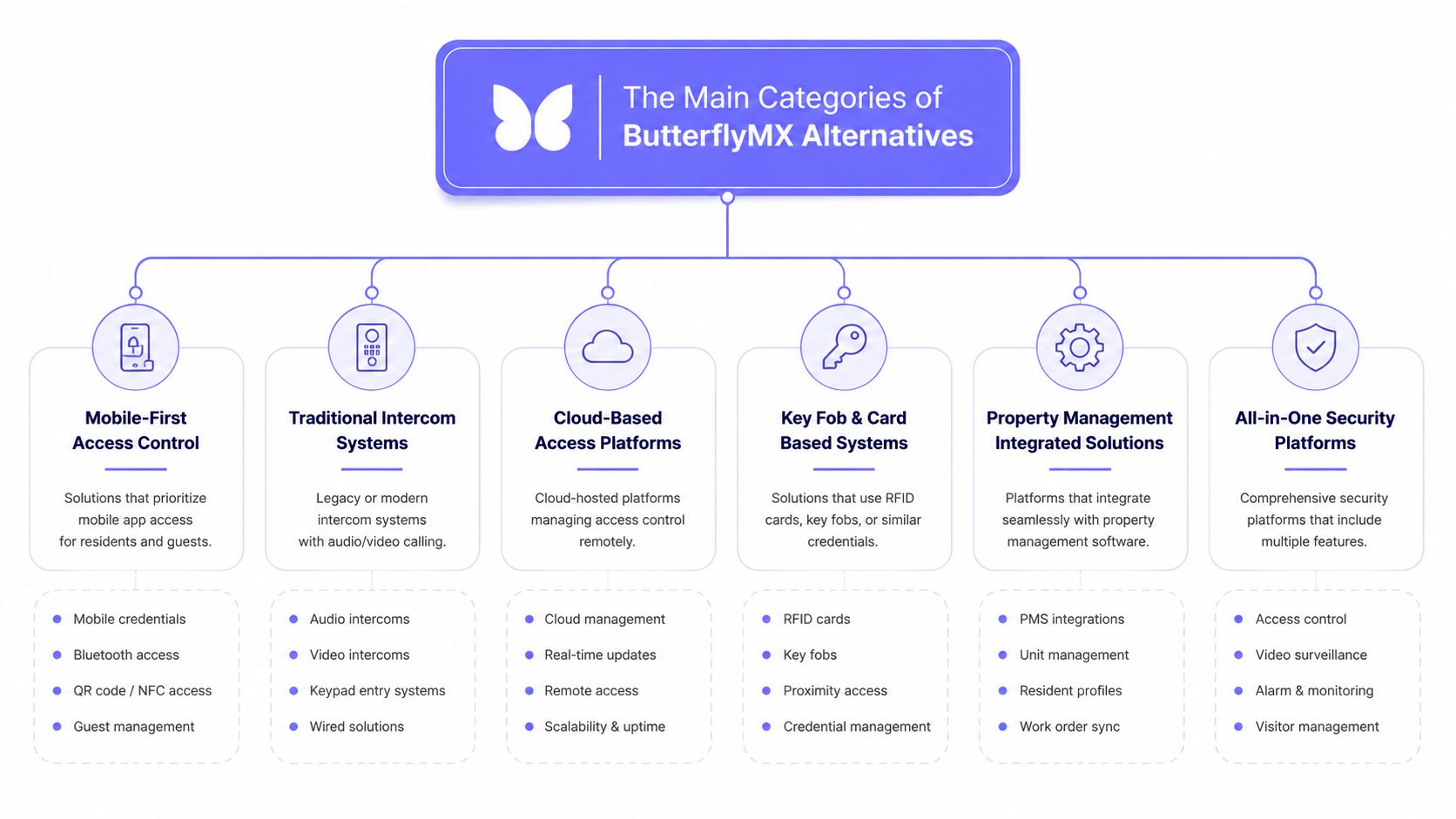
The market does not split into dozens of equal competitors. It falls into a few deployment models, and that is the right way to judge it.
For a buyer comparing ButterflyMX alternatives, the key question is whether the product fits the property's entry hardware and retrofit budget. A garden-style HOA with a working gate operator has different needs from a mid-rise that can tolerate a broader system replacement. Capterra's alternatives page shows that the competitive set stretches across intercom, access control, and adjacent property-management tools, which is exactly why a property-type lens matters more than a generic feature grid.
Cloud-native platforms
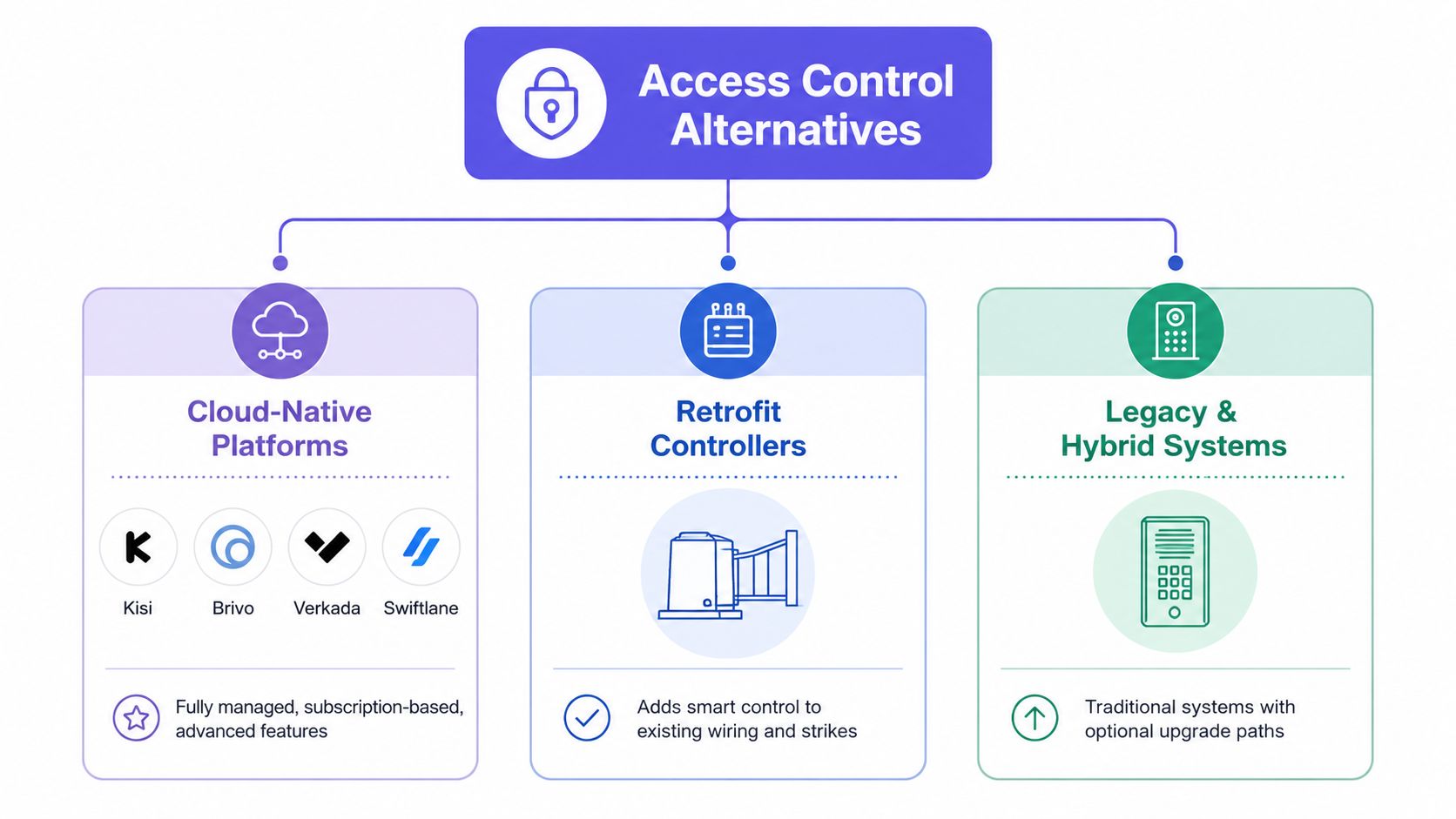
These are the names many buyers see first, including Kisi, Brivo, Verkada, and Swiftlane. The category relies on browser-based administration, mobile credentials, and multi-site management, which fits operators who want software-led control.
These systems are usually strongest in newer or more centralized environments. They are a weaker fit for a gate that already has working hardware and only needs a smarter access layer.
Retrofit-oriented controllers
This category exists for a different reason. Buyers want to modernize an existing gate or call box without tearing it out, and the platform has to work with that reality.
That is why hardware-light systems matter for HOAs and gated communities. They are built around preserving the existing gate operator, existing wiring, and existing call box while improving access at the edge.
Hybrid enterprise stacks
Hybrid systems sit in the middle. Comparison pages group Honeywell WIN-PAK 4.8, Bosch Access Management, Liberty Access Control, and similar tools around broader security control, often combining access, video, and intrusion into one admin surface.
These platforms fit larger environments with multiple systems to manage. They make less sense when the site only needs better gate access and does not want a security-operations overhaul.
The practical takeaway is blunt. Cloud-native is about centralized software control, retrofit is about preserving existing infrastructure, and hybrid enterprise is about converged security administration. Buyers who skip that distinction end up comparing products that solve different problems.
Buyer rule: Match the architecture to the property first, then compare features.
Side-by-Side Comparison Criteria That Matter
A serious comparison starts at the property, not the product page. Walk the gate, open the call box, check the panel, and ask six questions before anyone talks about app design or dashboard polish.
1. Connectivity
Ask whether the system depends on Wi-Fi, wired networking, or cellular connectivity. Cellular systems are usually the cleaner answer at gate houses where the network is weak, inconsistent, or expensive to extend.
That matters because remote entries fail in predictable ways. Metal enclosures, long driveways, and patchy internet service create the same complaint over and over, the gate goes offline and residents start calling the office.
2. Hardware compatibility
Ask what stays in place. If the platform needs a brand-new intercom stack, the property pays for hardware that may still be usable.
Gate-focused buyers should care about compatibility with existing gate operators, call boxes, and strikes, not just whether the app looks modern. If the system cannot work with the operator already on site, the quote will grow fast and the project will turn into a replacement job.
3. Installation model
Ask whether the platform is retrofit-friendly or replacement-heavy. A retrofit model usually fits best when the entry hardware already works and the goal is smarter access, not a new physical system.
A replacement-heavy model can make sense in a full renovation. It makes less sense when the current gate infrastructure is sound and the board is trying to control spend.
4. Security and privacy architecture
Ask where identity, logs, and admin permissions live. Cloud-native systems often emphasize remote administration and mobile credentials, while hybrid systems centralize more security layers together.
The right answer depends on the site. A small HOA does not need the same architecture as a campus with multiple controlled zones, and a property manager should not pay for centralized security complexity if the only pain point is a tired gate intercom.
5. Pricing structure
Ask how the vendor charges for hardware, users, site count, and service tiers. Buyers do not need a perfect public price sheet to see when a quote will expand as the property grows.
Retrofit projects hide costs in plain sight. Extra wiring, cellular service, mounting work, compatibility modules, and labor for the gate operator can matter more than the sticker price on the platform itself.
6. Admin tooling
Ask who will run the system. If office staff, board members, or a guard desk need to manage residents and visitors, the admin interface must be simple enough to use without constant support.
That matters most at properties with turnover, seasonal residents, or volunteer board leadership. A system that looks efficient in a demo can become expensive if every resident change requires a vendor ticket.
| Decision factor | What to look for | Retrofit warning sign | Best fit by property type |
|---|---|---|---|
| Connectivity | Cellular, wired, or network-based access that stays reliable at the entry point | The gate depends on weak Wi-Fi or a network extension that adds labor and downtime risk | Remote gates, HOAs, driveways, and sites with poor network access |
| Hardware compatibility | Works with existing gate operators, call boxes, and strikes | The vendor pushes a full rip-and-replace quote for working equipment | Communities that want to keep usable entry hardware |
| Installation model | Add-on deployment with minimal disruption | A project that turns into a renovation just to add mobile access | Properties trying to control retrofit cost |
| Security and privacy architecture | Admin control that matches the number of users and zones | Enterprise controls billed into a small community that does not need them | Small HOAs, larger campuses, and mixed-use sites with different needs |
| Pricing structure | Clear charges for hardware, users, service tiers, and growth | Costs rise every time the site adds residents, gates, or support needs | Buyers comparing lifetime cost, not only setup cost |
| Admin tooling | Simple resident and visitor management for the people who actually use it | The office or board needs constant vendor help for routine changes | Properties with non-technical staff or volunteer administrators |
The best buying decision is usually the least glamorous one. Match the system to the gate that is already there, then test the quote against retrofit labor, compatibility risk, and who will manage the site day to day.
Best-Fit Recommendations by Buyer Type
Different buyers need different answers, and the site type matters more than the product category name. A board managing a gate-served HOA should not buy like a high-rise operator, and a commercial campus shouldn't buy like a small residential community.
HOA boards and gated communities
These buyers usually get the most value from retrofit-first systems. The reason is simple, existing gates often still work, and the board wants better access without turning the entry into a construction project.
A cellular retrofit platform is especially useful when residents want smartphone access, managers want audit logs, and the community wants to keep remotes or keypads during the transition.
Single-family homeowners with driveway gates
For a homeowner, the best fit is usually the solution that preserves the current operator and keeps the system simple. A full cloud intercom suite is often too much, unless the home is being treated like a larger, managed property.
What matters here is reliability and day-to-day ease. The owner wants access from a phone, not a new project every time the internet blinks.
Commercial facility managers
Larger sites need to think harder about admin control, identity, and multiple entry points. That's where hybrid enterprise stacks like Honeywell WIN-PAK or Liberty Access Control can make sense, especially when access needs to sit alongside video or intrusion workflows.
A concrete benchmark helps here. Slashdot describes Liberty Access Control as web-based access management for up to 32 doors, which places it in a bounded small-to-mid installation class, while Honeywell WIN-PAK 4.8 is positioned as a browser-based interface that unifies access control, video surveillance, and intrusion detection in one interface. That split tells buyers whether they need a lightweight door workflow or a broader physical-security stack.
Security integrators
Integrators should look for systems that are easy to deploy, easy to support, and easy to explain to clients. Retrofit-friendly platforms win when the goal is to reuse the gate operator and reduce installation surprises.

One option that fits this logic is Nimbio, a cellular keyless entry system that retrofits electronic gates and lets residents and managers control access from a smartphone app without relying on Wi-Fi. It's the kind of product that makes sense when the hardware should stay and the control layer should change.
Migration Steps, Installation Effort, and ROI Levers
The easiest way to lose money on access control is to skip the site audit. A property team needs to know what hardware exists, what signals are available, and how residents currently enter before it ever signs a contract.
The sequence that avoids surprises
Start with the gate inventory. That means the operator, call box, wiring, credential method, and any existing camera or intercom gear.
Then confirm connectivity. Cellular coverage matters if the property wants to avoid reliance on shaky Wi-Fi, and many retrofit projects separate from the higher-friction replacements.
After that comes credential migration. Existing fobs, PINs, and resident access rules need to move cleanly so the new system doesn't create a week of lockouts.
The final steps are resident onboarding and admin training. If office staff or board members can't manage access quickly, every minor issue becomes a support ticket.
Where the payback comes from
The ROI levers are straightforward:
- Less rekeying and reprogramming: Digital credentials are easier to change than physical access methods.
- Fewer truck rolls: Remote admin reduces repeat visits for routine changes.
- Less guard dependency: Sites that rely on manual visitor handling can cut repetitive front-end work.
- Avoided replacement expense: Preserving the existing gate operator prevents a full rip-and-replace bill.
For teams that also handle visitor messaging or confirmation workflows, Salesmsg's 2026 texting guide is a useful companion read because resident notifications and access communication often live in the same operational lane.
Retrofit usually wins on disruption
A retrofit controller is typically the faster path when the gate hardware is serviceable. A full intercom replacement is the slower, heavier option because it drags in more labor, more coordination, and more resident retraining.
If the current gate opens reliably, don't replace it just to get a mobile app.
Before any rollout, managers should troubleshoot your gate controller and confirm the site can support the new access method. That avoids expensive backtracking after the hardware has already been ordered.
Recommendation Framework and Next Steps to Trial or Contact
The recommendation is simple.
If the property is a high-rise multifamily building, start with a cloud-native intercom platform. That's where ButterflyMX-style systems tend to fit best.
If the property is a gated community, HOA, or garden-style site with working hardware, start with a retrofit controller that preserves the existing gate operator and supports remote access from a phone. That includes systems designed to work with common operators like LiftMaster, Viking, FAAC, Nice, DoorKing, and Mighty Mule.
If the property is a large commercial campus with multiple security layers, evaluate hybrid enterprise stacks that combine access, video, and intrusion under one administration layer.
Before signing anything, ask for these four things:
- A site survey
- A cellular coverage test
- A pilot on one gate
- A live demo of the admin workflow
If the vendor won't show how residents get added, how access gets revoked, and how visitor entry is handled, keep looking. A real platform should make those tasks boring.
For HOAs, gated communities, and mixed-use sites that want to keep their existing gate hardware, the next move is a site survey and a live compatibility check. Visit Nimbio to review cellular retrofit options, request an evaluation of your gate operator, and compare whether a smartphone-based access layer fits the property better than a full intercom replacement.
Managing access for a gated community or multifamily property?
See how cellular access control works for communities like yours. Explore Multifamily & Gated Communities →