

Monday morning at a gated community often starts with ringing phones, resident complaints, and an unanswered question about the weekend. The gate stayed open too long, a delivery arrived outside the expected window, or an on-call guard used an override that nobody documented.
A digital schedule turns those recurring access decisions into rules inside cloud-based access control software. It tells the gate operator when to release, which credentials can enter, and what exceptions apply, replacing routine manual coordination with predictable behavior.
That shift reflects a broader change in how people manage time. A 2026 industry summary reported that 82% of consumers prefer booking appointments online rather than by phone, 40% of appointments occur outside business hours, and 65% are booked on mobile devices (scheduling industry data). Property operations face the same expectation, but with a higher consequence for mistakes: a schedule controls physical entry, not just an appointment slot.
The practical framework rests on three controls, hold-open windows, recurring schedules, and overrides. Properly configured, they reduce avoidable guard intervention while preserving human authority for unusual events.
Table of Contents
- What a Digital Schedule Means in Access Management
- The Three Building Blocks of Gate Scheduling
- How Digital Scheduling Cuts Manual Work and Guard Costs
- Real-World Use Cases Across Property Types
- Setting Up a Digital Schedule in a Nimbio-Style System
- Why Cellular and Hardware-Agnostic Scheduling Wins
- Best Practices and What Comes Next for Smart Communities
What a Digital Schedule Means in Access Management
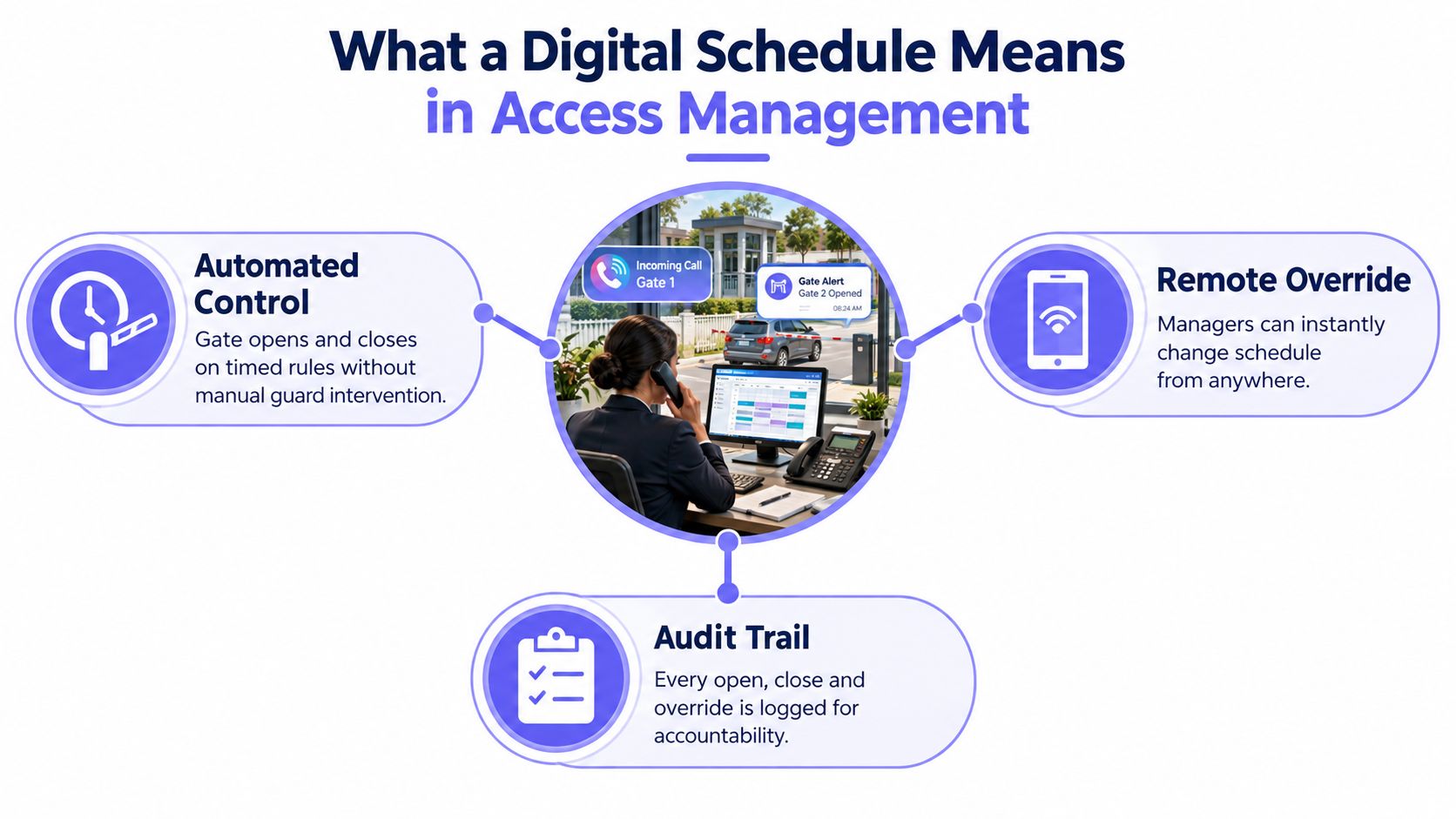
A digital schedule in access management is a ruleset embedded in a gate or building-entry platform. Rather than asking a guard or manager to press a control at a certain time, the software applies defined instructions to the connected gate motor.
Older systems handle the same problem less precisely:
- Mechanical timers switch a contact at fixed times but offer little context about who changed the setting.
- Shared keypad codes grant access without identifying the individual using them.
- Staffed gates depend on shift handoffs, phone calls, and the judgment of whoever is on duty.
A modern cloud-controlled gate operator keeps the schedule as a living operational record. A property manager can edit the rule, assign it to a specific gate, review the current state, and inspect the event history from an administrative dashboard.
Practical rule: A schedule should answer three questions before it goes live: what opens, when it opens, and who can override it.
Consider a community with a resident entrance, a service entrance, and a pedestrian gate. A recurring rule might release the resident gate during a predictable morning traffic period, keep the service entrance controlled, and restrict the pedestrian gate to authorized digital credentials. A holiday rule can change the default posture without requiring a guard to remember a paper calendar.
The record matters as much as the automation. Digital scheduling systems should capture the user ID, timestamp, action type, affected object, and before-and-after values for every schedule modification. This structure helps managers reconstruct who changed an access rule, what changed, and when, which supports auditability and dispute resolution in facility operations (audit logging requirements for scheduling systems).
A schedule also shouldn't be treated as a substitute for broader physical security planning. Teams evaluating gate hardware, visitor procedures, credential policies, and monitoring responsibilities can use this physical security procurement guidance to frame the technology decision around the entire property rather than one automation feature.
The result is straightforward. Routine access follows the community's policy, managers retain remote control, and the system leaves an accountable trail when someone changes that policy.
The Three Building Blocks of Gate Scheduling
Most effective gate schedules use three primitives. Each one solves a different operational problem, and confusing them creates unreliable behavior.
Hold-open windows
A hold-open window is a defined interval when the gate releases automatically for approaching vehicles or pedestrians. It addresses traffic flow, not permanent permission.
A community might use a morning window for resident traffic, a scheduled waste-collection period, or a vendor arrival block. When the window ends, the gate returns to its normal controlled state without a guard needing to close it manually.
The safest configuration limits the window to the gate and traffic type that need it. A service entrance may receive a longer interval than a pedestrian gate, while a high-security vehicle lane may never use an automatic open state.
Recurring schedules
A recurring schedule establishes the default pattern. Examples include weekday access during business operations, different weekend treatment, or a holiday lockout that overrides normal hours.
The rule should identify:
- The access point, such as the resident lane, loading gate, or lobby door.
- The active days and times, including the property's local time zone.
- The credential group, such as residents, vendors, tenants, or staff.
- The exception policy, including holidays, maintenance, and emergency closure.
Access-control documentation shows that credentials can be tied to defined schedules, and some platforms require separate schedules when a user needs multiple access windows in the same day (access-control credential scheduling). That distinction matters for vendors who need access before operations begin and again later for cleanup.
Overrides
An override is a one-off exception that temporarily changes the active rule. A manager might extend access for a delayed delivery, a guard might secure a gate after a tailgating concern, or a technician might open the gate during a controlled repair.
Overrides need an owner and an end condition. An open-ended manual change can become the new default, especially when several people share administrative access.
A useful override expires by design. The person who creates it should know when it ends and what event confirms that the normal schedule has resumed.
Scheduling can also connect to broader property workflows. Teams building automated vendor or resident communications may find this overview of schedule follow ups with APIs useful when mapping access events to notifications, service coordination, or property-management systems.
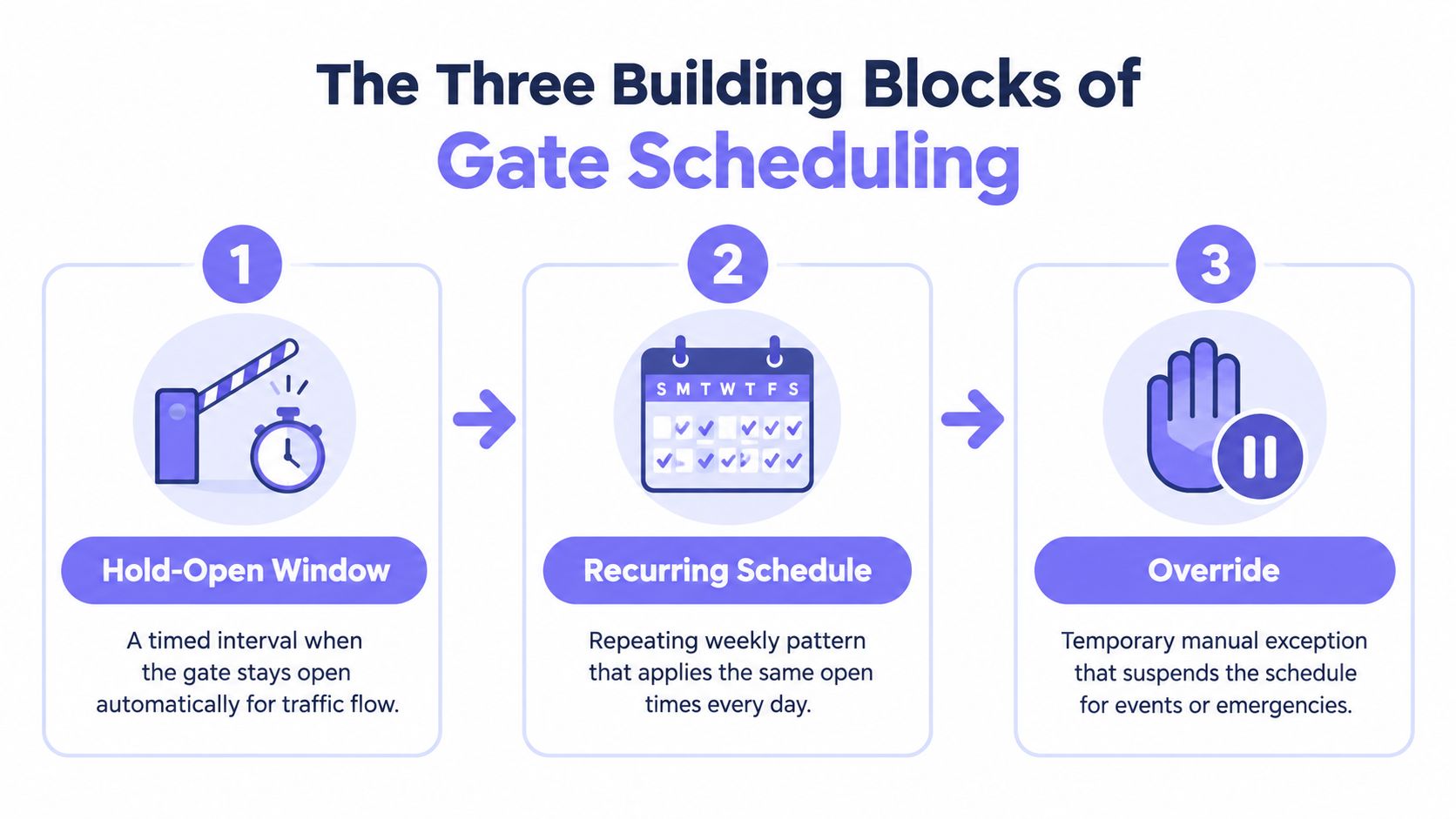
The strongest configurations keep these controls separate. Recurring rules define normal behavior, hold-open windows handle predictable traffic, and overrides address exceptions that deserve human judgment.
How Digital Scheduling Cuts Manual Work and Guard Costs
A manual gate process creates work even when nothing unusual happens. Someone drives to the gate, cycles it open, waits for traffic, closes it, confirms the position, and communicates the result to the next person.
A community with four daily gate openings and closings can burn roughly 14 staff-hours per week on drive-time, manual cycling, and shift coordination, based on the operating scenario described for this model. A properly tuned digital schedule can reduce those routine interventions to zero on ordinary days.
That calculation doesn't mean every property should remove human oversight. It means the team can reserve attention for exceptions instead of paying staff to repeat predictable actions.
Where the operational savings appear
The benefit shows up in several places at once:
- Guard deployment: Staff aren't dispatched for every planned opening or closing.
- Manager workload: Property teams spend less time answering “is the gate open?” calls.
- Vendor coordination: Approved service windows become rules instead of recurring phone conversations.
- Board reporting: Managers can show how routine access operates and identify exceptions.
- Incident review: A timestamped log can support a clearer reconstruction after a complaint.
The cost of a missed close isn't limited to the labor needed to correct it. After-hours loitering concerns, resident complaints, insurance questions, and board scrutiny can all follow. A schedule can't eliminate those risks, but it can make the intended operating posture explicit and reveal whether a person or system changed it.
NIST-oriented audit guidance treats access attempts and configuration changes as events worth logging, not merely edits to a calendar. For property operators, that distinction separates a simple timer from an accountable access-control workflow.
Manual operations versus digital scheduling
| Metric | Manual Gate | Digital Schedule |
|---|---|---|
| Routine opening | Guard, manager, or resident initiates the action | Rule initiates the action at the configured time |
| Routine closing | Depends on a person remembering and confirming closure | Returns to the controlled state after the window |
| Shift handoff | Verbal instruction, text message, or paper note | Shared administrative record |
| Exception handling | Phone calls and ad hoc decisions | Documented override with a defined scope |
| Review after an incident | Conflicting recollections are common | Event history provides timestamps and user identity |
| Staff role | Repeats predictable actions | Handles exceptions, safety checks, and resident support |
Digital scheduling works when the property team defines the normal case carefully. It fails when managers automate ambiguous policies, leave overrides active indefinitely, or skip testing after changing a gate rule.
The practical target isn't “no humans.” It's no unnecessary human intervention for predictable access.
Real-World Use Cases Across Property Types
The same scheduling primitives behave differently depending on the property's traffic pattern, liability profile, and access hierarchy. A rule that works for an HOA resident lane may be inappropriate for a logistics yard.
HOA communities
An HOA can use a recurring weekday window for the resident lane during the morning commute. A landscaping contractor can receive a recurring credential schedule for approved service periods, while a weekend override handles a special event or delayed vendor.
The resident gate should remain distinct from the service gate. That separation limits the effect of a scheduling mistake and gives the board a clearer operating policy.
Single-family estates
A private estate often needs less automation, but the consequences of an overlooked secondary gate can be significant. An after-dark rule can keep a pedestrian entrance controlled while a narrow dog-walker window supports a known routine.
The homeowner or property representative should use an override for guests rather than weakening the recurring nighttime rule. A temporary credential or remote visitor approval is easier to revoke than a shared keypad code.
Commercial sites
A commercial property may combine a tenant-only recurring window with a delivery override. A driver could receive single-use access during a defined early-morning delivery period, while tenant credentials remain governed by the standard business schedule.
Managers should avoid treating a delivery window as unrestricted site access. The access scope, expiration, and event record should match the delivery's actual operational need.
Logistics yards
Logistics yards often need longer hold-open periods during shift changes and tighter rules around high-security bays. The main vehicle entrance may prioritize throughput, while restricted areas use individual credentials and narrower time frames.
Automation and oversight must coexist. A schedule can control predictable vehicle flow, but a supervisor still needs authority to freeze a gate after a safety incident or security alert.
| Property Type | Primary Rule | Common Override | Operational Win |
|---|---|---|---|
| HOA community | Recurring resident and vendor windows | Weekend contractor access | Fewer routine calls and guard interventions |
| Single-family estate | After-dark access restrictions | Temporary guest entry | Better control of secondary entrances |
| Commercial site | Tenant access by operating period | Single-use delivery access | Clear separation between tenants and vendors |
| Logistics yard | Hold-open shift windows | Emergency gate freeze | Faster traffic flow with tighter restricted-area control |
For multifamily portfolios, a dedicated multifamily gate access control approach can help standardize schedules across entrances while preserving site-specific exceptions. The key is to standardize the policy model, not blindly copy the same hours to every property.
Setting Up a Digital Schedule in a Nimbio-Style System
A practical deployment starts with the existing gate, not with a demand to replace every component. A hardware-agnostic controller can connect to the gate operator's open command circuit, allowing the property to modernize access without replacing the motor or the full gate assembly.
1. Confirm the retrofit path
An installer identifies the gate operator, available control circuit, power conditions, and safe mounting location. The controller should support the existing equipment and preserve approved legacy remotes or keypads when the property still needs them.
Cellular connectivity matters at this stage because the access device doesn't need to depend on the property's Wi-Fi network for remote commands and schedule communication. The Nimbio gate access API can also support integrations where a property needs programmatic access management.
2. Name the access point clearly
The manager logs into the dashboard and locates the connected gate by a meaningful name, such as “North Resident Gate” or “Loading Entrance.” Clear names prevent a rushed operator from applying a rule to the wrong opening.
3. Create the normal schedule
A rule called “Morning Commute” might apply to the resident gate on weekdays from 6 a.m. to 9 a.m. The manager then selects the correct gate, reviews the time zone, and confirms which access behavior the window controls.
The label should describe the operational purpose, not just the device. “Gate 1 Schedule” tells staff almost nothing during an incident.
4. Add recurring vendor rules
A recurring vendor credential can cover predictable service activity without granting broad, permanent access. Separate schedules may be needed when the same vendor requires more than one access window during a day.
Managers should record who approved the vendor, what areas the credential reaches, and how the property will revoke it when the service relationship ends.
5. Test the behavior
Testing should include the dashboard command, the gate's physical response, the schedule transition, credential behavior, and event logging. A manager can trigger the gate remotely, verify the gate status, and confirm that the action appears in the photo or event record when the system supports that feature.
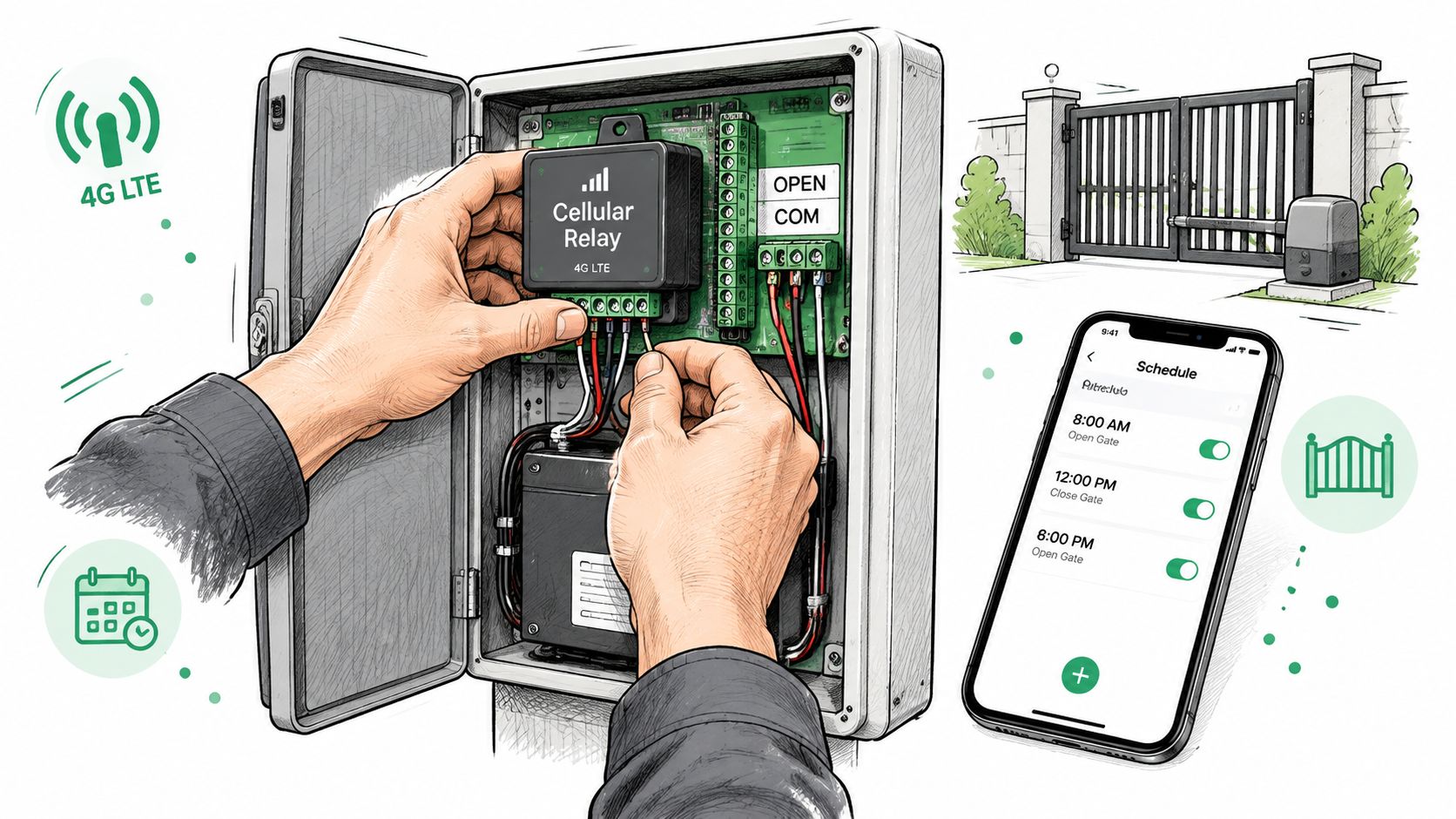
Offline buffering deserves a place in the test plan. If connectivity is briefly interrupted, the device should preserve relevant local state and report events when communication returns, subject to the platform's documented behavior.
The final check is administrative. One person creates the rule, another reviews it, and the property keeps a written override procedure so guards and managers don't improvise under pressure.
Why Cellular and Hardware-Agnostic Scheduling Wins
Security infrastructure shouldn't inherit every weakness of a consumer-grade property network. A Wi-Fi-dependent gate system can become difficult to reach when a router fails, a switch loses power, or a broadband connection drops during a storm.
A cellular access controller uses LTE or another mobile-network connection to keep the access API and remote control available independently of the property's Wi-Fi. This architecture doesn't make the gate immune to every failure, but it removes one common dependency (cellular access control for commercial properties).
Uptime without a local network dependency
A recurring schedule should continue to follow its configured behavior even when the property's internet service is unavailable, provided the controller has power and the platform supports local schedule execution. The device can buffer relevant events and synchronize them after communication resumes.
Managers should still plan for power loss, damaged gate hardware, and unsafe physical conditions. Cellular connectivity addresses the network path, not every failure mode.
Retrofit compatibility
Replacing a functioning gate motor solely to add digital scheduling can create unnecessary disruption and expense. A hardware-agnostic retrofit adds a modern controller to existing gate hardware, preserving prior equipment investment while enabling smartphone credentials and remote administration (hardware-agnostic security integration).
That approach also simplifies phased upgrades. A property can modernize one entrance, validate the operating model, and extend the pattern to additional gates without redesigning the entire site.
Remote resilience
Remote access is only useful when the system can reach the gate during the moments staff need it most. A manager may need to revoke a credential, change a hold-open window, or secure an entrance while away from the property.
Teams evaluating the architecture should review how cellular gate openers work alongside the gate's power, communications, and emergency procedures. The right design keeps automated rules dependable while retaining a deliberate manual fallback.
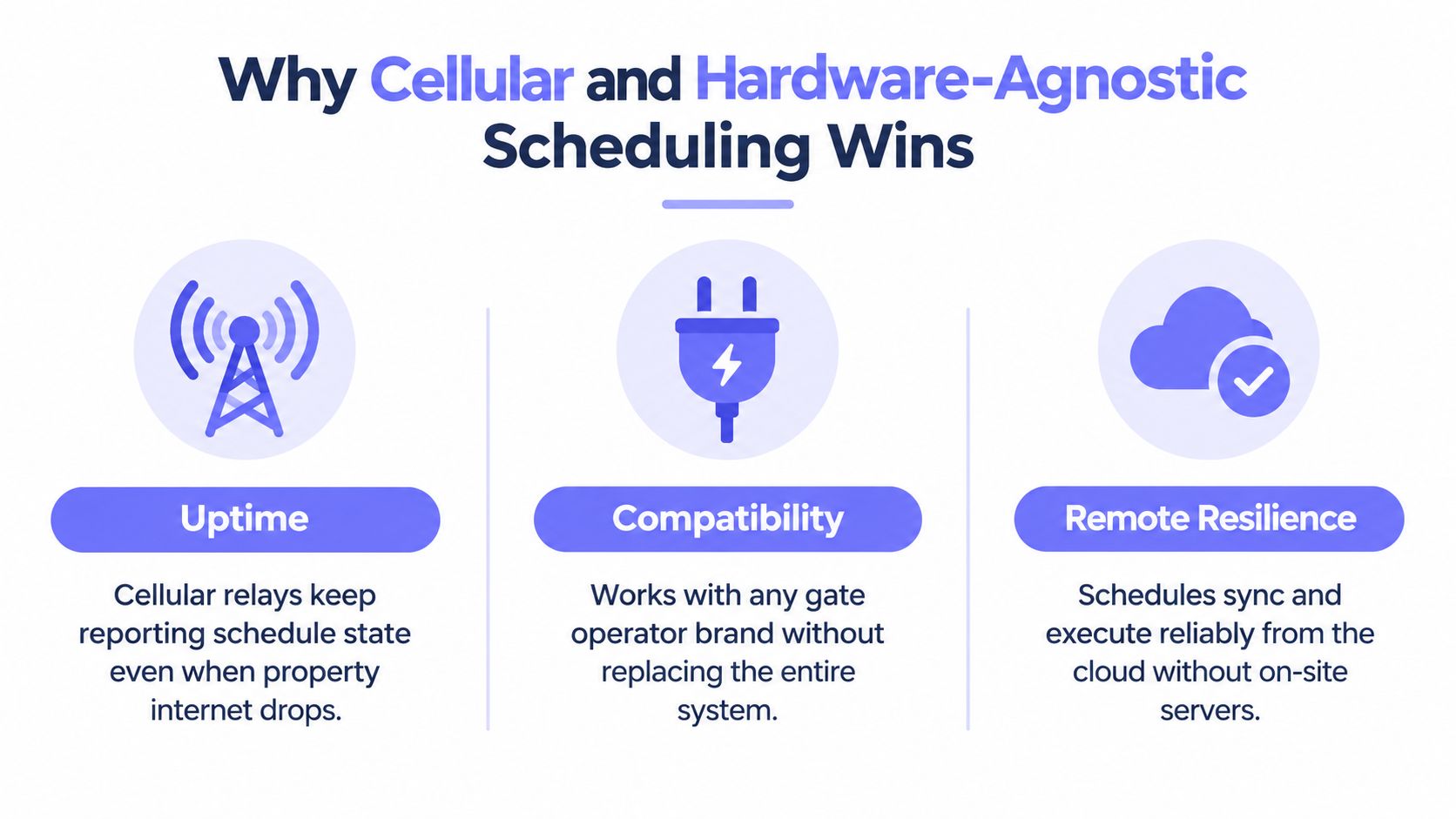
The trade-off is that cellular systems introduce their own service and coverage considerations. Installers should verify signal quality, device placement, power continuity, and the platform's behavior during outages before treating the schedule as mission-critical infrastructure.
Best Practices and What Comes Next for Smart Communities
A digital schedule becomes valuable when it reflects actual property policy. A poorly maintained rule can automate the wrong decision just as efficiently as the right one.
Property managers can use this operating checklist:
- Audit every gate: Match each entrance to a current weekly schedule, holiday policy, and named owner.
- Define traffic windows: Use hold-open periods only for predictable traffic blocks with a clear operational reason.
- Document overrides: State who can create one, what information belongs in the note, and when the exception expires.
- Review access logs: Inspect schedule edits, credential use, access attempts, and configuration changes regularly.
- Separate duties: Keep schedule administration distinct from log deletion or modification, and protect logs with append-only or write-once storage where appropriate.
- Test after changes: Confirm the physical gate response, remote command, credential behavior, and event record before relying on the new rule.
Access-log security deserves special attention. Time-based permissions can limit who accesses logs, from which location, and during what period, while role separation reduces the chance that one insider can both alter a schedule and erase evidence. Cryptographic hashing or digital signatures can help detect tampering, according to industry guidance on access controls for audit logs (audit-log access controls).
Calendar security is another emerging concern. In 2025, researchers demonstrated that malicious instructions placed in Google Calendar invite titles could hijack Gemini-powered assistants, while security coverage in 2025 and 2026 warned that calendar notifications and subscriptions can carry phishing links or malware (calendar security risks). Property teams should treat shared invitations, automated calendar imports, and AI-connected scheduling assistants as access-governance questions, not just productivity features.
The next stage is policy-driven automation. AI scheduling agents, delivery-window integrations, vendor pre-authorization, emergency lockdowns, and event-driven rules could allow a gate system to adapt without asking staff to rebuild the calendar manually. That future requires strong approval controls, explicit exception handling, and audit-ready records, because autonomous action without oversight creates a different kind of operational risk.
Smart communities shouldn't aim for automation at any cost. They should automate the predictable, constrain the exceptional, and make every meaningful decision traceable.
Nimbio provides cellular, smartphone-based access control that can retrofit existing gates, schedule digital credentials and hold-open windows, support remote visitor verification, and give property teams visibility into access activity without relying on Wi-Fi. Visit Nimbio to evaluate a digital schedule for the community's gates and plan a practical deployment with the existing hardware and operating policy in mind.


