

The most popular advice about a door entry keypad is also the least complete: install one, choose a strong PIN, and the access problem is solved. A keypad is convenient, familiar, and often easy to retrofit, but it can become a legacy tool the moment one shared code reaches a contractor, former resident, delivery driver, or house sitter.
The better question for an HOA board, property manager, installer, or gated-community resident is broader. Which credential system fits the property, who will manage it over time, and what happens when a code must be revoked, an audit is required, or the network and power supply fail?
Mechanical pushbutton entry locks were already in production by 1965, when the Kaba Ilco Unican 1800 entered the North American market. Electronic pushbutton locks reached commercial applications by the 1980s, adding multiple user codes, scheduling, and audit trails, as documented by Locksmith Ledger's history of smart locks. The technology has evolved, but the lifecycle questions remain.
Table of Contents
- What a Door Entry Keypad Actually Does
- The Four Main Types of Door Entry Keypads
- Security Risks Most Keypad Buyers Underestimate
- Wiring and Installation Fundamentals
- Compatibility and Smart Integration Options
- Troubleshooting and Routine Maintenance
- Choosing and Upgrading the Right System
What a Door Entry Keypad Actually Does
A door entry keypad is a credential reader. A user enters a PIN, the keypad validates it locally or through a controller, and a relay sends a momentary signal to release an electric strike, magnetic lock, or gate operator.
The keypad usually doesn't power the lock directly. Instead, it acts like a controlled switch between the access device and the locking or gate hardware. The relay may remain open until a valid code is entered, then close for a configured period before returning to its normal state.
The credential layers
Not every code has the same authority. A well-designed access system may separate:
- User PINs, assigned to residents, staff, or recurring service providers.
- Visitor codes, created for short-term or one-time access where supported.
- Master codes, reserved for approved administrators.
- Maintenance codes, used by installers or technicians during service.
That separation matters because a shared master code creates a much larger management problem than a resident-specific credential. Some systems also create entry logs, allowing an administrator to review credential activity. A keypad that only confirms a valid PIN, without identifying the person behind it, provides far less accountability.
Practical rule: A keypad should be evaluated as an access-management system, not just as a metal panel with numbered buttons.
The questions that determine long-term fit
Before selecting hardware, a board or installer should answer four questions:
- Who changes codes? A resident-managed door needs a different process from a professionally administered gate.
- How are credentials revoked? The system should support removal after a lease ends, a contractor's job is complete, or a code is exposed.
- What gets recorded? Audit-friendly systems connect an event to a person, credential, location, and time where the hardware supports it.
- What happens during an outage? Power loss, controller failure, cellular interruption, and network failure can affect different components in different ways.
A practical overview of keypad architecture and access-control components is available in the Wisenet Security keypad guide. It can help first-time buyers distinguish a simple standalone reader from a larger system with controllers, intercoms, and event management.
The keypad remains useful in many properties. It just shouldn't be treated as the automatic endpoint of a modern access strategy.
The Four Main Types of Door Entry Keypads
Keypads differ less by appearance than by how they receive credentials, how they receive power, and where access decisions are processed. The right choice for a single service door may be unsuitable for a shared vehicle gate.
| Type | Credential Method | Best Fit | Power & Connectivity | Key Limitation |
|---|---|---|---|---|
| Wired standalone keypad | Local PIN entered on physical buttons or a touchscreen | Single doors, equipment rooms, and small controlled areas | Low-voltage wired power, with relay or data output | Code administration and auditability may be limited |
| Wireless battery keypad | Local PIN, sometimes paired with wireless connectivity | Retrofit doors, remote gates, and locations where cabling is difficult | Battery power, with wireless communication where supported | Battery depletion, weather exposure, and service access |
| Intercom-plus-keypad unit | PIN combined with directory calling, audio, or video | Multifamily buildings and staffed or managed entrances | Wired power, communication network, and door or gate relay | Higher installation complexity and tenant onboarding |
| Mobile or touchless alternative | Smartphone app, Bluetooth, NFC, or another digital credential | Properties seeking individual, revocable access | Phone connectivity, cellular service, Wi-Fi, Bluetooth, or NFC depending on system | Phone ownership, onboarding, permissions, and device dependency |
Wired standalone keypads
A wired unit is often the most predictable option for a single door. It can use a dedicated low-voltage supply and connect directly to an electric strike, maglock, or gate operator input.
Its weakness is usually administrative rather than mechanical. If several people share one PIN, the hardware may continue working while the property loses track of who used the entrance.
Wireless battery keypads
Wireless units can simplify retrofit work at detached gates or locations where trenching and conduit would be disruptive. They're convenient, but the property needs a clear battery inspection process and a plan for water intrusion, temperature changes, and low-voltage warnings.
A gate entry system that uses cellular communication rather than local Wi-Fi can offer a different retrofit path. The GSM gate opener explained resource provides useful context for understanding how cellular control differs from a wireless keypad connection.
Intercom and keypad combinations
A directory panel with audio or video gives visitors a way to reach a resident instead of relying only on a shared code. This can be valuable in multifamily properties, where the access point has both credential and communication duties.
The trade-off is operational effort. Tenant directories need updates, residents need onboarding, and the panel must be protected from weather, tampering, and communication faults.
Mobile credentials and touchless entry
Smartphone apps, Bluetooth, and NFC reduce dependence on a code that multiple people know. Administrators can issue credentials to individuals and, where supported, set schedules or revoke access without physically reprogramming a panel.
These approaches don't eliminate every failure point. Residents may lose phones, change devices, or struggle with onboarding. For that reason, many properties use more than one form factor, such as a keypad for local convenience, an intercom for visitors, and mobile credentials for residents and staff.
Security Risks Most Keypad Buyers Underestimate
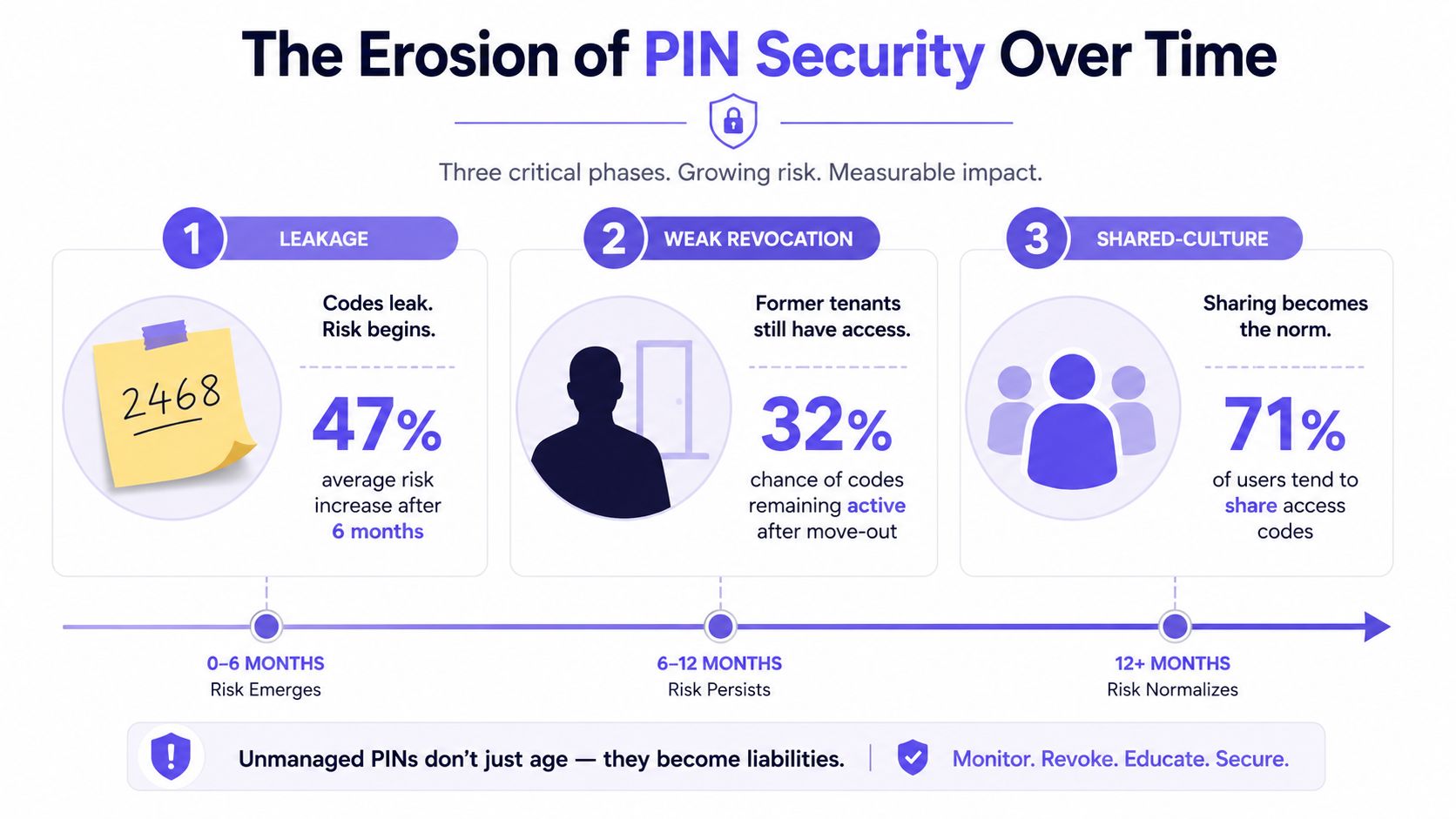
PIN security usually weakens through human behavior, not through a dramatic attack on the keypad's electronics. Residents send codes by text, contractors keep them after a job, and former occupants may retain access unless someone remembers to remove or change the credential.
A 2025 U.S. homeowner survey reported that 78% of travelers planned to share access codes with house sitters, neighbors, or family. Only 36% changed codes immediately after use, and just 8% used temporary codes that automatically expired, according to the survey record from Lund University.
That pattern creates persistence. A PIN shared for a weekend can remain active long after the original reason for access has disappeared. Common codes, including 1234, 1111, and 2580, are also widely leaked and reused, which makes convenience a security policy rather than a minor user preference.
Why code length isn't enough
Many keypad systems limit local PINs to 4 to 6 digits and store roughly 100 to 1,000 users, depending on the model. A four-digit code has only 10,000 possible combinations, so resistance to repeated guessing depends heavily on lockout settings, monitoring, and tamper signaling, as described in this access-control datasheet.
A stronger lifecycle policy includes:
- Individual credentials, so access can be connected to a person rather than a household or job category.
- Temporary access, with automatic expiration for visitors and service providers.
- Lockout rules, which slow repeated wrong entries.
- Tamper and forced-door signaling, which alerts administrators to suspicious activity.
- Audit-friendly output, allowing events to reach a central controller or management platform.
Federal access-control guidance also states that keypad devices should prevent unauthorized people nearby from observing number selection, and that devices outside a controlled area should use tamper-resistant enclosures and secure fastening. Physical placement, privacy shields, lighting, and the angle of approach all affect exposure.
Property managers reviewing hardware should also consult must-read door protection tips, particularly when a keypad is only one part of a broader entrance-protection plan.
Wiring and Installation Fundamentals
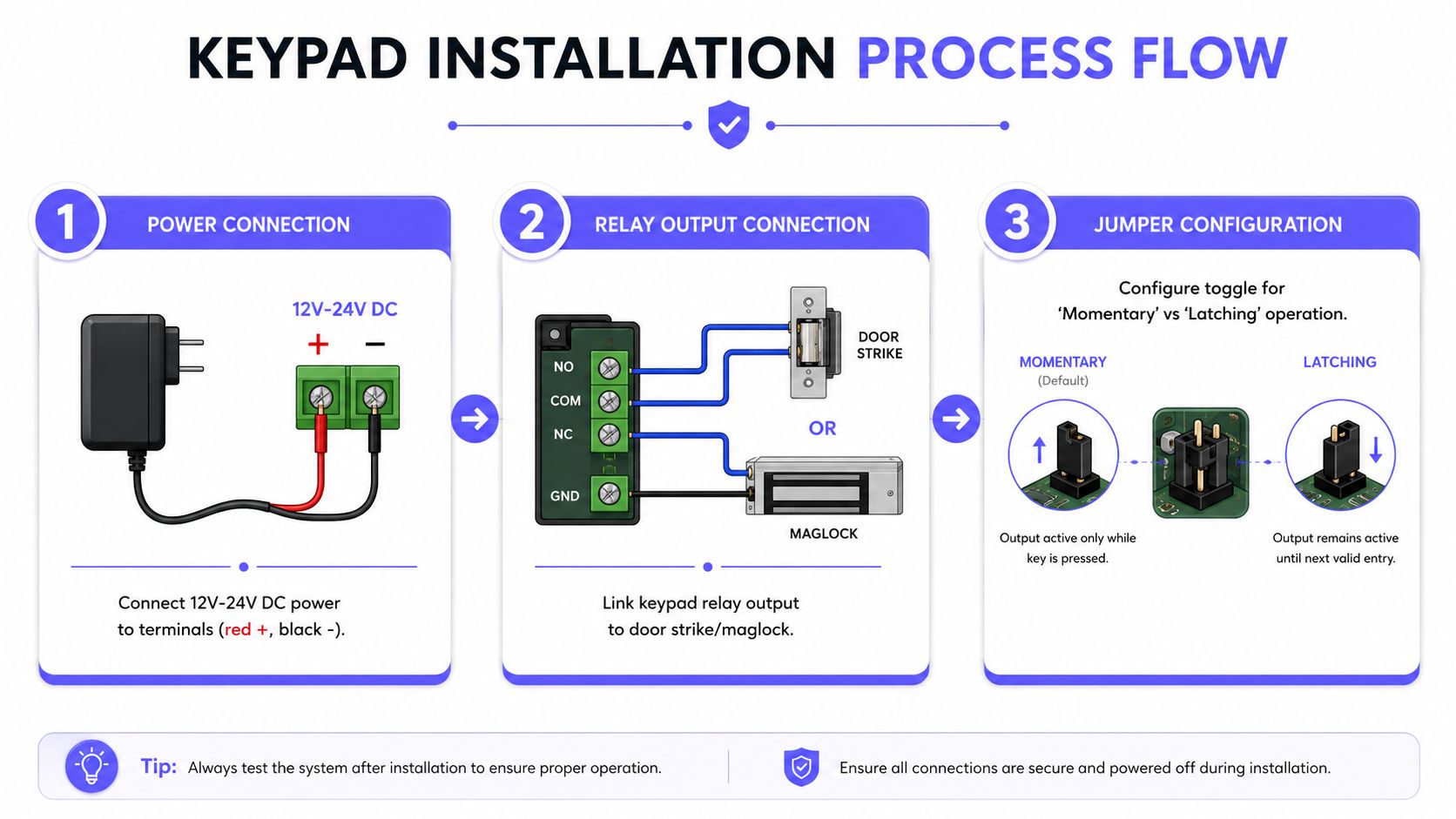
A keypad installation has three distinct jobs: provide suitable power, send a valid relay signal, and operate the downstream lock or gate equipment safely. Confusing those functions is a common cause of unreliable access.
Many standalone controllers accept 12 to 24 VAC or VDC input, use low standby current, and allow relay timing to be configured from 0 to 99 seconds, according to representative manufacturer documentation. One documented controller accepted 12 V AC/DC, drawing about 62 mA at quiescence and up to 130 mA when active. Another used 5 to 16 VDC at 30 mA typical and exposed a 26-bit Wiegand or 4-bit Word output, as shown in this keypad controller instruction document.
What the installer connects
The low-voltage circuit usually feeds the keypad and controller. The relay then connects to the gate operator's access input, an electric strike circuit, or a maglock control path.
A typical sequence looks like this:
- Power enters the keypad. The installer confirms polarity and voltage at the terminals.
- A valid PIN activates the relay. The relay closes or changes state for the programmed interval.
- The downstream device releases. The strike, maglock controller, or gate operator responds according to its own configuration.
Most installations use normally-open relay contacts for a momentary trigger. The contact closes only when access is granted, then opens again. Latching operation is different and must be configured carefully because the access device may remain energized or released.
Cable, distance, and weather protection
Installers commonly choose two-conductor or four-conductor low-voltage cable, such as 18/2 for power and relay paths or 22/4 where additional conductors are needed. The practical run length depends on conductor size, current draw, voltage, and the lock or gate motor's requirements. Voltage drop becomes more significant as the run grows, so the installer should measure voltage at the far end under load rather than relying only on the supply rating.
Exterior gate posts need weatherproof conduit, sealed entries, and hardware that can tolerate moisture. Frequent problems include:
- Shared power supplies, which can produce relay chatter or unstable operation.
- Missing surge protection, particularly near gate motors and long exterior cable runs.
- Loose or corroded terminals, which create intermittent faults.
- Poor grounding or bonding, leaving the metal housing more vulnerable to electrical noise and surge events.
A non-electrician can usually prepare conduit routes, mounting surfaces, and cable paths under an installer's direction. The installer should handle voltage verification, relay termination, grounding, surge protection, lock behavior, and final safety testing. For a retrofit that preserves the existing gate hardware, an installer can also retrofit a cellular gate opener without treating the keypad circuit as a reason to replace the entire operator.
Compatibility and Smart Integration Options
A keypad rarely works alone. It becomes useful only when its output matches the equipment controlling the entrance.
The simplest integration uses a dry-contact relay. The keypad closes a contact, and the existing gate operator or lock interprets that pulse as an open command. This method often preserves an older operator because the controller already has an input intended for a keypad, push button, intercom, or other access device.
The second path uses a data connection, such as Wiegand, to send credential information to a central access controller. The controller can then apply permissions, schedules, lockout rules, and event logging. Data integration generally provides more centralized control, but it also introduces compatibility requirements that a basic relay connection may avoid.
| Integration Method | Connection Type | Works With Legacy Gate? | Credential Flexibility |
|---|---|---|---|
| Dry-contact trigger | Relay pulse to operator or lock input | Often, if a compatible input exists | Limited by the keypad or downstream controller |
| Wiegand or similar data output | Credential data to central controller | Sometimes, if the controller accepts the format | Broader, with centralized policy options |
| Intercom integration | Relay plus audio or video communication | Often, with compatible strike or operator input | Visitor calls, resident credentials, and PINs |
| Cellular retrofit controller | Relay connection with cellular cloud access | Often, because it can use the existing operator input | Individual mobile credentials, schedules, and revocation |
Compatibility checks before purchase
An installer should verify:
- Relay polarity and contact type, including whether the operator expects normally-open or normally-closed behavior.
- Input voltage tolerance, especially when a keypad and lock share a power supply.
- Momentary or latching operation, because the gate or lock may respond differently to each mode.
- Credential output format, when the keypad connects to a central controller.
- Emergency and egress behavior, particularly for maglocks and building doors.
- Event visibility, including whether the system records a keypad event, a controller event, or only a generic open command.
Cloud-managed access control can extend the life of legacy wiring. A property may keep its gate operator, strike, and keypad relay while adding mobile credentials, temporary permissions, and event records through a compatible controller. The result is not necessarily a replacement of the old access point. It is a layered system that gives administrators more options than a shared PIN alone.
Troubleshooting and Routine Maintenance
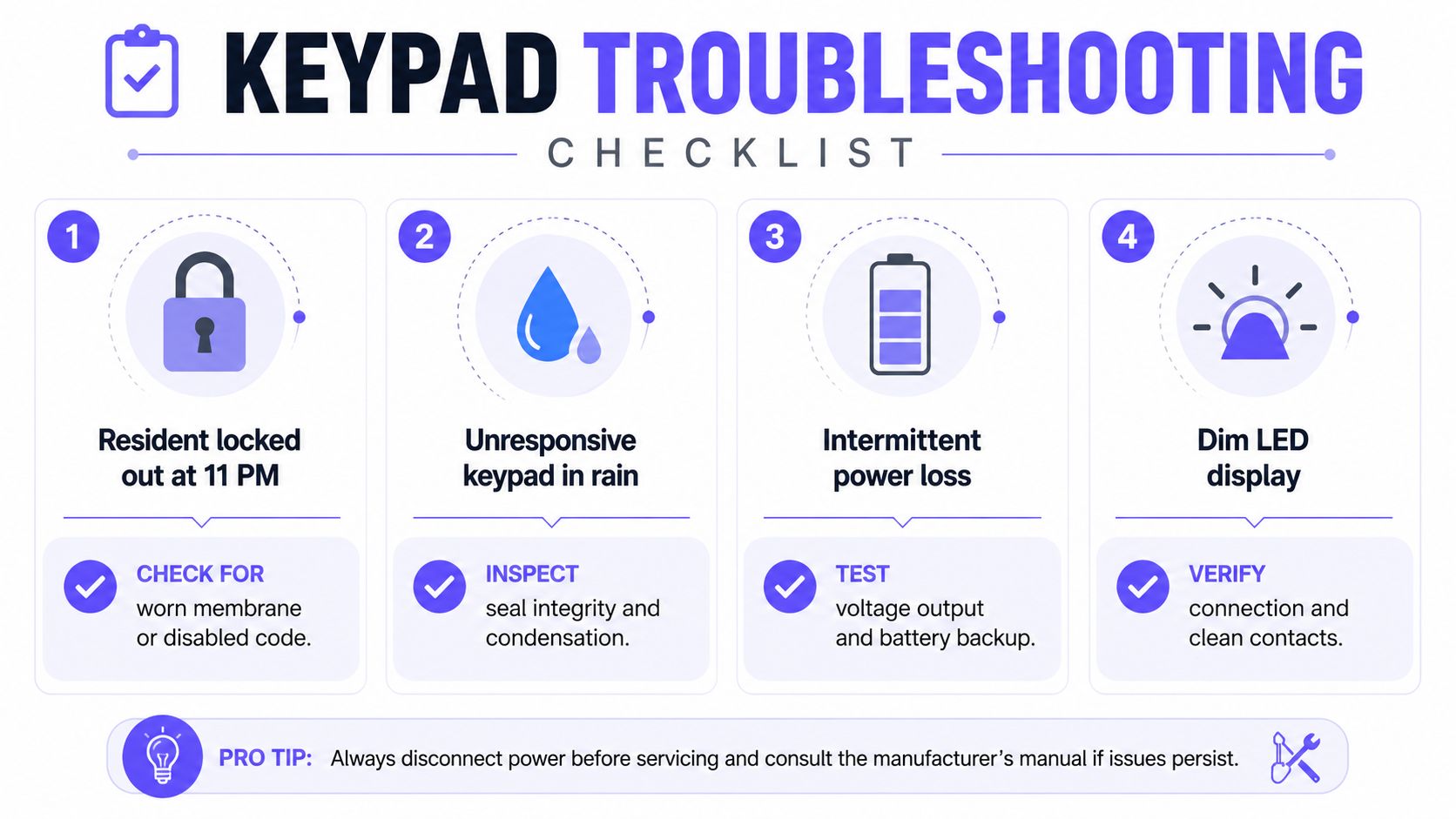
At 11 p.m., a resident reports that the gate keypad won't accept a familiar code. The cause may be a worn membrane, a disabled credential after tenant turnover, a depleted backup battery, or a controller that has lost power. Replacing the keypad immediately can waste time if the problem sits downstream.
A different call comes from an installer. The keypad works in the morning but fails intermittently later in the day. Long cable runs, voltage drop under load, corroded terminals, and a relay beginning to stick closed deserve inspection before the installer blames the software.
Three recognizable service scenarios
- Locked-out resident: Confirm that the keypad responds to individual buttons, check whether the credential remains active, and verify power at the unit.
- Unresponsive keypad during rain: Inspect the faceplate seal, conduit entry, condensation, and water tracks around terminals.
- Audit request from management: Determine whether the system identifies a person or only confirms that an anonymous PIN was accepted.
A PIN-only device may prove that a valid code was entered, but it may not prove who entered it. That distinction matters when a property manager needs to investigate an overnight entry or review access after a resident moves out.
A workable maintenance cadence
A maintenance plan should include:
- Quarterly cleaning: Remove dirt and residue from buttons, touch surfaces, and protective covers.
- Annual wiring inspection: Check terminal tightness, corrosion, conduit condition, gaskets, and grounding.
- Wireless battery service: Replace batteries every 12 to 24 months where the manufacturer and operating conditions support that interval.
- Credential review: Recheck code lists after staffing changes, resident turnover, contractor changes, or a known code exposure.
- Functional testing: Confirm that the keypad, relay, lock, gate operator, exit device, and safety sensors all respond correctly.
When diagnosing a failure, the technician should ask whether the keypad has power, whether the relay changes state, whether the downstream device receives the signal, and whether the gate or lock can operate from another authorized input. Those answers separate a keypad fault from a wiring fault, controller fault, or mechanical problem.
Choosing and Upgrading the Right System
A board can make a defensible decision by matching the access strategy to the property's scale, traffic pattern, and administrative capacity. The keypad type matters, but credential lifecycle management matters more.
| Property Profile | Recommended Keypad Type | Credential Strategy | Upgrade Path |
|---|---|---|---|
| Small multifamily building under 25 units | Wired standalone keypad or intercom-plus-keypad | Individual resident and service credentials, with prompt revocation | Add a controller or mobile option while preserving the strike and wiring where compatible |
| Mid-size gated community | Weather-rated gate keypad combined with mobile or cellular access | Resident-specific credentials, visitor scheduling, and auditable events | Layer a retrofit controller onto the existing gate operator |
| Large managed estate with shared amenities | Integrated intercom, keypad, mobile credentials, and centralized management | Separate resident, staff, vendor, and visitor permissions | Use a cloud-managed platform with reporting, schedules, and multiple credential types |
Small multifamily buildings
A small building may not need a full panel replacement. A wired keypad can handle a service entrance, while an intercom or mobile credential system can address resident and visitor access. The board should reject any proposal that leaves one permanent code in place for cleaners, vendors, and former residents.
Gated communities
A community gate needs more than a weatherproof keypad. Vehicle traffic, visitor volume, emergency access, resident turnover, and remote administration all affect the decision. A retrofit controller is often more practical than replacing a functioning gate operator, especially when the existing equipment already accepts a dry-contact trigger.
Nimbio provides a cellular controller and mobile app that can connect to existing electronic gates and building-entry equipment, preserve compatible keypads, and let administrators grant or revoke smartphone credentials remotely. Its cellular connection avoids dependence on local Wi-Fi at the gate, while its hardware-agnostic retrofit approach is designed to work with existing operators rather than require a complete replacement.
Large estates and shared amenities
Larger properties benefit from separating credential types by role. Residents, employees, delivery teams, and short-term visitors shouldn't all receive the same access method or schedule.
The selection committee should compare audit quality, visitor workflows, outage behavior, hardware support, and the effort required to remove access. A useful board-meeting reference is what to look for in a gate access system, particularly when the property must compare replacement projects with retrofit options.
A keypad can remain one useful credential, but it shouldn't be the only credential. A modern smart community may combine keypad access, smartphone credentials, video verification, cellular connectivity, and audit-grade event logs. That layered model reduces dependence on shared PINs and gives property managers a clearer answer when the board asks who had access, when it was used, and whether it can still be used.
Nimbio helps property managers, HOA boards, and installers add cellular smartphone access to compatible electronic gates and building-entry systems without relying on Wi-Fi or replacing functioning gate hardware. Visit Nimbio to review retrofit options, remote visitor management, and individual credentials that can be granted, scheduled, revoked, and audited.


