

Rain is coming down, a resident is waiting at the community gate, and the physical fob has disappeared into a pocket, bag, or car console. After several failed searches, the resident may resort to a hidden mechanical key or call a property manager, turning a routine arrival into a frustrating access incident.
A door lock with key fob still offers quick, familiar entry, but it also creates an operational weakness. The credential proves possession of an object, not the identity of the person carrying it. For HOAs, multifamily properties, commercial facilities, and gated communities, smartphone-based cellular access provides a more manageable way to issue credentials, control visitors, and respond to lost access.
Table of Contents
- The Fumbling Resident and the Lost Fob
- How a Key Fob Door Lock Actually Works
- Key Fob vs Smartphone Access Control
- The Hidden Security Risks of Traditional Fobs
- Retrofitting Your Gate for Modern Access
- When to Choose a Fob and When to Upgrade
The Fumbling Resident and the Lost Fob
A rainy Tuesday evening exposes the practical limits of a physical credential. The resident pulls up to the gate, reaches for the fob, and finds nothing. The search moves from the center console to the cup holder, then to a coat pocket, while cars begin to queue behind the vehicle.
The fob may be inside the home, in another vehicle, or already in someone else's possession. If the property depends on a mechanical backup, the resident might have to search for a concealed key or wait for a manager to provide assistance. That's a poor resident experience, and it can encourage unsafe habits such as leaving backup keys in predictable locations.

Why the inconvenience matters operationally
For a single private driveway, a misplaced fob may be a minor nuisance. In a managed property, the same event creates work across several roles:
- Resident support: Staff must answer calls, verify the resident, and arrange temporary access.
- Credential administration: A lost fob may need to be disabled and replaced.
- Security response: Managers must consider whether the missing credential was lost, stolen, or shared.
- Recordkeeping: The property may lack a clear way to connect a physical fob event with the actual person at the gate.
The historical spread of fob technology explains why so many properties still use it. Renault introduced an early remote system on the Fuego in 1982, and GM offered expanded fob functions by 1993, according to this history of automotive key fobs. By the late 1990s and early 2000s, keyless entry had moved from premium equipment toward mainstream vehicle use.
Practical rule: A physical fob can be convenient, but a property manager still needs a plan for lost credentials, shared access, visitor entry, and immediate offboarding.
The question isn't whether a door lock with key fob can open a gate. It can. The better question is whether the system gives the property enough control when the credential leaves the authorized user's hands.
How a Key Fob Door Lock Actually Works
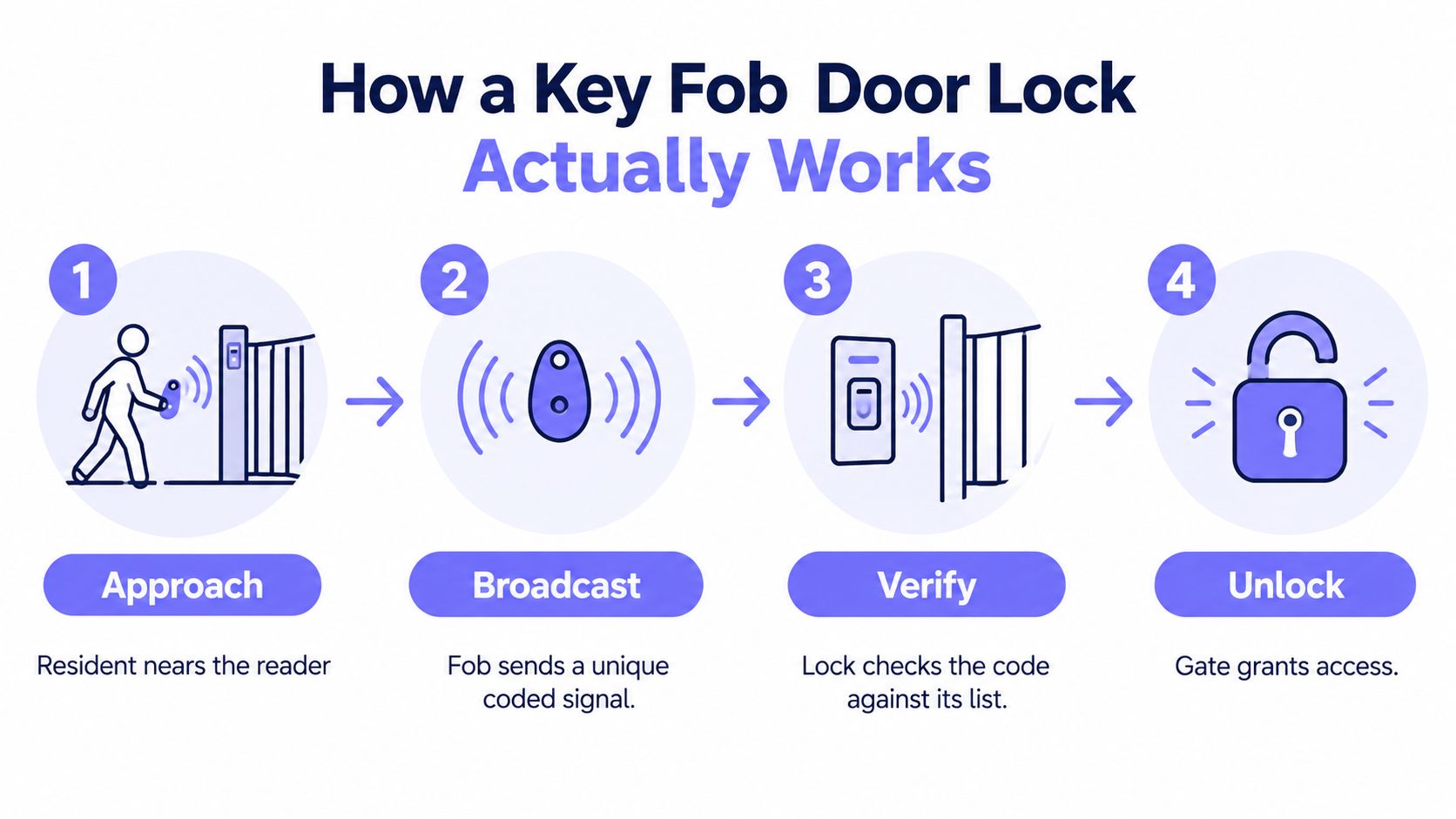
At its core, a key fob is a wireless key. The fob carries a credential, a nearby reader captures it, and an access controller decides whether the connected lock or gate operator should release.
The access sequence
- Approach: The resident brings the fob within the reader's operating range.
- Broadcast: The fob transmits its credential through a short-range RFID or NFC interaction.
- Verify: The reader passes the credential to a controller, which checks it against an approved database.
- Release: If the credential is authorized, the controller energizes or releases the electronic lock or gate operator.
This chain is important because the fob itself usually doesn't make the final decision. The reader and controller determine whether the credential is active, and commercial systems can apply permissions, schedules, and audit logging before granting entry. The same lock hardware may therefore support different policies without replacing the lock body.
Credential types affect the risk
Low-frequency credentials commonly operate around 125 kHz and may read at roughly 10 cm, while high-frequency credentials commonly operate at 13.56 MHz, with ranges up to about 3 feet and compatibility with NFC, as described in this overview of key-fob credential technology. Ultra-high-frequency credentials can operate at 860–960 MHz and may reach about 50 feet, which suits different use cases but changes the exposure and installation requirements.
Short range can reduce accidental activation, but range alone doesn't make a credential secure. Older 125 kHz fobs may transmit an unencrypted fixed identifier, making them vulnerable to cloning with readily available tools. Encrypted HF credentials are generally the stronger choice when a deployment requires better anti-clone protection and richer access-control functions.
Where the model falls short
The fob system verifies whether a credential appears on the approved list. It doesn't verify who is holding it. A resident can lend the fob to a guest, an employee can retain it after leaving, or a stranger can find it, and the reader may treat each event the same way.
That distinction separates possession-based access from identity-linked access. A smartphone app can add account controls, device authentication, remote revocation, and a more direct relationship between a credential and its assigned user.
Key Fob vs Smartphone Access Control
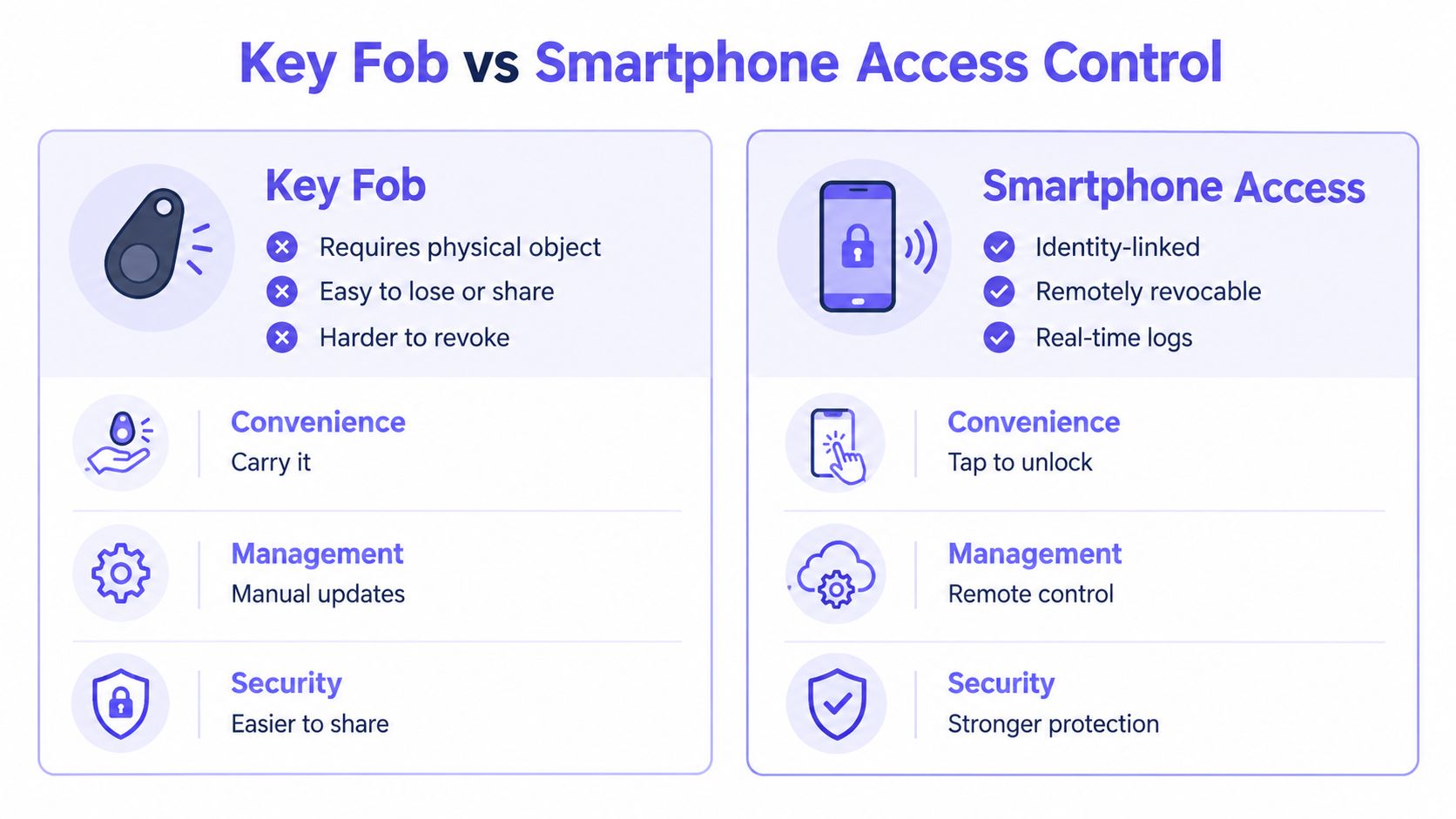
A physical fob and a smartphone credential can both open an electronic gate, but they create very different management workflows. The fob is simple at the point of entry. The smartphone system is more flexible before and after the entry event.
The resident experience
A fob requires a physical object to be present and functional. That's convenient when the resident has it, but there's no simple way to recover it when it's misplaced. A smartphone app uses a device residents already carry, while digital credentials can be updated without distributing another plastic token.
Neither approach removes every failure mode. A phone can have a depleted battery, a resident can forget the device, and cellular coverage can vary by location. A properly designed system needs fallback procedures, clear support policies, and a reliable connection between the access controller and its management platform.
The manager experience
For property teams, the differences become more consequential:
| Management requirement | Physical fob | Smartphone access |
|---|---|---|
| Issue access | Distribute an object | Assign a digital credential |
| Lost access | Identify and deactivate the fob | Revoke the assigned credential remotely |
| Guest entry | Lend or manually coordinate a fob | Send or schedule visitor access |
| Offboarding | Recover the physical item and disable it | Remove the user's digital permission |
| Auditability | Record a credential event | Associate activity with an account and device |
A fob inventory also creates ongoing administrative work. Staff must order replacements, track unreturned credentials, reconcile inactive residents, and decide how to handle shared devices. A digital workflow reduces those physical handoffs, although managers still need to configure roles, review logs, and maintain a clear offboarding process.
Security depends on the control layer
A smartphone credential isn't automatically secure just because it runs through an app. The system should support account protection, permission controls, revocation, event history, and visitor workflows. Managers should also confirm how the system behaves if the user's phone is lost or the network connection is interrupted.
A cellular controller is useful for properties that can't depend on resident or gatehouse Wi-Fi. Nimbio, for example, provides cellular smartphone control for existing electronic gates and entry systems, while allowing administrators to manage digital access and preserve compatible existing hardware. The important design principle is identity-linked, remotely manageable access, not the phone alone.
The Hidden Security Risks of Traditional Fobs
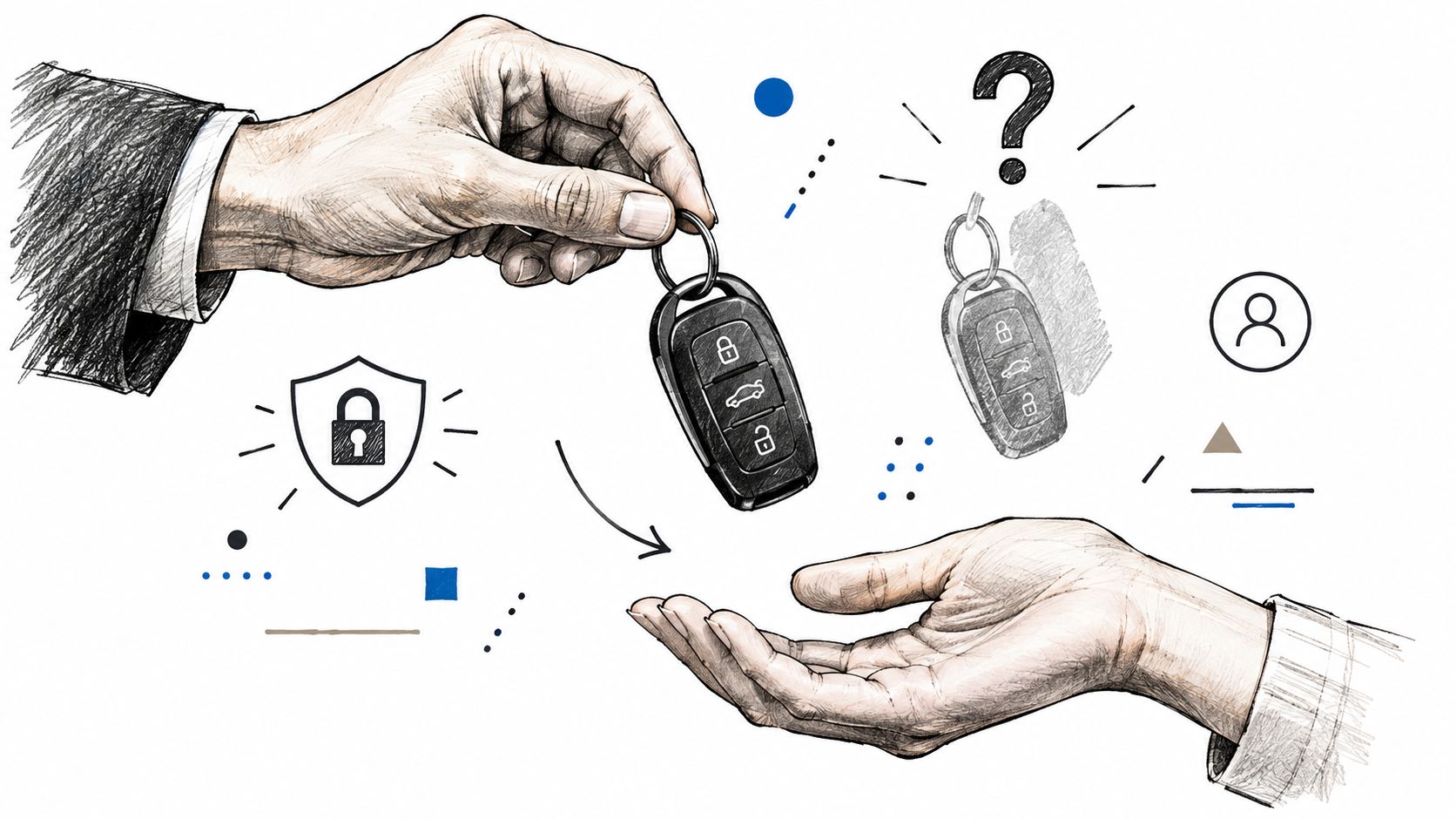
The most important weakness in a traditional fob system is easy to miss during installation. The fob verifies possession, not identity. If a resident shares it with a friend or leaves it in a vehicle, the system generally can't tell whether the authorized resident or another person is presenting the credential.
Recent access-control guidance makes the same practical point: when a fob is lost, stolen, or shared, the system usually cannot identify the person holding it unless another factor is added, as explained in this analysis of fob identity limitations.
Lost credentials create an audit gap
A reader may log that an approved credential opened the gate. That entry record doesn't necessarily reveal who used it. The result is a gap between credential activity and human activity, which becomes especially serious in shared buildings, HOAs, and workplaces.
The operational response should be immediate:
- Deactivate promptly: Disable the missing credential as soon as the report is confirmed.
- Review recent activity: Check access records for unusual events linked to that credential.
- Document the incident: Record when the loss was reported, who handled it, and when access ended.
- Issue selectively: Provide a replacement only after confirming the resident or employee's current status.
- Improve the factor mix: Consider encrypted credentials, mobile access, or a second factor for higher-risk doors.
Older 125 kHz building fobs deserve particular scrutiny because many don't use encryption. Commodity tools can scan and copy an unencrypted identifier, so a short read range doesn't compensate for weak credential design. For new commercial deployments, encrypted 13.56 MHz credentials are generally a more defensible starting point when the existing hardware supports them.
Sharing defeats clean accountability
Shared fobs are common because they solve immediate convenience problems. A resident gives one to a caregiver, a contractor borrows one for a service visit, or a household shares a single credential among several people. The system may grant access smoothly, but the manager loses confidence in the identity behind each event.
A smartphone system can improve accountability by assigning access to a user account, limiting permissions, and revoking entry without recovering a physical object. It still requires sound policy, because tailgating, account sharing, and unauthorized device use remain possible risks. The access platform should support role-based permissions, visitor controls, and automatic offboarding rather than relying on the fob alone.
For properties evaluating a gate retrofit, this GSM gate opener explained resource provides relevant context on cellular-based control and the move away from unmanaged physical credentials.
Retrofitting Your Gate for Modern Access
Replacing an entire gate operator is often unnecessary. In many properties, the existing motor, control board, and safety equipment can remain in place while a compatible cellular controller adds smartphone access and cloud-based administration.
Start with the installed hardware
A retrofit assessment should identify the gate operator, entry hardware, power availability, safety devices, and current credential methods. Common operator brands include LiftMaster, Viking, FAAC, Nice, DoorKing, and Mighty Mule, but compatibility depends on the specific installation and control interface.
The practical sequence looks like this:
- Inspect the operator: Confirm the motor and control board function correctly before adding access hardware.
- Map the entry methods: Document fobs, clickers, keypads, call boxes, and manual release procedures.
- Select the controller: Choose hardware that can communicate with the existing operator without replacing the gate.
- Install beside the equipment: Mount the cellular unit in a suitable protected location and connect it to the gate control circuit.
- Test operating states: Verify opening, closing, safety reversal, hold-open schedules, and manual overrides.
- Configure users: Create resident, manager, vendor, and visitor permissions with appropriate limits.
Why cellular connectivity matters
Gate equipment is often located where Wi-Fi coverage is weak or inconsistent. A controller that depends on the property's wireless network can become unreliable when the signal drops, the router is replaced, or the network credentials change.
Cellular connectivity removes that dependency from the gate's access path. Managers can administer credentials through a cloud dashboard without extending Wi-Fi across a driveway or relying on a resident's home network. The system still depends on power and mobile network availability, so installers should plan for backup procedures and verify signal quality at the equipment location.
Preserve what still works
A good retrofit doesn't force a property to discard every existing credential on day one. Residents may continue using compatible fobs or remotes while the property introduces smartphone access, reducing disruption during deployment.
That staged approach is useful for HOAs and multifamily properties. Managers can begin with staff, vendors, new residents, or a pilot entrance, then expand after confirming the user workflow. The broader principles of retrofitting legacy gate operators include preserving functional equipment, avoiding unnecessary construction, and adding management controls around the existing gate operator.
Installer's test: Don't stop after confirming that the gate opens. Test credential revocation, visitor access, network interruption procedures, manual release, and the audit trail before turning the system over to residents.
When to Choose a Fob and When to Upgrade
A door lock with key fob can still be reasonable in a low-risk, low-complexity setting. A single-family homeowner with a private driveway gate may value a simple credential, familiar operation, and minimal administration.
The decision changes when multiple people, vendors, visitors, or turnover enter the picture. HOAs, multifamily properties, commercial facilities, and managed communities need more than a reader that accepts an approved identifier.
A fob may be acceptable when
- The property is private: One household controls the gate and understands who has each credential.
- Turnover is limited: Access rarely changes, so credential administration remains manageable.
- Audit needs are modest: The owner doesn't need identity-linked event history or visitor workflows.
- The threat level is lower: The system doesn't protect a busy shared facility or sensitive workplace.
Even in those cases, encrypted credentials, a documented lost-fob process, and a reliable mechanical or manual backup remain sensible safeguards. A dead fob battery can stop button-based remote entry while leaving a hidden mechanical key available, so residents should know the fallback before an access failure occurs.
Smartphone access is the clearer upgrade when
- Residents move frequently: Digital credentials can be revoked without waiting for a physical item to be returned.
- Visitors need controlled entry: Managers can issue remote, scheduled access instead of lending a resident's fob.
- Staff need auditability: Account-linked logs provide more useful context than an anonymous credential event.
- The gate lacks dependable Wi-Fi: Cellular control avoids adding the gate to an unstable local network.
- The property wants to preserve existing hardware: A retrofit can add modern access without replacing the gate operator.
Property managers comparing platforms should review the cellular gate opener buying guide before selecting hardware. The right system should support the existing operator, provide remote credential management, handle visitor access, and define what happens during power, device, or network failures.
A fob remains a workable tool for limited private use. For a smart community with shared access, changing occupancy, and security obligations, cellular smartphone access is the more practical evolution because it connects entry control with identity, administration, and real-world operating procedures.
Nimbio adds cellular smartphone control to existing electronic gates and building entry systems, helping property managers issue, revoke, and schedule digital access without relying on Wi-Fi or replacing the gate operator. Visit Nimbio to evaluate a retrofit path for a gated community, HOA, multifamily property, or commercial facility.


