

A property manager usually learns the hard way that a clipboard isn't the same thing as a record. A package goes missing, a vendor shows up after hours, or a resident disputes who opened a gate, and suddenly the entry log template on the desk has gaps where the answer should be.
That's where most access problems start. The log exists, but it wasn't built to stand up to an audit, a complaint, or a real investigation.
For gated communities, multifamily buildings, and HOA security teams, a useful entry log template has to do more than collect names. It has to preserve the evidence a property needs: who entered, when they entered, where they entered, and who authorized it.
Table of Contents
- Why Most Entry Logs Fail the Audit Test
- What an Entry Log Template Should Actually Capture
- Printable vs Spreadsheet vs Digital Access System
- Building Your Entry Log Template Step by Step
- Retention Rules That Keep Logs Defensible
- Keeping the Template Useful Over Time
Why Most Entry Logs Fail the Audit Test
The failure usually shows up after an incident.
A manager pulls yesterday's sheet from the gatehouse and finds a first name only, no clear time out, a signature that can't be read, and no note showing which resident approved repeat vendor access. The sheet worked as a courtesy sign-in. It fails as a record.
What audit-ready actually means
An audit-ready entry log template should answer four questions on demand:
- Who entered
- When the event happened
- Which gate, door, or reader was used
- Who approved or issued the access
If a log can't answer those questions without guesswork, it won't help much during a dispute.
NIST's audit-trail guidance explains why this matters. Audit logs are used to identify breakdowns in access controls and verify that restrictions are working as expected, and they also support individual accountability by linking actions to specific users or processes (NIST audit-trail guidance).
Practical rule: If the log can't tie an access event to a person, a time, and an approval path, it's a memory aid, not an access record.
Where paper logs break down
The common problems are predictable:
- Single-initial sign-ins make identity hard to verify later.
- Skipped fields leave no record of host unit, vendor purpose, or badge issued.
- Illegible handwriting turns a timestamp into a guess.
- Shared resident credentials hide who opened the gate.
- Retroactive edits on paper leave no trail showing what changed.
None of that is usually caused by bad staff. It's usually bad template design.
Many communities still use attendance-style forms that focus on basic fields but stop short of investigation needs. That gap matters because newer logging guidance increasingly treats logs as part of a broader access-record system, including higher-detail events, real-time exports for high-risk actions, and 90 to 180 days of searchable logs plus 1 to 7 years of archive depending on legal or regulatory needs (visitor sign-in log guidance summary).
Teams that rely on outside operations support often run into the same issue across multiple sites. That's one reason some managers review process standards used in outsourced property management services when tightening gatehouse procedures.
A property with any digital gate system should also know how to troubleshoot gate access logs before a complaint turns into a blame exercise.
What an Entry Log Template Should Actually Capture
A defensible entry log template isn't complicated. It just needs the right structure.
A practical access audit trail typically records the identity of the person or credential, the door or reader used, the timestamp, and whether access was granted or denied (access audit trail structure). For property operations, one more field belongs beside those four: the basis for authorization.
The four-part structure that works
Identity
This field should identify the actor clearly enough that someone else can verify it later.
Useful fields include:
- Full name
- Role, such as resident, guest, vendor, courier, staff, or contractor
- Credential reference, such as badge number, issued pass, mobile key name, or resident account
- ID type and limited identifier, if the property has a valid reason to collect it
A first name alone won't hold up. Neither will “Amazon,” “pool guy,” or “Unit 204 guest.”
Time
Time needs to reflect the event, not a rough memory.
Capture:
- Date
- Time in
- Time out, when relevant
- System timestamp, if the gate operator, reader, or cloud-based access control platform creates one
Handwritten times are better than nothing. System-generated times are better than handwritten times.
Place
A community with more than one entrance needs location-specific logging.
That means logging:
- Gate or door identifier
- Reader, kiosk, or call box used
- Area accessed, when internal zones matter
“Entered property” isn't specific enough for a smart community with resident gates, service entries, clubhouse doors, and package rooms.
Capturing the event isn't the same as proving it
There's a difference between a record and evidence.
- A signature shows acknowledgment, but it doesn't prove the time is accurate.
- A handwritten timestamp can be filled in later.
- A shared spreadsheet may contain the right fields, but it can still be overwritten.
- A system event log with identity attribution is much harder to dispute because the platform records the event as it happens.
A strong template doesn't just ask for information. It preserves how that information was created.
Authorization
This is the field most paper templates miss.
The log should show:
- Resident or unit being visited
- Host or staff approver
- Work order, delivery note, or service reason
- Access result, including granted or denied where possible
That structure works across HOAs, offices, and multifamily properties because the operational question is always the same. Who entered, through which point, at what time, and under whose authority.
Printable vs Spreadsheet vs Digital Access System
Every property ends up choosing between three formats. A printable form, a shared spreadsheet, or a digital access system.
The wrong choice usually isn't about budget. It's about assuming convenience and evidence quality are the same thing.
Where each format helps and where it breaks
A printable PDF is simple and fast to deploy. It also depends on perfect human discipline.
A spreadsheet is easier to sort and search. It still relies on manual entry, and it often creates version-control problems across shifts.
A digital access system captures events automatically. It produces stronger records, but it still fails if staff bypass the workflow or residents share credentials.
| Criterion | Printable PDF | Spreadsheet | Digital Access System |
|---|---|---|---|
| Evidence integrity | Weak. Handwriting, missing fields, and manual edits are hard to trace | Moderate. More structured, but rows can still be changed later | Stronger. Event capture is tied to the system workflow |
| Searchability | Low. Review is manual | Moderate. Sort and filter are useful | High. Searchable event history works better during disputes |
| Retention enforcement | Weak. Binders and scans are easy to keep inconsistently | Moderate. Files can be retained by policy, but users may duplicate them | Stronger. Export and archive routines are easier to standardize |
| Dispute defensibility | Weak when signatures or timestamps are unclear | Better than paper, but still vulnerable to retroactive edits | Strongest when identity, timestamp, and access point are auto-recorded |
What usually fails under pressure
Printable logs fail when:
- Guards skip fields during busy periods
- Entries are scanned late or not at all
- No one can tell whether the form was changed after the event
Shared spreadsheets fail when:
- Different shifts use different file versions
- Staff fix mistakes without leaving an edit trail
- Manual copy-paste work breaks chain of custody
Digital systems fail when:
- Residents share credentials
- Staff prop gates open outside the system
- The kiosk or call workflow gets bypassed for “quick exceptions”
Field note: A digital log is only as good as the policy around it. If the gate opens outside the workflow, the record will have holes no software can fill later.
For teams trying to replace paper collection with structured workflow, tools built around digital forms for HR and operations can help standardize intake on the admin side, even if the property isn't ready for full gate integration.
For visitor-heavy communities, a dedicated system for smart visitor access for HOAs usually closes the biggest gap. It links authorization and entry events instead of splitting them across a call box, a clipboard, and a text thread.
Building Your Entry Log Template Step by Step
The best template starts lean. It should collect what the property can justify and use, not every field someone once saw on a generic form.
Public templates often recommend sensitive fields such as government-issued ID type and number, emergency contact details, permitted areas, NDA acknowledgment, induction acknowledgment, and digital signatures. The problem is that many templates don't explain when those fields are necessary or how to avoid over-collecting personal data (visitor log template discussion).
Required fields for most properties
These fields belong in almost every entry log template used at a gatehouse, leasing office, or lobby:
Entry timestamp
This is the anchor field. If the property uses a gate operator, call box, or mobile credential platform, the system timestamp should take priority over a handwritten one.Exit timestamp
This matters more for vendors, contractors, and office visitors than for residents. It becomes useful fast when someone asks how long a third party stayed on site.Full legal name
Nicknames create cleanup work. The log should match the person's identifying document or issued credential where appropriate.Resident, unit, or internal host
This establishes who expected the visitor or who requested the vendor.Purpose category
Keep this standardized. Examples include delivery, contractor, showing, guest, maintenance, inspection, and move-in or move-out.ID type and limited identifier
Many properties only need the ID type and last digits, not a full document number. That reduces privacy exposure.Issuing staff member or credential source
Record whether access came from front desk approval, resident app authorization, a scheduled vendor credential, or a temporary pass.
Optional fields that help in specific settings
Some fields are useful, but only when there's a clear operational reason:
- Vehicle plate for gated communities with frequent vendor traffic
- Phone number when the team regularly resolves access issues live
- Badge or pass number when temporary credentials circulate
- Signature when the property needs visitor acknowledgment of site rules
Privacy-sensitive fields need separate justification
Be careful with:
- Full government ID numbers
- Photos of IDs
- Emergency contact details
- Detailed personal notes unrelated to access
Those fields create more responsibility than value in many HOA and multifamily settings.
Don't collect a field just because a template allows it. Collect it because the property can explain why it needs it, who may access it, and when it will be deleted.
Sample Entry Log Row by Property Type
| Field | HOA Gatehouse | Leasing Office | Multifamily w/ Fobs |
|---|---|---|---|
| Name | Maria Santos | Devon Reed | Resident credential assigned to J. Patel |
| Role | Vendor | Prospect | Resident |
| Time in | 10:14 AM | 1:05 PM | System event timestamp |
| Time out | 11:02 AM | 1:42 PM | Not always needed for resident entry |
| Host or unit | Unit 18 | Leasing agent | Building B resident account |
| Purpose | Landscaping repair | Tour appointment | Building access |
| ID reference | Driver's license, last digits only | Visitor badge issued | Mobile credential or fob name |
| Access source | Guard approved from work order | Front desk check-in | Reader event |
One practical example belongs here. A hardware-agnostic, cellular system such as Nimbio can retrofit an existing gate without replacing the operator, and it records access events through a smartphone-based workflow rather than relying on Wi-Fi-dependent entry points or shared keypad codes. That's useful when a property wants remote visitor management and cleaner logs without tearing out existing hardware.
Retention Rules That Keep Logs Defensible
A good log policy doesn't keep everything forever. It keeps the right records for the right window, limits who can touch them, and disposes of them on schedule.
For visitor management logs, guidance summarized by ISMSlite says a visitor log should include the date and time of entry, the visitor's first and last name, company or organization, internal contact person, purpose of visit, and time of departure. It also says a retention period of three to six months is appropriate in most cases unless a longer period can be justified (visitor management and access logging guidance).
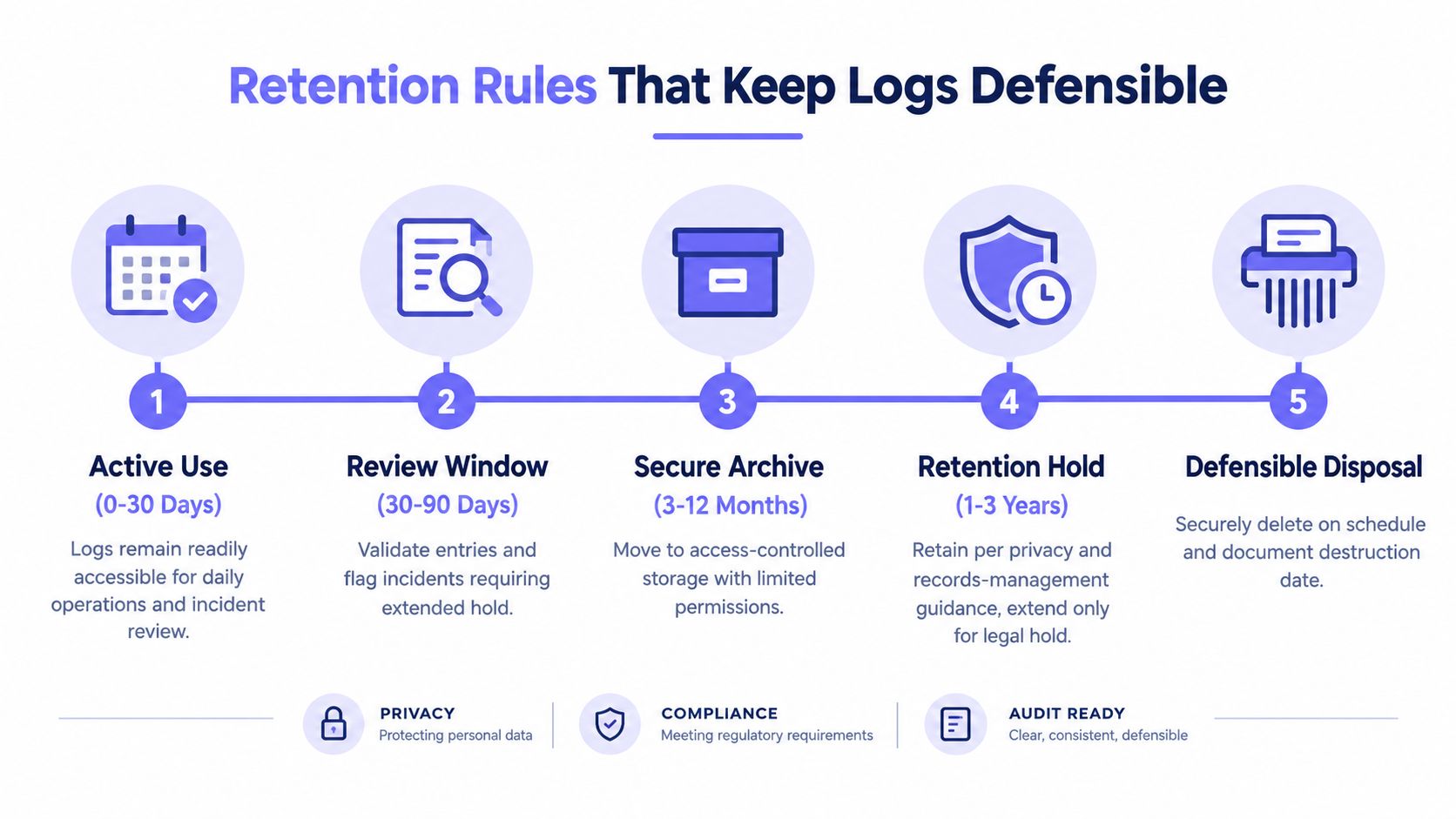
A workable retention model
Most properties do better with three buckets than with one giant archive:
- Routine visitor logs stay available for normal review, then age out on policy.
- Incident-linked logs move into a separate hold if they relate to a theft claim, rule violation, or access dispute.
- Legal hold records stay preserved until counsel or management releases them.
That's a more defensible approach than saving every entry forever.
Access control for the log itself
Retention only works if access is restricted.
Use separate permission levels:
- Read access for managers or authorized staff who need to review entries
- Administrative access for the small group allowed to export, correct metadata, or manage retention settings
- Write protection for exported logs once they move into archive storage
U.S. records guidance also supports treating entry logs as formal records. The Postal Service's AS-353 handbook treats building access information as records related to building access badges, and Western Washington University's schedule defines a record category for documents documenting entry and exit activity (records-management guidance for access records).
Properties should also keep written documentation for gated community security so an auditor can see the policy that produced the records, not just the records themselves.
Keeping the Template Useful Over Time
An entry log template only stays useful if someone maintains it in small, repeatable steps. This doesn't need a new hire. It needs a rhythm.
Weekly and shift-based habits that prevent drift
At the end of each shift, the manager or lead should:
- Reconcile paper and digital records if both exist
- Check for missing time-out fields on vendor or visitor entries
- Flag obvious duplicates where the same event appears twice
Once a week, review denied events and exception activity:
- Look for repeated denied attempts tied to the same credential or person
- Check timestamp alignment across gate logs, lobby systems, and any related camera review notes
- Mark gaps where a reader, sensor, or camera was offline
That review often reveals the source of trouble. Not a broken template, but a shared credential, a broken routine, or a side entrance nobody audits.
A simple operating cadence
A property manager can keep the process tight with a fixed calendar:
- Daily: confirm the log is complete for open incidents
- Each shift end: reconcile manual and system records
- Weekly: review denied attempts and anomalies
- Monthly: export logs to a read-only archive and confirm retention status
“The useful log isn't the one with the most fields. It's the one staff will complete the same way every time.”
The goal is consistency. A shorter template used correctly beats a detailed form nobody finishes.
Nimbio gives properties a cellular, smartphone-based way to manage gates and building access without depending on Wi-Fi and without replacing existing hardware. For teams that want cleaner entry records, remote visitor management, and more defensible access history, it's worth reviewing how Nimbio fits into the property's current gate operator and access workflow.


