

A guard texts a resident about an unfamiliar truck. A paper visitor log is soaking in the rain. A delivery driver circles the property because the shared PIN changed and nobody told the dispatcher. These failures push property managers, HOA boards, and facility teams toward visitor management system software.
The right platform does more than replace a clipboard. It lets a host pre-register a guest, issue a credential for a defined visit window, make an actual entry decision at the gate, and preserve a searchable record for later review. That distinction matters because a check-in record alone doesn't prevent an unauthorized vehicle from entering.
The visitor management system market has grown from niche security software into a global category. One estimate values it at USD 1.63 billion in 2023 and projects USD 3.98 billion by 2030, a 13.4% CAGR from 2024 through 2030 (MarketsandMarkets market analysis). This guide focuses on the part many buying guides skip, the connection between visitor workflows and the physical gate, door, or yard entrance.
Table of Contents
- Why Property Managers Are Searching for Visitor Management Software
- What Visitor Management System Software Actually Does
- Core Features and Capabilities to Evaluate
- Cloud Versus On-Prem and Cellular Versus Wi-Fi
- Benefits, ROI, and Compliance Value
- Integrating With Gates, Controllers, and Mobile Apps
- Real-World Examples From Gated and Commercial Sites
- Common Misconceptions and Questions to Ask Vendors
Why Property Managers Are Searching for Visitor Management Software
Property managers usually don't begin with a software wishlist. They begin with an avoidable problem at the entrance.
A resident calls the office because a contractor used a shared code. A guard can't confirm whether a truck belongs to a scheduled delivery. A board member asks for visitor records after an incident, and the only evidence is a handwritten name that may be incomplete or unreadable.
Three pressures drive the search:
- Resident expectations: People expect phone-based access, remote approvals, and digital credentials instead of fobs, clickers, and codes passed between households.
- Liability exposure: Paper logs record activity, but they rarely provide a dependable, searchable audit trail for an incident review.
- Labor pressure: A permanently staffed gate can become difficult to justify when residents, vendors, and delivery teams need access outside predictable office hours.
A modern visitor platform should connect the entire process:
- A host or property manager pre-registers the visitor.
- The visitor receives a credential before arrival.
- The credential works only under defined rules, such as a visit window or approved purpose.
- The gate or door controller makes the physical entry decision.
- The system records the attempt, result, host, and time.
- Managers can search and export the record when an insurer, attorney, board, or corporate security team requests evidence.
Practical rule: A visitor system that records entry without controlling entry is a logbook with a nicer interface.
That doesn't mean every property needs a kiosk, printed badge, or identity scanner. A small HOA may need resident approval and temporary gate access, while a logistics yard may need manifest validation, dock assignment, and contractor reporting. The evaluation should start with the property's access decision, not the appearance of the check-in screen.
What Visitor Management System Software Actually Does
Visitor management system software is a digital layer for registering, authorizing, tracking, and reviewing people who aren't regular occupants or employees. It commonly replaces paper sign-in sheets with searchable records containing entry events, host information, timestamps, and visit metadata (Veris explains digital visitor audit trails).
The software can replace manual logs, gatehouse phone calls, and shared PINs distributed through email or text. It doesn't replace the physical gate, gate operator, access controller, resident directory, or door hardware. Those components still perform the mechanical and electrical work.
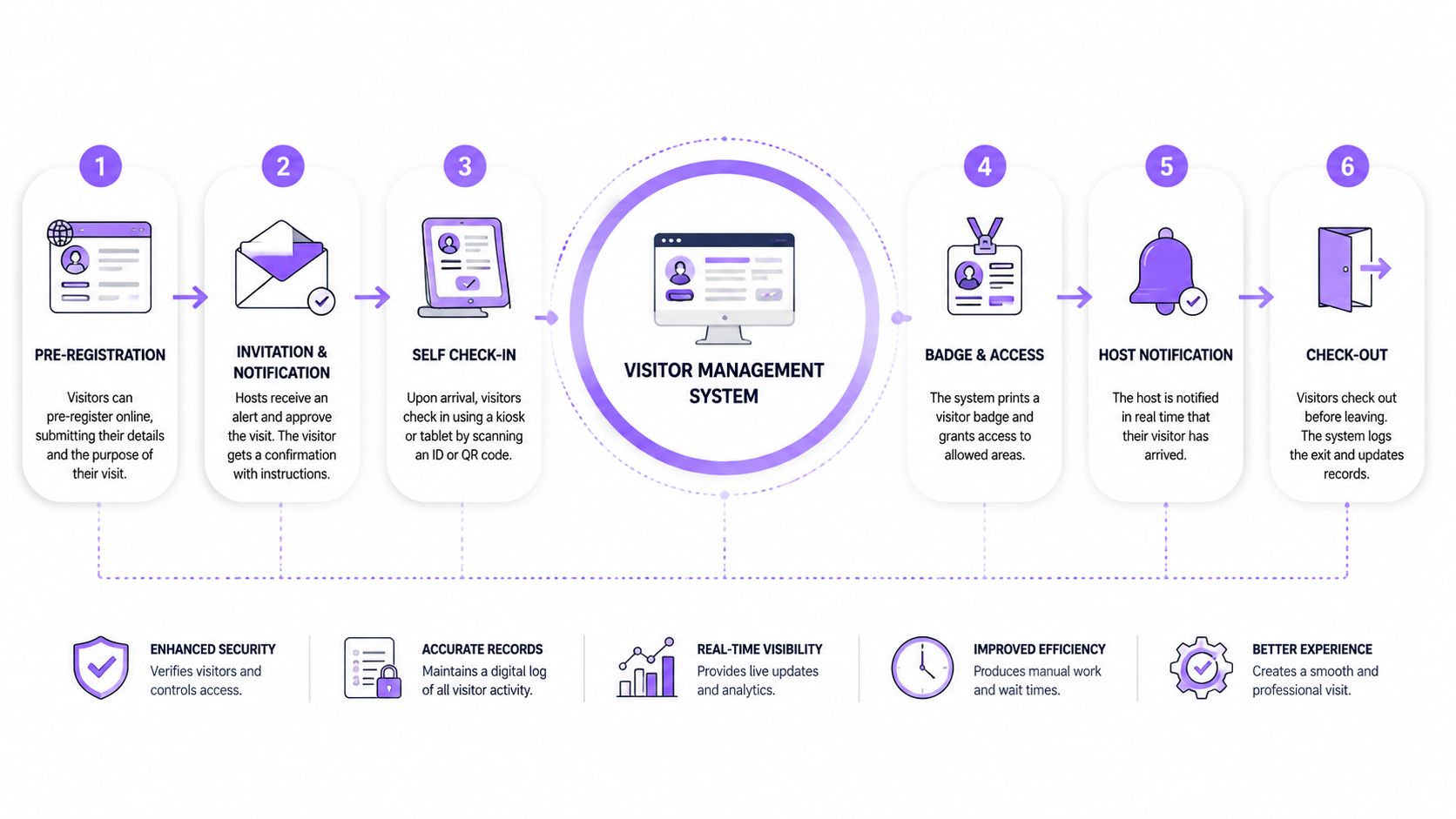
The four operational jobs
A useful system performs four connected jobs:
- Identify the visitor. The platform captures the visitor's name, contact details, vehicle information, photo, or other required details at the lobby, lane, or pre-registration stage.
- Authorize the visit. It checks the request against host approval, property rules, time windows, visitor type, or denied-party policies.
- Log the event. It records whether the credential was issued, used, denied, revoked, or expired, along with the relevant timestamp.
- Audit the outcome. Managers search dashboards, reports, and exports to investigate failed entries, confirm contractor activity, or support compliance reviews.
A QR code or mobile pass acts as an authorization token, not proof that someone wrote a name in a book. QR-based systems can issue a credential for a specific visit window, expire it automatically, and log scans for audit purposes (Swiftlane describes QR visitor credentials).
The software communicates with gate operators and credential readers through access-control integrations, relays, APIs, webhooks, or compatible controller boards. A host's approval must reach the edge device that decides whether the gate opens.
A simple definition works for board meetings and asset reviews: visitor management software turns a visitor request into a controlled, time-bound, and auditable access event.
Core Features and Capabilities to Evaluate
A vendor demo can make almost any platform look complete. Buyers should evaluate features against decisions the property must make, not against the length of a brochure.
Registration and approval
Pre-registration lets a resident, host, dispatcher, or property manager enter visitor details before arrival. The workflow should support:
- Host invitations: Send a visitor a digital invitation or request for approval.
- Purpose-based access: Separate residents' guests, contractors, deliveries, vendors, and recurring service providers.
- Time-windowed credentials: Set start and end times instead of leaving access active indefinitely.
- Multi-visit passes: Support repeated visits when a contractor needs authorized access across a defined schedule.
- Host notifications: Alert the resident or responsible employee when the visitor arrives or requests entry.
Photo capture and ID scanning can matter at higher-risk sites. They're less useful when the property only needs a resident-approved guest pass and a reliable gate record.
Credentials and evidence
Modern platforms may support QR codes, Bluetooth phone credentials, badges, and temporary mobile links. Printed badges still make sense in offices, healthcare settings, and controlled facilities, but they don't solve a gate problem by themselves.
Watchlists and denied-party checks deserve careful testing. A feature that appears in a demo isn't valuable if the property can't configure it, review a match, or document the decision.
| Capability | Decision It Solves |
|---|---|
| Pre-registration | Can a host authorize a visitor before arrival? |
| Expiring QR or mobile credential | Can access stop automatically after the visit? |
| Host approval | Who makes the access decision? |
| Photo or ID capture | What identity evidence does the site require? |
| Badge issuance | Does the visitor need visible identification inside the property? |
| Denied-party screening | Can the system flag people who shouldn't enter? |
| Searchable audit log | Can managers reconstruct an event quickly? |
| Exportable reports | Can records support insurers, legal teams, or audits? |
| Directory synchronization | Does the platform know current residents, hosts, or employees? |
| Controller API or webhook | Can approval trigger the actual gate or door action? |
For communities assessing property manager guest entry controls, integration features usually matter more than decorative kiosk options. A polished check-in flow that leaves the gate on a shared code creates duplicate systems and duplicate risk.
The unglamorous details often pay off: audit exports, role-based permissions, automatic expiry, time-zone handling, deletion controls, and clear outage behavior. A small community may not need advanced analytics, but it still needs reliable revocation and a record of denied attempts.
Cloud Versus On-Prem and Cellular Versus Wi-Fi
Cloud hosting and edge connectivity solve different problems. A buyer should evaluate both instead of treating “cloud” as a complete architecture decision.
A cloud platform gives property teams centralized administration, mobile directories, remote updates, and off-site data redundancy. Managers can oversee multiple properties from a dashboard rather than maintaining a server at each site (Guideflow describes cloud-based gate access management).
An on-premises server may appeal to organizations with strict data-sovereignty requirements or an established IT environment. Its failure mode is operationally simple: the server, local network, or power supply can fail during a storm, and nobody may be on site to restore service.
The edge connection matters more than the lobby connection
Wi-Fi can work well inside a building. It's a weaker assumption at a remote gate, buried cabinet, parking entrance, or distribution yard. A gate located 300 feet from the building may sit outside usable Wi-Fi range, while mesh extenders can still drop during rain or equipment failure.
Cellular LTE or 5G connects the controller directly to the mobile network. That avoids dependence on a property's local Wi-Fi and makes cellular connectivity a practical choice for entrances that sit beyond the building's network footprint.
| Option | Best Fit | Typical Failure Mode | Maintenance Burden |
|---|---|---|---|
| Cloud-hosted platform | Multi-property teams and remote administration | Vendor outage or service interruption | Vendor-managed updates, local teams manage devices |
| On-premises server | Specific data-sovereignty or local IT requirements | Server, power, or network failure on site | Property or IT team maintains infrastructure |
| Gate Wi-Fi | Entrances with stable, engineered coverage | Signal loss, weather, extender, or local network failure | Network monitoring and access-point upkeep |
| Cellular controller | Remote gates, yards, and retrofit projects | Carrier coverage or device power issue | Subscription and device health monitoring |
The practical decision rule is direct: choose cloud-hosted, cellular-connected architecture unless a defined compliance requirement forces a different design. The controller still needs a documented offline behavior, because connectivity can fail regardless of the chosen network.
Benefits, ROI, and Compliance Value
Visitor management creates value in three places: labor, physical credential administration, and incident evidence. The return isn't limited to a faster check-in.
A property that retires a staffed gate post may reduce recurring labor, but the actual result depends on local wages, coverage requirements, shifts, and the security model. A responsible financial review should compare the current guard schedule with the proposed operating model rather than assume software eliminates every labor hour.
The same discipline applies to rekeying and shared codes. Digital credentials can be issued, scheduled, and revoked without changing a property-wide code after every service appointment. That reduces administrative disruption and limits the number of people who retain access.
Compliance turns records into an asset
Visitor platforms process personally identifiable information, including names, contact details, vehicle plates, photos, and visit timestamps. Privacy controls should include data minimization, explicit consent, role-based access, logging, and automated retention or deletion policies (EntranceIQ's privacy guidance covers HIPAA and GDPR considerations).
Practical retention windows are often configured around 30 to 90 days, depending on legal and operational requirements, according to the same guidance. The property should document why each field is collected, who can search it, and when it should be deleted.
A clean audit trail doesn't just help during an investigation. It gives the board or facility manager evidence that the access policy was actually enforced.
Digital records can shorten the work required to reconstruct an event because managers can search by visitor, host, credential, gate, and timestamp instead of reviewing paper pages. They can also support insurance reviews, internal security investigations, and documented responses to denied-entry disputes.
| Cost Line | Old Approach (Annual) | With VMS Software | Net Savings |
|---|---|---|---|
| Gate staffing | Variable guard labor and coverage costs | Reduced staffing or remote administration, depending on policy | Property-specific |
| Paper registers | Printed logs, storage, and manual searches | Digital records and exportable reports | Reduced administrative work |
| Shared PIN administration | Repeated code distribution and rotation | Time-bound credentials with revocation | Fewer code changes and fewer uncontrolled users |
| Incident review | Manual reconstruction from incomplete records | Searchable entry and denial history | Faster investigation and stronger evidence |
The strongest financial argument appears when a denied entry, revoked credential, or disputed contractor visit must be defended. A property that can produce the authorization history, access result, and responsible approver has something more valuable than a convenient check-in screen, it has evidence.
Integrating With Gates, Controllers, and Mobile Apps
Integration should be treated as a pre-contract checklist. The key question isn't whether a platform can send a notification. It's whether an approved visitor can receive access, use it at the right entrance, lose it when revoked, and leave a record at the controller.
Test the three integration points
Gate controller: Identify the relay, controller board, or OSDP connection that operates the gate. Ask which controller models are natively supported and whether the vendor can retrofit the existing operator without replacing it.
Visitor intent: Determine where the request begins. It may start in a resident directory, intercom, QR flow, lobby kiosk, or web form. The system should connect that request to a host and an access policy.
Resident application: Establish whether the mobile app is an actual credential or merely a notification tool. A text message that tells a resident someone is waiting isn't the same as a credential that opens the gate and creates an auditable event.
Before signing, buyers should ask:
- Controller compatibility: Which gate and door hardware models are supported?
- Revocation: Can a new credential revoke an earlier credential immediately?
- Outage behavior: What happens during an internet, cellular, or power interruption?
- Credential security: Are passes encrypted, time-limited, and tied to a host or purpose?
- Directory data: Can the platform synchronize residents, employees, or tenants?
- API access: Can the property management system, guard app, or resident app exchange data?
- Commercial terms: Which installation, support, cellular, and recurring service fees apply?
A hardware-agnostic retrofit generally preserves more flexibility than a closed replacement kit. It can modernize an existing gate operator while allowing the property to keep compatible equipment, but the exact controller fit and outage behavior still require validation.
For facilities that also manage member or staff entry, smarter gym management tools provide useful context on how access control can connect with operational software.
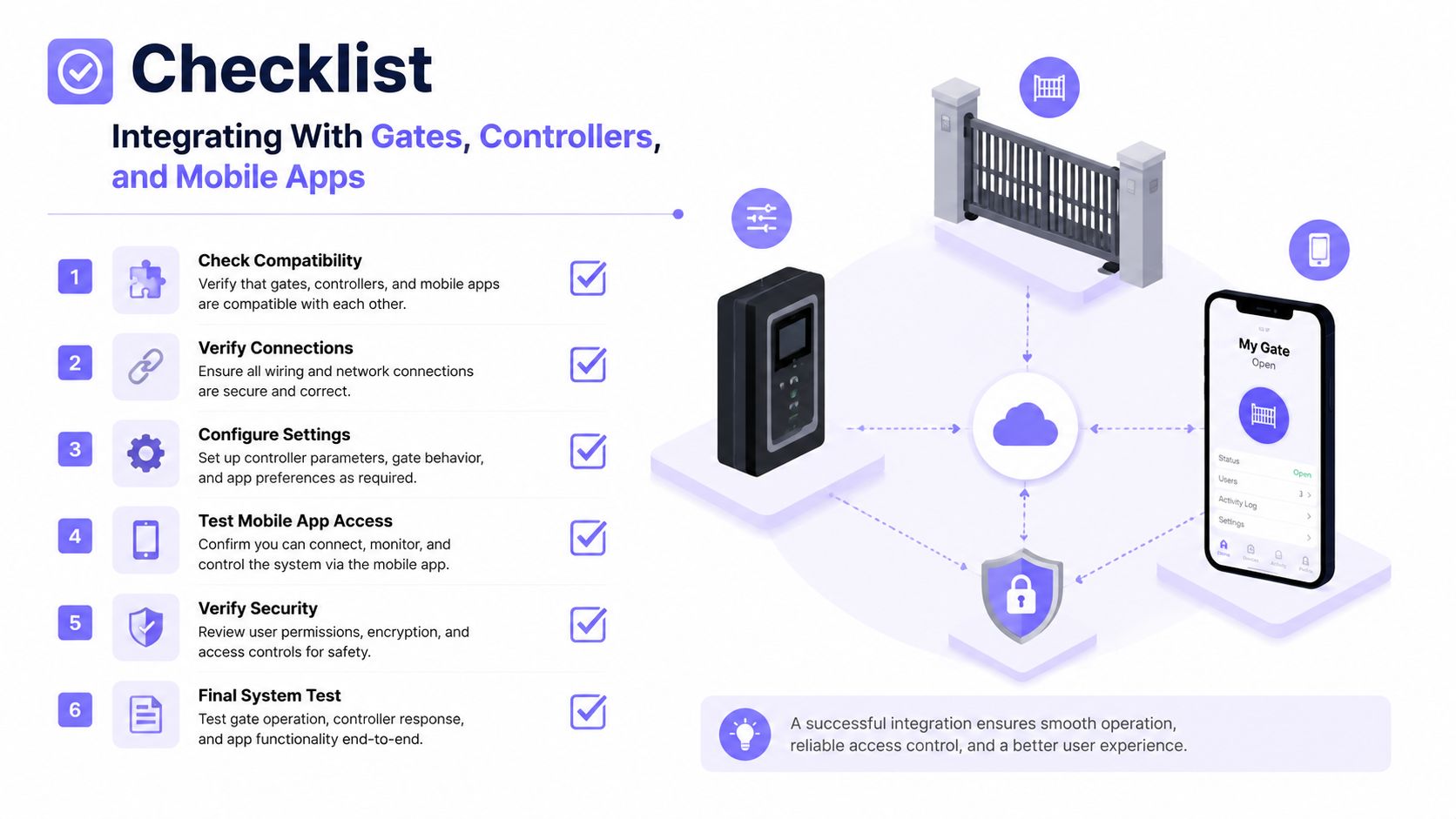
Nimbio's hardware-agnostic, cellular-connected controller approach can preserve existing electronic gates while adding smartphone credentials, remote approvals, and visitor access workflows. Teams evaluating ways to add gate control to your app should confirm the hardware model, API scope, cellular coverage, offline behavior, and total contract terms before deployment.
Real-World Examples From Gated and Commercial Sites
A 240-home HOA replaced shared gate PINs with resident-approved digital passes. A visitor receives a time-limited link before arrival, the host approves the request remotely, and the cloud platform sends an authorized credential to the gate controller.
The operational improvement is enforcement, not presentation. Staff no longer need to reissue a shared code after every service appointment, while management can review failed entries, host activity, and contractor access in one audit log. An expired pass stops working instead of remaining active until someone remembers to change it.
The useful record starts with an authorization decision, not with a visitor typing a name into a screen.
A distribution center presents a different workflow. Drivers are pre-registered, checked against a delivery manifest, issued temporary credentials, and directed to an assigned dock. Front-desk staff can see entry and exit activity, while operations teams can review denied attempts, overstays, and unusual access patterns.
Cellular connectivity suits remote yard gates where trenching cable or extending building Wi-Fi would add complexity. The controller should also have defined offline-safe behavior so a network interruption doesn't turn into an uncontrolled open gate.
These examples show why a property should map the physical journey first:
- Where does the visitor request access?
- Who approves the visit?
- Which credential reaches the gate or door?
- What happens if the visitor arrives early or late?
- How does the system revoke access?
- Which record proves the result?
Commercial buyers comparing broader perimeter options can also review this guide to upgrade office security with Networking2000. For properties managing multiple entrances, commercial gate access control should be assessed as an integrated operating layer, not as a separate keypad purchase.
Common Misconceptions and Questions to Ask Vendors
A paper log documents activity after the fact. It doesn't stop an unauthorized person from reaching the gate, and it can't prove that the person listed had permission to enter.
A shared PIN has the same weakness. Once copied, forwarded, or left active after a contractor's visit, it no longer identifies one visitor or one approved purpose.
Wi-Fi also isn't guaranteed at every entrance. Remote gates, buried cabinets, parking yards, and changing weather conditions can create gaps that a lobby network map won't reveal.
A credible platform should preserve authorization during a connectivity interruption, fail in a defined direction, and synchronize changes when the connection returns. The vendor should explain that behavior in operational terms, not hide behind a general uptime statement.
Vendor questions that expose weak designs
- Hardware: Which gates, controllers, readers, and intercoms are supported?
- Credential control: Can a new credential revoke an earlier one?
- Resilience: What happens during internet, cellular, and power outages?
- Privacy: What data is retained, who can search it, and how are deletion requests handled?
- Mobile approval: Can residents approve visitors without calling the office?
- Integration: Are APIs, webhooks, directories, elevators, intercoms, and credential systems supported?
- Ownership: Who owns the access data if the contract ends?
- Cost: Which installation, support, cellular, hardware, and subscription charges recur?
Nimbio fits properties seeking a cloud-managed, hardware-agnostic visitor and access layer across gates, controllers, or locations. Buyers should validate exact hardware compatibility, service coverage, offline behavior, support terms, and total contract cost before selecting any deployment partner.
Nimbio connects electronic gates and building entry systems to smartphone-based access through cellular hardware, allowing property teams to grant, revoke, schedule, and audit credentials without relying on shared PINs or gate Wi-Fi. Property managers, HOA boards, installers, and facility teams can review the visitor workflow and access-control approach by visiting Nimbio.
Securing gates or doors at a commercial property?
See how cellular access control works for commercial sites. Explore Commercial Gate & Door Access Control →


