A remote can carry the word universal on its package and still fail to open a gate. That's not a contradiction. The word usually describes the transmitter in a buyer's hand, while pairing also depends on the receiver already installed at the gate, the code type that receiver expects, and whether the operator's safety circuit will allow movement at all.
A search for a gate remote control Home Depot listing returns garage-door remotes, universal transmitters, batteries, and related hardware side by side. Availability on a shelf or a product page doesn't prove a match with a specific driveway gate operator. The checks below start at the operator, because the operator decides what can pair with it.
Table of Contents
- Identify Your Gate Operator Before You Buy
- How Frequency and Rolling Code Decide Pairing
- Universal Listings and Big-Box Purchases
- Safety Checks That Come Before Programming
- Replacement Remote, Universal Transmitter or Smartphone Retrofit
- Confirm the Match, Then Program and Test
Identify Your Gate Operator Before You Buy
| Detail to check | Where to find it | Why it matters |
|---|---|---|
| Operator manufacturer and model | Label on the operator housing or in the manual | Determines which remote families can pair |
| Learn-button color | Area around the operator's Learn button | Chamberlain's instruction sheet separates 315 MHz and 390 MHz families by this color |
| Operating frequency | Remote label or operator manual | A remote transmitting on the wrong band will not pair |
| Rolling or fixed code | Operator manual or receiver label | A remote using an incompatible coding protocol will not pair |
| Receiver generation | Receiver board label or manual | Same-brand remotes may not pair with a different receiver generation |
| Control-board input type | Control cabinet wiring diagram | Needed to judge whether an add-on controller's contact is supported |
Why button count tells a buyer almost nothing
Two remotes with one button each can send completely different signals. One may work on one frequency with a code that changes at every press, while the other uses a different band and sends the same code each time. The housing, button label, and visor clip don't reveal either fact.
A Chamberlain instruction sheet identifying separate 315 MHz and 390 MHz product families by colored Learn button shows why the small colored button inside the operator matters more than the shape of a replacement remote. A remote transmitting on the wrong band, or using an incompatible coding protocol, won't pair even when its housing looks universal. FCC Part 15 compliance on that same sheet establishes operating-rule compliance. It doesn't establish universal interoperability or a guaranteed range.
Practical rule: Photograph the operator label, the receiver label, and both sides of a working remote before shopping. A listing that can't be checked against those photos is a guess.
The three values that cause most mismatches
Frequency comes first. The table above shows 315 MHz and 390 MHz as separate Chamberlain families, and some universal listings work on a fixed 433 MHz instead. A buyer who treats those numbers as close enough will end up with a remote the receiver never hears.
Code type comes second. A rolling code receiver expects a new, expected code sequence, while a fixed code system repeats one signal. Those systems don't become compatible because both remotes come from a familiar brand.
Receiver generation comes third. Manufacturers change receiver designs over time, so a brand name alone doesn't settle the question. The receiver label and operator manual carry the generation detail that a product photo can't show.
Range claims need the same caution. A Home Depot universal remote listing cited in that instruction material specifies fixed 433 MHz operation and a claimed range of up to 50 meters using a CR2032 battery. That distance is an open-air benchmark, not a promised gate-entry distance. Metal enclosures, reinforced concrete, foliage, vehicle position, antenna orientation, battery condition, and local radio interference can all reduce the signal that reaches the receiver.
One more check for add-on equipment
A buyer considering an add-on controller needs the control-board input type from the wiring diagram inside the control cabinet. Preserving the existing receiver while adding a separate access channel can reduce the risk of disrupting working remotes, but the added controller must connect to a supported dry-contact or accessory input. Its behavior also needs testing against the operator's programmed open and close cycle.
Readers weighing that route can compare the operator details above with a cellular gate opener buying guide before buying hardware. The photograph set, the manual, and the wiring diagram are the documents that turn a listing claim into a confirmed match.
How Frequency and Rolling Code Decide Pairing
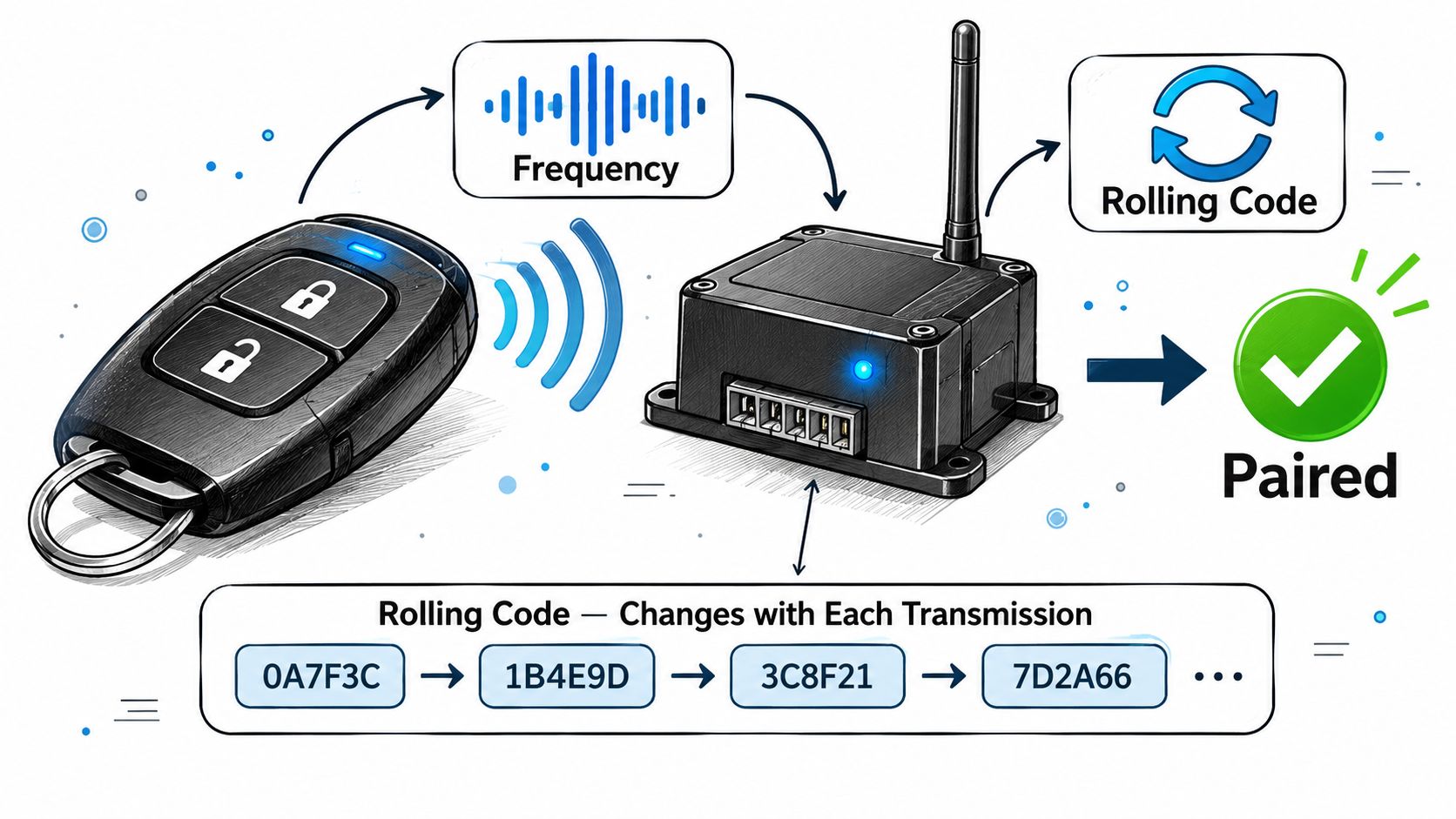
Think of frequency as a radio station. A remote broadcasts on one channel, and the receiver listens on one channel. If those channels differ, pressing the button produces a signal the receiver isn't tuned to hear, and nothing happens at the gate.
That silence confuses buyers because the remote may light up, feel solid, and look identical to the lost one. The light only confirms the battery works. It says nothing about whether the receiver can hear or accept the signal.
Rolling code as a changing key
A fixed code remote sends the same signal at every press. Anyone who copies that signal can replay it, which is why fixed-code systems are the simpler and weaker arrangement. A rolling code remote sends a new code each time, and the receiver expects that next code in sequence. A copied earlier signal doesn't match what the receiver waits for, so it fails.
For a replacement purchase, the practical point matters more than the security point. A fixed-code remote and a rolling-code receiver speak different languages even on the same frequency. Pairing won't succeed, and repeated attempts won't change that.
Three cases a buyer can test on paper
- Matching frequency and matching code type: The remote is a candidate for pairing at the operator's Learn button, following the steps in the operator manual.
- Matching frequency, different code type: The receiver hears a signal it can't accept, so the remote is not a candidate.
- Same brand, different receiver generation: The brand match proves nothing by itself, and the receiver label decides the answer.
Older systems add one variation. Some use DIP switches, small switches inside the remote and receiver that must sit in identical positions, instead of a Learn button. The operator manual shows which method a given model uses, so that check belongs before a purchase, not after a failed pairing attempt in the driveway.
The general pairing step is the same in outline. A person puts the operator into learn mode and presses the remote button so the receiver stores it. The exact sequence, timing, and indicator behavior differ by model, which is why the manual for the installed operator is the reference. Readers who want the parallel approach explained can read about how cellular gate openers work, since that method triggers the operator through a wired input rather than through a handheld radio signal.
Check frequency first, code type second, and brand last. Reversing that order is how a buyer ends up holding a familiar logo that the gate ignores.
Universal Listings and Big-Box Purchases
| Listing | Stated compatibility | Frequency | Other stated detail |
|---|---|---|---|
| Chamberlain 1-Button Garage Door Remote CH361 | Many Chamberlain, LiftMaster and Craftsman openers made after 1997 | Check the listing and operator manual for the specific model | Remotes are generally not preprogrammed and must be paired at the Learn button |
| Universal remote with fixed 433 MHz operation | Broad compatibility as advertised | Fixed 433 MHz | Claimed range up to 50 meters in open air, CR2032 battery |
The Home Depot listing for the Chamberlain 1-Button Garage Door Remote Control CH361 claims compatibility with many Chamberlain, LiftMaster, and Craftsman openers made after 1997. That sentence describes garage-door openers. It doesn't settle whether an electronic driveway gate accepts the same remote.
That distinction is where big-box shopping misleads people. A gate may run on a commercial operator with an external receiver, a keypad, photocells, dual leaves, or nonstandard wiring inside the cabinet. A listing organized by brand, model year, Learn-button color, and frequency doesn't answer questions about any of that equipment.
What a listing cannot inspect
A product page can't see a missing receiver. It can't see a damaged antenna, a control cabinet that only an installer can open, or a safety circuit that currently blocks movement. Even Home Depot's own product answers confirm that remotes are generally not preprogrammed and must be paired at the opener's Learn button, which means the buyer still needs physical access to the operator.
Shelf presence doesn't close that gap either. The Home Depot reported fiscal 2025 net sales of $164.7 billion, up $5.2 billion, or 3.2%, from fiscal 2024, and operated 2,359 stores at the end of that year, according to Home Depot investor documents reporting fiscal 2025 results and store count. The company doesn't publicly disclose unit sales specifically for gate remotes. A large retail footprint explains why homeowners encounter these products there. It doesn't confirm that any single remote matches a particular gate.
Compatibility is not the same as successful installation. A pairing claim covers the radio link. Installation also involves the receiver, the antenna, the code generation, and the safety circuit.
When a store purchase fits, and when it doesn't
A big-box purchase suits a single residential operator with a confirmed brand, model, frequency, and code type, plus a clear return window if pairing fails. The risk stays low because the buyer has already done the matching work at the operator label. The store visit becomes a pickup, not a diagnostic step.
A manufacturer part or a qualified installer suits a different set of cases. Commercial operators, dual gates, shared community gates, and unknown wiring all carry questions a listing can't answer. In those cases, paying for identification first usually costs less time than returning two or three wrong remotes.
Five questions before paying
- Which operator models does the listing name? A vague brand claim is weaker than a named model list.
- Is a separate receiver needed? Some transmitters assume a receiver that may be missing or defective.
- Does the listing describe gate use or garage-door use? Those are different installed systems.
- What frequency and code type does it state? Both must match the values recorded at the operator.
- Does the return policy cover a failed pairing after programming attempts? Packaging and receipt matter if the answer is no.
Store staff can read the same listing a buyer reads at home. Staff usually can't inspect the operator, open the control cabinet, or test the receiver. The matching responsibility stays with the person who has access to the gate, which is why the photographs and manual pages from the first section carry more weight than advice given in an aisle.
Safety Checks That Come Before Programming
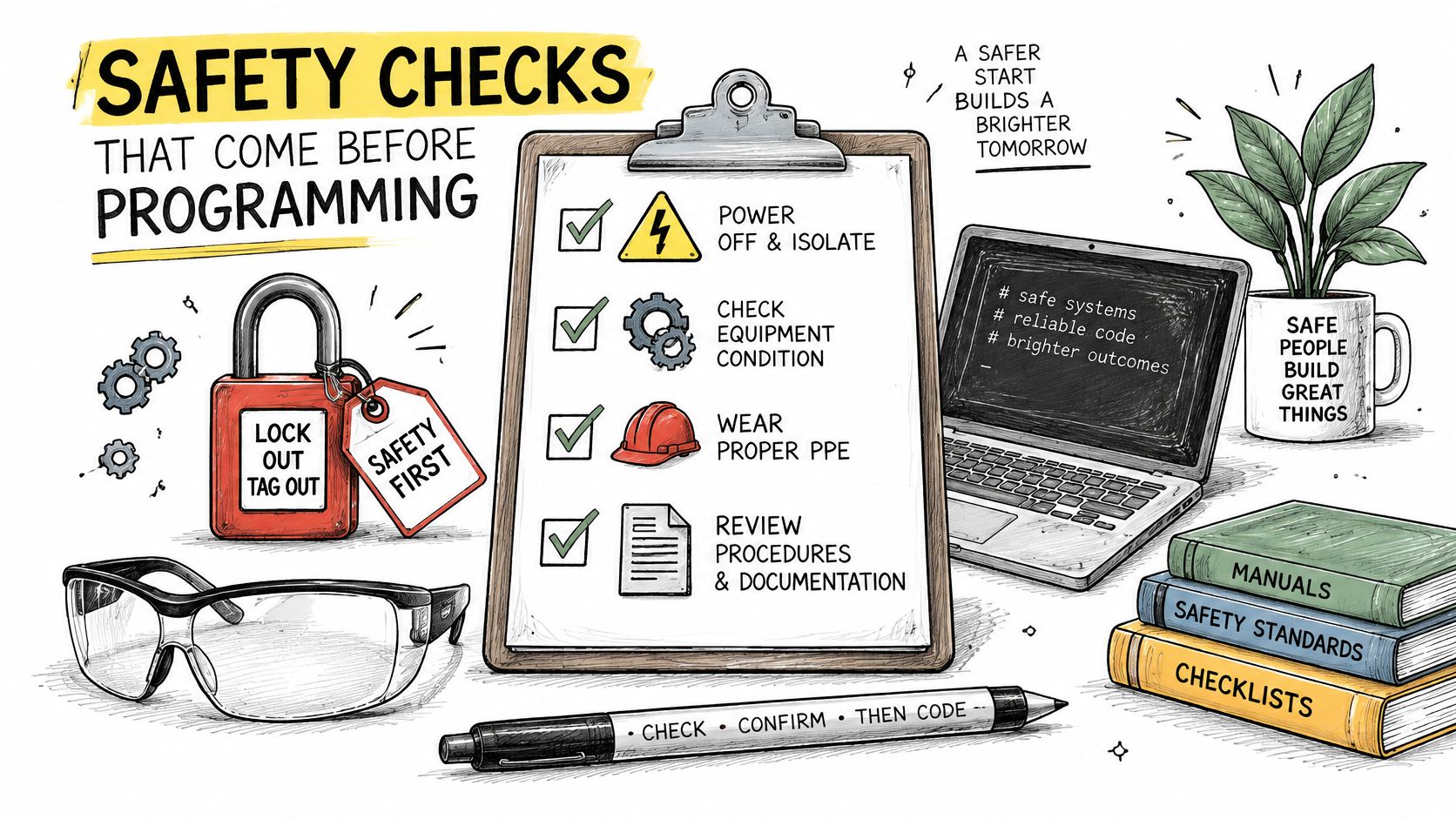
A remote that learns successfully feels like proof that the gate works. It isn't. Learning only proves the receiver accepted a new transmitter, while a separate safety circuit decides whether the operator may move the gate at all.
UL 325 guidance requires user-operated controls to sit at least 6 feet from moving gate components, placed so a person can't reach over, under, around, or through the gate to operate them, as set out in DASMA technical data sheet TDS 356 on UL 325 gate operator requirements. That distance keeps the person pressing the control outside the path of the moving gate. Local requirements vary, so the operator manual and local rules govern a specific property.
Entrapment protection in plain words
An entrapment zone is any place where a moving gate could catch a person or vehicle. Current safety guidance describes two independent protection devices for each potential entrapment zone, using monitored external devices such as photoelectric sensors or sensing edges where they apply. A photoelectric sensor watches a beam across the opening, and a sensing edge reacts to contact along the gate edge.
Those devices are monitored, which means the operator checks that they are present and working. If a required device is missing or faulty, the controller can refuse to run. A buyer who replaces only a remote may meet that refusal for the first time during testing and blame the new remote for a safety fault that existed already.
Wiring points an installer checks
A controller that supplies a momentary relay contact needs more evaluation than its wireless range suggests. An installer checks pulse duration, whether the input expects normally-open or normally-closed wiring, how the contact behaves during power loss, and whether the operator's accessory terminals support that connection. Each point affects whether a brief signal starts a normal cycle or produces unexpected behavior.
The verification sequence
- Interrupt each photoelectric beam during a test cycle and confirm the gate stops or reverses.
- Test each sensing edge the same way, one device at a time.
- Confirm remote activation can't bypass any safeguard that blocks movement.
- Measure the control position against the six-foot boundary from moving parts.
Models differ, and indicator lights or fault codes mean different things across brands. A light pattern should be read against the installed operator's manual, never guessed at. Any fault that the manual doesn't resolve belongs with a qualified gate technician.
Replacement Remote, Universal Transmitter or Smartphone Retrofit
| Option | Best when | Existing remotes keep working | Main risk |
|---|---|---|---|
| Replacement handheld remote | One lost or broken transmitter and a confirmed brand and frequency match | Yes, when the receiver stays in place | A wrong frequency or code type will not pair |
| Universal transmitter | One household with several openers that share a confirmed frequency | Yes, when the receiver stays in place | Compatibility depends on the installed receiver |
| Receiver replacement | The original receiver is missing or defective | Depends on the new receiver and relearned remotes | Needs installer access to the control cabinet |
| Cellular retrofit controller | Shared gates that need individual digital keys, remote revocation or visitor entry | Yes | Needs a supported input; a licensed installer is recommended, though self-install is supported |
Reading the table by situation
A replacement handheld remote is the narrowest fix. It suits a single lost or damaged transmitter where a working remote or a clear operator label confirms the match. The buyer changes one item and leaves the receiver, wiring, and safety devices untouched.
A universal transmitter suits a household holding several remotes for openers that share confirmed values. The convenience is real, but the earlier warning applies in full. "Universal" describes what the transmitter can send. It says nothing about what the installed receiver will accept.
A receiver replacement answers a different failure. When the original receiver is missing, water-damaged, or no longer stores remotes, a new handheld remote has nothing to pair with. Replacing the receiver means opening the control cabinet, working with the operator's terminals, and relearning every remote that residents or staff still use.
Where a cellular retrofit fits
A cellular retrofit controller adds a parallel access channel instead of replacing the radio system. Nimbio is one example of that approach. It wires in parallel to the gate operator, call box, or lock a property already owns, with no Wi-Fi at the gate and no landline. Existing clickers, fobs, and keypad codes keep working alongside the app.
That arrangement suits shared gates. A property manager can issue individual digital keys, revoke a resident's access instantly, group homes, pull 24/7 access logs, and handle visitor entry with video verification of who is at the gate. Each user holds a key on a phone rather than a shared code or one of a pooled set of identical clickers. Readers comparing that model against a handheld replacement can review the smartphone gate access features and judge them against the actual problem at the gate.
A retrofit adds hardware and an ongoing service relationship. That trade makes sense when the problem is managing many users. It is more than a single household needs to replace one lost clicker.
Wiring deserves care either way. Nimbio recommends having a licensed professional gate or low-voltage technician install the device, and its support team also works directly with property owners or their personnel who prefer to install it themselves. Whoever does the work, the operator manual governs which input the controller may use, and the safety checks from the previous section still apply after installation.
The honest comparison is about scope. A replacement remote restores one person's access at the lowest complexity when the match is confirmed. A retrofit changes how a whole property issues and withdraws access, which is a larger decision that deserves the larger evaluation.
Confirm the Match, Then Program and Test
Photograph the operator label and note the Learn-button color. Those values decide which listings are worth reading at all. A buyer without them is filtering product pages by appearance.
Record frequency and code type from the remote label or operator manual. Every candidate listing must match both values. As covered in the section above on pairing, matching only one of the two still ends in failure.
Compare each listing against the recorded values. Set aside any listing that doesn't name the operator model or leaves frequency unstated. A gate remote control Home Depot search result earns attention only after it survives that comparison.
Buy only after the return terms are clear. Keep the packaging and receipt until the remote pairs and runs a full cycle. That habit turns a wrong purchase into an exchange instead of a sunk cost.
Program at the Learn button using the operator manual. Then test open, close, and safety reversal with the gate area clear of people and vehicles. Steps and indicator behavior differ by model, so the manual for the installed operator stays open during the test.
Stop if the remote learns but the gate won't run. Check the manual and call a qualified technician. Never bypass a sensor to make a test pass.
Why step six happens
External entrapment sensors must be monitored for proper operation, and a published UL 325 summary specifies that every external sensor protecting against entrapment must be monitored for presence at least once per gate cycle, using manufacturer-specified compatible components, according to the Apollo UL 325 frequently asked questions document. The operator may be prevented from running when required devices are missing or faulty. Remote programming and safety-device verification are separate procedures, so a learned remote and a blocked gate can both be true at the same time.
That point decides the final choice for many properties. If no listing names the installed operator, or if several users need separate and revocable access, a retrofit deserves comparison against another round of handheld purchases. Nimbio's support team will confirm wiring compatibility before installation for a customer unsure about a specific gate model, and customers can call 1-800-353-3422. A custom retrofit plan is also available by sharing a few details about the property so access experts can map the cellular upgrade for the gate or door.
For a property where lost clickers and shared codes create recurring work, Nimbio offers a cellular controller and smartphone app that wire into the existing gate operator, need no Wi-Fi at the gate, and keep current remotes and keypads working. Property managers can issue and revoke digital keys remotely and let visitors in with video verification. Visit the site to check whether that approach fits the operator already installed at the gate.